
MiaoMiaoCe Smart Thermometer - Thermometers Xiaomi - Free user manual and instructions
Find the device manual for free MiaoMiaoCe Smart Thermometer Xiaomi in PDF.


| Product Type | Smart Thermometer |
| Brand | Xiaomi |
| Model | MiaoMiaoCe |
| Connectivity | Bluetooth, compatible with Miaomiaoce app (iOS/Android) |
| Measurement Method | Continuous skin contact temperature monitoring |
| Measurement Location | Recommended: hollow below the middle of the chest; for infants up to 6 months: inguinal area |
| Temperature Compensation | Manual calibration via app to adjust for individual differences |
| Remote Monitoring | Yes, via Xiaomi account sharing |
| Alerts | High/low temperature notification |
| Night Mode | Yes, available in app settings |
| Battery | Replaceable coin cell battery (e.g., CR2032); app recommends charging smartphone for overnight use |
| Battery Life | Extended with automatic sleep mode when placed in storage chamber |
| Dimensions | Approximately 30mm x 30mm x 7mm (estimated) |
| Weight | Approximately 10 g (estimated) |
| Material | Plastic body with adhesive pad |
| Adhesive | Double-sided adhesive tape for skin attachment; use diaper for newborns |
| Water Resistance | Not specified; avoid water contact |
| Cleaning | Wipe with a soft, dry cloth; do not use liquids |
| Safety | Not recommended for direct skin contact on newborns under 6 months; fix with diaper instead |
| Compatibility | Requires Xiaomi account and smartphone with Miaomiaoce app |
Frequently Asked Questions - MiaoMiaoCe Smart Thermometer Xiaomi
User questions about MiaoMiaoCe Smart Thermometer Xiaomi
0 question about this device. Answer the ones you know or ask your own.
Ask a new question about this device
Download the instructions for your Thermometers in PDF format for free! Find your manual MiaoMiaoCe Smart Thermometer - Xiaomi and take your electronic device back in hand. On this page are published all the documents necessary for the use of your device. MiaoMiaoCe Smart Thermometer by Xiaomi.
USER MANUAL MiaoMiaoCe Smart Thermometer Xiaomi
-
Scan the code
-
Connection
-
Temperature measurement

Scan the QR code to download and install the mobile Miaomiaoce application
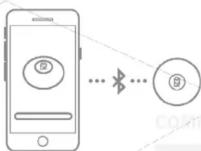
Take out the thermometer, run the Miaomiaoce application, click on the button on the screen to connect
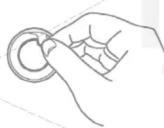
Glue the double-sided adhesive tape to the bottom of the thermometer and stick it to the temperature measurement point * start measuring
Recommended location for measuring temperature

Miaomiaoce
Manual
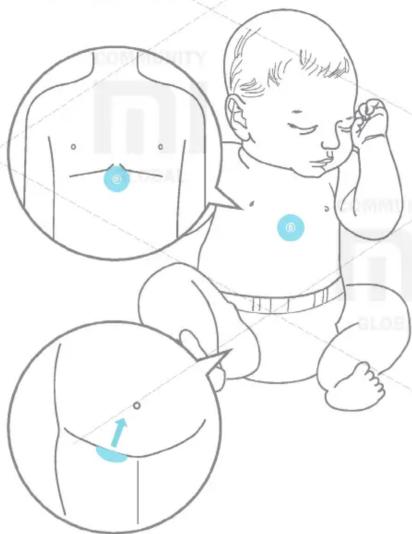
- Due to the temperature difference of different parts of the body, for a more accurate measurement, it is recommended that the thermometer is placed on the hollow below the middle of the chest (see the figure on the right). - Before starting the temperature measurement, to create a better thermometer contact with the skin, lightly press the thermometer body for 3-5 seconds.
Attention!
- Newborns up to 6 months have very delicate skin, therefore, to measure temperature, it is not recommended to apply a thermometer. Use a diaper to fix the thermometer and make sure that the temperature sensitive plate closely adjoins the inguinal area.
- During the temperature measurement, the phone should be on sound, the mobile application must work in the active mode (do not block the screen and do not put the application into the background mode).
- When measuring the temperature during the night, we recommend that you connect the smartphone to the charger to avoid discharging the battery and not being able to receive alerts.
• After finishing the temperature measurement, to reduce the discharge of the battery, place the thermometer in the storage chamber.
How to implement a remote measurement?
Step 1. Add a friend with your Xiaomi account
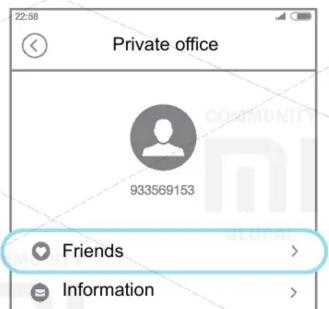
- Click on the « ⚙ » icon in the upper right corner of the menu, select the option «Personal account»
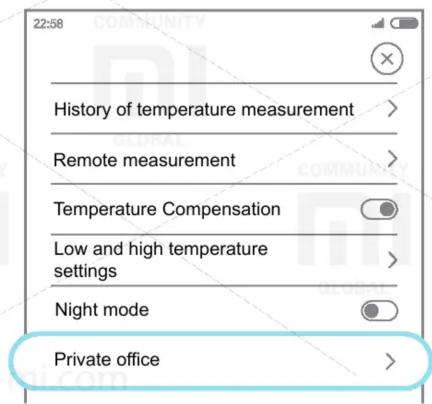
- Click on the «Friends» option to go to your friends list
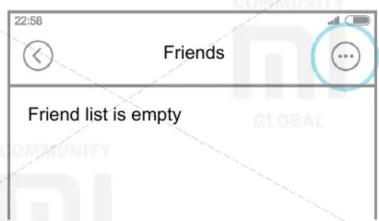
- Click on the « ⚙ » icon in the upper right corner of the «Friends» menu, select the method for adding a friend's account
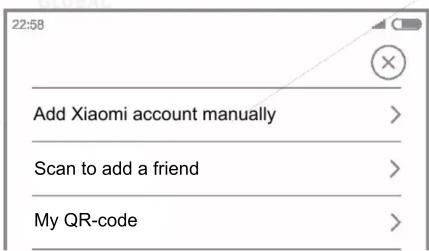
Step 2. Start the remote measurement
- Click on the « ⚙ » icon in the upper right corner of the menu, select « Remote Dimension»
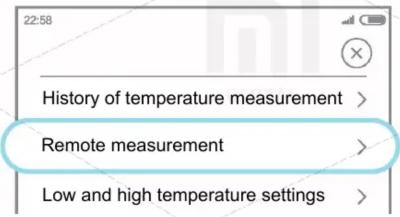
- Select an account for remote measurement
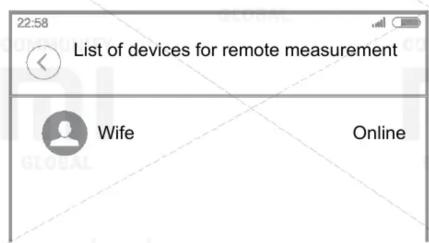
Note: The instructions below for setting the temperature compensation function are not necessary, you do not need to familiarize yourself with this function. This product uses adaptive temperature calculation, suitable for most people and measurement conditions, if the measurement result is different from the actual temperature, perform the following steps to compensate for temperature.
How do I perform temperature compensation?
- Glue the Miaomiaoce thermometer to the middle of the chest, run the Miaomiaoce application and connect to the thermometer
- Using a conventional thermometer, measure the temperature under the mouse for 10 minutes, remember the measurement result
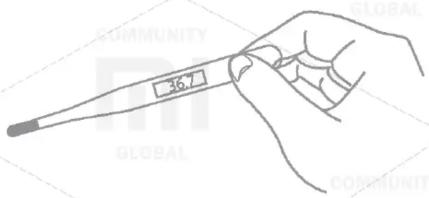
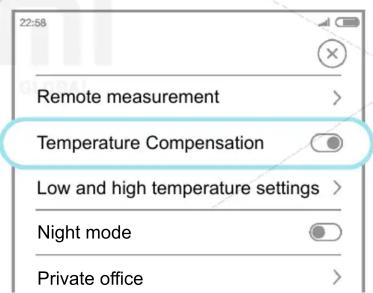
- Click the «😊» icon in the upper right corner of the menu, turn on the «Temperature Compensation»
-
Return to the main measurement screen, press the temperature compensation button « ⏚ »
-
After stabilization of the measured temperature, the temperature will be displayed taking into account the compensation
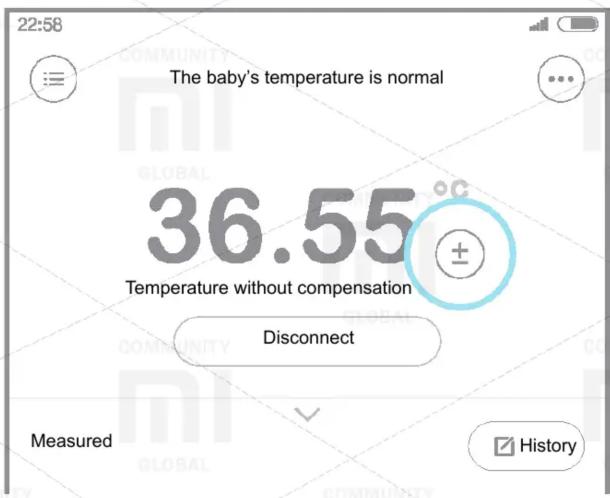
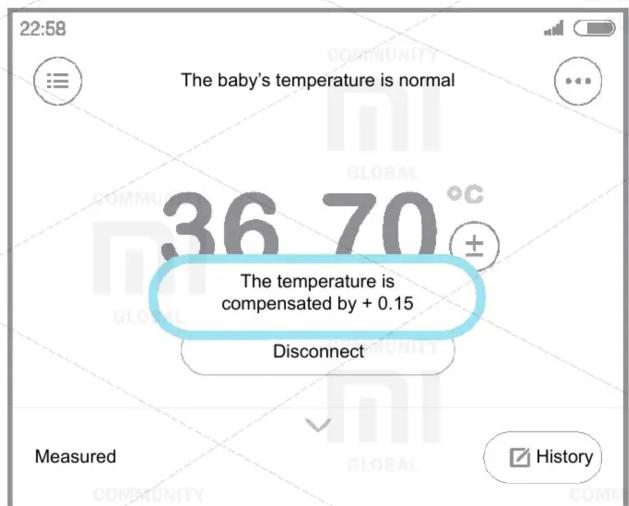
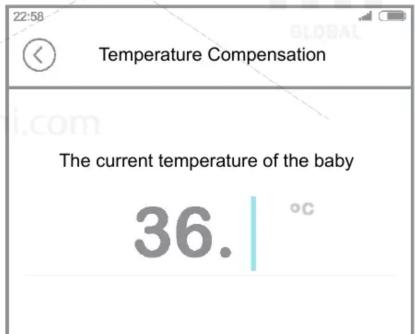
- Click on the temperature display area, enter the measurement results with a conventional thermometer.
XIAOMI-MI.COM
Brand : Xiaomi
Model : MiaoMiaoCe Smart Thermometer
Category : Thermometers