
Mi Smart LED Lamp - LED Lamp Xiaomi - Free user manual and instructions
Find the device manual for free Mi Smart LED Lamp Xiaomi in PDF.


| Product Type | LED Desk Lamp |
| Model | MJTD01YL |
| Power Input | 12V DC, 0.5A |
| Rated Voltage | 100-240V AC, 50/60 Hz |
| Power Consumption | 6W (42 LEDs x 0.15W) |
| Color Temperature Range | 2700K - 6500K |
| Luminance | 300 lumens |
| Connectivity | Wi-Fi IEEE 802.11 b/g/n, 2.4 GHz |
| App Support | Android & iOS (Mi Smart LED Desk Lamp app) |
| Controls | Rotary knob: press for on/off, rotate for brightness, press+rotate for color temperature |
| Eye Protection | Yes, natural uniform illumination |
| Brightness Control | Yes, stepless dimming |
| Color Temperature Adjustment | Yes, stepless |
| Additional Modes | Focus mode, Mode change, Lamp Off Timer, Delay off |
| Remote Control | Yes, via smartphone app |
| Firmware Update | Yes, via app |
| Reset | Press and hold reset button under lamp stand for 5 seconds |
| Warranty | 12 months (with specific terms) |
| Operating Temperature | -10°C to +40°C |
| Humidity | 0% - 85% RH |
| Safety | Do not disassemble LED module; use only included adapter; ensure voltage compatibility |
Frequently Asked Questions - Mi Smart LED Lamp Xiaomi
User questions about Mi Smart LED Lamp Xiaomi
0 question about this device. Answer the ones you know or ask your own.
Ask a new question about this device
Download the instructions for your LED Lamp in PDF format for free! Find your manual Mi Smart LED Lamp - Xiaomi and take your electronic device back in hand. On this page are published all the documents necessary for the use of your device. Mi Smart LED Lamp by Xiaomi.
USER MANUAL Mi Smart LED Lamp Xiaomi
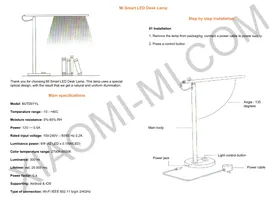
Thank you for choosing Mi Smart LED Desk Lamp. This lamp uses a special optical design, with the result that we get a natural and uniform illumination.
Main specifications
Model: MJTD01YL
Temperature range: -10 - +40C
Moisture resistance: 0%-85% RH
Power: 12V --- 0.5A
Rated input voltage: 100-240V - 50/60 Hz 0.2A
Luminance power: 6W (42 LED x 0.15W/LED)
Color temperature range: 2700K-6500K
Luminance: 300 lm
Supporting: Android & iOS
Type of connection: Wi-Fi IEEE 802.11 b/g/n 2/4GHz
Mi Smart LED Desk Lamp
Step by step installation
01 Installation
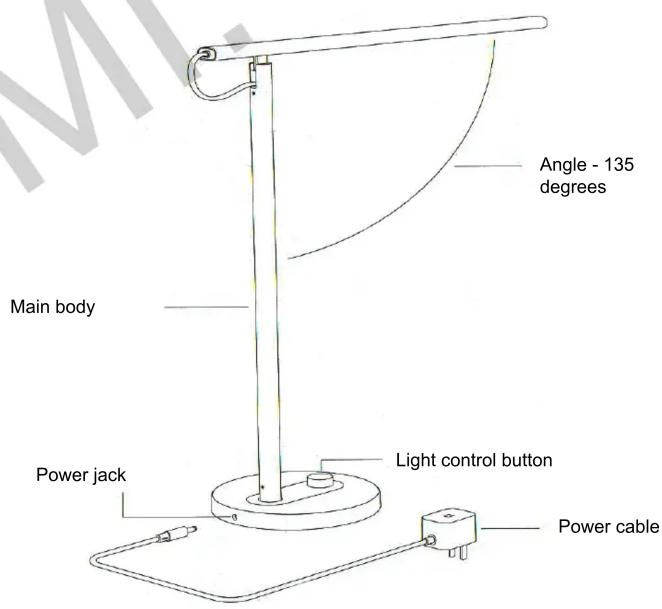
- Remove the lamp from packaging, connect a power cable to power supply.
- Press a control button.
02 Using
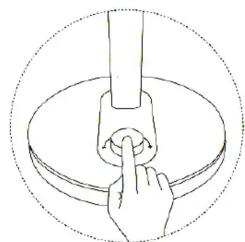
Click on light control button to turn on / off the lamp.
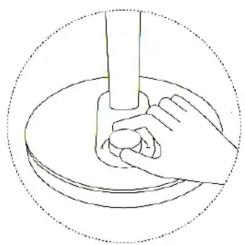
Turn light control button to select a brightness of light.
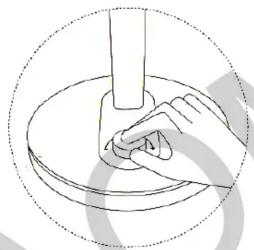
Press and rotate light control button to select desired color temperature.
03 Smart controls
- To set «Mi Smart LED Desk Lamp» APP, scan QR-code, or search and download it at APP Store.
- Turn on the lamp, open the APP, following application, make a necessary adjustment.

* Please ensure affordable and stable Wifi signal.
Reset to factory default settings
Reset button (RESET) is under the lamp stand. Connect the lamp to power supply, use a thin object to press and hold a reset button for 5 seconds. When light starts flashing, release a reset button. After 5 seconds, the lamp will turn off, indicating a successful recovery of a factory default settings.
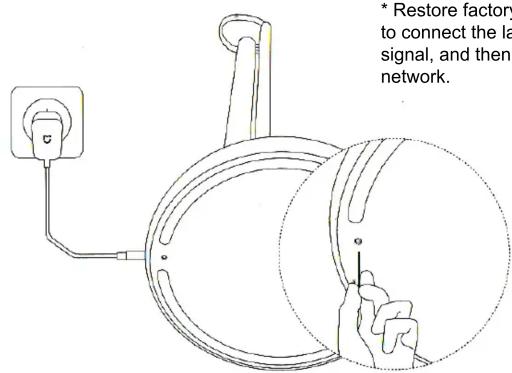
* Restore factory settings in order to connect the lamp to a new Wifi signal, and then re-connect to network.
Features
Eye protection
Brightness control
Adjusting a color temperature
Focus mode
Mode change
Lamp Off Timer
Delay lamp off
Remote control from
smartphone
Firmware Update
Warranty
Warranty service is carried out in accordance with the law on «consumer rights» and the «Law on the quality of products.» The warranty service includes:
- Within 7 days from the date of purchase, in case of a problem from the «List of faults», Xiaomi service center determines the cause of the problem, then you can choose a free replacement product or a refund.
- Within 8-15 days of purchase, in case of a problem of «fault list» Xiaomi service center defines the problem, then you choose a free replacement or repair of the goods.
- Within 12 months from the date of purchase, in case of a problem from the «List of faults», Xiaomi service center defines the problem, then you are given a free repair.
Terms that are not included in a warranty service
- Completion of service, falling, neglect, abuse, liquid ingress, an accident, if torn or slipped label and labeling devices;
- The warranty period has expired;
- Damage caused by force majeure;
- Failures, which do not correspond to Xiaomi center service «List of faults»;
- Failure of the device or its components from «Fault list», which arose in connection with a human factor, and which interfere with normal operation. Failures that result from use of lamps with outsiders adapters with wrong rated voltage in an inappropriate setting.
| Name of faults | |
| Mi Smart LED Desk Lamp | The lamp is not lit |
| A smartphone can't find the Lamp | |
| Problems with a light control button | |
| Problems with a reset button | |
| Adapter | Problems with power |
List of faults
Cautions
- Before using the lamp, make sure that voltage in the electrical supply corresponds to voltage of the device. Incorrect voltage can cause damage to the lamp or cause an accident.
- LED module can not be replaced, do not disassemble the device by yourself.
- In operation, the lamp produces heat. Please make room ventilation for better heat dissipation.
- Do not use extraneous adapter, otherwise it may damage the device or cause an accident.
The presence of toxic and hazardous substances
| Part | PbPBDE | Hg | Cd | Cr6+ | PBB | PBDE |
| Body | 0 | 0 | 0 | 0 | 0 | 0 |
| Adapter | 0 | 0 | 0 | 0 | 0 | 0 |
| Package | 0 | 0 | 0 | 0 | 0 | 0 |
0: toxic and harmful substances in all components of the device are contained in an amount below limit value according to SJ / T11363-2006 «limit requirement for toxic and hazardous substances in products.»
X: indicates the presence of toxic and harmful substances, at least one of components of this product in excess of limit value, according to SJ / T11363-2006 «Requirements limiting a presence of toxic and hazardous substances in products.»
Xiaomi-Mi.com
Brand : Xiaomi
Model : Mi Smart LED Lamp
Category : LED Lamp