
Mi TV 3 60 - Television Xiaomi - Free user manual and instructions
Find the device manual for free Mi TV 3 60 Xiaomi in PDF.


| Product Type | Television |
| Brand | Xiaomi |
| Model | Mi TV 3 60 |
| Screen Size | 60 inches |
| Resolution | 3840 x 2160 (4K UHD) |
| Display Technology | LED |
| Dimensions (with stand) | 134.5 × 79.5 × 22.0 cm |
| Dimensions (without stand) | 134.5 × 77.5 × 4.5 cm |
| Weight (with stand) | 25.0 kg |
| Weight (without stand) | 24.0 kg |
| Power Supply | 100-240V AC, 50/60 Hz |
| Power Consumption (typical) | 180 W |
| Smart TV Platform | MIUI TV (Android-based) |
| Connectivity | Wi-Fi, Bluetooth, HDMI (3), USB (2), Ethernet |
| Audio | Stereo speakers, 2 × 8W |
| Remote Control | Bluetooth remote with voice control |
| VESA Mount Compatible | Yes, 300 × 300 mm |
| Cleaning Instructions | Wipe with a dry soft cloth; do not use liquid cleaners |
| Safety Warnings | Do not block ventilation; keep away from heat sources |
| Spare Parts Availability | Contact Xiaomi support for remote and stand replacements |
Frequently Asked Questions - Mi TV 3 60 Xiaomi
User questions about Mi TV 3 60 Xiaomi
0 question about this device. Answer the ones you know or ask your own.
Ask a new question about this device
Download the instructions for your Television in PDF format for free! Find your manual Mi TV 3 60 - Xiaomi and take your electronic device back in hand. On this page are published all the documents necessary for the use of your device. Mi TV 3 60 by Xiaomi.
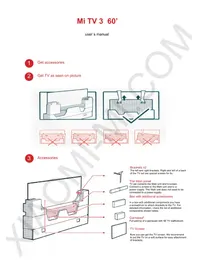
USER MANUAL Mi TV 3 60 Xiaomi
Get TV as seen on picture

3
Accessories
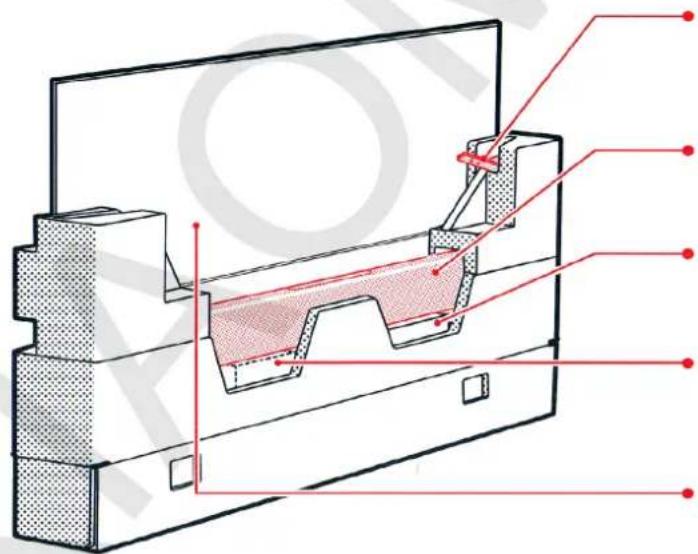

Brackets x2
The left and right brackets. On the back of the TV set, there are special screws for attaching them.
The Main panel
TV set contains the Main unit and a screen. Connect a screen to the Main unit and to a power supply. The Main unit does not need to be connected to a power supply.
Box with additional accessories
In a box with additional components you have a screwdriver to attach brackets to the TV. For detailed information, check the list of additional components shown below.
Gamepad*
Full pairing of a gamepad with Mi TV via Bluetooth.
TV Screen
Now you can get the TV screen. We recommend to put the TV on a soft surface for easy attachment of brackets.
 |  |  |  | |||||||
| Remote control | Battery (No7) x2 | Remote control strap* | VIP card of home fitness* | Power cable | MI PORT cable | AV cabel | Screwdriver | Screw x5 | [7T60] |  |
Mi TV and its components can be used together with a special wall bracket, if you want to buy them, contact the seller.
Ingredients marked with * are optional accessories, that you can purchase separately.
5
Installation of TV brackets and the Main panel

2

01 Installation of brackets

On the back of the brackets there are signs indicating which one is for the right or left side of the TV.
02 Attaching the Main panel to the TV
Connect the Main unit (linear device) to the MI PORT port of the TV, using the MI PORT cable.
03 Connect a power supply
a: Connect Mi stereo subwoofer to a power supply. b: Connect the TV screen to a power supply.
04 Switching on
Before switching on the TV for the first time, read the manual.
To achieve maximum performance of the Main unit of the TV, do not put it on the floor or on a metal surface.
!
First, connect the Stereo Subwoofer to power, and then the TV set. The Main unit of the TV will be powered via the MI PORT cable, so it does not need to be connected to the power supply.

When you need to connect a wired/wireless port, or install a device in port F for connecting a coaxial line, you can choose an antenna adapter.
1

2
7
Sensor panel management
Switching: after connecting to a power supply, touch the sensor panel to turn on Mi TV.
Location: the touch panel is at the bottom of the Mi TV.
Functions: you can control some functions of the Mi TV by a slight touch to the touch panel: search of remote console, change channels, adjust the volume, switch the source input channel, make a transition to 3D, and others.
8
Remote control

Using the strap for the remote control
- Thread the strap through the hole at the bottom of the battery compartment.
- Once you have inserted a loop of the strap through the hole at the bottom of the battery compartment, slide it through the latch between the two batteries.
- Insert the batteries, and close the back cover of the battery compartment.

Notices:
The remote, that supports the audio control mode, can be used together with a gamepad, TV set to become the gaming device!
Pairing a remote control with TV set
In the lower right corner of the TV there is a special Bluetooth system, which operates within a range of 20 meters. Simultaneously press the button and , you will hear a sound, then you can release the buttons (please adhere to the specified distance). Then you will hear two beeps from the panel that will indicate successful pairing.
Power: press the Power button to turn off the TV; press and hold the button to turn off, restart, or set the time off.
Home: press the button to quickly return to the homepage. Press and hold for 2 seconds to view a list of recently used applications.
Menu: shows the interface and options.
At the interface of online video, go to a search; playable files in the interface display the parameters of the video; you can also find more video categories list, etc.
Wheel of options: control of choice (up, down, left, right). While watching the video using these buttons, you can rewind the video fast forward, backward.
Set: confirms your current selection. During video playback, you can stop it on pause / play the current video.
Back: Back one step.
Main parameters
Screen size
60 inch
Resolution
3840 x 2160 (4K)
Components parameters
Main processor
Cortex A17 4-core, 1.4G, 2GB three-channel RAM DDR3
ROM
8GB eMMC
Mali-760 MP4
GPU
Ports
Input
HDMI 2.0 x3; AV x1; VGA x1; analog/digital TV (DTMB) x1
Output
MI PORT, Audio out x1 (only Mi subwoofer)
Data interfaces
USB 2.0 x1; USB 3.0 x1; Ethernet x1
Antenna
two ranges: 2.4 GHz, 5GHz
Wi-Fi
(802.11 a/b/g/n/ac, 2x2 MIMO support)
Bluetooth
4, BLE, low power using
Audio & video
Audio
FLAC, AC3, WMA, MP3, AMR, DTS, AAC, OGG
Video
AVC, MPEG2/4, H.263, H.265, VP8, COOK
Sound effects
Dolby Audio x2 (uniform sound power and other control functions of sound)
Multiscreen
supports images, music and video-based technology Milian, is compatible with Air Play, DLNA, Miracast and WIDI.
3D
supports
Power
Required
180W
In hold mode
<5W
Main sound parameters
Crossover
170 Hz
Mi speakers (the Main unit)
Interface
Wifi; Av; AUX in; HDMI
Freq. range
16 ~ 22,000 Hz
Components
2.5-inch, wide-range speaker - 4 pcs., tweeter - 2 pcs.
6.5-inch active subwoofer + 6.5-inch passive subwoofer
More options for Mi TV when using it with a smartphone
Display an image on the TV screen
Cut off the TV screen using a smartphone
Cut the TV screen at one touch of a button and save to your smartphone
Display pictures and videos on the TV screen
Download and view pictures and videos on your TV
Files history
At any time, view the history of playable files on Mi TV or Mi Box, using a smartphone, continue or begin viewing the file again.
Installing TV software on a smartphone
Management of Mi TV applications and games from your smartphone
Smartphone as a remote control
Use a smartphone as remote control of your Mi TV or Mi Box
Installing the device
• Install the TV near an easily accessible outlet to connect the device to a power supply and disconnect it. - Place the TV on a flat, stable surface to prevent the TV from falling or damage as a result of human actions. - For wall mounting, we recommend that you purchase special brackets and use the services of a qualified service person. For more information, call service. - If you use screws of different diameter or different length to attach the TV to the wall, it may cause its downfall, or other malfunctions.
Transporting
- Before transporting the TV set, disconnect all power cords.
- Transporting a large TV set requires two or more persons. When transporting the TV, do not put pressure on the LCD screen. Protect the TV against shocks and violent shaking.
- If you need to deliver the TV set for repairs or when moving, pack it into the cardboard box and packing material in which it was originally supplied.
Ventilation
- Do not cover the ventilation holes or place the TV too close to other objects. The Mi TV air vents are located around the TV.
- When installing Mi TV on a wall, to ensure proper ventilation, prevent dirt and dust accumulation in vents:
- Do not place the TV set horizontally, upside down, backwards, or sideways.
- Do not cover the TV set with curtains or other things (such as newspapers), etc.
- Do not place the TV set on a shelf, rug, bed, or in a closet.
Power cable
To prevent fire, electrical shock, damage, and/or injuries, contact with a power cord and a power outlet in accordance with the following instructions:
- Fully insert the plug into the socket.
- Use only Mi TV power network AC voltage 220V.
- When connecting the cables, for safety reasons, be sure to disconnect the AC power cord and try not to tangle cables.
- The power cord must be away from heat sources.
- Clean a plug from the accumulated dust and moisture accumulation which can cause damage.
- Do not pinch, bend, or twist the power cord. Otherwise, it may be exposed or broken wires inside the cable.
- Do not put heavy objects on the power cord.
- Do not pull the cord when removing it from the outlet.
- Do not connect too many appliances to a single outlet.
- Do not use nonconforming outlet.
Cleaning
Do not sprinkle water on the TV. As a result of such actions a water can accumulate on the screen, external and internal components, and may cause certain failure.
Children
- Do not allow children to climb on the TV.
- Keep the small parts out of reach of children to prevent them from accidentally swallowing them.
When you have a faults
• A power cord is damaged. - An outlet has a poor contact. • TV set is damaged by being dropped, hit or having something thrown at it. - A liquid or an object falls inside a body through holes.
Turn off the TV and immediately disconnect the power supply from the wall socket. Contact Xiaomi Service Center, to qualified service personnel check the TV.
Additional devices
Keep optional components or any equipment that emits electromagnetic radiation away from the TV. Otherwise, the picture and/or sound may become distorted.
In accordance with the laws of the PRC, Mi, Xiaomi, MI, MIUI, Mi TV and other trademarks and copyrights are owned by Xiaomi Technology, Beijing LLC and its subsidiaries.
http://www.mi.com is the only official website of the company Xiaomi Technology, Beijing LLC and its subsidiaries, and the domain name is protected by the laws of the PRC.
MIUI is a mobile communication terminal operating system developed by Xiaomi. In accordance with the laws of the PRC, Xiaomi Technology, Beijing LLC and its subsidiaries received full and independent copyright in the software.
To view patents of DTS, visit the site http://patents.dts.com.
Manufactured under license from DTS Licensing Limited. DTS, the Symbol, & DTS and the Symbol are registered trademarks, and DTS Express 5.1 is a trademark of DTS, Inc. DTS, Inc. All rights reserved.
Manufactured under license from Dolby Laboratories. Dolby Audio and the double-D symbol are trademarks of Dolby Laboratories.
Limitations
To prevent fire, electric shock, or damage and/or breakage, install and use the TV set in accordance with the instructions below.
- Locations:
Outdoors (under direct sunlight), at the seashore, on a ship or other vessel, inside a vehicle, in medical institutions, unstable locations, near water, or where possible exposure to rain, moisture, or smoke. If you install Mi TV in rooms with high humidity, or in the case of air containing sulfide and other harmful substances, some damage and malfunction may occur.
- Furnishings:
In hot, humid, or excessively dusty rooms; in areas where insects may enter; in places where it might be exposed to mechanical vibration; near flammable objects (candles, etc.). The TV set should not be exposed to any dripping or splashing water or other liquids; you cannot put on it anything containing liquid, such as a vase of flowers.
To prevent fire, electric shock, or malfunction, do not set the TV in humid or excessively dusty rooms, in places filled with soot or steam (near the stove or humidifier).
Do not install near places where water is heated, near a heater, places for cooking, repellents and so on.
• Under conditions:
Do not touch the TV with wet hands; do not operate with the removed body, or with accessories, not recommended by the manufacturer. During thunderstorms, disconnect the TV from the power supply and antenna (unplug from the power outlet).
Do not install the TV set outdoors, to prevent the occurrence of human injuries or fall and damage the TV.
- TV screen:
Do not throw any objects into the TV. A blow screen glass may break and cause serious injury to you.
If a surface of the TV cracks, before you touch it, unplug the power cord from the wall outlet. Otherwise, you may get an electric shock.
Note:
- Watch TV with the appropriate lighting, as poor lighting or a long-term view of the TV can cause problems with you vision.
- When watching TV, it may heats up, this is normal.
Caring of a screen, a TV casing and the cleaning of it
Before cleaning the TV, its screen, plug of a cable etc., be sure to disconnect it from the power supply. To avoid material degradation or screen coating, observe the following precautions:
• To remove dust from a screen surface / casing, wipe gently with a soft cloth. If there are still remnants of the dust, wipe with a soft cloth slightly moistened with a mild detergent solution. - Do not spray water or cleaning liquid directly to the TV. Fluid may accumulate in the bottom of the screen or on the outer surfaces and cause some damage and malfunction of the TV. - Do not use abrasive pad, alkaline / acid cleaner, scouring powder, or volatile solvents such as alcohol, benzene, thinner or insecticide. Using such materials or maintaining prolonged contact with rubber / vinyl may damage a casing and screen surface. - When adjusting the angle of the TV set, move it slowly and carefully to avoid slipping off the TV from a stand.
Mi TV audio system
- In compliance with the standard GB8898-2011, you must use your TV in a dry place.
- The subwoofer must be installed near an easily accessible power outlet. A speaker or appliance connector should be installed in such a way that if you do not use them, you can disconnect the cable from the power supply. Never put any objects on a speaker to prevent disconnection of speakers.
- Do not place the device near an open flame source, such as a burning candle.
- Do not expose the device to dripping or splashing water or other liquid. Do not put objects containing liquid on it, such as a vase of flowers. It is advisable to install the appliance out of reach of children to prevent accidents.
- Do not install this device in rooms with high temperature and high humidity, or in places with high dust accumulation.
- Do not arbitrarily reconstruct, repair, or disassemble this product. Doing so may cause a short circuit, damage the device, or even catch fire. In this case, you may lose the right to warranty service for the device.
Note: While the main unit of the TV is working, its temperature will be higher than room temperature. This is normal.
Certificate: CMIIT ID: Broadcasting module: 2015AJ4655

- BRACKETS X
- THE MAIN PANEL
- BOX WITH ADDITIONAL ACCESSORIES
- GAMEPAD
- TV SCREEN
- INSTALLATION OF TV BRACKETS AND THE MAIN PANEL
- INSTALLATION OF BRACKETS
- ATTACHING THE MAIN PANEL TO THE TV
- CONNECT A POWER SUPPLY
- SWITCHING ON
- SENSOR PANEL MANAGEMENT
- REMOTE CONTROL
- NOTICES
- PAIRING A REMOTE CONTROL WITH TV SET
- MAIN PARAMETERS
- COMPONENTS PARAMETERS
- PORTS
- AUDIO & VIDEO
- MULTISCREEN
- POWER
- MAIN SOUND PARAMETERS
- MI SPEAKERS (THE MAIN UNIT)
- MORE OPTIONS FOR MI TV WHEN USING IT WITH A SMARTPHONE
- CUT OFF THE TV SCREEN USING A SMARTPHONE
- DISPLAY PICTURES AND VIDEOS ON THE TV SCREEN
- FILES HISTORY
- INSTALLING TV SOFTWARE ON A SMARTPHONE
- SMARTPHONE AS A REMOTE CONTROL
- INSTALLING THE DEVICE
- TRANSPORTING
- VENTILATION
- POWER CABLE
- CLEANING
- CHILDREN
- WHEN YOU HAVE A FAULTS
- ADDITIONAL DEVICES
- LIMITATIONS
- NOTE
- CARING OF A SCREEN, A TV CASING AND THE CLEANING OF IT
- MI TV AUDIO SYSTEM
Brand : Xiaomi
Model : Mi TV 3 60
Category : Television