
FengMi WEMAX ONE Laser TV - Television Xiaomi - Free user manual and instructions
Find the device manual for free FengMi WEMAX ONE Laser TV Xiaomi in PDF.


| Product Type | FengMi Wemax One Laser Projection TV |
| Dimensions (W x D x H) | 410 mm x 291 mm x 88 mm |
| Weight | 6.9 kg |
| Power Supply | AC 200-240V~ 50/60Hz, built-in AC-DC |
| Power Consumption (Normal) | <250W (High brightness mode) |
| Standby Power | <0.5W |
| Operating System | MIUI TV |
| Processor | T968 Cortex-A53 quad-core 1.8GHz/64-bit |
| RAM | 2GB DDR3 |
| Storage | 16GB eMMC flash |
| Display Technology | 0.47" DMD, ALPD laser light source |
| Standard Resolution | Full HD (1920x1080) |
| Screen Size Range | 80" - 150" diagonal |
| Projection Ratio | 0.233:1 |
| Keystone Correction | 8-point and 4-point calibration |
| Focus | Electrofocusing |
| Audio System | 2 full-range + 2 high-frequency speakers, total ~30W |
| Connectivity | HDMI x3 (1 with ARC), USB 3.0, AV input, S/PDIF, Ethernet, Bluetooth, Wi-Fi |
| Safety Features | Class 1 laser, motion sensor for eye protection, smart thermal control, automatic shutdown on overheat |
| Remote Control | Bluetooth remote (voice control supported) |
| Operating Temperature | 0°C to 40°C |
| Storage Temperature | -20°C to 55°C |
| Humidity Range | 20% - 80% |
| Maintenance & Cleaning | Wipe with soft cloth; avoid liquids and abrasive cleaners; clean lens with included wipes |
| Repairability / Spare Parts | CPU replacement possible by authorized service; no user-serviceable parts inside |
Frequently Asked Questions - FengMi WEMAX ONE Laser TV Xiaomi
User questions about FengMi WEMAX ONE Laser TV Xiaomi
0 question about this device. Answer the ones you know or ask your own.
Ask a new question about this device
Download the instructions for your Television in PDF format for free! Find your manual FengMi WEMAX ONE Laser TV - Xiaomi and take your electronic device back in hand. On this page are published all the documents necessary for the use of your device. FengMi WEMAX ONE Laser TV by Xiaomi.
USER MANUAL FengMi WEMAX ONE Laser TV Xiaomi
FengMi Wemax One Laser Projection TV
User's Manual

FengMi Technology
FENGMITECHNOLOGY
WEMAX
Home Cinema Experience
To User
Thank you for choosing the FengMi Wemax One Laser Projection TV multimedia projector.
Before using the device, please read this instruction manual carefully and keep it properly for future use.
Laser Safety Information
This device is equipped with Class 1 laser equipment, which meets the requirements (Class 1 laser equipment) of IEC 60825-1: 2014, CFR 1040.10 and 1040.11, and is not a source of hazardous laser radiation.
Safety Information
Before using the device, please read carefully all the safety requirements and recommendations on the labels and/or labeling of the device.
Meaning of Warning Signs

This sign indicates that there are uninsulated wires in the device housing, which can cause electric shock and any contact with them creates a risk of injury.

Attention! Heat.

This sign reminds the user to pay attention to important information about the rules of use and maintenance of the device. Please read this information carefully to avoid damaging the projector.

Do not touch by hands.
About electrical ground

Use this device only with a compulsory grounding condition.
Transportation

It is recommended that you use the original packaging or similar material to transport this device safely.
Prevention of electric shock and / or fire

- The use of unreliable electrical cables can affect the performance and characteristics of the device. In addition, this may result in an electric shock, fire, or other accidents. To avoid the above situations, we recommend to use original electrical cables, or cables of the same type.
- If you need to use an extension cord, select a cable, whose rated current is not less than the rated current of the device. Ignoring this recommendation may result in overheating of the power cord, that can cause electric shock or fire.
- During lightning or if the device is not used for a long time, please remove the plug from the outlet. This way you will avoid damage to the projector, which can occur due to lightening or overvoltage of power lines.
- Do not leave flammable objects near this unit to avoid a fire.
- Do not cover the lens of the device with foreign objects while it is operating. This can lead to lens heating, deformation and even fire.
- Do not leave foreign objects near the ventilation openings and air circulation holes (heat dissipating holes). This can lead to the accumulation of heat inside the device or even the occurrence of a fire.
Safety regulations
- Do not install the unit on unstable surfaces, tables, or other supports to avoid falling, damaging, or injuring others.
- Do not look directly into the lens or into the air circulation holes (heat dissipating holes) during operation, in order to avoid eye injuries.
- Do not disassemble the device by yourself. Inside the device there is a high voltage, on contact with which you can be injured. If there is a need for maintenance or a complete repair of the device, be sure to contact the appropriate authorized service center.
- Do not install the device in a vertical position, otherwise it may fall or injure others.
- Avoid getting the product in the rain and do not leave it in a damp environment (the operating humidity of the device is between 20% and 80%).
- Do not immerse the device in water and avoid water or other liquids. If any foreign object or liquid enters the device, immediately disconnect it from the power supply and contact an authorized service center for technical inspection. Only after this can you use the device again.
- Do not install the device:
- in places with poor ventilation or air circulation or in very tight places;
- along with other devices that are sources of a strong magnetic field; • In direct sunlight;
- next to the fire alarm;
- In rooms with high humidity, in rooms with very high or low temperatures.
Accessories
When opening the package with the device, check the conformity of all related accessories in the package with the list below. If any parts are missing, contact the distributor immediately.
Projector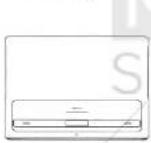
Remote control and batteries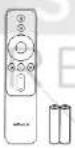
Power cable
Wipes for cleaning the device

Instruction
Instruction Overview
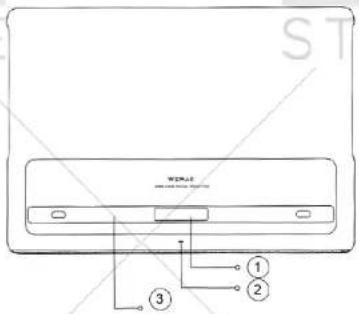
1 - Projector lens; 2 - Power indicator; 3 - Protective panel.
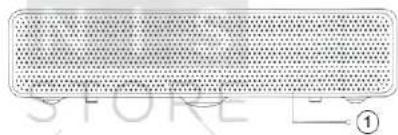
1 - Metal grid of speaker.
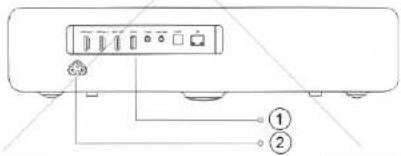
1 - Connectors and interface; 2 - Power connector.
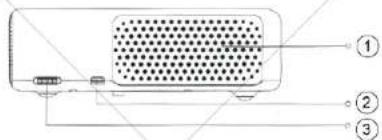
1 - Ventilation holes;
2 - USB 2.0 port;
3 - Volume adjustment wheel (right speaker).
1 - Volume adjustment wheel (left speaker) 2 - holes for air circulation (heat dissipating holes).
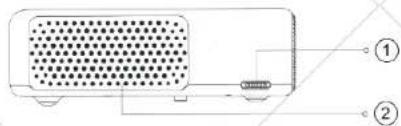
- Do not leave foreign objects, that are sensitive to heat, near the air circulation holes (heat dissipating holes).
- Please do not leave foreign objects near the ventilation holes. This may cause the device to overheat.
- During operation, the projector emits a powerful light flux. Please do not look directly into the lens so as not to damage your eyesight.
Power indicator
The power indicator is white. - After connecting the cable to the mains, the system automatically turns on. - The indicator flashes during the activation process. - After logging in, the indicator turns off. - The indicator blinks while the screen is off. - After entering the mode of the switched off screen, the indicator lights up constantly. - The indicator flashes during the shutdown. - The indicator stops burning when the system is turned off.
Connectors and interface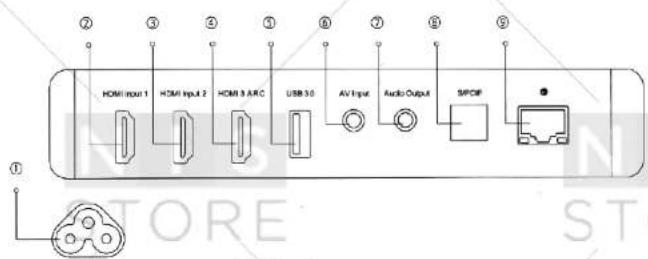
1 Power connector; 2 HDMI input 1 - HDMI input port 1. 3 HDMI input 2 - HDMI input port 2. 4 HDMI 3 ARC - HDMI input port 3, audio output. 5 USB 3.0. 6 AV Input - Input video signal (3.5 mm jack). 7 Audio Output - Audio output, support for coaxial S/PDIF connector, subwoofer. 8 S/PDIF - Digital audio output. 9 Ethernet - Network connection port.
Distance and size of the projection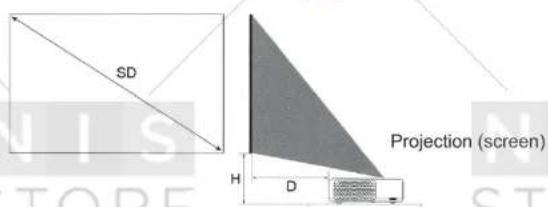
The size of the projection area depends on the distance from the projector to the projection screen.
| Projection size (SD) | Distance from projection to projection screen (D) | Relative altitude (H) |
| 80° | 14 CM | 29 CM |
| 90° | 19 CM | 32 CM |
| 100° | 24 CM | 35 CM |
| 120° | 34 CM | 41 CM |
| 150° | 49 CM | 50 CM |
Size of projection area (SD): projection diagonal (inches)
Distance from the projection to the projection screen (D): distance from the rear of the projector to the projection screen (cm)
Relative altitude (H): distance from the bottom of the projector to the projection screen (cm).
The above indicators may differ from the actual ones.
Remote Control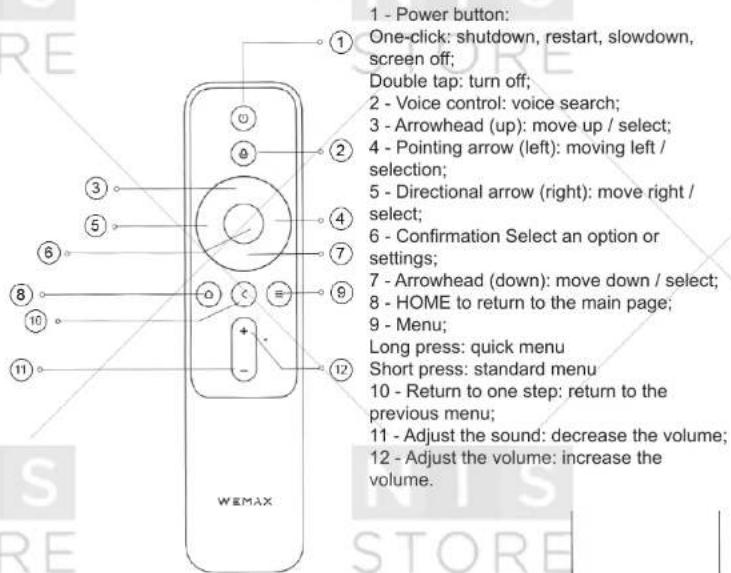
Installing / replacing remote control batteries - Two AAA batteries are used for this remote control. - When changing batteries, pay attention to the polarity. - In the event of a battery leakage, immediately wipe the battery compartment with a dry, clean cloth / wipe and replace the battery that is unusable. - Dispose of used batteries according to the instructions for using the batteries and local regulations.
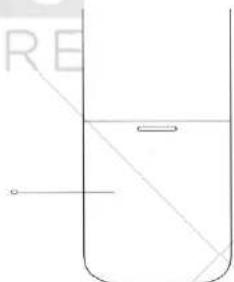
Battery compartment cover
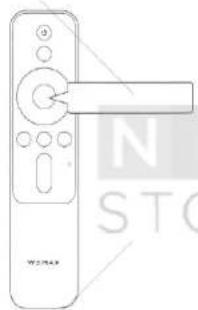
Quick start
- Insert the batteries and connect the projector's console. Click the «6» button to start the connection.
Please make sure that the batteries are inserted correctly and securely fixed.
If there is an insulating film in the battery compartment, remove it.
Connecting the projector's remote control:
Press the «8» and «9» buttons, pointing the remote control at the laser in the lower right corner of the projector.
A sound signal will indicate a connection of the devices.
Release the button and wait for a while.
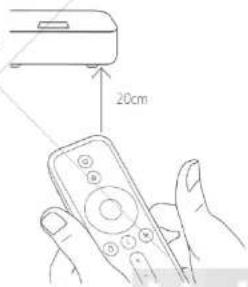
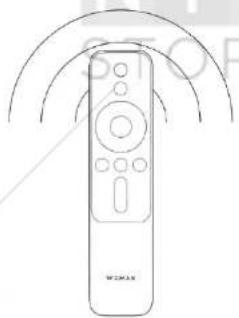
The projector's console is connected successfully. No need to apply additional settings, start using the remote.
2. Electrofocusing
Press and hold the Menu button (9) on the remote control to switch to the focus settings or select «Image Settings» in the system settings.
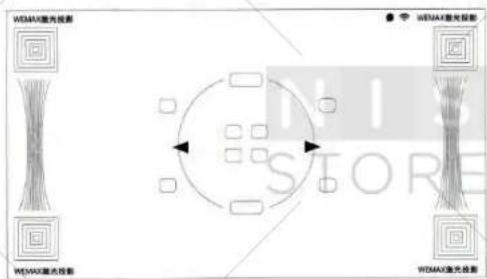
- Correction of trapezoidal distortion
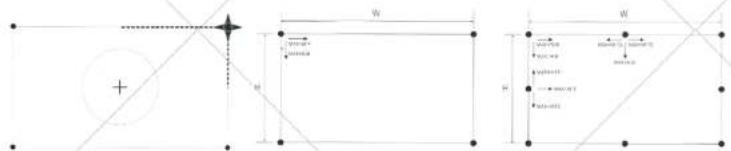
Fine Tuning
Acknowledgment
Reset
Four-point calibrating mode
Eight-point calibration
mode

The above shows the adjustment range for the eight- and four-point calibration. Dimensions W (width) and H (height) of the projection image may differ. For example, the width and height of the 100" 16:9 screen projection is approximately: W = 2214 mm, H = 1245 mm (the actual screen size has priority).
4. Interface settings
Scan the QR code and install the mobile application.
Operate the projector remotely using a smartphone.

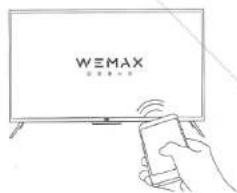
5. Connecting to the wireless network
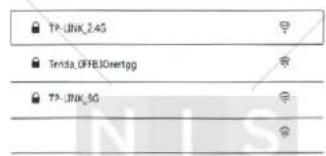
Operating system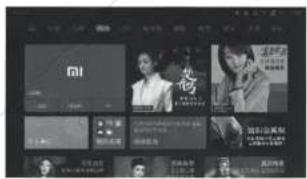
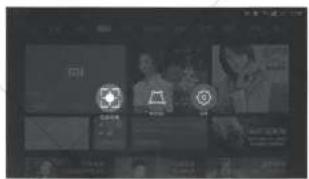
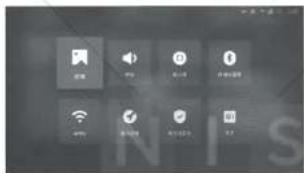
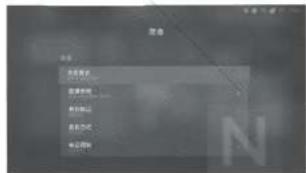
The main screen
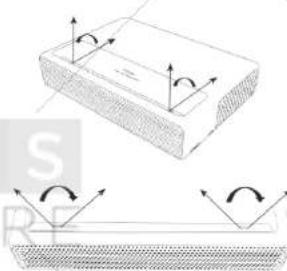
Infrared motion sensor & Fresnel optical lens.
Security measures
The sensitivity angle of the front of the device is 55°; the sensitivity angle of the right and left sides of the device is 70°.
The device has a built-in infrared motion sensor with a smart function to detect people in the projection area, which is designed to protect the eyes from a powerful light flux.
When motion is detected, the projector reduces the brightness to a minimum, after which the warning «Please do not look at the light source» appears. To restore the brightness, press any button on the remote control or the device will automatically restore the brightness of the image after a short period of time.
Bluetooth speakers
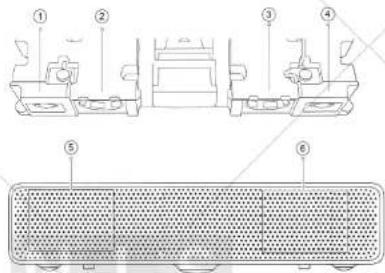
1 - High-frequency speaker; 2 - Full-range speaker; 3 - High-frequency speaker; 4 - Full-range speaker; 5 - Speaker; 6 - Speaker.
The projector has four built-in high-quality speakers with a total output power of ~30W. It is possible to use as independent Bluetooth speakers.
Updating the System Board
The device supports updates of the system board in accordance with the processor performance. It is necessary to perform after-sales service of the motherboard or return the device to the manufacturer for its updating. Users are not allowed to disassemble the device and perform any actions on the motherboard.
Smart thermocontrol
NTC temperature sensor system (laser, ambient temperature, color temperature), automatic fan speed control. The range of normal ambient temperature is 0 - 40°C , the temperature of the laser unit and the color temperature are controlled by the system.
- Three brightness modes are available within the normal temperature range;
- If the temperature has reached a high level, a warning appears, after which the device automatically switches to the energy-saving mode;
If the temperature exceeds the permissible value, a warning will appear on the screen, after which the device will automatically turn off.
Temperature switch: The laser device is equipped with a high-temperature sensor, which is designed to automatically turn off the power when the maximum permissible temperature is exceeded.
Maintenance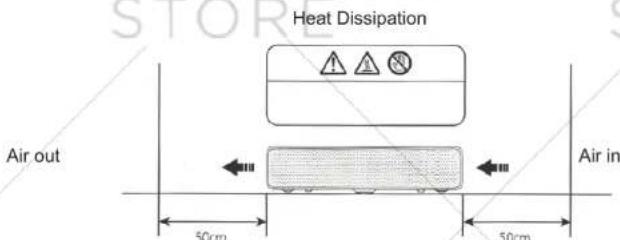
Attention: the temperature of the ventilation openings and the holes for air circulation (heat dissipating holes) can reach 65° C, any contact with them is forbidden. Please do not place foreign objects on the projector at a distance of 50 mm so as not to interfere with effective heat dissipation.
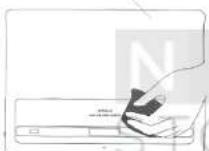
Before wiping the device, turn off the projector and unplug it from the electrical outlet
Regularly wipe the projector body and lens protective panel with a special cloth or cloth to clean the appropriate surfaces. Do not use abrasive cleaners, solvents or other aggressive chemicals to avoid scratching the surface of the

- There is no watertightness in this device. Avoid getting any liquid into the projector, especially
for the power indicator, the glass protective panel, the ventilation holes, the air circulation holes (heat dissipating holes), etc.
- To clean the mirror surfaces, use special wipes that come with the device, or cloth to clean the corresponding surfaces.
Poisonous and harmful substances
| Name | Toxic and harmful substances or elements | |||||
| Pb | Hg | Cd | CrV1 | PBB | PBDE | |
| Mainboard | X | O | O | O | O | O |
| Metal components | O | O | O | O | O | O |
| Housing | O | O | O | O | O | O |
| Battery | O | O | O | O | O | O |
| Other components | O | O | O | O | O | O |
| These tables are provided in accordance with SJ / T 11364.A: Toxic and harmful substances in all components of this device are contained below the threshold value in accordance with GB / T 26572.X: the presence of toxic and noxious substances in at least one of the components of this device in an amount exceeding the threshold in accordance with standard GB / T 26572.Note: components marked "x" have a small amount of harmful or toxic substance. This is due to the fact that today it is technically impossible to completely eliminate these substances or replace them with other, harmless (non-toxic) or less harmful (less toxic). | ||||||
Troubleshooting
| Fault | Method of fixing the problem |
| Problems with the projection screen | Turn off the device and unplug the power cord; reconnect the cable to the mains and restart the system. |
| Problems with the Android system | Turn off the device and unplug the power cord; reconnect the cable to the mains and restart the system. |
| Incorrect screen projection | Turn off the device and unplug the power cord; reconnect the cable to the mains and restart the system. |
| Remote control is lost or problems with connecting to the projector | Turn off the device and unplug it from the mains, wait 5 minutes and turn it on again. After that, try reconnecting the remote control to the projector |
| Automatic system shutdown in case of exceeding the permissible temperature | Remove all foreign objects from the ventilation holes and air circulation holes (heat dissipating holes), ensure cool air admission and restart the device again |
| Other system failures | Contact technical support and consult with a specialist or contact the appropriate service centers for after-sales service of the device |
Specifications
| Basic information | Product type | Feng MI Wemax One Laser Projection TV |
| Dimensions | 410 mm x 291 mm x 88 mm | |
| Weight | 6.9 kg | |
| Basic functions | Lens focusing | Electrofocusing |
| Dust-protective panel | Glass protection panel | |
| Optical parameters | Screen parameters | 0.47" DMD |
| Parameters of the light source | ALPD | |
| Standard resolution | Full HD (1920x1080) | |
| Projection parameters | Screen refresh rate | 60/120Hz (for best picture, it is recommended to use 1920x1080@60Hz) |
| Focal length of the lens | 18.08 mm | |
| Coefficient of projection (TR) | 0.233 | |
| Screen size | 80"-150" | |
| Correction of Keystone Distortion | 8-point keystone correction, 4-point keystone correction | |
| System parameters | CPU | T968 Cortex-A53 |
| 4-core 1.8GHz/64 bit | ||
| RAM | 2GB DDR3 | |
| Flash memory | 16GB eMMC high-speed flash memory | |
| System software | Operating system | MIUI TV |
| Compatibility | MI MXPlayer | |
| APP | Pre-installed APP | |
| Wireless transmission of audio and video files | Mi TV WI-FI module | |
| Selecting the brightness mode | High brightness, movie mode, standard brightness | |
| Dynamic image | HDR support | |
| Sound | Model | Bluetooth mode support |
| Extended support | External USB speaker | |
| Speaker | Full-frequency x 2 + high-frequency x 2 (overall ~ 30W) | |
| Remote control | Bluetooth control | MiJia Bluetooth console |
| Eyes protection | Protection from lens | Motion detection in the projection area (device may be turned off) |
| Power | Built-in power supply | Built-in AC-DC, DC-DC |
| External power supply | Indicator | Indicator flashes white |
| Electric parameters | Noise | <32dB@ standard mode/Ambient temperature 25°C/ distance 1 M |
| Power | <250W at a high level of brightness | |
| Rated power | 200-240V~ @50/60Hz | |
| Consumption at standby mode | <0.5W | |
| Safety | Smart thermo-control | Automatic screen brightness switching, Smart fan speed control |
| Thermo-switcher | Automatic power off in case of overheating | |
| Hardware update | CPU replacement possible | Maintenance for hardware upgrades |
| Other | Storage temperature | -20°C ~ 55°C |
| Working temperature | 0°C ~ 40°C | |
| Humidity | 20% ~ 80% |

- FENGMI WEMAX ONE LASER PROJECTION TV
- TO USER
- LASER SAFETY INFORMATION
- SAFETY INFORMATION
- MEANING OF WARNING SIGNS
- ABOUT ELECTRICAL GROUND
- TRANSPORTATION
- PREVENTION OF ELECTRIC SHOCK AND / OR FIRE
- SAFETY REGULATIONS
- ACCESSORIES
- POWER INDICATOR
- QUICK START
- ELECTROFOCUSING
- INTERFACE SETTINGS
- CONNECTING TO THE WIRELESS NETWORK
- SECURITY MEASURES
- UPDATING THE SYSTEM BOARD
- SMART THERMOCONTROL
Brand : Xiaomi
Model : FengMi WEMAX ONE Laser TV
Category : Television