
Mi VR Glasses - VR headset Xiaomi - Free user manual and instructions
Find the device manual for free Mi VR Glasses Xiaomi in PDF.


| Product Type | VR Headset (Mobile VR) |
| Brand | Xiaomi |
| Model | Mi VR Glasses |
| Compatible Smartphones | Xiaomi Mi5, Mi5s, Mi5s Plus, Mi Note 2 (MIUI system required) |
| Lens | Optical lens x2 |
| Input Methods | Helmet button, touch panel on remote control |
| Head Tracking | Yes, via head movement for cursor control |
| Connectivity | Bluetooth remote control (range up to 10 meters) |
| Power Source | Remote control powered by 2x batteries (included) |
| Phone Connection | Type C slot with adjustable clamp |
| Focus Adjustment | Yes, via distance regulation disk |
| Head Strap | Adjustable foam headband with button for length regulation |
| Material | Foam headband, soft rubber pillows, plastic external case |
| Safety Warnings | Motion sickness, overheating, children under 13 caution, avoid use when tired or under influence |
| Overheat Protection | Remove phone to cool down if overheating |
| Warranty | 7 days replacement/return, 15 days free replacement, 6 months free repair |
| Included Accessories | Touch panel (remote control), instruction manual, 2x batteries, protective film (to remove) |
| Maintenance | Remove protective film before use; allow device to cool if overheating; no charging required for headset itself |
| Regulatory Compliance | European RoHS compliant |
| Repair Policy | Repair only by authorized service centers; warranty void if unauthorized repair |
Frequently Asked Questions - Mi VR Glasses Xiaomi
User questions about Mi VR Glasses Xiaomi
0 question about this device. Answer the ones you know or ask your own.
Ask a new question about this device
Download the instructions for your VR headset in PDF format for free! Find your manual Mi VR Glasses - Xiaomi and take your electronic device back in hand. On this page are published all the documents necessary for the use of your device. Mi VR Glasses by Xiaomi.
USER MANUAL Mi VR Glasses Xiaomi
Perform step-by-step tunings, otherwise you may use the Mi VR helmet incorrectly. Make sure that your phone model and its software support the Mi VR helmet. For more detailed information, scan the QR code.
Three steps to perform the necessary settings. Look at the back of the card.
- Insert the phone, following the instructions in the Mi VR helmet app.
- Open the app and finish the setup.
- Insert the phone into the helmet and adjust the straps. * If there is no reminder, update the software to the appropriate MIUI version. * Supports Mi5, Mi5s, Mi5s Plus, Mi Note 2. * For Mi5 and Mi5s, insert into the Type-C slot for reliable phone fixation.
Notes before use:
- Mi VR V1 is compatible with Mi5, Mi5s, Mi5s Plus, Mi Note 2, and other officially listed models.
- MIUI system support is required to use the Mi VR helmet. Please update the MIUI system to the required version. Scan the QR code on the card to check the compatibility of your phone model with the system requirements of the Mi VR helmet.
- Children under 13 years old should use this device with care.
- Before using the device, carefully read the recommendations and safety guidelines.
Safety recommendations
- Please use the device in a safe environment. "Staying in virtual reality" will isolate you from the real world. Pay special attention to your surroundings; there is a risk of falling or accidents.
- Use the helmet in a horizontal position, and make sure you feel comfortable. Ensure that the image on the display is accurate and bright.
- During use of the Mi VR helmet, your body gradually gets used to being in virtual reality, so you may experience motion sickness. If you are tired, have taken medication or alcohol, have stomach problems, feel anxious, or have a headache, do not use the Mi VR helmet, as these symptoms may become worse.
- Do not use this helmet while traveling in unstable vehicles, such as coaches or ships, as it may cause motion sickness.
- It is recommended to take a 10-15 minute break every 30 minutes of video viewing with the Mi VR helmet. Each person has different perceptual characteristics, so if you feel unwell, adjust the frequency and duration of use according to your health.
- After stopping video viewing in the Mi VR helmet, when returning to reality, you may feel fatigue or motion sickness. If you feel unwell and negative symptoms worsen, immediately stop using the Mi VR helmet. It is forbidden to engage in any activity until normal coordination of movements and eyes is restored.
- If the device becomes too hot, remove the phone to allow both the Mi VR helmet and the phone to cool down before resuming use.
- Excessively loud video playback can negatively affect your hearing. When using earphones, do not set the volume to maximum so that you can hear ambient sounds and avoid hearing damage.
- Immediately stop using the Mi VR helmet in the following situations: if you experience fainting, signs of asthenopia (severe eye fatigue), cramps, nausea, blurred vision, distortion, double vision or other visual disturbances, dizziness, disorientation, loss of balance, impaired coordination of eyes and arms, increased sweating and salivation, or symptoms of fatigue or motion sickness.
Troubleshooting:
Before contacting customer support, try to identify and fix the problem yourself using the following methods:
- Make sure that the Mi VR helmet supports your phone model and that the phone is installed correctly.
- Make sure that the phone is turned on and unlocked.
- Make sure that the Mi VR helmet app is correctly installed on the phone.
- An increase in temperature is considered normal and does not negatively affect the phone's lifespan or functionality. When using the Mi VR helmet, the phone's temperature typically rises above normal levels due to the demanding graphics and computing processes. If the phone overheats excessively or displays an overheating warning, immediately stop using the device until its temperature returns to normal.
- If the display image jumps while you are stationary, make sure there is no electronic equipment nearby that could cause interference or be a source of a strong magnetic field.
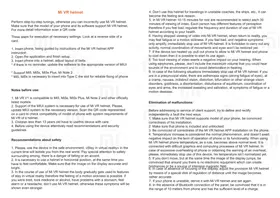
- If the display is not in focus, adjust the position of the Mi VR helmet using the distance adjustment dial until the image becomes clear.
- If your phone is unstable, pair it with the Mi VR helmet and set it up again.
- If the panel is not connecting via Bluetooth, make sure it is within 10 meters of the phone and has sufficient battery charge.
Package contents:
Mi VR helmet, touch panel, instructions, batteries x2
Note: The Mi VR helmet does not need to be charged; it uses power and charge from a special remote control.
1
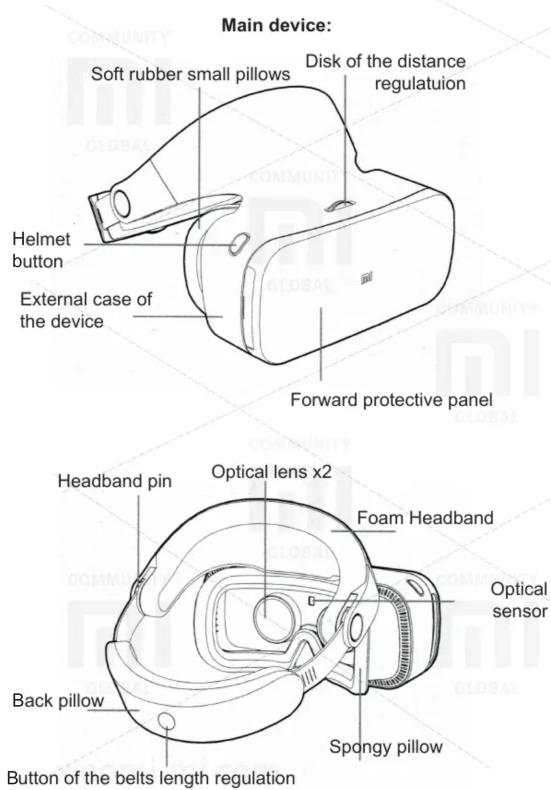
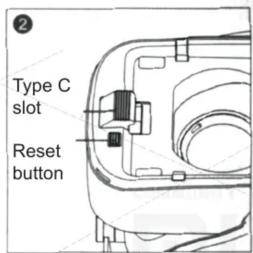
Installing the phone in the Type C slot and special clamp of the Mi VR helmet, using different models of phones.
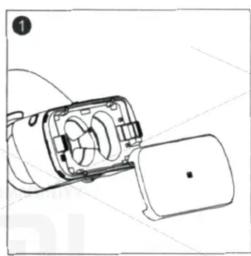
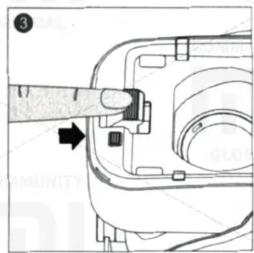
- Open the forward protective panel of the device.
- Using the special clamp and the release button, you can adjust the position of the Type C slot.
- For phones with different display sizes, adjust the position of the Type C slot accordingly.
- The USB Type C slot has a feature for phone installation. When installing the phone into the helmet, apply a little effort for correct and reliable fixing.
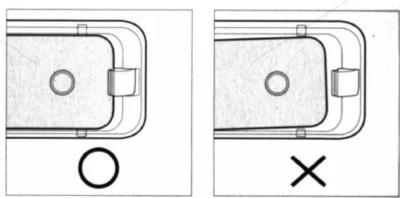
- After installing the phone into the helmet, make sure it is securely fixed and installed to avoid the device falling and breaking.
- After installing the phone into the Mi VR helmet, make sure it is positioned correctly. If the layout is unsuccessful or the phone is installed incorrectly, you may feel discomfort when viewing video.
Installing the phone in the helmet and installing the APP
- Make sure your phone is connected to the Internet, turn on WiFi.
- Insert the phone into the Type C slot with the back side facing up.
- Put on your helmet. After viewing the installation reminder, remove the phone. The APP installation is complete.
- Open the APP and follow the manual to complete the download.
Note: After inserting the phone into the helmet, you will see automatic prompts for installing the Mi VR Helmet APP. If you do not see such notifications, please update the MIUI system to the correct version. Before scanning the QR code shown on the front panel, make sure that the phone model and operating system version meet the requirements of the Mi VR helmet.
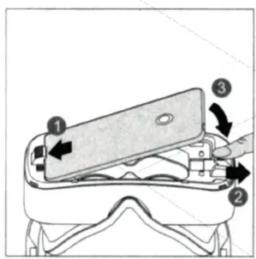
Phone installation:
1) Insert the phone into the Type C slot with the back side facing up. 2) Slide the lock on the right side to the right as far as it will go. 3) Insert the phone into the helmet, then release the latch.
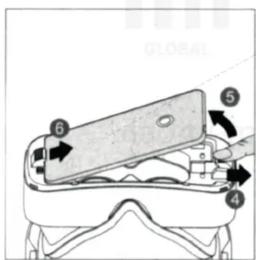
Removing the phone:
4) Slide the latch on the right side to the right as far as it will go (the phone will then pop out slightly). 5) Lift the phone, then release the latch. 6) Remove the phone from the Type C slot.
Immerse yourself in the virtual reality world:
- After completing all the settings, insert the phone into the Mi VR helmet.
- Properly attaching the device:
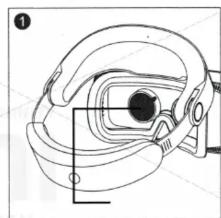
1) Before using the helmet, remove the protective film from both lenses.
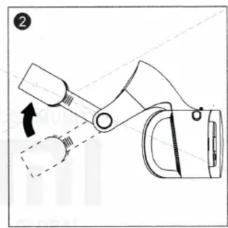
2) The head restraint should be in the highest possible position.
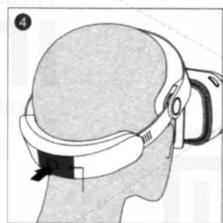
3) Put the helmet on your head. Make sure your eyes are level with the lenses, press your forehead firmly against the foam headband, and then lower the headrest downwards.
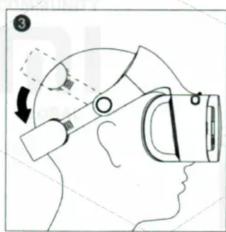
4) Remove the protective film before use. Press the head restraint button to adjust the length of the straps. Release the button to lock the current position of the head restraint.
Start search:
- Moving the cursor:
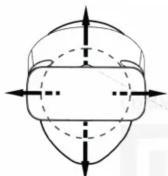
Turning your head to the right, left, up or down, you move the cursor on the display (change the field of view)
- Selection and confirmation of choice:
Hover the cursor over a specific icon on the display, click on the helmet button or on the touchpad panel to connect the Mi VR system and confirm your choice.
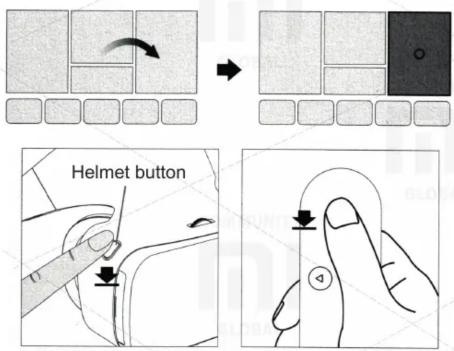
Press the helmet button Press the touch panel of the remote control
- The general menu
Long press on the button of the helmet or on the touch panel of the remote control returns to the main menu at any time. In the general menu, you can configure the system, check the boot process and perform other operations.
Warranty
During the warranty period, you have the right to repair, change or return the goods. For repair, replacement or return of goods, you must present a sales receipt.
- Within 7 days from the date of purchase, in case of a problem, you can choose one-time free replacement of the same model or return.
- Within 15 days from the date of purchase, in case of a problem, you can choose a free replacement of the same model or repair.
- Within 6 months from the date of purchase, in case of a problem, you are provided with free repair.
Conditions that are not included in the warranty service
List of circumstances (including, but not limited to) under which warranty service is not possible:
- Absence of a warranty coupon, a check or expired warranty;
- Damage caused by force majeure, such as: lightning strike, fire or flood;
- Damage resulting from improper use of the device, its care or storage;
- Breakdowns that have occurred as a result of repairing the device in unauthorized service centers;
- Inconsistency of the model or the device code with the data specified in the warranty card;
- Discoloration or deterioration of the device as a result of its use;
- Breakage of the device, which have arisen in connection with the human factor and which prevent its normal operation.
The presence of toxic and harmful substances
| Details Name | The presence of toxic and harmful substances | |||||
| Pb | Hg | Cd | Cr6+ | PBB | PBDE | |
| The outer shell of the helmet | O | O | O | O | O | O |
| Mounting plate for helmet | O | O | O | O | O | O |
| External case of the panel | O | O | O | O | O | O |
| Mounting plate of the panel | O | O | O | O | O | O |
| Additional accessories | O | O | O | O | O | O |
A: Toxic and harmful substances in all components of this device are contained in an amount below the limit value according to SJ / T11363-2006 «Requirements for limiting the presence of toxic and harmful substances in goods.»
X: indicates the presence of toxic and noxious substances in at least one of the components of this device in an amount exceeding the limit value, according to SJ / T11363-2006 «Requirements for limiting the presence of toxic and harmful substances in goods.»
This product complies with European RoHS and environmental standards. However, in some countries, it is still not possible to replace or reduce the lead content in alloys and copper alloys, as well as in electrical ceramics and optical glass.
Brand : Xiaomi
Model : Mi VR Glasses
Category : VR headset