
MZ-V6E1T0 - SSD Drive SAMSUNG - Free user manual and instructions
Find the device manual for free MZ-V6E1T0 SAMSUNG in PDF.


User questions about MZ-V6E1T0 SAMSUNG
0 question about this device. Answer the ones you know or ask your own.
Ask a new question about this device
Download the instructions for your SSD Drive in PDF format for free! Find your manual MZ-V6E1T0 - SAMSUNG and take your electronic device back in hand. On this page are published all the documents necessary for the use of your device. MZ-V6E1T0 by SAMSUNG.
USER MANUAL MZ-V6E1T0 SAMSUNG
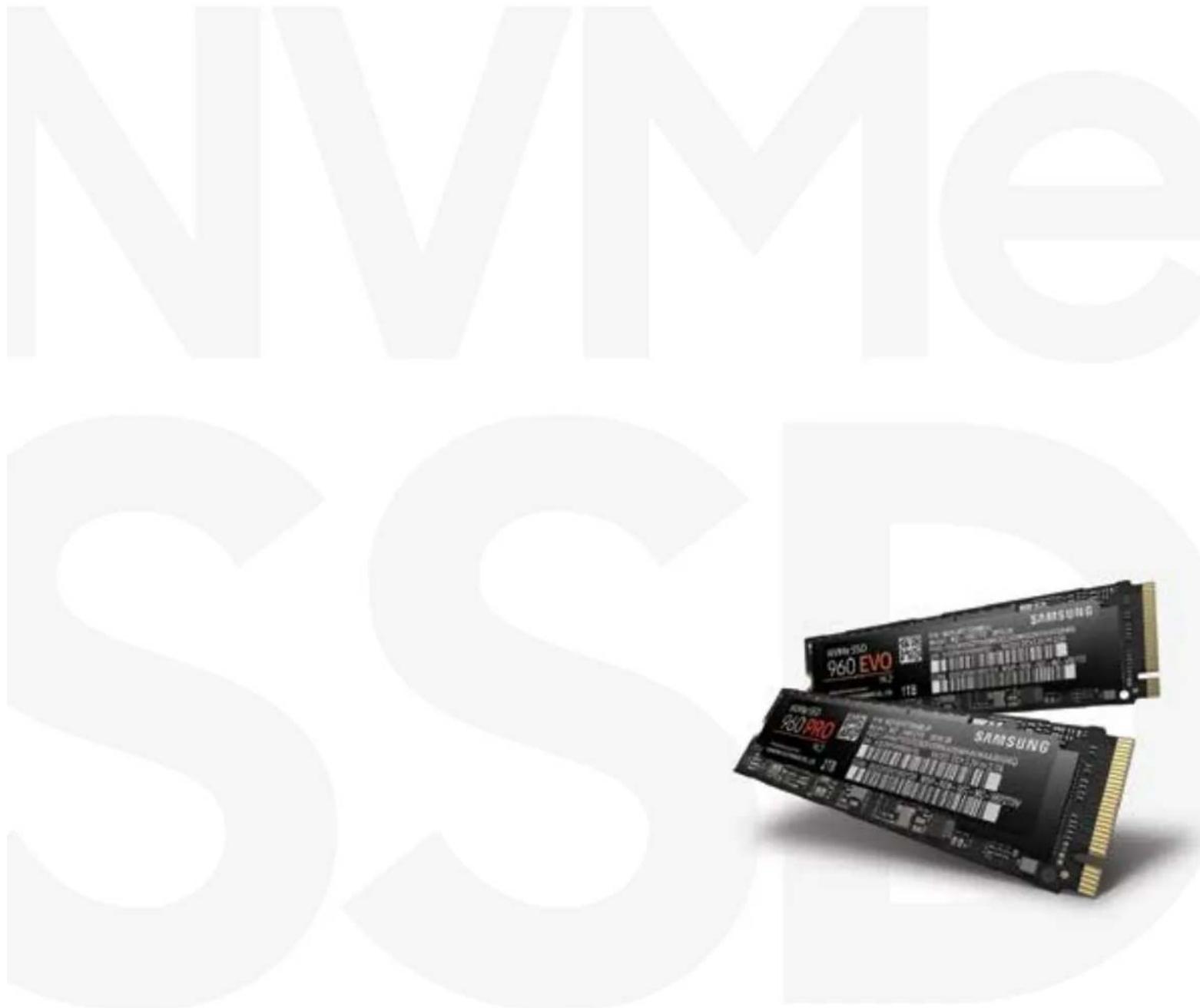
The NVMe protocol is newly designed specifically for solid state drives (SSDs). This brochure will inform you about next generation NVMe SSDs, including an introduction, gamer benefits, system requirements, and FAQs.
text_image
NVMe SSSS 960 EVO 960 PRO SAMSUNGOverview
When it comes to a PC's system "responsiveness", storage is one of the most crucial hardware components. The faster the drive, the faster the system boots, the faster apps launch, and the faster files save. The introduction of SSDs a number of years ago was a major step forward from traditional spinning HDDs, but SSDs recently hit a performance wall in the existing SATA III protocol, and they simply cannot run any faster.
NVMe is built for SSDs
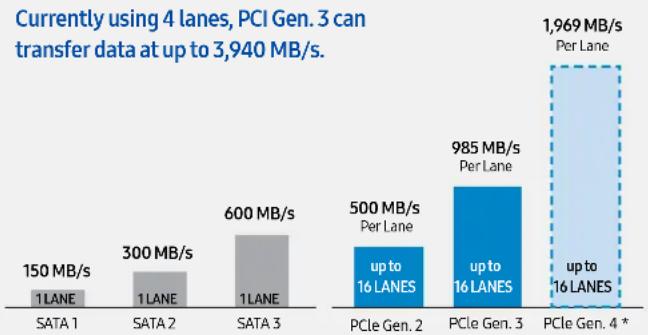
SSD technology grew enormously alongside advances in CPU and GPU. With a significant boost in storage capacity and performance, NAND Flash - the technology behind Solid State Drives - possesses the capability to do far more. The Non-Volatile Memory Express (NVMe) protocol was specially created for NAND Flash storage solutions to accelerate transfer speeds by overcoming legacy constraints in existing storage interfaces and protocols. SATA was optimized for mechanical Hard Disk Drive Storage, but even with revisions over time, the current SATA 3 interface bandwidth does not accommodate the full potential of NAND Flash based SSDs.
bar
| Category | Metric | Value | | :--- | :--- | :--- | | SATA 1 | 1 LANE | 150 MB/s | | SATA 2 | 1 LANE | 300 MB/s | | SATA 3 | 1 LANE | 600 MB/s | | PCIe Gen. 2 | up to 16 LANES | 500 MB/s | | PCIe Gen. 3 | up to 16 LANES | 985 MB/s | | PCIe Gen. 4 * | up to 16 LANES | 1,969 MB/s | Currently using 4 lanes, PCI Gen. 3 can transfer data at up to 3,940 MB/s.SATA Transfers up to. PCIe Transfers up to.
* In the future, using PCIe 4.0 can be scaled to 16 lanes for a theoretical max. of 32 GB/s.
Transfer faster with NVMe SSDs
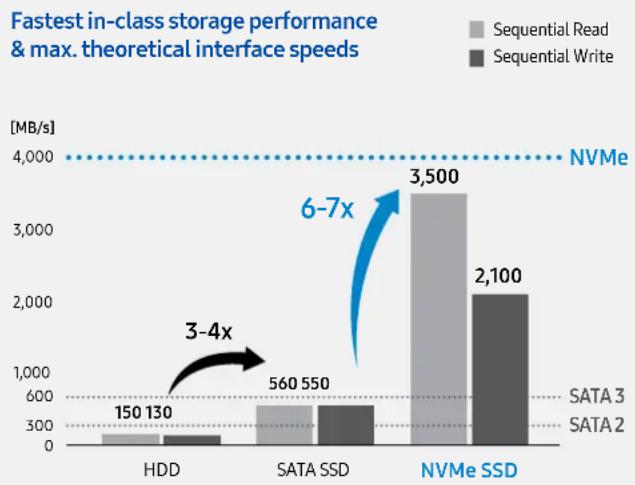
Non-Volatile Memory Express (NVMe) protocol was especially designed for NAND Flash storage solutions to unleash a new dimension of data transfer speed. It allows SSDs to achieve peak performance, 6-7 times the sequential read/write speeds of SATA.
More gains from NVMe SSDs
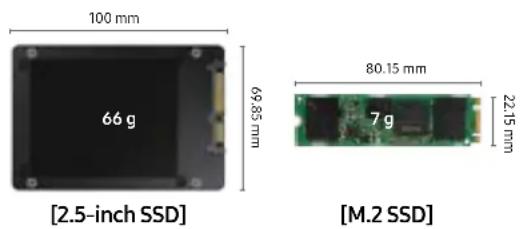
Besides providing a leap in performance, NVMe SSDs are smaller, lighter, more efficient, and easier to install (no cables). The M.2 form-factor reduces the overall size of internal storage devices. Standard M.2 cards are just 22 mm wide, allowing dramatically expanded capacity without messy cables, power wires, or bulky disk housing.
bar
| Category | Sequential Read (MB/s) | Sequential Write (MB/s) | | :--- | :--- | :--- | | HDD | 150 | 130 | | SATA SSD | 560 | 550 | | NVMe SSD | 3,500 | 2,100 | The chart includes a dashed line labeled "NVMe" at approximately 4,000 MB/s. An arrow indicates a 3-4x speedup from HDD to NVMe SSD, and a blue arrow indicates a 6-7x speedup from HDD to NVMe SSD. Below the bars, the horizontal lines represent SATA 3 and SATA 2 storage speeds.The next generation of storage
With the faster data transfer speeds of the PCIe interface and the NVMe protocol, the SSD of the future is scalable with a theoretical transfer speed of up to 31,504 MB/s (using PCIe 4.0).
NVMe SSDs unlock a new level in speed, capacity, and form.
System requirement for NVMe SSDs
The solution to storage protocol / interface bottleneck
The NVMe protocol is newly designed specifically for solid state drives (SSDs) and replaces older SATA protocols which were optimized for hard disk drives. The new NVMe protocol has an interface and form-factor vastly different from prior storage solutions.
Fundamental changes in how storage connects to the PC system brings certain hardware and software requirements. Users are advised of the following requirements to ensure compatibility and to gain the full benefits of the revolutionary NVMe storage technology.
Hardware requirements
Please refer to the product documentation published by the manufacturer of your system or components to verify that a Samsung NVMe SSD is compatible with your build.
| Category Minimum Requirement | |
| Mainboard (System) | Intel Haswell Refresh or later client chipset based main board with free (unallocated) PCIe Gen. 3 X 4 lanes |
| Processor | 64-bit processor (recommended) single, dual or higher number of processors can be used |
| Memory More than 2GB DRAM | |
| Connector | Requires M.2 ('M' Key) or use third party adapter (AIC) to connect to PCIe connector |
| Form-Factor | Space for a single sided M.2 2280 (SSD with dimensions 22mm x 80 mm) or use third party adapter (AIC) to connect to PCIe connector |
| Power 25W compatible PCIe slot |
Software requirements
The following operating systems are supported, so long as equipped with required or recommended driver as indicated below:
| OS Notes | |
| Windows 7 32/64bit Samsung NVMe driver required | |
| Windows 8 32/64bit Samsung NVMe driver required | |
| Windows 8.1 32/64bit Samsung NVMe driver recommended* | |
| Windows 10 32/64bit Samsung NVMe driver recommended* | |
* The Samsung NVMe driver ensures maximum compatibility between host and Samsung NVMe SSDs and optimizes system performance.
Gamer benefit from Samsung NVMe SSDs
NVMe Advantages: Your competitive edge
Gamers can seize a competitive advantage over rivals, and experience superior gameplay with the industry leading performance of Samsung NVMe SSDs.
This case study shows how and when gamers can best experience the performance gains of an NVMe SSD upgrade.
Samsung NVMe SSD acceleration for 4K and DirectX 12 games
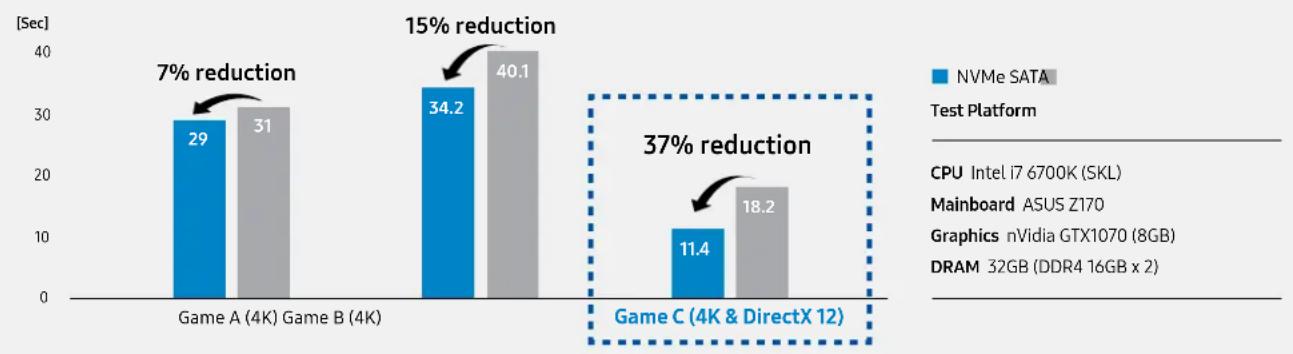
NVMe SSDs have transfer and access speeds far superior to those of SATA SSDs. For more graphically demanding games which involve loading larger files and more disk input/output operations, the time savings increases. Our tests showed game loading times significantly reduced by 7% to 37%. Most of today's games can already greatly benefit from NVMe SSDs. But in the near future, with more 4K and DirectX12 games, NVMe SSDs will be an essential for all serious gamers.
Game loading time comparison (Lower is better)
bar
| Device | NVMe SATA [Sec] | Mainboard [Sec] | Reduction (%) | | :--- | :--- | :--- | :--- | | Game A (4K) | 29 | 31 | 7 | | Game B (4K) | 34.2 | 40.1 | 15 | | Game C (4K & DirectX 12) | 11.4 | 18.2 | 37 |NVMe SSD gives high-end systems maximum benefit
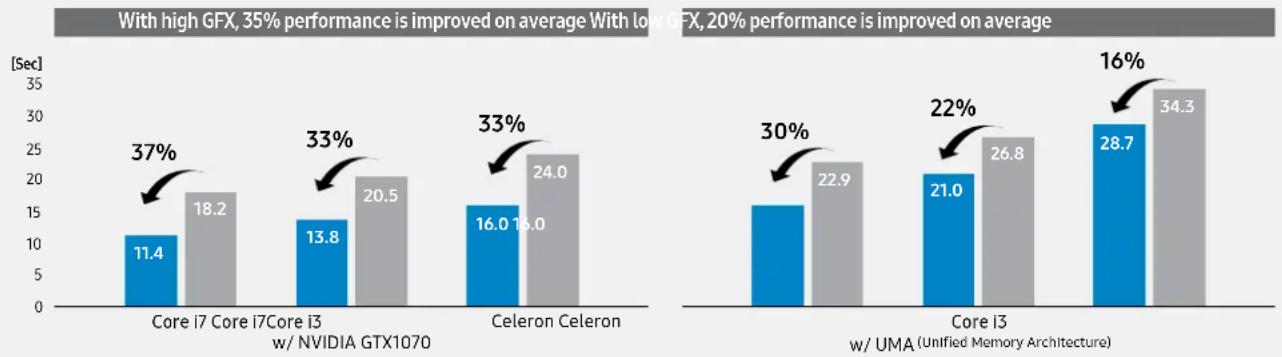
While NVMe SSDs noticeably benefit all compatible systems, performance benefits are maximized when combined with other high-end, high-performance components of gaming PCs. Our tests showed that NVMe SSDs used in conjunction with top-rated high-end CPUs and GPUs delivered the greatest performance benefits. The trend towards 4K and DirectX12 games calls for ever more powerful performance hardware. NVMe SSDs ensure that you get the most from your gaming system.
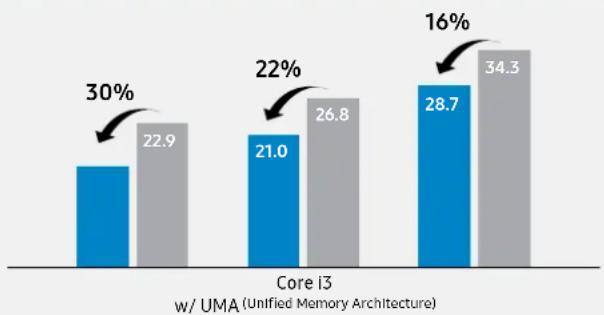
NVMe effects comparison by hardware - Game C (4K & DirectX 12)
NVMe SATA
bar
| Category | Blue Bar Value | Gray Bar Value | Percentage Increase | | :--- | :--- | :--- | :--- | | Core I3 w/ UMA (Unified Memory Architecture) | 21.0 | 26.8 | 22% | | Core I3 w/ UMA (Unified Memory Architecture) | 28.7 | 34.3 | 16% | | w/ UMA (Unified Memory Architecture) | 22.9 | 30% | — | The chart displays a percentage increase from the first to the second category of the Core I3. The blue and gray bars represent two distinct data series, with the blue bar increasing by 15% and the gray bar by 10%. The arrows indicate the magnitude of the increase.Samsung : NVMe SSDs forerunner
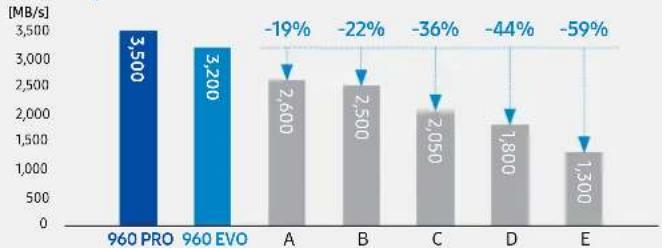
The Samsung 960 PRO is a leader in the NVMe client PC SSD market. Even its little sibling, the 960 EVO easily outperforms the competition in the basic performance benchmarks (sequential read & write speed), offering customers the best NVMe experience currently available.
Sequential Read Performance
bar
| Category | Value (MB/s) | |---|---| | 960 PRO | 3,500 | | 960 EVO | 3,200 | | A | 2,600 | | B | 2,500 | | C | 2,050 | | D | 1,800 | | E | 1,300 | -19% -22% -36% -44% -59%Sequential Write Performance
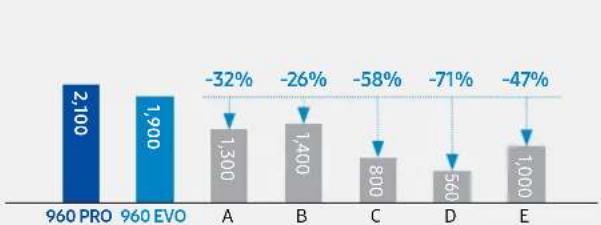
bar
| Category | Value | Change (%) | | :--- | :--- | :--- | | 960 PRO | 2,100 | - | | 960 EVO | 1,900 | -32 | | A | 1,300 | -26 | | B | 1,400 | -58 | | C | 800 | -71 | | D | 560 | -47 | | E | 1,000 | -47 |Random Read Performance Random Write Performance
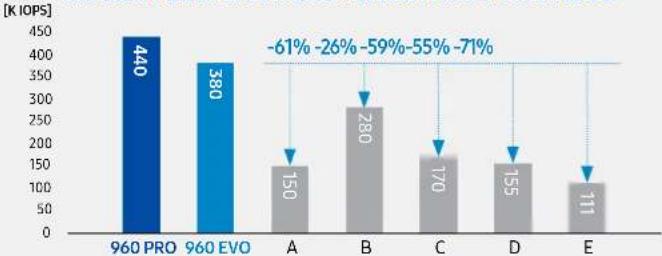
bar
| Category | Value (K IOPS) | |---|---| | 960 PRO | 440 | | 960 EVO | 380 | | A | 150 | | B | 280 | | C | 170 | | D | 155 | | E | 111 | -61% -26% -59% -55% -71%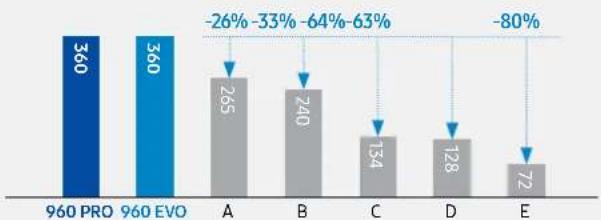
bar
| Category | Value | |---|---| | 960 PRO | 360 | | 960 EVO | 360 | | A | 265 | | B | 240 | | C | 134 | | D | 128 | | E | 72 | -26% -33% -64% -63% -80%Samsung SSD comprehensive leadership
Samsung is the most wholly integrated SSD maker in the world, resulting in superior products. In-house developed NAND Flash and DRAM, coupled with proprietary purpose-built controllers, and in-house end product assembly utilizing the industry's most advanced processes, all result in incomparable quality and high integration. Our technologies are developed and tested in close collaboration with the world's leading technology companies and regularly obtain industry and expert recognition from the top tech publications.
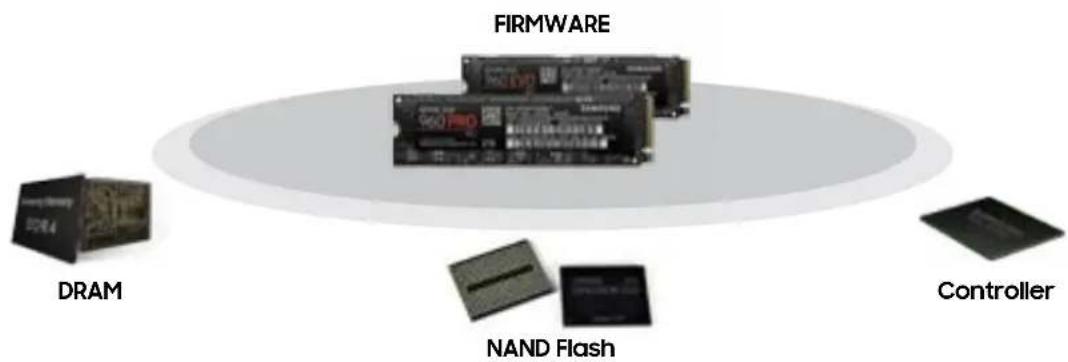
flowchart
graph TD
    A["FIRMWARE"] --> B["DRAM"]
    A --> C["NAND Flash"]
    A --> D["Controller"]

Benchmark Reviews
Golden Tachometer Award

The SSD Review
Editor's Choice

PC Perspective
Editor's Choice

The Tech Report
Editor's Choice

CDR Labs
Editor's Choice Award

TechSpot
Rating: 90 out of 100

Custom PC Review's Certified Awesome Award
Samsung accelerated the NVMe era in 2015 with the launch of the 950 PRO and continues to accelerate the innovation to address the evolving PC environment across laptops and desktops. These hardware options have fully matured for NVMe adoption with chipset, operating system, as well as motherboard support for PCI Express (PCIe) Gen. 3x4 lanes in an M.2 slot. Samsung is expanding the NVMe SSD market with the development of the 4th-generation V-NAND and two tier lineup.
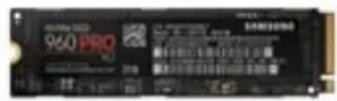
960 PRO
Designed for tech enthusiasts and professionals seeking unprecedented workstation and PC performance for CAD engineering or data simulations.
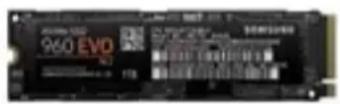
960 EVO
The smart choice for entry-level NVMe SSD users who want to discover next-generation PC performance for gaming and graphics.
FAQS
Compatibility
1) Do Samsung NVMe M.2 SSDs work with any M.2 slot?
There are different types of M.2 slots. A "B-Key" enables SATA or PCIe NVMe SSDs using up to 2 PCIe lanes, while an "M-Key" enables NVMe SSDs with the use of up to 4 PCIe lanes.
Performance of PCIe NVMe M.2 SSDs leveraging PCIe x4 lanes is roughly twice as high as with PCIe x2 lanes, so the vast majority of mainboards today support "M-Key" slots with 4 lanes. This is the solution supported by Samsung NVMe SSDs, and works in the majority of M.2 slots.
Please check the type of M.2 (M or B Key) slots available on your main-board by reading the user manual or contacting your system vendor.
2) Will Samsung NVMe M.2 SSDs work on Z97 Mainboards?
Yes. Samsung NVMe SSDs will work on Haswell Refresh or newer chipsets that follow the standard mainboard requirements defined by Intel (note that some mainboards customized for certain PC makers might not offer the required M.2 slot). Should you have any doubt, please contact your mainboard or PC vendor for more information.
3) Do Samsung NVMe M.2 SSDs work with AMD Ryzen?
Yes. Samsung NVMe M.2 SSDs will work with standard Ryzen chipsets.
4) Are there any issues with running Windows 7 on a Samsung NVMe M.2 SSD?
Samsung NVMe SSDs are compatible with Windows 7, but for optimal performance and ease of use we recommend Win 8.1 or newer.
5) Do Samsung NVMe M.2 SSDs work under Linux?
Samsung NVMe SSDs are compatible with Linux.
Please note, however, that Samsung NVMe SSDs are optimized for use under Windows operating systems.
6) Which Generation PCIe does Samsung NVMe M.2 SSD use?
Samsung NVMe SSDs use PCIe Gen 3.0. For more information please refer to Samsung NVMe SSD datasheets available at www.samsungssd.com
Installation
1) How should a Samsung NVMe M.2 SSD be installed on a PC?
Installation of Samsung NVMe M.2 SSDs is essentially plug-and-play. Simply insert the NVMe SSD in an M.2 PCIe slot, tighten the SSD in place with the screw and spacer provided by your mainboard manufacturer, and boot up your system from an external source before proceeding with a fresh install of your operating system. Windows has an in-box driver that ensures your Samsung NVMe SSD is operational from the start, but we recommend installing the Samsung NVMe Driver specifically designed for Samsung NVMe SSDs, to ensure optimal performance and to maximize compatibility with your system.
For more information, please refer to: www.samsungssd.com
2) Are Samsung NVMe M.2 SSDs delivered with a screw?
Samsung NMVe M.2 SSDs are not delivered with a screw. This is because mainboard manufacturers typically provide the specific screws and spacers that fit the proprietary needs of each mainboard.
3) Can I move data from an HDD or SATA SSD to a Samsung NVMe M.2 SSD?
Yes. It is possible to clone a SATA HDD or SATA SSD to an NVMe SSD. Samsung, however, recommends performing a "clean install" of the OS and later transferring the desired non-executable files.
Because the registry information needed for NVMe SSDs is different from those of SATA HDDs or SSDs, a clean install helps to avoid unnecessary compatibility and performance issues that may arise from simply cloning a storage device.
4) Can I plug a Samsung NVMe M.2 SSD in a traditional PCIe slot?
Yes. Many add-in-card adapters exist, but for optimal performance and compatibility Samsung recommends using an original M.2 slot for your Samsung NVMe SSD.
Operation
1) Can I use a Samsung NVMe M.2 SSD at the same time as a SATA SSD or HDD? Yes. There are no technical limitations in using an NVMe M.2 SSD concurrently with a SATA SSD or HDD. Please make sure your mainboard has a sufficient number of interfaces to accommodate multiple storage devices
2) Can Samsung NVMe M.2 SSDs be RAIDed?
Yes. Samsung NVMe M.2 SSDs can be grouped into a RAID formation. Please ensure that your mainboard has a sufficient number of NVMe M.2 slots and that sufficient PCIe lanes are available for maximal performance.
3) Can the OS be installed on a Samsung NVMe M.2 SSD? Yes. Samsung NVMe M.2 SSDs can be used as the primary storage device, with the Operating System installed on the SSD.
4) Are Samsung NVMe M.2 SSDs bootable when used in combination with an add-in-card (AIC)?
Yes. An AIC is merely an adapter, and therefore does not change the inherent bootability or connectivity of a Samsung NVMe M.2 SSD. Please note that depending on the quality of the AIC, the performance of your Samsung NVMe M.2 SSD may, in rare cases, be below the performance specifications published by Samsung.
Performance
1) What is the difference between a Samsung NVMe M.2 SSD and a regular SSD? NVMe SSDs leverage a new type of interface and protocol – Non-Volatile Memory Express – to break through the bottleneck limitations of SATA based systems. Concretely, this means that whereas SATA SSDs' maximal performance does not exceed 550MB/s, NVMe SSDs can achieve transfer speeds of about 3,500MB/s when connected via PCIe Gen.3 x4 lanes.
2) Why does my Samsung NVMe M.2 SSD not achieve its performance specs in benchmark tests?
Benchmark test results may differ depending upon the system environment, host software and hardware configuration. Please see the data sheet for more information on the test conditions used by Samsung.
3) Do Samsung NVMe M.2 SSDs have RAPID Mode support? Samsung NVMe SSDs do not support RAPID Mode.
4) Do I need a heat sink for optimal performance of the Samsung NVMe M.2 SSD? Samsung NVMe SSDs rarely require a heat sink, yet maintain optimal performance thanks to Samsung's advanced design and manufacturing capabilities coupled with an integrated, heat dissipating thermal label. In rare instances of extreme workloads (transfer of several hundreds of GB), performance may be throttled through Samsung's dynamic thermal throttling algorithm to protect the SSDs integrity. Please be aware, however, that an external heat source such as a high-powered graphics card, or CPU placed in close proximity to a Samsung NVMe SSD, can adversely affect airflow around a Samsung NVMe SSD which may lead to performance degradation. Therefore, please ensure there is appropriate airflow around your Samsung NVMe SSD.
Specifications
1) What is the physical size of a Samsung NVMe M.2 SSD? Will it fit my PC? Samsung NVMe SSDs use the M.2 (2280) form factor. M.2 is an industry standard, and M.2 SSDs typically measure 22mm in width. Various standardized lengths range between 30mm and 110mm, with the 80mm solution used by Samsung being the most common. This means that Samsung NVMe SSDs are 22mm wide and 80mm long, and should physically fit in the majority of M.2 slots on mainboards. It is also important to note that Samsung NVMe M.2 SSDs are “single sided” meaning that all components are mounted on just one side of the PCB, ensuring a relatively “flat” profile that fits in virtually all M.2 slots.
2) Do Samsung NVMe M.2 SSDs have hardware encryption? Samsung NVMe SSDs provide internal hardware encryption of all data
stored on the SSD, including the operating system. Data is decrypted through a pre-boot authentication process. Because all user data is encrypted, private information is protected against loss or theft. Encryption is done by hardware, which provides a safer environment without sacrificing performance.
The encryption methods provided by each Samsung NVMe SSD are: AES (Advanced Encryption Standard, Class0 SED) TCG/OPAL, and eDrive. Please note that you cannot use more than one encryption method simultaneously.
3) Do Samsung NVMe M.2 SSDs support TCG Opal?
TCG Opal is supported by Samsung NVMe SSDs (960EVO / PRO and newer). It is an authentication method that employs the protocol specified by the Trusted Computing Group (TCG) meaning that you will need to install TCG software supplied by a TCG OPAL software development company.
User authentication is done by pre-boot authentication provided by the software.
For more detailed information and instructions, please contact a TCG software company. In addition, TCG/opal can only be enabled / disabled by using special security software.
Others
1) What is the difference between the 960PRO and 960EVO?
The EVO series is designed for demanding mainstream users, while the PRO series is destined for users with very high workload requirements for their SSD, and the need for high capacities.
2) What is an AIC?
AIC stands for Add-in-Card and it is essentially an adapter that allows connection of a Samsung NVMe M.2 SSD to a standard PCIe x16 slot, instead of an M.2 interface.
3) What is NVMe?
NVMe (Non-Volatile Memory Express) is a new storage protocol designed to leverage the full performance potential of SSDs and the underlying NAND Flash technology, by eliminating the performance bottleneck imposed by the previous storage protocol - SATA - which had been optimized for far slower hard disk drives. Utilizing this new protocol, NVMe SSDs currently outperform SATA based SSDs by a factor of 6-7 times, with significant upward potential in the future.
4) What is PCIe?
PCIe (Peripheral Component Interconnect Express) is a well-established and versatile interface. Because of its prevalence (used for Graphic Cards etc.) and high data throughput capability PCIe was adopted by the storage industry to replace the much older and constrained SATA interface for the next generation of SSDs.
Adoption of PCIe, combined with other factors, enable NVMe SSDs to outperform SATA based SSDs by a factor of 6-7 times, with significant upward potential in the future thanks to the scalability of PCIe.
5) What is M.2?
M.2 is a form-factor describing the physical dimensions and connector used for M.2 SSDs. It was primarily designed to incorporate the new PCIe interface and NVMe protocol in SSDs, and to reduce the overall footprint of storage media from the former HDD based 2.5 inch standard dimension.
6) Will a Samsung NVMe M.2 SSD function in a PCIe x1 slot?
A Samsung NVMe SSD is not compatible with a PCIe x1 slot.
7) What is an "M-Key"? What is a "B-Key"?
"M" and "B" are different connector types for M.2 slots. A "B-Key" enables SATA or PCIe NVMe SSDs using up to 2 PCIe lanes, and an "M-Key" enables using up to 4 PCIe lanes.
Please note that Samsung NVMe SSDs use the "M-Key" (to leverage PCIe x4 for maximum performance) and cannot be plugged into an M.2 slot with a "B-Key".
| 960 PRO 960 EVO | |||||||
| Usage application Client PCs | |||||||
| Interface PCIe Gen 3.0 x4, NVMe 1.2 | |||||||
| Hardware information | Model name | MZ-V6P512 | MZ-V6P1TO | MZ-V6P2TO | MZ-V6E250 | MZ-V6E500 | MZ-V6E1TO |
| Capacity ^1 | 512 GB | 1 TB (1,024 GB) | 2 TB (2,048 GB) | 250 GB | 500 GB | 1 TB (1,000 GB) | |
| Controller | Samsung Polaris Controller | ||||||
| NAND flash memory | Samsung V-NAND flash memory | Samsung V-NAND 3bit MLC flash memory | |||||
| DRAM cache memory | 512 MB LP DDR3 | 1 GB LP DDR3 | 2 GB LP DDR3 | 512 MB LP DDR3 | 1 GB LP DDR3 | ||
| Dimension | Max. 80.15 x 22.15 x 2.38 (mm) | ||||||
| Form-factor | M.2 (2280) ^2 | ||||||
| Performance (Max.) | Sequential read | 3,500 MB/s | 3,200 MB/s | ||||
| Sequential write ^3 | 2,100 MB/s | 1,500 MB/s | 1,800 MB/s | 1,900 MB/s | |||
| Random read (QD1, Thread1) | 14K IOPS | 14K IOPS | |||||
| Random write (QD1, Thread1) | 50K IOPS | 50K IOPS | |||||
| Random read (QD32, Thread4) | 330K IOPS | 440K IOPS | 440K IOPS | 330K IOPS | 330K IOPS | 380K IOPS | |
| Random write (QD32, Thread4) | 330K IOPS | 360K IOPS | 360K IOPS | 300K IOPS | 330K IOPS | 360K IOPS | |
| Power consumption ^4 | Idle (Typ.) | 40 mW | 40 mW | ||||
| Active read (Average, Typ.) | 5.1 W | 5.3 W | 5.8 W | 5.3 W | 5.4 W | 5.7 W | |
| Active write (Average, Typ.) | 4.7 W | 5.2 W | 5.2 W | 4.2 W | 4.4 W | 4.8 W | |
| DEVSLP (L1.2 mode, Typ.) | 5 mW | 5 mW | 8 mW | 5 mW | |||
| Data security | AES 256-bit for user data encryption, TCG/Opal | ||||||
| Supporting features | TRIM (Required OS support), Garbage Collection, S.M.A.R.T | ||||||
| Temperature | Operating | 0 - 70°C | |||||
| Non-operating | -45 ~ 85°C | ||||||
| Humidity 5% to 95%, non-condensing | |||||||
| Shock | Non-operating | 1,500G, duration: 0.5ms, 3 axis | |||||
| Vibration | Non-operating | 20 ~ 2,000Hz, 20G | |||||
| Reliability | MTBF | 1.5 million hours | |||||
| Weight (Max.) | 8.3 g | 8.5 g | 9 g | 7.7 g | 8 g | 8 g | |
| Warranty | Total Bytes Written | 400 TBW ^3 | 800 TBW | 1,200 TBW | 100 TBW | 200 TBW | 400 TBW |
| Period | 5-year limited | 3-year limited | |||||
- 1 GB=1,000,000,000 bytes by IDEMA. A certain portion of capacity may be used for system file and maintenance use, so the actual capacity may differ from what is indicated on the product label.
- M.2 is a specification of form factor for ultra-thin PCs. The M.2 standard allows widths 12, 16, 22 and 30mm and lengths of 16, 26, 30, 38, 42, 69, 80 and 110mm , Commercially M.2 is popular with width 22mm and lengths 30, 42, 60, 80 and 110mm . Samsung provides the most popular form factor with 22mm × 80mm model (i.e., 2280) for user convenience.
- Sequential performance measurements based on CrystalDiskMark 5.1.2, and random performance measurements based on lometer1.1.0. Performance may vary based on SSD's firmware version, system hardware & configuration. Test system configuration: Intel Core i7-6700K @ 4.0 GHz, DDR4 1,700 MHz 16 GB, OS - Window910 Pro x64, ASROCK™ Z170 EXTREME 7 For 960 EVO, sequential write performance measurements based on TurboWrite technology. These sequential write performance after TurboWrite region are 300 MB/s (250 GB), 600 MB/s (500 GB) and 1,200 MB/s (1 TB). Random write performance measurements based on TurboWrite technology. These random write performance after TurboWrite region are 80,000 IOPS (250 GB), 160,000 IOPS (500 GB) and 300,000 IOPS (1 TB).
- Power consumption measured with IOMeter 1.1.0 with Intel I7-5820K @ 3.3 GHz, DDR4 8 GB, ASUSx99-M WS/SE, OS-Windows10 Pro x64 and APST on.
- TBW means Terabytes Written.
About Samsung Electronics Co., Ltd.
Samsung Electronics Co., Ltd. inspires the world and shapes the future with transformative ideas and technologies. The company is redefining the worlds of TVs, smartphones, wearable devices, tablets, cameras, digital appliances, printers, medical equipment, network systems, and semiconductor and LED solutions. For the latest news, please visit the Samsung Newsroom at news.samsung.com.
For more information
For more information about the Samsung NVMe SSD, visit www.samsungssd.com.
Copyright © 2017 Samsung Electronics Co., Ltd. All rights reserved. Samsung is a registered trademark of Samsung Electronics Co., Ltd. Specifications and designs are subject to change without notice. Nonmetric weights and measurements are approximate. All data were deemed correct at time of creation. Samsung is not liable for errors or omissions. All brand, product, service names and logos are trademarks and/or registered trademarks of their respective owners and are hereby recognized and acknowledged.
Microsoft and Windows are registered trademarks of Microsoft Corporation In the United States and/or other countries. NVMe is a trademark of the NVM Express Organization. PCI, PCI Express and PCIe are trademarks or registered trademarks of PCI-SIG.