
Dry nature 21 - Dehumidifier ARGO - Free user manual and instructions
Find the device manual for free Dry nature 21 ARGO in PDF.


| Product Type | Portable Dehumidifier |
| Brand | ARGO |
| Model | Dry nature 21 |
| Refrigerant | R290 (Flammable, GWP = 3) |
| Refrigerant Charge | 0.80 kg |
| Power Supply | 220-240 V ~ 50 Hz |
| Operating Temperature Range | +5°C to +35°C |
| Continuous Drainage | Yes (10 mm hose included) |
| Air Filter | Washable |
| Fan Speeds | 2 (High / Low) |
| Timer | 1-24 hours (auto on/off) |
| Defrost | Automatic |
| Control Type | Touch buttons with LED display |
| Full Tank Indicator | Yes (LED and audible alert) |
| Auto Shut-off | Yes when tank full |
| Caster Wheels | Yes |
| Handle | Yes |
| Air Outlet Swing | Yes |
| Memory Function | Yes (retains settings after power failure) |
| Minimum Room Area | 4 m² |
Frequently Asked Questions - Dry nature 21 ARGO
User questions about Dry nature 21 ARGO
0 question about this device. Answer the ones you know or ask your own.
Ask a new question about this device
Download the instructions for your Dehumidifier in PDF format for free! Find your manual Dry nature 21 - ARGO and take your electronic device back in hand. On this page are published all the documents necessary for the use of your device. Dry nature 21 by ARGO.
USER MANUAL Dry nature 21 ARGO
natural_image
White portable air purifier with gray ventilation slots and a small logo on top (no visible text or symbols)OPERATING INSTRUCTIONS
Read the instructions carefully before operating or servicing the dehumidifier.
Observe all the safety instructions; failure to observe the instructions may lead to accidents and/or damage. Keep these instructions in a safe place for future reference.

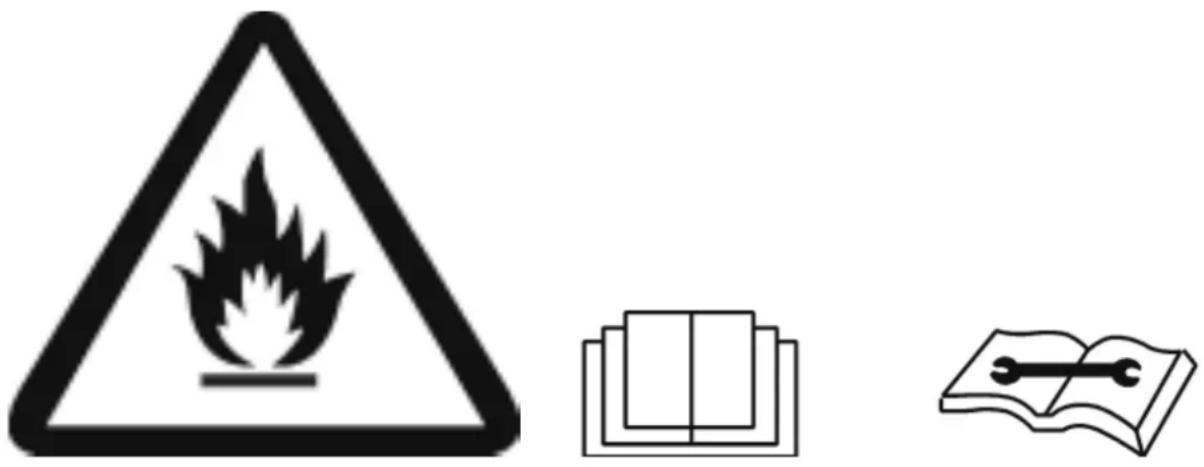
Appliance filled with flammable gas R290.
Before installing and using the appliance, read the owner's manual.

Before repairing the appliance, read the service manual.
The Refrigerant R290
- To realize the function of the air conditioner unit, a special refrigerant circulates in the system. The refrigerant is the fluoride R290 = 3 GWP (Global warming potential). This refrigerant is flammable and inodorous. It can lead to explosions under certain conditions, however the flammability of this refrigerant is very low and it can be ignited only by fire.
- Compared to other common refrigerants, R290 is a non-polluting refrigerant with no harm to the ozonosphere and a no effect upon the greenhouse effect. R290 has very good thermodynamic features which lead to a really high energy efficiency. The units therefore need less filling.
Warning:
Do not try to accelerate the defrosting process or to clean the appliance in different ways other than those recommended by the manufacturer. Should repair be necessary, contact your nearest authorized Argoclima Service Centre. Any repairs carried out by unqualified personnel may be dangerous. The appliance has to be stored in a room that doesn't have any continuously operating ignition sources. (for example: open flames, an operating gas appliance or an operating electric heater.) Do not pierce or burn.
Appliance has to be installed, operated and stored in a room with a floor area larger than 4 m^2 . For repairs, strictly follow manufacturer's instructions only for appliances filled with R290 flammable gas. Be aware that refrigerants do not have any odour.
natural_image
Three black-and-white warning symbols: a triangular flame, a book with a grid, and an open book with a wrench (no text or labels)- This appliance is a very effective dehumidifier designed only for domestic use!
- Do not place the appliance in humid environments such as laundries.
- Do not place the unit near appliances which can generate heat or near dangerous/inflammable materials.
- Only use this dehumidifier as described in this manual. Any other use not recommended by the producer could cause fires, electric shocks or malfunction.
- The unit must be placed in vertical position because it contains refrigerant.
- After opening the unit packing for the first time, place the appliance in vertical position to allow to the refrigerant to stabilize and wait for two hours before to use it.
- Ensure that the required voltage and frequency (220-240 V/50 Hz) match the available power source.
- This appliance can be used by children aged from 8 years and above and people with reduced physical, sensory or mental capabilities or lack of experience and knowledge if they have been given supervision or instruction concerning use of the appliance in a safe way and understand the hazards involved.
- Children shall not play with the appliance.
- Cleaning and user maintenance shall not be made by children without supervision.
- Make sure that the electric plug is secutely inserted. Do not use multiple adapters. Do not touch the plug with wet hands. Ensure that the plug is clean.
- Children between 3 and 8 years of age must only be able to turn on/off the appliance, provided that it has been placed in its normal operating position, and that they have been instructed on how to safely use the appliance and that they have understood the risks.
- Children between 3 and 8 years of age must not be able to connect the plug, regulate operation or clean the appliance or carry out maintenance on it.
-
Disconnect the power plus from the main power supply if it is not used or during cleaning. An inserted power plug may cause electric shock or accident.
-
To turn the appliance off, press the button on OFF and remove the plug from the socket. Pull on the plug only. Do not pull the cord.
- Do not bend, drag, twist or pull out the cable with force.
Do not use the appliance if the cord or plug are damaged, could be fires or electric shock risks. If the power supply cord is damaged, it must be replaced by the manufacturer, dealer or a similarly qualified person so as to avoid any safety risks.
- Do not place heavy objects on the dehumidifier.
- To avoid water spill, empty the water tank before moving the appliance.
- Do not tilt on one side, or do not turn the product upside down as the leaking water could damage the product.
- Do not place the product on unstable or sloping surfaces: water leakage could cause malfunction or abnormal vibrations with consequent noise.
- The dehumidifier must be positioned at least 50 cm away from the wall or other obstacles to properly dissipate the heat.
- Do not place the operating appliance inside the furnitures or cabinets, otherwise could cause fires.
- Close all open windows to achieve the maximum dehumidification efficiency.
- Do not insert fingers or objects in the air supply grille.
- Do not cover the inlet and outlet air grille.
WARNING!
In the event of an anomaly, switch the appliance off and unplug from the socket. Do not dismantle or attempt to repair or modify the product. In the event of a malfunction, contact the after-sales service centre directly.
- Do not soak the power cord, the socket or any other part of dehumidifier into the water or other liquids.
- Do not expose the appliance to direct sunlight.
- Keep away the appliance from heat sources as this may alter the colour of the materials.
-
Do not use insecticides, oils, detergents or spray paints near the appliance; do not use aggressive chemical detergents to clean the casing as this may damage the finish and colour.
-
Keep away from the applianced flammable gases or oils!
- Do not move the unit during operation: this could cause water leaks and malfunctions.
- Do not pierce or burn the appliance.
The manufacturer shall not be held liable if the relevant safety and accident prevention rules are not observed.
DESCRIPTION OF PARTS
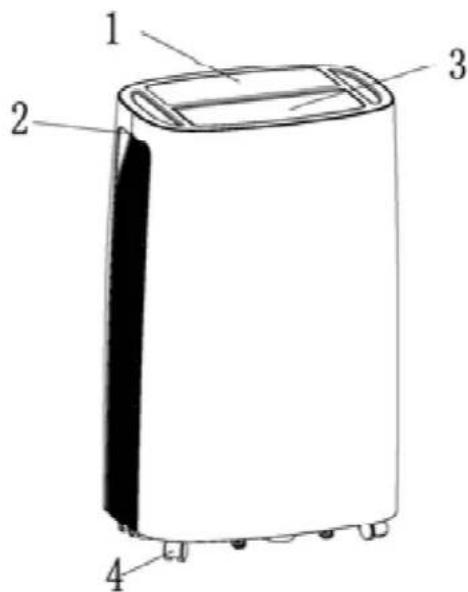
FRONT VIEW
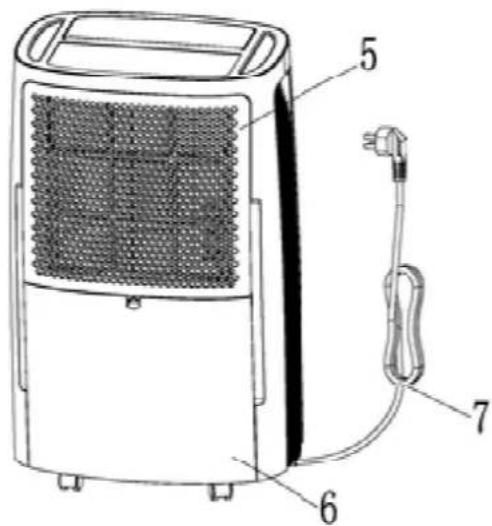
REAR VIEW
- Control panel
- Handle
- Air outlet flap
- Wheels
- Filter box
- Water tank
- Power cord
PRE-OPERATING CHECKS BEFORE THE USE
Make sure the floater and the condensate collection tank are correctly positioned
- Pull out the tank using both hands and verify the correct position of the floater (1).
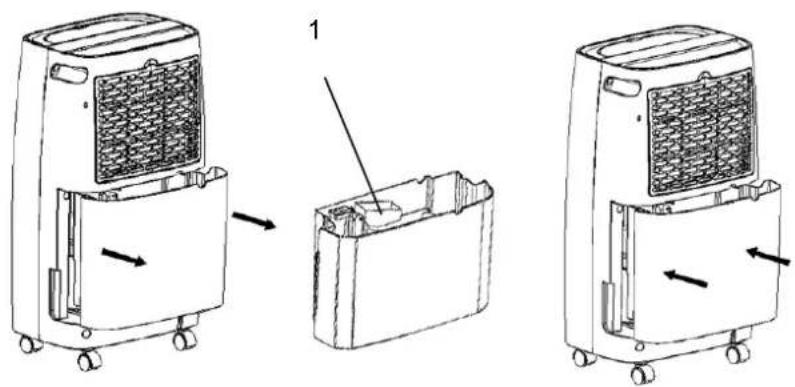
- The following space must be maintained to ensure the operating efficiency of the dehumidifier.
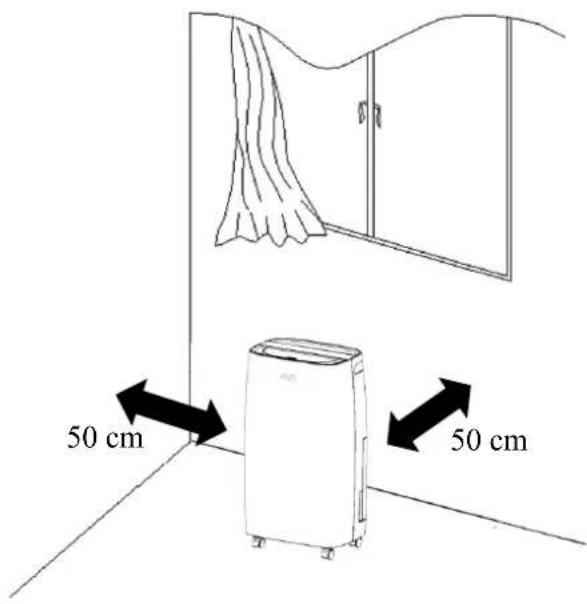
OPERATING INSTRUCTIONS
APPLIANCE START-UP
Place the product on a flat and stable heat-resistant surface, at least 1 metre away from flammable or heat-sensitive materials and 50 cm away from walls or other obstructions.
Make sure the water tank is in the correct position.
Connect the power cord to a suitable electric socket (220-240V/50Hz).
Turn the appliance on with POWER on the control panel.
The dehumidifier is designed to operate at ambient temperatures from +5°C to +35°C.
If it is operated at low temperatures, ice may form on the evaporator, degrading its operation.
When this happens, the dehumidifier goes into defrost mode. The compressor stops, but the fan continues running.
The defrosting operation may start up and operate for some minutes; during the defrosting operation, the dehumidification function may intermit: please don't turn off the switch or pull out the power plug of the dehumidifier.
We recommend not using the dehumidifier in room temperatures lower than 5°C.
OPERATING PRECAUTIONS
The dehumidifier will start working only if the humidity level set is lower than the humidity in the surrounding environment and it will work till reaching the selected humidity level or continuously if the selected humidity level in the room is lower than the humidity in the environment, with the exception of interruptions caused by a full tank. In this case, empty and reinstall the tank: the dehumidifier will start running again.
WARNING:
After each interruption of its operation, at least 3 minutes must pass before the dehumidifier starts up again: this delay prevents the compressor being damaged.
If you follow the start up instructions but the dehumidifier does not start stops for no reason, make sure the plug and power cord are in good working order. After doing so, wait for 10 minutes and then restart the appliance.
If the dehumidifier still does not start after 10 minutes, or if either the power cord or plug are damaged, switch off the appliance and contact an after-sales service centre.
WARNING:
When the dehumidifier is running, the compressor produces heat and the appliance emits warm air into the room. The room temperature will therefore tend to increase. This is completely normal.
AUTOMATIC DEFROST: the dehumidifier is designed to operate at ambient temperatures from +5°C to +35°C. When the unit operates at low environmental temperature the evaporator surface can be covered by ice that can reduce dehumidifying capacity. When environmental temperature is between 5 and 12°C the unit will stop to operates quick defrosting cycles every 30 minutes. If the environmental temperature is between 12 and 20°C the unit will stop to operates quick defrosting cycles every 45 minutes.
When this happens, the dehumidifier goes into defrost mode. The compressor stops, but the fan continues running.
We recommend not using the dehumidifier in room temperatures lower than 5°C.
MEMORY FUNCTION: the dehumidifier starts up again after a power failure maintaining its settings.
To turn the dehumidifier off press the POWER button. This shuts off power to the unit. Unplug the appliance if you do not intend to use it for some time.
HOW TO ELIMINATE CONDENSATE
The water extracted from the air can be collected in the provided front tank.
When the tank is full, not inserted or not correctly inserted, the FULL TANK led turns on and the unit beeps for about 15 times, at the end of which the unit turns off.
To switch off the appliance, press the POWER button and wait a few seconds.
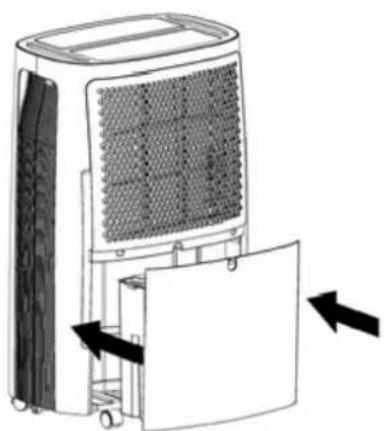
- Carefully remove the tank using both hands and following the direction of the arrow.
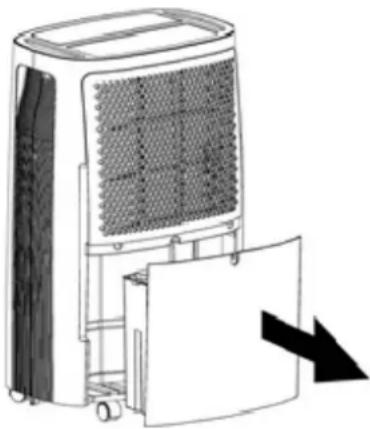
natural_image
Diagram of a portable air conditioner unit with cooling fan and door, showing internal grid structure and directional arrow (no text or symbols)- Empty the tank.
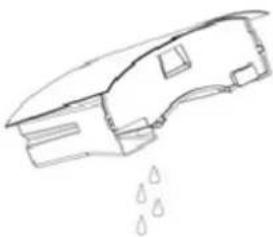
natural_image
Simple line drawing of a building with water droplets falling (no text or symbols)- Reposition the tank following the direction of the arrow.
natural_image
Diagram of a portable air conditioner unit with cooling panel and door, showing airflow direction (no text or symbols)If the drainage tank is dirty, wash it with cold or lukewarm water. Do not use detergent, scouring pads, chemically treated dust clothes, gasoline, benzene, thinner or other solvents, as these can scratch and damage the tank and cause water leakage.
When replacing the drainage tank, press the tank firmly into place with both hands. If the tank is not positioned properly, the "tank Full" sensor will be active, and the dehumidifier will not operate.
N.B.
Do not use the drain hose when you are collecting condensation in the tank, otherwise water can leak out of the hose.
CONTINUOUS CONDENSATE DRAINAGE
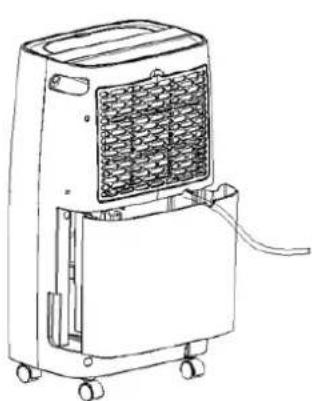
The water can be continuously drained when using the PVC hose of 10 mm diameter, supplied in the package, to insert in the drain hole placed in the central part of the rear side of dehumidifier.
Turn off the appliance and remove the plug before connecting the hose.
natural_image
Line drawing of a portable air conditioner unit with wheels and ventilation grille (no text or symbols)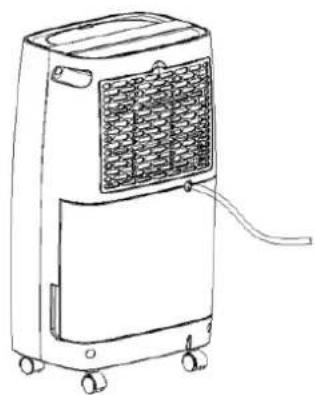
natural_image
Line drawing of a portable air conditioner unit with wheels and ventilation grille (no text or symbols)Remove the tank and safely connect the hose to the continuous condensate discharge connection, as shown in the figures below.
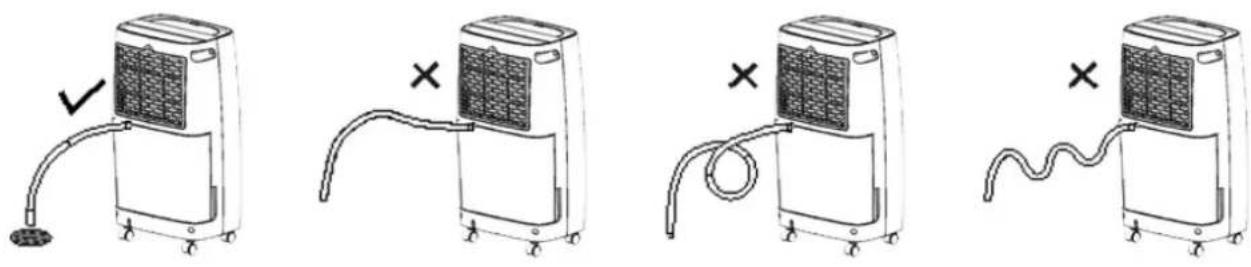
The height of the drainage hose must not exceed that of the hole: do not block the drainage hose exit.
CONTROL PANEL
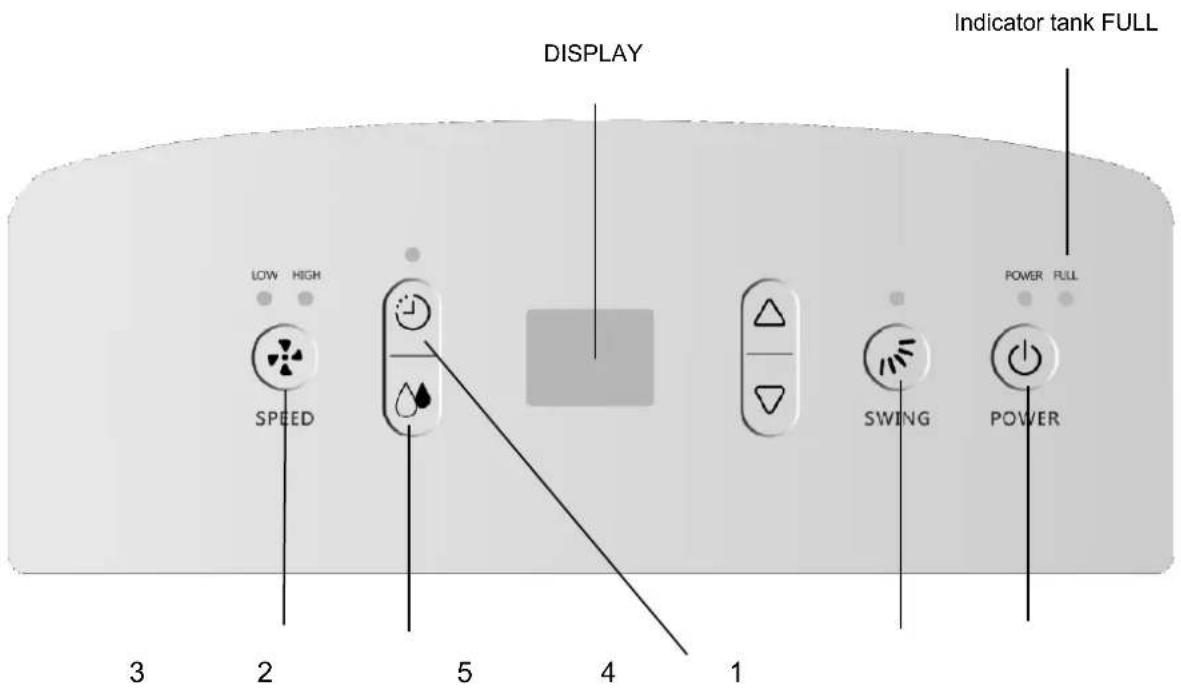
Indications of Display on control panel
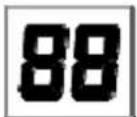
The indicator features 3 functions:
- when the unit is plugged in, it will indicate the room humidity level.
- when you set the humidity, it will indicate the humidity that you have selected
- when you program the time for the unit to turn on and off, it will show the hours.
- When the environment humidity is lower than 35%, it will show "35"
- When the environment humidity is higher than 95%, it will show "95"
TOUCH BUTTONS AND LED INDICATORS
The buzzer will alarm for several times when the unit is powered on, the LED will show the room humidity for 3 seconds, then it will automatically turn off.
1. Turn on/off button
Touch the button to start the unit when the unit is stop, or touch to shutdown it, when the unit is operating.
2. Humidity setting button
Touch the button to enter humidity-setting state, then touch or to adjust the humidity from 40% to 80%, every setting is 5%, the LED flashing display when adjusting. Stop pressing for 5 seconds, it will return to normal display. The default value of humidity is 55%.
3. Fan-speed setting button
Touch the button 📋 to set the fan speed to HIGH or LOW, and the corresponding fan speed light will be lighted.
4.Swing setting button
After the appliance is started, touch the button to start or stop the air-outlet leaf swing
5.Time-setting button
Touch the button 📁 to enter boot-time setting state when the unit is stop, then the LED will display the time, you may touch 🐘 or 🐘 or button to adjust the automatic boot time from 1 to 24 hours.
Touch to enter shutdown-time setting state when the unit is running, then the LED will display the time, you may touch or button to adjust the automatic shutdown time from 1 to 24 hours. Once turned on or off by user or entering water-full state, the unit may lose the timing function.
CLEANING AND MAINTENANCE
MAINTENANCE OF THE HUMIDIFIER'S EXTERIOR SURFACE
Warning
Always pull the dehumidifier's plug out of the power socket before cleaning it, to prevent electric shock and malfunction.
⚠ Warning
Do not wet the appliance or immerse it in water, otherwise electric shocks may occur.
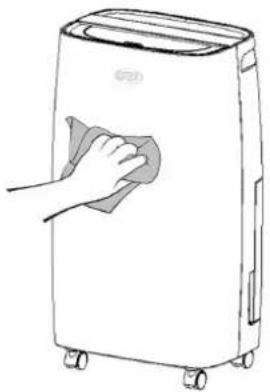
Use a damp and soft cloth to clean the exterior surface of the dehumidifier.
Do not use solvents, petrol, xylene, talcum powder or brushes to clean the unit: these may damage the surface or colour of the casing.
natural_image
Line drawing of a hand cleaning a large portable air conditioner (no text or symbols)CLEANING THE WATER TANK
We recommend to clean the water tank once every few weeks to prevent mould and bacteria forming on it. Fill the tank with clean water a small amount of detergent; swill the water around in it, then it out and rinse it thoroughly.
CLEANING THE AIR FILTER
WARNING!
Unplug the unit before start cleaning the air filter.
The filter is designed to remove dust or dirt from the air.
If the filter is clogged by dust, electricity consumption will be higher than normal.
Cleaning instructions:
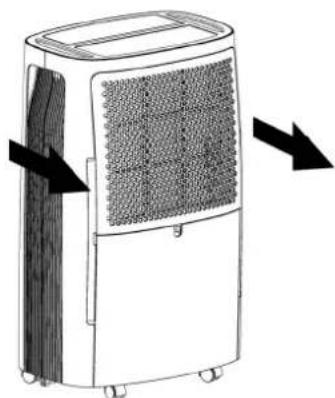
- Remove the filter by pulling down the grid to complete extraction. Clean the filter washing it with warm soapy water. DO NOT USE ALCOHOL, BENZENE OR OTHER AGGRESSIVE PRODUCTS TO CLEAN THE FILTER.
Do not use the dehumidifier without the filter as dust may affect the efficiency of the evaporator, resulting in higher energy consumption.
V 04/20
natural_image
Diagram of a portable air purifier with heat exchanger and directional arrows indicating airflow or movement (no text or symbols)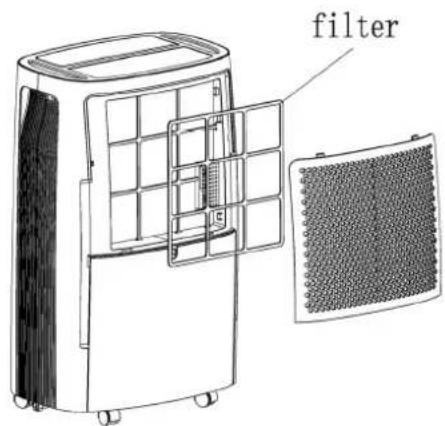
2. Clean the air filter
Run a vacuum cleaner lightly over the surface of the air filter to remove dirt. If the air filter is exceptionally dirty wash it with warm water and mild cleanser and dry thoroughly.

natural_image
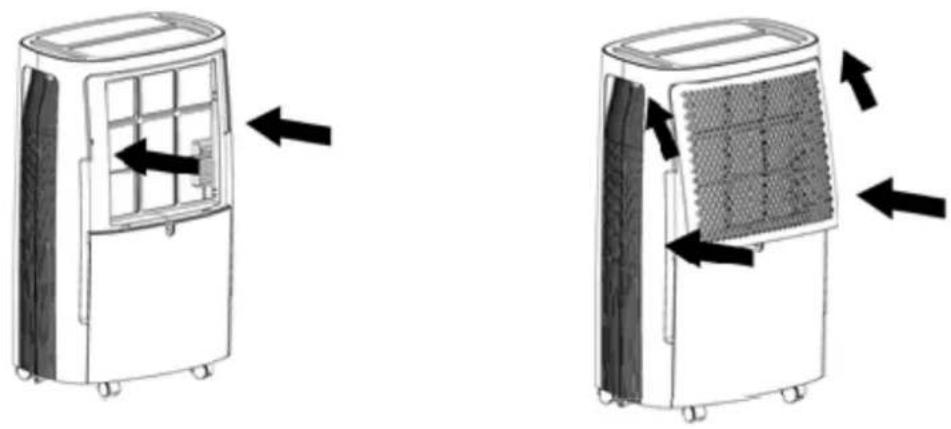
Simple line drawing of a cylindrical container with a grid-patterned top surface (no text or symbols)3. Attach the air filter
Insert the filter into the grill smoothly, and place the inlet grill into right place.
natural_image
Two identical line drawings of a portable air conditioner unit with heat exchangers and ventilation slots, shown in side-by-side motion (no text or symbols)Storing the Dehumidifier
When the unit is not being used for a long period of time and you want to store it note the following steps:
- Empty any water left in the drainage tank.
- Fold up the power supply cord and put it in the water tank.
- Clean the air filter
- Discard in a cool and dry place.
TROUBLESHOOTING
| Problem | Possible | Cause |
| The unit doesn't operate | Has the power cord been disconnected? | Plug the power cord into the outlet. |
| Is the tank full indication lamp blinking? (The tank is full or in a wrong position.) | Empty the water in the drainage tank and then reposition the tank. | |
| Is the temperature of the room above 35°C or below 5°C? | The protection device is activated and the unit cannot be started. | |
| The dehumidifying function doesn't work | Is the air filter clogged? | Clean the air filter as instructed under "Cleaning the dehumidifier". |
| Is the intake duct or discharge duct obstructed? | Remove the obstruction from the discharge duct or intake duct. | |
| No air is discharged Is the air filter clogged? | Clean the air filter as instructed under "Cleaning the dehumidifier". | |
| Operation is noisy | Is the unit tilted or unsteady? | Move the unit to a stable, sturdy location. |
| Is the air filter clogged?If the units operates with a temperature between 5 and 15°C the dehumidifier will stop for the automatic defrost. The compressor will stop for short periods. After defrost the unit will start to norm | Clean the air filter as instructed under "Cleaning the dehumidifier". | |
REGULATION (EU) N. 517/2014 - F-GAS
DRYNATURE 17
The unit contains R290, a natural greenhouse gas with global warming potential (GWP) = 3 - Kg. 0,075 = 0,000225
Tons CO_2 equiv.
Do not release R290 into the atmosphere.
DRYNATURE 21
The unit contains R290, a natural greenhouse gas with global warming potential (GWP) = 3 - Kg. 0,80 = 0,000240 Tons CO₂ equiv.
Do not release R290 into the atmosphere.
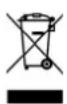
INFORMATION FOR THE CORRECT DISPOSAL OF THE PRODUCT IN ACCORDANCE WITH EUROPEAN DIRECTIVE 2012/19/EU
This appliance may not be scrapped with domestic waste at the end of its life cycle. We call your attention to the crucial role played by the consumer in the re-use, recycling and other forms of recovery of such waste.
The appliance must be scrapped by a sorted waste disposal centre or by returning it to the retailer (no charge is levied for this service), when you purchase a new equivalent appliance.
Sorted disposal of electric and electronic equipment prevents the negative effects on the environment and human health resulting from improper scrapping, and also allows the materials from which it is made to be recovered and recycled, with significant savings in terms of energy and resources.
The sorted disposal requirement is indicated by the crossed waste bin label affixed to the appliance.


- OPERATING INSTRUCTIONS
- The Refrigerant R290
- Warning:
- WARNING!
- DESCRIPTION OF PARTS
- PRE-OPERATING CHECKS BEFORE THE USE
- APPLIANCE START-UP
- OPERATING PRECAUTIONS
- HOW TO ELIMINATE CONDENSATE
- CONTINUOUS CONDENSATE DRAINAGE
- Indications of Display on control panel
- TOUCH BUTTONS AND LED INDICATORS
- Turn on/off button
- Humidity setting button
- Fan-speed setting button
- 4.Swing setting button
- 5.Time-setting button
- CLEANING AND MAINTENANCE
- MAINTENANCE OF THE HUMIDIFIER'S EXTERIOR SURFACE
- Warning
- ⚠ Warning
- CLEANING THE WATER TANK
- CLEANING THE AIR FILTER
- Clean the air filter
- Attach the air filter
- Storing the Dehumidifier
- TROUBLESHOOTING
- REGULATION (EU) N. 517/2014 - F-GAS
- DRYNATURE 17
- DRYNATURE 21
- INFORMATION FOR THE CORRECT DISPOSAL OF THE PRODUCT IN ACCORDANCE WITH EUROPEAN DIRECTIVE 2012/19/EU
Brand : ARGO
Model : Dry nature 21
Category : Dehumidifier