Nano One - Battery Fxlion - Free user manual and instructions
Find the device manual for free Nano One Fxlion in PDF.


User questions about Nano One Fxlion
0 question about this device. Answer the ones you know or ask your own.
Ask a new question about this device
Download the instructions for your Battery in PDF format for free! Find your manual Nano One - Fxlion and take your electronic device back in hand. On this page are published all the documents necessary for the use of your device. Nano One by Fxlion.
USER MANUAL Nano One Fxlion
text_image
FX® FXLIONLi-ion Battery: NANO ONE
I. Product Appearance
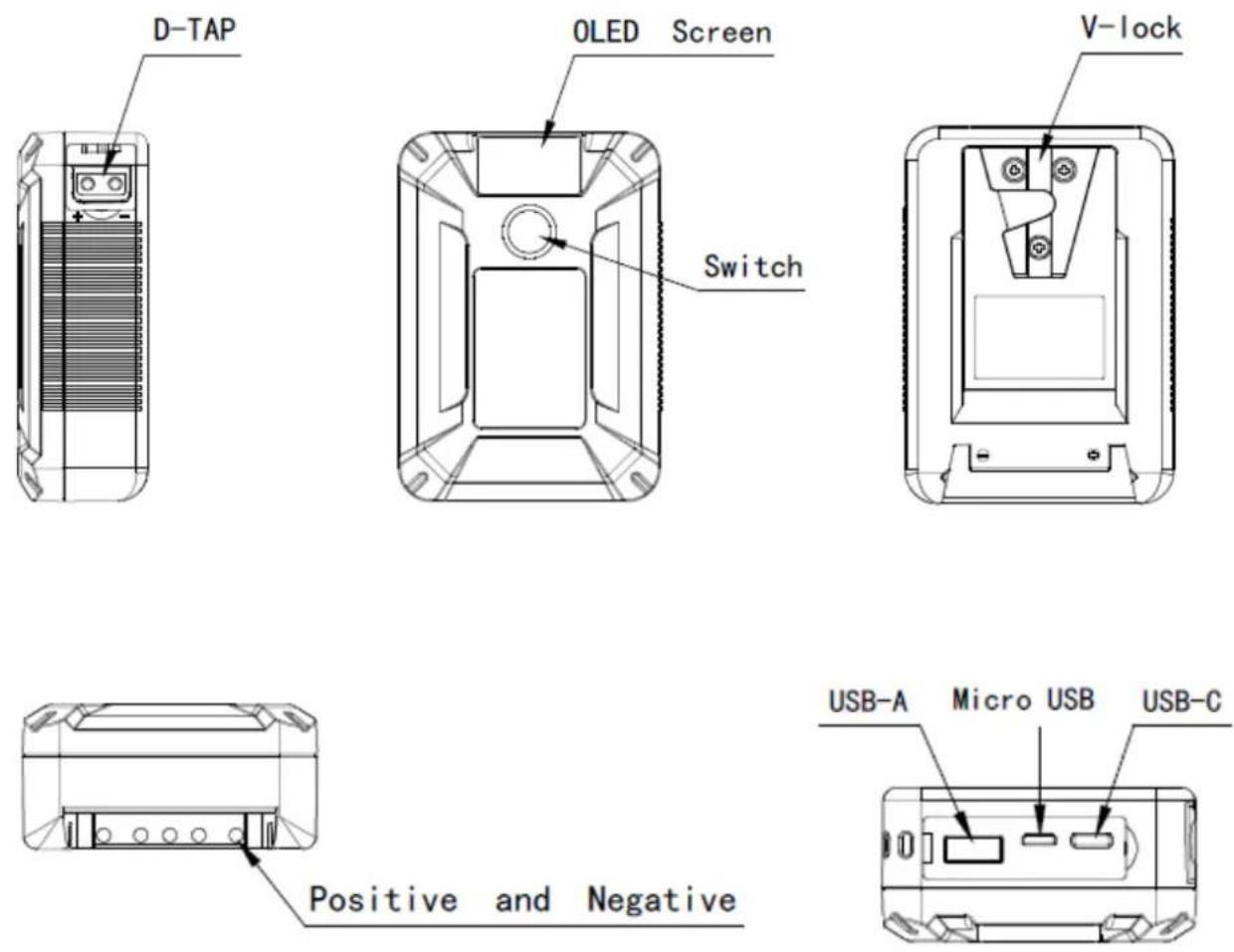
Chart 1
II. Battery Basic Features:
✨ Ultra mini size;
With OLED screen, showing battery voltage, capacity, USB output voltage;
It can not only charge mobile phones, laptops, but also power for lights and cameras, suitable for lots of application scenarios.
✨ Rechargeable Li-ion battery, no memory effect.
Intelligent control protection: over-heat, over-charge, over-discharge, and over-current protection.
✧ With D-tap and USB output, protection rubber cap
III. Battery specification:
NANO ONE
Capacity: 14.8V 3.4Ah 50Wh
D-TAP Output: 14.8V/8A(MAX)
USB-A Output: 5V/2.4A 9V/2A 12V/1.5A
Support QC2.0, QC3.0, FCP, BC1.2 and other fast charge protocols
USB-C Input/Output: 5V/3A 9V/3A 12V/3A 15V/3A 20V/2.2A
Support PD2.0, QC2.0, QC3.0, BC1.2, FCP and other fast charge protocols
Micro USB Input: 5V/3A
Dimension: 100(L)mm×71(W)mm×35(H)mm
Weight: 310g
Working temperature: -20^ +55^
Applicable charger: 16.8V/2A Charger, cellphone adapter, other adapters supporting PD2.0 fast charge protocols.
IV. Instructions
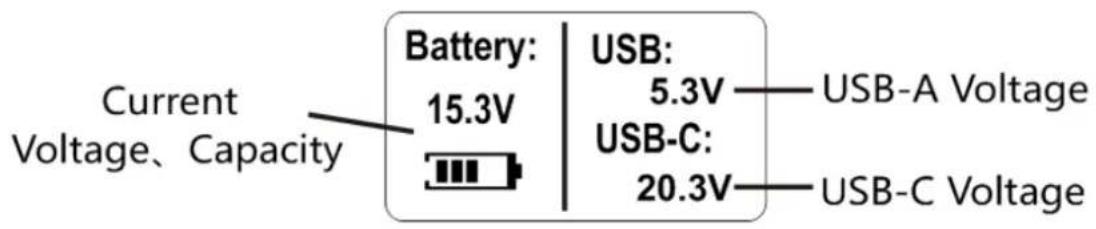
1、Screen display instructions
Left side screen: show battery output voltage
Right side screen: show USB-A and USB-C output voltage
text_image
Current Voltage、Capacity Battery: 15.3V USB: 5.3V — USB-A Voltage USB-C: 20.3V — USB-C VoltageChart 2
2、Power switch and 4-level power indicator
Press power switch, 4-level power indicator and screen on, showing current battery voltage, capacity, current USB voltage.

pie
| Category | Percentage (%) | | :--- | :--- | | 100% | 100 | | 75% | 75 | | 50% | 50 | | 25% | 25 | Switch label at top center.4-level LED power indicator
Chart 3
3、USB Discharge
When use USB-A or USB-C to charge a device, the USB automatically detects the load and supply power to the digital device, while showing output voltage on USB Screen.
4、Charge
1) Use 5V/2A cellphone adapter to charge NANO battery from Micro-USB;
2) Use charger supporting PD fast charge protocols fast charge NANO battery from USB-C;
3) Use professional 16.8V camera charger to charge NANO battery from V-lock or D-tap.
4) Do not charge the battery at the same time from the three charging methods. The charging speed is related to the selected charger.
V. Cautions:
- Must accordance with instructions;
- Do not put battery into water or fire;
- Avoid strong impact;
4.Do not heated or disassemble; - Avoid short-circuit;
- Keep away from children.
VI. Storage and Transportation
- Battery should be charged to half-saturation status(1/3 charge time of fully charge time) when need long term storage. Place in a dry and cool environment. Inspected once every six months.
- Storage in a clean, dry and ventilated place, avoid contact with corrosive substances, away from fire and heat sources.
- Storage temperature: -5^ +35^ Storage humidity: ≤75%RH
- Batteries should be packed into boxes for transport which should prevent severe vibration, shock or extrusion, sun exposed and rain. Transportation could be use cars, trains, boats and airplane.
VII. Maintenance and After-sales Service
- Warranty period is one year.
Product damage caused by not using in accordance with the instructions and operation which will be beyond the scope of warranty. - Warranty period: From the date of purchase with the record on warranty card accordingly.
- Warranty restrictions
The warranty will not cover the following cases:
★ Non Fxlion products
★ Out of warranty period
★ Non Fxlion tie line and power supply connection caused failure.
★ Force majeure: Do not work or parts damage caused by earthquake, fires and other natural disasters or accidents
★ Disassemble by non-professionals
★ Battery damage caused by wrong voltage
★ Damage caused by man-made improper use
Warranty Card
| Date | Description | Note |
★Please safe keeping this warranty card. If lost no reissue.
★Strict quality control procedures were done to every Fxlion product before it leaves the factory. Please do not fix or disassemble the product by yourself or non-professionals if problem occurs. Please contact local Fxlion distributor or call our service center at +86 10 8879 8684 for assistance.
Fxlion Electronic Co., Ltd.
Add: Floor 5, Huayue Building, No.1 Tanyuan Road, Mentougou District, Beijing China 102308
TEL: +86 10 88798684
WEB: www.fxlion.net
Email: info@fxlion.net