
10x32 IS - Binoculars CANON - Free user manual and instructions
Find the device manual for free 10x32 IS CANON in PDF.


| Product Type | Prism binoculars |
| Magnification | 10x |
| Objective Lens Diameter | 32 mm |
| Real Field of View | 6° |
| Apparent Field of View | 55.3° (ISO 14132-1:2002) |
| Field of View at 1000 m / yds | 105 m / 344 ft |
| Exit Pupil Diameter | 3.2 mm |
| Eye Relief | 14.5 mm |
| Focusing Distance Range | Approx. 2 m (6.6 ft) to infinity |
| Image Stabilizer System | Lens-shift optical correction |
| Stabilizer Correction Angle | ±1° |
| Power Supply | 2 AA alkaline batteries (Ni-MH also usable) |
| Battery Life (Continuous, 23°C) | Approx. 10 hours (alkaline) |
| Operating Temperature | -10°C to 45°C / 14°F to 113°F |
| Operating Humidity | 90% max |
| Dimensions (W x H x D) | 142 x 77 x 171 mm / 5.6 x 3.1 x 6.8 in |
| Weight (Excluding Batteries) | Approx. 780 g / 27.6 oz |
| Accessories Included | Case, strap, eyepiece lens caps, strings, 2 AA alkaline batteries |
| Safety Warning | Never look at the sun; keep away from children; do not use while walking |
Frequently Asked Questions - 10x32 IS CANON
User questions about 10x32 IS CANON
0 question about this device. Answer the ones you know or ask your own.
Ask a new question about this device
Download the instructions for your Binoculars in PDF format for free! Find your manual 10x32 IS - CANON and take your electronic device back in hand. On this page are published all the documents necessary for the use of your device. 10x32 IS by CANON.
USER MANUAL 10x32 IS CANON
natural_image
Black Canon binoculars with visible lens and control buttons (no text or symbols on the device itself)Thank you for purchasing a Canon product.
The Canon 10x32 IS (10x), 12x32 IS (12x), and 14x32 IS (14x) prism binoculars are equipped with a lens-shift type Image Stabilizer.
Before using the binoculars, read this instruction booklet to familiarize yourself with the proper operation.
Also, please keep this instruction booklet in a safe place so that you can refer to it at anytime.
“IS” stands for Image Stabilizer.
Symbols

Warning to prevent malfunction or damage to the binoculars.

Supplementary hints for using the binoculars.
Accessories
The binoculars come with the following accessories:
Case 1
Strap 1
Eyepiece lens caps.... 1
Strings (for eyepiece lens caps) ...... 1
AA alkaline batteries 2
Precautions for Use
(Please be sure to read before use)
Please be sure to read this section carefully beforehand in order to use your binoculars correctly and safely.
The following precautions are designed so that you will use your binoculars safely. Please be sure to read and follow them in order to prevent injury to you or others as well as damage to them.

Warning (regarding the binoculars)
Details pertaining to risks that may result in death or serious injury.
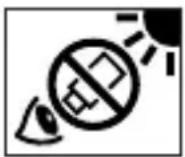
Never look at the sun with the binoculars. Doing so can cause loss of vision.
Do not place the binoculars under direct sunlight. Otherwise, the lens may concentrate the sun's rays and cause a fire.
Keep the plastic bags used for packaging out of reach of small children since suffocation may occur if a bag is placed over their head.
the strap is mistakenly wrapped around the neck, suffocation may result.

Caution (regarding the binoculars)
Details pertaining to risks that may result in injury.
Do not place the binoculars on an unstable surface. Doing so may cause the binoculars to fall and could result in a personal injury.
Do not use the binoculars while walking. Doing so may cause you to collide into objects or fall down and could result in a personal injury.
Do not swing the binoculars around by the strap. Doing so may cause others to be hit by the binoculars and could result in a personal injury.
Fingers may be pinched when adjusting the width of the binoculars. Be aware of this when the binoculars are being used by small children.
When used for a prolonged period or when used repeatedly, the rubber eyecups may irritate the skin around the eyes. If you suspect that this may have occurred, please see a physician.
Caution (regarding the binoculars)
Details pertaining to risks that may result in damage to property.
Binoculars are precision instruments. Do not drop them or subject them to shock. Never attempt to disassemble them.
Do not place these binoculars underwater. Also, avoid exposing the binoculars to rain or water spray.
Do not store the binoculars in a car or similar location under direct sunlight. Doing so will cause the binoculars to reach a temperature higher than expected which may cause damage to occur.
Do not use any organic solvent, such as alcohol, thinner, or benzene when wiping the lenses or body. If the lens is dirty, first use a blower brush to remove dust, etc., from the lens surface. Then use a soft, dry cloth and wipe the lens gently without scratching it.

Warning (regarding the batteries)
Details pertaining to risks that may result in death or serious injury.
Please follow the precautions below when using batteries. Not doing so may result in overheating, generation of smoke, ignitions, battery leakage, and explosions which may lead to fire or personal injury.
- Be sure not to use batteries with a nominal voltage rating of 1.5V or higher or batteries which have no nominal voltage information.
- Do not use batteries of different brands together or use old batteries with new ones. Replace the batteries with two new batteries at the same time from the same brand.
- Make sure that the battery polarity is correct.
- Do not attempt to disassemble batteries, charge the batteries (except for rechargeable batteries), leave batteries in a hot place, short circuit the contacts, or throw them into a fire.
In rare cases, some AA-size lithium batteries will reach extremely high temperatures. For your safety, please refrain from using AA-size lithium batteries.

Caution (regarding the batteries)
Details pertaining to risks that may result in injury.
In the event that liquid from the inside of the battery leaks out and contacts your skin, be sure to wash the liquid off thoroughly. Also, do not rub your eyes or mouth using any hand that made contact with liquid from the battery.
Caution (regarding the batteries)
Details pertaining to risks that may result in damage to property.
- Please remove the batteries when not using the binoculars. If the batteries are left inside, they may leak and cause damage.
Handling Precautions
Storing the binoculars in a humid location may cause fungus to form on the lenses or cause the lenses to become cloudy. If the binoculars are not to be used for an extended period, clean the lenses and body thoroughly and store in a well-ventilated dry place.
- the binoculars are taken from a cold environment to a warm one, condensation may develop on the surface and internal parts due to the sudden change in temperature. To prevent condensation, first put the binoculars into an airtight plastic bag before taking it to a warm environment. Let it gradually adjust to the warmer temperature, then take out the binoculars. Do the same when taking the binoculars from a warm environment to a cold one.
Nomenclature
(The 14x32 IS is shown in the illustrations.)
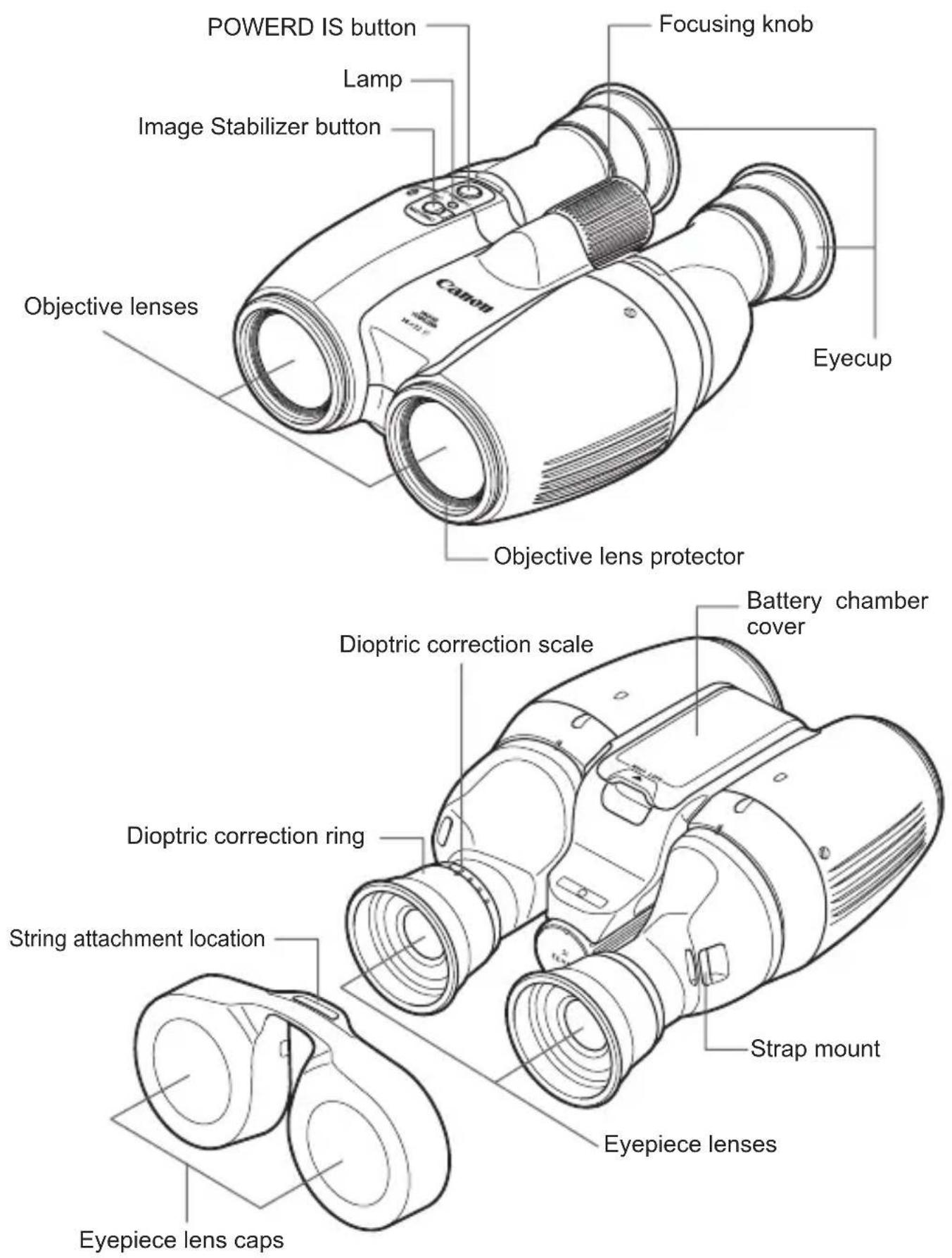
Using the Lens Caps
natural_image
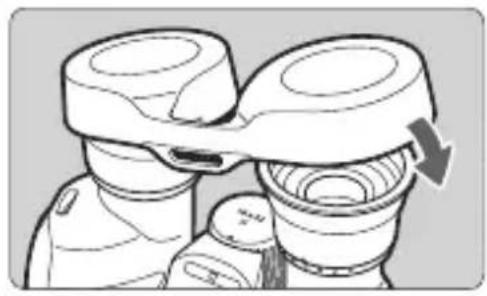
Illustration of binoculars with a directional arrow indicating compression (no text or symbols)Attaching Eyepiece Lens Caps
- Attach them over the eyecups.
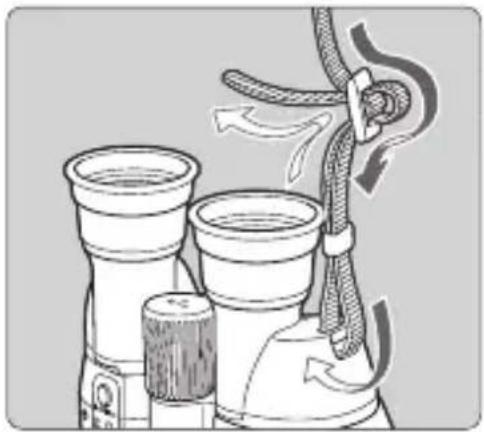
Installing the Strap
natural_image
Diagram of a mechanical device with two cylindrical components and a rope being inserted (no text or symbols)1 Fasten the strap.
● Make sure that there is no slack and the strap does not loosen at the clasp when you pull it.
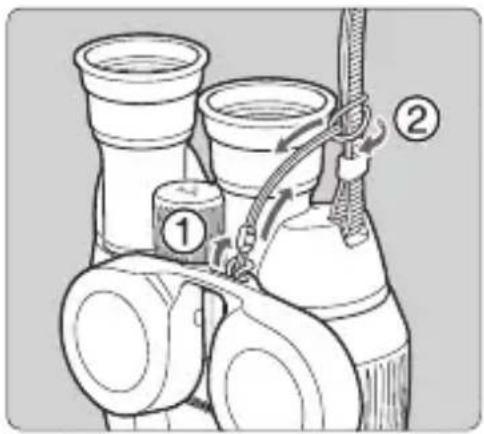
Connect the objective lens caps.
- Install the string included in the package to the eyepiece lens cap (1) and then attach the string to the strap (2).
Loading the Batteries
natural_image
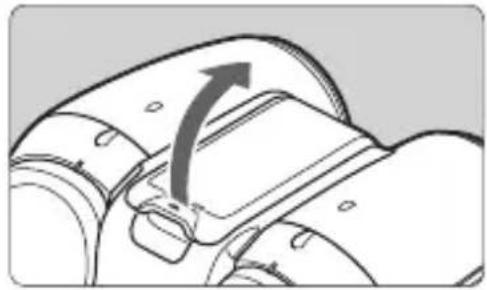
Diagram of a mechanical component with an arrow indicating direction (no text or symbols present)1 Open the cover.
- Open the battery chamber cover.
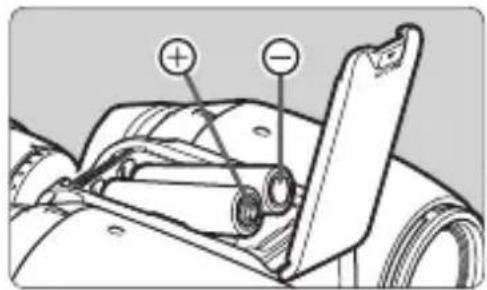
2 Insert the battery.
- Load the two batteries in the correct + and – orientation as shown in the illustration on the battery chamber cover. Once the batteries have been placed inside, firmly close the battery chamber cover.
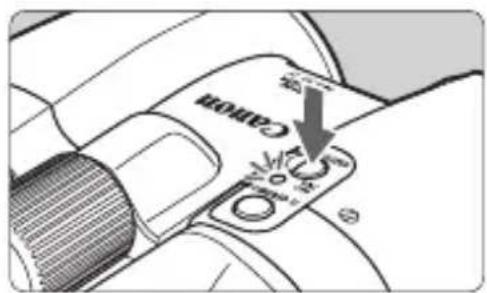
3 Check that the lamp lights.
- Press the Image Stabilizer button or POWERD IS button and check that the lamp lights (please continue to hold the button for more than one second).

When handling batteries, please carefully read " ⚠ Warning (regarding the batteries)" and " ⚠ Caution (regarding the batteries)" which are found on page 3-4 of this manual.
Do not load the batteries backwards. Doing so may bend the spring electrodes, causing damage.
Be careful not to let moisture onto the inner side of the battery chamber cover or into the chamber. If there is moisture, make sure to remove it and adequately dry it off before changing batteries.
Battery Life (Continuous Use) (Based on Canon's testing conditions)
| 23°C / 73°F –10°C / 14°F | |
| Size-AA alkaline batteries* Approx. 10 hours Approx. | 2 hours |
* Alkaline battery usage times can vary greatly depending on the brand.

AA-size nickel metal hydride batteries (Ni-MH) can also be used.
Before You Start
natural_image
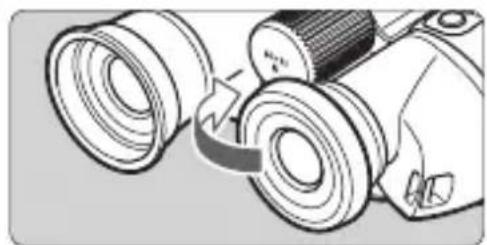
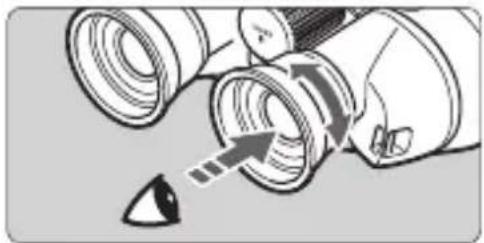
Diagram of a camera with dual lenses and a scroll wheel (no text or symbols)1 Adjust the eyecup position.
- When using the binoculars while wearing eyeglasses, turn the eyecups to adjust the height for easy viewing.
natural_image
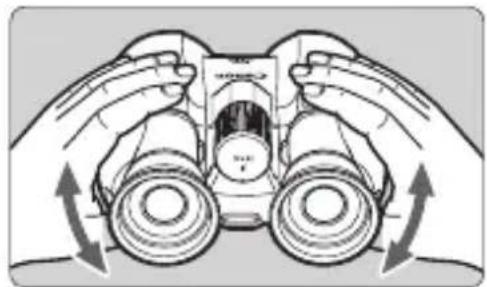
Illustration of hands operating a binocular device with directional arrows indicating motion (no text or symbols)2 Adjust the width of the binoculars.
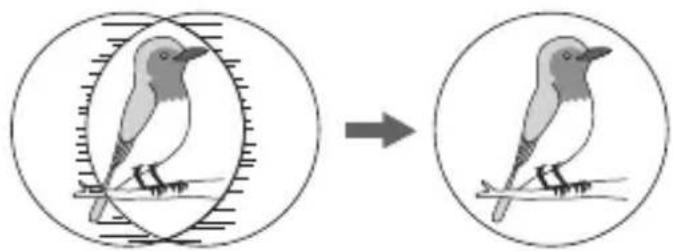
- Look through the binoculars and adjust the angle of the eyepieces until the left and right images converge.
natural_image
Illustration of a bird perched on a branch, showing the change from an oval frame to a circular frame (no text or symbols)
Doing the above minimizes eye fatigue during viewing.
When adjusting the width of the binoculars to suit the width between your eyes, look at a distant object.
natural_image
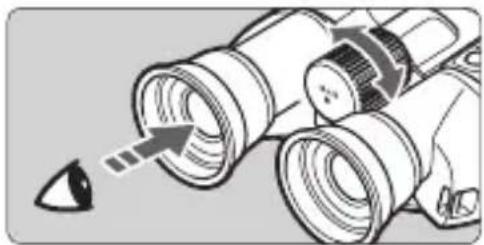
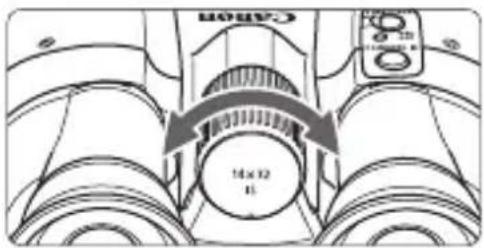
Illustration of a pair of eyeglasses with an arrow pointing to a droplet (no text or symbols present)3 Adjust the diopter.
- First look through the left eyepiece only and adjust the focusing knob until the object looks sharp.
natural_image
Diagram of a mechanical device with arrows indicating motion or force direction (no text or symbols)- Then look through the right eyepiece only and look at the same object while turning the dioptric correction ring until the object looks sharp.
4 Adjust the focus.
- Look through the eyepiece and turn the focusing knob until the object looks sharp.
Using the Image Stabilizer
When you look through the binoculars, the image may be shaking and difficult to see since your hands are holding the binoculars. In such a case, the Image Stabilizer can help steady the image.
The binoculars feature a general IS, which provides image stabilization when looking at a wide area, and a POWERD IS, which is especially effective when continuously aiming the binoculars at one point.
The Image Stabilizer can be operated using the following methods:
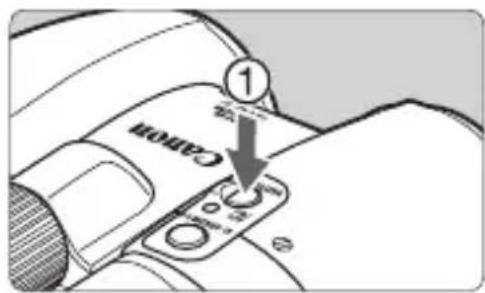
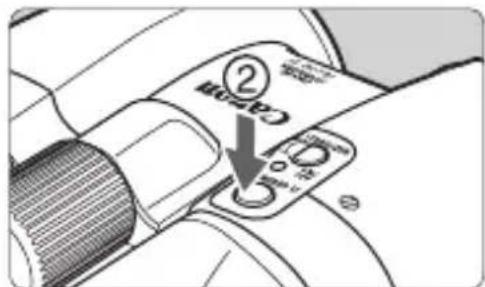
(1) Five-minute operation
- Starting and stopping Image Stabilizer operation
- Press the Image Stabilizer button and quickly let it go, and the general IS will operate continuously for five minutes (1).
To stop general IS operation, press and release the Image Stabilizer button again (1).
• Similarly, pressing the POWERD IS button and quickly letting it go will activate the POWERD IS continuously for five minutes (2).
To stop POWERD IS operation, press and release the POWERD IS button again (2).
- Switching between general IS and POWERD IS
- During general IS operation, press and quickly release the POWERD IS button to switch to POWERD IS* (2).
Also, press and hold the POWERD IS button during general IS operation to switch to POWERD IS. Operation will be stopped once the button is released (2).
• Similarly, pressing and quickly releasing the Image Stabilizer button during POWERD IS operation will cause the binoculars to switch to general IS* (1).
Also, press and hold the Image Stabilizer button during POWERD IS operation to switch to general IS. Operation will be stopped once the button is released (1).
* After switching to the other IS, it will continue to operate for five minutes.
(2) Holding down the button
- Starting and stopping Image Stabilizer operation
- The general IS will operate while holding down the Image Stabilizer button (1). Similarly, the POWERD IS will operate while holding down the POWERD IS button (2).
• IS operation will stop once you let go of the button.
- Switching between general IS and POWERD IS
- When continuing to hold the Image Stabilizer button during general IS operation, press and hold the POWERD IS button and let go of the Image Stabilizer button to switch to POWERD IS operation (1, 2).
- When continuing to hold the POWERD IS button during POWERD IS operation, press and hold the Image Stabilizer button and let go of the POWERD IS button to switch to general IS operation (2, 1).
- IS operation will stop once you let go of all buttons.

The Image Stabilizer may not be able to compensate when the user's body is being deeply shaken, subjected to vibration, or when the user's hands are shaking too much.
If the binoculars face down for more than 10 seconds, such as when they are hanging from the strap, the Image Stabilizer will turn off to conserve power. To use the binoculars in a downward direction, keep pressing the Image Stabilizer button or the POWERD IS button.
Even without batteries loaded, the binoculars can still be used as is.
Using the Case
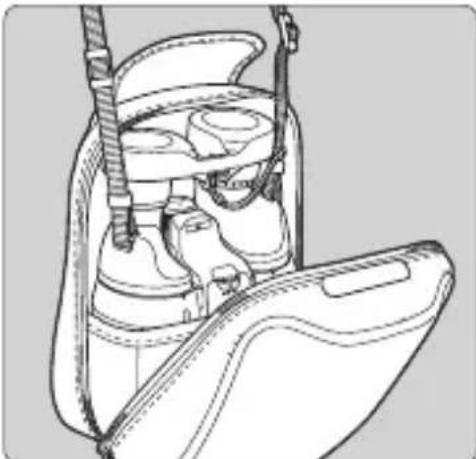
natural_image
Line drawing of a car back panel with harness and seat (no text or symbols)- Place the binoculars in the case while allowing the strap to extend outside the case.
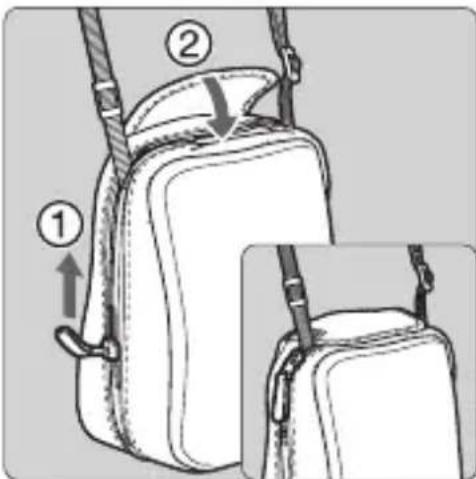
- Close the zipper to where the strap extends from the case and then close the case flap.
Troubleshooting
If there is a problem with the binoculars, first refer to the table below to see if you can resolve it. If the problem cannot be resolved, contact your dealer or nearest Canon Service Center.
| Problem Probable Cause Corrective Measures | ||
| The image is not clear. | The lens is dirty. Use a blower brush to remove dust, etc., from the lens surface. Then use a soft, dry cloth to wipe the lens gently. | |
| The diopter has not been properly set. | Adjust the diopter (see step 3 on page 8). | |
| The width of the binoculars does not suit the width between your eyes. | Adjust the width of the binoculars (See step 2 on page 8). | |
| The binoculars are not properly focused. | Focus the binoculars (see step 4 on page 8). | |
| The Image Stabilizer does not operate. | There are no batteries loaded. | Load batteries having enough power (See page 7 “Loading the Batteries”). |
| When the Image Stabilizer button is pressed, the lamp does not light. | If the lamp does not light, it means the batteries are exhausted. Replace the batteries with new ones. (See page 7 “Loading the Batteries”) | |
| When the Image Stabilizer is on, the binoculars make an unusual sound when shaken deeply. | The battery power is low. Replace the batteries with new ones. (See page 7 “Loading the Batteries”) | |
Major Specifications
| 10x32 IS 12x | 32 IS 14x32 IS | ||
| Type Prism binoculars | |||
| Magnification 10x 12x 14x | |||
| Objective lens effective diameter | 32 mm | ||
| Real field of view 6° 5° 4.3° | |||
| Apparent field of view (Calculated based on ISO 14132-1:2002) | 55.3° | 55.5° | |
| Field of view at 1000 m / yds 10 | 5 m / 344 ft 87 m | / 285 ft 75 m / 2 | 46 ft |
| Exit pupil diameter 3.2 mm 2.7 | mm 2.3 mm | ||
| Eye relief 14.5 mm | |||
| Focusing distance range Approx. 2 m (6.6 ft) - infinity | |||
| Image Stabilizer system Optical correction with lens-shift | |||
| Correction angle ±1° | |||
| Battery check | Lamp (LED) turns on | ||
| Power | 2 AA-size alkaline batteries (AA-size nickel metal hydride batteries (Ni-MH) can also be used.) | ||
| Operating environment | Temperature: -10°C to 45°C / 14°F to 113°F Humidity: 90% | ||
| Dimensions (W x H x D) | 142 x 77 x 171 mm / 5.6 x 3.1 x 6.8 inch | ||
| Weight (Excluding batteries) | Approx. 780 g / 27.6 oz | Approx. 775 g / 27.4 oz | |
This device complies with Part 15 of the FCC Rules. Operation is subject to the following two conditions: (1) This device may not cause harmful interference, and (2) this device must accept any interference received, including interference that may cause undesired operation.
Do not make any changes or modifications to the equipment unless otherwise specified in the instructions. If such changes or modifications should be made, you could be required to stop operation of the equipmet.
This equipment has been tested and found to comply with the limits for a Class B digital device, pursuant to Part 15 of the FCC Rules. These limits are designed to provide reasonable protection against harmful interference in a residential installation.
This equipment generates, uses and can radiate radio frequency energy and, if not installed and used in accordance with the instructions, may cause harmful interference to radio communications. However, there is no guarantee that interference will not occur in a particular installation. If this equipment does cause harmful interference to radio or television reception, which can be determined by turning the equipment off and on, the user is encouraged to try to correct the interference by one or more of the following measures:
- Reorient or relocate the receiving antenna.
- Increase the separation between the equipment and receiver.
- Connect the equipment into an outlet on a circuit different from that to which the receiver is connected.
- Consult the dealer or an experienced radio/ TV technician for help.
CAN ICES-3 (B) / NMB-3 (B)
Only for European Union and EEA (Norway, Iceland and Liechtenstein)
natural_image
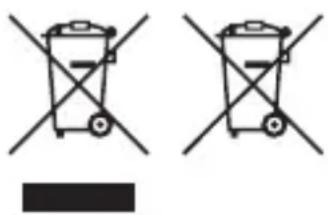
Two identical hand-drawn trash bin symbols crossed with diagonal lines, no text or labels present.These symbols indicate that this product is not to be disposed of with your household waste, according to the WEEE Directive (2012/19/EU), the Battery Directive (2006/66/EC) and/or national legislation implementing those Directives.
If a chemical symbol is printed beneath the symbol shown above, in accordance with the Battery Directive, this indicates that a heavy metal (Hg = Mercury, Cd = Cadmium, Pb = Lead) is present in this battery or accumulator at a concentration above an applicable threshold specified in the Battery Directive.
This product should be handed over to a designated collection point, e.g., on an authorized one-for-one basis when you buy a new similar product or to an authorized collection site for recycling waste electrical and electronic equipment (EEE) and batteries and accumulators. Improper handling of this type of waste could have a possible impact on the environment and human health due to potentially hazardous substances that are generally associated with EEE. Your cooperation in the correct disposal of this product will contribute to the effective usage of natural resources.
For more information about the recycling of this product, please contact your local city office, waste authority, approved scheme or your household waste disposal service or visit www.canon-europe.com/weee, or www.canon-europe.com/battery.
Canon
- Thank you for purchasing a Canon product.
- Symbols
- Accessories
- Precautions for Use
- Warning (regarding the binoculars)
- Never look at the sun with the binoculars. Doing so can cause loss of vision.
- Caution (regarding the binoculars)
- Warning (regarding the batteries)
- Caution (regarding the batteries)
- Handling Precautions
- Nomenclature
- Using the Lens Caps
- Attaching Eyepiece Lens Caps
- Installing the Strap
- Fasten the strap.
- Connect the objective lens caps.
- Loading the Batteries
- Open the cover.
- Insert the battery.
- Check that the lamp lights.
- Battery Life (Continuous Use) (Based on Canon's testing conditions)
- Before You Start
- Adjust the eyecup position.
- Adjust the width of the binoculars.
- Adjust the diopter.
- Adjust the focus.
- Using the Image Stabilizer
- Five-minute operation
- - Starting and stopping Image Stabilizer operation
- - Switching between general IS and POWERD IS
- Holding down the button
- Using the Case
- Troubleshooting
- Only for European Union and EEA (Norway, Iceland and Liechtenstein)
- Canon
Brand : CANON
Model : 10x32 IS
Category : Binoculars