
FTE16 - Dehumidifier DIMPLEX - Free user manual and instructions
Find the device manual for free FTE16 DIMPLEX in PDF.


| Product Type | Dehumidifier |
| Brand | Dimplex |
| Model | FTE16 |
| Moisture Removal | 16 litres/day (at 30°C & RH 80%) |
| Power Supply | 220-240 V ~ 50 Hz |
| Power Input | 410 W |
| Running Current | 2.1 A |
| Weight | 13.3 kg |
| Dimensions (W x D x H) | 365 x 220 x 500 mm |
| Water Tank Capacity | 2.3 L |
| Applicable Temperature Range | 5°C - 35°C |
| Refrigerant | HFC134a (0.12 kg, GWP 1430) |
| CO₂ Equivalent | 0.172 tonnes |
| Humidity Control | Rotary dial with positions for 20% to 80% RH and continuous operation |
| Continuous Drainage | Yes (requires 9 mm internal diameter hose, not included) |
| Filter Type | Washable mesh filter |
| Filter Cleaning Interval | Every 2 weeks |
| Safety Features | Auto shut-off when tank full, defrost protection, 3-minute restart delay |
| Warranty | 1 year standard, extended to 3 years upon registration within 28 days (UK & Ireland only) |
Frequently Asked Questions - FTE16 DIMPLEX
User questions about FTE16 DIMPLEX
0 question about this device. Answer the ones you know or ask your own.
Ask a new question about this device
Download the instructions for your Dehumidifier in PDF format for free! Find your manual FTE16 - DIMPLEX and take your electronic device back in hand. On this page are published all the documents necessary for the use of your device. FTE16 by DIMPLEX.
USER MANUAL FTE16 DIMPLEX
Installation and Operating Instructions
| Model: | FTE10 | 10L | Dehumidifier | |
| Model: | FTE16 | 16L | Dehumidifier | |
| Model: | FTE20 | 20L | Dehumidifier | 08/52826/0 Issue 5 |
natural_image
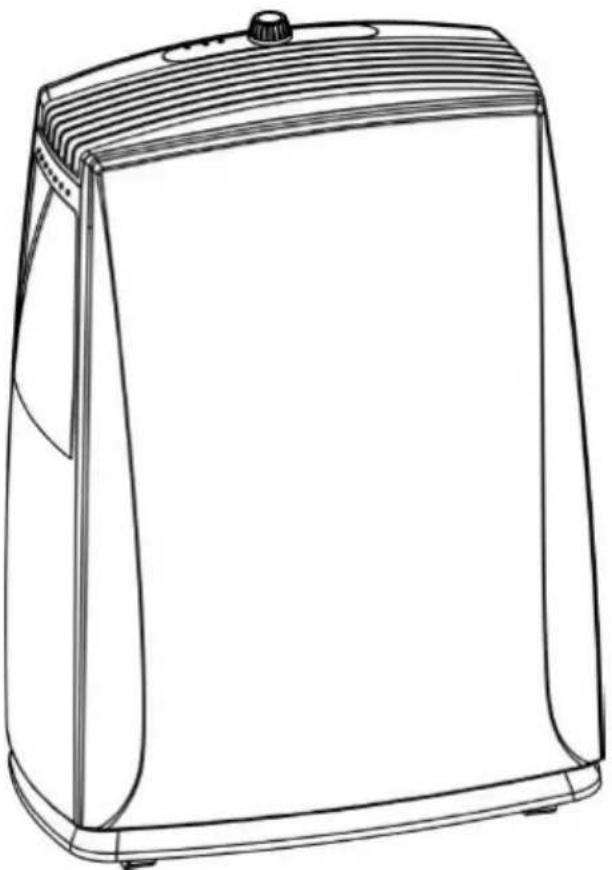
Line drawing of a portable kitchen appliance with lid and side panel (no text or symbols)Please read the operating instructions carefully before using your dehumidifier for the first time and keep them in a safe place.
- Never immerse the appliance in water or other liquids.
- Never operate the appliance if a cable or connector has been damaged, after appliance malfunction or if the appliance was dropped or is otherwise damaged.
- When the supply cord is damaged, it must be replaced by the manufacturer, or a professional service agent only.
- Please ask a professional service agent to repair the product. Improper repair may cause danger to users.
- Disconnect the appliance from mains power whenever it is not in use, before relocating it, and before cleaning.
- Operate the appliance only at the voltage specified on the rating label.
- Do not connect this product to mains using an extension lead.
- Do not connect the dehumidifier to a multiple socket outlet, which is also being used for other electrical appliances
- This dehumidifier is only intended for INDOOR RESIDENTIAL applications. This dehumidifier should not be used for commercial or industrial or leisure applications.
- DO NOT COVER. Never cover or obstruct in any way the outlet at the top of the dehumidifier or the air inlet slots at the rear of the dehumidifier.
- Only operate this appliance with a minimum of 50cm clearance all around i.e. away from walls, furniture and overhanging objects such as curtains or a shelf.
- Children aged from 3 years and less than 8 years shall only switch on/off the appliance provided that it has been placed or installed in its intended normal operating position and they have been given supervision or instruction concerning use of the appliance in a safe way and understand the hazards involved. Children aged from 3 years and less than 8 years shall not plug in, regulate and clean the appliance or perform user maintenance.
- Children of less than 3 years should be kept away unless continuously supervised. "
- To prevent spillage, empty the water tank before relocating the appliance.
- Do not tip the appliance to any side as escaping water could damage the appliance. Only operate the product in a level upright position.
- “WARNING: Never leave water in the reservoir when the appliance is not in use, microorganisms can grow in stagnant water, the water tank should be emptied and cleaned regularly and properly.
- CAUTION: Clean and empty the water tank at least every third day. Empty the water tank and clean it with fresh tap water or mild detergent. Remove any scale, deposits, or film that has formed on the sides of the water tank or on interior surfaces using soft non-abrasive cleaning agents (such as washing up liquid), wipe all surfaces dry on completion. Empty the tank, clean and dry it when not in use and before putting into storage.
- Be aware that high humidity levels may encourage the growth of biological organisms in the environment.
- Monitor the area around the dehumidifier to ensure there is no damp or wet. Do not allow absorbent materials, such as carpeting, drapes, or tablecloths to become damp.
- When the unit stops, you have to wait for 3 minutes before you can restart the unit to protect the compressor from damage
- Air inlet filter must be cleaned regularly to ensure correct operation and to avoid damage to the appliance, please refer to page 7 and 8.
- Never operate the product without the filter
- WARNING: To avoid danger of suffocation please remove all packaging materials particularly plastic and EPS and keep these away from vulnerable people, children and babies.
- WARNING: To avoid the risk of accidental strangulation from the supply cord all children and vulnerable people must be supervised when in the vicinity of the product whether it is working or not.
PRODUCT PART DESCRIPTIONS
- Control panel
- Air outlet
- Carry handle
- Front panel
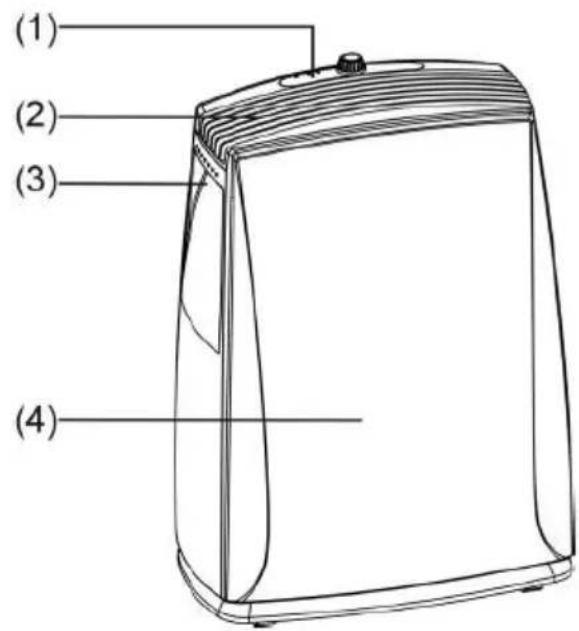
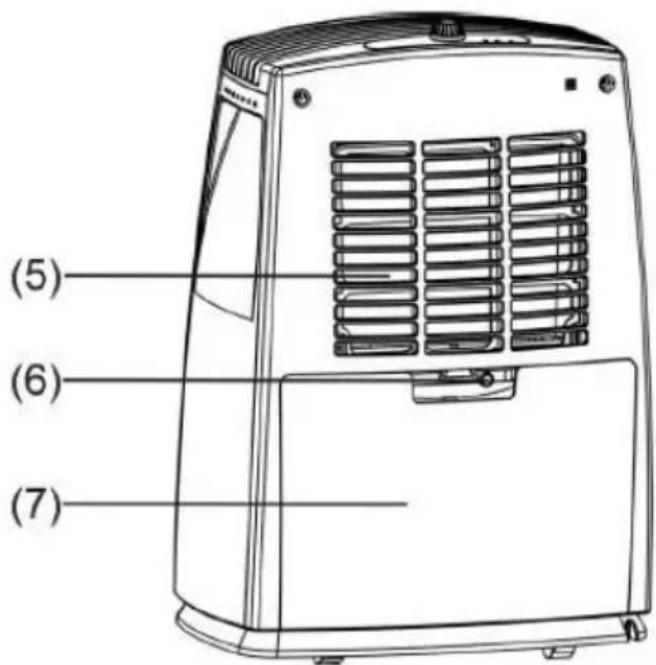
- Air inlet
- Water outlet tube (continuous use)
- Water tank
CONTROL PLATE DESCRIPTION
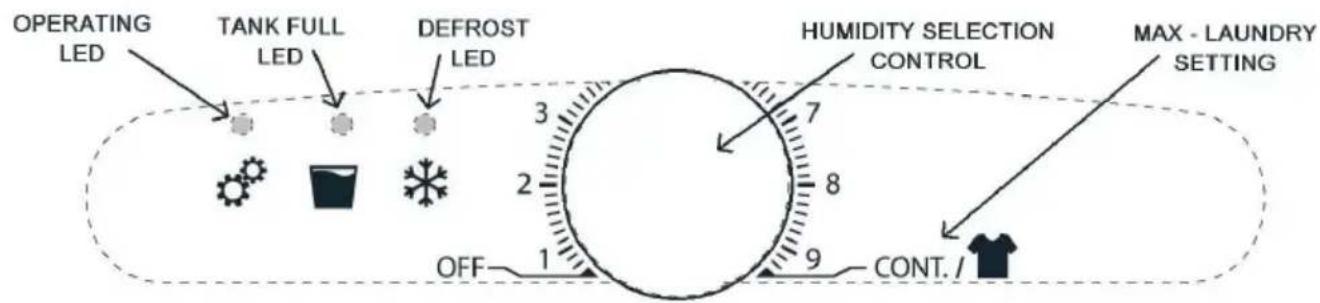
flowchart
graph LR
    A["OPERATING LED"] --> B["TANK FULL LED"]
    B --> C["DEFROST LED"]
    C --> D["HUMIDITY SELECTION CONTROL"]
    D --> E["MAX - LAUNDRY SETTING"]
    E --> F["CONT. / T-shirt"]
    style A fill:#f9f,stroke:#333
    style B fill:#ccf,stroke:#333
    style C fill:#cfc,stroke:#333
    style D fill:#fcf,stroke:#333
    style E fill:#cff,stroke:#333
    style F fill:#ffc,stroke:#333
Allow the unit to stand upright for 24hrs to let the compressor stabilize before first use or when transported.
- Firstly, turn the humidity control switch to the "OFF" position.
- Plug in the dehumidifier.
- Turn on the humidity control switch (clockwise) and set it at the desired humidity level, please refer to table in point 4 below (e.g. position"4 = 60%).
- For assistance in drying clothes in a laundry/ utility room, please select maximum dial position for continuous operation and maximum moisture removal.
Turning off the unit
- Turn the humidity control switch fully anticlockwise to the "OFF" position and the power supply is cut off and the unit stops operating.
- If the dehumidifier is not in use for a long time, please disconnect the power cord plug from the supply outlet.
NOTES AND PRECAUTIONS
- The dehumidifier will not operate if the humidity dial is set lower than the ambient humidity e.g. room humidity 40% and dial setting 2 or 4. In other words the higher the humidistat dial setting e.g. position 8 the dehumidifier will attempt to dry the ambient humidity to 20% (RH) relative humidity.
- When the water tank is full an automatic float switch shuts down the product and the tank full LED illuminates. Remove the water storage tank and empty its contents, carefully replace the empty water tank back in position, the unit will now automatically restart operating.
- The following table indicates the approximate relative humidity settings against its related position number on the humidity control switch:
- The ideal position is around position 6- approximately 40% relative humidity
- The operational temperature range for this unit is 5-35°C. Please note the effectiveness of the product reduces as the ambient temperature reduces. For example in a room of 6°C-little if any moisture will be removed. The product works on the principal that it requires a high ambient temperature with warm air drawing over a very cold compressor creating water droplets.
- Other than on the case of note 2 above, where the dehumidifier does not start,
the operational light does not illuminate or the dehumidifier intermittently stops for unknown reasons, please check the plug and power supply for poor connection. If the plug and power supply are in good condition, wait for 10 minutes and restart the unit (it can take about 10 minutes for the unit to reset). If the unit still does not start after 10 minutes, please contact your retailer or the manufacturer for repair.
-
When the dehumidifier is in operation, the running compressor will produce heat. This is normal and may potentially raise the room temperature.
-
When the product is defrosting, the defrost LED will illuminate. The reason this happens is because the compressor gets very cold to maximize moisture removal. The defrost function protects the compressor from freezing up and avoid damage to the product.
| CONTROL SWITCH POSITION NO. | APPROXIMATE HUMIDITY SETTING |
| Cont. | Continuous running |
| 8 20 | % |
| 7 30 | % |
| 6 40 | % |
| 4 60 | % |
| 2 80 | 8 % |
DRAINAGE INSTRUCTION
Switch off before carrying out any of these operations and leave for 3 minutes before switching on again.
The extracted water is collected by the water tank (set up as supplied), or can be set up to drain continuously using a PVC hose (not included) connected to a drain outlet, the drain point must be lower than the unit outlet (see details below).
natural_image
Line drawing of a portable electronic device with ventilation slots and a folded case (no text or symbols)USE OF THE WATER TANK:
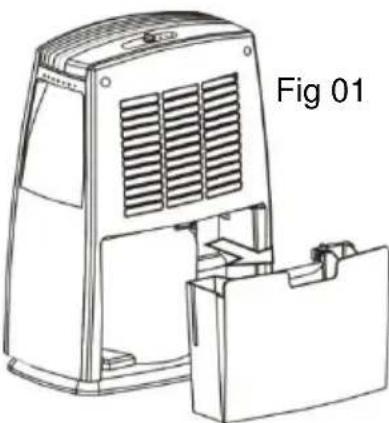
When the tank full LED illuminates the tank is full, the compressor and the fan will stop operation, please empty the water tank. Remove the water tank as per Fig 01 and empty it. Gently refit the water tank into the unit in its original position. Note, if the tank full LED remains on when the tank is emptied please remove and re-fit the tank to reset the light.
CONTINUOUS DRAINAGE
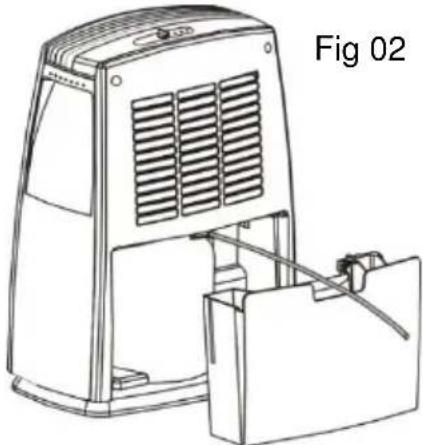
If you want to use this function, please pull out the water tank and plug a 9mm internal diameter water pipe onto the “Water out tube” (See Fig.02). Replace the water tank into the unit, the unit will now operate while discharging the extracted water through the free end of the fitted pipe, Note, you must ensure that the free end of the pipe is below the product outlet connection and that the drain point is likewise lower than the unit outlet. NOTE: When the continuous drain feature is not being used, remove the drain hose from the outlet and attach the rubber plug back to the drain outlet. Store the drain hose safely away from children and vulnerable people.
natural_image
Line drawing of a portable electronic device with ventilation slots and a separate panel attachment (no text or symbols)Filter Removal
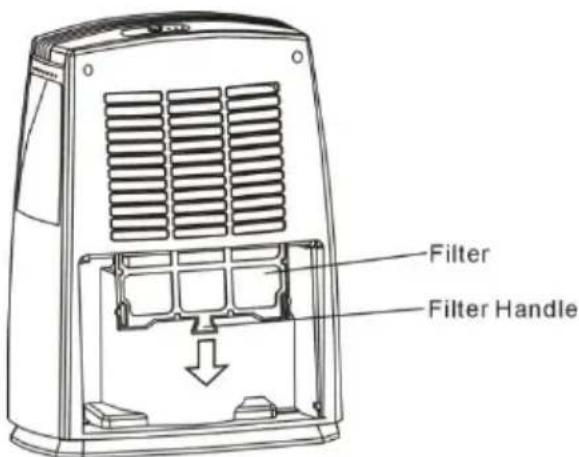
•To remove the filter you must first remove the water tank as instructed above.
•The filter can then be removed from its slot by gripping the filter handle and sliding it down and out of the back of the appliance as indicated.
- Every 2 weeks, remove the filter and clean it with warm water, below 40^ C . Allow it to dry naturally and then replace by reversing the removal instruction above.
- Never operate the product without the filter
Care and Maintenance Instruction
-
To avoid the occurrence of vibration and noise the unit should not be operated while located on any soft or uneven surface.
-
Never insert any foreign objects into the unit through its air inlet or outlet to avoid hazard or unit failure.
-
During power off or when not in use for a long time, please disconnect the product from the mains.
natural_image
Cartoon drawing of a smiling rectangular character with a surprised expression, standing on ground with scattered stars (no text or symbols)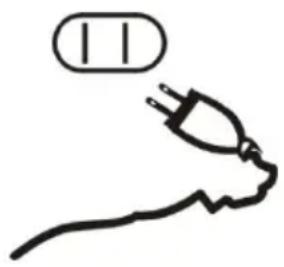
natural_image
Simple line drawing of an electric plug with a bulb above it, no text or symbols present.-
For a better dehumidifying effect, the areas to the front, rear and above the unit should be clear and free from any obstacles which will block the air flow of the unit. Do not block any air inlet or outlet grilles – keep clear of hanging drapes, curtains and furnishings – DO NOT COVER, as specified under safety information section a clearance of 50cm should be maintained all around the appliance when it is in use.
-
Every 2 weeks, remove the air filter and clean it with warm water, below 40^ C. Allow it to dry naturally and then replace by reversing the removal instruction above. Never operate the product without the filter
SPECIFICATIONS
| SPECIFICATION\MODEL | FTE10 | FTE16 FTE20 | |
| POWER SUPPLY 220-240V~50Hz | |||
| POWER INPUT 250W 410W | 480W | ||
| RUNNING CURRENT 1.2A 2.1A 2.2A | |||
| WEIGHT 11.1Kg 13.3Kg 13.7Kg | |||
| MOISTURE REMOVAL(@ 30°C& RH 80%) | 10 litre/day | 16 litre/day | 20 litre/day |
| DIMEMSIONS(WxDxH)mm | W:365 x D:220 x H:500 | ||
| APPLICABLETEMPERATURE | 5°C - 35°C | ||
| WATER TANK CAPACITY | 2.3L | ||
Contains fluorinated greenhouse gases
Hermetically sealed system.
Contains Refrigerant HFC134a 100%
Global Warming Potential – 1430
Refrigerant Weight and CO2 equivalent weight by model as per below table
| Model | Refrigerant Weight | CO2 Equivalent Weight |
| FTE10 | 0.065Kg | 0.093 tonnes |
| FTE16 | 0.12Kg | 0.172 tonnes |
| FTE20 | 0.135Kg | 0.193 tonnes |
natural_image
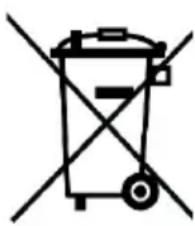
Simple line drawing of a trash bin with two crossed lines indicating no waste or restriction (no text or symbols)Recycling: For electrical products sold within the European Community. At the end of the electrical products useful life it should not be disposed of with household waste.
Please recycle where facilities exist.
Check with your Local Authority or retailer for recycling advice in your country.
After Sales Service and Extended Guarantee terms and conditions
Your product is guaranteed for 1 year from the date of purchase. If you experience a problem with your Dimplex product, which is found to be defective due to faulty materials or workmanship within the Guarantee Period, this Dimplex
Guarantee will cover repair or - at the discretion of Dimplex – replacement with a functionally equivalent Dimplex product.
The 1 year guarantee is extended for an additional 2 years when you register the product with Dimplex, within 28 days of purchase. If you do not register the product with Dimplex within 28 days, your product will remain guaranteed for 1 year only.
Within the extended guarantee period we undertake to repair or exchange this product free of charge providing:
a) Proof of purchase such as a sales receipt should be provided, showing that the appliance was bought within the 36-months prior to registering the defect/fault.
b) The appliance was correctly installed and operated in accordance with the manufacturer's instructions and used solely for domestic purposes.
c) The defect/fault was not as a result of accident, misuse, unauthorised modification or inexpert repair
Your rights under this guarantee are additional to your statutory rights, which in turn are not affected by this guarantee.
To validate your extended guarantee register with us online at http://register.dimplex.co.uk
N.B. Each qualifying product needs to be registered with Dimplex individually.
What is not covered by a Dimplex Guarantee?
The Dimplex Guarantee does not cover any of the following:
Any fault or damage to your Dimplex product due to faulty materials or workmanship occurring outside the 3* year Guarantee Period (*subject to successful online registration for the additional 2 years within 28 days of purchase).
Normal wear and tear including parts that might wear out over time or consumables, such as filters.
Any fault or damage occurring to any pre-owned Dimplex product or to any other equipment or property.
Accidental damage to your Dimplex product or damage to your Dimplex product from external sources (for example, transit, weather, electrical outages or power surges).
Fault or damage to your Dimplex product which is:
- not due to faulty materials or workmanship or which is due to circumstances outside Dimplex's control.
- caused by use of your Dimplex product for anything other than normal domestic household purposes in the country where it was purchased.
- caused by any misuse, abuse or negligent use of the Dimplex product, including but not limited to any failure to use it in accordance with the Operating Instructions supplied with the product.
- caused by any failure to assemble, install clean and maintain your Dimplex product in accordance with the Operating Instructions supplied with the product unless this was carried out by Dimplex or its authorised dealers.
- caused by repairs or alterations to your Dimplex product not carried out by Dimplex service personnel or its authorised dealer(s).
- caused by use of any consumables or spare parts for your Dimplex product which are not Dimplex-specified. A full range of Dimplex-specified consumables, parts and accessories is available at www.dimplex.co.uk
Terms and Conditions
The Dimplex Guarantee is valid for 3* calendar years from the date of purchase (*subject to successful online registration for the additional 2 years within 28 days of purchase) of your Dimplex product from a recognised retailer in the country of purchase and use, or the date of delivery of the product if later, always provided the original receipt has been retained and is produced as proof of purchase.
You must provide to Dimplex or its authorised agents on request the original receipt as proof of purchase and - if required by Dimplex - proof of delivery. If you are unable to provide this documentation, you will be required to pay for any repair work required.
Any repair work under the Dimplex Guarantee will be carried out by Dimplex or its authorised dealer(s) and any parts that are replaced will become the property of Dimplex. Any repairs performed under the Dimplex Guarantee will not extend the Guarantee Period.
Any replacement of your Dimplex product by Dimplex during the Guarantee Period will start the 3*-year Guarantee Period afresh from the date of delivery of the replacement Dimplex product to you. (*Please keep original online guarantee registration email+ sales receipt for your original purchase as proof of the additional 2 years, in case of the unlikely event you experience an issue).
The Dimplex Guarantee does not entitle you to recovery of any indirect or consequential loss or damage including but not limited to loss or damage to any other property.
The Dimplex Guarantee is in addition to your statutory rights as a consumer and your statutory rights are not affected by this Dimplex Guarantee.
Please note that the extended guarantee is only available in the UK and Ireland
If after following these steps your product still does not operate you should return it to your point of purchase.
Please do not return a faulty product to us as this may result in loss or damage and delay in providing you with a satisfactory service.
Dimplex Customer Service UK: 0844 879 3588
Millbrook House Fax: 0844 879 3582
Grange Drive Email: customer.service@gdcgroup.co.uk
Hedge End Republic of Ireland: 01 842 4833
Southampton
S030 2DF
A division of GDC Group Limited.
Website: www.gdcgroup.co.uk
© GDC Group Limited.
All rights reserved. Material contained in this publication may not be reproduced in whole or in part without prior permission in writing of GDC Group Limited.
Contact Dimplex
If you have any questions about what the Dimplex Guarantee covers and does not cover or how to claim under the Dimplex Guarantee, please contact us:
GDC Group Limited, Millbrook House, Grange Drive, Hedge End, Southampton SO30 2DF
Telephone: 0844 879 3588
Email: customer.services@gdcgroup.co.uk
Visit: www.dimplex.co.uk/support

- Installation and Operating Instructions
- PRODUCT PART DESCRIPTIONS
- CONTROL PLATE DESCRIPTION
- Allow the unit to stand upright for 24hrs to let the compressor stabilize before first use or when transported.
- Turning off the unit
- NOTES AND PRECAUTIONS
- DRAINAGE INSTRUCTION
- USE OF THE WATER TANK:
- CONTINUOUS DRAINAGE
- Filter Removal
- Care and Maintenance Instruction
- After Sales Service and Extended Guarantee terms and conditions
- What is not covered by a Dimplex Guarantee?
- Terms and Conditions
- Please note that the extended guarantee is only available in the UK and Ireland
- Contact Dimplex
Brand : DIMPLEX
Model : FTE16
Category : Dehumidifier