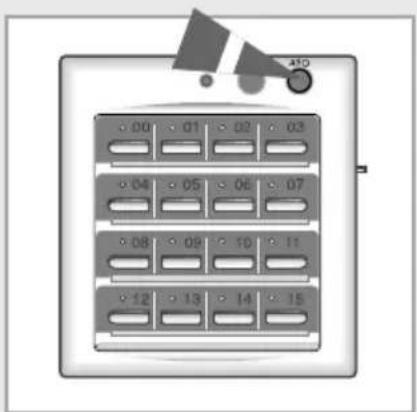
MCM-A200 - Air-conditioner SAMSUNG - Free user manual and instructions
Find the device manual for free MCM-A200 SAMSUNG in PDF.


| Product Type | Centralized Controller for Air Conditioners |
| Brand | Samsung |
| Model | MCM-A200 |
| Compatible Indoor Units | Up to 16 air conditioners (wired connection) |
| Operating Modes | Cool, Auto, Heat (selectable via switch on side panel) |
| Default Temperature Settings | Cool: 24°C (76°F), Heat: 27°C (81°F) |
| Controls | All On button, All Off button, Individual On/Off buttons (0-15) |
| Indicators | Operating lamp (lights when any unit is on), On/Off status indicators per unit |
| Power Supply | Supplied from the air conditioning system (low voltage DC, typical 12V) |
| Dimensions (Approx.) | 120 mm (H) x 80 mm (W) x 25 mm (D) |
| Weight (Approx.) | 200 g (0.44 lbs) |
| Mounting Type | Wall-mounted (screws included) |
| Enclosure Material | Plastic (ABS) |
| Color | White / Off-white |
| Communication | Wired connection to indoor units |
| Safety Certifications | CE, RoHS (typical) |
| Operating Temperature | 0°C to 40°C (32°F to 104°F) |
| Accessories Included | User manual, installation manual, mounting screws |
| Maintenance | Clean with soft cloth; do not use benzene, acid, or alkaline solvents |
| Repair | No user-serviceable parts; contact authorized service personnel |
Frequently Asked Questions - MCM-A200 SAMSUNG
User questions about MCM-A200 SAMSUNG
0 question about this device. Answer the ones you know or ask your own.
Ask a new question about this device
Download the instructions for your Air-conditioner in PDF format for free! Find your manual MCM-A200 - SAMSUNG and take your electronic device back in hand. On this page are published all the documents necessary for the use of your device. MCM-A200 by SAMSUNG.
USER MANUAL MCM-A200 SAMSUNG
System Air Conditioner
natural_image
Abstract icon of server racks or server units with no text or symbolsSafety Precautions
- Before using the centralized controller, read the instructions in this booklet carefully.
- Keep this Owner's Instructions booklet plus the Installation Manual in a handy and safe place. If the user of this product changes, hand over the manuals to the new user.
- Never attempt to install the air conditioning system or move the centralized controller by yourself.

WARNING
◆ Do not attempt to install or repair this product by yourself.
- This product contains no user-serviceable parts. So always consult an authorized service personnel for repairs.
When moving, consult an authorized service personnel for disconnection and installation of the centralized controller.
◆ Ensure that the wall is strong enough to support the weight of the centralized controller.
◆ Install the product using the proper electric power.
◆ In the event of a malfunction(burning smell, etc.), immediately stop the operation, turn off the electrical breaker, and consult an authorized service personnel.

CAUTION
◆ Do not install this product in places where it will come into contact with volatile substances such as machine oil, benzene, gasoline or naphtha.
◆ Do not install this product in places where it will come into contact with combustible gases such as sulfuric gas, hydrogen gas, methane gas, etc.
◆ Do not spill liquid of any kind into the centralized controller.
◆ Do not operate this product with wet hands.
◆ Avoid using spray products such as insecticides near this product.
◆ Do not press the buttons on the centralized connector with a sharp object.
- When installing the electric wires, do not pull or bend the wire excessively because it may be disconnected.
◆ Do not use this product for other purposes.
◆ Do not clean this product with substances such as benzene or acid/alkali solvents.
View of the Centralized Controller
Front View
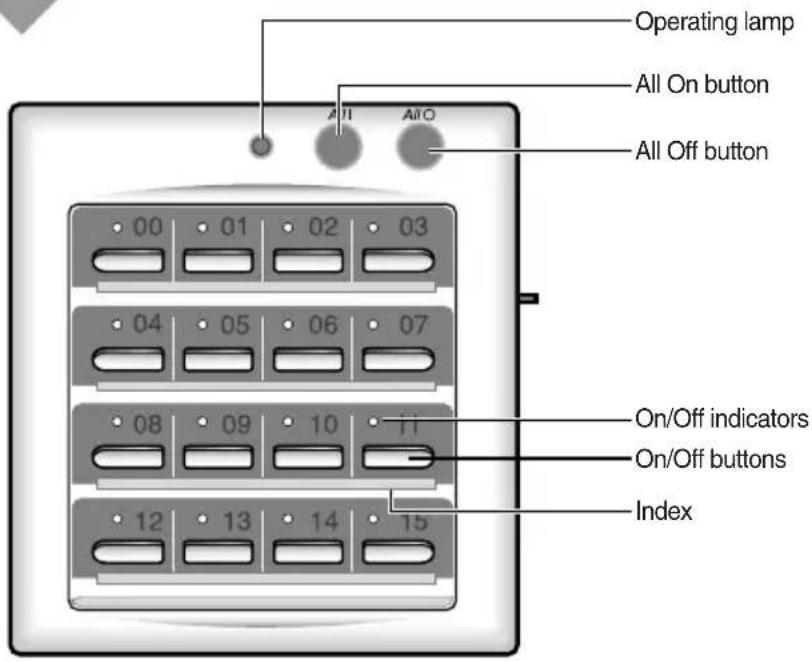
text_image
Operating lamp All On button All Off button 00 01 02 03 04 05 06 07 08 09 10 12 13 14 15 On/Off indicators On/Off buttons IndexR员②
◆The operating lamp comes on even when only one air conditioner connected to the centralized controller is operating.
Side View
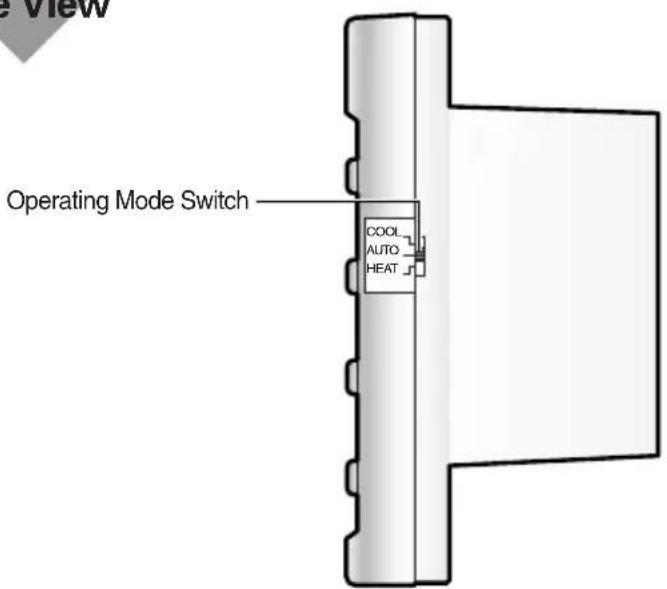
text_image
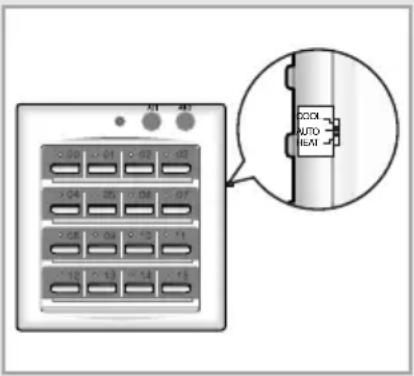
Operating Mode Switch COOL AUTO HEAT.
◆Choose the appropriate operating mode with the Operating Mode Switch that enables the user to choose between the Cool/Auto/Heat mode.
Setting the Operating Mode
The operating mode can be adjusted with the Operating Mode Switch. It is also possible to control the operating mode of the air conditioner with the wired/wireless remote controller or the indoor unit button.
1 Choose an appropriate operating mode with the Operating Mode Switch.
Result:
◆ If the air conditioner is turned on using the centralized controller, the air conditioner will run in the mode selected when the unit was last used.
When operating the air conditioner in the cool/heat operating mode, the temperature will be set as 24^(76^) for cooling and 27^(81^) for heating.
\Idue©
When setting the operating mode with the Operating Mode Switch., the air conditioner must be turned on and off with the centralized controller button, in order to deliver the content of the operating status to each indoor unit.
When using a heat pump model, the indoor units connected to one outdoor unit cannot have 'Mixed Operations'.
- 'Mixed Operation' means that the indoor units connected to one outdoor unit show different kinds of operating modes. In other words, certain indoor units connected to one outdoor unit operate in the heating mode, while other indoor units operate in the cooling mode.
text_image
Diagram showing a device panel with labeled buttons and an inset close-up of a connector labeled 'AUTO' and 'HEAT'.The operating mode can be affected by the operating status of the indoor unit and the centralized controller.
◆The air conditioner can operate in a mode other than the one specified with the Operating Mode Switch.
When operating the indoor units in the Cool or Heat Mode
1 If the operating mode that was selected when the unit was last used is the same as the centralized controller's operating mode, the indoor unit will operate in the operating mode that was selected when the unit was last used.
If the indoor unit is in the Heat operating mode with a set temperature of 30^(86^) and the centralized controller is in the Heat operating mode with a set temperature of 27^(81^) , the air conditioner will start its operation in the heating mode with a set temperature of 30^(86^) .
2 If the operating mode that was selected when the unit was last used is different from the centralized controller's operating mode, the indoor unit will operate in the operating mode of the centralized controller.
If the indoor unit is in the Dry operating mode with a set temperature of 24^(76^) and the centralized controller is in the Heat operating mode with a set temperature of 27^(81^) , the indoor unit will operate in the Heat operating mode with a set temperature of 27^(81^) .
When operating the indoor units in the Auto Mode
If the air conditioner is turned on, it will operate in the operating mode that was selected when the unit was last used. However, when the power is turned on for the first time after installing the system, the air conditioner will operate in the Auto operating mode with a set temperature of 24^(76^) .
When using the Centralized Controller
Up to sixteen air conditioners can be turned on or off if the centralized controller is used. However, you cannot adjust the cooling temperature or set the timer with it. If you are also using the wired remote controller, CENTRALIZED CONTROL is displayed at the top of the remote controller.
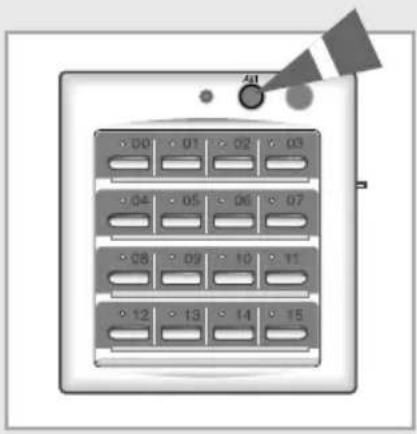
1 In order to turn ON all the air conditioners connected to the centralized controller., press the ⏻(All ON) button.
Result:
◆The operating lamp of the centralized controller comes on.
◆ All of the air conditioners will operate in the operating mode chosen with the Operating Mode Switch.
2 In order to turn ON/OFF a specific air conditioner connected to the centralized controller, press the (Specific ON/OFF) button.
Result:
◆The operating lamp of the centralized controller and the ON/OFF indicator of a specific air conditioner comes on.
◆A specific air conditioner will operate in the operating mode chosen with the Operating Mode Switch.
3 Press the ⚡ (All OFF) button to turn off all the air conditioners connected to the centralized controller.
text_image
00 01 02 03 04 05 06 07 08 09 10 11 12 13 14 15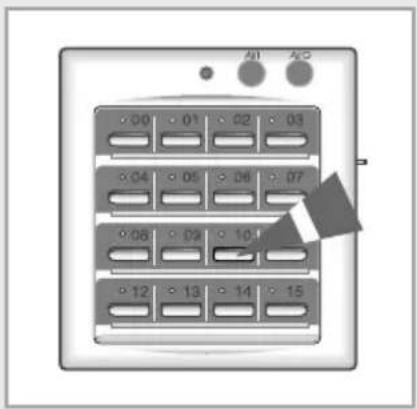
text_image
00 01 02 03 04 05 06 07 08 09 10 12 13 14 15