
Emit M15C - Pregnant DYNAUDIO - Free user manual and instructions
Find the device manual for free Emit M15C DYNAUDIO in PDF.


User questions about Emit M15C DYNAUDIO
0 question about this device. Answer the ones you know or ask your own.
Ask a new question about this device
Download the instructions for your Pregnant in PDF format for free! Find your manual Emit M15C - DYNAUDIO and take your electronic device back in hand. On this page are published all the documents necessary for the use of your device. Emit M15C by DYNAUDIO.
USER MANUAL Emit M15C DYNAUDIO
- Start
■ Introduction
■ Speaker positioning and installation
■ Speaker connections
■ Using and caring for speakers
■ Backcover
Use the language selector in the navigation to access this manual in other languages.
Introduction
Welcome, and many thanks for putting your music in our hands.
Back in 1977, Dynaudio's founder, Wilfried Ehrenholz, was dissatisfied by the hi-fi speakers he'd been listening to, so he began the Dynaudio story by building his own: mounting drivers made by other companies in modified off-the-shelf cabinets, and blending the systems with his own crossover designs. But Wilfried still wasn't satisfied. He came to realise that he could only get the speaker performance he aspired to if he designed and made as many components as possible himself. And we all know there's sometimes only one way to get something right: do it yourself.
Your new Dynaudio speakers have a direct link back to Wilfried's commitment to retaining control of all the vital components, design, engineering and manufacture. And that, in today's interconnected and badge-engineered commercial world, makes Dynaudio a very unusual organisation.
The paragraphs and illustrations of Dynaudio user manuals will help you get the best from your speakers and should provide all the guidance you need. But if you have further questions there are extensive support and FAQ resources available via the Dynaudio website.
Dynaudio manuals start with a little housekeeping and a few obligatory notes of caution, and continue with sections on speaker positioning, speaker connections, speakers in use, and speaker care.

CAUTION!
High sound-pressure levels
Listening to high sound pressure levels over extended periods can damage hearing.

CAUTION!
Floor spikes
Some Dynaudio speakers and stands are equipped with floor spikes. Floor spikes can cause injury or damage sensitive surfaces if not handled carefully.

CAUTION!
Speakers on stands
Speakers mounted on floor stands should always be restrained on the stand top-plate by rubber pads or similar adhesive materials. Speakers mounted on stands without top-plate restraint can fall and potentially cause injury.
Note
To maintain the long-term aesthetic quality of your speakers, excessively warm, cold, or humid locations should be avoided. Similarly, direct sunlight or excessive artificial light can affect the colour of the natural wood veneers used on speaker cabinets.
Speaker positioning and installation
At Dynaudio we appreciate that speakers should fit with your environment and lifestyle, not the other way around, so our speakers make no unusual room positioning demands. Even so, every listening room has its own acoustic character and is uniquely furnished, so there are always choices to be made to help ensure that your speakers can give their best. Don't be afraid to experiment with adjusting the speaker positioning, and listening carefully, until you have it just right to your ears.
Speaker positioning
Speaker stands or wall mounting
Dynaudio speakers designed to sit on speaker stands can often also be placed on shelves, wall brackets or furniture units. Speaker stands, however, are likely to provide both the best performance and enable the greatest flexibility in positioning. They will also place the speakers at the correct height – approximately head height when listening. If you'd rather install your speakers on shelves, brackets or furniture units there are a few things to consider:
- Installing speakers on shelves, wall brackets or furniture units will lessen your ability to adjust speaker positioning. Make sure to read the General Layout paragraphs before deciding on shelf or bracket locations.
- Installing speakers on shelves, wall brackets or furniture units will result in increased bass volume and potentially less focussed stereo images due to reflections from the nearby back wall.
- The height of your speakers is important. They should be positioned approximately at head height when listening. Both speakers of the pair should be mounted at the same height.
- Shelves, brackets and furniture units should be easily able to support the weight of the speakers and be both rigid and non-resonant. Shelves or brackets attached to stud-work and plasterboard walls are unlikely to provide adequate strength or rigidity. If you're unsure of your wall's suitability, or of your ability to install shelf or bracket hardware, check with a qualified professional.
- Furniture that incorporates large unsupported panels might not be suitable for speaker mounting as the vibrations from the speakers can cause sympathetic panel vibrations. Similarly, locating speakers within furniture alcoves can result in a resonant air volume around and behind the speaker that could colour the sound.
Using speaker stands
If your Dynaudio speakers are supplied with stands, or you intend to use alternative Dynaudio stands, please follow the assembly instructions supplied with them. If you have lost the instructions, you can download them free of charge from the support section of the Dynaudio website. Instructions for using the feet supplied with the stands are also available.
If you intend to user speaker stands from an alternative manufacturer, please follow the assembly instructions supplied with them.
We always recommend that speakers mounted on stands are restrained on the stand-top plate by rubber pads or similar adhesive materials. Speakers mounted on stands without top-plate restraint can fall and potentially cause injury.
General layout – stereo systems
In the majority of cases, stereo speakers should be between 2 m and 4 m (6 ft and 13 ft) apart. If the speakers are too close together, the stereo image will lack scale; if they're too far apart, the image might have a weak central focus. The distance from the loudspeakers to the listening area should be similar to, or slightly more than, their distance apart. The closer the listening area is to the loudspeakers, the closer the speakers can be to each other. Paying attention to the stereo image will help dictate optimum speaker positioning. Diagram 1 illustrates basic speaker positioning.
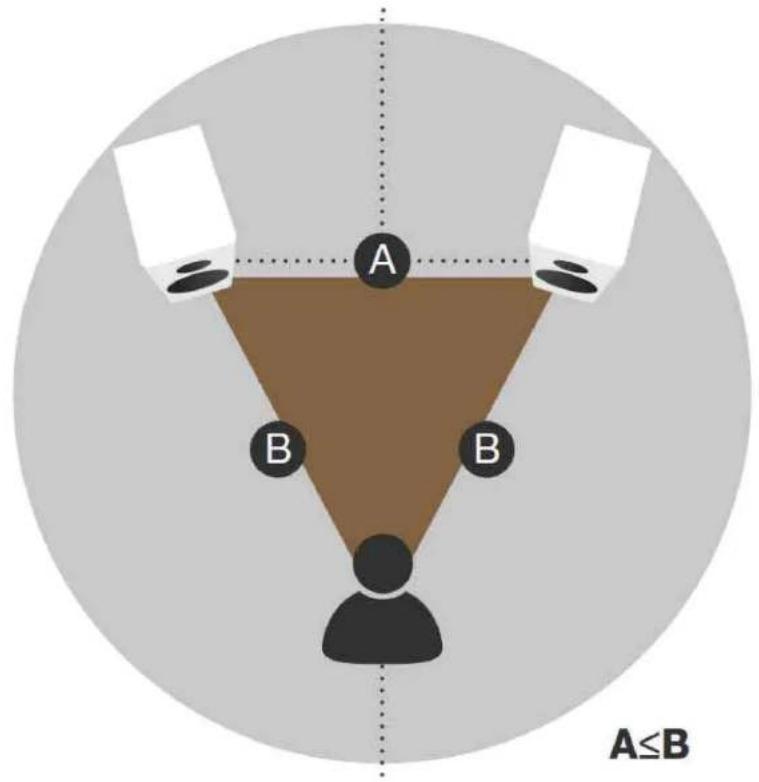
flowchart
graph TD
    A["A"] --> B["B"]
    B --> C["..."]
    style A fill:#f9f,stroke:#333
    style B fill:#bbf,stroke:#333
    style C fill:#dfd,stroke:#333
    note right of A A≤B
Diagram 1: Basic speaker positioning
Surround-channel speakers
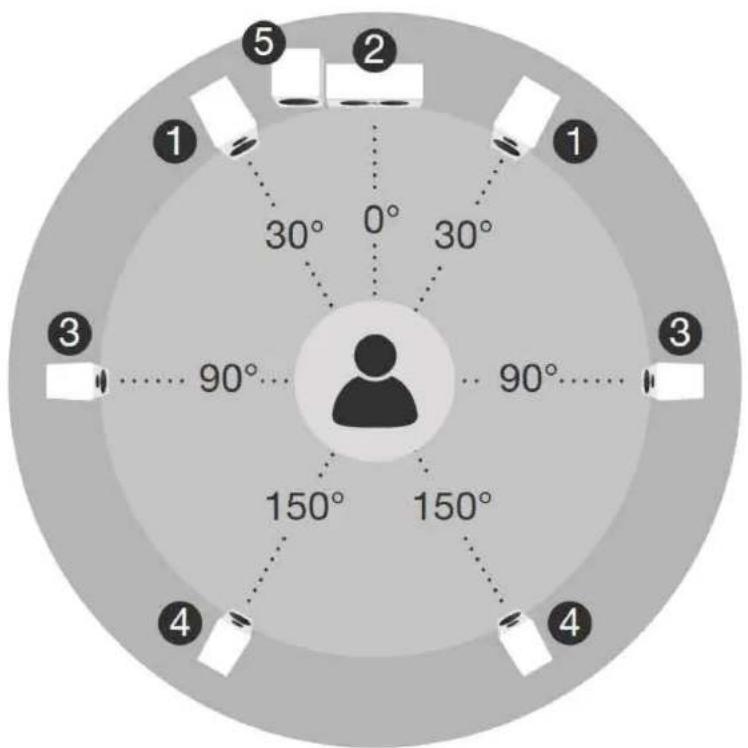
Surround-channel speakers in a home cinema system are sometimes described as rear-channel speakers. In 5.1 systems (five speakers and one subwoofer), the surround-channel speakers should in fact be placed either side of the listening area, just above head height. In systems with more than two surround channels, the extra speakers go behind the listening position, so deserve the title 'rear'. Diagram 2 illustrates multi-channel speaker positioning.
text_image
1 2 3 4 5 0° 30° 90° 150° 150° 30° 3 3 4 3Diagram 2: Multi-channel speaker positioning
General Layout - multi-channel systems
In home-cinema systems, the locations of the centre- and front-channel speakers are the most important. The location of surround-channel speakers is less critical. However, to experience a film soundtrack the way its sound designer intended, the surround-channel speakers should be positioned appropriately. Diagram 2 illustrates multi-channel speaker positioning.
Front-channel speakers
The front-channel speakers in a home-cinema system should be located either side of the screen. The top of the speakers should be approximately level with, or slightly above, the screen's horizontal centre-line, and each speaker should be between 15 cm (6 in) to 60 cm (2 ft) away from the screen's sides. The surround-channel in home-cinema systems tends to stretch stereo images so the front-channel speakers can be located a little closer together than in traditional stereo systems. Front channel audio can also become 'detached' from the video if the speakers are too far apart. Diagram 2 illustrates multi-channel speaker positioning.
Centre-channel speaker
The centre-channel speaker in a multi-channel home-cinema system can be located either directly above or below the screen on its vertical centre line. If the screen is located relatively high on the wall, the centre-channel speaker should always be located beneath. Diagram 2 illustrates multi-channel speaker positioning.
Speaker positioning – room effects
Every loudspeaker radiates sound energy not only forward but also to the side and, particularly at lower frequencies, to the rear. As a result, reflections from the room boundaries occur that interfere with the speaker's forward radiation. When loudspeakers are positioned too close to room boundaries their performance is affected.
Even with your speakers placed away from room boundaries, the material and acoustic character of the boundaries will still have an effect on the sound. Try to ensure that immediate surroundings of each speaker have similar acoustic qualities. Different acoustic qualities would be heavy curtains and bare walls, for example. The sound of any speaker will also be influenced by the furniture and other large objects within the listening room, and the material of its construction and wall covering. For example, a large room with little furniture and hard wall surfaces will result in a bright, diffuse sound, while a room with carpet, curtains and soft furnishings will result in a more focussed and less lively sound.
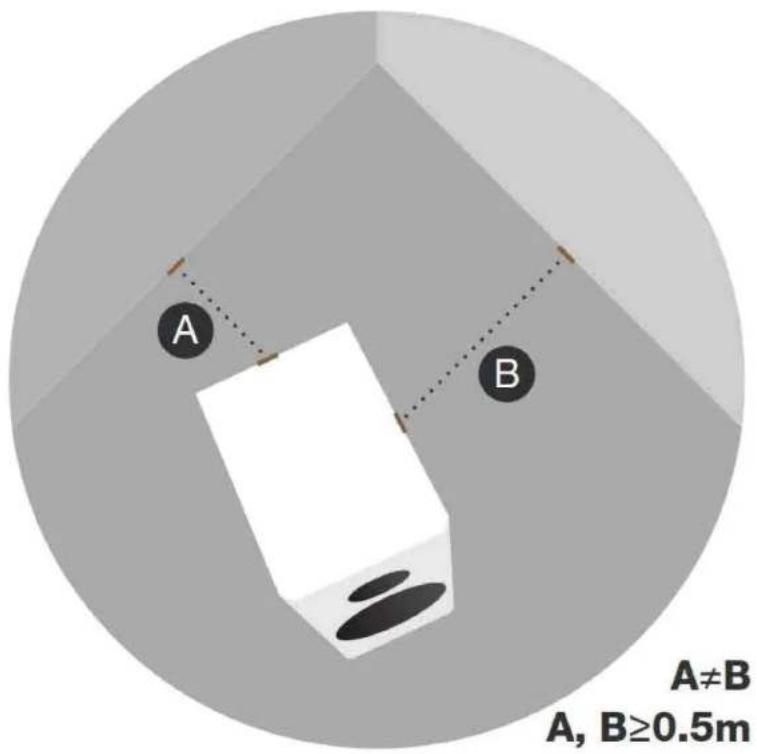
Dynaudio speakers are designed to perform at their best when positioned as far from any walls as possible. Ideally, try to aim for a minimum distance of 50 cm (18 in) from each speaker to any wall. Diagram 3 illustrates room boundary distances.
text_image
A B A≠B A, B≥0.5mDiagram 3: Distance to walls
Speaker positioning – using port plugs
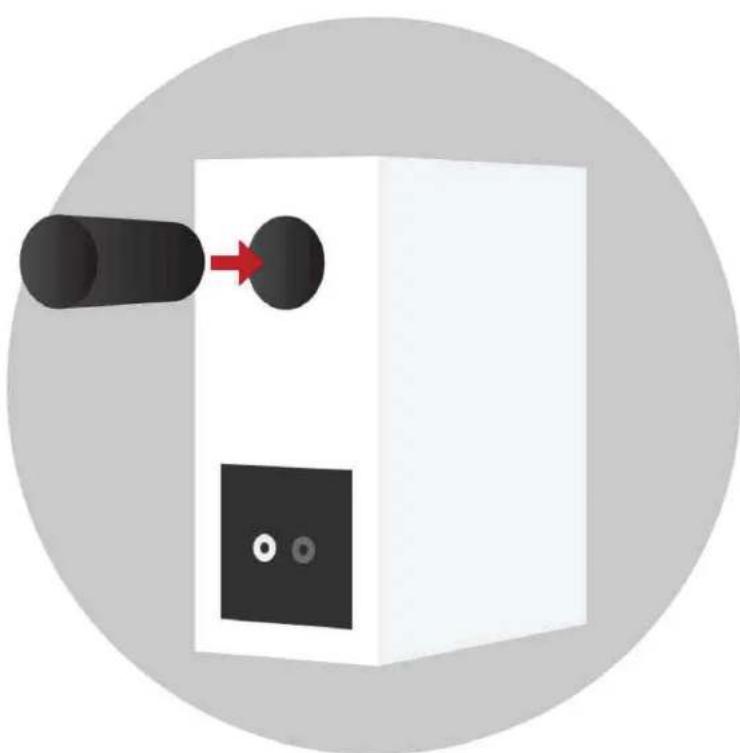
If your Dynaudio speakers have reflex ports and are supplied with foam plugs, these can be fitted to reduce the bass emphasis that may be apparent if the speakers are placed close to room boundaries. Some Dynaudio port plugs can be split to provide optional levels of bass volume reduction. For mild bass reduction, fit only the outer foam ring by sliding it in the port tube so that it sits just inside the flared port exit – making sure it retains its shape to minimise airflow turbulence. For more extreme bass reduction, fit the complete plug so that the port is blocked. Diagram 4 illustrates the use of port plugs and their effect on speaker frequency response.
natural_image
Illustration of a device with a black cylindrical port and two circular ports, no text or symbols present.Diagram 4: Reflex port foam plugs
Speaker positioning – inward angle
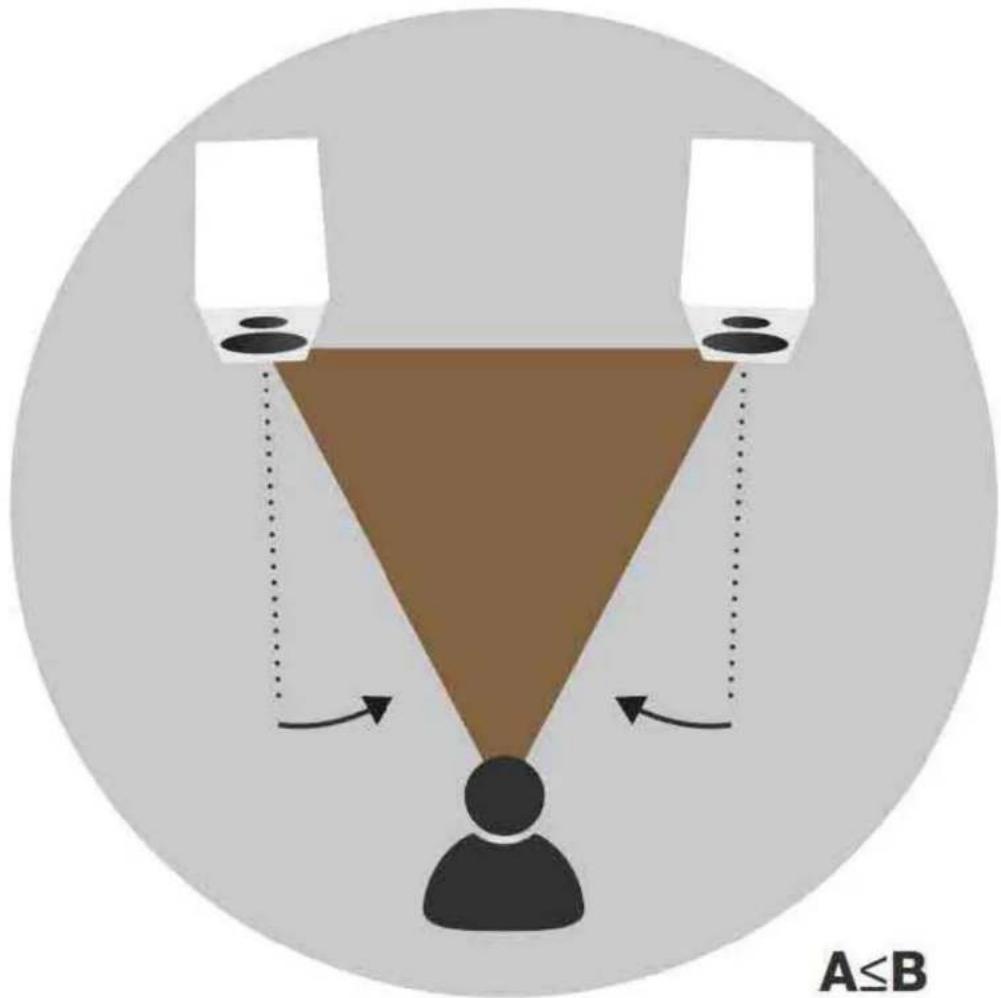
There is no rule that speakers must be angled inward, but depending on the dimensions and acoustic character of your listening room, it could improve the stereo image focus. Experiment and trust your ears – you'll definitely know when it sounds its best.
Speakers used for front channels in home-cinema systems are less likely to benefit from inward angling as the centre-channel speaker tends to control the central image. Diagram 5 illustrates inward angle.
text_image
A≤BDiagram 5: Angle inwards loudspeakers to improve imaging
Speaker and stand foot options
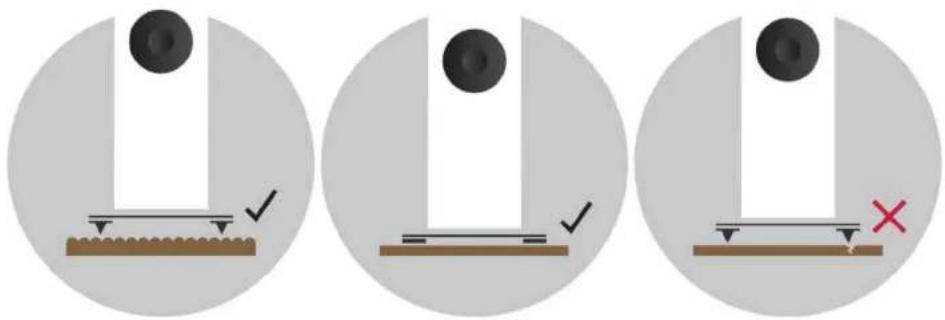
Dynaudio floor-standing speakers and Dynaudio floor-stands intended for stand-mount speakers are supplied with two foot options: floor spikes and rubber feet. Diagram 6 illustrates the use of floor spikes and rubber feet.
natural_image
Three circular diagrams showing a mechanical setup with a weight, a surface, and a cross mark (no text or symbols)Diagram 6: Use of floor spikes and rubber feet
Spikes are designed for use on carpets and rugs. They pierce the carpet to rest on the floor surface beneath, providing the speaker or stand with a solid foundation. When using floor spikes ensure that the spike length extends enough that the bottom of the speaker or stand is well clear of the carpet.
Spikes can also be used on non-carpeted floors with metallic discs (such as coins) placed between the spike tips and the floor. In this case the length of spike extending beneath the speakers or stands should be minimised.
The rubber feet are for when speakers or stands are used on uncovered wooden or tile floors. Make sure the length of foot adjustment extending beneath the speakers or stands is minimised.
Spikes or rubber feet should be adjusted so that the speakers or stands are vertical and don't rock.
Always take great care when installing floor spikes or when moving speakers or stands with floor spikes fitted.
Never tilt a speaker or stand with floor spikes or rubber feet fitted so that its entire weight rests on one or two spikes or feet.
Speaker connections
The type of speaker cable you use can affect audio performance. While it isn't absolutely necessary to use specialised cables, in general quality speaker cable will give the best results. In any case, the cable used should have a conductor cross-sectional area of at least 1.5 mm ^2 – and performance may begin to suffer if cable length exceeds a maximum of around 15 m. The cable length to each speaker of a stereo pair should be approximately the same.
Your Dynaudio retailer will be able to offer advice on speaker cable that will suit both your electronics and your Dynaudio speakers.
Your Dynaudio speakers' connection terminals can accommodate stripped cables, 4 mm banana plugs or cable spades. Emit series speakers support only stripped cables and banana plugs. Most modern amplifiers incorporate terminals that provide similar connection options.
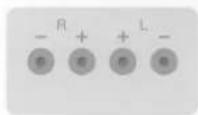
Begin by connecting the cable to the terminals on the speaker cabinet. Ensure that conductors marked 'positive' are connected to the positive (red) speaker terminals and that cable conductors marked 'negative' are connected to the negative (black) speaker terminals. The process of speaker connection varies depending on the type of cable connectors in use:
- 4 mm plugs: insert the plugs directly into the end of the speaker terminals. The terminals don't need to be tightened, but it's good practice to do it anyway to minimise any chance of mechanical buzzing.
- Stripped cables: fully unscrew the speaker terminals and insert the stripped cable ends into the holes through the terminal posts. Make sure that no stray cable strands are left free. It will help to twist the stripped cable strands together. Tighten the terminals down securely onto the stripped cable. It's good practice to check terminals for tightness soon after they are initially tightened and occasionally thereafter.
- Cable spades: fully unscrew the speaker terminals and position each cable spade arm either side of a terminal post. Secure the cable spades by securely tightening the terminals. It's good practice to check terminals for tightness soon after they are initially tightened and occasionally thereafter.
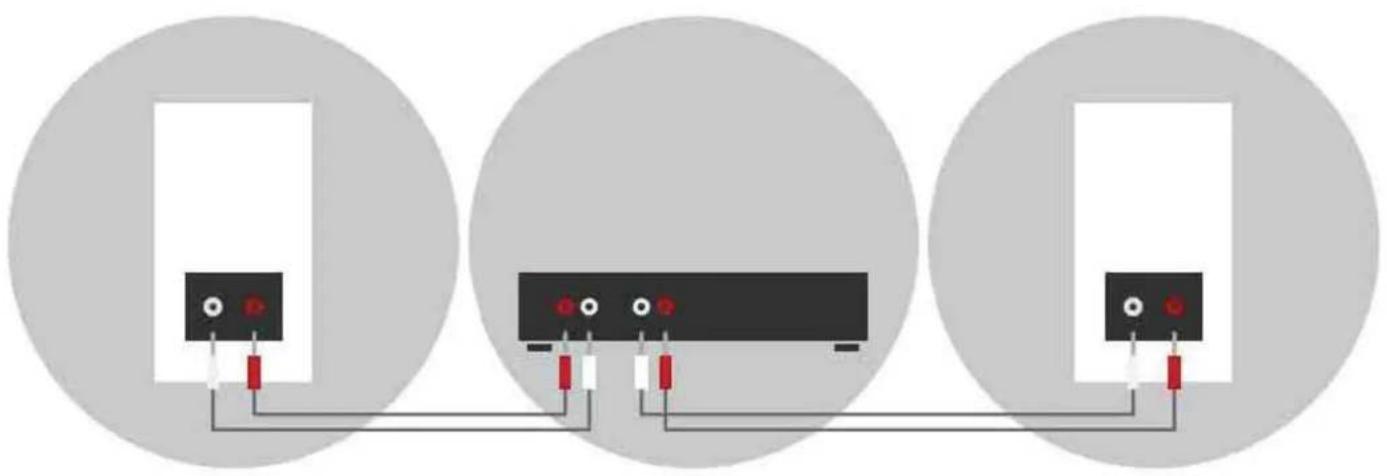
Once cables are connected to the speakers, they can be connected to the amplifier speaker output terminals. Make sure the amp is switched off, connect the cables from the left speaker to the left-channel amplifier terminals and the cables from the right speaker to the right-channel amplifier terminals. For multi-channel home-cinema systems with surround- and centre-channel outputs, connect each speaker to the appropriately marked amp terminals.
Ensure in every case that cable conductors marked “positive” are connected to the positive (red) amplifier and speaker terminals and that cable conductors marked “negative” are connected to the negative (black) amplifier and speaker terminals.
Diagram 7 illustrates speaker connections.
natural_image
Three circular diagrams showing connected components with red and black pins, no text or symbols present.Diagram 7: Basic speaker positioning
Using and caring for speakers
Amplifier power and speaker power handling
Every Dynaudio speaker has a power-rating specification, and we always suggest using this for guidance on maximum amplifier power. As a rough guide we suggest a minimum amplifier power of around 20% of a speaker's power rating per channel to ensure the amp can drive hard without producing potentially speaker-damaging distortion. Your Dynaudio retailer will always be able to offer advice on suitable amplifiers for your speakers.
The golden rule is to reduce the volume if ever the sound becomes distorted. Distortion is a sure sign that damage to either speakers or amplifier is likely.
Speaker grilles
Many Dynaudio speakers have removable front grilles. Their use is really a matter of personal preference, but there are a few factors to consider. First, drive-unit diaphragms, especially tweeters, are delicate and can easily be damaged by inquisitive fingers. If you have young children, grilles are probably best left fitted. Second, even though grilles are designed to have a minimal influence on performance, the sound quality of your speakers may be marginally improved without them. We suggest removing the grilles for serious listening and replacing them at other times.
Some Dynaudio speaker grilles are attached magnetically while others are use plastic plugs and corresponding sockets. In either case, grilles are removed simply by gently pulling them away from the cabinet front panel. Grille replacement is the reverse procedure.
Running-In
The moving parts of a newly manufactured Dynaudio loudspeaker have been acoustically checked after production, but nevertheless are not as flexible as they need to be for optimum results to be realised. The higher the quality of any driver system, the more demanding the loudspeaker will be regarding time for running in the system.
A newly unpacked Dynaudio loudspeaker therefore requires several weeks running/ playing to reach its optimum performance capability. After that period, a couple of minutes before every listening session will be helpful to “warm up” the loudspeakers.
Care and maintenance
Dynaudio speakers don't require any special treatment apart from the kind of care that you would invest in any valuable items in your home.
Use a soft, dry or very slightly damp cloth to clean the cabinet and other non-functional components. You should always avoid touching the tweeter dome. Dust can be removed from bass and midrange driver diaphragms using a soft brush. Fabric grilles are best cleaned with a soft brush. We do not recommend use of any cleaning or polishing fluids or sprays. If you do use such things, however, they are best applied to a cleaning cloth rather than directly to the speaker cabinets. It is wise also to test cleaning products on a small area of either the back or underside of the cabinet first. Don't let any cleaning products touch the driver diaphragms.
Warranty
Dynaudio provides a transferable limited manufacturer's warranty. This warranty only covers faults or defects in materials and production. Damage caused as a result of abuse, misuse or defective electronics isn't covered.
All warranty claims must be accompanied by a copy of the original purchase invoice, and warranties are only valid in the country or market of original origin or distribution. Should warranty service be required, it must be arranged for in the country of purchase by an authorised Dynaudio dealer.
DYNAUDIO
Dynaudio A/S
8660 Skanderborg
Denmark
dynaudio.com
Passive Speakers
User manual
© 2019 Dynaudio. Last edit: 2019-02-15
All text and image copyrights reserved.
Subject to change without notice.
DYNAUDIO
www.dynaudio.com
text_image
1 2 2 1 ≤ 2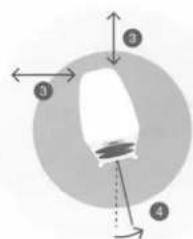
text_image
Diagram showing a circular object with four numbered regions and directional arrows indicating movement or flow.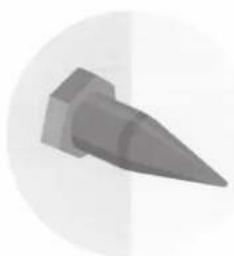
natural_image
3D-rendered gray bullet or projectile with pointed tip, isolated on white background (no text or symbols)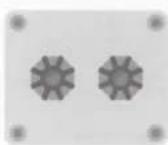
SPEAKERS
Deutsch
This Quick Setup Guide allows you to quickly set up your Dynaudio loudspeakers. It does not replace the Operating Guide. Please refer to this for further information.
Positioning

CAUTION SPIKES WITH SHARP TIPS
Some loudspeaker models and the Dynaudio stands are equipped with spikes. The sharp tips of the spikes may cause injuries and can damage sensitive surfaces like hardwood or tile flooring.
▶ Be careful when handling the loudspeakers and stands.
▶ Place discs (such as coins) between the spikes and the underlying surface for protection. (Note: Spikes will generally not damage carpeting).
Stereo setup
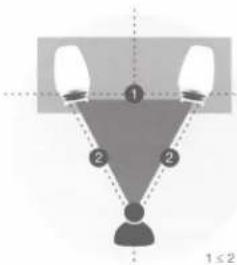
- The distance between each loudspeaker and your listening position should be the same (2).
- The distance between the loudspeakers (1) should be the same or preferably slightly less than the distance between each
loudspeakers and your listening position (2) ▶ As a starting point, it is recommended that the speakers be about 2 meters apart from each other for the best results (1).
Multichannel setup
In multi-channel setups, additional channels (speakers) must be added. See operating guide for additional information.
Distance to walls (3)
For the best performance, it is recommended that the speakers are placed away from walls as far as practically possible.
▶ To reduce possible influences from the back and sidewalls, the distance to these boundaries should at least 0.5 meter (3).
Loudspeaker toe-in (4)
The loudspeakers may be angled in towards the listening position area to focus sound dispersion which typically improves imaging.
▶ Widen the angle (4) step by step to find best setup.
Positioning compact speakers
- Compact speakers will realize their optimum performance when used together with a dedicated stand (such as Dynaudio Stands).
- Due to the compact dimensions, the loudspeaker can also be positioned on a shelf or a cabinet.
- When placing speakers in an enclosed space such as a audio/video cabinet allow minimal clearance from the surrounding walls to the top and rear of the loudspeaker cabinet.
Floor-standing speakers
▶ Adjust each of the four spikes in the base plinth for maximum stability.
Note: Heed the warnings above regarding the spikes.
Connecting
1. Cable and speakers
▶ Connect a two-pole (+/-) loudspeaker cable to the binding posts, located at rear of the cabinet.
The posts can accommodate 4.0 mm banana plugs, cable spades or bare wires. Note: Ensure that none of the leads are shorting with another through loose strands or otherwise.
2. Cable and amplifier
▶ Switch off the amplifier and connect the speaker cables to the amplifier's loudspeaker terminals.
Note: Ensure that the red marked post of the speaker is connected to the red marked output of the amp, and the white or black marked post to the while or black marked output accordingly.
3. Multichannel connections
▶ Proceed in the same way to connect all channels in your multichannel setup.
▶ Refer to the operating instructions of your multichannel power amplifier for further help.
Operation
▶ A new Dynaudio loudspeaker requires several weeks of playing to reach its optimum performance capability.
▶ Use high quality amplifiers only and run loudspeakers and amplifiers within specified power ratings.
Français
GB To extend the warranty on your Dynaudio loudspeakers to a maximum of eight years, please register your speakers online at www.register.dynaudio.com or contact your dealer for assistance.
(Note: The extended warranty period is limited on active speakers and subwoofers.)