Classic 1097 - Watch Sekonda - Free user manual and instructions
Find the device manual for free Classic 1097 Sekonda in PDF.


| Product Type | Watch |
| Brand | Sekonda |
| Model | Classic 1097 |
| Movement | Quartz analogue |
| Case Material | Stainless steel |
| Case Diameter | Approximately 40 mm |
| Case Thickness | Approximately 10 mm |
| Strap Material | Leather or stainless steel (depending on variant) |
| Water Resistance | 30 meters (3 ATM) – suitable for splashes and rain, not for swimming |
| Battery Type | Lithium button cell (e.g., SR626SW) |
| Battery Life | 2–3 years under normal use |
| Functions | Time and date display; day/date and chronograph on select variants |
| Guarantee | 2 years against manufacturing defects (battery, strap, and water damage excluded) |
| Service Interval | Recommended every 12 months for water resistance seal check |
| Bracelet Adjustment | Multiple clasp system for easy resizing; additional links removable by jeweller |
| Maintenance | Avoid operating crown or buttons underwater; keep away from moisture if not water resistant |
| Spare Parts | Batteries, straps, and bracelets available from authorised retailers |
Frequently Asked Questions - Classic 1097 Sekonda
User questions about Classic 1097 Sekonda
0 question about this device. Answer the ones you know or ask your own.
Ask a new question about this device
Download the instructions for your Watch in PDF format for free! Find your manual Classic 1097 - Sekonda and take your electronic device back in hand. On this page are published all the documents necessary for the use of your device. Classic 1097 by Sekonda.
USER MANUAL Classic 1097 Sekonda
InstructionGuide and
2YearGuarantee
IS01
Contents
1ServiceandRepairs/SettingtheTime–AM/PM
2WaterResistancy 3–12OperationandAdjustment
Forfreebraceletadjustingservice,returnthewatch totheaddressbelow.
T.P.(UK)Ltd,AlexanderHouse,ChartwellDrive,Wigston,LeicesterLE182EZ
Formaximumprotection,pleasekeepyourwatch initspresentationboxwhennotinuse.
ImportantNote It is important to identify your watch correctly. If, after reading this Instruction Guide, you have any further questions regarding the use, operation or adjustment of your watch, please call us during office hours on 01162882500
SERVICEANDREPAIRS
YourSEKONDAwatchisguaranteedagainstdefectsinmaterials andworkmanshipforaperiodof2yearsfromthedateof purchase. During this period, wewillexchangeorrepair, atourdiscretion, any defective components.
IMPORTANT-NotcoveredbyGuarantee
- Batteries, strapsandbracelets.
- Damagecausedbyaccident, misuseorlackofcare.
- Waterpenetrationexceptinwatchesmarked as "WaterResistant". (seepage2).
SERVICINGANDREPAIRSUNDERGUARANTEE
Pleasepostyourwatch,togetherwiththeRetailer'sSalesRe- ceiptorProofofPurchase,thecompletedGuaranteesliponthe backcoverofthisbooklet,andabriefnotetoexplainthenature ofthefault,byRegisteredPostorRecordedDeliverytothead-dressshown.Donotsendthepresentationboxasthiswillnotbe returned.
SERVICINGANDREPAIRSOUTSIDEOFGUARANTEE
Availableatareasonablechargeafteranestimatehasbeen sentbySEKONDA.SendyourwatchtousbyRegisteredPost orRecordedDeliverytotheaddresssshownontheinsidefront cover.
SETTINGTHECORRECTTIME(AM/PM)—DATEWATCHES
- IftheDATEchangeswhenthehandsareturnedpast 12o'clock,thetimeshownis“am”.
- IftheDATEdoesnotchange,thetimeshownis"pm".
WATERRESISTANCY
If your watch is water resistant, it will clearly state "Water Resistant" or have a static water pressure indication (eg "30/50/100 metres") on the daily and/or caseback.
IfitisNOTmarkedaswaterresistant, it should not be allowed to come into contact with water or beworn in condition that could expose it to moisture (egwashing, heavy rainetc). Certain chemicals in water may damage the watch seals. Tomaintain its water resistance, were recommend that your watch is serviced and re-sealed at least every 12 months by SEKONDA.
IMPORTANTButtonsmustnotbeoperatedwhilein contactwithwater.
WATERRESISTANTorRESISTANT TO30METRES
Suitablefornormaleverydayuseandwillresist exposuretosplashesandrain;itisNOTdesigned tobeusedwhilebathingorswimming.
WATERRESISTANTTO50METRES
As30metresplusbathingorswimming.
WATERRESISTANTTO100METRES
As50metrespluspoolsidedivingandsnorkelling, butNOThighboardorscubadiving.
WATERRESISTANTTO200METRES
As100metresplusscubadiving, but NO Thighboard diving.
MODELSWITHASCREW-DOWNCROWN (BUTTON)
Unlockthecrownbyturningitanti-clockwiseuntilfree. Lockitbypressinginwhileturningclockwise.WATER RESISTANCEislostwhenthecrownisintheUN-LOCKEDposition.
QuartzanaloguewatchesdoNOT requirewinding.
Thebuttonisusedforhand/functionsettingonly.When inuse,ensurethatthebuttonispushedFULLYINto position“A”.Failuretodosocanresultinexcessive batterydrainordamagetothehandsetting/date mechanism.
The instructions and diagramson the following pages are designed to demonstrate the adjustment of all models within our range.
Yourwatchmaynothaveallofthecharacteristics shownandmayhaveotherbuttonsanddialsinadditiontothoseshownonindividualdiagrams.
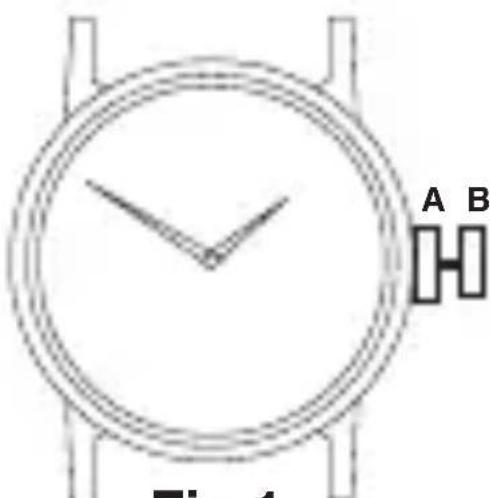
QUARTZNON-DATEWATCH TIMESETTING:
- Pullbuttonouttoposition“B”.
- Advancehandstocorrecttime.
- Returnbuttontoposition“A”.
text_image
A B Fig 1Fig 1
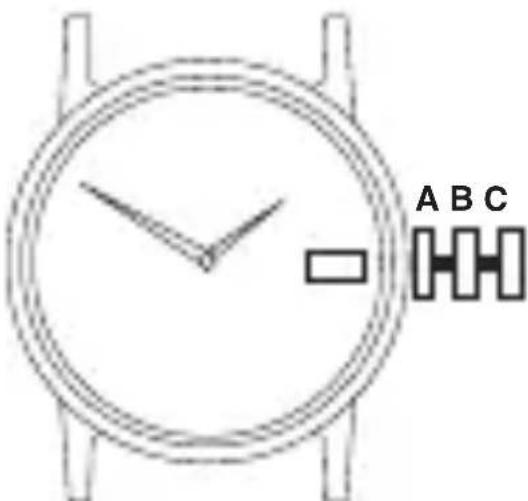
QUARTZDATEWATCH DATESETTING:
- Pullbuttonouttoposition“B”.
- Turnclockwiseoranti-clockwisetosetcorrectdate.
- Returnbuttontoposition“A”.
NOTE: Donotusethisfunctionbetween8.30pm and1.30amasdatechangecycleisinprogress.
text_image
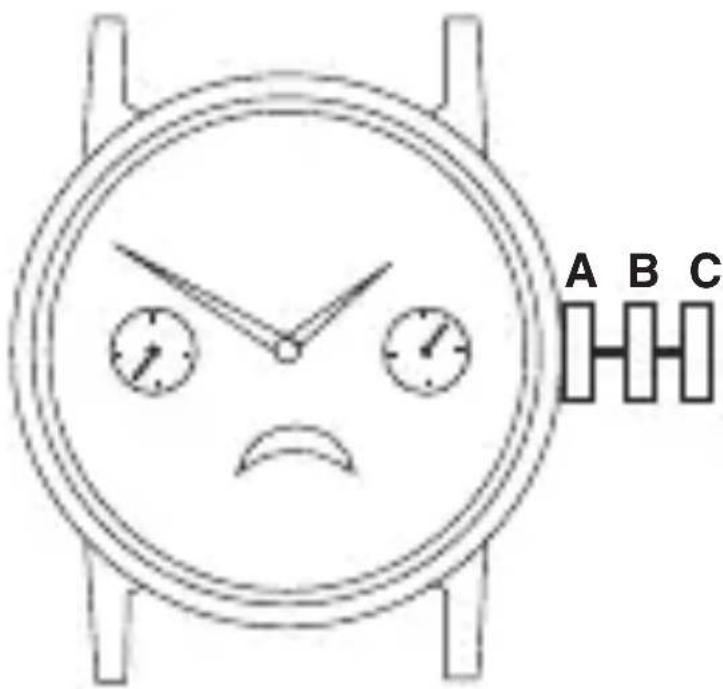
A B CDAY/DATEMOONPHASEWATCH MOONPHASESETTING:
- Pullbuttonouttoposition“B”.
- Turnbuttonclockwisetosetcorrectmoonphase (seeenclosedleafletfordatesofmoonphase).
- Returnbuttontoposition“A”.
DATECORRECTION:
- Pullbuttonouttoposition“B”.
- Turnbuttonanti-clockwisetosetdate.
- Returnbuttontoposition“A”.
DAY/TIMESETTING:
- Pullbuttonouttoposition"C".
- Turnhandsforwardsuntilcorrectdayandtimearereached.
- Returnbuttontoposition“A”.
text_image
A B CQUARTZ3EYECHRONOGRAPHWITHDATE TIME/DATESETTING:
Seeinstructionsonpages4and5.
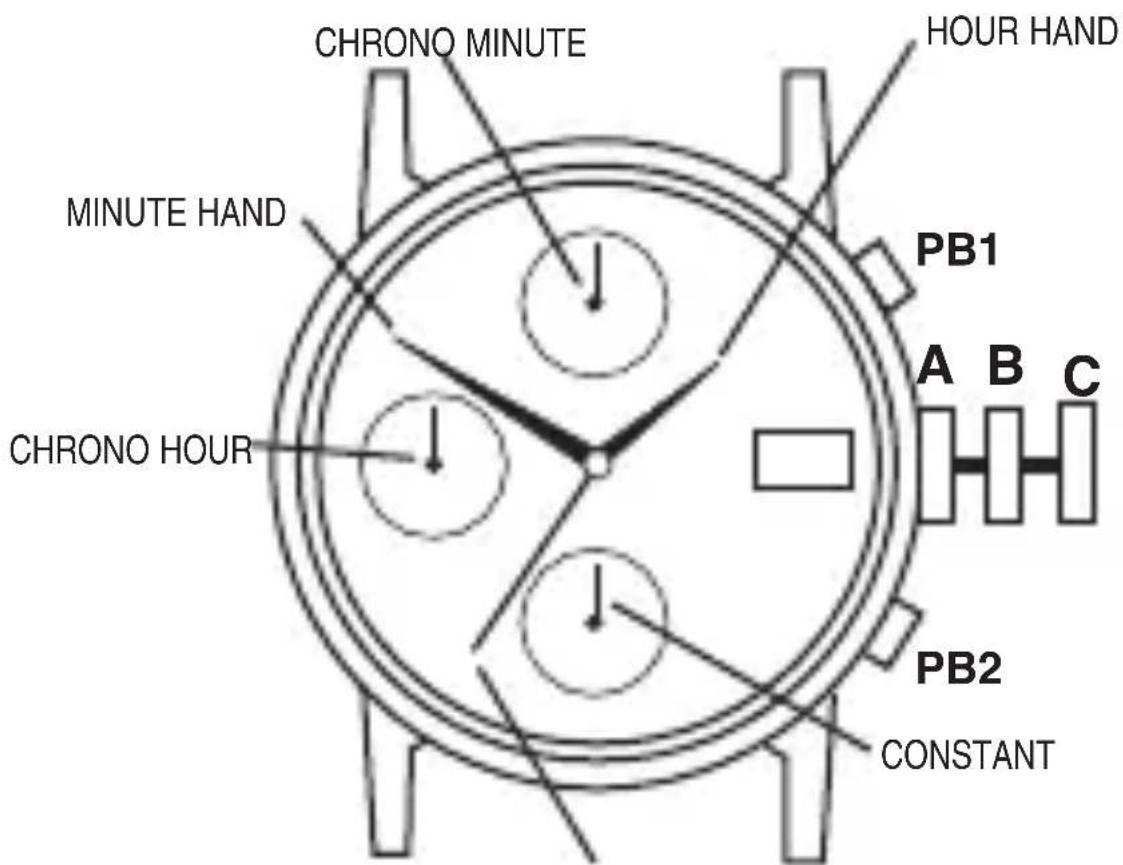
OPERATINGCHRONOGRAPH:
- PushPB1tostart/stopchronograph.
- PushPB2toreset.
CHRONOGRAPHZERORESET:
- Pullbuttonouttoposition'C' (Chronosecondhandsreturntozeroposition).
- PushPB1tosetChronosecondhand to12.00(zero)position.
- Returnbuttontoposition'A'.
- PushPB2tosetChronominuteto12.00(zero)position.
HAND DISPLAYS
text_image
CHRONO MINUTE HOUR HAND MINUTE HAND PB1 A B C CHRONO HOUR PB2 CONSTANTCHRONO SECONDS NOTE: Thishandshouldbeat zero(12o'clockposition) whenchronoisnotinuse.
QUARTZDAY/DATEWATCHES TIMESETTING:
- Pullbuttonouttoposition“C”.
- Advancehandstocorrecttime.
- Returnbuttontoposition“A”.
DAY/DATESETTING:
- Pullbuttonouttoposition“B”.
- Turnclockwiseoranti-clockwisetosetcorrectdate.
- Turnclockwiseoranti-clockwisetosetcorrectday.
NOTE:DaysoftheweekcanbesetinEnglishor Spanish. Oncesetthewatchwillautomatically indicatethedayinthechosenlanguage.
- Returnbuttontoposition“A”.
NOTE: Donotsetday/datebetween8.30pm and5.00amasday/datechangecycleisinprogress.
text_image
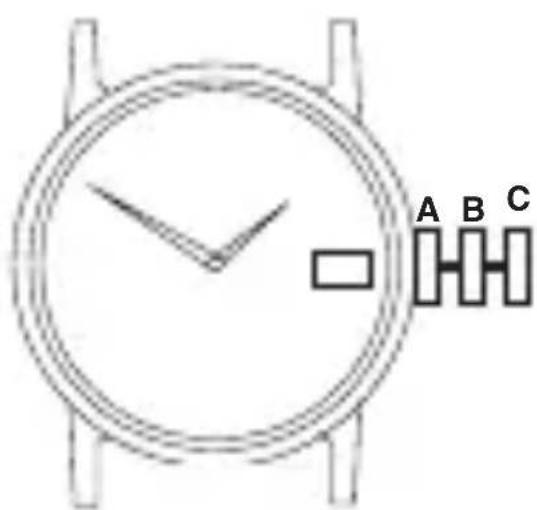
A B CQUARTZ“TWO-EYE”(MONTH&DAY)WITHDATEWATCH DAY&TIMESETTING:
- Pullbuttonouttoposition"C".
- Turnbuttontoadvancehandsuntildaychanges; repeatuntilcorrectdayandtimeisshown.
- Returnbuttontoposition“A”.
DATE&MONTHSETTING:
- Pullbuttonouttoposition“B”.
- Turnbuttonclockwiseuntilmonthchanges (every31days).
- Repeat until correct month and date areshown.
- Returnbuttontoposition"A".
text_image
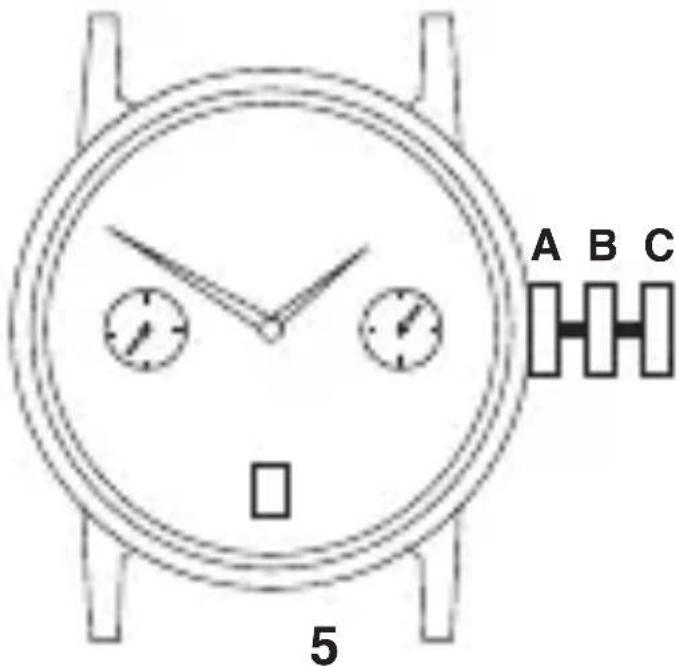
A B C 5QUARTZ“TWO-EYE”(DAY&DATE)WATCH
IMPORTANT-Thepositionoftheday/date"eyes"referredtoin theseinstructionsMAYBEREVERSEDoncertainModels.
DATEINRIGHTEYE-DAY&TIMESETTING:
- Pullbuttonouttoposition“C”.
- Turnbuttontoadvancehandsuntildaychanges; repeatuntilcorrectdayandtimeisshown.
- Returnbuttontoposition"A".
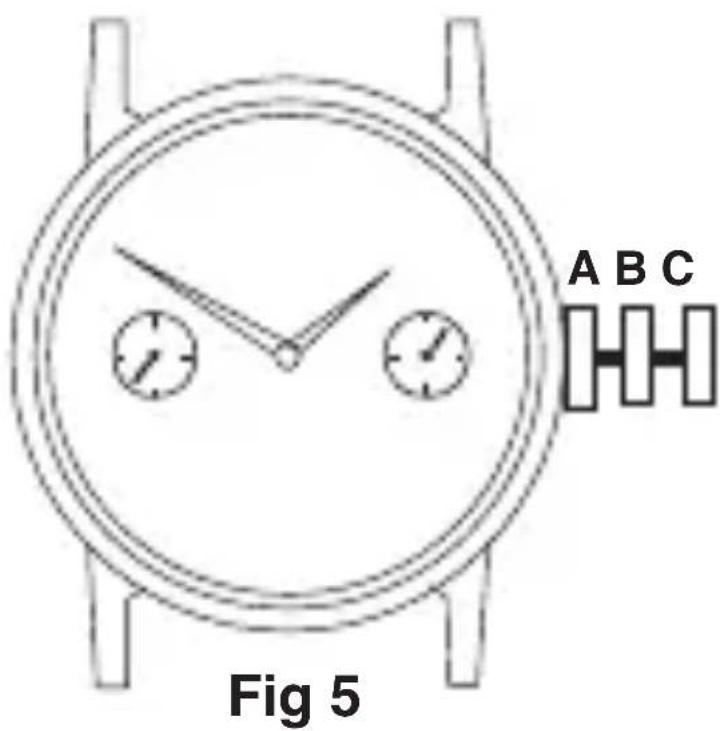
QUARTZ“TWO-EYE”(DAY&DATE)WATCH(continued) DATEINRIGHTEYE(continued) DATESETTING:
- Pullbuttonouttoposition“B”.
- Turnbuttonclockwiseuntildatechanges.
- Repeatuntilcorrectdateisshown.
- Returnbuttontoposition“A”.
DATEINLEFTEYE TIMESETTING:
- Pullbuttonouttoposition"C".
•Turnbuttontoadvancehands. - Returnbuttontoposition“A”.
DAY/DATESETTING:
- Pullbuttonouttoposition“B”.
- Turnbuttonanti-clockwisetosetcorrectDAY.
- TurnbuttonclockwisetosetcorrectDATE.
- Returnbuttontoposition“A”.
text_image
A B C Fig 5MODELSWITHELECTROLUMINESCENT DISPLAY(E.L.D.)FACILITY
NON-DATEMODELS
TIMESETTING:
•Seeinstructionsonpage4.
DATEMODELS
TIME/DATESETTING:
•Seeinstructionsonpages4and5.
text_image
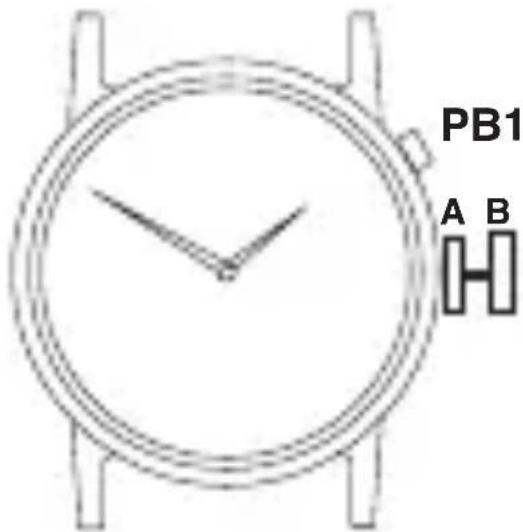
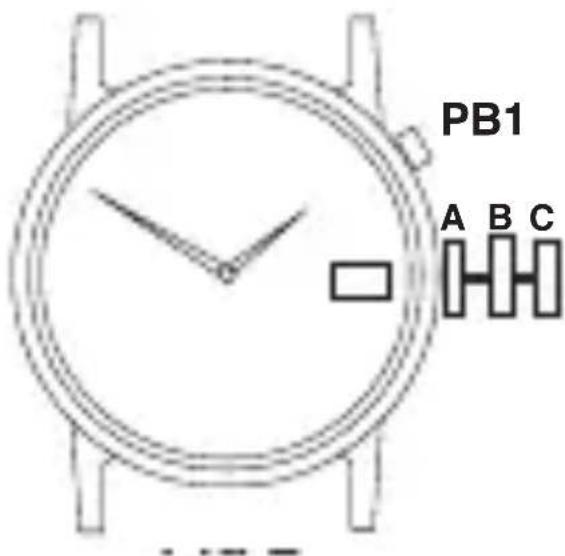
PB1 A BE.L.D.DISPLAY
- PressPB1toactivatedisplay (Displayonlyvisibleinsubduedlight).
Note: Displayshouldonlybeactivatedfor shortperiods, e.g. 1 or 2 seconds as excessive use will greatly reduce the life of the battery.
text_image
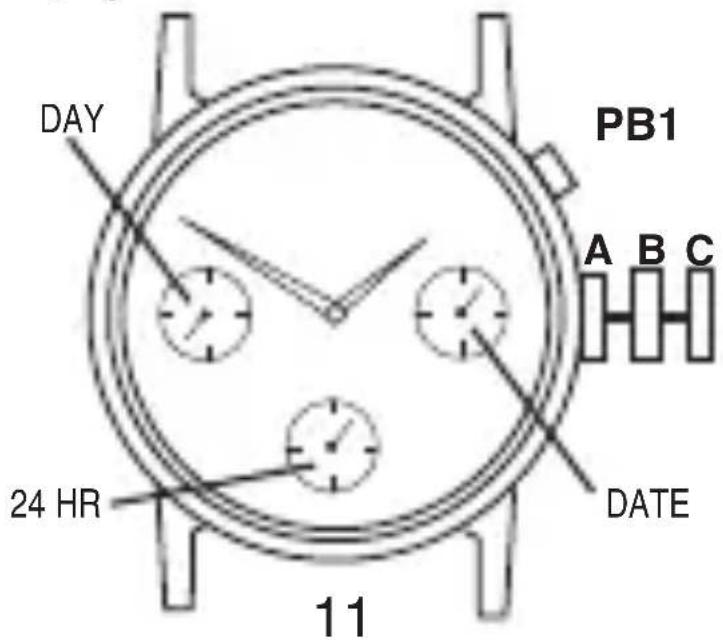
PB1 A B CE.L.D.-THREEEYEWITHDAY-DATE- 24HOURFUNCTIONS DAYSETTING:
- Pullbuttonouttoposition"C".
- Turnbuttonclockwisetoadvancehands.
- Continueuntilcorrectdayisshown.
- Returnbuttontoposition“A”.
NOTE: Datechangetakesplacebetweenapproximately midnight and 5.30am.
TIME/24HRFUNCTIONSETTING:
- Pullbuttonouttoposition"C".
- Turnbuttonclockwisetosetthehour,minuteand24 hourhandstothecorrecttime.*Whensettingthehour hand,besuretocheckthatthe24hourhandisset properly.(E.G.12midnight=24.00hrs)
- Returnbuttontoposition“A”.
NOTE: Whensettingtheminutehandfirstadvanceit4to 5minutesaheadofthedesiredtimeandthenturnitback totheexactminute.
DATE(QUICKCHANGEFUNCTION)SETTING:
- Pullbuttonouttoposition“B”.
- Turnbuttonanti-clockwisetoadvancedatehand tocorrectdate.
- Returnbuttontoposition“A”.
E.L.D.DISPLAY:
Seeinstructionsonpage10.
text_image
DAY PB1 A B C 24 HR DATE 11
text_image
AB
MULTIPLECLASPS
Someofourbraceletmodelsare nowfittedwithamultipleclasp systemwhichisdesignedtomake braceletadjustmenteasierforyou.
Toreducethesizeofthebracelet simplyopenandremoveoneor bothoftheadjustableclasps indicatedas(A)and(B)onthe diagram.
Shouldyoufeelthatyourbracelet isinneedoffurtheradjustment, pleasefollowtheproceduresinIn-struction3ofthebraceletgaugein-cluduedinthisleaflet.
Guarantee
BlockCapitals
Name
Address
PostCode
DaytimePhone
T.P.(UK)Ltd,AlexanderHouse,ChartwellDrive,Wigston,LeicesterLE182EZ
Important
ThisguaranteeshouldberetainedbytheownerofthewatchandshouldbesenttoSekondatogetherwiththewatchand£4.00tocoverhandlingandpostagewhenserviceunderguaranteeisrequired.Pleaserefertopage1oftheinstructionguideforfurtherinformationonserviceunderguarantee.Thisguaranteedoesnotaffect yours tatutoryrights.
RetailersStampifrequiredorfullnameandaddress
AttachReceptorProofofPurchase; failuretoattachmayinvalidateguarantee. Thisguaranteedoesnotaffectyour statutoryrights.
IS01/10-10