
MC26AC2-12 - Air-conditioner SAMSUNG - Free user manual and instructions
Find the device manual for free MC26AC2-12 SAMSUNG in PDF.


User questions about MC26AC2-12 SAMSUNG
0 question about this device. Answer the ones you know or ask your own.
Ask a new question about this device
Download the instructions for your Air-conditioner in PDF format for free! Find your manual MC26AC2-12 - SAMSUNG and take your electronic device back in hand. On this page are published all the documents necessary for the use of your device. MC26AC2-12 by SAMSUNG.
USER MANUAL MC26AC2-12 SAMSUNG
MANUAL DE INSTRUÇÕES
GEBRAUCHSANWEISUNG
ΟΔΗΓΙΕΣ ΧΡΗΣΤΗ
Indoor unit Outdoor unit
| AM14B1(B2)E07 | UM14B1(B2)E2 |
| AM18B1(B2)E09 | UM18B1(B2)E2 |
| AM20B1(B2)E06 | UM20B1(B2)E3 |
| AM20B1(B2)E09 | |
| AM26B1(B2)E07 | |
| AM26B1(B2)E12 | UM26B1(B2)E3 |
| AM18B1(B2)B09 | UM18B1(B2)B2 |
| AM26B1(B2)B13 | UM26B1(B2)B2 |
| AM26B1(B2)B13A | UM26B1(B2)B2 |
| AM27B1(B2)C07 | UM27B1(B2)C3 |
| AM27B1(B2)C13 | |
| MC18AC2-09 | MC18AC2X |
| MC19AC2-07 | |
| MC19AC2-12 | MC19AC2X |
| MC24AC2-12 | MC24AC2X |
| MC26AC2-07 | |
| MC26AC2-12 | MC26AC2X |
MULTI-SPLIT TYPE ROOM AIR CONDITIONER(Cool)
natural_image
Pure electrical circuit lines without any symbolsSafety Precautions
The following safety precautions must be taken when using your air conditioner.

WARNING
Risk of electric shock. • Can cause injury or death. • Disconnect all remote electric power supplies before servicing, installing or cleaning. • This must be done by the manufacturer or its service agent or a similar qualified person in order to avoid a hazard.
DURING OPERATION
◆ Users of this product are cautioned not to attempt repair of this product at their own discretion. Instead, they are requested to directly contact a designated service center or the outlet at which the product was purchased.
◆ Never spill any kind of liquid into the unit. Should this happen, unplug or main switch off the unit and contact an authorized service center.
Do not insert anything between the air outlet blades because the inner fan may be damaged and could cause injury. Keep children away from the unit.
◆ Do not place any obstacles in front of the unit.
◆ Do not spray liquid of any kind into the indoor unit. Should this happen, switch off the breaker used for your air conditioner and contact your installation specialist.
◆ Make sure that the unit is correctly ventilated at all times: Do not place clothing or other materials over it.
◆ If the wireless remote control will not be used for a long time, remove the batteries. (If applicable)
When using a wireless remote control, the distance should not be more than 7 meters from the air conditioner. (If applicable)
◆ Before throwing out the device, it is necessary to pull back the battery cells and get rid of them safely for recycling reasons.
When you need to dispose of the unit, consult your dealer. If pipes are removed incorrectly, refrigerant may blow out and come into contact with your skin, causing injury. Releasing refrigerant into the atmosphere also damages the environments.
◆ Please recycle or dispose of the packaging material for this product in an environmentally responsible manner.
◆ Never store or ship the air conditioner upside down or sideways to avoid damage to the compressor.
◆ The appliance is not intended for use by young children or infirm persons without supervision: Young children should be supervised to ensure that they do not play with the appliance.
◆ Max current is measured according to IEC standard for safety and current is measured according to ISO standard for energy efficiency.
DISPOSING OF THE UNIT
OTHERS
Contents
◆ PREPARING YOUR AIR CONDITIONER
■ Safety Precautions 2
■ View of the Unit 4
■ Remote Control-Buttons and Display 6
- Getting Started 7
- Inserting the Remote Control Batteries ....8
◆ OPERATING YOUR AIR CONDITIONER
■ 5 Way Function 9
■ Selecting the Automatic Operating Mode ..... 10
■ Cooling Your Room 11
■ Changing the Room Temperature Quickly ..... 12
■ Removing Excess Humidity 13
■ Airing Your Room 14
■ Adjusting the Air Flow Direction Vertically ..... 15
■ Adjusting the Air Flow Direction Horizontally ..... 15
◆ PROGRAMMING YOUR AIR CONDITIONER
■ Setting the On Timer 16
■ Setting the Off Timer 17
■ Setting the Sleep Timer 18
◆ RECOMMENDATIONS FOR USE
■ Operating Recommendations .... 19
■ Temperature and Humidity Ranges 20
■ Cleaning Your Air Conditioner 20
■ Solving Common Problems ..... 21
■ Installing a Filter (Option) 22
◆ TECHNICAL SPECIFICATIONS
Correct Disposal of This Product (Waste Electrical & Electronic Equipment)
(Applicable in the European Union and other European countries with separate collection systems)
This marking shown on the product or its literature, indicates that it should not be disposed with other household wastes at the end of its working life. To prevent possible harm to the environment or human health from uncontrolled waste disposal, please separate this from other types of wastes and recycle it responsibly to promote the sustainable reuse of material resources.
Household users should contact either the retailer where they purchased this product, or their local government office, for details of where and how they can take this item for environmentally safe recycling.
Business users should contact their supplier and check the terms and conditions of the purchase contract. This product should not be mixed with other commercial wastes for disposal.
View of the Unit
The design and shape are subject to change according to the model.
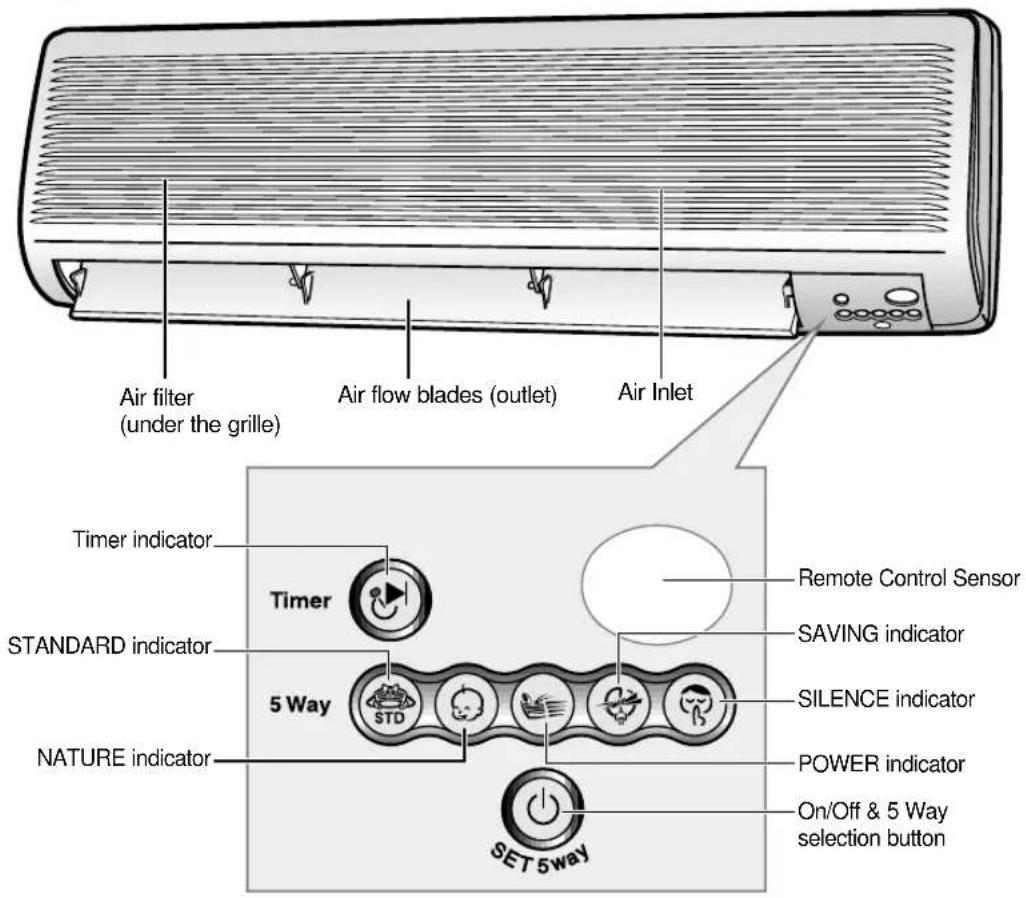
Indoor Unit
text_image
Air filter (under the grille) Air flow blades (outlet) Air Inlet Timer indicator Timer STANDARD indicator 5 Way NATURE indicator SET 5way Remote Control Sensor SAVING indicator SILENCE indicator POWER indicator On/Off & 5 Way selection buttonNide
◆ For details on the 5 Way, refer to page 9.
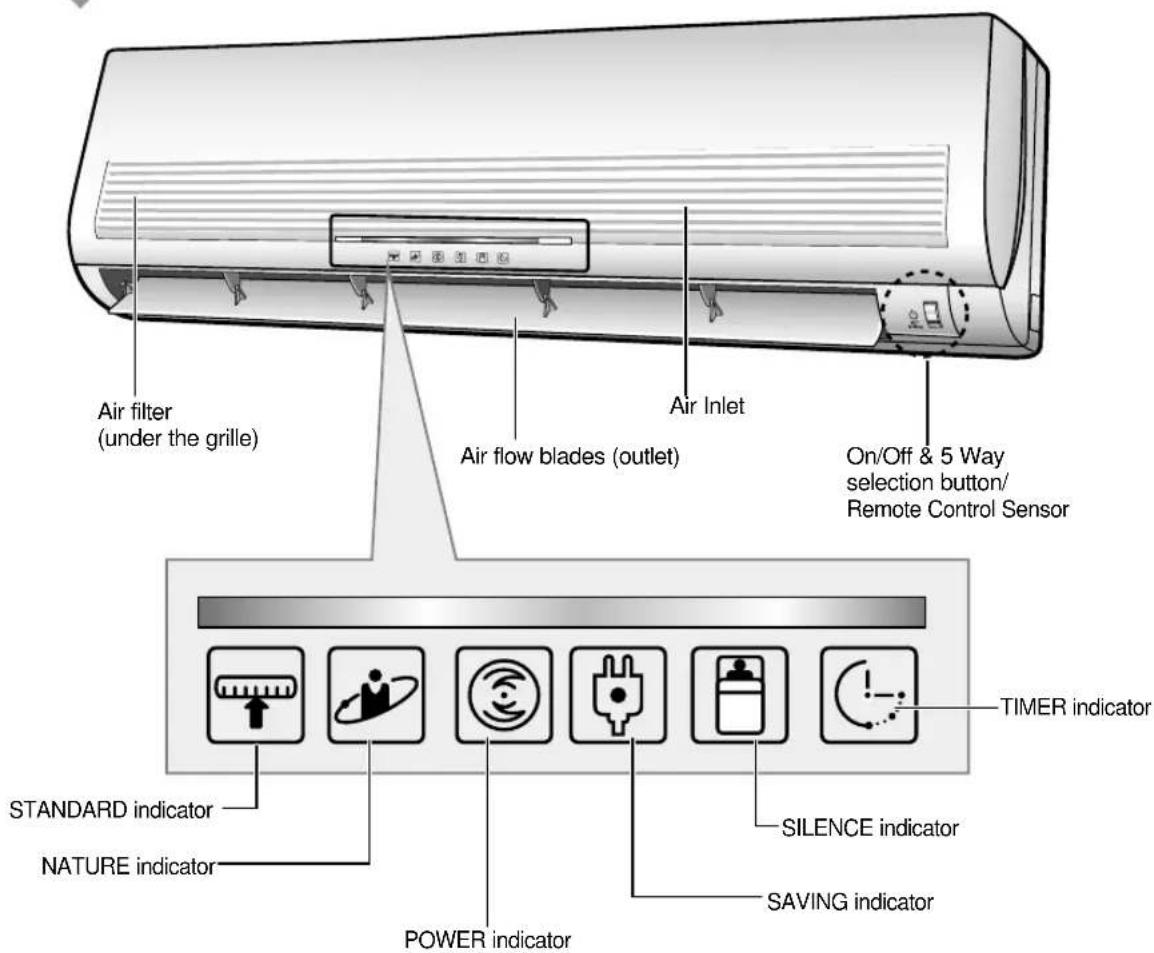
Indoor Unit MC**C2**
text_image
Air filter (under the grille) Air Inlet Air flow blades (outlet) On/Off & 5 Way selection button/ Remote Control Sensor STANDARD NATURE POWER SILENCE SAVING indicator TIMER indicator
◆ For details on the 5 Way, refer to page 9.
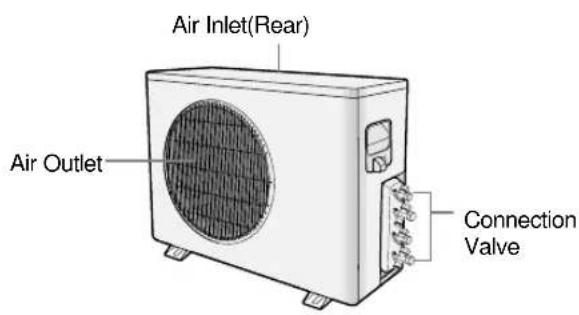
Outdoor Unit The design and shape are subject to change according to the model.
text_image
Air Inlet(Rear) Air Outlet Connection Valve
text_image
Air Inlet(Rear) Air Outlet Connection ValveRemote Control - Buttons and Display
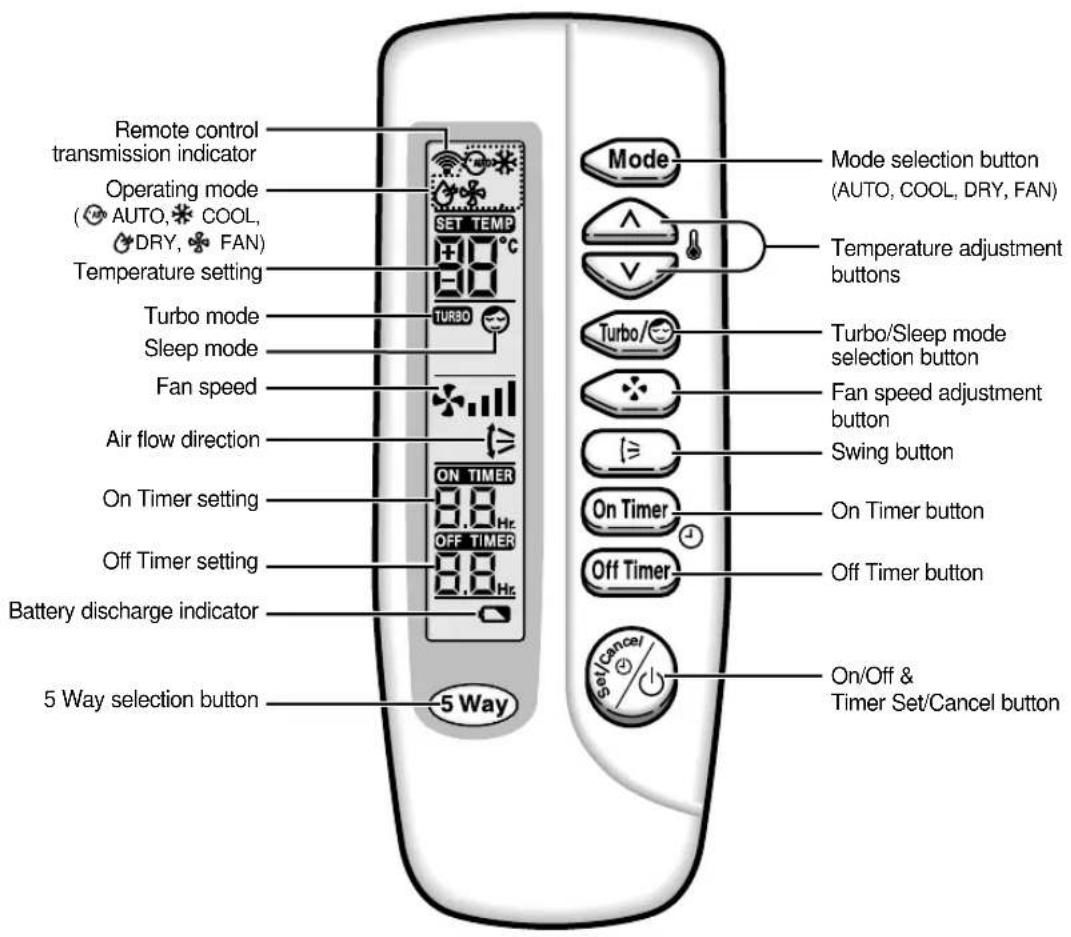
text_image
Remote control transmission indicator Operating mode (AUTO, COOL, DRY, FAN) Temperature setting Turbo mode Sleep mode Fan speed Air flow direction On Timer setting Off Timer setting Battery discharge indicator 5 Way selection button SET TEMP TURBO ON TIMER OFF TIMER 5 Way Mode selection button (AUTO, COOL, DRY, FAN) Temperature adjustment buttons Turbo/Sleep mode selection button Fan speed adjustment button Swing button On Timer button Off Timer button On/Off & Timer Set/Cancel buttonGetting Started
You have just purchased a split type air conditioner and it has been installed by your installation specialist.
Your Owner's Instructions contains valuable information on using your air conditioner. Please take the time to read it as it will help you take full advantage of the unit's features.
The booklet is organized as follows.
◆ The following figures are shown on pages from 4 to 6 :
- Indoor and outdoor units
- Remote control(buttons and display)
They will help you find the buttons and understand the symbols displayed.
◆ In the main part of the installation book, you will find a series of step-by-step procedures for each function available.
The illustrations in the step-by-step procedures use three different symbols:
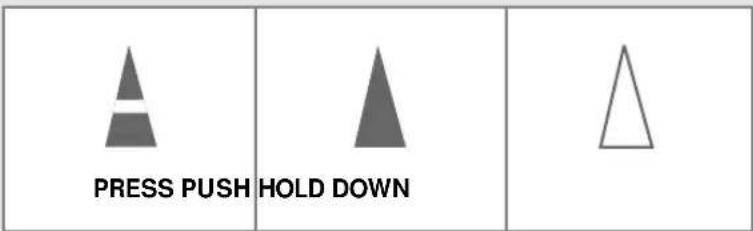
text_image
PRESS PUSH HOLD DOWNInserting the Remote Control Batteries
natural_image
Illustration of a remote control device with internal components and a directional arrow (no text or symbols)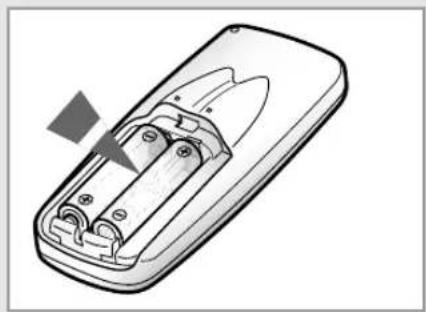
natural_image
Illustration of a remote control device with battery and socket (no text or symbols)You must insert or replace the remote control batteries when :
◆ You purchase the air conditioner
◆ The remote control does not work correctly

◆ Use two AAA, LR03 1.5V batteries.
◆ Do not use old batteries or different kinds of batteries together.
◆ Batteries may be completely discharged after 12 months, even if they have not actually been used.
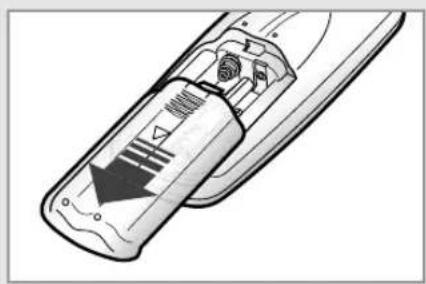
1 Push the battery cover on the rear of the remote control with your thumb in the direction of the arrow and remove it.
2 Insert the two batteries, taking care to respect the polarities :
◆ + on the battery with + on the remote control.
◆ - on the battery with - on the remote control.
3 Close the cover by sliding it back until it clicks into place.
5 Way Function
You can select the 5 Way function with operating mode of the air conditioner for more comfortable circumstances. You can use the 5 Way function with the indoor unit as well as the remote control. Thus, you can use this function even though you have lost your remote control.
Using with the indoor unit
1 Press the ⏻ (ON/OFF) button one time and then select the desired mode.
| To obtain a(n)... | Then select... | |
| Normal operating |  | (STANDARD) mode |
| Reducing the uncomfortable temperature gradually |  | (NATURE) mode |
| High fan speed |  | (POWER) mode |
| Compressor run time reduced |  | (SAVING) mode |
| Fan speed reduces as the temperature decreases |  | (SILENCE) mode |
| MC**C2** | ||
| To obtain a(n)... | Then select... | |
| Normal operating | (STANDARD) mode | |
| Reducing the uncomfortable temperature gradually | (NATURE) mode | |
| High fan speed | (POWER) mode | |
| Compressor run time reduced | (SAVING) mode | |
| Fan speed reduces as the temperature decreases | (SILENCE) mode | |
To stop the operating, press the ⏻ (ON/OFF) button until all indicators turn off.

Even if the air conditioner has been turned on via the ON/OFF button on the unit, operations can still be controlled using the remote control as usual.
Selecting with the Remote Control
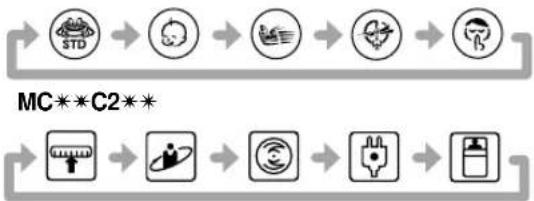
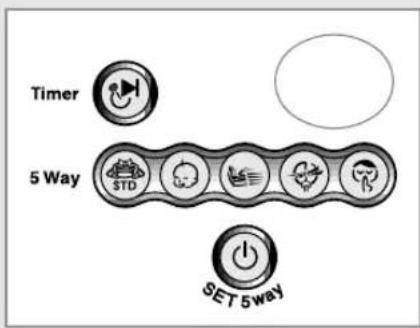
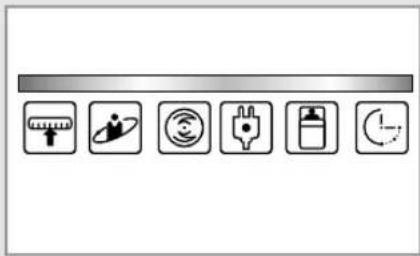
To select the 5 Way function with the remote control, press the 5 Way button one or more times until the desired mode is selected.
◆ Each time you press the 5 Way button:
flowchart
graph LR
    A["Start"] --> B["Standard Icon"]
    B --> C["Image Icon"]
    C --> D["Image Icon"]
    D --> E["Image Icon"]
    E --> F["End"]
Each 5 Way indicator on the indoor unit lights up in order.
flowchart
graph LR
    Timer["Timer"] --> 5Way["5 Way"]
    5Way --> SET["SET 5way"]
    SET --> Power["Power"]
    Power --> Speed["Speed Limit"]
    Speed --> Speed1["Speed Limit"]
    Speed2["Speed Limit"] --> Speed3["Speed Limit"]
    Speed4["Speed Limit"] --> Speed5["Speed Limit"]
natural_image
Row of six icons representing technical and operational symbols (no text or labels)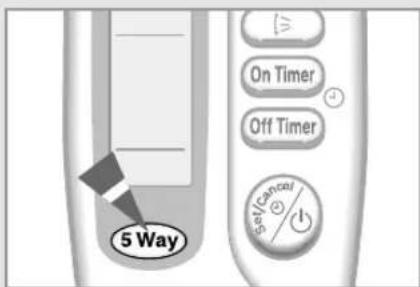
text_image
5 Way On Timer Off Timer Self/CancerSelecting the Automatic Operating Mode
text_image
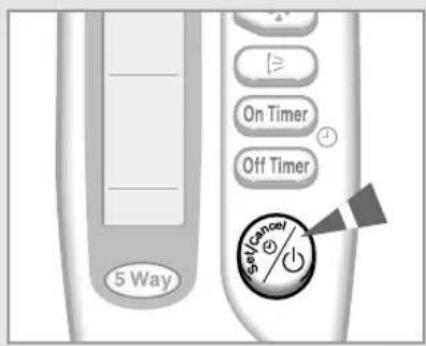
5 Way On Timer Off Timer Set/CancelYou can start the air conditioner in Automatic mode from your remote control. In the Automatic mode, the standard temperature and the optimum fan speed is selected automatically. You can adjust the standard temperature but not the fan speed.
1 If necessary, press the ⚡ (On/Off) button.
Result: ◆ The 5 Way indicator on the indoor unit lights up.
◆ The air conditioner starts up in the mode selected when the unit was last used.
◆ The indoor unit beeps.
IMPORTANT
The air conditioner is fitted with a protection mechanism to prevent the unit from being damaged when it is started immediately after being:
◆ Plugged in
◆ Stopped
It will start up normally after three minutes.
text_image
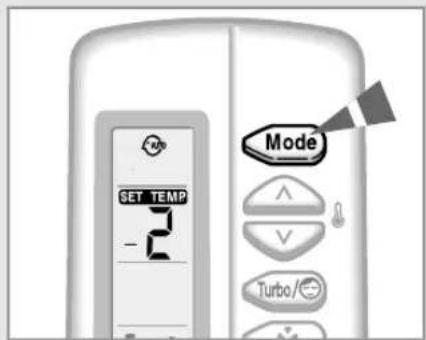
SET TEMP - Mode Turbo/2 If the Ⓜ is not displayed at the top of the remote control, press the MODE button on the remote control one or more times until it appears.
Result: ◆ The indoor unit beeps each time you press the MODE button.
◆ The air conditioner runs in AUTO mode.

You can change modes at any time.
text_image
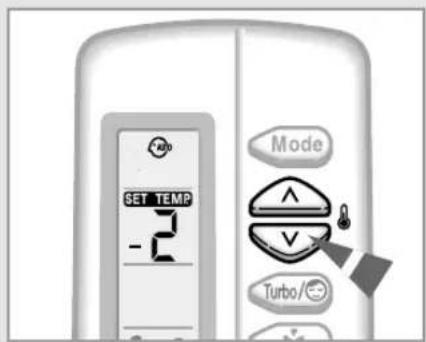
SET TEMP -2 Mode Turbo/3 To adjust the standard temperature (The air conditioner automatically set the standard temperature by the current room temperature.), press the TEMPERATURE buttons one or more times.
| SET TEMP. SET TEMP.-2°C -1°C Standard temperature +1°C< When you feel hot > | SET TEMP. SET TEMP.+2°C< When you feel chilly > |
Cooling Your Room
You must select the Cool mode if you wish to adjust the:
◆ Cooling temperature
◆ Fan speed when cooling
1 If necessary, press the ⚠️ (On/Off) button.
Result:
◆ The 5 Way indicator on the indoor unit lights up.
◆ The air conditioner starts up in the mode selected when the unit was last used.
◆ The indoor unit beeps.
IMPORTANT
The air conditioner is fitted with a protection mechanism to prevent the unit from being damaged when it is started immediately after being:
◆ Plugged in
◆ Stopped
It will start up normally after three minutes.
2 If the ✿ is not displayed at the top of the remote control, press the MODE button on the remote control one or more times until it appears.
Result:
◆ The indoor unit beeps each time you press the MODE button.
◆ The air conditioner runs in COOL mode.

You can change modes at any time.
3 To adjust the temperature, press the TEMPERATURE buttons one or more times until the required temperature is displayed. Possible temperatures are between 18°C and 30°C inclusive.
Result: ◆
Each time you press the TEMPERATURE buttons:
- The temperature is adjusted by 1°C
- The indoor unit beeps
◆ The air conditioner starts cooling, provided that the room temperature is higher than the selected temperature; the fan will, however, operate.
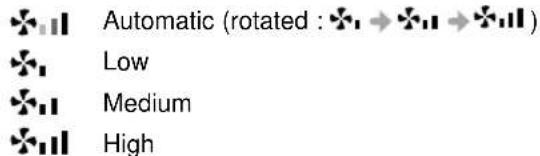
4 Select the fan speed by pressing the FAN button one or more times until the required setting is displayed:
text_image
Automatic (rotated : ❄ → ❄ → ❄)Result: Each time you press the FAN button, the indoor unit beeps.
5 To control the direction of the air flow, refer to page 15.

text_image
5 Way On Timer Off Timer Cancel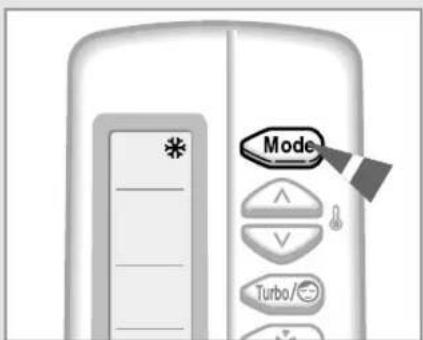
text_image
Mode Turbo/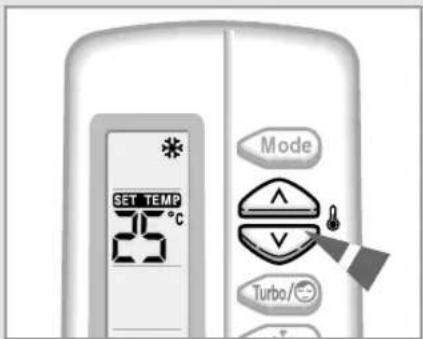
text_image
SET TEMP 25°C Mode Turbo/°C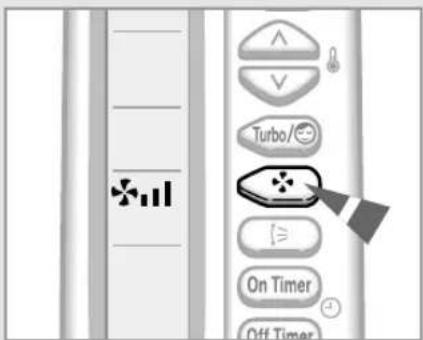
text_image
Turbo/ On Timer Off TimerChanging the Room Temperature Quickly
text_image
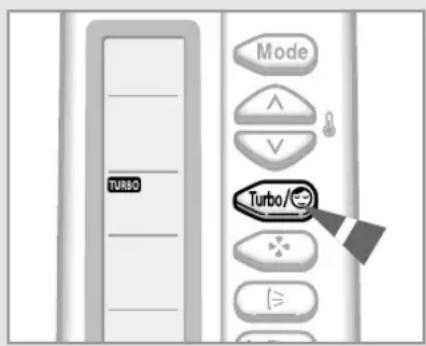
TURBO Mode Turbo/The Turbo cooling function is used to cool your room as quickly as possible.
You have just come home and find that the room is very hot. You wish to cool it down as quickly as possible.
The Turbo function operates for 30 minutes with the maximum settings before returning automatically to the mode and temperature previously selected.
1 If necessary, press the ⚠️ (On/Off) button.
Result: ◆ The 5 Way indicator on the indoor unit lights up.
◆ The air conditioner starts up in the mode selected when the unit was last used.
◆ The indoor unit beeps.
2 Press the button.
Result: ◆ The temperature and fan settings are adjusted automatically.
◆ The air conditioner cools the room as quickly as possible.
◆ After 30 minutes, the air conditioner is reset automatically to the previous mode, temperature and fan settings.
But, if you press the Turbo button in DRY or FAN mode, it will change to AUTO mode automatically.
3 If you wish to stop the Turbo function before the end of the 30-minute period, press the button one or more times until or disappears.
Result: The air conditioner is reset automatically to the previous mode, temperature and fan settings.
4 To control the direction of the air flow, refer to page 15.
Removing Excess Humidity
If the atmosphere in your room is very humid or damp, you can remove excess humidity without lowering the room temperature too much.
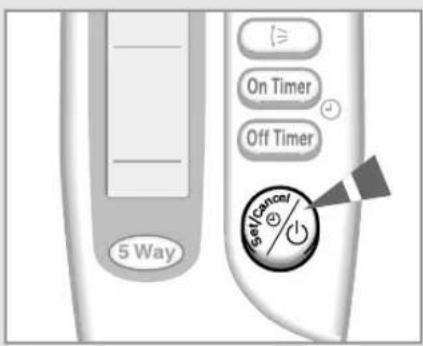
1 If necessary, press the

On/Off) button.
Result: ◆ The 5 Way indicator on the indoor unit lights up.
◆ The air conditioner starts up in the mode selected when the unit was last used.
◆ The indoor unit beeps.

PORTANT
The air conditioner is fitted with a protection mechanism to prevent the unit from being damaged when it is started immediately after being:
◆ Plugged in
◆ Stopped
It will start up normally after three minutes.
2 If the

is not displayed at the top of the remote control, press the button on the remote control one or more times until it appears.
Result: ◆
The indoor unit beeps each time you press the MODE button.
◆ The air conditioner runs in DRY mode.
图2-2
You can change modes at any time.
3 To adjust the temperature, press the TEMPERATURE buttons one or more times until the required temperature is displayed. Possible temperatures are between 18°C and 30°C inclusive.
Result: ◆ Each time you press the TEMPERATURE buttons:
- The temperature is adjusted by 1°C
- The indoor unit beeps
◆ The air conditioner starts removing the excess humidity; the quantity of air is adjusted automatically.
4 To control the direction of the air flow, refer to page 15.
text_image
5 Way On Timer Off Timer Go/Cancel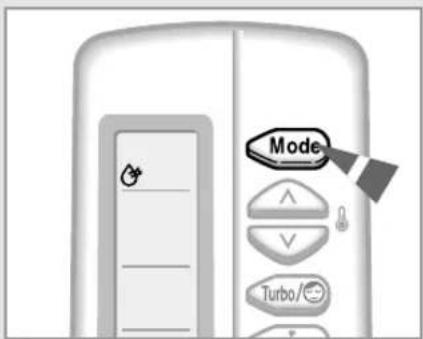
text_image
Mode Turbo/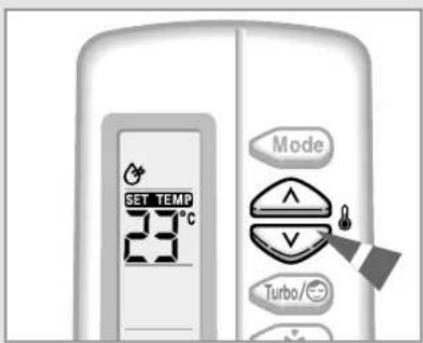
text_image
SET TEMP 23°C Mode Turbo/°CAiring Your Room
text_image
5 Way On Timer Off Timer Set/curance ①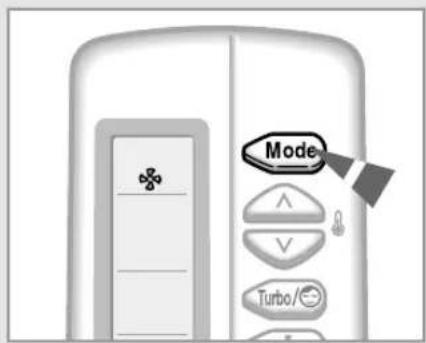
text_image
Mode Turbo/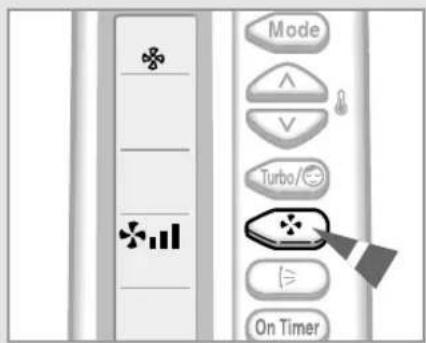
text_image
Mode ^ V Turbo/~ On TimerIf the atmosphere in your room is stale, you can air the room using the Fan feature.
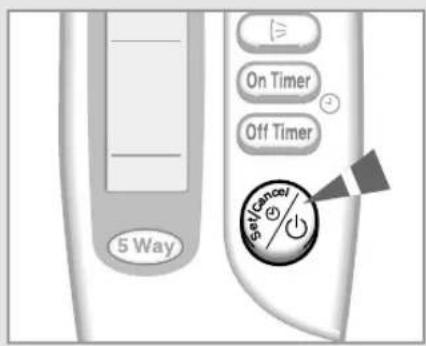
1 If necessary, press the

On/Off) button.
Result: ◆ The 5 Way indicator on the indoor unit lights up.
◆ The air conditioner starts up in the mode selected when the unit was last used.
◆ The indoor unit beeps.
2 If the ✿ is not displayed at the top of the remote control, press the MODE button on the remote control one or more times until it appears. Result: ◆ The indoor unit beeps each time you press the MODE button. ◆ The air conditioner runs in FAN mode. ◆ The temperature is set automatically. Note You can change modes at any time.
3 Select the fan speed by pressing the FAN button one or more times until the required setting is displayed:
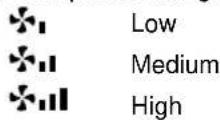
Result: Each time you press the FAN button, the indoor unit beeps.
4 To control the direction of the air flow, refer to page 15.
Adjusting the Air Flow Direction Vertically
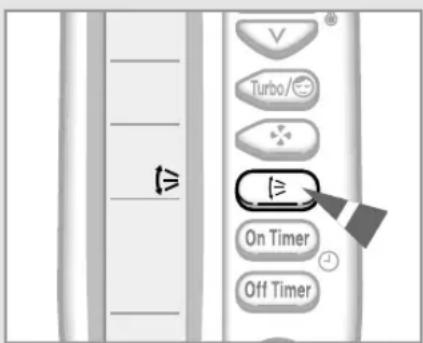
Depending on the position of the indoor unit on the wall of your room, you can adjust the position of the outer air flow blade on the bottom of the unit, thus increasing the efficiency of the air conditioner.
1 Press the SWING button one or more times as required.
Result: The outer blade is adjusted vertically.
RECOMMENDATION When... Adjust the blade to face...
Cooling Upwards.
2 If you want the blade to move up and down automatically when the air conditioner is operating, press the SWING button.
Result: The blade move up and down, around the base position set.
3 To stop the blade moving up and down, press the SWING button again.

If you switch the air conditioner... Then the blade is...
Off Closed completely.
On again Set to the initial position powered.
text_image
Turbos On Timer Off TimerAdjusting the Air Flow Direction Horizontally
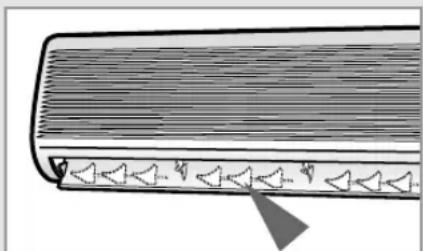
There are two sets of inner air flow blades. Just as the outer air flow blade can be adjusted vertically, the inner blades can be adjusted horizontally.
1 Adjust each set of inner blades to the required position, by pushing or pulling them sideways.
natural_image
Diagram of a mechanical component with triangular elements and a pointed tip, no text or symbols present* The design and shape are subject to change according to the model.
Setting the On Timer
text_image
ON TIMER 3.0 Hr. On Timer Off Timer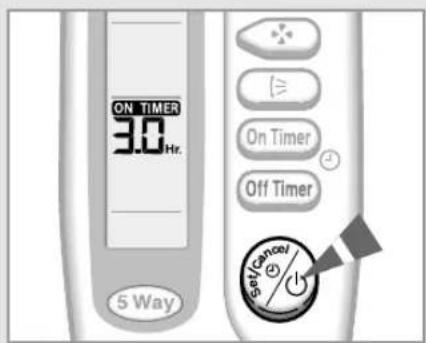
text_image
ON TIMER 3.0 Hr. 5 Way On Timer Off Timer Set/Cancel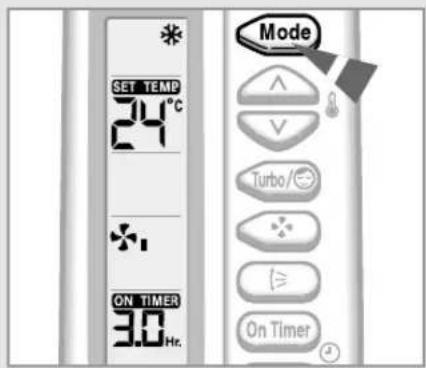
text_image
SET TEMP 24°C ON TIMER 30 Hr. Mode Turbo/© On Timer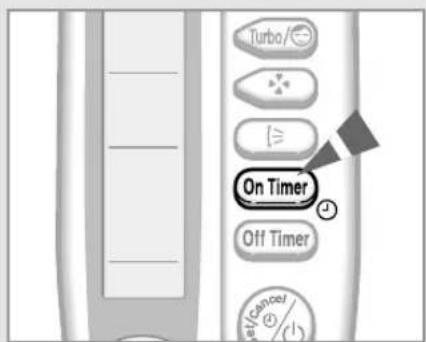
text_image
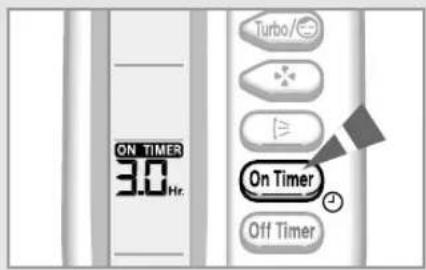
Turbo/- On Timer Off Timer eV/Cancel (%) (1)The On Timer enables you to switch on the air conditioner automatically after a given period of time. You can set the period of time from 30 minutes to 24 hours.
1 To set the operating time, press the ON TIMER button one or more times until the required time is displayed. Possible time is between 0.5 hour and 24 hour inclusive.
2 Press the Ⓧ (Set/Cancel) button to complete the setting.
Result:

(Set/Cancel) button to complete the setting.
◆ The remaining time is displayed.
◆ Blinking of the timer indicator stops.
◆ The selected mode and the temperature on the display disappear after 10 seconds.
◆ The air conditioner will switch on automatically when the counter displayed on the remote control reaches the set time and disappears the On timer setting.
3 To select an operating mode in advance, press the Mode button until the desired mode is displayed at the top of the remote control.
Result:
◆ The air conditioner will run in the selected mode when it is turned on.
To Cancel the On Timer
1 To cancel the On Timer, press the ON TIMER button one or more times until the timer setting disappears.
2 Press the ⚡ (%) (Set/Cancel) button.

If you want to turn on the air conditioner before the timer reaches the setting time, press the Ⓞ(ON/OFF) button.
Setting the Off Timer
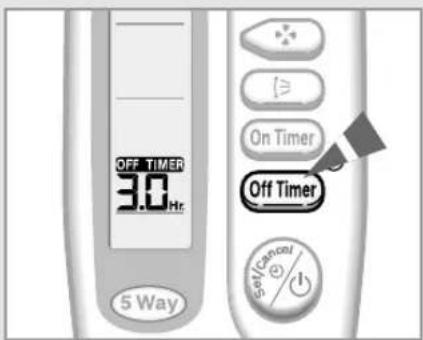
The Off Timer enables you to switch off the air conditioner automatically after a given period of time. You can set the period of time from 30 minutes to 24 hours.
1 To set the operating time, press the OFF TIMER button one or more times until the required time is displayed. Possible time is between 0.5 hour and 24 hour inclusive.
2 Press the Ⓧ (Set/Cancel) button to complete the setting.
Result: ◆ The remaining time is displayed.
◆ Blinking of the timer indicator stops.
◆ The air conditioner will switch off automatically when the counter displayed on the remote control reaches the set time and disappears the Off timer setting.
If you would like to turn the air conditioner on after 2 hours and to operate it for 2 hours:
- Press the ON TIMER button until '2.0 Hr' is displayed.
- Press the Ⓜ(Set/Cancel) button.
- Press the OFF TIMER button until '4.0 Hr' is displayed.
- Press the Ⓜ(Set/Cancel) button.
You can see or change the setting mode and/or the temperature by pressing the MODE button or the TEMPERATURE buttons after setting the Off timer.
To Cancel the Off Timer
1 To cancel the Off Timer, press the OFF TIMER button one or more times until the timer setting disappears.
2 Press the ⚡️ (Set/Cancel) button.
If you want to turn off the air conditioner before the timer reaches the setting time, press the ⏻ (ON/OFF) button.
text_image
OFF TIMER 30.0 Hz 5 Way On Timer Off Timer 5V Control +/-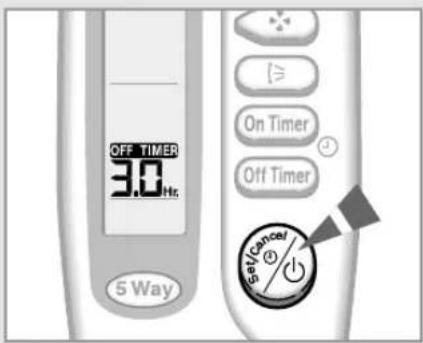
text_image
OFF TIMER 3.0 Hz. 5 Way On Timer Off Timer Set/Cancel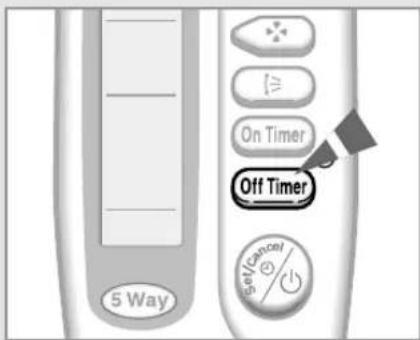
text_image
5 Way On Timer Off Timer SeveranceSetting the Sleep Timer
text_image
Mode Turbo/The Sleep Timer can be used when you are cooling your room to switch the air conditioner off automatically after a period of six hours.

If you wish to switch the unit off at a specific time, refer to page 17.
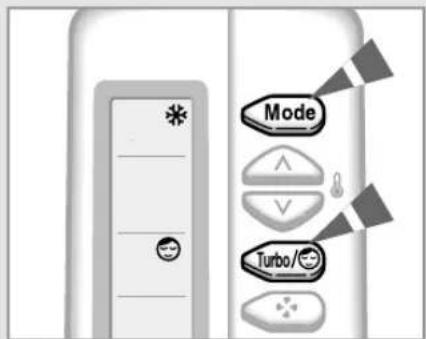
1 If the ✝ is not displayed at the top of the remote control, press the MODE button on the remote control one or more times until it appears.
2 Press the 📂 button one or more times until 😊 appears on the remote control.
Result: ◆ The indoor unit beeps.
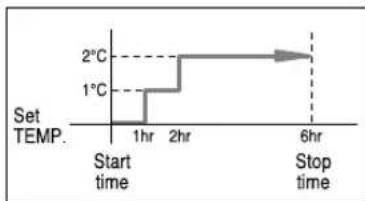
◆ The air conditioner will be controlled as indicated in the illustrations below.
Cooling The desired temperature is increased by 1^ C every hour. When it has been increased by 2^ C (after two hours), the temperature is maintained for four hours.
line
| Time | Temperature (°C) | |---|---| | Start time | 0 | | 1hr | 1 | | 2hr | 2 | | 6hr | 3 | Set TEMP. 2°C 1°C Stop time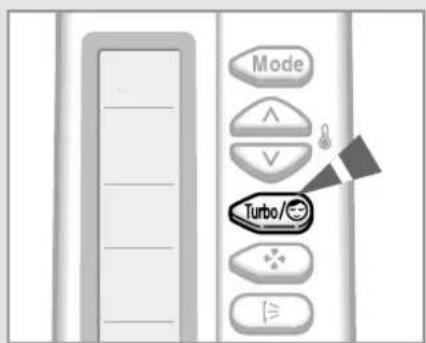
text_image
Mode Turbo/3To Cancel the Sleep Timer
If you no longer wish to use the Sleep Timer that you have set, you can cancel it at any time.
Press the Turbo/Button.
Result: ◆ The indoor unit beeps.
◆ The is no longer displayed.
◆ The air conditioner operates normally.
Operating Recommendations
Here is a recommendation that you should follow when using your air conditioner.
| Topic | Recommendation | |
| Power failure | If a power failure occurs when the air conditioner is operating, the unit is switched off.When the power returns, | |
| **B1** | you must press the (ON/OFF) button to restart it. | |
| **B2** | the air conditioner starts up again automatically | |
| **C2** | ||
| MnOe Be sure which model you have purchased because some air conditioners do not restart automatically. | ||
Temperature and Humidity Ranges
The following table indicates the temperature and humidity ranges within which the air conditioner can be used.
If the air conditioner is used at... Then...
| High temperatures | The automatic protection feature may be triggered and the air conditioner stopped. |
| Low temperatures | A water leak or some other malfunction may occur if the heat exchanger freezes. |
| High humidity levels | Water may condense on and drip from the surface of the indoor unit if it is used for long periods. |
Mode Outdoor Temperature Indoor Temperature Indoor Humidity
Cooling 21°C to 43°C approx. 18°C to 32°C approx. 80% or less
Drying 18°C to 43°C approx. 18°C to 32°C approx. -
* If the cooling operation is used at over 33°C(indoor temperature) then, it does not cool as its full capacity.
Cleaning Your Air Conditioner

natural_image
Diagram showing a device with a handle and a magnified inset of its cable (no text or symbols)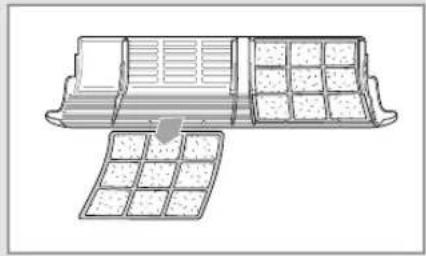
natural_image
Diagram of a container with internal compartments and a grid-like structure, no text or symbols present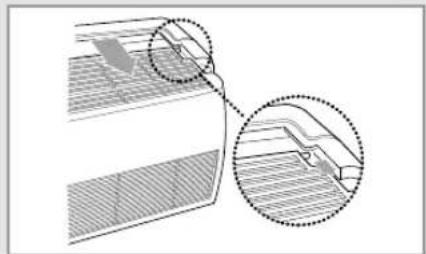
natural_image
Diagram showing two views of a mechanical component with hatched areas and dotted outlines (no text or symbols)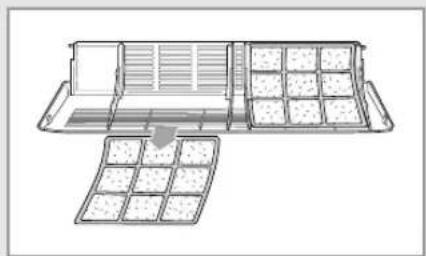
natural_image
Diagram of a container with internal compartments and storage compartments, no text or symbols presentTo get the best possible use out of your air conditioner, you must clean it regularly to remove the dust that accumulates on the air filter.

PORTANT
Before cleaning your air conditioner, ensure that you have switched off the breaker used for the unit.
1 Open the front grille by pulling on the tabs on the lower right and left sides of the indoor unit.
2 Disassemble the front grille by pulling it forwards.
3 Hold the edge of the air filter under the front grille and pull to release them.
4 Remove all dust on the air filters with a vacuum cleaner or brush.
5 Clean the front panel with a damp cloth and mild detergent (do NOT use benzene, solvents or other chemicals).
6 Reassemble the air filters and the front grille.

If you have not used the air conditioner for a long period of time, set the fan going for three to four hours to dry the inside of the air conditioner thoroughly.
Solving Common Problems
Before contacting the after-sales service, perform the following simple checks.
They may save you the time and expense of an unnecessary call.
| Problem | Explanation/Solution |
| The air conditioner does not operate at all | ◆ Check that the breaker used for the air conditioner is switched on.◆ Check that the 5 Way indicator on the indoor unit is on; if necessary press the (On/Off) button on the remote control.◆ Check whether the TIMER indicator on the indoor unit is switched on. If so:- Wait until the switch-on time is reached and the air conditioner starts up automatically- Cancel the timer (see pages 16 and 17 for further details) |
| The air conditioner does not operate with the remote control | ◆ Check that there are no obstacles between you and the indoor unit.◆ Check the remote control batteries.◆ Check that you are close enough to the indoor unit (seven metres/yards or less). |
| No beep is heard when you press the (On/Off) on the remote control | ◆ Check that you are pointing the remote control at the remote control sensor in the right of the indoor unit.◆ Replace the remote control batteries if necessary. |
| The air conditioner does not cool | ◆ Check that the correct operating mode has been selected (AUTO, COOL).◆ The room temperature may be too low.◆ Dust may be blocking the air filter guard; refer to page 20 for cleaning instructions.◆ Check that there is no obstacle in front of the outdoor unit. |
| The fan speed does not change when you press the FAN button | ◆ Check that the operating mode is set to COOL or FAN ; in the AUTO mode, the fan speed changes automatically and in the DRY mode, it is set to AUTO. |
| The air flow direction does not change when you press the SWING button | ◆ Check that the air conditioner has been switched on; if necessary, press the (On/Off) button on the remote control. |
| The timer is not correctly triggered | ◆ Check that the timer has been programmed correctly; see pages 16 and 17. |
| Odours are permeated in the room during air conditioning | ◆ Air the room. |
Installing a Filter (Option)
text_image
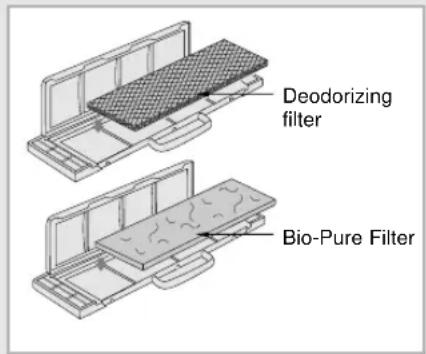
Deodorizing filter Bio-Pure FilterThe air conditioner can be fitted with a deodorizing and Bio-Pure filter to remove minute dust particles or odours. The service life of the filter is approximately three months depending on the time during which the air conditioner is used.
1 Remove the vinyl packing from the filter.

Do not remove the packing from a deodorizing filter until you wish to use the filter, as it will lose its properties.
2 Insert the filter in the filter holder and press the three insert tabs until you hear a click.
3 Open the front grille by pulling on the tabs on the lower right and left sides of the indoor unit.
4 Take out the existing filter and replace it with the new one.
| Indoor unit Outdoor unit Power Supply | ||
| AM14B1(B2)E07 | UM14B1(B2)E2 | 220-240V~, 50Hz |
| AM18B1(B2)E09 | UM18B1(B2)E2 | |
| AM20B1(B2)E06 | UM20B1(B2)E3 | |
| AM20B1(B2)E09 | ||
| AM26B1(B2)E07 | UM26B1(B2)E3 | |
| AM26B1(B2)E12 | ||
| MC18AC2-09 | MC18AC2X | |
| MC19AC2-07 | MC19AC2X | |
| MC19AC2-12 | ||
| MC24AC2-12 | MC24AC2X | |
| MC26AC2-07 | MC26AC2X | |
| MC26AC2-12 | ||
| AM18B1(B2)B09 | UM18B1(B2)B2 | 220V~, 60Hz |
| AM26B1(B2)B13 | UM26B1(B2)B2 | |
| AM26B1(B2)B13A | UM26B1(B2)B2A | |
| AM27B1(B2)C07 | UM27B1(B2)C3 | 208-230V~, 60Hz |
| AM27B1(B2)C13 | ||
THIS AIR CONDITIONER IS MANUFACTURED BY: