
Doreen - Scale KORONA - Free user manual and instructions
Find the device manual for free Doreen KORONA in PDF.


| Product Type | Diagnostic Scale |
| Brand | KORONA |
| Model | Doreen |
| Measurement Principle | Bioelectric Impedance Analysis (B.I.A.) |
| Functions | Body weight, body fat %, body water %, muscle %, bone mass % |
| Maximum Capacity | 180 kg (396 lb, 28 st) |
| Display | LCD |
| Power Supply | 1 x 3V CR2032 battery |
| User Memory | Up to 12 users |
| Weight Units | kg, lb, st |
| Platform Material | Glass |
| Dimensions (approx.) | 30 x 30 x 2.5 cm |
| Weight (approx.) | 1.5 kg |
| Automatic Shut-off | Yes |
| Battery Change Indicator | "Lo" on display |
| Error Codes | Err (overload), Errl (low fat), Errh (high fat), C (poor contact) |
| Safety Precautions | Not for use with pacemakers, not during pregnancy, slippery when wet |
| Maintenance | Clean with damp cloth, do not immerse, avoid abrasive cleaners |
| Storage | Keep dry, protect from extreme temperatures and knocks |
| Battery Type | CR2032 lithium coin cell |
Frequently Asked Questions - Doreen KORONA
User questions about Doreen KORONA
0 question about this device. Answer the ones you know or ask your own.
Ask a new question about this device
Download the instructions for your Scale in PDF format for free! Find your manual Doreen - KORONA and take your electronic device back in hand. On this page are published all the documents necessary for the use of your device. Doreen by KORONA.
USER MANUAL Doreen KORONA
natural_image
Digital kitchen glass with digital display showing 63.8kg weight, no text or symbols on the device itselfGB DIAGNOSTIC SCALE Instruction for use
DEUTSCH
Inhalt
flowchart
graph TD
    A["Power off"] --> B["Press SET(ON/SET) to switch on"]
    B --> C["165 Default parameters"]
    C --> D["Press to select user code"]
    D --> E["165 Press SET(ON/SET) to confirm and prompt to next setting"]
    E --> F["Press SET(ON/SET) to confirm and prompt to next setting"]
    F --> G["165 Press to select gender"]
    G --> H["165 Press to set height"]
    H --> I["168 Press SET(ON/SET) to confirm and prompt to next setting"]
    I --> J["25 Press to set age"]
    J --> K["28 Tap on the scale platform"]
    K --> L["00 LCD shows '0.0' Power off"]
    L --> M["Auto off after several seconds"]
Übersetzung:
(Power off) = aus - (Press SET) = SET drücken - (User Code) = Benutzer -(Gender) = Geschlecht - (CM) = Größe - (Age) = Alter
flowchart
graph TD
    A["Power off"] --> B["165 cm"]
    B --> C["Press to select user code or reset parameters"]
    C --> D["168 cm"]
    D --> E["Tap on the scale platform"]
    E --> F["0.0 kg LCD shows 0.0°"]
    F --> G["Step onto weighing platform gently (both feet touching with metal electrodes)"]
    G --> H["Wait until the digits stabilize"]
    H --> I["Weight readings locked and flash once"]
    I --> J["0.000 Measuring..."]
    J --> K["Measured results (Repeat for 3 times and saved, The reading will re-appear at next measuring for users' reference):<br>Weight: 52.8kg, Fat status: ...………………………………………………………………………………………………………………………………………………………………………………………………………………………………………………………………<br>Shut down automatically"]

flowchart
graph TD
    A["Power off"] --> B["Press SET(ON/SET) to switch on"]
    B --> C["165°"]
    C --> D["Show parameters of the last user or default parameters"]
    D --> E["Press ▲ to select user code"]
    E --> F["168°"]
    F --> G["Wait for 5 seconds or Tap on the scale platform"]
    G --> H["0.0 kg"]
    H --> I["Press ▲ to enter Recall mode"]
    I --> J["Display the last test record of the user. Press ▼ for quick page tuning."]
    J --> K["Repeat 3 times and switch off automatically"]
    K --> L["Power off"]
- Getting to know your instrument...18 8. Operation....23-25
- Signs and symbols....18 9. Evaluation of results.....25-28
- Safety and General Notes.....18-19 10. Replacing batteries.....29
- Unit description....20 11. Storage and Maintenance....29
- Initial use....20 12. Disposal....29-30
- Information......21-22 13. What if there are problems...31
- Settings.....22-23
Delivery Scope
Diagnostic scale
1 x 3 V CR2032
Instruction Manual
Dear Customer
You have chosen a quality product from Korona.
Before use, please read these instructions carefully and keep them in a safe place for future reference. When passing on the appliance to a third party, make sure to include these instructions for use
This diagnostic scale is designed to make a significant contribution to your health.
With kind regards
Your Korona team
1. Getting to know your instrument
Functions of the unit
This digital diagnostic scale is used to weigh you and to provide diagnostic data about your personal fitness.
The scale is only intended for individual, household use.
The scale has the following diagnostic functions that can be used by up to 12 persons:
• Body weight measurement,
• Measurement of body fat percentage,
• Body water percentage,
- Muscle percentage and
- Bone mass percentage.
The memory function allows up to 12 people to access their last measured weight and the body values that are simultaneously determined.
This scale also has the following functions:
- Switch between kilograms [kg], pounds [lb] and stones [st]
• Automatic shutoff function - Battery change indicator for weak batteries
2. Signs and symbols
The following symbols appear in these instructions.
| Warning | Warning instruction indicating a risk of injury or damage to health! |
| Important | Safety note indicating possible damage to the unit/accessory! |
| Note | Note on important information! |
3. Safety and General Notes
Safety Notes

Warning
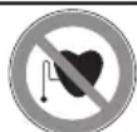
- The scale must not be used by persons with medical implants (e.g. heart pacemakers) Otherwise their function could be impaired.
- Do not use during pregnancy.
- Do not stand on the outer edge to one side of the scale otherwise it may tip!
- Do not step onto the scale with wet feet or if the surface of the scale is damp – danger of slipping!
- Keep children away from packaging materials. Risk of suffocation!
Notes on handling batteries

Warning:
- Swallowing batteries can be extremely dangerous. Keep the batteries and scale out of the reach of small children. Should a child swallow a battery, seek medical assistance, immediately.
- Batteries must not be recharged, taken apart, thrown into an open fire or short circuited. Risk of fire/explosions!
- Always replace all batteries at the same time and always use the same battery type.
- Batteries can contain toxins that are harmful to your health and the environment. Always dispose of batteries in accordance with applicable legal regulations.
Do not dispose of batteries with the normal household waste.

General notes
- The unit is for personal use only and is not intended for medical or commercial applications.
Note: Measuring tolerances are possible for technical reasons as this scale is not calibrated for use in a professional medical context. - The scales' maximum load is 180 kg (396 lb/28 st)
- Before submitting any complaint, first check the batteries and replace them if necessary.
- Repairs may only be performed by an authorized customer services team.
- Should you have any questions concerning the use of our devices, please contact your dealer or customer service.
- Manufacturer takes no responsibility for any damage caused by incorrect use.
4. Unit description
Overview
1 Electrodes
2 ▲ UP button
3 SET button
4 ▼ DOWN button
5 Display

5. Initial use
Inserting the batteries
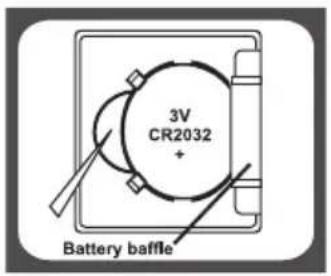
Open the battery compartment (at the back of the scale) and remove the battery safety strip. Make sure that the battery cell is inserted according to its polarity. If the scale fails to operate, remove the battery and reinsert it.

Changing the weight unit
The scale shows the values in kg. On the back of the device, there is a button that you can use to switch the units between kilograms [kg], pounds [lb] and stone [st].

flowchart
graph TD
    A["Press"] --> B["0.0 ib"]
    A --> C["0.0 ib"]
    A --> D["0:0.0 at ib"]
    B --> E["Press"]
    C --> E
    D --> E
Setting up the scale
Place the scale on a level (non-carpet), firm and non-slippery surface.

Careful, slippery if wet!
6. Information
The measuring principle
This scale operates according to the B.I.A. principle (bioelectric impedance analysis). This enables the measurement of physical relationships within seconds by means of an undetectable, completely harmless
electric current. The body fat percentage and other physical relationships in the body can be determined by measuring the electrical resistance (impedance) and calculating constants and individual parameters such as age, height, gender and degree of activity.
Muscle tissue and water have good electrical conductivity, and therefore lower resistance. Bones and fatty tissue, on the other hand, have low conductivity as fat cells and bones conduct hardly any current as a result of their very high resistance.
Please be aware that values obtained from the diagnostic scale represent only an approximation of actual analytical medical data. Only a specialist doctor can establish the exact amount of body fat, body water,
muscle percentage and bone mass using medical methods (e.g. computed tomography).
General tips
- If possible, always weigh yourself at the same time of day (preferably in the morning), after using the toilet, on an empty stomach and unclothed, in order to achieve comparable results.
- Important for the measurement: only measure body fat when barefoot and with the soles of the feet slightly moist. Completely dry soles can result in unsatisfactory measurements due to inadequate conductivity.
- Remain standing and still during the measurement and distribute your weight evenly over both legs.
- Wait a few hours after unaccustomed physical activity.
- Wait approx. 15 minutes after getting up in the morning to allow the water in the body to distribute.
- Remember that only long-term trends are important. Short-term changes in weight within a few days are usually caused by a loss of fluid. Body water plays an important role towards our general wellbeing.
Limitations
When measuring body fat and other values, deviating and implausible results may occur in:
• Children under approx. 10 years,
• Competitive athletes and body builders,
- Persons running a temperature, undergoing dialysis treatment or with symptoms of edema or osteoporosis,
7. Settings Settings
Setting user data
You must enter personal user parameters in order to measure your body fat percentage and other physical data.
The scale has 12 user memory locations which allows, for example, you and your family members to save personal settings and retrieve them later:
Press “SET”. The first memory position will appear flashing on the display.
Now you can enter the following settings:
| Sequence User Data Parameters | ||
| 1 Memory Position | 1 - 12 | |
| 2 Sex Male | Female | |
| 3 Body Height 100 | cm – 250cm | |
| 4 Age 10 - 100 | ||
Enter the respective setting by pressing the ▲ “UP” or ▼ “DOWN” button. Confirm each setting by pressing the “SET” button.
The data you've just entered are displayed again consecutively. The scale then automatically switches off.
Example: 3rd user, female, 168 cm, 28 years

flowchart
graph TD
    A["Power off"] --> B["Press SET(ON/SET) to switch on"]
    B --> C["165 °C Default parameters"]
    C --> D["Press to select user code"]
    D --> E["165 °C"]
    E --> F["Press SET(ON/SET) to confirm and prompt to next setting"]
    F --> G["165 °C"]
    G --> H["Press to select gender"]
    H --> I["165 °C"]
    I --> J["Press to set height"]
    J --> K["168 °C"]
    K --> L["Press SET(ON/SET) to confirm and prompt to next setting"]
    L --> M["25 °C"]
    M --> N["Press to set age"]
    N --> O["28 °C"]
    O --> P["Tap on the scale platform"]
    P --> Q["Power off"]
    Q --> R["Auto off after several seconds"]
    R --> S["LCD shows 0.0°"]
8. Operation
Weighing Only
Step on the electrodes barefoot – make sure that you are standing still -weight flashes and stabilizes.
After a few seconds, the scale will switch off automatically.

Taking measurements
After all parameters have been entered, you can now measure your weight, body fat and all the other data.
- Press the "SET"-button to switch on the scale. Select your user data by pressing the▲“UP” or ▼ “DOWN” button. Those will be displayed.
- Step on the scale barefoot and make sure that you stand on both electrodes. First, your weight will be measured and displayed.
- Remain standing on the scale; now your body fat and body water analysis, muscle percentage, bone mass and calories is performed. This can take a few seconds.
Example: User 3, female, 168 cm, 28 years

flowchart
graph TD
    A["Power off"] --> B["165 cm Show parameters of the last user or default parameters"]
    B --> C["Press ▲▼ to select user code or reset parameters"]
    C --> D["168 cm Tap on the scale platform"]
    D --> E["0.0 kg LCD shows '0.0'"]
    E --> F["528 kg 238 %"]
    F --> G["523 %"]
    G --> H["372 %"]
    H --> I["120 %"]
    I --> J["1840 %"]
    J --> K["Shut down automatically"]

    subgraph Measurement Results
        L["Weight: 52.8kg, Fat status: i, Fat 23.8%, Hydration 52.3%, Muscle 37.2%, Bone 12%, Calorie 1840."] --> M["Measured results(Repeat for 3 times and saved. The reading will re-appear at next measuring for users' reference)."]
    end
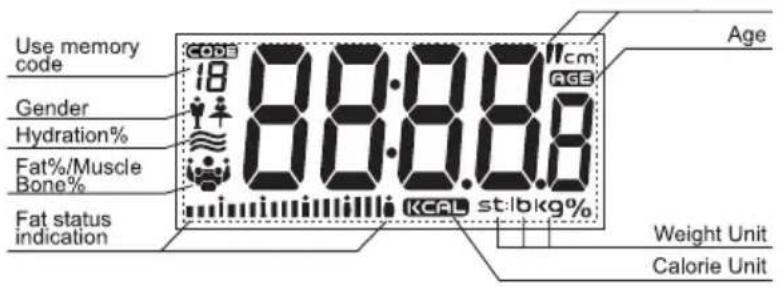
Display of last readings
You can display your last User data by pressing the "SET" button.
- Press the "SET"-button, to choose resp. data.
- Confirm by pressing the ▲ / ▼'UP/DOWN" button.
- Wait for approx. 6 seconds.
- Tap on the electrodes.
- Press the ▲ "UP" button.
- The last measured user data are displayed.
Saved data is displayed 3times in a row, before the scale automatically shuts down.
Example: 3rd user, female, 168 cm, 28 years

flowchart
graph TD
    A["Power off"] --> B["Press SET(ON/SET) to switch on"]
    B --> C["165 °C"]
    C --> D["Show parameters of the last user or default parameters"]
    D --> E["Press ↑ to select user code"]
    E --> F["168 °C"]
    F --> G["Wait for 6 seconds or Tap on the scale platform"]
    G --> H["0.0 kg"]
    H --> I["Press ↑ to enter Recall mode"]
    I --> J["Display the last test record of the user. Press ↑▼ for quick page turning"]
    J --> K["Repeat 3 times and switch off automatically"]
    K --> L["Power off"]
9. Evaluation of results
Body fat and body water percentage
The body fat / body water values are shown in the display. The following body fat / body water percentages are guide values only (contact your physician for further information).
| Age Fat % | Female | Water % Female | Fat % Male | Water % Male | Status Key Line Indication |
| Under 30 | 4 - 16 | 66 - 57.8 | 4 - 11 | 66 - 61.2 | Too lean |
| 16.1 - 20.5 | 57.7 - 54.7 | 11.1-15.5 | 61.1- 58.1 | Lean | |
| 20.6 - 25 | 54.6 - 51.6 | 15.5 - 20 | 58 - 55 | Normal | |
| 25.1 - 30.5 | 51.5 - 47.8 | 20.1 - 24.5 | 54.9 - 51.9 | Fat | |
| 30.6 - 60 | 47.7 - 27.5 | 24.6 - 60 | 51 - 27.5 | Too fat | |
| Over 30 | 4 - 20 | 66 - 55 | 4 - 15 | 66 - 58.4 | Too lean |
| 20.1 - 25 | 54.9 - 51.6 | 15.1 - 19.5 | 58.3 - 55.3 | Lean | |
| 25.1 - 30 | 51.5 - 48.1 | 19.6 - 24 | 55.2 - 52.3 | Normal | |
| 30.1 - 35 | 48 - 44.7 | 24.1 - 28.5 | 52.2 - 49.2 | Fat | |
| 35.1 - 60 | 44.6 - 27.5 | 28.6 - 60 | 49.1 - 27.5 | Too fat |
The above information is for reference only!
Body fat
A lower value is often found in athletes. Depending on the type of sports, training intensity and physical constitution, values may result which are below the recommended values stated. It should, however, be noted that there could be a danger to health in the case of extremely low values.
Body water
Body fat contains relatively little water. Therefore persons with a high body fat percentage have body water percentages below the recommended values. With endurance athletes, however, the recommended values could be exceeded due to low fat percentages and high muscle percentage.
This scale is unsuitable for measuring body water in order to draw medical conclusions concerning age-related water retention, for example.
If necessary ask your physician. Basically, a high body water percentage should be the aim.
Muscle percentage
The muscle percentage is normally within the following ranges:
Male
| Age Low Normal High | ||
| 10 – 14 < 44 % | 44 – 57 % > 57 % | |
| 15 – 19 < 43 % | 43 – 56 % > 56 % | |
| 20 – 29 < 42 % | 42 – 54 % > 54 % | |
| 30 – 39 < 41 % | 41 – 52 % > 52 % | |
| 40 – 49 < 40 % | 40 – 50 % > 50 % | |
| 50 – 59 < 39 % | 39 – 48 % > 48 % | |
| 60 – 69 < 38 % | 38 – 47 % > 47 % | |
| 70 – 100 < 37 % | 37 – 46 % > 46 % |
Female
| Age Low Normal High | ||
| 10 – 14 < 36 % | 36 – 42 % > 43 % | |
| 15 – 19 < 35 % | 35 – 41 % > 41 % | |
| 20 – 29 < 34 % | 34 – 39 % > 39 % | |
| 30 – 39 < 33 % | 33 – 38 % > 38 % | |
| 40 – 49 < 31 % | 31 – 36 % > 36 % | |
| 50 – 59 < 29 % | 29 – 34 % > 34 % | |
| 60 – 69 < 28 % | 28 – 33 % > 33 % | |
| 70 – 100 < 27 % | 27 – 32% > 32 % |
Bone mass
Like the rest of our body, our bones are subject to natural growth, shrinking and ageing processes. The bone mass increases rapidly during childhood and reaches its peak between the ages of 30 and 40. As we age, our bone mass then begins to reduce. You can combat this reduction to an extent with the help of a healthy diet (particularly calcium and vitamin D) and regular physical exercise. The stability of the skeleton can be further increased by means of targeted muscle build-up. Please note that this scale does not identify the calcium content of the bones; instead, it calculates the weight of all the components that make up the bones
(organic matter, inorganic matter and water). It is very difficult to influence the bone mass, although it does fluctuate within the scope of influencing factors (weight, height, age, gender). There are no recognized guidelines or recommendations.

IMPORTANT:
Please do not confuse bone mass with bone density.
The bone density can only be determined by means of a medical examination (e.g. computer tomography, ultrasound). It is therefore not possible to draw conclusions on changes to bones and bone hardness (e.g. osteoporosis) using this scale.
Results in relation to time
Note that it is only the long-term trend which counts. Short period fluctuations in weight over a few days are mostly the result of a loss of fluid. The interpretation of the results will depend on changes in your: overall weight and body fat, body water and muscle percentages, as well as on the period during which these changes take place. Rapid changes within days must be distinguished from medium term changes (over weeks) and long term changes (months).
A basic rule is that short term changes in weight almost exclusively represent changes in water content, whereas medium and long term changes may also involve the fat and muscle percentages.
- If your weight reduces over the short term, but your body fat percentage increases or remains the same, you have merely lost water – e.g. after a training session, sauna session or a diet restricted only to rapid weight loss.
- If your weight increases over the medium term and the body fat percentage falls or stays the same, then you could have built up valuable muscle mass.
- If your weight and body fat percentage fall simultaneously then your diet is working – you are losing fat mass.
- Ideally you should support your diet with physical activity, fitness or power training. This way you can increase your muscle percentage over the medium term.
- Body fat, body water or muscle percentages should not be added (certain elements of muscle tissue also contain body water).
10. Replacing batteries
The battery must be replaced if the message “L0” appears in the display. If the battery is too flat, then the scale will switch off automatically.

Note:
- Always replace all batteries at the same time and always use the same battery type.
- Do not use rechargeable batteries.
- Use batteries that are free of heavy metals.
11. Storage and Maintenance
Important:
- Clean the unit on a regular basis. Do not use any abrasive cleaning products.
- Make sure that no liquids come into contact with the scales. Never submerge the scales into water.
- Protect the scales from knocks, damp, dust, chemicals, drastic changes in temperature, electromagnetic fields and nearby sources of heat (ovens, heaters). Do not press the buttons violently or with pointed objects.
- Remove the batteries if you should not use the unit for a longer period of time.
12. Disposal
Standard and rechargeable batteries should not be thrown into regular household waste. As a consumer, you are legally obliged to return used batteries for proper disposal. You can hand in your used batteries at public collection points in your district or sales outlets where batteries of this type are sold.

Note:
The codes below are printed on batteries containing harmful substances:
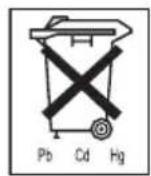
Pb = Battery contains lead
Cd = Battery contains cadmium
Hg = Battery contains mercur

Appliances marked with this sign must not be disposed of with your household waste, but – according to the EU directive on Waste Electric And Electronic Equipment are to be collected separately. Therefore, please return this device at the end of its life cycle to special collection points for disposal or your local dealer. The Scale is packed in a retail box. Such boxes are recyclable waste, i.e. they are reusable or recyclable.
13. What if there are problems?
If the scale detects and error when measuring, the following is displayed.
| DisplayCauseRemedy | ||
| Lo Low battery | indicationThe battery power is running low. | Replace Battery |
| Err The max weight was exceeded | Step off the scale to avoid damage | |
| Errl Low body fat (%) | indication | Your body fat is too low. Change your lifestyle and food intake. |
| Errh High body (%) | indication | Your body fat is too high. Change your lifestyle and do more exercise. |
| C The electrical | resistance between theelectrodes and the sole of your foot istoo high (e.g. if you have tough calluses). | Repeat the measurement barefoot. If necessary, moisten the soles of your feetslightly. If necessary, remove the callusesfrom the soles of your feet. |
KORONA


- DEUTSCH
- Inhalt
- Übersetzung:
- Delivery Scope
- Instruction Manual
- Dear Customer
- Getting to know your instrument
- Functions of the unit
- Signs and symbols
- Safety and General Notes
- Safety Notes
- Warning
- Notes on handling batteries
- Warning:
- General notes
- Unit description
- Overview
- Initial use
- Inserting the batteries
- Changing the weight unit
- Setting up the scale
- Information
- The measuring principle
- General tips
- Limitations
- Settings Settings
- Setting user data
- Example: 3rd user, female, 168 cm, 28 years
- Operation
- Weighing Only
- Taking measurements
- Display of last readings
- You can display your last User data by pressing the "SET" button.
- Evaluation of results
- Body fat and body water percentage
- The above information is for reference only!
- Body fat
- Body water
- Muscle percentage
- Bone mass
- IMPORTANT:
- Results in relation to time
- Replacing batteries
- Note:
- Storage and Maintenance
- Disposal
- What if there are problems?
- KORONA
Brand : KORONA
Model : Doreen
Category : Scale