1793VA-4G - Router LANCOM - Free user manual and instructions
Find the device manual for free 1793VA-4G LANCOM in PDF.


User questions about 1793VA-4G LANCOM
0 question about this device. Answer the ones you know or ask your own.
Ask a new question about this device
Download the instructions for your Router in PDF format for free! Find your manual 1793VA-4G - LANCOM and take your electronic device back in hand. On this page are published all the documents necessary for the use of your device. 1793VA-4G by LANCOM.
USER MANUAL 1793VA-4G LANCOM
© 2018 LANCOM Systems GmbH, Wuerselen (Germany). All rights reserved.
While the information in this manual has been compiled with great care, it may not be deemed an assurance of product characteristics. LANCOM Systems shall be liable only to the degree specified in the terms of sale and delivery.
The reproduction and distribution of the documentation and software supplied with this product and the use of its contents is subject to written authorization from LANCOM Systems. We reserve the right to make any alterations that arise as the result of technical development.
Windows® and Microsoft® are registered trademarks of Microsoft, Corp.
The LANCOM Systems logo, LCOS and the name LANCOM are registered trademarks of LANCOM Systems GmbH. All other names or descriptions used may be trademarks or registered trademarks of their owners.
Subject to change without notice. No liability for technical errors or omissions.
Products from LANCOM Systems include software developed by the "OpenSSL Project" for use in the "OpenSSL Toolkit" (www.openssl.org).
Products from LANCOM Systems include cryptographic software written by Eric Young (eay@cryptsoft.com).
Products from LANCOM Systems include software developed by the NetBSD Foundation, Inc. and its contributors.
Products from LANCOM Systems contain the LZMA SDK developed by Igor Pavlov.
LANCOM Systems GmbH
Adenauerstr. 20/B2
52146 Wuerselen
Germany
www.lancom-systems.com
Wuerselen, April 2018
Introduction
Thank you for purchasing an LCOS-based LANCOM device.
This installation guide describes how to put your LANCOM device into operation and its initial setup.
Installation includes:
Positioning and mounting
Safety advice
The initial setup includes:
Configuration via LANconfig
LANconfig is the free-of-charge and user-friendly software for the configuration of LANCOM devices on Microsoft Windows. LANconfig has a huge spectrum of applications, from the user-friendly commissioning of a single device with installation wizards to the comprehensive management of large-scale installations.
You can find the download free of charge at:
www.lancom-systems.com/downloads/
Configuration via WEBconfig
WEBconfig is the browser-based configuration user interface that is available on the LANCOM device and can be used on any operating system.
Configuration via the LANCOM Management Cloud
The LANCOM Management Cloud is the management system that intelligently organizes, optimizes, and controls your entire network architecture. (licence and working Internet access required)
You can find out more about the LANCOM Management Cloud at:
www.lancom-systems.com/lmc/
The document continues with further information about operating the device, the documentation, and LANCOM Service & Support.
Installation
For safe and secure installation of your LANCOM device, please observe the safety instructions and the instructions for positioning and mounting.
Positioning and mounting
Please observe the instructions for the positioning and mounting of the device in the Quick Reference Guide.
In order to avoid damage, note the temperature range given in the Quick Reference Guide. Further, ensure there is adequate ventilation and do not place the device in direct sunlight.
Antennas are only to be attached or exchanged while the device is switched off. Mounting or demounting antennas while the device is switched on may cause the destruction of the radio module! When installing outdoor antennas, the instructions on installation and grounding in the LANCOM Outdoor Wireless Guide must be observed.
Notes on the individual interfaces, switches and displays on your device are available in the supplied Quick Reference Guide.
Safety advice
This section contains notices which should be observed to avoid injury to persons or damage to your device.
Proper usage
Operate the device only as described in the accompanying documentation. Pay particular attention to all warnings and safety instructions. Use
only those third-party devices and components that are recommended or approved by the manufacturer.
Power supply
Please make sure to use only the power adapter listed in the Quick Reference Guide. The use of the incorrect power adapter can be a hazard to the device or persons. The Quick Reference Guide is shipped with your device. Alternatively it can be downloaded from the LANCOM website (www.lancom-systems.com). Some models can be powered via the Ethernet cable (Power-over-Ethernet, PoE). Please observe the relevant notes in the Quick Reference Guide for the device.
General safety
This device is powered by electricity. Adhere strictly to the safety requirements outlined in the documentation with regard to the voltages to be applied. Never operate damaged components. Turn a device on only if the housing is closed.
Opening the housing is reserved exclusively for the manufacturer's authorized technicians. Never insert pointed objects (thin screwdrivers, wires, etc.) into the product's interior. Risk from electric shock!
Any work required for the electrical installation must be carried out by a trained electrician.
Make sure that the electrical installation complies with local or national safety requirements.
Initial setup
A LANCOM device can be configured conveniently by TCP/IP. The following configuration paths are available for this:
LANconfig
WEBconfig
LANCOM Management Cloud

For devices with a serial interface, the configuration can be conducted with LANconfig or a terminal program.
Configuration via LANconfig
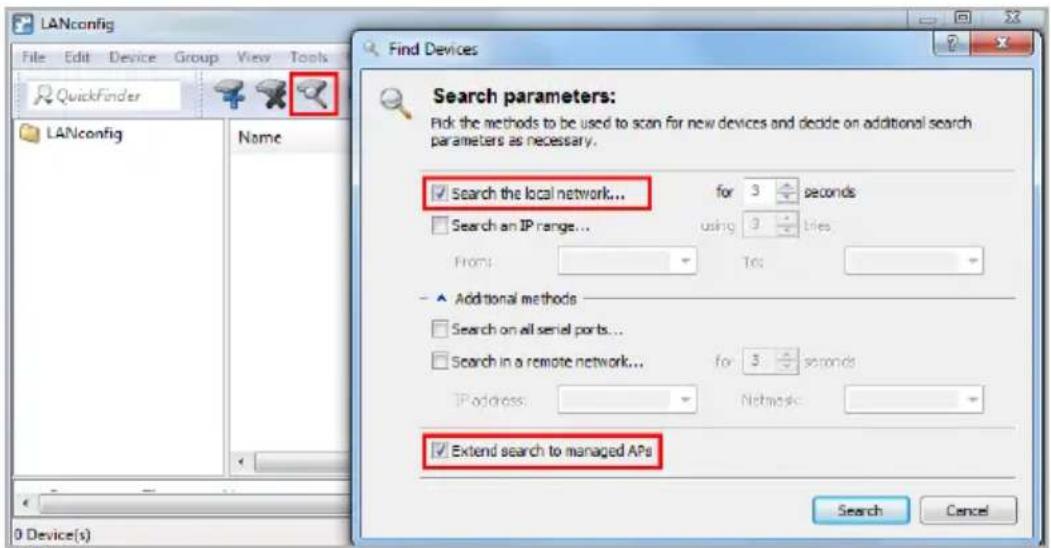
Unconfigured LANCOM devices in local networks (LAN) are detected automatically. It is very easy to search the LAN for new devices. Click the button Search now.
text_image
LANconfig File Edit Device Group View Tools QuickFinder LANconfig Name Find Devices Search parameters: Pick the methods to be used to scan for new devices and decide on additional search parameters as necessary. ✓ Search the local network... for 3 seconds ✓ Search an IP range... using 3 tries From: To: - Additional methods ✓ Search on all serial ports... ✓ Search in a remote network... for 3 seconds IP address: Network ✓ Extend search to managed APs 0 Device(s) Search CancelIn the dialog box that follows, you further specify the settings for the device search.
If LANconfig does not find the device you should check the network connection and update the IP address of the configuration PC.
i LANCOM access points start in managed mode and can only be detected by the search if the option Extend search to managed APs is selected.
The setup wizard for configuring the basic settings starts automatically after the new LANCOM device is added. This setup wizard configures basic parameters such as the master device password, device name, IP address, etc.
You continue with the device configuration, such as setting up Internet access or the WLAN, by means of the other setup wizards or directly with LANconfig.
Configuration via WEBconfig
For configuration via TCP/IP, the IP address of the device in the local network (LAN) is required. Following power-on, an unconfigured LANCOM device first checks whether a DHCP server is already active on the LAN.
Local network without DHCP server
If no DHCP server is available on the LAN, the LANCOM device switches on its own DHCP server and assigns an IP addresses, subnet mask and a DNS server to itself and any other devices on the LAN that are set up to obtain IP addresses automatically (auto-DHCP). In this situation, the device can be accessed from any computer with the auto-DHCP function enabled under the IP address 172.23.56.254 or via a browser under the name LANCOM.
With the factory settings and an activated DHCP server, the device forwards all incoming DNS requests to the internal Web server. This means
that unconfigured LANCOM devices can be reached by entering any name and put into operation.
Local network with DHCP server
If the local network has a DHCP server that actively assigns the IP addresses, an unconfigured LANCOM device switches its own DHCP server off and goes into DHCP client mode. It obtains an IP address from the DHCP server on the LAN.
If the LAN contains a DNS server for name resolution, the LANCOM device can be reached in a Web browser under the name LANCOM-

The MAC address on a sticker on the base of the device.
Configuration via the LANCOM Management Cloud
In order to configure a LANCOM device via the LANCOM Management Cloud (LMC), it must first be integrated into the LMC.

Integrating the device into the LMC requires the device to be connected to the Internet and able to reach cloud.lancom.de. If a router that is intended to provide Internet access is to be integrated into the LMC, the first step is to perform a basic configuration and to configure an Internet connection.
EN
There are two different methods of integrating a LANCOM device into the LANCOM Management Cloud:
Integration into the LANCOM Management Cloud by serial number and Cloud PIN
Integration into the LANCOM Management Cloud by activation code
Integration into the LMC by serial number and Cloud PIN
If you have purchased a LANCOM device that was shipped with LCOS version 10.0 or later – i.e. it is already “Cloud-ready” – all you have to do is simply add the device to a project in the LANCOM Management Cloud (Public).
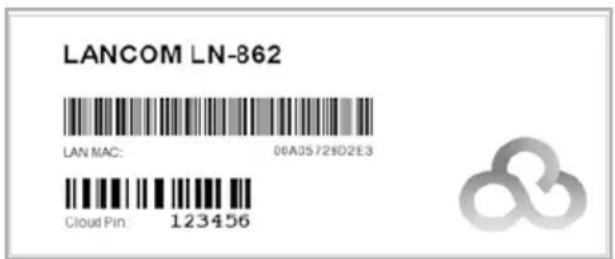
You will need the serial number of the device and the associated Cloud PIN. You can find the serial number on the bottom of the device or in LANconfig or WEBconfig. The Cloud PIN can be found on the Cloud-ready flyer, supplied with the device.
text_image
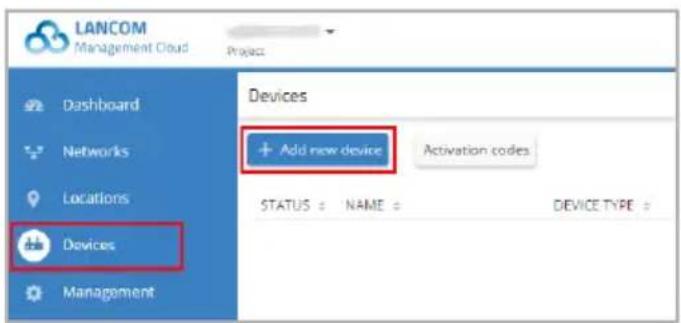
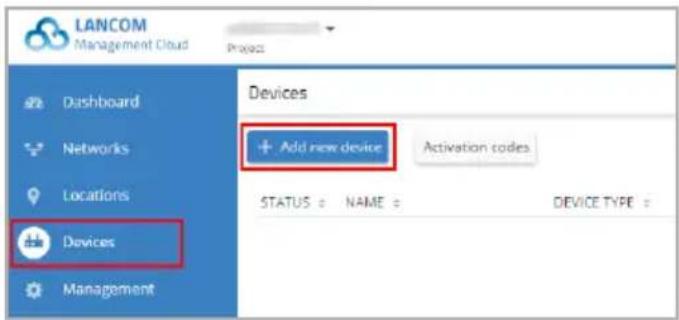
LANCOM LN-862 LAN MAC: 00A0S729D2E3 Cloud Pin: 123456In the LANCOM Management Cloud, open the Devices view and click Add new device.
text_image
LANCOM Management Cloud Project Dashboard Networks Locations Devices + Add new device Activation codes STATUS : NAME : DEVICE TYPE :
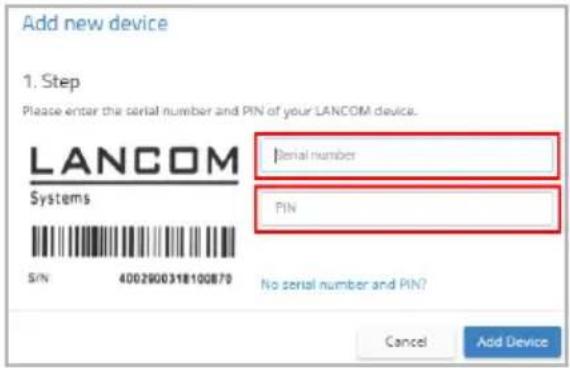
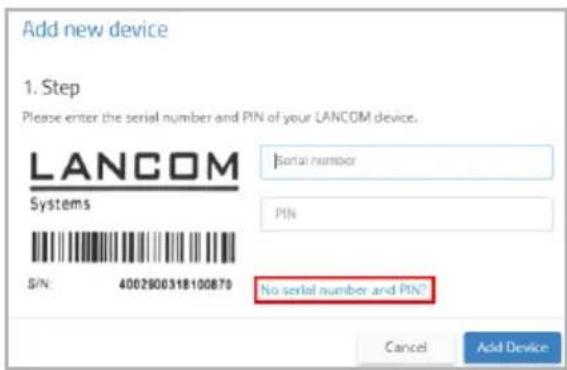
In the next window, enter the serial number and Cloud PIN of the device. Then confirm with the button Add new device.
The next time the LANCOM device has contact with the LANCOM Management Cloud (Public), it will be paired automatically.
text_image
Add new device 1. Step Please enter the serial number and PIN of your LANCOM device. LANCOM Systems SIN 4002900318100870 Serial numbers PIN No serial number and PIN? Cancel Add Device
A Cloud PIN for integrating devices into the LANCOM Management Cloud (Public) is available for devices that have been supplied with LCOS version 10.0 or later and are thus "Cloud-ready". If devices without a Cloud PIN are to be included into the LMC, the alternative method for integration into the LANCOM Management Cloud makes use of an activation code.
Integration into the LMC by activation code
This method uses LANconfig and just a few steps to integrate one or more LANCOM devices simultaneously into the LANCOM Management Cloud.
Create an activation code
In the LANCOM Management Cloud, open the Devices view and click Add new device.
text_image
LANCOM Management Cloud Process Dashboard Networks Locations Devices Management Devices + Add new device Activation codes STATUS : NAME : DEVICE TYPE :In the following window, click the link No serial number and PIN available?
text_image
Add new device 1. Step Please enter the serial number and PIN of your LANCOM device. LANCOM Systems Serial number PIN S/N: 4002900318100879 No serial number and PIN Cancel Add DeviceCreate an activation code by following the instructions in the dialog. This activation code allows you to integrate the LANCOM device into this project at a later time.

The Activation code button displays all of the activation codes for this project in the Devices view.
Using the activation code
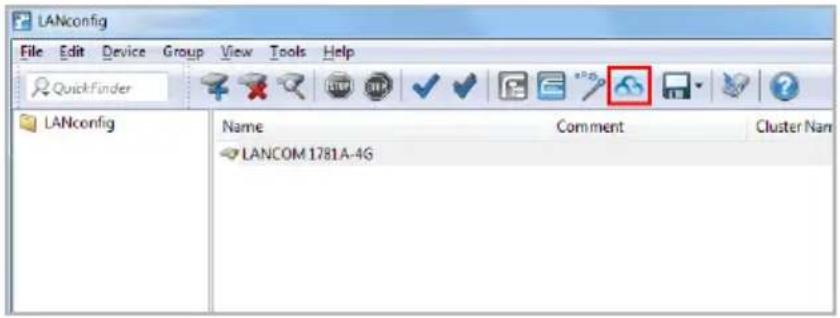
Open LANconfig and select the desired device or devices and click the Cloud icon in the menu bar.
text_image
LANconfig File Edit Device Group View Tools Help QuickFinder LANconfig Name Comment Cluster Nam LANCOM 1781A-4G
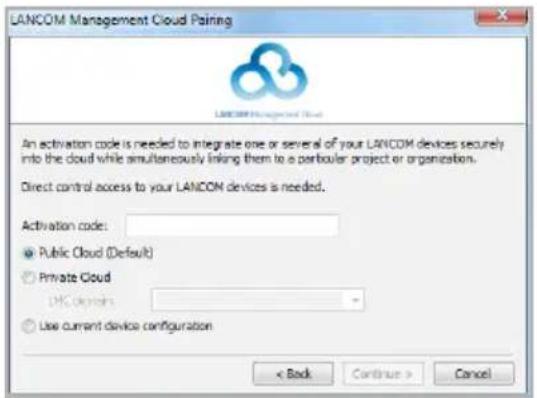
In the dialog window that opens, enter the activation code that you generated previously and click the button OK.
text_image
LANCOM Management Cloud Pairing LANCOM Management Cloud An activation code is needed to integrate one or several of your LANCOM devices securely into the cloud while simultaneously linking them to a particular project or organization. Direct control access to your LANCOM devices is needed. Activation code: ● Public Cloud (Default) ○ Private Cloud LPG Domain ○ Use current device configuration < Back Continue > Cancel
If you copied an activation code to the clipboard, it is automatically entered into the field.
Once the device is paired with the LANCOM Management Cloud, it is available in the project for further configuration.
Further information
Resetting the device
It is possible to reset the device to its factory settings if you need to reconfigure the device irrespective of any existing settings, or if it is impossible to connect to the device.
The position of the reset button on your device is illustrated in the supplied Quick Reference Guide.
The reset button offers two basic functions—boot (restart) and reset (to the factory settings)—which are called by pressing the button for different lengths of time.
Press for less than 5 seconds to reboot.
Press for more than 5 seconds until all LEDs on the device light up for the first time to restart while deleting the user-defined configuration. Customer-specific default settings will be loaded if the device contains them, otherwise the LANCOM factory settings will be loaded.
Press for more than 15 seconds until all LEDs on the device light up for the second time to restart while deleting the user-defined configuration. A rollout configuration will be loaded if the device contains one, otherwise the LANCOM factory settings will be loaded.

After resetting, the device starts completely unconfigured and all settings are lost. If possible be sure to backup the current device configuration before resetting.
Documentation
The full documentation for the LANCOM device consists of the following:
This Installation Guide offers an easy introduction for readers with knowledge of installing network components and routers and who are familiar with the workings of the basic network protocols.
The LCOS Reference Manual fully addresses issues concerning the LANCOM operating system LCOS for this and all other models.
The LCOS Menu Reference describes all of the parameters of LCOS in full.
The Quick Reference Guide details the main technical specifications for your device and the connectors it provides.
The full documentation and the latest firmware and software are available from the download area of the LANCOM website:
www.lancom-systems.com/publications/
Recycling notice
At the end of its useful life, this product should be properly disposed of in accordance with applicable electronic waste disposal regulations in your district, state and country.
LANCOM Service & Support
You have chosen a LANCOM or AirLancer product with highest reliability. If you still encounter a problem, you are in best hands! The most important information regarding our Service and Support is summarized below, just in case.
LANCOM Support
Installation Guide / Quick Reference Guide
If you encounter any problems when installing or operating your product, the included installation guide resp. quick reference guide may help you in many cases.
Support from reseller or distributor
You can contact your reseller or distributor for support: www.lancom-systems.com/how-to-buy/
Online
The LANCOM Knowledge Base, with more than 2,500 articles, is always available via our website: www.lancom-systems.com/knowledgebase/
In addition you can find explanations of all features of your LANCOM device in the LCOS reference manual: www.lancom-systems.com/publications/
If you have further questions please send us your query via our portal: www.lancom-systems.com/service-support/
Online support is free of charge at LANCOM. Our experts will respond as quickly as possible.
Firmware
The latest LCOS firmwares, drivers, tools, and documentation can be downloaded free of charge from the download section on our website:
www.lancom-systems.com/downloads/
Partner support
Our partners get additional support access according to their partner level.
More information can be found on our website:
www.lancom-systems.com/mylancom/
LANCOM Service
Warranty
Within the EU all LANCOM Systems products come with a voluntary manufacturer warranty. The warranty period depends on the device type:
2 years for all LANCOM unmanaged and websmart switches as well as accessories
3 years for all LANCOM routers, gateways, WLAN controllers, and access points
5 years for all LANCOM managed switches
Within the EU: To apply for warranty you need an RMA number (Return of Material Authorization). In this case please contact our support team.
More information can be found under der following link:
www.lancom-systems.com/repair/
Outside EU: Please contact your reseller or distributor.
Lifecycle
The LANCOM lifecycle applies to the support of products. For more information please visit the LANCOM website:
www.lancom-systems.com/lifecycle/
Options for your individual requirements
LANCOM offers individually tailored value-added services according to your needs. Little money provides best protection for your investment.
Warranty extensions for additional safeguarding for your devices:
www.lancom-systems.com/warranty-options/
Individual support contracts and service vouchers for best possible support with guaranteed response times:
www.lancom-systems.com/support-products/
Your LANCOM team