Boomerang VB-508-BK - Headphones Volkano - Free user manual and instructions
Find the device manual for free Boomerang VB-508-BK Volkano in PDF.


User questions about Boomerang VB-508-BK Volkano
0 question about this device. Answer the ones you know or ask your own.
Ask a new question about this device
Download the instructions for your Headphones in PDF format for free! Find your manual Boomerang VB-508-BK - Volkano and take your electronic device back in hand. On this page are published all the documents necessary for the use of your device. Boomerang VB-508-BK by Volkano.
USER MANUAL Boomerang VB-508-BK Volkano
natural_image
Line drawing of a handheld electronic device with earbuds and a power connector (no text or symbols)USER'S MANUAL
Please read and retain these instructions for future use.
HIGHLIGHTS:
Lightweight and comfortable to wear.
Built-in microphone.
PRODUCT SPECIFICATIONS:
Model: VB-508-BK
Bluetooth Version: V4.0
Supported Profiles: HFP, HSP, A2DP, AVRCP, APTX
Usage Distance: 10m
Battery Capacity: 60mAh
Stand-by Time: >100 hours
Talk Time: 4 Hours
Power Input: DC5V/200mA
Charge Time: 2 Hours
This product is compatible with most devices that have Bluetooth: Mobile phone, Tablet, iPads, PC.

text_image
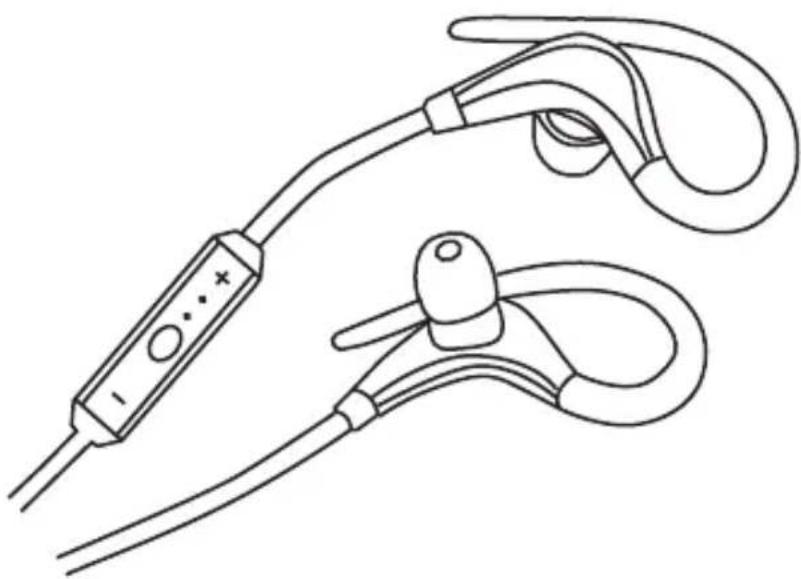
+ Volume Up ■ Universal switch Telephone Answering Key - Volume DownSAFETY PRECAUTIONS:
- Do not listen to loud music for extended periods of time.
- Do not use these earphones when performing tasks that require your full attention, like driving.
- Not intended for use by children. Keep out of reach of children.
- These earphones are sweat proof, however, they are not water resistant.
- Do not submerge in water or allow the earphones to become wet.
- Stop using the earphones should you experience any discomfort, irritation or have any adverse reaction caused by use.
- Do not store the earphones or use the earphones in temperatures below 15^ C or above 55^ C.
INSTRUCTIONS FOR USE:
PLEASE NOTE: Basic functions may vary from Bluetooth device to Bluetooth device.
ON/OFF: press and hold the SQUARE Key for 5 seconds to turn on or off.
PAUSE PLAYBACK: Press the SQUARE Key to pause playback, and press again to resume.
ANSWER / END CALL: Press the SQUARE key to answer a call, and press again to end.
REJECT A CALL: Press and hold the SQUARE key for about 2 seconds to reject call.
SELFIE SHUTTER: While paired to a device with a camera, close all music applications and press the "+" Key twice to use your earphones as a remote shutter.
PAIRING YOUR EARPHONES:
- Ensure the distance between the Bluetooth device and the earphones is within 1m.
- Press and hold the SQUARE key for about 5 seconds, releasing only when blue and red lights flash alternatively. Flashing lights indicates pairing mode.
- Enable the Bluetooth function of your device and search for the earphones in the list of discovered items. Click on the earphones to pair. Should the connection be successful, the blue light will flash slowly.


DIAGRAM DRAWING:
NOTE:
-
You do not require a password to pair these earphones to a device, however, older models of Bluetooth may ask you for a password. Please enter "0000" should this happen.
-
The pairing mode will be active for 5 minutes. Should pairing fail after 2 minutes, the earphones will automatically enter stand-by mode.
-
After pairing is completed, the headphone will recall the Bluetooth device it last connected to, and re-connect automatically when next used.
natural_image
Line drawing of a handheld electronic device with two earbuds and a control switch (no text or symbols)