
Baby-G BLX-560-7ER - Watch CASIO - Free user manual and instructions
Find the device manual for free Baby-G BLX-560-7ER CASIO in PDF.


User questions about Baby-G BLX-560-7ER CASIO
0 question about this device. Answer the ones you know or ask your own.
Ask a new question about this device
Download the instructions for your Watch in PDF format for free! Find your manual Baby-G BLX-560-7ER - CASIO and take your electronic device back in hand. On this page are published all the documents necessary for the use of your device. Baby-G BLX-560-7ER by CASIO.
USER MANUAL Baby-G BLX-560-7ER CASIO
Operation Guide 3296
CASIO®
Getting Acquainted
Congratulations upon your selection of this CASIO watch. To get the most out of your purchase, be sure to read this manual carefully.
Warning!
•The measurement functions built into this watch are not intended for use in taking measurements that require professional or industrial precision. Values produced
by this watch should be considered as reasonably accurate representations only. •The longitude, lunitidal interval, moon age and tide graph data that appear on the display of this watch are not intended for navigation purposes. Always use proper instruments and resources to obtain data for navigation purposes.
- This watch is not an instrument for calculating low tide and high tide times. The tide graph of this watch is intended to provide a reasonable approximation of tidal movements only.
EE-1
About This Manual
- Depending on the model of your watch, display text appears either as dark figures on a light background or light figures on a dark background. All sample displays in this manual are shown using dark figures on a light background.
- Button operations are indicated using the letters shown in the illustration.
• Each section of this manual provides you with the information you need to perform operations in each mode. Further details and technical information can be found in the "Reference" section.
Contents
General Guide ...... E-6
Timekeeping E-8
Tide/Moon Data E-17
World Time E-21
Stopwatch E-23
Countdown Timer E-26
Alarms E-32
Illumination E-39
Reference E-41
Specifications E-49
E2
E3
Procedure Lookup
The following is a handy reference list of all the operational procedures contained in this manual.
To set the time and date ....E-9
To toggle between 12-hour and 24-hour timekeeping ....E-12
To toggle the Timekeeping Mode time between DST and Standard Time ..... E-13
To configure Home Site data E-15
To specify a date ....E-19
To view the time in another city E-22
To toggle a city code time between Standard Time and Daylight Saving Time E-22
To measure times with the stopwatch....E-24
To use Auto-Start E-25
E-4
To configure the countdown timer E-29
To use the countdown timer E-31
To set an alarm time....E-34
To test the alarm E-36
To turn an alarm on and off....E-37
To turn the Hourly Time Signal on and off E-38
To illuminate the display E-39
To specify the illumination duration....E-40
To turn Flash Alert on and off E-44
To turn the button operation tone on and off....E-45
General Guide
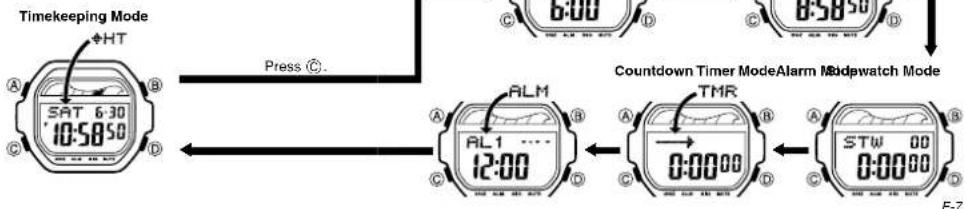
- Press © to change from mode to mode.
- In any mode (except when a setting screen is on the display), press Ⓑ to illuminate the display.
flowchart
graph LR
    A["Timekeeping Mode"] --> B["SAT 6:30 10:58:50"]
    B --> C["ALM"]
    C --> D["AL1 12:00"]
    D --> E["TMR"]
    E --> F["0:00:00"]
    F --> G["STW 00 0:00:00"]
    G --> H["Countdown Timer ModeAlarm"]
    H --> I["Stopwatch Mode"]
    I --> J["Press C..."]
    J --> K["6:00"]
    K --> L["6:30"]
    L --> M["6:30"]
E-6
Timekeeping
Day of week Tide graph
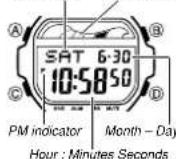
Use the Timekeeping Mode to set and view the current time and date.
- The tide graph (page E-42) shows tidal movements for the current date in accordance with the current time as kept in the Timekeeping Mode.
Important!
- Be sure to configure the current time and date, and your Home Site data (data for the site where you use the watch) correctly before using the functions of this watch. See "Home Site Data" (page E-13) for more information.
Setting the Time and Date
This watch is preset with UTC differential values that represent each time zone around the globe. Before setting the time, be sure to set the UTC differential for your Home Site first, which is the location where you normally will be using the watch.
- Note that World Time Mode times (page E-21) are all displayed based on the time and date settings you configure in the Timekeeping Mode.
To set the time and date
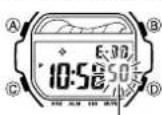
Seconds
- In the Timekeeping Mode, hold down Ⓐ until the seconds start to flash, which indicates the setting screen.
- Be sure to configure the correct UTC differential for your Home Site before configuring any other Timekeeping Mode settings.
- See the "UTC Differential/City Code List" at the back of this manual for information about the UTC differential settings that are supported.
E·8
E-9
Operation Guide 3296
CASIO
- Press Ⓐ to move the flashing in the sequence shown below to select other settings.
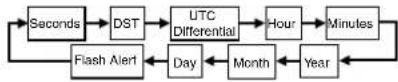
- When the setting you want to change is flashing, use Ⓓ and Ⓑ to change it as described below.
| Screen To do this: Do this: | ||
| 50 | Reset the seconds to 00 | Press 1. |
| DST OF F | Toggle between Daylight Saving Time (ON) and Standard Time (OF F) | Press 1. |
E·10
| Screen To do this: Do this: | ||
| + 90 | Specify the UTC differential | Use Ⓓ (+) and Ⓑ (-). |
| *10:58 | Change the hour or minutes | Use Ⓓ (+) and Ⓑ (-). |
| 2012 6-30 | Change the year, month or day | Use Ⓓ (+) and Ⓑ (-). |
- See "Daylight Saving Time (DST) Setting" (page E-12) for details about the DST selling.
- The UTC differential setting range is -12.0 to +14.0, in 0.5-hour units.
- When DST is turned on, the UTC differential setting range is -11.0 to +15.0, in 0.5-hour units.
- For information about Flash Alert, see "Flash Alert" (page E-44). 4. Press (A) twice to exit the setting screen.
•The day of the week is displayed automatically in accordance with the date month, and day) settings.
E-11
To toggle between 12-hour and 24-hour timekeeping
In the Timekeeping Mode, press Ⓓ to toggle between 12-hour timekeeping and 24-hour timekeeping.
- With the 12-hour format, the P (PM) indicator appears to the left of the hour digits for times in the range of noon to 11:59 p.m. and no indicator appears to the left of the hour digits for times in the range of midnight to 11:59 a.m.
- With the 24-hour format, times are displayed in the range of 0:00 to 23:59, without any indicator.
- The 12-hour/24-hour timekeeping format you select in the Timekeeping Mode is applied in all other modes.
Daylight Saving Time (DST) Setting
Daylight Saving Time (summer time) advances the time setting by one hour from Standard Time. Remember that not all countries or even local areas use Daylight Saving Time.
E·12
To toggle the Timekeeping Mode time between DST and Standard Time
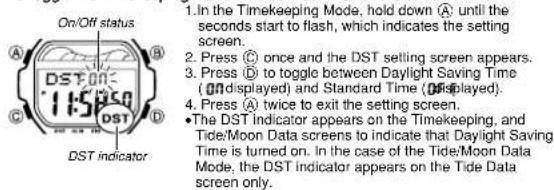
-
In the Timekeeping Mode, hold down (a) until the seconds start to flash, which indicates the setting screen.
-
Press © once and the DST setting screen appears.
-
Press © to toggle between Daylight Saving Time (ONdisplayed) and Standard Time (Odisplayed).
-
Press (A) twice to exit the setting screen. •The DST indicator appears on the Timekeeping, and Tide/Moon Data screens to indicate that Daylight Saving Time is turned on. In the case of the Tide/Moon Data Mode, the DST indicator appears on the Tide Data screen only.
Home Site Data
Moon age, tide graph data, and Tide/Moon Data Mode data will not be displayed properly unless Home Site data (UTC differential, longitude and lunitidal interval) is configured correctly.
E-13
- The Lunitidal interval is the time elapsing between the Moon's transit over a meridian and the next high tide at that meridian. See "Lunitidal Interval" (page E-43) for more information.
•This watch displays lunitidal intervals in terms of hours and minutes.
- The "Site/Lunitidal Interval Data List" at the back of this manual provides UTC differential and longitude information around the world.
- The following is the initial factory default Home Site data (Tokyo, Japan) when you first purchase the watch and whenever you have the battery replaced. Change these settings to match the area where you normally use the watch. UTC differential (+9.0); Longitude (East 140 degrees); Luntidal interval (5 hours, 20 minutes)
E-14
To configure Home Site data
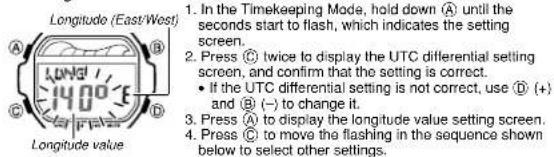
-
In the Timekeeping Mode, hold down (A) until the seconds start to flash, which indicates the setting screen.
-
Press © twice to display the UTC differential setting screen, and confirm that the setting is correct. • If the UTC differential setting is not correct, use ① (+) and ② (-) to change it.
-
Press Ⓐ to display the longitude value setting screen.
- Press Ⓐ to move the flashing in the sequence shown below to select other settings.

- While the setting you want to change is flashing, use ① and ⑧ to change it as described below.
| Setting | Screen | Button Operations |
| Longitude Value | LONG140° E | Use 1(+) and 8(-) to change the setting.·You can specify a value from 0^ to 180^ , in 1-degree units. |
| Longitude (East/West) | Use 1 to switch between east longitude (E) and west longitude (B) | |
| Lunitidal Interval Hours, Minutes | INT5:20 | Use 1(+) and 8(-) to change the setting. |
- Press Ⓐ to exit the setting screen.
E-16
E-15
Tide/Moon Data
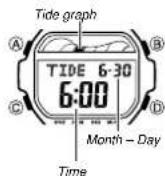
Tide/Moon data lets you view the moon age for a particular date, and tidal movements for a particular date and time for your Home Site.
- When you enter the Tide/Moon Data Mode, the data for 6:00 a.m. on the current date appears first.
- If you suspect that the Tide/Moon data is not correct for some reason, check the Timekeeping Mode data (current time, date, and Home Site settings), and make changes as required.
• See "Tide Graph" (page E-42) for information about the tide graph.
- All of the operations in this section are performed in the Tide/Moon Data Mode, which you enter by pressing © (page E-7).
E-17
Tide/Moon Data Screens
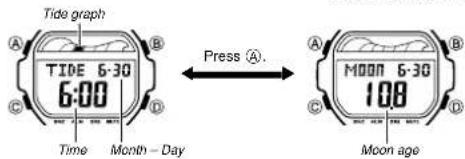
In the Tide/Moon Data Mode, press Ⓐ to toggle between the Tide Data screen and the Moon Data screen.
text_image
Tide graph TIDE 6-30 6:00 Press Ⓐ. Time Month - Day Moon age- While the Tide Data screen is displayed, press ① to advance to the next hour. - While the Moon Data screen is displayed, press ② to advance to the next day. - You also can specify a particular date (year, month, day) to view its tide data and moon data. See "To specify a date" for more information. - When you enter the Tide/Moon Data Mode, the screen (tide data or moon data) that was displayed the last time you exited the mode appears first.
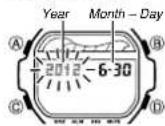
To specify a date
-
In the Tide/Moon Data Mode, hold down Ⓐ until the year setting starts to flash, which indicates the setting screen.
-
Press Ⓐ to move the flashing in the sequence shown below to select the other settings.

E-18
E-19
Operation Guide 3296
CASIO®
- While a setting is flashing, use Ⓓ (+) or Ⓑ (−) to change it.
- You can specify a date in the range of January 1, 2000 to December 31, 2099.
-
Press (A) to exit the setting screen.
-
Use Ⓐ to display either the Tide Data screen or the Moon Data screen.
World Time
Current time in selected city
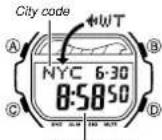
World Time shows the current time in 48 cities (29 time zones) around the world.
- The times kept in the World Time Mode are synchronized with the time being kept in the Timekeeping Mode. If you feel that there is an error in any World Time Mode time, check the UTC differential of your Home Site Data (Home City) and the current setting of the Timekeeping Mode time.
- Select a city code in the World Time Mode to display the current time in any particular time zone around the globe. See the "UTC Differential/City Code List" at the back of this manual for information about the UTC differential settings that are supported.
- All of the operations in this section are performed in the World Time Mode, which you enter by pressing © (page E-7).
E·20
E-21
To view the time in another city
While in the World Time Mode, press Ⓓ (eastward) to scroll through the city codes (time zones).
To toggle a city code time between Standard Time and Daylight Saving Time
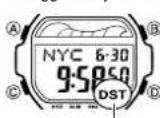
DST indicator
-
In the World Time Mode, use Ⓓ to display the city code (time zone) whose Standard Time/Daylight Saving Time setting you want to change.
-
Hold down Ⓐ to toggle between Daylight Saving Time (DST indicator displayed) and Standard Time (DST indicator not displayed).
•The DST indicator is shown on the World Time Mode screen while Daylight Saving Time is turned on.
- Note that the DST/Standard Time setting affects only the currently displayed city code. Other city codes are not affected.
Stopwatch
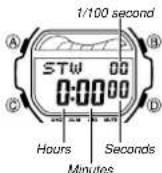
The stopwatch lets you measure elapsed time, split times, and two finishes. It also includes Auto-Start.
•The display range of the stopwatch is 23 hours, 59 minutes, 59.99 seconds.
•The stopwatch continues to run, restarting from zero after it reaches its limit, until you stop it.
•The stopwatch measurement operation continues even if you exit the Stopwatch Mode.
- Exiting the Stopwatch Mode while a split time is frozen on the display clears the split time and returns to elapsed time measurement.
- All of the operations in this section are performed in the Stopwatch Mode, which you enter by pressing © (page E-7).
E.22
E 23
To measure times with the stopwatch
Elapsed Time
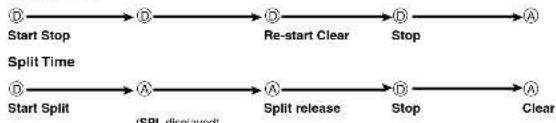
flowchart
graph LR
    A["Start Stop"] --> B["Split Time"]
    B --> C["Start Split"]
    C --> D["Split release"]
    D --> E["Stop"]
    E --> F["Clear"]
    style A fill:#f9f,stroke:#333
    style B fill:#f9f,stroke:#333
    style C fill:#f9f,stroke:#333
    style D fill:#f9f,stroke:#333
    style E fill:#f9f,stroke:#333
    style F fill:#f9f,stroke:#333
Two Finishes

flowchart
graph LR
    A["Start"] --> B["A Split"]
    B --> C["Stop"]
    C --> D["A Split release"]
    D --> E["A Clear"]
    style A fill:#f9f,stroke:#333
    style E fill:#f9f,stroke:#333
E-24
About Auto-Start
With Auto-Start, the watch performs a 5-second countdown, and stopwatch operation starts automatically when the countdown reaches zero.
During the final three seconds of the countdown, a beeper sounds with each second.
To use Auto-Start
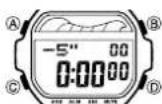
- While the stopwatch screen is showing all zeros in the Stopwatch Mode, press (A).
- This displays a 5-second countdown screen. - To return to the all zeros screen, press Ⓐ again.
- Press Ⓓ to start the countdown.
- When the countdown reaches zero, a lone sounds and a stopwatch timing operation starts automatically.
- Pressing Ⓓ while the Auto-Start countdown is in progress will start the stopwatch immediately.
E-25
Countdown Timer
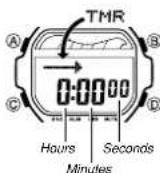
You can set the countdown timer within a range of one minute to 24 hours. An alarm sounds when the countdown reaches zero. The countdown timer also has an auto-repeat feature and a progress beeper that signals the progress of the countdown.
- All of the operations in this section are performed in the Countdown Timer Mode, which you enter by pressing © (page E-7).
Configuring the Countdown Timer
The following are the settings you should configure before actually using the countdown timer. Countdown start time; Auto-repeat on/off; Progress beoper on/off
- See "To configure the countdown timer" (page E-29) for information about setting up the timer.
E-26
Auto-repeat
When auto-repeat is turned on, the countdown restarts automatically from the countdown start time when it reaches zero. When auto-repeat is turned off, the countdown stops when it reaches zero and the display shows the original countdown start time.
- Pressing Ⓓ while an auto-repeat countdown is in progress pauses the current countdown. You can resume the auto-repeat countdown by pressing Ⓔ, or you can press Ⓔ to reset to the countdown time starting value.
Countdown Timer Beeper Operations
The watch beeps at various times during a countdown so you can keep informed about the countdown status without looking at the display. The following describes the types of beeper operations the watch performs during a countdown.
E-27
Countdown End Beeper
The countdown end beeper lets you know when the countdown reaches zero. - When the progress beeper is turned off, the countdown end beeper sounds for about 10 seconds, or until you press any button to stop it.
- When the progress beeper is turned on, the countdown end beeper sounds for about one second.
Progress Beeper
When the progress beeper is turned on, the watch uses beeps to signal countdown progress as described below.
- Starting from five minutes before the end of the countdown, the watch emits four short beeps at the top of each countdown minute.
- 30 seconds before the end of the countdown, the watch emits four short beeps.
- The watch emits a short beep for each of the last 10 seconds of the countdown. - If the countdown start time is six minutes or greater, the watch emits a short beep for each second of the final 10 seconds before the five-minute point is reached. Four short beeps are emitted to signal when the five-minute point is reached.
To configure the countdown timer
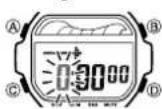
- While the countdown start time is on the display in the Countdown Timer Mode, hold down Ⓐ until the current countdown start time starts to flash, which indicates the setting screen.
- If the countdown start time is not displayed, use the procedure under "To use the countdown timer" (page E-31) to display it.
- Press © to move the flashing in the sequence shown below to select other settings.
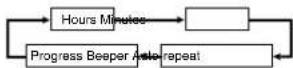
E-28
E-29
Operation Guide 3296
CASIO
- When the setting you want to change is flashing, use Ⓓ and Ⓑ to change it as described below.
| Setting | Screen | Button Operation |
| Hours, Minutes | Use Ⓓ(+) and Ⓑ(-) to change the setting. | |
| Auto-repeat | Press Ⓓ to toggle auto-repeat on ( ⊕displayed) and off (-displayed). | |
| Progress Beeper | Press Ⓓ to toggle the progress beeper on ( ON) and off ( OFF). |
• To specify a countdown start time of 24 hours, set 0:00
4. Press Ⓐ to exit the setting screen.
- You also can perform steps 1 and 2 of the above procedure whenever you need to view the current auto-repeat and progress beeper settings.
To use the countdown timer
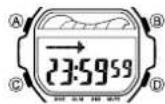
Press Ⓓ while in the Countdown Timer Mode to start the countdown timer.
- The countdown timer operation continues even if you exit the Countdown Timer Mode.
- Press Ⓓ while a countdown operation is in progress to pause it. Press Ⓓ again to resume the countdown.
• To stop a countdown operation completely, first pause it (by pressing Ⓓ), and then press Ⓔ. This returns the countdown time to its starting value.
E30
E31
Alarms
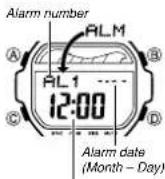
Alarm time
(Hour : Minutes)
This watch has three independent multi-function alarms (including one snooze alarm). When an alarm is turned on, the alarm tone sounds when the alarm time is reached. You also can turn on an Hourly Time Signal that causes the watch to beep twice every hour on the hour.
- There are three alarm screens: AL1, AbE SNZ (snocze). The Hourly Time Signal screen is indicated by SIG.
- All of the operations in this section are performed in the Alarm Mode, which you enter by pressing © (page E-7).
Alarm Types
The alarm type is determined by the settings you make, as described below.
•Daily alarm
Set the hour and minutes for the alarm time. This type of setting causes the alarm to sound everyday at the time you set.
- Date alarm
Set the month, day, hour and minutes for the alarm time. This type of setting causes the alarm to sound at the specific time, on the specific date you set.
•1-Month alarm
Set the month, hour and minutes for the alarm time. This type of setting causes the alarm to sound everyday at the time you set, only during the month you set.
•Monthly alarm
Set the day, hour and minutes for the alarm time. This type of setting causes the alarm to sound every month at the time you set, on the day you set.
E32
E-33
To set an alarm time
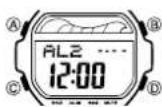
- In the Alarm Mode, use Ⓓ to scroll through the alarm screens until the one whose time you want to set is displayed.
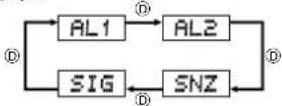
•The snooze alarm operation repeats every five minutes.
2. After you select an alarm screen, hold down Ⓐ until the hour setting of the alarm time starts to flash, which indicates the setting screen.
•This operation turns on the currently selected alarm automatically.
- Press Ⓒ to move the flashing in the sequence shown below to select other settings.

- While a setting is flashing, use Ⓓ and Ⓑ to change it as described below.
| Screen | To do this: | Do this: |
| 12:00 | Change the hour and minutes | Use Ⓐ (+) and Ⓑ (-).•With the 12-hour format, set the time correctly as a.m. or p.m. (P indicator).•To set an alarm that does not include a month and/or day, set - for each setting. |
| ---- | Change the month and day |
- Press Ⓐ to exit the setting screen.
E-34
E-35
Alarm Operation
The alarm tone sounds at the preset time for 10 seconds, regardless of the mode the watch is in. In the case of the snooze alarm, the alarm operation is performed a total of seven times, every five minutes, until you turn the alarm off (page E-37).
- Alarm and Hourly Time Signal operations are performed in accordance with the Timekeeping Mode time.
•To stop the alarm tone after it starts to sound, press any button.
- Performing any one of the following operations during a 5-minute interval between snooze alarms cancels the current snooze alarm operation.
Displaying the Timekeeping Mode setting screen (page E-9) Displaying the SNZ setting screen (page E-34)
To test the alarm
In the Alarm Mode, hold down Ⓓ to sound the alarm.
To turn an alarm on and off
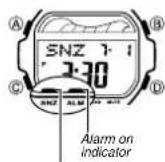
Snooze alarm indicator
- In the Alarm Mode, use Ⓓ to select an alarm screen.
- Press Ⓐ to toggle the selected alarm between on and off.
- Turning on an alarm displays the alarm on indicator on its Alarm Mode screen (AL1.ALE SNZ
• In all modes, the alarm on indicator is shown for any alarm that is currently turned on. - The alarm on indicator flashes while the alarm is sounding.
- The snooze alarm indicator flashes while the snooze alarm is sounding and during the 5-minute intervals between alarm operations.
E-36
E-37
To turn the Hourly Time Signal on and off
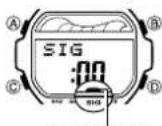
Hourly time signal on indicator
- In the Alarm Mode, use Ⓓ to select the Hourly Time Signal (SIG).
- Press Ⓐ to toggle it on and off.
•The Hourly Time Signal on indicator is shown on the display in all modes while this function is turned on.
Illumination
This watch has an EL (electro-luminescent) panel that causes the entire display to glow for easy reading in the dark.
- See "Illumination Precautions" (page E-48) for other important information about using illumination.
To illuminate the display
In any mode (except when a setting screen is on the display), press Ⓗ to turn on illumination.
- You can use the procedure below to select either 1.5 seconds or 3 seconds as the illumination duration. When you press Ⓔ, the illumination will remain on for about 1.5 seconds or 3 seconds, depending on the current illumination duration setting.
E-38
E-39
To specify the illumination duration
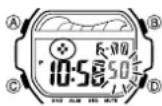
- In the Timekeeping Mode, hold down Ⓐ until the seconds start to flash, which indicates the setting screen.
- While the seconds are flashing, press Ⓑ to toggle the setting between 1.5 seconds (♦) and 3 seconds (✿)
- Press (A) twice to exit the setting screen.
Reference
This section contains more detailed and technical information about watch operation. It also contains important precautions and notes about the various features and functions of this watch.
Moon Age
The Moon goes through a regular 29.53-day cycle. During each cycle, the Moon appears to wax and wane as the relative positioning of the Earth, the Moon, and the Sun changes. The greater the angular distance between the Moon and the Sun, ^4 the more we see illuminated.
* The angle to the Moon in relation to the direction at which the Sun is visible from the Earth.
This watch performs a rough calculation of the current Moon age starting from day 0 of the moon age cycle. Since this watch performs calculations using integer values only (no fractions), the margin for error of the displayed Moon age is ± 1 day.
E-40
E-41
Tide Graph
The Tide Graph has six graphic segments, each of which indicates a different tide level. The current tide level is indicated by the displayed graphic segment.
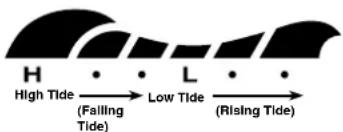
text_image
H • • L • • High Tide (Falling Tide) Low Tide (Rising Tide)E-42
Tidal Movements
Tides are the periodic rise and fall of the water of oceans, seas, bays, and other bodies of water caused mainly by the gravitational interactions between the Earth, Moon and Sun. Tides rise and fall about every six hours. The tide graph of this watch indicates tidal movement based on the Moon's transit over a meridian and the lunitidal interval. The lunitidal interval differs according to your current location, so you must specify a lunitidal interval in order to obtain the correct tide graph readings. The tide graph displayed by this watch is based on the current Moon age. Remember that the margin for error of the Moon age displayed by this watch is ± 1 day. The greater the error in a particular Moon age, the greater the error in the resulting tide graph.
Lunitidal Interval
Theoretically, high tide is at the Moon's transit over the meridian and low tide is about six hours later. Actual high tide occurs somewhat later, due to factors such as viscosity, friction, and underwater topography. Both the time differential between the Moon's transit over the meridian until high tide and the time differential between the Moon's transit over the meridian until low tide are known as the "lunitidal interval". When setting the lunitidal interval for this watch, use the time differential between the Moon's transit over the meridian until high tide.
E-43
Flash Alert
When Flash Alert is turned on, the illumination flashes for the alarms, the Hourly Time Signal, the countdown alarm, and stopwatch auto start.
To turn Flash Alert on and off
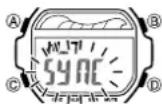
- In the Timekeeping Mode, hold down Ⓐ until the seconds start to flash, which indicates the setting screen.
- Press © eight times to display the Flash Alert setting screen.
- Press Ⓓ to toggle Flash Alert on (SYNC displayed) and off (----displayed).
- Press Ⓐ twice to exit the setting screen.
- The Flash Alert setting you select with the above procedure is applied in all modes.
- When Flash Alert is on, SYNC appears for about one second whenever you enter the Stopwatch, Countdown Timer, or Alarm Mode.
Button Operation Tone
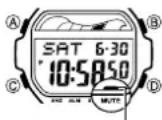
Mute indicator
The button operation tone sounds any time you press one of the watch's buttons. You can turn the button operation tone on or off as desired.
- Even if you turn off the button operation tone, the alarms, the Hourly Time Signal, the countdown alarm, and stopwatch auto start all operate normally.
To turn the button operation tone on and off In any mode (except when a setting screen is on the display), hold down Ⓐ to toggle the button operation tone on (mute indicator not displayed) and off (mute indicator displayed).
- Holding down © to turn the button operation tone on or off also causes the watch's current mode to change.
- The mute indicator is displayed in all modes when the button operation tone is turned off.
E-45
E-44
Auto Return Features
- If you leave the watch in the Alarm Mode or Tide/Moon Data Mode for two or three minutes without performing any operation, it changes to the Timekeeping Mode automatically.
- If you leave a screen with flashing digits on the display for two or three minutes without performing any operation, the watch exits the setting screen automatically.
Scrolling
The Ⓑ and Ⓓ buttons are used in various modes and setting screens to scroll through data on the display. In most cases, holding down these buttons during a scroll operation scrolls at high speed.
Initial Screens
When you enter the World Time or Alarm Mode, the data you were viewing when you last exited the mode appears first.
E-46
UTC
•The UTC differential is a value that indicates the time difference between a
reference point in Greenwich, England and the time zone where a city is located.
- The letters UTC is the abbreviation for Coordinated Universal Time, which is the world-wide scientific standard of timekeeping. It is based upon carefully maintained atomic (cesium) clocks that keep time accurately to within microseconds. Leap seconds are added or subtracted as necessary to keep UTC in sync with the Earth's rotation.
Timekeeping
- Resetting the seconds to 80 while the current count is in the range of 30 to 59 causes the minutes to be increased by 1. In the range of 00 to 29, the seconds are reset to 80 without changing the minutes.
•The year can be set in the range of 2000 to 2099. - The watch's built-in full automatic calendar makes allowances for different month lengths and leap years. Once you set the date, there should be no reason to change it except after you have the watch's battery replaced.
E-47
World Time
- The seconds count of the World Time is synchronized with the seconds count of the Timekeeping Mode.
- All World Time Mode times are calculated from the current time in the Timekeeping Mode using UTC time differential values.
Illumination Precautions
- The electro-luminescent panel that provides illumination loses power after very long use.
- Illumination may be hard to see when viewed under direct sunlight.
- The watch may emit an audible sound whenever the display is illuminated. This is due to vibration of the EL panel used for illumination, and does not indicate malfunction.
- Illumination turns off automatically whenever an alarm sounds.
•Frequent use of illumination runs down the battery.
Specifications
Accuracy at normal temperature: ± 30 seconds a month
Timekeeping: Hour, minutes, seconds, p.m. (P), month, day, day of the week Time format: 12-hour and 24-hour Calendar system: Full Auto-calendar pre-programmed from the year 2000 to 2099 Other: Daylight Saving Time (summer time)/Standard Time; Home Site data settings (UTC differential, longitude, lunitidal interval)
Tide/Moon Data: Moon age for specific date; Tide level for specific date and time
World Time: 48 cities (29 time zones)
Other: Daylight Saving Time/Standard Time
Stopwatch:
Measuring unit: 1/100 second
Measuring capacity: 23:59' 59.99'
Measuring modes: Elapsed time, split time, two finishes
Other: Auto-Start
E-48
E-49
Operation Guide 3296
CASIO®
Countdown Timer:
Measuring unit: 1 second
Input range: 1 minute to 24 hours (1-minute increments and 1-hour increments) Other: Auto-repeat timing: Progress beeper
Alarms: 3 multi-function alarms (with 1 snooze alarm); Hourly Time Signal Illumination: EL (electro-luminescent panel); Selectable illumination duration Other: Button operation tone on/off; Flash alert
Battery: One lithium battery (Type: CR1616)
Approximately 3 years on type CR1616 (10 seconds of alarm operation per day (with flash alert), one countdown timer operation (with progress beeper and flash alert) per week, one stopwatch operation (with auto start and flash alert) per week, 1.5 seconds of illumination per day)
Frequent use of the light shortens the battery life.

UTC Differential/City Code List
Site/Lunitidal Interval Data List
E·50
UTC Differential/City Code List
| City Code | City | UTC Differential | Other major cities in same time zone |
| PPG | Pago Pago | -11 | |
| HNL | Honolulu | -10 | Papeete |
| ANC | Anchorage | -9 | Nome |
| YVR | Vancouver | ||
| SFO | San Francisco | -8 | Las Vegas, Seattle/Tacoma, Dawson City |
| LAX | Los Angeles | ||
| DEN | Denver | -7 | Edmonton, El Paso |
| MEX | Mexico City | ||
| CHI | Chicago | -6 | Houston, Dallas/Fort Worth, New Orleans, Winnipeg |
| MIA | Miami | ||
| NYC | New York | -5 | Montreal, Detroit, Boston, Panama City, Havana, Lima, Bogota |
| CCS* | Caracas | -4 | La Paz, Santiago, Port Of Spain |
| YYT | St. Johns | -3.5 | |
| RIO | Rio de Janeiro | -3 | Sao Paulo, Buenos Aires, Brasília, Montevideo |
| RAI | Praia | -1 | |
| LIS | Lisbon | ||
| LON | London | 0 | Dublin, Casablanca, Dakar, Abidjan |
L-2
| City Code | City | UTC Differential | Other major cities in same time zone |
| BCN | Barcelona | +1 | Amsterdam, Algiers, Hamburg, Frankfurt, Vienna, Madrid, Stockholm |
| PAR | Paris | ||
| MIL | Milan | ||
| ROM | Rome | ||
| BER | Berlin | ||
| ATH | Athens | +2 | Heisinki, Beirut, Damascus, Cape Town |
| JNB | Johannesburg | ||
| IST | Istanbul | ||
| CAI | Cairo | ||
| JRS | Jerusalem | ||
| MOW | Moscow | +3 | Kuwait, Riyadh, Aden, Addis Ababa, Nairobi |
| JED | Jeddan | ||
| THR | Tehran | +3.5 | Shiraz |
| DXB | Dubai | +4 | Abu Dhabi, Muscat |
| KBL | Kabul | +4.5 | |
| KHI | Karachi | +5 | |
| MLE | Male | ||
| DEL | Delhi | +5.5 | Mumbai, Kolkata, Colombo |
L-3
| City Code | City | UTC Differential | Other major cities in same time zone |
| DAC | Dhaka | +6 | |
| RGN | Yangon | +6.5 | |
| BKK | Bangkok | +7 | Phnom Penn, Hanoi, Vientiane, Jakarta |
| SIN | Singapore | +8 | Kuala Lumpur, Taipei, Manila, Perth, Ulsanbaatar |
| HKG | Hong Kong | ||
| BJS | Beijing | ||
| SEL | Seoul | +9 | Pyongyang |
| TYO | Tokyo | ||
| ADL | Adelaide | +9.5 | Darwin |
| GUM | Guam | +10 | Melbourne, Rabaul |
| SYD | Sydney | ||
| NOU | Nouyeho | +11 | Port Villa |
| WLG | Wellington | +12 | Christchurch, Nadi, Nauru Island |
•Based on data as of December 2010.
In December 2007, Venezuela changed its offset from -4 to -4.5. Note, however, that this watch displays an offset of -4 (the old offset) for the CCS (Caracas, Venezuela) city code.
L-4
Site/Lunitidal Interval Data List
| Site | UTC Differential | Longitude | Lunitidal Interval | |
| Standard Time | DST/Summer Time | |||
| Anchorage -9.0 -8.0 149°W 5:40 | ||||
| Bahamas -5.0 -4.0 77°W 7:30 | ||||
| Baja, California -7.0 -6.0 110°W 8:40 | ||||
| Bangkok +7.0 +8.0 101°E 4:40 | ||||
| Boston -5.0 -4.0 71°W 11:20 | ||||
| Buenos Aires | -3.0 -2.0 59°W 6:00 | |||
| Casablanca | +0.0 +1.0 | 8°W | 1:30 | |
| Christmas Island | -14.0 | +15.0 158°W | 4:00 | |
| Dakar | +0.0 | +1.0 17°W | 7:40 | |
| Cold Coast | -10.0 | +11.0 154°E | 8:30 | |
| Great Barrier Reef, Cairns | -10.0 | +11.0 | 146°E | 9:40 |
| Guam | -10.0 | +11.0 146°E | 7:40 | |
| Hamburg | +1.0 | +2.0 10°E | 4:50 | |
| Hong Kong | -8.0 | +9.0 114°E | 9:10 | |
L-5
| Site | UTC Differential | Longitude | Lunitidal Interval | |
| Standard Time | DST/Summer Time | |||
| Honolulu | -10.0 -9.0 | 58^ 3.40 | ||
| Jakarta | +7.0 | +8.0 107^ | 0:00 | |
| Jeddah | +3.0 | +4.0 39^ | 6:30 | |
| Karachi | +5.0 | +6.0 67^ | 10:10 | |
| Kona, Hawaii | -10.0 -9.0 | 166^ 4.00 | ||
| Lima | -5.0 -4.0 | 77^ 5.20 | ||
| Lisbon | -0.0 | +1.0 | 9^ 2:00 | |
| London | -0.0 | +1.0 | 0^ 1:10 | |
| Los Angeles | -8.0 -7.0 | 118^ 9.20 | ||
| Maldives | -5.0 | +6.0 74^ | 0:10 | |
| Manila | -8.0 | +9.0 121^ | 10:30 | |
| Mauritius | -4.0 | +5.0 57^ | 0:50 | |
| Melbourne | -10.0 | +11.0 145^ | 2:10 | |
| Miami | -5.0 -4.0 | 0^ 7:30 | ||
| Noumea | +11.0 | +12.0 166^ | 8:30 | |
L-6
| Site | UTC Differential | Longitude | Lunitidal Interval | |
| Standard Time | DST/Summer Time | |||
| Pago Pago | -11.0 | -10.0 171°W 6.40 | ||
| Palau | +9.0 | +10.0 135°E | 7:30 | |
| Panama City | -5.0 -4.0 80°W 3:00 | |||
| Papele | -10.0 -9.0 150°W 0:10 | |||
| Rio De Janeiro | -3.0 -2.0 48°W 3.10 | |||
| Seattle -8.0 -7.0 122°W 4:20 | ||||
| Shanghai | +8.0 +9.0 21°E 1:20 | |||
| Singapore | +8.0 | +9.0 104°E | 10:20 | |
| Sydney +10.0 -11.0 151°E 8:40 | ||||
| Tokyo | +9.0 | +10.0 140°E 5:20 | ||
| Vancouver | -8.0 -7.0 23°W 5:10 | |||
| Wellington | +12.0 | +13.0 175°E 4:50 | ||
- Based on data as of 2003.
L-7