DI-390AHDVF+ - Security Camera Provision-ISR - Free user manual and instructions
Find the device manual for free DI-390AHDVF+ Provision-ISR in PDF.


| Product Type | Security Camera |
| Model | DI-390AHDVF+ |
| Image Sensor | 1/3" 2MP CMOS Sensor |
| Effective Pixels | 1984(H) x 1225(V) |
| Resolution | Digital 1920x1080P, Analog 960H |
| Minimum Illumination | 0.01 Lux (0 Lux IR On) |
| Day/Night | Auto (ICR), Color, B/W, EXT |
| IR LED | 3 LED Array (25m range) |
| Lens | 2.8-12mm varifocal, DC drive |
| Video Output | AHD/TVI/CVI/CVBS selectable via DIP switch |
| OSD Menu | Available via CoC (Control over Coax) up to 200m |
| Backlight Compensation | OFF / BLC / HSBLC |
| White Balance | AWB, ATW, AWC, Indoor, Outdoor, Manual |
| Noise Reduction | 2D-DNR and 3D-DNR |
| Privacy Mask | Up to 4 areas |
| Motion Detection | Up to 4 areas |
| Defog | Auto / OFF |
| Power Supply | DC 12V ±10%, ~410mA |
| Dimensions (W x H x D) | 129.5 x 90 x 119 mm |
| Net Weight | 476 g |
| Operating Temperature | -20°C to +50°C (-4°F to 122°F) |
| Weatherproof | Not waterproof; use in dry indoor/outdoor with protection |
| Certification | FCC (per manual reference) |
| Video Transmission Distance | Up to 400m on RG59 coaxial cable |
Frequently Asked Questions - DI-390AHDVF+ Provision-ISR
User questions about DI-390AHDVF+ Provision-ISR
0 question about this device. Answer the ones you know or ask your own.
Ask a new question about this device
Download the instructions for your Security Camera in PDF format for free! Find your manual DI-390AHDVF+ - Provision-ISR and take your electronic device back in hand. On this page are published all the documents necessary for the use of your device. DI-390AHDVF+ by Provision-ISR.
USER MANUAL DI-390AHDVF+ Provision-ISR
natural_image
Four technical line drawings of mechanical components, including a cylindrical component and a flanged housing (no text or symbols)FCC
www.provision-ISR.com
natural_image
Solid red rectangular shape with a curved gray border (no text or symbols)
Now you can see!
text_image
AHDUSER MANUAL
■ 1080P 4 in 1 Pro Series
Contents
1) Cautions:
2) Product Introduction
2.1 Camera Introduction
2.2 Product Features
3) Menu Setup
4) Product Installation
4.1 General Notes
4.2 Installation Tools and Information
4.3 Installation Method
4.4 Setting the video output type
4.5 Setting the Camera
4.6 Connection
4.7 OSD Control
5) Technical Specification
1 Cautions:
-
To reduce the risk of electric shock, do not open the camera or perform internal maintenance by yourself. Please consult a professional service person if needed.
-
To prevent fire or electrical shock hazard, make sure that the input voltage, current, polarity and operating temperature meet the requirements of the camera.
-
Please note the operating temperature and environmental limits of the camera. Do not install in higher/lower temperatures than -20^ +50^ ( -4^ 122^ ). These cameras are not waterproof! Minimize dust and moisture erosion, otherwise camera would be damaged.
-
Avoid directing the camera to sunlight while powered on, otherwise the sensor will be damaged.
-
Do not touch the sensor surface. If any foreign objects exist use a cotton swab or lens paper to clean, if it is difficult to remove, use a neutral detergent diluted with water.
-
In order to ensure smooth and satisfactory image, the power and video cables shouldn't be too long. Please follow general AHD/Analog sepcifications for cables types and lenghts.
-
In order to prevent the camera from falling, please install the camera on a stable surface.
-
The camera should not be placed near a radiator or heating resistor.
2 Product Introduction
2.1 Camera Introduction
PROVISION-ISR's new series of cameras have adopted a high performance CMOS image sensor which provides HD resolution and supports high resolution video output. The cameras support video transmission distance of around 400M base on Rg59 standard coaxial cable. This series can support AHD/TVI/CVI/CVBS 960H analog output.
2.2 Product Features
• Coaxial Cable with BNC Connector
- DIP Switch
• Auto Day/Night (ICR)
• Auto Defog, HBLC
• Digital WDR, 2D/3D NR
- Motion Detection, Privacy Mask
- AHD/TVI/CVI/CVBS Signal Selectable (by jumper)
3 Menu Setup
AHD/TVI: Click on "Iris+" button from the DVR's PTZ interface to call the OSD Menu. Use the PTZ interface to scroll through the menu and "Iris+" to confirm.
CVI: Click "▶" button from the DVR's PTZ interface, then click "💡" and press "Enter" to call the OSD Menu.
4 Product Installation
4.1 General Notes
- Make sure the unit is powered off before installation.
- Check that power supply voltage complies with the camera requirement to prevent damage to the camera.
- The installation and maintenance of this product should be done by a professional. Please do not remove or modify the camera in any way.
4.2 Installation Tools and Information:
Prepare the required tools and instructions. Before installation please prepare the following tools: A straight or a Phillips-head screwdriver, multi-meter, cutter, needle nose pliers, measuring tape, pencil.
4.3 Installation Method:
-
Check the camera for any external damage.
-
Mount the bracket or base:
① For cement wall, install the expansion screws, and then mount the bracket/base.
② For wooden wall use self-tapping screws to mount.
4.4 Setting the video output type:
The camera supports AHD/TVI/CVI/CBVS video output. Choosing the output type is done by setting a DIP switch on the cable as illustrated:

text_image
ON 1 2 1 ON ON ON 2 2 1 2 HD CVI Analog AHD HD TVI4.5. Setting the camera:
a. Dome Camera
Adjust the lens position so it aims at the main monitoring point and gives a clear picture.
b. Bullet Camera
Adjust the body so that the lens aims at the main monitoring point and gives a clear picture. Tighten the screws to ensure that it does not move.
Note:
The wall needs to bear at least 3 times the weight of the camera.
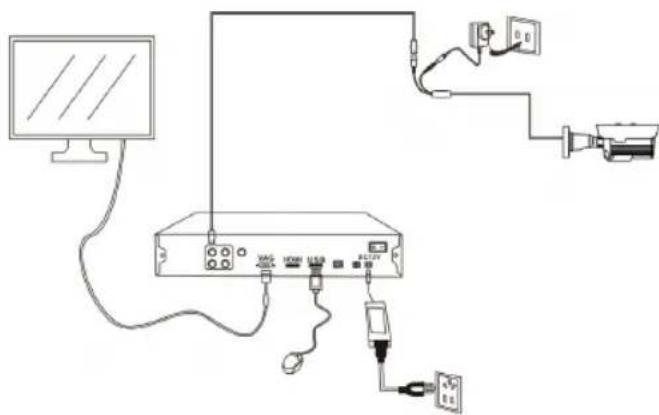
4.6 Connection
Connection as shown in the figure below:
text_image
Diagram showing connections between a computer, network device, and electronic devices with labeled ports and cables4.7 OSD Control
The OSD control is available by CoC (Control over Coax). If your AHD/TVI/CVI DVR supports this function*, use the DVR's PTZ interface to press on "Iris+" or "☐" to open the OSD menu.
Navigate through the OSD menu using the PTZ direction arrows.
* Notice: CoC function works no more than 200M by Rg59 coaxial cable
* All of Provision-ISR's DVRs support CoC Starting from version 3.4.4
OSD Menu List
| Main Menu | Second Menu | Third Menu | |||
| LENS | DC | Indoor | |||
| Outdoor | ↓ | MIN_SHU | |||
| MAX_SHU | |||||
| Manual | |||||
| EXPOSURE | ↓ | SHUTTER | AUTO1/25s-1/50000sX2-X30 | ||
| AGC | 0-15 | ||||
| SENS-UP | AUTO | SENS-UP | x2-x30 | ||
| BRIGHTNESS | 1-100 | ||||
| D-DWR | OFF | ||||
| AUTO | |||||
| ON | |||||
| DEFOG | OFF | ||||
| AUTO | POS/SIZE | ||||
| GRADATION | |||||
| DEFAULT | |||||
| BACKLIGHT | OFF | ||||
| BLC | LEVEL | ||||
| AREA | |||||
| DEFAULT | |||||
| HSBLC | SELECT | AREA1-4 | |||
| DISPLAY | OFF | ||||
| ON | POS/SIZE | ||||
| BLACK MASK | ON/OFF | ||||
| LEVEL | 1-100 | ||||
| MODE | ALL DAY | ||||
| NIGHT | AGC LEVEL | 0-255 | |||
| DEFAULT | |||||
| WHITE BAL | ATW | ||||
| AWB | |||||
| MANUAL | BLUE | 1-100 | |||
| RED | 1-100 | ||||
| OUTDOOR | |||||
| INDOOR | |||||
| AWC-SET | |||||
| DAY/NIGHT | AUTO | ||||
| COLOR | |||||
| B/W | |||||
| EXT | ↓ | D-N(DELAY) | 0-60 | ||
| N-D(DELAY) | 0-60 | ||||
| NR | ↓ | 2DNR | LOW/MID/ | ||
| HIGH | |||||
| 3DNR | LOW/MID/ | ||||
| HIGH | |||||
| SPECIAL | ↓ | CAM TITLE | |||
| D-EFFECT | ↓ | FREEZE | |||
| MIRROR | OFF | ||||
| ROTATION | |||||
| V-FLIP | |||||
| MIRROR | |||||
| NEG IMAGE | |||||
| MOTION | SELECT | AREA1-4 | |||
| DISPLAY | ON/OFF | ||||
| SENSITIVITY | 0-100 | ||||
| ALARM | ON/OFF | ||||
| PRIVACY | SELECT | AREA1-4 | |||
| COLOR | W/R/B/G | ||||
| TRANS | 0.25-1.0 | ||||
| LANGUAGE | 12 choices | ||||
| DEFECT | ↓ | WHITE | ON/OFF | ||
| BLACK | ON/OFF | ||||
| RS485 | |||||
| ADJUST | ↓ | SHARPNESS | ↓ | LEVEL | 1-10 |
| VALUE | 0-255 | ||||
| VIDEO OUT | PAL/NTSC | ||||
| Monitor | CRT/LCD and LSC | ||||
| EXIT | SAVE&END | ||||
5 Specifications:
4 in 1 Pro camera (1080P)
DI-390AHD36+ / DI-390AHDVF+ / DAI-390AHDVF+ I3-390AHD36+ / I4-390AHDVF+
| Model | DI-390AHD36+ | DI-390AHDVF+ | DAI-390AHDVF+ |
| Image Sensor | 1/3" 2MP CMOS Sensor | ||
| Effective Pixels | 1984(H)×1225(V) | ||
| Scanning System | Progressive | ||
| Resolution | Digital: 1920×1080P, Analog:960H | ||
| Min. Illumination | 0.01Lux / (0Lux IR On) | ||
| Day & Night | EXT, Color, B&W, AUTO | ||
| IR LED | 2 LED Array (20m) | 3 LED Array (25m) | 35 LED (20m) |
| OSD Menu | Available by CoC Only | ||
| CoC Support | Yes | ||
| Backlight Compensation | OFF/BLC/HSBLC | ||
| S/N Ratio | ≥80dB (AGC Off) | ||
| White Balance | AWB, ATW, AWC (Push), Indoor, Outdoor, Manual | ||
| Noise Reduce | 3D-DNR (For Analog HD), 2D-DNR (For Analog) | ||
| Video Output | AHD/TVI/CVI/CVBS (Signal Selectable by DIP switch) | ||
| Defog | Off/On | ||
| Privacy Mask | Off/On (4 Areas) | ||
| Motion Detection | Off/On (4 Areas) | ||
| D-Effect | Freeze, Mirror, Negative Image | ||
| Lens | 3.6mm | 2.8-12mm | 2.8-12mm |
| Power | DC12V±10%, ~310mA | DC12V±10%, ~410mA | DC12V±10%, ~310mA |
| Operation temp. | -20°C~+50°C (-4°F~122°F) | ||
| Dimension | 104*70.8*93.2mm | 129.5*90*119mm | Φ145×119.5mm |
| Net Weight | 269g | 476g | 810g |
| Model | I3-390AHD36+ | I4-390AHDVF+ |
| Image Sensor | 1/3" 2MP CMOS Sensor | |
| Effective Pixels | 1984(H)×1225(V) | |
| Scanning System | Progressive | |
| Resolution | Digital:1920×1080P, Analog:960H | |
| Min. Illumination | 0.01Lux / (0Lux IR On) | |
| Day & Night | EXT, Color, B&W, AUTO | |
| IR LED | 3 LED Array (25m) | 4 LED Array (40m) |
| OSD Menu | Available by CoC Only | |
| CoC Support | Yes | |
| Backlight Compensation | OFF/BLC/HSBLC | |
| S/N Ratio | ≥80dB (AGC Off) | |
| White Balance | AWB, ATW, AWC (Push), Indoor, Outdoor, Manual | |
| Noise Reduce | 3D-DNR (For Analog HD), 2D-DNR (For Analog) | |
| Video Output | AHD/TVI/CVI/CVBS (Signal Selectable by DIP switch) | |
| Defog | Off/On | |
| Privacy Mask | Off/On (4 Areas) | |
| Motion Detection | Off/On (4 Areas) | |
| D-Effect | Freeze, Mirror, Negative Image | |
| Lens | 3.6mm | 2.8-12mm |
| Power | DC12V±10%, ~410mA | DC12V±10%, ~480mA |
| Operation temp. | -20°C~+50°C (-4°F~122°F) | |
| Dimension | 206.5*67.6*68.5mm | 286*77*85.6mm |
| Net Weight | 380g | 836g |