
Brix - Car Mount Tracer - Free user manual and instructions
Find the device manual for free Brix Tracer in PDF.


| Product Type | Car Phone Mount |
| Brand | Tracer |
| Model | Brix |
| Compatible Phone Size | 4 to 6.5 inches |
| Material | ABS plastic |
| Dimensions (approx.) | 12 x 8 x 15 cm |
| Weight | 150 g |
| Mounting Type | Dashboard or windshield suction cup |
| Adjustable Arm | Yes, 360° rotation |
| Power Source | None (passive mount) |
| Phone Retention | Spring-loaded clamps |
| Installation | No tools required |
| Cleaning | Wipe with a soft dry cloth |
| Safety Features | Non-slip pad, secure grip |
| Spare Parts Available | Suction cup replacement |
| Repairability | User-replaceable suction cup |
| Warranty | 1 year limited |
Frequently Asked Questions - Brix Tracer
User questions about Brix Tracer
0 question about this device. Answer the ones you know or ask your own.
Ask a new question about this device
Download the instructions for your Car Mount in PDF format for free! Find your manual Brix - Tracer and take your electronic device back in hand. On this page are published all the documents necessary for the use of your device. Brix by Tracer.
USER MANUAL Brix Tracer
Instructions for use
CS
BT reproduktor Brix
Návod k obsluze
SK
BT reproduktor Brix
Návod na obsluhu
HU
BT hangszóró Brix
Használati útmutató
RU
Колонка BT Brix
natural_image
Blank white image with no visible content, text, or symbols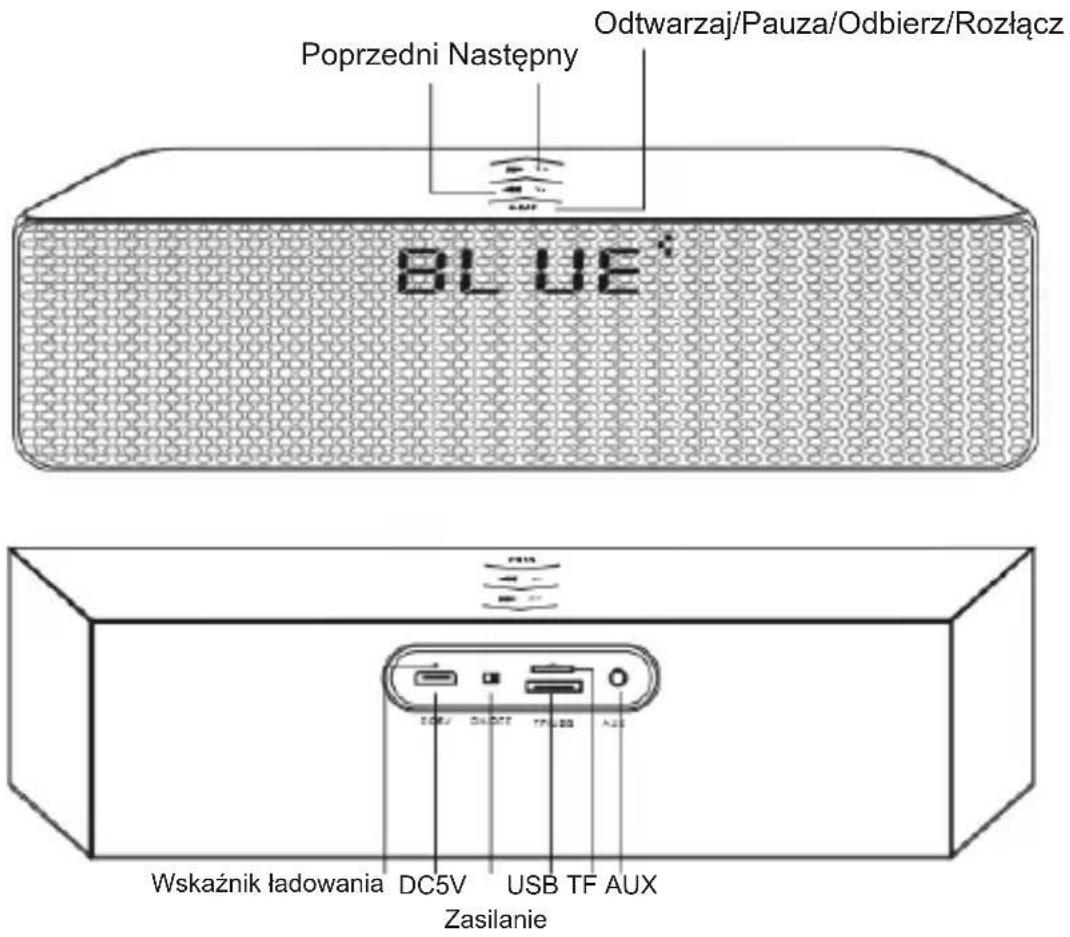
Thanks for your purchase of our Bluetooth Speaker!
Like all our products, great care has been taken in its design. A combination of advanced engineering and state-of-the-art materials will provide you with years of listening pleasure.
EN
BT speaker
Brix
Instructions for use
Charging The Battery
- Before using, fully charge the battery using the supplied USB cable. Plug in to any USB port supplying power (Laptop, Computer, AC Charger, Car Charger, etc.).
• A audible tone indicates Low Battery - A solid red LED indicates that the speaker is charging, when fully charged it will turn off.
Power on/off
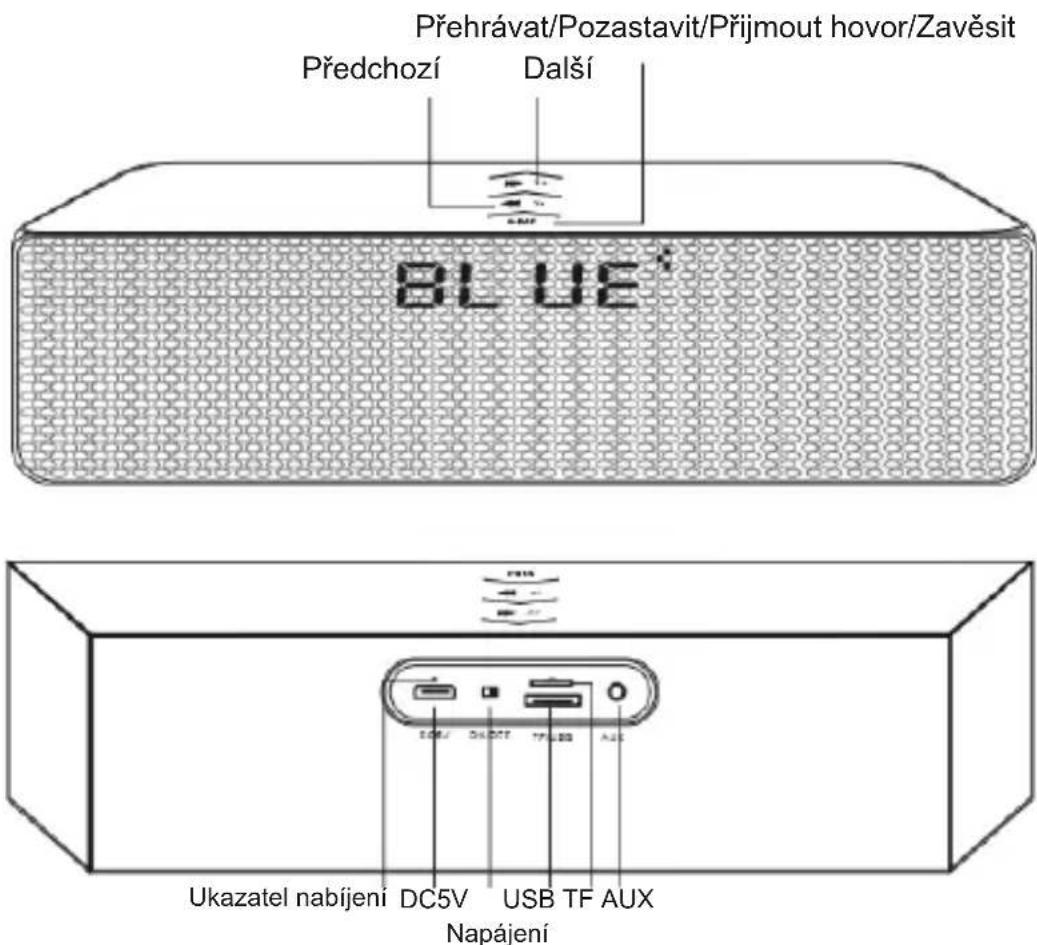
- Move the power switch to the "on" or "off" side to power on / off the device.
Bluetooth Pairing
- With the Speaker turned on, it comes to pairing model. Open the Bluetooth settings of your phone, tablet or other Bluetooth enabled audio device and select BRIX BT.
Playing Music
- Select a song, artist, genre, or play list on your phone, tablet or other Bluetooth enabled audio device.
- Press the play button to start or pause the music.
- Short press the last button or next button to go to next or last song.
- Long press the last button or next button to adjust volume.
TF card playing
- Play music of TF directly when insert in TF card.
USB flash playing
- Insert USB flash and music will be played automatically.
FM Radio
- Connect 3,5 mm Audio Cable connector into AUX (Antenna)
- Press long Play/pause and set to FM Radio
- Press short Play/pause to program FM stations
- Press short next or previous to change FM station
- Press long next or previous to change volume level.
Hands-free For Calling
- Answer or Drop a call by short pressing the answer button.
- Reject a call by long pressing the answer button for 3s.
Note: After making or dropping a call the speaker will re-start your music.
| LED Indicator Status of the speaker | |
| Red LED light on Battery is charging | |
| Red LED light off while charging Battery is full | |
EN
BT speaker
Brix
Instructions for use
Specifications
| Bluetooth Version V3.0 | |
| Bluetooth profiles HSP, HFP, A2DP | |
| Range Up to 10 meters | |
| Number of paired devices in memory Up to 8 | |
| Music playing time Up to 6 hours | |
| Talk time Up to 6 hours | |
| Charging time About 3 hours | |
| Dimensions 280*60*68mm | |
| Weight 552g |
Package Contents:
- USB-charge cable
• 3.5mm Audio cable
• This Owners manual

Brand : Tracer
Model : Brix
Category : Car Mount