
Skylanders - Giants (Wii U) - Video game NINTENDO - Free user manual and instructions
Find the device manual for free Skylanders - Giants (Wii U) NINTENDO in PDF.


| Product Type | Video Game |
| Platform | Nintendo Wii U |
| Genre | Action, Adventure, Fantasy |
| Number of Players | 1-2 (cooperative) |
| ESRB Rating | Everyone 10+ (E10+) |
| Publisher | Activision |
| Release Year | 2012 |
| Language | English (manual in English) |
| Game Disc Type | Wii U Optical Disc |
| Storage Requirements | 2 GB available storage (approx.) |
| Required Accessories | Wii Remote, Nunchuk, Skylanders Portal of Power |
| Additional Accessories | Skylanders Giants figures (sold separately) |
| Dimensions (case) | 19 cm x 13.5 cm x 1.5 cm (approx.) |
| Weight | 0.1 kg (approx.) |
| Power Supply | None (uses console power) |
| Care Instructions | Keep disc clean and free from scratches; store in case when not in use. |
| Cleaning | Wipe with a soft, dry cloth; avoid solvents. |
| Safety Instructions | Keep away from magnets, moisture, and extreme temperatures. |
| Spare Parts | Not applicable (software product) |
| Repairability | Not repairable; replace disc if damaged. |
| Supported Controllers | Wii Remote, Nunchuk, Wii U GamePad (partial) |
| Manual Format | PDF, 13 pages |
| Download | Available free at notice-facile.com |
Frequently Asked Questions - Skylanders - Giants (Wii U) NINTENDO
User questions about Skylanders - Giants (Wii U) NINTENDO
0 question about this device. Answer the ones you know or ask your own.
Ask a new question about this device
Download the instructions for your Video game in PDF format for free! Find your manual Skylanders - Giants (Wii U) - NINTENDO and take your electronic device back in hand. On this page are published all the documents necessary for the use of your device. Skylanders - Giants (Wii U) by NINTENDO.
USER MANUAL Skylanders - Giants (Wii U) NINTENDO
text_image
SKYLADERS GIANTSPRESS THE HOME BUTTON WHILE THE GAME IS RUNNING, THEN SELECT TO VIEW THE ELECTRONIC MANUAL.
PLEASE CAREFULLY READ THE Wii U™ OPERATIONS MANUAL COMPLETELY BEFORE USING YOUR Wii U HARDWARE SYSTEM, DISC OR ACCESSORY. THIS MANUAL CONTAINS IMPORTANT HEALTH AND SAFETY INFORMATION.
IMPORTANT SAFETY INFORMATION: READ THE FOLLOWING WARNINGS BEFORE YOU OR YOUR CHILD PLAY VIDEO GAMES.
WARNING - SEIZURES
- Some people (about 1 in 4000) may have seizures or blackouts triggered by light flashes or patterns, and this may occur while they are watching TV or playing video games, even if they have never had a seizure before.
- Anyone who has had a seizure, loss of awareness, or other symptom linked to an epileptic condition should consult a doctor before playing a video game.
- Parents should watch their children play video games. Stop playing and consult a doctor if you or your child has any of the following symptoms:
Convulsions Eye or muscle twitching Altered vision Loss of awareness Involuntary movements Disorientation
- To reduce the likelihood of a seizure when playing video games:
- Sit or stand as far from the screen as possible.
- Play video games on the smallest available television screen.
- Do not play if you are tired or need sleep.
- Play in a well-lit room.
- Take a 10 to 15 minute break every hour.
WARNING - REPETITIVE MOTION INJURIES AND EYESTRAIN
Playing video games can make your muscles, joints, skin or eyes hurt. Follow these instructions to avoid problems such as tendinitis, carpal tunnel syndrome, skin irritation or eyestrain:
- Avoid excessive play. Parents should monitor their children for appropriate play.
Take a 10 to 15 minute break every hour, even if you don't think you need it. - If your hands, wrists, arms or eyes become tired or sore while playing, or if you feel symptoms such as tingling, numbness, burning or stiffness, stop and rest for several hours before playing again.
- If you continue to have any of the above symptoms or other discomfort during or after play, stop playing and see a doctor.
CAUTION - MOTION SICKNESS
Playing video games can cause motion sickness in some players. If you or your child feel dizzy or nauseous when playing video games, stop playing and rest. Do not drive or engage in other demanding activity until you feel better.
IMPORTANT LEGAL INFORMATION
REV-F
This game is not designed for use with any unauthorized device. Use of any such device will invalidate your Nintendo product warranty. Copying and/or distribution of any Nintendo game is illegal and is strictly prohibited by intellectual property laws.
TABLE OF CONTENTS
Introduction....2
Portal of Power ^® 2
Gameplay Controls....3
Menus....4
Playing the Game....5
Battle Mode....9
Save Features....9
Customer Support Documentation....11
natural_image
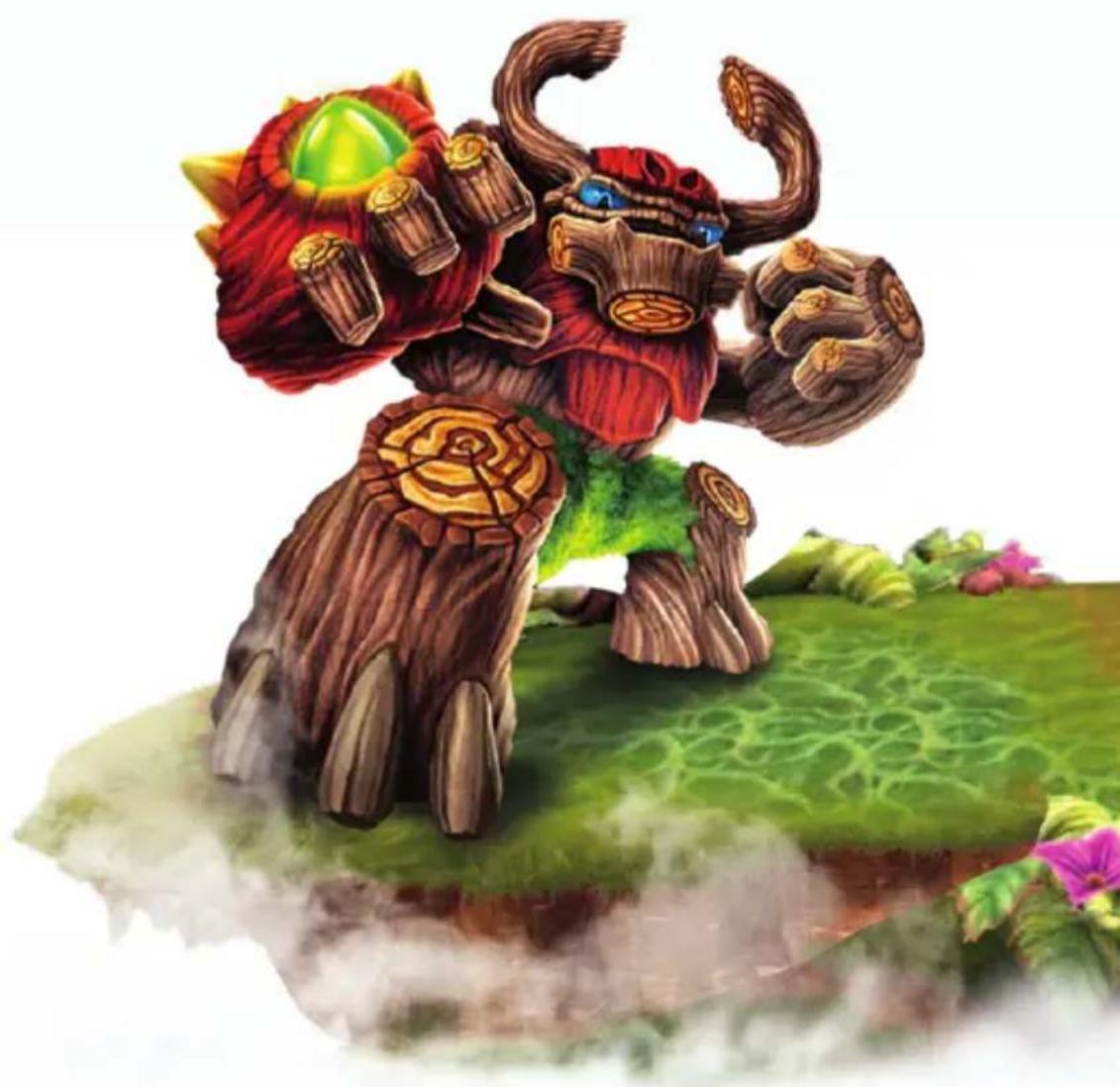
Illustration of a fantasy character with red and green hair, standing on grass with flowers (no text or symbols)INTRODUCTION
Welcome to Skylands young Portal Master. Only you, the Skylanders, and the newly returned Skylanders Giants can stop the evil that now threatens the peace of Skylands!
Kaos is back, and with a slew of new evil tricks! It is up to you to discover the secrets behind the ancient and mysterious Arkeyan ways before Kaos does!
PORTAL OF POWER
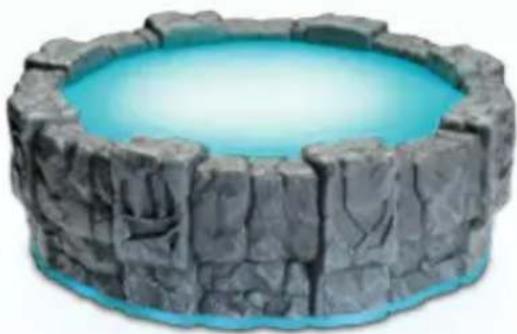
To begin Skylanders Giants™, the Portal of Power must first be connected up to your Wii U console. With the Wii U console powered off, insert the Portal of Power into an available USB port. Power on your Wii U console and the Portal of Power will automatically be ready for use.
More information on how to set up your Portal of Power can be found in your Quick Start Guide. It is through the Portal of Power that the Skylanders can enter the ancient islands that make up Skylands. Once placed on the Portal of Power, the Skylander will come to life on screen and be playable in game.
natural_image
Illustration of a stone and blue water-filled circular container (no text or symbols)TOY PLACEMENT
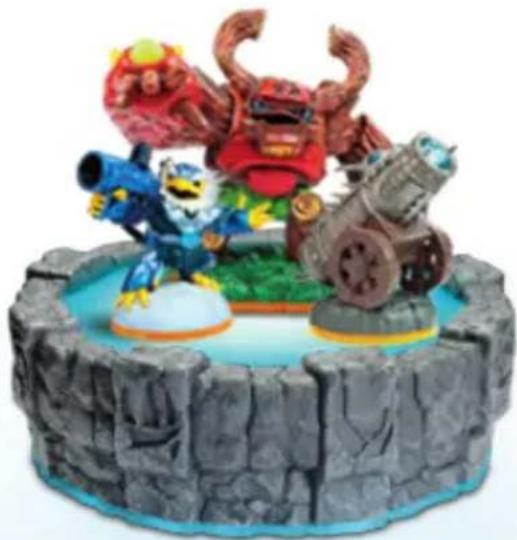
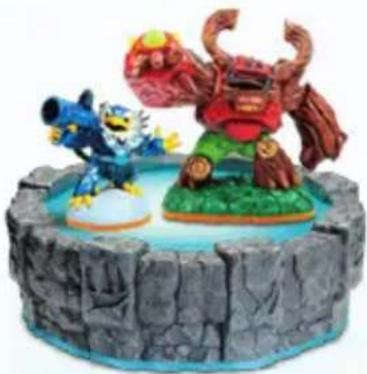
You may place up to 3 toys on the Portal of Power at once, which includes 2 playable Skylanders (for 2 player mode only) and 1 Magic Item or 1 Location Piece (sold separately).
natural_image
Colorful toy character sculpture on a rocky base, featuring stylized dragons, a blue creature, and a cannon (no text or symbols visible)The Portal of Power and at least one Skylander figure are required to start a new profile and to proceed in the first part of the tutorial.
The following controllers can be paired with the Wii U console and used with this software.
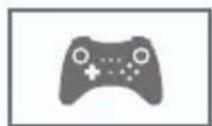
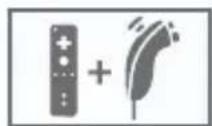
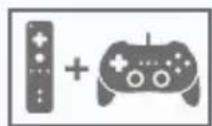
- To play multiplayer modes, each player needs a separate controller. • Only one Wii U GamePad can be paired with the console at a time. • A Sensor Bar is required when using the Wii Remote/Wii Remote Plus. For more information, read the Wii U Operations Manual. • A Classic Controller can be used instead of a Classic Controller Pro.
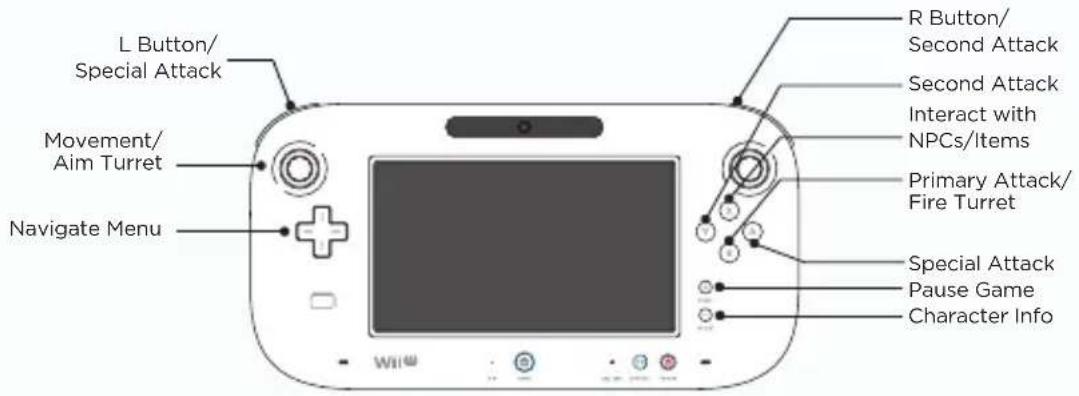
text_image
L Button/ Special Attack Movement/ Aim Turret Navigate Menu R Button/ Second Attack Second Attack Interact with NPCs/Items Primary Attack/ Fire Turret Special Attack Pause Game Character Info| Wii U Basic Action | |
| + Button Pauses Game | |
| - Button Character Info | |
| Left Stick Movement/Aim Turret | |
| B Button Primary Attack/Back in Menus/Unjoin Co-Op Mode/Fire Turret | |
| Y Button Second Attack | |
| X Button Interact with NPCs/Items/Use Keys | |
| A Button Special Attack/Accept in Menus/Join Co-Op Mode | |
| Repetitively Press X Button Open Treasure | |
| +Control Pad Navigate Menu | |
| touch screen Navigate Menu/Skystone Game | |
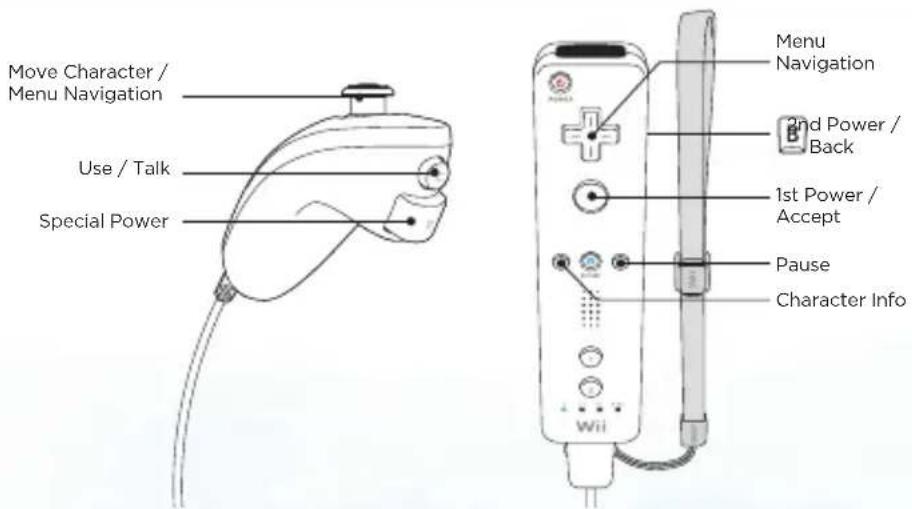
text_image
Move Character / Menu Navigation Use / Talk Special Power Menu Navigation 2nd Power / Back 1st Power / Accept Pause Character Info Wii
CAUTION: WRIST STRAP USE
Please use the wrist strap to help prevent injury to other people or damage to surrounding objects or the Wii Remote in case you accidentally let go of the Wii Remote during gameplay.
Also remember the following:
• Make sure all players put on the wrist strap properly when it is their turn.
- Do not let go of the Wii Remote during game play.
• Dry your hands if they become moist.
- Allow adequate room around you during gameplay and make sure that all areas you might move into are clear of other people and objects.
- Stay at least three feet from the television.
- Use the Wii Remote Jacket.
MENU NAVIGATION
+Control Pad/Control Stick - Navigate menus.
A Button - Press to accept.
B Button - Press to go back to the previous menu or cancel.
MAIN MENU
Story Mode – Begin your adventure in either Single Player or Co-Op mode.
Battle Mode - Challenge a friend in a variety of battle modes and arenas.
Settings - Adjust General Settings (Visiting Nicknames), Audio Settings (Music, Voice, and Effects) and view Controls Layout.
PAUSE MENU
Chapter Select - Load a previously completed level.
Objectives - Displays level objectives.
Collections - View your Skylanders, Story Scrolls, Skystones, Accolades, Charms and Movie Collections.
Settings - Adjust General Settings (Visiting Nicknames and Difficulty levels), adjust Audio Settings (Music, Voice, Effects) and View Controls Layout.
Flynn's Ship - Return to Flynn's ship.
Main Menu - Exit to the Main Menu.
IN-GAME DISPLAY - SKYLANDERS GIANTS STORY MODE
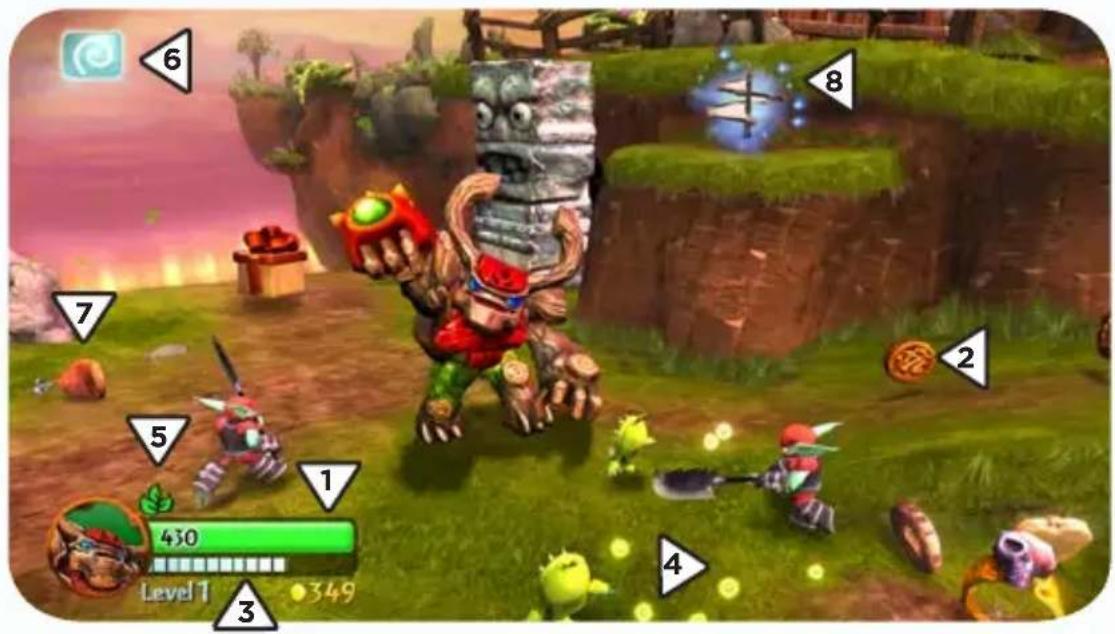
text_image
6 7 8 5 1 430 Level 1 349 2 4-
Life Meter – The green meter displays the amount of Health your Skylander has. If the Life Meter of any Skylander reaches zero, they must be removed from the Portal of Power and replaced with a different Skylander.
-
Currency – Collecting various forms of treasure will allow you to purchase upgrades.
-
Level and Level Meter - This displays the current level of your Skylander. When the meter is filled up completely, your Skylander will level up. The maximum level a Skylander can reach is 15. Skylanders from Skylanders Spyro's Adventure® can also reach level 15 while being used in Skylanders Giants.
-
Experience Points - Collecting these Experience Points will increase your Level Meter.
-
Elemental Symbol - Displays the elemental symbol of your Skylander.
-
Elemental Bonus Symbol - While in one of these areas, if you place a Skylander that has the matching element type on the Portal of Power, the Skylander will be more powerful than normal.
-
Health Pick Up - Collecting food pick ups will restore some of your Life Meter.
-
Legendary Treasure - Collected Legendary Treasures will appear in Flynn's Cabin aboard the Dreadyacht. While in the cabin, Legendary Treasures can be used to customize the appearance of the ship!
CHARACTER INFO
Press the - Button to view and manage each of your Skylanders in the "Character Info" Section. The adjacent menus and sub menus can be found under "Character Info":
Stats - Displays your current Skylanders Stats.
Hats – View which Hats your Skylander has collected and equip or remove them here.
Upgrades - View which Upgrades your Skylander has acquired.
Quests - Defines your individual Skylander's Quests and shows your Skylander's rank, which is dependent on how many quests you have completed.
Manage - Allows you to create a Nickname, take ownership of a Skylander, view your Update Code for the Skylanders Universe™ website for your Skylander, or Reset the progress of your Skylander.
UPGRADES
While on Cap'n Flynn's Ship, you can visit the fairy Persephone and purchase upgrades with collected currency to make your Skylanders more powerful in battle. You can also upgrade with the Fairy Dust you buy from Auric's Store.
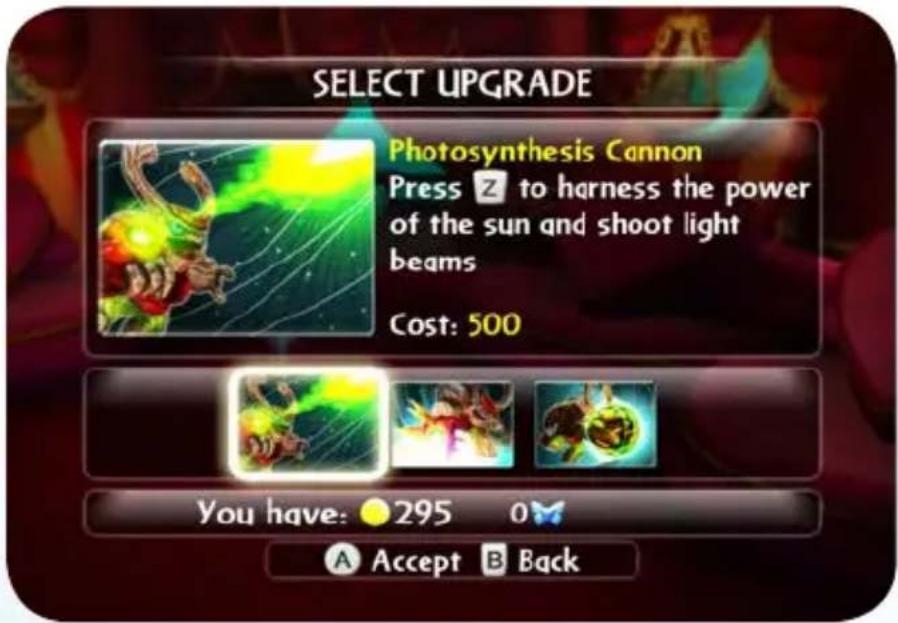
text_image
SELECT UPGRADE Photosynthesis Cannon Press 2 to harness the power of the sun and shoot light beams Cost: 500 You have: 295 0 Accept BackELEMENTAL CLASSES
Each Skylander possesses the power of one of 8 Elemental Classes. The elemental classes included are:

Air

Life

UndeadEarth


Fire

Water

Magic

Tech
Throughout Skylands, there are Elemental Gates that only Skylanders of that element can open. Inside are special areas containing new challenges, collectibles, and other rewards for you to discover!
FEATS OF STRENGTH
Feats of Strength are certain events in Skylands which only Giant Skylanders can undertake. Complete Feats of Strength for massive rewards!
SKYSTONES
In Story Mode, you can play the ever-popular game Skystones against various in-game characters hidden throughout the game. To play Skystones, you must play your collected Skystones on a board next to your opponent's. The object of the game is to have more of your Skystones on the board than your opponent when the board is full. By placing stones with more blades next to your opponent's stone with fewer blades, you take possession of the stone on the board. After defeating your opponent, you will win one of their favorite stones to use in your next Skystones game.
LEVELING UP
Your Skylanders can collect Experience Points after they defeat enemies. As your Skylander levels up, their health and stats will increase as well. The maximum level a Skylander can reach is 15.
THE DREADYACHT - CAP'N FLYNN'S SHIP
Flynn's ship is always on the move, making it the best place to prepare and train for the next level in between traveling Skylands. Flynn's ship is full of useful areas and other surprises which will help you on your journey to stop Kaos! Areas of interest include:
Game Room – Inside the Game Room, talk to Auric to buy items from his Store or practice Skystones with Dreadbeard.
Main Deck - Up for an additional adventure? Talk to Cali on the main deck to partake in her special Heroic Challenges to further test your skill. Once he arrives on the ship, talk to Brock to test your strength by fighting in Arena Challenges!
Cali's Room - Collect the Lucky Wheels strewn about Skylands to use the Luck-O-Tron, found in Cali's Room, and increase your chances of doubling loot, food drops, attack power and experience.
Persephone's Cabin - Visit Persephone to upgrade your Skylanders with your collected currency.
Captain's Wheel - Near the Captain's Wheel you can find Flynn, who will assist you in navigating Skylands.
Cap'n Flynn's Cabin - Here you can use the Legendary Treasures you've found from throughout Skylands to upgrade the ship.
TOYS
The Skylanders Giants game can be played using both the Skylanders Giants figures and the Skylanders Spyro's Adventure figures.
During gameplay you can switch Skylanders at any time. Skylanders can be used on their home Portal of Power or as a guest on a friend's Portal of Power in both Story Mode and Battle Mode. All Experience Points, currency and upgrades are automatically saved to each toy.
CO-OP PLAY
At any time during Story Mode, a second player can join the game by hitting the A Button on their Wii Remote, and placing a Skylander on the Portal of Power. To drop out of the game, Player 1 or Player 2 must remove their Skylander from the Portal of Power and press the B Button on their Wii Remote.
BATTLE MODE
In the various Battle Modes, choose from a variety of arenas and have a brawl against your friends. Use items, traps and jump pads to your advantage as you try to become the ultimate Portal Master. Challenge a friend in four different head-to-head modes:
Arena Rumble: A head-to-head battle between two Portal Masters in a fight to the finish to determine who will reign supreme.
SkyGoal: Retrieve a Skyball and take it into the end zone.
SkyGem Master: Be the first to collect a set number of Sky Gems.
Ring Out: Send your opponent flying out of the ring!
natural_image
Illustration of two cartoon characters on a rocky platform, one holding a megaphone and the other a giant creature with horns (no text or symbols)SAVE FEATURES
TOY SAVE FEATURE
While on your home Portal of Power the following items are saved to your toys:
• Experience Points and Experience Level
- The "Nickname" that you give to your Skylander
- Currency
- Upgraded Abilities and Statistics
• The Hat your Skylander is wearing
• The Quest ranking of your Skylander
This allows you to take your Skylanders to another Portal of Power and play with your very own upgraded and personalized collection of Skylanders. While at your friend's house, your Skylander will continue to remember and will save all of the Currency and Experience Points it has earned and collected.
Take your own personalized Skylander to a friend's house and help them with their quest...or fight against them in Battle Mode!
GAME SAVE
Your progress through the objectives of the Story Mode, as well as certain types of collectibles, are saved onto your save game slot as opposed to being saved on your toy. These collectibles include Story Scrolls, Skystones, Soul Gems, Charms and Legendary Treasures.
SOFTWARE LICENSE AGREEMENT
IMPORTANT - READ CAREFULLY: USE OF THIS PROGRAM IS SUBJECT TO THE SOFTWARE LICENSE TERMS SET FORTH BELOW. "PROGRAM" INCLUDES THE SOFTWARE INCLUDED WITH THIS AGREEMENT, THE ASSOCIATED MEDIA, ANY PRINTED MATERIALS, AND ANY ON-LINE OR ELECTRONIC DOCUMENTATION, AND ANY AND ALL COPIES AND DERIVATIVE WORKS OF SUCH SOFTWARE AND MATERIALS. BY OPENING THIS PACKAGE, AND/OR USING THE PROGRAM, YOU ACCEPT THE TERMS OF THIS LICENSE WITH ACTIVISION PUBLISHING, INC. ("ACTIVISION").
LIMITED USE LICENSE. Activision grants you the non-exclusive, non-transferable, limited right and license to use one copy of this Program solely and exclusively for your personal use. All rights not specifically granted under this Agreement are reserved by Activision. This Program is licensed, not sold. Your license confers no title or ownership in this Program and should not be construed as a sale of any rights in this Program.
OWNERSHIP. All title, ownership rights and intellectual property rights in and to this Program and any and all copies thereof (including but not limited to any titles, computer code, themes, objects, characters, character names, stories, dialog, catch phrases, locations, concepts, artwork, animation, sounds, musical compositions, audio-visual effects, methods of operation, moral rights, and any related documentation, incorporated into this Program) are owned by Activision or its licensors. This Program is protected by the copyright laws of the United States, international copyright treaties and conventions and other laws. This Program contains certain licensed materials and Activision's licensors may protect their rights in the event of any violation of this Agreement.
YOU SHALL NOT:
- Exploit this Program or any of its parts commercially, including but not limited to use at a cyber cafe, computer gaming center or any other location-based site. Activision may offer a separate Site License Agreement to permit you to make this Program available for commercial use; see the contact information below.
- Sell, rent, lease, license, distribute or otherwise transfer this Program, or any copies of this Program, without the express prior written consent of Activision.
- Reverse engineer, derive source code, modify, decompile, disassemble, or create derivative works of this Program, in whole or in part.
- Remove, disable or circumvent any proprietary notices or labels contained on or within the Program.
- Hack or modify (or attempt to hack or modify) the Program, or create, develop, modify, distribute or use any software programs, in order to gain (or allow others to gain) advantage of this Program in an on-line multiplayer game settings including but not limited to local area network or any other network play or on the internet.
- Export or re-export this Program or any copy or adaptation in violation of any applicable laws or regulations.
LIMITED WARRANTY. Activision warrants to the original consumer purchaser of this Program that the recording medium on which the Program is recorded will be free from defects in material and workmanship for 90 days from the date of purchase. If the purchaser finds the recorded medium of the Program defective within 90 days of original purchase, Activision agrees to replace, free of charge, such recorded medium of the Program discovered to be defective within such period upon its receipt of the recorded medium of the Program, as long as the Program is still being manufactured by Activision. In the event that the Program is no longer available, Activision retains the right to substitute a similar product of equal or greater value. This warranty is limited to the recording medium of the Program as originally provided by Activision and is not applicable to normal wear and tear. This warranty shall not be applicable and shall be void if the defect has arisen through abuse, mistreatment or neglect. This remedy is the purchaser's sole, exclusive remedy, and is in lieu of all other express warranties. Any implied warranties on this product prescribed by statute, including but not limited to an implied warranty of merchantability or fitness for a particular purpose, are expressly limited in duration to the 90-day period described above. Activision reserves the right to modify this warranty prospectively at any time and from time to time in our sole discretion.
When returning the Program for warranty replacement please send the original product disc or cartridge, as applicable, only in protective packaging and include: (1) a photocopy of your dated sales receipt; (2) your name and return address typed or clearly printed; (3) a brief note describing the defect, the problem(s) you are encountering and the system on which you are running the Program; and (4) if you are returning the Program after the 90-day warranty period, but within one year after the date of purchase, please include check or money order for \$20 U.S. currency per disc or cartridge replacement, as applicable.
NOTE: Certified mail is recommended.
For customers in North America: Please contact Activision Customer Support for warranty replacements at (800) 255-6588 or www.activision.com/support.
LIMITATION ON DAMAGES. IN NO EVENT WILL ACTIVISION BE LIABLE FOR SPECIAL, INCIDENTAL OR CONSEQUENTIAL DAMAGES RESULTING FROM POSSESSION, USE OR MALFUNCTION OF THE PROGRAM, INCLUDING DAMAGES TO PROPERTY, LOSS OF GOODWILL, COMPUTER FAILURE OR MALFUNCTION AND, TO THE EXTENT PERMITTED BY LAW, DAMAGES FOR PERSONAL INJURIES, EVEN IF ACTIVISION HAS BEEN ADVISED OF THE POSSIBILITY OF SUCH DAMAGES. ACTIVISION'S LIABILITY SHALL NOT EXCEED THE ACTUAL PRICE PAID FOR THE LICENSE TO USE THIS PROGRAM. SOME STATES/COUNTRIES DO NOT ALLOW LIMITATIONS ON HOW LONG AN IMPLIED WARRANTY LASTS AND/OR THE EXCLUSION OR LIMITATION OF INCIDENTAL OR CONSEQUENTIAL DAMAGES, SO THE ABOVE LIMITATIONS AND/OR EXCLUSION OR LIMITATION OF LIABILITY MAY NOT APPLY TO YOU. THIS WARRANTY GIVES YOU SPECIFIC LEGAL RIGHTS, AND YOU MAY HAVE OTHER RIGHTS WHICH VARY FROM JURISDICTION TO JURISDICTION.
TERMINATION. Without prejudice to any other rights of Activision, this Agreement will terminate automatically if you fail to comply with its terms and conditions. In such event, you must destroy all copies of this Program and all of its component parts.
U.S. GOVERNMENT RESTRICTED RIGHTS. The Program and documentation have been developed entirely at private expense and are provided as "Commercial Computer Software" or "restricted computer software." Use, duplication or disclosure by the U.S. Government or a U.S. Government subcontractor is subject to the restrictions set forth in subparagraph (c)(1)(ii) of the Rights in Technical Data and Computer Software clauses in DFARS 252.227-7013 or as set forth in subparagraph (c) (1) and (2) of the Commercial Computer Software Restricted Rights clauses at FAR 52.227-19, as applicable. The Contractor/ Manufacturer is Activision Publishing, Inc., 3100 Ocean Park Boulevard, Santa Monica, California 90405.
INJUNCTION. Because Activision would be irreparably damaged if the terms of this Agreement were not specifically enforced, you agree that Activision shall be entitled, without bond, other security or proof of damages, to appropriate equitable remedies with respect to breaches of this Agreement, in addition to such other remedies as Activision may otherwise have under applicable laws.
INDEMNITY. You agree to indemnify, defend and hold Activision, its partners, affiliates, contractors, officers, directors, employees and agents harmless from all damages, losses and expenses arising directly or indirectly from your acts and omissions to act in using the Product pursuant to the terms of this Agreement.
MISCELLANEOUS. This Agreement represents the complete agreement concerning this license between the parties and supersedes all prior agreements and representations between them. It may be amended only by a writing executed by both parties. If any provision of this Agreement is held to be unenforceable for any reason, such provision shall be reformed only to the extent necessary to make it enforceable and the remaining provisions of this Agreement shall not be affected. This Agreement shall be construed under California law as such law is applied to agreements between California residents entered into and to be performed within California, except as governed by federal law and you consent to the exclusive jurisdiction of the state and federal courts in Los Angeles, California.
CUSTOMER SUPPORT
For self-help, please visit our website at support.activision.com
Our support section of the web has the most up-to-date information available. We update the support pages daily, so please check here first for solutions. Please do not contact Customer Support for hints/codes/cheats.
Please see the Limited Warranty contained within our Software License Agreement for warranty replacements. Our support representatives will help you determine if a replacement is necessary. If a replacement is appropriate we will issue an RMA number to process your replacement.
©2012 Activision Publishing, Inc. SKYLANDERS GIANTS is a trademark, SKYLANDERS UNIVERSE is a service mark, and SKYLANDERS SPYRO'S ADVENTURE, PORTAL OF POWER, and ACTIVISION are registered trademarks of Activision Publishing, Inc.