FX-I250-100 - Computer Cable FiberX - Free user manual and instructions
Find the device manual for free FX-I250-100 FiberX in PDF.


User questions about FX-I250-100 FiberX
0 question about this device. Answer the ones you know or ask your own.
Ask a new question about this device
Download the instructions for your Computer Cable in PDF format for free! Find your manual FX-I250-100 - FiberX and take your electronic device back in hand. On this page are published all the documents necessary for the use of your device. FX-I250-100 by FiberX.
USER MANUAL FX-I250-100 FiberX
text_image
SOURCE FIBERX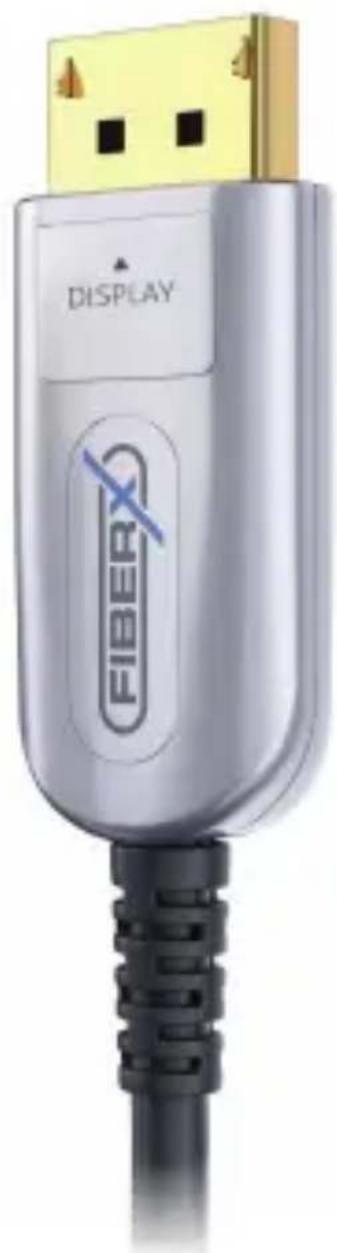
natural_image
Close-up of a silver USB connector with gold port and black cable (no text or symbols visible)DisplayPort 1.2 AOC Cable
TABLE OF CONTENTS
CHAPTER PAGE
Introduction 3
Intended Use .... 3
Safety Instructions 4-5
Delivery content 5
Features 6
Application 7
Specifications 7-9
Mechanical properties and Environmental performance ..... 7
Specifications 8
Environmental Conditions 9
Cross Section 9
Construction 9
Cable Construction 9
Operation and connection diagram 10-11
Troubleshooting 11
Maintenance 12
Cleaning 12
Warranty and Liability 13
CE Conformity 14
Disposal of the Device 14
Disclaimer 15
INTRODUCTION
Thank you for purchasing the Fiber Optic DisplayPort 1.2 AOC Cable.
This Cable allows you to transmit DisplayPort signals to a distance of up to 100m without external power supply.
This cable is a hybrid cable containing both fiber optic and copper cores. Our DisplayPort Active Hybrid Cable is the most competitive long distance DisplayPort interconnection solution on the market. It supports a maximum data rate of 5.4 Gbps per channel, is light weight, flexible, and has an ultra-small fixed installation bending radius of 48mm.
With our advanced optical engine embedded the DisplayPort Hybrid Cable provides full signal integrity.
INTENDED USE
This product is intended for indoor use only. Do not use it outdoors. Contact with moisture, e.g. in bathrooms, must be avoided under all circumstances.
For safety and approval purposes (CE), you must not rebuild and/or modify this product. If you use the product for purposes other than those described above, the product may be damaged. In addition, improper use can cause hazards such as short circuiting, fire, electric shock etc.
Read the instructions carefully and keep them. Make this product available to third parties only together with its operating instructions.
SAFETY INSTRUCTIONS
Read the operating instructions carefully and especially observe the safety information. If you do not follow the safety instructions and information on proper handling in this manual, we assume no liability for any resulting personal injury or damage to property. Such cases will invalidate the warranty/guarantee.
The device is not a toy. Keep it out of the reach of children and pets. Do not leave packaging material lying around carelessly. These may become dangerous playing material for children. Risk of suffocation!
The maximum pulling tensile load of the cable is 150N (15kg). Never pull the cable with higher load. The minimum bending radius of the hybrid cable is approximately 48mm, bending the cable to a smaller radius will irreversibly destroy the cable.
Pay attention to trip hazards; make sure that the cable is installed safely.
Protect the product from extreme temperatures, direct sunlight, strong jolts, high humidity, moisture, flammable gases, vapors and solvents.
Do not place the product under any mechanical stress. If it is no longer possible to operate the product safely, take it out of operation and protect it from any accidental use.
Safe operation can no longer be guaranteed if the product:
- is visibly damaged
• is no longer working properly - has been stored for an extended period in poor ambient conditions or
- has been subjected to any serious transport-related stresses.
Please handle the product carefully. Jolts, impacts or a fall even from a low height can damage the product.
Also observe the safety and operating instructions of any other devices which are connected to the product.
Consult an expert when in doubt about the operation, safety or connection of the device.
DELIVERY CONTENT
1x DisplayPort 1.2 AOC Cable
1x User Manual DE/EN
1x Warning Insert
FEATURES
This DisplayPort 1.2 AOC Cable has many features that enable it to perform in a superior manner. Among those features you will find:
• Supports DisplayPort 1.2 specification with data rates up to 21.6 Gbps
- Supports HBR2
- Low RFI / EMI profile for sensitive applications
• Supports resolutions up to Ultra HD 4K (3840×2160) 60Hz, 4:4:4
• Supports computer resolutions including 1080P and 4K2K (60Hz)
• Supports lossless DisplayPort audio formats
• Supports EDID incl. self-detecting function
- Long-term bending radius (48mm)
- Plug and Play
- Low Power Consumption: 250mW (max) (Power Required)
- No loss of signal
- Delivering crystal clear digital images instantly
APPLICATION
This product is for example applicable to:
- Digital Signage
- LED Signboards
- Home Theater
- Blu-ray, 3D Video, Projector, Set-top box, DVR, Game Consoles and Computer
• TV Broadcast Station - Conference Room
- Video Equipment
• Security Systems
... and more
SPECIFICATIONS
Mechanical properties and Environmental performance:
Item Units Specified values
| Tensile strength (Long-term) | N Up to 150 | |
| Crush resistance (Long-term) | N/100mm 300 | |
| Minimum bending radius (dynamic) | mm 20 D* | |
| Minimum bending radius (static) | mm 10 D* |
*D = the diameter of the cable body, in this case it is 4.5mm
Specifications:
Item Description
| Units Transmitter (Source) | Receiver (Display) | |
| DisplayPort Version DisplayPort 1.2, Fully Support bi-directional EDID, HDCP and DPCP communication | ||
| Video Bandwidth 21.6 Gbps – 5.4 Gbps pro Kanal + Clock | ||
| Supported Resolution & Distance | Max. resolutions: 2160p60 4:4:4 8/10bitPC: WUXGA 1920x1200 up to 100 metersHDTV: 480p, 720p, 1080i and 1080p deep | |
| O/E Converter 4 channel | 850 nmVCSEL array | 4 CH GaAs PD array |
| Connector Type DisplayPort | ||
| Cable Type Hybrid type with OM3 fiber and copper wire | ||
| Cable Outer Diameter 4.8 mm | ||
| Jacket Outer Material PVC | ||
| Differential Input 100 Ohm | ||
| Power Consumption 250 mW (max.) | ||
| Power Supply Non external power required | ||
| Passive Power Supply 4.75-5.5 V | ||
Environmental Conditions
Operating Temperature: -10–50°C
Storage Temperature: -20–60°C
Relative Humidity: 10–80%RH
CROSS SECTION
Construction:
Hybrid cable, fiber (high speed data) & copper (low speed signals)
Cable construction:
4 fiber cores and 7 cooper conductors
Cable jacket: PVC / TPU,
Diameter: 4.8mm
Connector dimensions: 46.9 x 20 x 12.3 mm
Connector material: Zinc Alloy
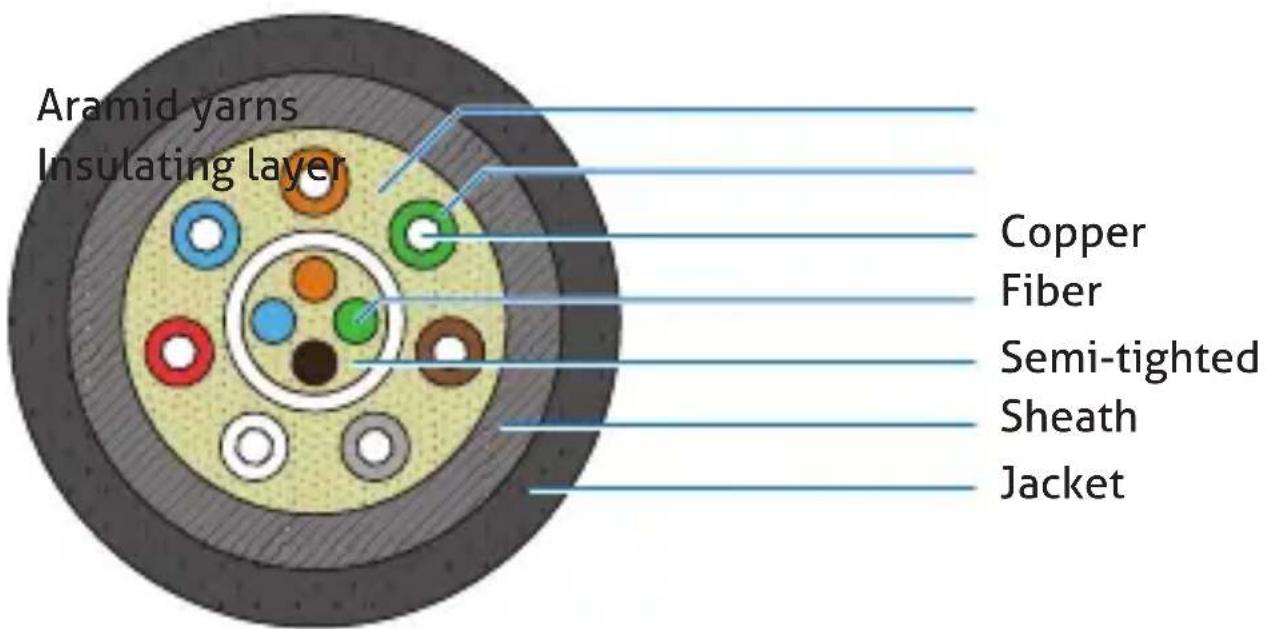
text_image
Aramid yarns Insulating layer Copper Fiber Semi-tighted Sheath JacketOPERATION AND CONNECTION DIAGRAM
Attention:
The FX-I250 series is designed for use with the + 5V passive power supply, provided by the source device through the DisplayPort connection. This +5V connection, as well as powering the internal fiber optic module, is also carried through to the other sink via a full standard copper connection. Please make sure, that the source device is capable of delivering more than 500mA.
This cable can only be used in one direction. The connectors are marked with "SOURCE" and "DISPLAY". Each connector must be plugged into the correct port to avoid signal loss.
Before using this cable, please make sure that all devices which will be connected with the AOC DisplayPort Cable are shut down and without power.
Then you can start to connect the "source side" of the Display-Port plug to the transmitter and connect the "display side" of the other DisplayPort plug to the receiver/display.
This works without additional power supply.
We do not recommend using any intermediate cables or adapters between the connections, as the signal transmission performance maybe attenuated.
Switch on the power of the device of the DisplayPort source and the display.
If the system does not work properly, see trouble shooting guide in next section.
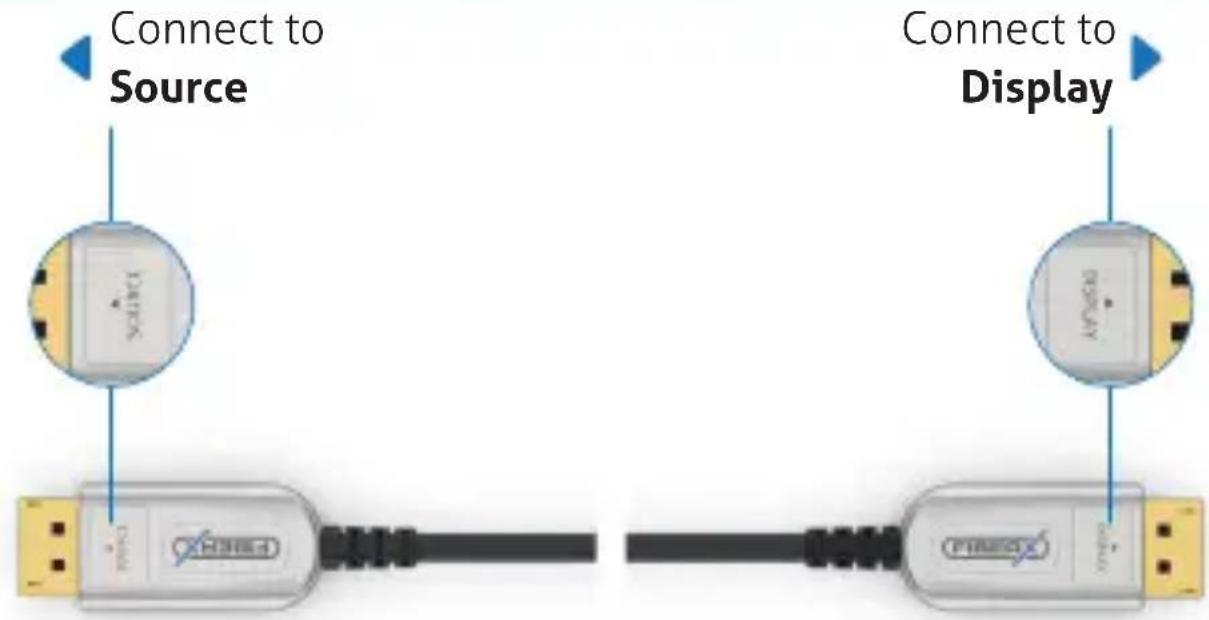
text_image
Connect to Source Connect to DisplayTROUBLESHOOTING
The Display shows:
- A black screen
- Screen is distorted
-
Noise interference
-
Check that the connectors are in the correct ports of the source and sink devices – check the labels on the connector housing to be sure.
-
Ensure that the DisplayPort plugs are firmly inserted into the DisplayPort source and display.
-
Check if the DisplayPort source and display are powered on and properly booted.
-
Reset the system by unplugging and re-plugging the source or display port.
-
Re-boot the system with the optical DisplayPort cable system reconnected.
MAINTENANCE
There are no components located inside the product you need to maintain. Never open/dismantle the product.
Maintenance, modifications and repairs are to be performed exclusively by an expert or at a qualified shop.
If you have questions which remain unanswered by these operating instructions, contact our technical support service or other technical personnel.
CLEANING
Before cleaning the product it must be disconnected from all other connected products.
Do not use abrasive or solvents or any aggressive cleaning agents, rubbing alcohol or other chemical solutions as they can cause damage to the housing and malfunctioning.
To clean the product, a dry, soft and clean cloth is sufficient. Do not apply too much pressure to the housing as this may cause scratch marks. You can easily remove dust using a long-haired, soft and clean brush.
WARRANTY AND LIABILITY
The producer grants 2 years warranty to a new device.
As the manufacturer has no influence on installation, warranty only applies to the product itself.
If any fault or damage is detected on your product, please contact your dealer and provide your sales slip or invoice as evidence of the purchase, if necessary. Your dealer will repair the fault either on site, or send the device to the manufacturer. You make the work of our technicians considerably easier, describing possible faults in detail – only then you can be assured that faults, occurring only rarely, will be found and repaired with certainty!
The manufacturer is not liable for damages to persons or property caused by improper installation, operation or maintenance, not described in this manual.
Do not alter or modify the product or its accessories.
Any use other than described in this user's manual is not permitted and causes loss of warranty, loss of guarantee, and non-liability.
CE CONFORMITY

PureLink GmbH hereby declares that the FX-I250 Series complies with Directive 2014/30/EU.
The full text of the EU Declaration of Conformity is available at the following Internet address:
According to the European WEEE directive, any electrical and electronic equipment must not be disposed with consumers waste. As a consumer, you are committed by law to reposit electrical and electronic devices to public collecting points or to the dealer for free at the end of the device's lifetime. Details are regulated in the respective national legislations. The garbage can symbol on the product, in the manual or on the packaging refers to these terms. With the return of your used devices you actively take part in protecting the environment.
DISCLAIMER
This product complies with the statutory national and European requirements. All company names and product names are trademarks of their respective owners.
All rights reserved.
We reserve our right for misprints and changes of the device, packing or user's manual.

text_image
FIBERXPureLink GmbH