CR-4000-B - Cash register Posiflex - Free user manual and instructions
Find the device manual for free CR-4000-B Posiflex in PDF.


| Product Type | Cash Drawer |
| Brand | Posiflex |
| Model | CR-4000-B |
| Dimensions (W x D x H) | 428 x 460 x 100 mm |
| Weight | 7.0 kg |
| Power Source | Solenoid drive: 12-24 VDC, pulse 100-250 ms; optional 12VAC 1.5A adapter |
| Interface Compatibility | Printer drive (CR-4000), RS232C (CR-4001/4002/4004), Parallel (CR-4003), USB 1.1 (CR-4005-II) |
| Security Code | Configurable via DIP switches, 1-255, factory preset 07H (for non-dedicated RS232/Parallel models) |
| Keylock Positions | Lock (physical lock), Open (key open), Standby (auto open by signal) |
| Bill Compartments | 5 adjustable (4 separators included) |
| Coin Compartments | 9 fixed |
| Coin Roll Storage | 1 underneath cash tray |
| Bill Clip | Plastic |
| Signal Cable | 8-pin telephone plug to 6-pin (printer drive models) |
| Carton Contents | Pre-assembled drawer, user manual, 4 bill separators, 2 keys, signal cable per model |
| Maximum Current Consumption | 0.75A @ 12VDC / 1.5A @ 24VDC (solenoid) |
| Drawer Open Sense | Pin 9 shorts to pin 5 when open (serial models CR-4001/4002/4101/4102/4211/4212) |
| UPOS Driver Support | UPOS 1.7 (CR-4000/4001/4002), UPOS 1.8 (CR-4005-II) |
| FCC Compliance | Class A digital device for commercial environment |
| Cable Wire Color Coding | Red (drawer open sense), Blue (return), Green (+24V to solenoid), Yellow (drawer kick pulse) |
| Power Supply Options | 12VAC 1.5A adapter (serial/parallel/USB); PC power (CR-4004) |
Frequently Asked Questions - CR-4000-B Posiflex
User questions about CR-4000-B Posiflex
0 question about this device. Answer the ones you know or ask your own.
Ask a new question about this device
Download the instructions for your Cash register in PDF format for free! Find your manual CR-4000-B - Posiflex and take your electronic device back in hand. On this page are published all the documents necessary for the use of your device. CR-4000-B by Posiflex.
USER MANUAL CR-4000-B Posiflex
CR-4000/6000 SERIES CASH DRAWER
USER'S MANUAL
FCC Notes:
Rev. A2
This equipment generates, uses, and can radiate radio frequency energy and, if not installed and used in accordance with the instructions manual, may cause interference to radio communications. It has been tested and found to comply with limits for a Class A digital device pursuant to subpart J of Part 15 of FCC Rules, which are designed to provide reasonable protection against interference when operated in a commercial environment. Operation of this equipment in a residential area is likely to cause interference in which case the user at his own expense will be required to take whatever measures to correct the interference.

natural_image
Isometric line drawing of a rectangular electronic device with a slot and ventilation slots (no text or symbols)Warranty Limits:
Warranty terminates automatically when any person other than the authorized technicians opens the machine. The user should consult his/her dealer for the problem happened. Warranty voids if the user does not follow the instructions in application of this merchandise. The manufacturer is by no means responsible for any damage or hazard caused by improper application.
About This Manual:
Posiflex has made every effort for the accuracy of the content in this manual. However, Posiflex will assume no liability for any technical inaccuracies or editorial or other errors or omissions contained herein, nor for direct, indirect, incidental, consequential or otherwise damages, including without limitation loss of data or profits, resulting from the furnishing, performance, or use of this material.
This information is provided “as is” and Posiflex Inc. expressly disclaims any warranties, expressed, implied or statutory, including without limitation implied warranties of merchantability or fitness for particular purpose, good title and against infringement.
The information in this manual contains only essential hardware concerns for general user and is subject to change without notice. Posiflex reserves the right to alter product designs, layouts or drivers without notification. The system integrator shall provide applicative notices and arrangement for special options utilizing this product. The user may find the most up to date information of the hardware from web sites: http://www.posiflex.com or http://www.posiflex.com.tw
All data should be backed-up prior to the installation of any drive unit or storage peripheral. Posiflex will not be responsible for any loss of data resulting from the use, disuse or misuse of this or any other Posiflex product.
All rights are strictly reserved. No part of this documentation may be reproduced, stored in a retrieval system, or transmitted in any form or by any means, electronic, mechanical, photocopying, or otherwise, without prior express written consent from Posiflex Inc. the publisher of this documentation.
© Copyright Posiflex Inc. 2006
All brand and product names and trademarks are the property of their respective holders.
P/N: 19240901041
Part 1
MODEL NUMBERS
| Model | CR400X | CR410X | |
| Bill Compartment | 5 Adjustable | 5 Fixed | 5 Fixed |
| Bill clip | Plastic | Metal | Metal |
| Coin compartment | 9 Fixed 9 Fixed | 5 Fixed | |
| Coin Roll storage | 1 Underneath Cash Tray | 4 Behind | Cash Tray |
Note: 1. CR-4020 series is a special model having 9 bill compartments with plastic bill clip and no coin compartment
- CR-621X series is heavy duty metal casing
INTERFACE APPLICATION
| Model Number Interface | Security Code | Power / Source | |
| CR-4000/4020/4100/4210/CR-6210 | Printer drive N. A. | 12/24 V Pulse / Printer | |
| CR-4001/4101/4211 Dedicated RS232 serial N. A. | 12VAC / Adaptor | ||
| CR-4002/4102/4212 | Non-dedicated RS232 serial | 0 ~ 255 | |
| CR-4003/4103/4213 | Parallel | 0 ~ 255 | |
| CR-4004/4104/4214 CR-6214 | Dedicated RS232 serial N. A. | 12VDC / PC | |
| CR-4005-II/4105-II /4215-II/ CR- 6215 | USB | USB PID | 12VAC / Adaptor |
CARTON CONTENTS
-
Cash drawer pre-assembled.
-
User's manual.
-
Separators of bill compartment: 4 pcs (for CR4000\~4 and CR4005-II only).
-
Key 2pcs: There is a key serial No. sticker on the cash drawer bottom plate. If user lost the key he/she can order the key according to this number.
-
Signal Cable depend on model
a). For CR4000/4020/4100/4210/6210: The standard signal cable is 21863018010 which has a 8 pin plug at one end to connect to the cash drawer and a 6 pin plug at the other end to connect to the POS system/printer. This cable serves for most popularly used POS equipment such as all Posiflex POS terminals, all Posiflex POS printers, most Epson POS printers, most Star POS printers and all other
compatibles. The user may cut the 6 pin end and assemble this free end according to his POS printer specification if the POS printer used utilizes different connection. The cable connection on the wires is as below:
| Wire color | RJ45 | Function |
| Red Pin 1 | Drawer open sense | |
| Blue Pin 2 | Drawer open sense return | |
| Green Pin 7 | + 24V to solenoid | |
| Yellow Pin | 8 Drawer kick pulse | |
b). For CR4001/ 4101/ 4211/ 4002/ 4102/ 4212: 21863137210 /21863237210 with one 9PM and one 9PF connector.
c). For CR4003/ 4103/ 4213: 21863231810 with one 25PM and one 25PF connector.
d). For CR4004/ 4104/ 4214/ 6214: The serial signal cable is already built on.
e). For CR-4005-II/ 4105-II/ 4215-II/ 6215: USB cable is already built on.
- Power Source depend on model
a). For CR-4000/ 4020/ 4100/ 4210/ 6210: not applicable
b). For CR-4001/ 4101/ 4211/ 4002/ 4102/ 4212/ 4003/ 4103/ 4213/ CR4005-II / 4105-II/ 4215-II/ 6215: Power adapter 12VAC 1.5A
c). For CR4004/ 4104/ 4214/ 6214: Power connector cable and I/O bracket plate.
INSTALLATION
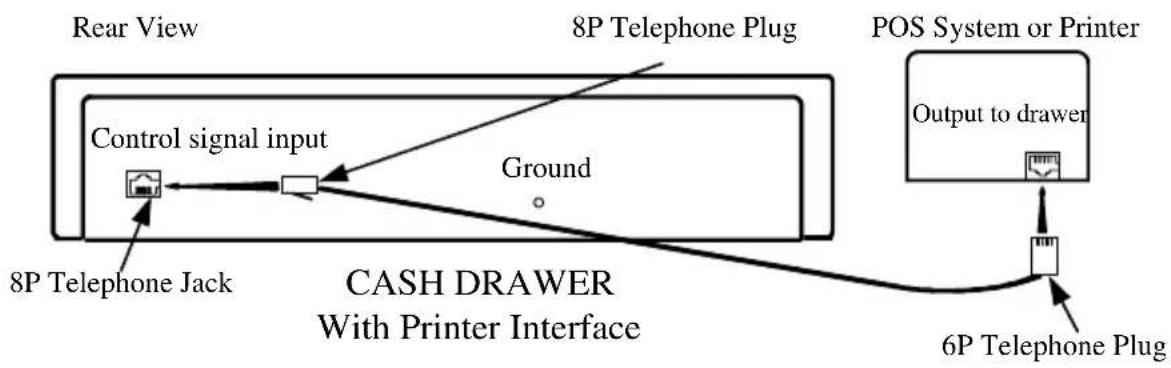
CR4000 / 4020 / 4100 / 4210 / 6210 Connect the drawer to POS
system/printer as shown below:
flowchart
graph TD
    A["Control signal input"] --> B["Ground"]
    C["8P Telephone Jack"] --> A
    D["8P Telephone Plug"] --> E["Ground"]
    F["6P Telephone Plug"] --> G["Output to drawer"]
    H["CASH DRAWER With Printer Interface"] --> A
    H --> D
    H --> F
CR4001 / 4101 / 4211
1). Connect the drawer serial I/P port to the computer COM port. Connect the power adapter output to the Power Input jack
2). No other RS232C devices should be connected to the serial O/P port.
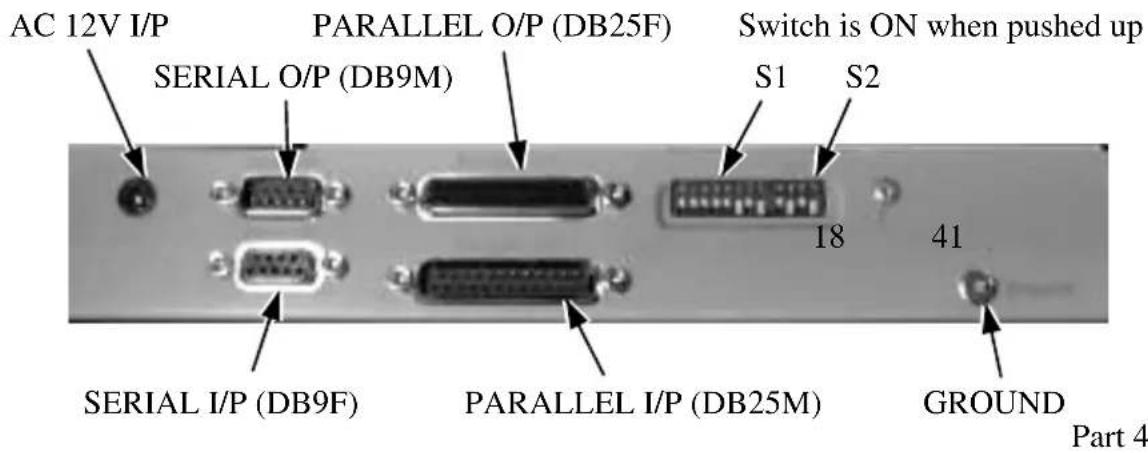
3). Set position 3 of S2 to OFF and position 4 of S2 to ON. Please refer to rear panel illustration.
CR4002 / 4102 / 4212
1). Connect the drawer serial I/P port to the computer COM port. Connect the power adapter output to the Power Input jack.
2). Other RS232C device can be connected to the serial O/P port when needed as long as the security code makes no influence to this RS232C device.
3). Set position 3 of S2 to ON and position 4 of S2 to OFF. Set S1 for security code to open cash drawer. In normal practice, the security code is suggested to be a non-displayable ASCII character, for example, a hexadecimal number between 01 to 1F. Please refer to rear panel illustration below.
CR4003 / 4103 / 4213
1). Connect the drawer parallel I/P port to the computer LPT port. Connect the power adapter output to the Power Input jack.
2). Other parallel device such as a printer can be connected to the parallel O/P port when needed as long as the Security code makes no influence to this parallel device.
3). Set S1 for security code to open cash drawer. In normal practice, the security code is suggested to be a non-displayable ASCII character. For example, a hexadecimal number between 01 to 1F. Please refer to rear panel illustration below.
CR4001/ 4101/ 4211/ 4002/ 4102/ 4212/ 4003/ 4103/ 4213 Rear panel illustration.
text_image
AC 12V I/P PARALLEL O/P (DB25F) Switch is ON when pushed up SERIAL O/P (DB9M) S1 S2 18 41 SERIAL I/P (DB9F) PARALLEL I/P (DB25M) GROUND Part 4S1 Set security code. (Default Setting: BIT 1,2,3 OFF and BIT 4,5,6,7,8 ON. Security code is 07H)
| B I T | 1 | 2 | 3 | 4 | 5 | 6 | ||
| Number to be added to the security code if OFF. | 1 2 | 4 8 1 | 6 32 | 64 12 | 8 |
S2 BIT1 ON and BIT2 OFF to receive security code via Pin2 of P4 (DB9F). BIT1 OFF and BIT2 ON* to receive security code via Pin3 of P4 (DB9F). BIT3 OFF and BIT4 ON for dedicated RS-232C. BIT3 ON and BIT4 OFF* for non-dedicated RS-232C. (* denotes factory default setting)
CR4004 / 4104 / 4214 / 6214
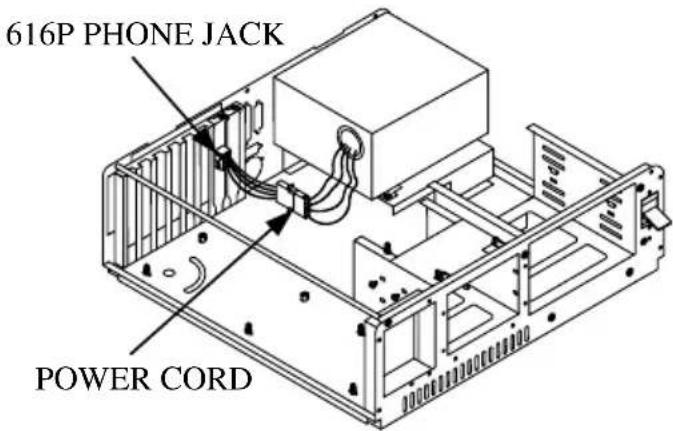
1). Open the PC case. Put the metal bracket with power connector into one of the I/O windows.
2). Connect the cable to the HDD type power connector of PC power supply. See illustration below. Then close the PC case.
3). Connect the DB-9 connector to the computer's serial port of COM1 (or COM2). Connect the 4P phone plug connector to the added I/O bracket. See below illustration.
text_image
616P PHONE JACK POWER CORD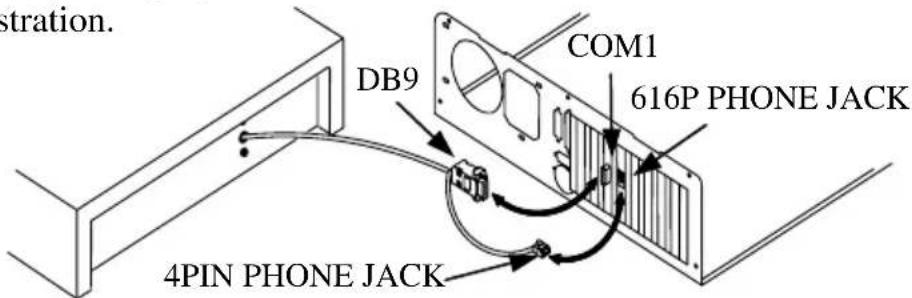
text_image
stration. DB9 COM1 616P PHONE JACK 4PIN PHONE JACKCR4005-II / 4105-II / 4215-II / 6215
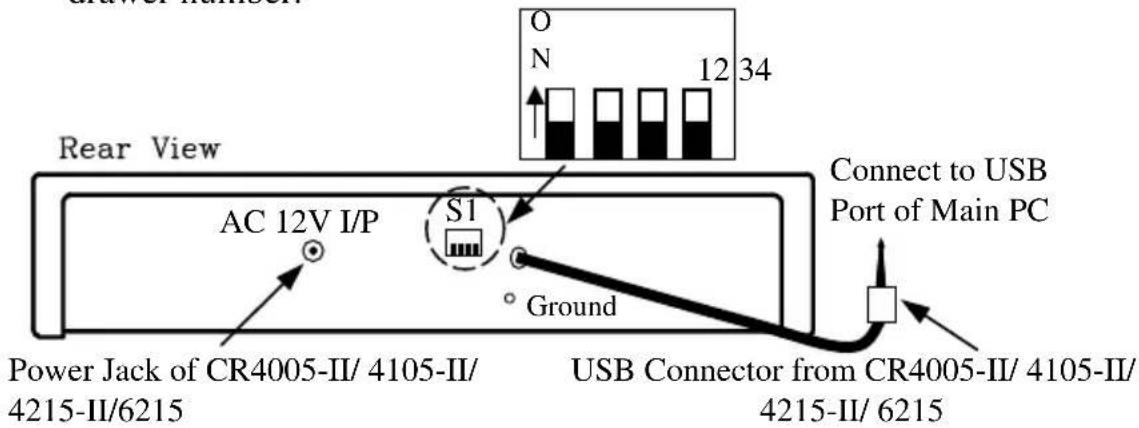
1). Define a drawer number for the cash drawer so that this cash drawer is going to respond accordingly in USB communication. Follow the table below for “Switch settings” to adjust the switch S1 according to this drawer number if it is not 7. Please note that within each system there
should never be any 2 USB interface cash drawers carrying the same drawer number.
text_image
Rear View AC 12V I/P S1 Ground Power Jack of CR4005-II/ 4105-II/ 4215-II/6215 Connect to USB Port of Main PC USB Connector from CR4005-II/ 4105-II/ 4215-II/ 6215Rear View of Model CR4005-II/ 4105-II/ 4215-II/ 6215 Cash Drawer with USB Interface
Switch settings:
| Drawer | 0 | 1 | 2 | 3 | 4 | 5 | 6 | 7 |
| SW1 | ON | OFF | ON | OFF | ON | OFF | ON | OFF |
| SW2 | ON | ON | OFF | OFF | ON | ON | OFF | OFF |
| SW3 | ON | ON | ON | ON | OFF | OFF | OFF | OFF |
| SW4 | Reserved | |||||||
Default setting: Drawer 7 (SW1: OFF; SW2: OFF; SW3: OFF)
2). Connect USB connector of cable coming out from the rear side of the USB interface cash drawer to USB port of main PC.
3). Check the specification of power adaptor on its nameplate. Insert the power adaptor into the correct power outlet. Insert the output plug to the jack at rear side of CR4005-II/ 4105-II/ 4215-II/ 6215 to supply power for drawer kickout.
4). Install the USB utility driver from Posiflex Product Information CD with Posiflex POS system or visit our web sites http://www.posiflex.com or http://www.posiflex.com.tw or http://www.posiflexusa.com for latest updates.
UPOS driver application (Applied for all Posiflex cash drawer)
Please first find in Posiflex Product Information CDROM or download from Posiflex web sites for UPOS driver setup. In this application CR4XX3 and CR4XX4/ 6214 respond to openDrawer command only; CR4XX0/ 6210, CR4XX1 and CR4XX2 are compliant to UPOS version 1.7 and CR4XX5-II/ 6215 are compliant to UPOS version 1.8.
SPECIFICATIONS
MECHANICAL: Dimensions:
428 (W) x 460 (D) x 100 (H) mm (CR-4000)
428 (W) x 456 (D) x 100 (H) mm (CR-6000)
Weight: 7.0 Kg (CR-4000)
8.8
Kg
Removable tray with a lock-on cover (option)
ELECTRICAL:
Power Source
Solenoid Drive (for CR-4000 / 4020 / 4100 / 4210 / 6210)
Pulse Amplitude 12 to 24 VDC
Pulse Width 100 to 250 msec
Pulse Duty Cycle 10% max.
Max. Current Consumption 0.75A @ 12 VDC/1.5A @ 24 VDC
Output Voltage 12 VAC at 1.5 A
DC Power Kit (for CR-4004 / 4104 / 4214 / 6214): +12 V DC and +5 V DC
Interface
Direct Drive: CR-4000/ 4020/ 4100/ 4210/ 6210
Serial (RS232C): CR-4001
CR-4002
CR-4004
CR-4101
CR-4102
CR-4104
CR-4211
CR-4212
CR-4214/6214
Baud rate 9600
9600
150 \~ 19200
Parity None
none
none, even, or odd
Data Bits 8
8 7 or 8
Stop Bits 1 or 2
1 or 2
1 or 2
Parallel (IEEE1284): CR-4003/ 4103/ 4213
USB (1.1): CR-4005-II/ 4105-II/ 4215-II/ 6215
Security Code
CR-4002/4102/4212/4003/4103/4213
1-255; factory preset
value = 7
CR-4005-II/ 4105-II/ 4215-II
USB PID
CR-6215
Drawer Open Sense
CR-4001/4101/4211/4002/4102/4212
Pin 9 shorts to pin 5 when drawer open
CR-4005-II/4105-II/4215-II
CR-6215
Through USB driver
KEYLOCK OPERATION
text_image
a I aKeylock
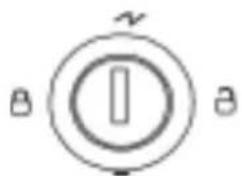
Lock ( ): Physically lock the drawer.
Open (☐): Open the drawer by the key.
Standby (▼): Automatically open the drawer by POS printer or POS system or interface signal control
STRUCTURE
text_image
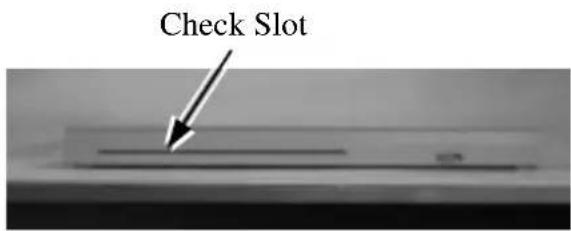
Check SlotInside CR-4000/ 4001/ 4002/ 4003/ 4004/ 4005-II/ 4100/ 4101/ 4102/ 4103/ 4104/4105-II
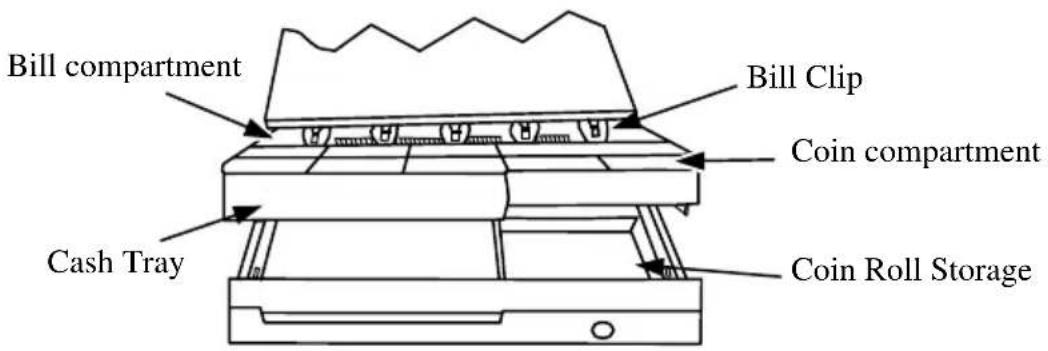
text_image
Bill compartment Cash Tray Bill Clip Coin compartment Coin Roll StorageTray for CR-4020
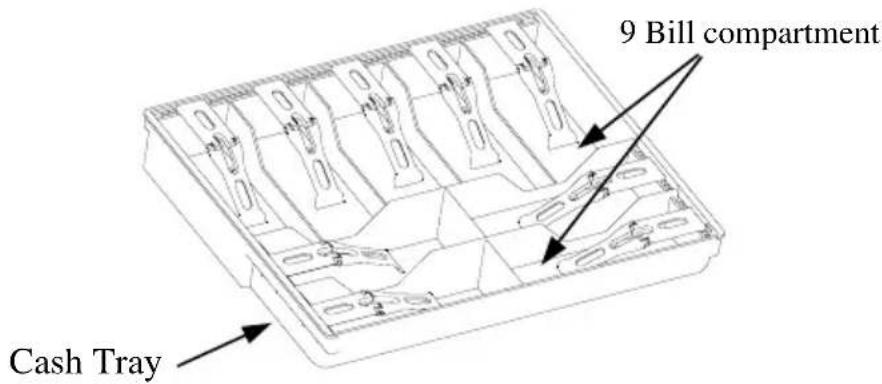
text_image
9 Bill compartment Cash Traytext_image
Bill compartment Cash Tray Coin Roll Storage Bill Weight Coin compartmentPOSIFLEX

警告使用者
T31454