
Pretty - Vacuum Cleaner FAKIR - Free user manual and instructions
Find the device manual for free Pretty FAKIR in PDF.


| Product Type | Dry Vacuum Cleaner with Dust Bag |
| Brand | Fakir |
| Model | Pretty |
| Motor Power | 750 W |
| Mains Voltage | 220-240 V |
| Nominal Frequency | 50/60 Hz |
| Energy Efficiency Class | A |
| Annual Energy Consumption | 25.6 kWh (based on 50 test cycles) |
| Carpet Cleaning Performance | B |
| Hard Floor Cleaning Performance | A |
| Dust Re-emission Class | B |
| Sound Power Level | 78 dB |
| Usage Life | 10 years |
| Dust Bag Type | Replaceable dust bag |
| Filter Type | Motor protection filter (washable), EPA filter (replace every 6 months) |
| Accessories Included | Handle, telescopic tube, parquet/carpet brush, crevice nozzle |
| Suction Power Control | Electronic power adjustment with button on body |
| Dust Indicator | Visual indicator shows fill rate of dust bag; replace when all red |
| Cord Rewind | Yes, with foot button |
| Parking | Vertical and horizontal parking options |
| Safety Features | Automatic shut-off? Not specified; CE declaration, important safeguards |
Frequently Asked Questions - Pretty FAKIR
User questions about Pretty FAKIR
0 question about this device. Answer the ones you know or ask your own.
Ask a new question about this device
Download the instructions for your Vacuum Cleaner in PDF format for free! Find your manual Pretty - FAKIR and take your electronic device back in hand. On this page are published all the documents necessary for the use of your device. Pretty by FAKIR.
USER MANUAL Pretty FAKIR
natural_image
Black and white photo of a vacuum cleaner with coiled hose and control panel (no visible text or symbols)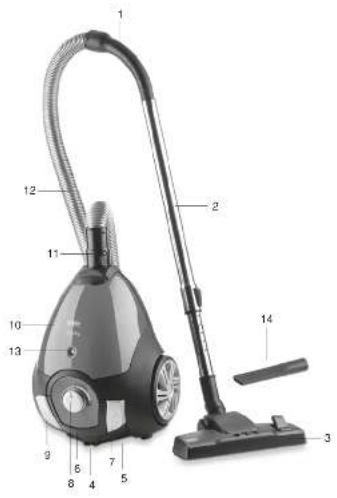
natural_image
Simple line drawing of an open box with an upward arrow inside (no text or symbols)natural_image
Close-up of a desktop computer keyboard with an open pad and indicator lights (no visible text or symbols)natural_image
Close-up of a black and white robotic vacuum cleaner with a circular dial (no visible text or symbols)natural_image
Close-up of a rotary dial with a white label, no visible text or symbols on the dial itself.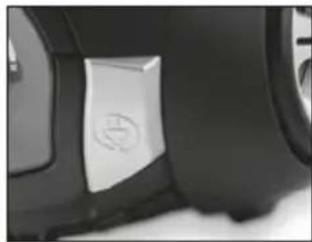
natural_image
Close-up of a car's side panel showing a white rectangular object with a circular emblem on the left side (no text or symbols visible)natural_image
Close-up of hands installing or adjusting a car door panel (no visible text or symbols)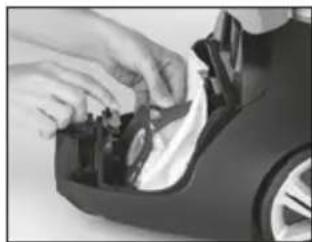
natural_image
Close-up of hands installing or adjusting a mechanical component with a circular housing (no visible text or symbols)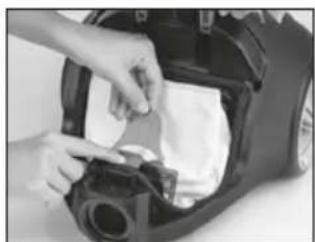
natural_image
Close-up of hands installing or adjusting a mechanical component into a car's hood (no visible text or symbols)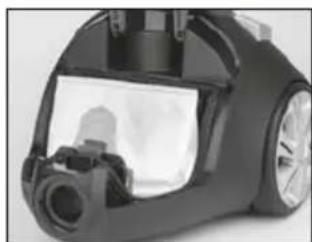
natural_image
Close-up of a black vacuum cleaner's head and side panel, showing internal components and no visible text or symbols.
WARNUNG!
Information about the operating instructions....13
Liability 13
Safety is important....13
CE Declaration of Conformity 13
Usage Area....13
Unauthorized Use....13
Important Safeguards....14
Unpacking and first use....14
Product Description 15
New energy-saving Technology....15
Attaching / detaching the hose....15
Attaching / detaching telescopic tube 15
Attaching / detaching the parquet / carpet brush on the telescopic tube....15
Setting parquet and carpet brush....15
Operation 16
Setting suction power 16
Dust indicator 16
Operation 16
Turning of the cleaner and parking....16
Vertical parking....16
Horizontal parking 16
After Use....17
Cleaning and Maintenance....17
Cleaning the filters....18
Waste Disposal 19
Dispatch....19
Troubleshooting....20
Thank you for purchasing Fakir Pretty Dry Vacuum Cleaner With Dust Bag which has been designed and manufactured to give you many years of trouble-free service.
Information about the operating instructions
These operating instructions are intended to enable the safe and proper handling and operation of the appliance. Read these operating instructions carefully before using the appliance for the first time. Keep the operating instructions in a safe place. Include these operating instructions when passing the appliance on to another user.
Liability
Fakir Elektrikli Ev Aletleri Dış Tic. A.Ş. will accept no liability for damages resulting from failure to comply with the operating instructions and cannot assume any liability in case the appliance is used for other purposes than its intended use or handled, repaired or serviced improperly.
Safety is important
For yours and others safety please read the instructions before using the appliance. Please keep this instruction in a safe place for the further use. If you pass the appliance on, pass on the instructions too. Remove all packaging, but keep it until you are satisfied that the appliance is working.
CE Declaration of Conformity
This appliance fulfills the requirements of the Appliance and Product Safety Law (GPSG) and the EU Directives. 2004/108/EC "Electromagnetic Compatibility" and 2006/95/EC "Low-Voltage Directive". The appliance bears the CE mark on the rating plate.
Usage Area
This product designed for just household use. It is not suitable for Business and industry type. Otherwise it will be accepted as “out of warranty conditions” by our Authorized Services.
Unauthorized Use
The examples of unauthorized use listed here can result in malfunctions, damage to the appliance or personal injury: This appliance is not designed to be used by persons (including children) with limited physical, sensory or mental capacities or by persons lacking in experience and/or knowledge, unless they are supervised by someone who is responsible for their safety or have received instructions on how to use the appliance. Children should be supervised to ensure that they do not play with the appliance. Children should be supervised to ensure that they do not play with the appliance. Home appliances are not toys for children! Therefore, use and store the appliance away from the reach of children. Children do not recognize the danger involved with handling an appliance. Keep packaging films away from children - danger of suffocation!

NOTICE!
Emphasizes tips and other useful information in the operating instructions.

WARNING!
Indicates notices which, if ignored, can result in risk of in jury or death.

ATTENTION!
Indicates notices of risks that can result in damage to the appliance.
Important Safeguards
When using an electric appliance, basic precautions should always be followed, including the following
To reduce the risk of fire, electric shock, or injury:
- Read this operating manual through completely before working with the appliance. Keep the operating manual safe. If you pass the appliance on to a third party, give them the operating manual as well.
- Ensure that, the apparatus and the accessories of the vacuum cleaner are complete when you first open the giftbox. If there are defective parts, apply to an authorized Fakir Service.
- Keep the packaging away from babies and children in order to avoid the risk of suffocation.
- If there is any damage on the vacuum cleaner or power cord or the plug, do not use the vacuum cleaner. Apply to an authorized Fakir Service.
- Don't use the vacuum cleaner to suck up inflammables and glass or metal splinters or the clothes. This appliance is not suitable to be used to pick up substances constituting a health hazard.
- If the appliance has breakdown, it may only be repaired by the maintenance center. Never dismantle it by yourself blindly.
- Don't suck up surface covered with plastic, cement, Stone dust or flour.
- The appliance is operated with electrical power which means there is in principle a risk of electric shock so that do not touch the plug with wet hands.
- If you want to pull the plug out of the socket then always pull directly on the plug. Never pull on the cable as this could damage it.
- Make sure that the power cable is not bent, caught or run over, and that it does not come into contact with heat sources or sharp edges.
- Do not push objects into the openings of the appliance while it is running. The appliance could overheat.
- Do not use in the open-air. There is a risk of the appliance being destroyed by rain and dirt.
- Never immerse the appliance in water or other fluids and keep it away from rain and moisture.
- Only use an extension cable that is designed for the power requirement of the appliance.
- Never leave the appliance unattended, and use it with the greatest of care if children or persons who cannot assess the risks are nearby.
- Unplug the unit, during connecting accessories, cleaning, repairing or servicing the unit.
- Only use the vacuum cleaner if all filters are correctly in place and once you have ensured that no openings are blocked The filters must be intact and dry. Non-compliance can damage the cylinder vacuum cleaner.
- If the power cord or the plug of the appliance is broken or damaged, do not use the appliance. Apply to nearest authorized Fakir Service.
KEEP THIS MANUAL FOR FUTURE REFERENCES.
natural_image
Simple line drawing of an open box with an upward arrow inside (no text or symbols)Unpacking and first use
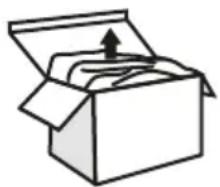
Unpack the device and check the content of the packaging
for completeness. Should you note any damage incurred during transit, please contact your dealer immediately.

WARNING!
Never use a defective appliance.

NOTICE!
Keep the packaging for storage and future transports (e.g. for moves, service).
Product Description
1- Handle
2- Telescopic tube
3- Parquet carpet brush
4- Motor protection pad
5- Power cord
6- Carrying handle
7- Button for cord wrapping
8- Button for setting suction power
9- On-off button
10- Cover
11- Hose nozzle
12- Hose
13- Dust indicator
14- Crevice Nozzle
Vacuum cleaner: Fakir Pretty Dry Vacuum Cleaner With Dust Bag
Mains voltage: 220-240 V
Nominal frequency: 50/60 Hz
Motor power: 750 W
Energy efficienzy class: A
Annual energy consumption: Energy
consumption per year is calculated on the
basis of 50 test cycles and is 25,6 kWh. The
actual energy consumption could vary,
depending on how the device is used.
Carpet cleaning performance: B
Hard floor cleaning performance: A
Dust re-emission class: B
Sound power level: 78 dB
Usage Life: 10 Years
*Indicative annual energy consumption (kWh per year), based on 50 cleaning tasks.
Actual annual energy consumption will depend on how the appliance is used.
Crevice nozzle
The crevice nozzle allows dirt from deep cracks in upholstered furniture, corners, skirting boards etc. to be suctioned off.
New energy-saving Technology
The Fakir vacuum cleaner is equipped with new energy-saving technology.
A combination of highly efficient accessories i.e. vacuum nozzle, tube, hose, *HEmotor, filter and appliance provide optimum vacuum power at low energy usage. It offers excellent dust collection, low dust release and low noise level on both carpeted and hard floors.
*High efficiency-motor
Attaching / detaching the hose:
Push the hose so that the hose nozzle will fit to the suction nozzle when attaching.
Ensure that the pins on the hose nozzle are fitted and clicked.
Detach the hose by pressing on the pin latch on the hose nozzle and pulling back.
Attaching / detaching telescopic tube:
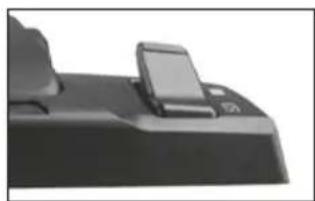
You can extend or shorten the telescopic tube by pressing on the latch of the telescopic tube. Release the latch once you have set the desired length, and fix the position.
Attaching / detaching the parquet / carpet brush on the telescopic tube:
Fit the telescopic tube on the slot of the parquet carpet brush.
After vacuuming, pull the telescopic tube and remove the brush.
Setting parquet and carpet brush:
Adjust the setting latch on the parquet carpet brush for the floor to be cleaned. Set the latch to carpet or hard floor position.
To clean any hollowed or splined floor on a hard floor, set the latch to hard floor position, and set the scraper setting button on the figure to splined floor (tile edges) position.
natural_image
Close-up of a black electronic device with a small screen and indicator lights (no visible text or symbols)
ATTENTION!
Be sure that all filters were attached correctly to the appliance before you start cleaning. Filters must be undamaged and dry. Uncompatibility can damage your vacuum cleaner.

ATTENTION!
If you use the cylinder vacuum cleaner without attached nozzle, there is a greater risk of accidentally vacuuming up objects.
Operation
- Plug the suction hose adapter into the suction hose receiver.
- Push the handle into the upper end of the telescopic tube.
- Push the floor nozzle onto the lower end of the telescopic tube.
- Adjust the length of the telescopic tube. To do this, pres the telescopic tubelock forwards. Then pull the telescopic tube by the handle to the desired length. To lock it, release the telescopic tube lock while you pull.
- Pull the cable till you see the red mark on the cable.
- Switch on the cylinder vacuum cleaner using the on/off switch.
- Adjust the carpet/hard floor switch depending on the type of flooring:
- Hard floor laminate flooring, tiles, PVC flooring, etc. (with brush)
- Carpet long and short pile carpets, runners, etc. (without brush)
- To vacuum, pull the cylinder vacuum cleaner behind you like a sledge.
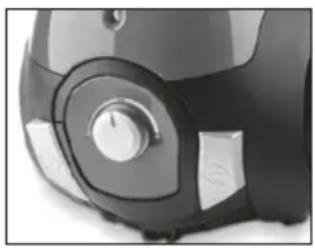
Your divice has electronic power adjustment. You can increase or decrease the vacuum power when you would like. We advise you to keep the suction power at medium/minimum level for carpet cleaning, and at maximum level parquet and floor cleaning.
natural_image
Close-up of a black and white electronic device with a circular dial and control buttons (no visible text or symbols)Setting suction power:
You can set the suction power of the appliance for the floor to be cleaned using the suction power setting button on the body.
Dust indicator:
The dust indicator shows the fill rate of the dust bag. If the indicator shows all red, replace the dust bag even if it is not totally full.
Operation:
Pull the plug on the back of the appliance and plug into a socket.
Press the on-off button to run the appliance.
Turning of the cleaner and parking:
Turn off the appliance using the on-off button and unplug it.
Hold the cord wrapping button to collect the electrical cord into the appliance and release it once the whole electrical cord is collected within the appliance.
Vertical parking:
Fit the hook of the parquet/carpet brush on the parking conduit under the appliance.
Horizontal parking:
Fit the hook of the parquet/carpet brush on the parking conduit on the backside of the appliance.

ATTENTION!
If you leave your work area, switch off the appliance.
After Use

WARNING!
Follow the steps below as soon as you stop vacuum cleaning. Never leave the appliance unattended.
natural_image
Close-up of a black circular device with a metallic knob and a white label (no visible text or symbols)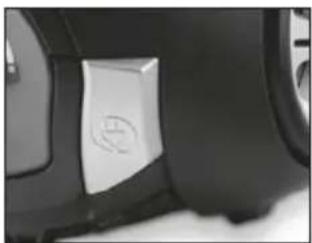
natural_image
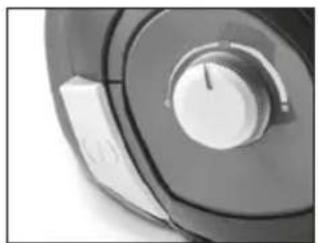
Close-up of a car's side panel showing a white rectangular button with a logo (no readable text or symbols)- Press the foot button "On/Off" to switch off the vacuum cleaner.
- Remove the plug from the mains socket.
- Press the foot button "cable rewind" to reel in the cable.
Gently guide the cable with your hand until the cable has been completely wound.

NOTICE!
Only use original Fakir filters. This is the only way to ensure that the excellent filter properties of the vacuum cleaner are utilised.
Cleaning and Maintenance:
Replacing the dust bag:
Turn off and unplug the appliance before cleaning.
Replacing the dust bag:
If the indicator shows all red, replace the dust bag even if it is not totally full.
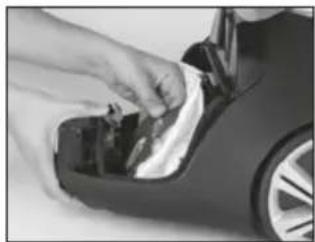
Lift the latch on the front side and open the appliance cover.
Remove the dust bag by pressing the latch of the dust bag.
Place the new dust bag on the slot below - (SEE THE FIGURE) - and then pull the dust bag towards the latch, and ensure that the dust bag is placed under the latch by expanding the latch backward.
To place the dust bag, fold the dust bag following the folding sign. Eventually, you will prevent the dust bag from getting jammed between the cover and the body.
If you do not fit the dust bag properly, the dust bag cover will not be closed. In this case, do not force the cover to close and ensure that the dust bag is fitted properly.
natural_image
Close-up of hands installing or adjusting a car door panel (no visible text or symbols)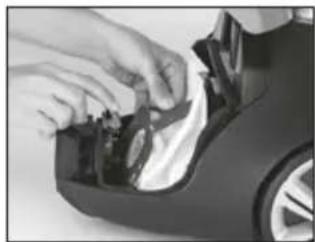
natural_image
Close-up of hands installing or adjusting a mechanical component on a car (no visible text or symbols)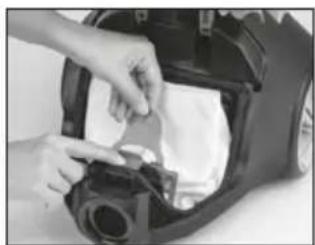
natural_image
Close-up of hands installing or adjusting a mechanical component on a car body (no visible text or symbols)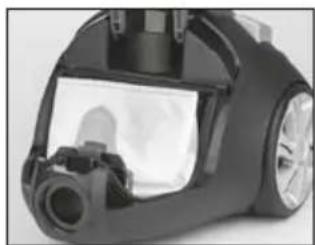
natural_image
Close-up of a black vacuum cleaner with visible spray bottle and mechanical components (no text or symbols)
WARNING!
Do not wash the dust bag.
Cleaning the filters:
Motor protection filter:
Wash the motor filter once in 5 uses. Fit it back after ensuring that it is totally dry (may vary depending on the operation time).
EPA filter:
We recommend you to change your EPA filter every 6 months.
Storage
- Insert the park holder of the floor nozzle into the nozzle holder on the underneath of the appliance.
- Store the vacuum cleaner in a place that is out of the reach of children.

CAUTION!
Never place the appliance next to heat sources and avoid direct sunlight, as the heat may damage the vacuum cleaner.

WARNING!
Switch off the vacuum cleaner and disconnect the plug from the mains socket before cleaning the appliance.
This ensures that the appliance is not switched on unintentionally.

WARNING!
Do not use cleaning detergents, abrasive agents or alcohol as these will damage the casing.
Only dry-wipe the appliance or clean with a damp cloth.
You can also clean the filter chamber with a damp cloth if necessary.
Suction accessories such as the hose, pipes or nozzles should be regularly checked for blockages, cleaned and, washed and dried.
Waste Disposal

If the service life of the device has ended, in particular if functional disturbances occur, make the worn-out device unusable by cutting through the power cable. Dispose of the device according to the environmental regulations applicable in your country.
Electrical waste must not be disposed of together with household waste. Bring the worn-out device to a collection center. The packaging of the device consists of recycling-capable materials. Place these, sorted out according to material, in the collectors provided, so that recycling can be carried out on them. For advice on recycling, refer to your local authority or your dealer.
This appliance fulfills the requirements of the 2002/96/EC WEEE regulations.
Dispatch
Carry the appliance in the original package or a similar, well-padded package to prevent damage to the appliance.
Troubleshooting
Before you contact our Fakir Customer Service, check whether you can correct the fault yourself.

WARNING!
Before you start checking the appliance, you switch off the vacuum cleaner and disconnect the plug from main socket. Never use defective appliance.
| Multifunction | Possible Cause | Solutions |
| Appliance does not work | Plug is not plugged in or the appliance is not switched on. | Plug in the plug or switch the appliance on |
| Socket does not carry any current. | Test the cylinder vacuum cleaner at another socket which you are sure carries current | |
| Power cable is damaged. | Have the cable replaced by authorized Fakir services | |
| Appliance does not suck up any dirt | Dustbag is full or blocked. | Replace the dustbag with the new one. |
| Selected brush/nozzle are incorrect for the type of flooring. | Adjust your brush/nozzle selection to the type of flooring. | |
| Filter is dirty. | Clean the corresponding filter. Make sure your filters are clean. | |
| Nozzle, telescopic tube or suction hose are blocked. | Remove the blockage. If necessary, use along wooden rod for this (e.g.a broom handle). | |
| Appliance is making unusually loud noises while running | Sucked-in particles are blocking the air-way. | Remove the particles. If necessary, use a long wooden rod for this (e.g. a broom handle). |
natural_image
Simple line drawing of an open box with an upward arrow on top (no text or symbols)natural_image
Close-up of a desktop computer keyboard with a monitor and keyboard (no visible text or symbols)
DİKKAT!
natural_image
Close-up of a black and white robotic vacuum cleaner with a circular dial and control knob (no visible text or symbols)natural_image
Close-up of a black circular mechanical component with a central knob and a side tab (no visible text or symbols)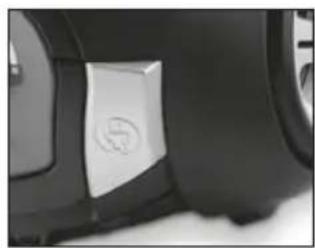
natural_image
Close-up of a car's side panel showing a white button with a logo (no readable text or symbols)natural_image
Close-up of hands installing or adjusting a car door panel (no visible text or symbols)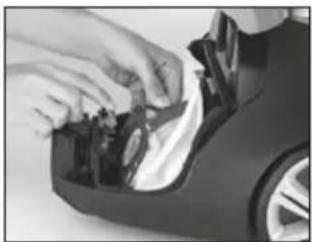
natural_image
Close-up of hands installing or adjusting a mechanical component with a curved housing (no visible text or symbols)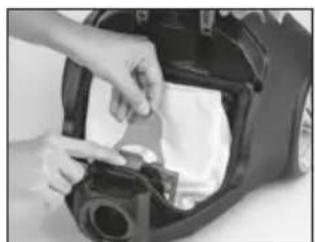
natural_image
Close-up of hands installing or adjusting a mechanical component on a vehicle's hood (no visible text or symbols)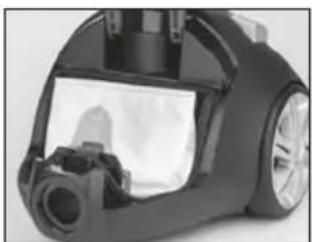
natural_image
Close-up of a black vacuum cleaner with visible mechanical components (no text or symbols)
UYARI!
natural_image
Simple line drawing of an open box with an upward arrow inside (no text or symbols)natural_image
Close-up of a black electronic device with a small screen and a logo (no visible text or symbols)
ВНИМАНИЕ!
natural_image
Close-up of a black and silver robotic vacuum cleaner with control knob (no visible text or symbols)natural_image
Close-up of a circular mechanical component with a central knob and a side tab (no visible text or symbols)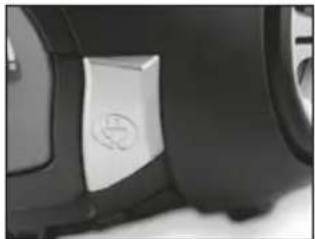
natural_image
Close-up of a car's side panel showing a white rectangular button with a circular logo (no readable text or symbols)natural_image
Close-up of hands cleaning a car's side panel (no visible text or symbols)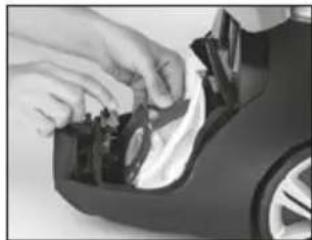
natural_image
Close-up of hands installing or adjusting a component on a car's side panel (no visible text or symbols)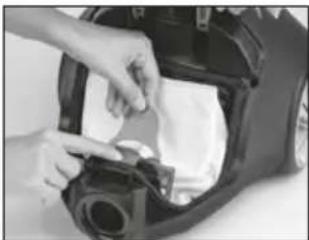
natural_image
Close-up of hands installing or adjusting a mechanical component on a car body (no visible text or symbols)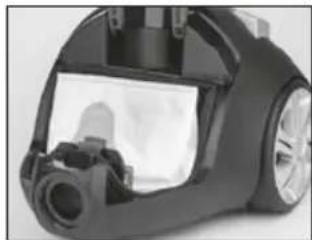
natural_image
Close-up of a black vacuum cleaner's hood with visible mechanical components (no text or symbols)
ПРЕДУПРЕЖДЕНИЕ!
natural_image
Simple line drawing of an open box with an upward arrow on top (no text or symbols)natural_image
Close-up of a black electronic device with a small screen and indicator lights (no visible text or symbols)انتباه!

natural_image
Close-up of a black and white industrial vacuum cleaner with control knob (no visible text or symbols)مؤشرة الغبار
natural_image
Close-up of a rotary dial with a knob and button (no visible text or symbols)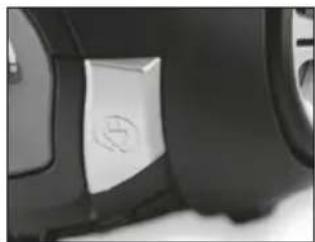
natural_image
Close-up of a car's side panel with a white 3D button and circular logo (no readable text or symbols)natural_image
Close-up of hands installing or adjusting a car door panel (no visible text or symbols)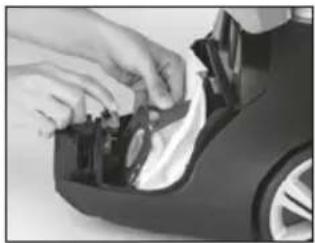
natural_image
Close-up of hands installing or adjusting a mechanical component on a car (no visible text or symbols)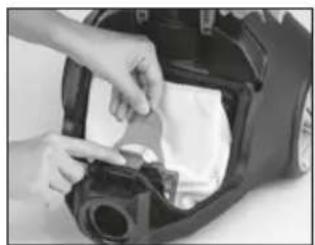
natural_image
Close-up of hands installing or adjusting a mechanical component on a vehicle (no visible text or symbols)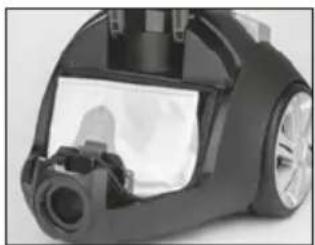
natural_image
Close-up of a black vacuum cleaner with visible spray bottle and control panel (no text or symbols)تحذير!

- WARNUNG!
- Information about the operating instructions
- Liability
- Safety is important
- CE Declaration of Conformity
- Usage Area
- Unauthorized Use
- NOTICE!
- WARNING!
- ATTENTION!
- Important Safeguards
- Unpacking and first use
- Product Description
- Vacuum cleaner: Fakir Pretty Dry Vacuum Cleaner With Dust Bag
- Crevice nozzle
- New energy-saving Technology
- Attaching / detaching the hose:
- Attaching / detaching telescopic tube:
- Attaching / detaching the parquet / carpet brush on the telescopic tube:
- Setting parquet and carpet brush:
- Operation
- Setting suction power:
- Dust indicator:
- Operation:
- Turning of the cleaner and parking:
- Vertical parking:
- Horizontal parking:
- After Use
- Cleaning and Maintenance:
- Replacing the dust bag:
- Cleaning the filters:
- Motor protection filter:
- EPA filter:
- Storage
- CAUTION!
- Waste Disposal
- Dispatch
- Troubleshooting
- DİKKAT!
- UYARI!
- ВНИМАНИЕ!
- ПРЕДУПРЕЖДЕНИЕ!
Brand : FAKIR
Model : Pretty
Category : Vacuum Cleaner