SL-MP80 - Hi-Fi System PANASONIC - Free user manual and instructions
Find the device manual for free SL-MP80 PANASONIC in PDF.


User questions about SL-MP80 PANASONIC
0 question about this device. Answer the ones you know or ask your own.
Ask a new question about this device
Download the instructions for your Hi-Fi System in PDF format for free! Find your manual SL-MP80 - PANASONIC and take your electronic device back in hand. On this page are published all the documents necessary for the use of your device. SL-MP80 by PANASONIC.
USER MANUAL SL-MP80 PANASONIC
Operating Instructions
The model number and serial number of this product can be found on either the back or the bottom of the unit.
Please note them in the space provided below and keep for future reference.
MODEL NUMBER
SERIAL NUMBER
Dear Customer
Thank you for purchasing this product. Before connecting, operating or adjusting this product, please read these instructions completely. Please save this manual for future reference.

This manual was printed with soy based ink.

Panasonic Consumer Electronics Company,
Division of Matsushita Electric Corporation of America
One Panasonic Way Secaucus, New Jersey 07094 http://www.panasonic.com
Panasonic Sales Company,
Division of Matsushita Electric of Puerto Rico, Inc. ("PSC")
Ave. 65 de Infantería, Km. 9.5 San Gabriel Industrial Park, Carolina, Puerto Rico 00985
Panasonic Canada Inc.
5770 Ambler Drive, Mississauga, Ontario L4W 2T3 www.panasonic.ca
C 2003 Matsushita Electric Industrial Co., Ltd.
Printed in Japan
RQT6774-P
F0103KK0
Troubleshooting guide
References to WMA apply only to SL-MP80.
Before requesting service, make the below checks. If you are in doubt about some of the check points, or if the remedies indicated in the chart do not solve the problem:
In the U.S.A., contact the Panasonic Customer Call Center at 1-800-211-7262, or e-mail consumerproducts@panasonic.com, or web site (http://www.panasonic.com).
In Canada, contact Panasonic Canada Inc. Customer Care Centre at 905-624-5505, web site (www.panasonic.ca), or an authorized Servicentre close to you.
| No play. | The HOLD function is on (←page 4).The disc isn't correctly set.The disc is scratched or dirty.(Tracks skipped.)There is moisture on the lens. Wait for about an hour and then try again.The lens is dirty: clean it with a blower (recommended product: SZZP1038C). If the lens gets marked with fingerprints, gently wipe them off with a cotton swab. |
| Cannot play WMA/MP3. | The unit may not read WMA/MP3 correctly if it is shaken while it is reading the files.You may not be able to play WMA/MP3 if you have copied a multi-session disc that has no data between sessions.You may not be able to play a WMA disc if it contains large files, such as JPEG.You cannot play a WMA disc if the copy protection setting was on when you made the disc. |
| No sound or there is a lot of noise. | Ensure the plugs are inserted firmly.Wipe the plugs clean with a clean cloth.Noise may occur when playing WMA/MP3 if recording quality is poor.The elapsed playing time disappears and sound is interrupted if bumps continue repeatedly.Separate this unit from mobile telephones. |
| Play doesn't resume from the track where play stopped at. | This doesn't work if you change discs.This doesn't work during random play.It may not work correctly under some conditions. |
| Play doesn't start from the first track. | Random play modes may be on (←page 6).Play resumes from the track where you last stopped play. Use skip to return to the first track. |
| The unit stops working. | Disconnect then reconnect all power sources (batteries and AC adaptor). |
| Cannot search through tracks. | You cannot search through WMA/MP3 files. |
| Cannot skip albums. | You cannot skip between the first and last albums during play. |
| The ID3 titles aren't displayed. | They are not displayed while playing WMA. |
| Cannot recharge. | You aren't using the special rechargeable batteries (←page 5).You must insert two batteries before you can recharge them.The unit must be off before you can recharge. |
| The AC adaptor becomes warm during recharging. | This is normal. |
| Play time is very short even after recharging. | The batteries may have reached the end of their service life.Usually they can be recharged 300 times. |
| Play time is short after recharging. | This may occur after the first time you recharge the batteries or after you haven't used them for a long time. Play time should be restored after a few recharges.The batteries can go flat if you leave the AC adaptor connected after recharging is complete. |
| The battery indicator fails to appear or is incorrect. | The indicator does not appear when the AC adaptor is connected.The indicator does not appear correctly under some other conditions. |
Display
References to WMA apply only to SL-MP80.
| HOLD | The HOLD function is on (←page 4). |
| NO DISC | You haven't inserted a disc or it isn't inserted correctly.You have inserted a disc this unit cannot play. |
| OPEN | The disc lid is open. |
| F | Full: The program already contains 20 tracks. |
| CHARGE | The batteries are recharging. Recharging is complete when this disappears. |
| READING | Reading disc. “>” also appears when reading WMA/MP3 files. |
Read these operating instructions carefully before using the unit. Follow the safety instructions on the unit and the safety precautions listed below. Keep these operating instructions handy for future reference.
Safety
- Power source—Connect the unit to a power source of the type described in these instructions or as marked on the unit.
- Polarization—The unit is equipped with a polarized power plug where one blade is wider than the other. This safety feature ensures that the plug fits into your household AC outlet only one way. If the plug doesn't fit one way, try reversing it. If the plug still doesn't fit, contact an electrician to replace the obsolete outlet. Do not attempt to defeat the safety purpose of the plug.
- Power cord protection—Route the AC power supply cord so that it will not be walked on or pinched by items placed on or against it. Never take hold of the plug or cord with wet hands. Always grasp the plug body firmly when connecting and disconnecting it.
- Overloading—When connecting the AC power supply cord, be careful not to overload the household AC outlet, extension cord, or outlet from any other device as this can result in fire or electric shock.
- Nonuse periods—Turn the unit off when it is not in use. Unplug the unit from the household AC outlet if it is not to be used for a long time. Unplug the unit during lightning storms. Leaving the unit connected to a household AC outlet for extended periods can cause battery fluid leakage.
- Attachments and accessories—Use only the attachments and accessories recommended in these operating instructions.
Installation
Placement
- Foreign material—Ensure objects and liquids do not get into the unit. Avoid exposing the unit to excessive smoke, dust, mechanical vibration, and shock.
- Magnetism—Situate the unit away from equipment and devices that generate strong magnetic fields.
- Stacking—Do not place anything on top of this unit.
- Wall and ceiling mounting—Do not mount the unit on walls or ceilings unless specified in the instructions.
■Environment
- Water and moisture—Do not use the unit near water, such as near a bathtub or swimming pool. Avoid damp basements.
- Heat—Situate the unit away from heat sources, such as radiators. Do not leave it in an automobile exposed to direct sunlight with the doors and windows closed as this may deform the cabinet.
Do not situate where temperatures fall below 5 °C (41 °F) or rise above 35 °C (95 °F).
Using jogger soft case (SL-MP73J only)

text_image
Insert so buttons are facing away from your body. Fasten the belt securely.■Before jogging with this unit, allow sufficient time for the memory buffer to fill up completely (CD-DA: 45 seconds, WMA: 130 seconds, MP3: 100 seconds).
This unit is designed for light jogging, but not for serious running. It may occasionally skip if used by an aggressive runner, or by someone with a heavy, jarring stride.
■ Do not machine wash. Fading and loss of shape can occur.
■Do not drop the unit as the soft case cannot protect the unit and CD from damage.
Maintenance
Unplug the unit from the household AC outlet before cleaning.
Clean with a damp cloth.
Do not use abrasive pads, scouring powders, or solvents.
Service
- Damage requiring service—The unit should be serviced by qualified service personnel if:
(a) The AC power supply cord or AC adaptor has been damaged; or (b) Objects or liquids have gotten into the unit; or
(c) The unit has been exposed to rain; or
(d) The unit does not operate normally or exhibits a marked change in performance; or
(e) The unit has been dropped or the cabinet damaged. - Servicing—Do not attempt to service the unit beyond that described in these operating instructions. Refer all other servicing to authorized servicing personnel.
- Replacement parts—When parts need replacing ensure the servicer uses parts specified by the manufacturer or parts that have the same characteristics as the original parts. Unauthorized substitutes may result in fire, electric shock, or other hazards.
- Safety check—After repairs or service, ask the servicer to perform safety checks to confirm that the unit is in proper working condition.
Caution
■Batteries
- Do not peel off the covering on batteries and do not use if the covering has been peeled off.
- Align the poles + and - correctly when inserting the batteries.
- Do not mix different types of batteries or old and new batteries.
- Remove the batteries if you do not intend to use the unit for a long time.
- Do not throw into fire, short-circuit, disassemble, or subject to excessive heat.
- Do not attempt to recharge dry cell batteries.
- When carrying batteries in a pocket or bag, ensure no metal objects such as necklaces are placed together with them. Contact with metal may cause short-circuiting which can cause a fire.
■CDs
- Do not use irregularly shaped CDs.
- Do not use non-specification discs.
- Do not use CDs printed with label printers available on the market.
- Do not use CDs with labels and stickers that are coming off or with adhesive exuding from under labels and stickers.
■Listening


Do not play your headphones or earphones at a high volume. Hearing experts advise against continuous extended play.
If you experience a ringing in your ears, reduce volume or discontinue use. Do not use while operating a motorized vehicle. It may create a traffic hazard and is illegal in many areas.
You should use extreme caution or temporarily discontinue use in potentially hazardous situations.
Even if your headphones or earphones are the open-air type designed to let you hear outside sounds, don't turn up the volume so high that you can't hear what's around you.
Sound can be deceiving. Over time your hearing “comfort level” adapts to higher volumes of sound. So what sounds “normal” can actually be loud and harmful to your hearing.
Guard against this by setting your equipment at a safe level BEFORE your hearing adapts.
To establish a safe level:
- Start your volume control at a low setting.
- Slowly increase the sound until you can hear it comfortably and clearly, and without distortion.
Once you have established a comfortable sound level:
- Leave it there.
Allergies
Discontinue use if you experience discomfort with the earphones or any other parts that directly contact your skin. Continued use may cause rashes or other allergic reactions.
WARNING:
TO REDUCE THE RISK OF FIRE, ELECTRIC SHOCK OR PRODUCT DAMAGE, DO NOT EXPOSE THIS APPARATUS TO RAIN, MOISTURE, DRIPPING OR SPLASHING AND THAT NO OBJECTS FILLED WITH LIQUIDS, SUCH AS VASES, SHALL BE PLACED ON THE APPARATUS.
CAUTION!
THIS PRODUCT UTILIZES A LASER.
USE OF CONTROLS OR ADJUSTMENTS OR PERFORMANCE OF PROCEDURES OTHER THAN THOSE SPECIFIED HEREIN MAY RESULT IN HAZARDOUS RADIATION EXPOSURE.
DO NOT OPEN COVERS AND DO NOT REPAIR YOURSELF. REFER SERVICING TO QUALIFIED PERSONNEL.
CAUTION:
Use only car adaptor, Model: SH-CDC9
manufactured by Matsushita Electric Industrial Co., Ltd.
Marking sign is located on bottom of the unit.
THE FOLLOWING APPLIES ONLY IN THE U.S.A.
CAUTION:
This equipment has been tested and found to comply with the limits for a Class B digital device, pursuant to Part 15 of the FCC Rules.
These limits are designed to provide reasonable protection against harmful interference in a residential installation. This equipment generates, uses and can radiate radio frequency energy and, if not installed and used in accordance with the instructions, may cause harmful interference to radio communications. However, there is no guarantee that interference will not occur in a particular installation. If this equipment does cause harmful interference to radio or television reception, which can be determined by turning the equipment off and on, the user is encouraged to try to correct the interference by one or more of the following measures:
● Reorient or relocate the receiving antenna.
- Increase the separation between the equipment and receiver.
- Connect the equipment into an outlet on a circuit different from that to which the receiver is connected.
- Consult the dealer or an experienced radio/TV technician for help. Any unauthorized changes or modifications to this equipment would void the user's authority to operate this device.
This device complies with Part 15 of the FCC Rules. Operation is subject to the following two conditions: (1) This device may not cause harmful interference, and (2) this device must accept any interference received, including interference that may cause undesired operation.
Product service
- Damage requiring service—The unit should be serviced by qualified service personnel if:
(a) The AC power supply cord or AC adaptor has been damaged; or
(b) Objects or liquids have gotten into the unit; or
(c) The unit has been exposed to rain; or
(d) The unit does not operate normally or exhibits a marked change in performance; or
(e) The unit has been dropped or the cabinet damaged.
- Servicing—Do not attempt to service the unit beyond that described in these operating instructions. Refer all other servicing to authorized servicing personnel.
- Replacement parts—When parts need replacing ensure the servicer uses parts specified by the manufacturer or parts that have the same characteristics as the original parts. Unauthorized substitutes may result in fire, electric shock, or other hazards.
- Safety check—After repairs or service, ask the servicer to perform safety checks to confirm that the unit is in proper working condition.
Product information
For product information or assistance with product operation:
In the U.S.A., contact the Panasonic Customer Call Center at 1-800-211-7262, or e-mail consumerproducts@panasonic.com, or web site (http://www.panasonic.com). For assistance in the continental U.S.A. in obtaining repairs please ship the product to:
Panasonic Services Company - Customer Servicenter
Suite B 4900 George McVay Drive
McAllen, TX 78503
In Puerto Rico contact the Panasonic Sales Company.
Tel. (787) 750-4300 Fax. (787) 768-2910
When shipping the unit carefully pack and send it prepaid, adequately insured and preferably in the original carton. Include a letter detailing the complaint and provide a day time phone number where you can be reached.
IF REPAIR IS NEEDED DURING THE WARRANTY PERIOD THE PURCHASER WILL BE REQUIRED TO FURNISH A SALES RECEIPT/PROOF OF PURCHASE
INDICATING DATE OF PURCHASE, AMOUNT PAID AND PLACE OF PURCHASE. CUSTOMER WILL BE CHARGED FOR THE REPAIR OF ANY UNIT RECEIVED WITHOUT SUCH PROOF OF PURCHASE.
Also, the purchaser will be responsible for shipping the unit to the above address. In Canada, contact Panasonic Canada Inc. Customer Care Centre at 905-624-5505, web site (www.panasonic.ca), or an authorized Servicentre close to you.
User memo:
DATE OF PURCHASE
DEALER NAME
DEALER ADDRESS
TELEPHONE NUMBER
Panasonic Consumer Electronics Company,
Division of Matsushita Electric Corporation of America
One Panasonic Way Secaucus, New Jersey 07094
ONLY FOR U.S.A.
Panasonic Sales Company, Division of Matsushita Electric of Puerto Rico, Inc.
San Gabriel Industrial Park, Carolina, Puerto Rico 00985
Panasonic Portable Audio Products Limited Warranty
Limited Warranty Coverage
If your product does not work properly because of a defect in materials or workmanship, Panasonic Consumer Electronics Company or Panasonic Sales Company (collectively referred to as "the warrantor") will, for the length of the period indicated on the chart below, which starts with the date of original purchase ("warranty period"), at its option either (a) repair your product with new or refurbished parts, or (b) replace it with a new or a refurbished product. The decision to repair or replace will be made by the warrantor.
| Product or Part Name | Parts | Labor |
| All Portable Audio Products except item listed below | One (1) Year | One (1) Year |
| Rechargeable batteries(in exchange for defective item) | Ten (10) Days | Not applicable |
During the "Labor" warranty period there will be no charge for labor. During the "Parts" warranty period, there will be no charge for parts. You must mail-in your product during the warranty period. This Limited Warranty excludes both parts and labor for batteries, antennas, and cosmetic parts (cabinet). This warranty only applies to products purchased and serviced in the United States or Puerto Rico. This warranty is extended only to the original purchaser of a new product which was not sold "as is".
Mail-In Service
For assistance in the continental U.S.A. in obtaining repairs please ship the product to:
Panasonic Services Company
Customer Servicenter
Suite B
4900 George McVay Drive
McAllen, TX 78503
For assistance in Puerto Rico call Panasonic Sales Company (787)-750-4300 or fax (787)-768-2910. When shipping the unit carefully pack and send it prepaid, adequately insured and preferably in the original carton. Include a letter detailing the complaint and provide a day time phone number where you can be reached.
Customer Services Directory
For Product Information, Operating Assistance, Literature Request,
Dealer Locations, and all Customer Service inquiries please contact:
1-800-211-PANA (7262), Monday–Friday 9 am–9 pm;
Saturday–Sunday 9 am–7 pm, EST.
or send e-mail:
consumerproducts@panasonic.com
For hearing or speech impaired TTY users, TTY: 1-877-833-8855
Web Site: http://www.panasonic.com
You can purchase parts, accessories or locate your nearest servicenter by visiting our Web Site.
IF REPAIR IS NEEDED DURING THE WARRANTY PERIOD THE PURCHASER WILL BE REQUIRED TO FURNISH A SALES RECEIPT/PROOF OF PURCHASE INDICATING DATE OF PURCHASE, AMOUNT PAID AND PLACE OF PURCHASE. CUSTOMER WILL BE CHARGED FOR THE REPAIR OF ANY UNIT RECEIVED WITHOUT SUCH PROOF OF PURCHASE.
Limited Warranty Limits And Exclusions
This warranty ONLY COVERS failures due to defects in materials or workmanship, and DOES NOT COVER normal wear and tear or cosmetic damage. The warranty ALSO DOES NOT COVER damages which occurred in shipment, or failures which are caused by products not supplied by the warrantor, or failures which result from accidents, misuse, abuse, neglect, mishandling, misapplication, alteration, faulty installation, set-up adjustments, misadjustment of consumer controls, improper maintenance, power line surge, lightning damage, modification, introduction of sand, humidity or liquids, commercial use such as hotel, office, restaurant, or other business or rental use of the product, or service by anyone other than a Factory Servicenter or other Authorized Servicer, or damage that is attributable to acts of God.
THERE ARE NO EXPRESS WARRANTIES EXCEPT AS LISTED UNDER "LIMITED WARRANTY COVERAGE". THE WARRANTYOR IS NOT LIABLE FOR INCIDENTAL OR CONSEQUENTIAL DAMAGES RESULTING FROM THE USE OF THIS PRODUCT, OR ARISING OUT OF ANY BREACH OF THIS WARRANTY. (As examples, this excludes damages for lost time, travel to and from the servicer, loss of or damage to media or images, data or other memory or recorded content. The items listed are not exclusive, but are for illustration only.)
ALL EXPRESS AND IMPLIED WARRANTIES, INCLUDING THE WARRANTY OF MERCHANTABILITY, ARE LIMITED TO THE PERIOD OF THE LIMITED WARRANTY.
Some states do not allow the exclusion or limitation of incidental or consequential damages, or limitations on how long an implied warranty lasts, so the exclusions may not apply to you. This warranty gives you specific legal rights and you may also have other rights which vary from state to state. If a problem with this product develops during or after the warranty period, you may contact your dealer or Servicenter. If the problem is not handled to your satisfaction, then write to the warrantor's Consumer Affairs Department at the addresses listed for the warrantor.
PARTS AND SERVICE, WHICH ARE NOT COVERED BY THIS LIMITED WARRANTY, ARE YOUR RESPONSIBILITY.
Service in Puerto Rico
Matsushita Electric of Puerto Rico, Inc. Panasonic Sales Company/Factory
Servicenter:
Ave. 65 de Infanteria, Km. 9.5, San Gabriel Industrial Park, Carolina, Puerto Rico 00985
Phone (787) 750-4300 Fax (787) 768-2910
Accessory Purchases:
1-800-332-5368 (Customer Orders Only)
For hearing or speech impaired TTY users, TTY: 1-866-605-1277
Panasonic Services Company 20421 84th Avenue South, Kent, WA 98032
(6 am to 5 pm Monday–Friday; 6 am to 10:30 am Saturday; PST)
(Visa, MasterCard, Discover Card, American Express, Check)
Location of controls/ Connection to other equipment
References to WMA apply only to SL-MP80.
Turn off this unit and the other equipment before connection.
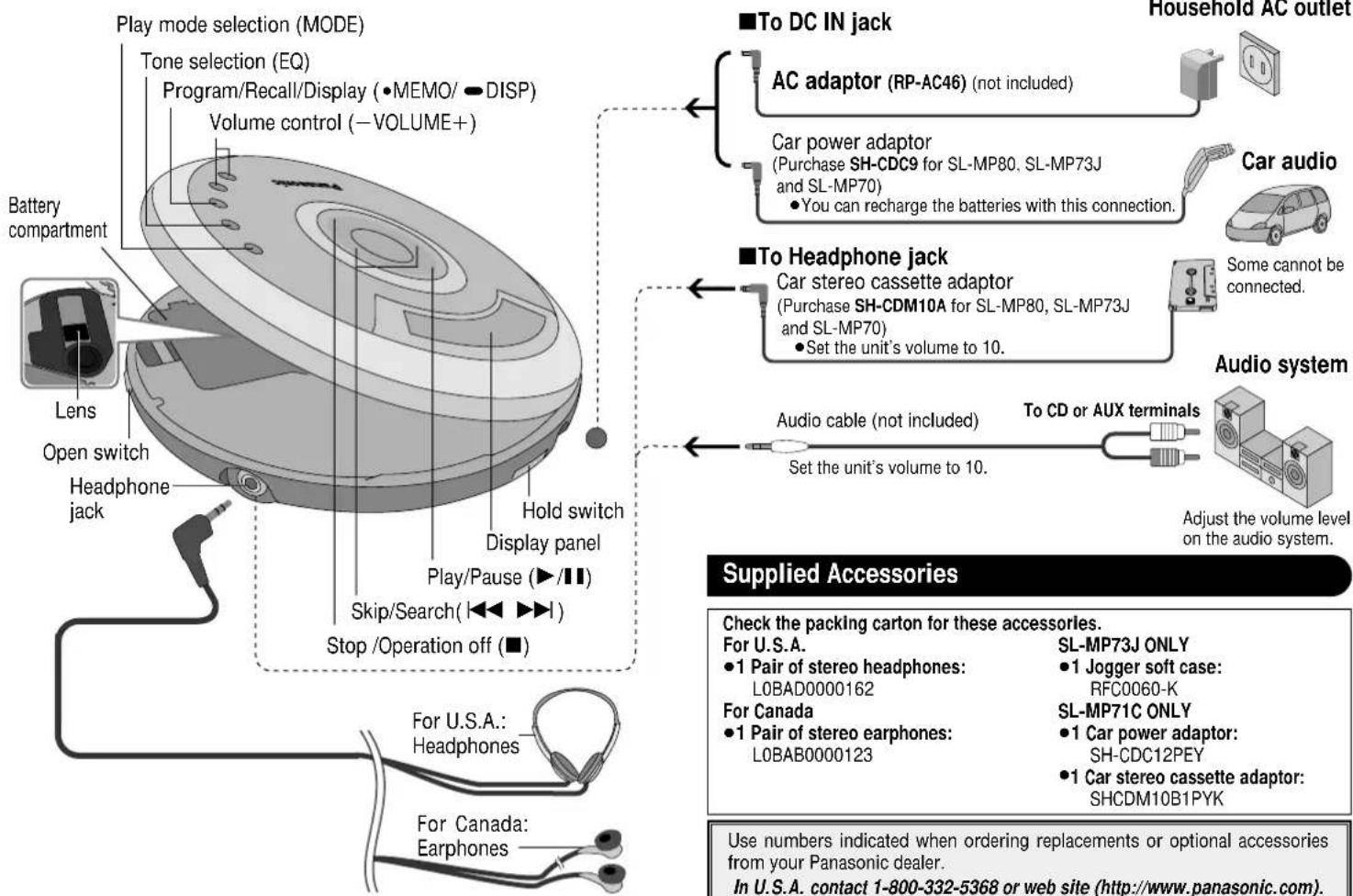
flowchart
graph TD
    A["Play mode selection (MODE)"] --> B["Battery compartment"]
    A --> C["Lens"]
    A --> D["Open switch"]
    A --> E["Headphone jack"]
    A --> F["Hold switch"]
    A --> G["Play/Pause (▶/■)"]
    A --> H["Skip/Search (◀◀▶▶)"]
    A --> I["Stop/Operation off (■)"]
    J["To DC IN jack"] --> K["AC adaptor (RP-AC46) (not included)"]
    K --> L["Car power adaptor (Purchase SH-CDC9 for SL-MP80, SL-MP73J and SL-MP70)<br>• You can recharge the batteries with this connection."]
    M["To Headphone jack"] --> N["Car stereo cassette adaptor (Purchase SH-CDM10A for SL-MP80, SL-MP73J and SL-MP70)<br>• Set the unit's volume to 10."]
    O["Audio system"] --> P["To CD or AUX terminals"]
    P --> Q["Adjust the volume level on the audio system."]
    R["Household AC outlet"] --> S["Car audio"]
    S --> T["Some cannot be connected."]
    U["Supplied Accessories"] --> V["Check the packing carton for these accessories.<br>For U.S.A.<br>• 1 Pair of stereo headphones: LOBAD0000162<br>For Canada<br>• 1 Pair of stereo earphones: LOBAB0000123"]
    V --> W["SL-MP73J ONLY<br>• 1 Jogger soft case: RFC0060-K<br>SL-MP71C ONLY<br>• 1 Car power adaptor: SH-CDC12PEY<br>• 1 Car stereo cassette adaptor: SHCDM10B1PYK"]
    X["Use numbers indicated when ordering replacements or optional accessories from your Panasonic dealer.<br>In U.S.A. contact 1-800-332-5368 or web site (http://www.panasonic.com)."]
Specifications
References to WMA apply only to SL-MP80.
Audio (CD-DA)
No. of channels:
2 (left and right, stereo)
Frequency responses
20 to 20,000 Hz
(+0.5 dB to -10 dB)
DA converter: 1 bit, MASH
Headphone output level:
RMS max. 8 mW+8 mW/
16 Ω (adjustable)
Pickup
Light source: Semiconductor laser
Wavelength: 780 nm
WMA/MP3
Supported bit-rates:
WMA: 32 kbps to 192 kbps (96 kbps is recommended)
MP3: 32 kbps to 320 kbps (128 kbps is recommended)
Supported sampling frequency 48 kHz/44.1 kHz/32 kHz
Maximum number of items (sum of albums and tracks): 999
Maximum album levels: 100
General
Power supply:
DC input (via optional AC adaptor): DC 4.5 V
Operational temperature range:
0 °C-40 °C
(32°F-104°F)
Rechargeable temperature range:
5^ C-40^ C
(41 °F-104 °F)
Play time:
Approximate operating time in hours, playing WMA/MP3 at the recommended bitrate (WMA: 96 kbps, MP3: 128 kbps), with HOLD on and EQ canceled, at 25 °C on a flat, stable surface.
| Batteries used | WMA disc | MP3 disc | CD-DA disc |
| 2 optional alkaline batteries | 45 | 48 | 37 |
| 2 optional rechargeable batteries | 20 | 23 | 15 |
Recharging time: 3 to 4 hours
●The play time may be less depending on the operating conditions.
● Play time will be considerably reduced when playing CD-RW.
Dimensions (W×H×D):
135×28×135 mm
(5^5/16'' × 1^3/32'' × 5^5/_16'')
Mass: 230 g (8.1 oz.)
(with batteries)
184 g (6.5 oz.)
(without batteries)
Note:
Specifications are subject to change without notice.
Mass and dimensions are approximate.
Household AC outlet

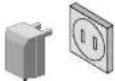
Car power adaptor
(Purchase SH-CDC9 for SL-MP80, SL-MP73J and SL-MP70)
- You can recharge the batteries with this connection.
Car stereo cassette adaptor
(Purchase SH-CDM10A for SL-MP80, SL-MP73J and SL-MP70)
- Set the unit's volume to 10.

Some cannot be connected.
Audio cable (not included)
To CD or AUX terminals
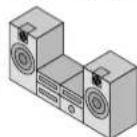
Adjust the volume level on the audio system.
Supplied Accessories
Check the packing carton for these accessories.
For U.S.A.
●1 Pair of stereo headphones: LOBAD0000162
For Canada
●1 Pair of stereo earphones: LOBAB0000123
SL-MP73J ONLY
●1 Jogger soft case: RFC0060-K
SL-MP71C ONLY
●1 Car power adaptor: SH-CDC12PEY
●1 Car stereo cassette adaptor: SHCDM10B1PYK
Use numbers indicated when ordering replacements or optional accessories from your Panasonic dealer.
In U.S.A. contact 1-800-332-5368 or web site (http://www.panasonic.com).
Playing WMA and MP3
SL-MP80 can play WMA and MP3 files. SL-MP73J, SL-MP71C and SL-MP70 can play MP3 files.
MP3:MPEG Layer-3 audio decoding technology licenced from Fraunhofer IIS and Thomson multimedia.
Large, two-line display
This unit can show the WMA/MP3 album and track titles, including ID3 tags for MP3, that you entered on a computer.
HOLD
This function causes the unit to ignore accidental button presses.
Set to HOLD so the unit doesn't power on accidentally or play is interrupted.
Note on CD-R and CD-RW
This unit can play CD-R and CD-RW recorded with CD-DA or WMA/MP3. Use an audio recording disc for CD-DA and finalize ^® it when you finish recording. The unit may not be able to play some discs due to the condition of the recording.
※A process performed after recording that enables CD-R/CD-RW players to play audio CD-R and CD-RW.
Resume function
The player stores the track where you stopped play. Replacing the disc cancels the function.
Auto power off function
If the unit is left in stop mode for approximately 10 minutes, the unit powers itself off automatically.
Rechargeable battery (not included) Recharge before initial use.
As a safety precaution this unit is constructed so it is impossible to recharge ordinary batteries. For details, check with your dealer.
Special rechargeable Ni-Cd batteries: P-3GAVA/2B (set of 2)
Ordinary dry cell batteries/rechargeable batteries
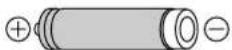
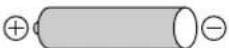
Make sure the unit is off when recharging.
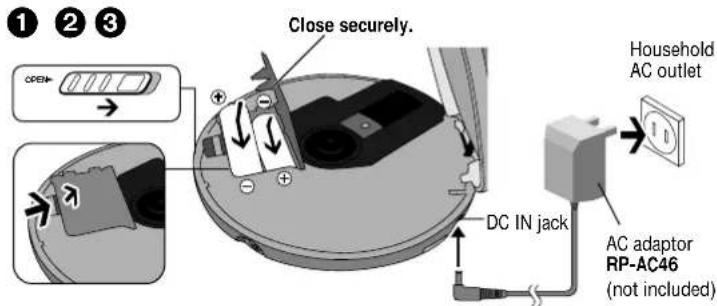
text_image
1 2 3 Close securely. OPEN DC IN jack Household AC outlet AC adaptor RP-AC46 (not included)■“CHARGE” appears and the battery indicator (☐) scrolls on the display while recharging and disappears when finished (3 to 4 hours).
■You can recharge the batteries before they are fully discharged.
■Fit the battery lid so it is secure and flush with the battery compartment if it comes loose, otherwise it can scratch your discs.
Dry cell batteries (not included)
After disconnecting the AC adaptor, insert two "LR6, AA, UM-3" alkaline batteries.
Insert the same way as the rechargeable batteries.
The battery indicator
This indicator appears when the unit is on.

text_image
1 5:22 The unit switches off shortly after the indicator starts flashing.■Before playing starts the battery indicator may flash although the batteries are not drained. It appears correctly once you start play.
General
■Play time
→Specifications, page 4
■Removing batteries
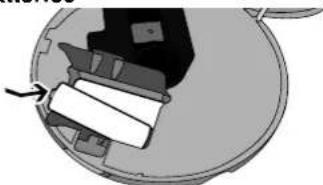
natural_image
Mechanical assembly diagram showing a rotating component with a paper strip inside (no text or symbols)Car adaptor
SL-MP71C includes a car power adaptor. (Refer to the separate installation instructions.)
Be sure to obtain the car power adaptor (SH-CDC9) for SL-MP80, SL-MP73J and SL-MP70 available as an optional accessory.
How to Use
References to WMA apply only to SL-MP80.
Playback
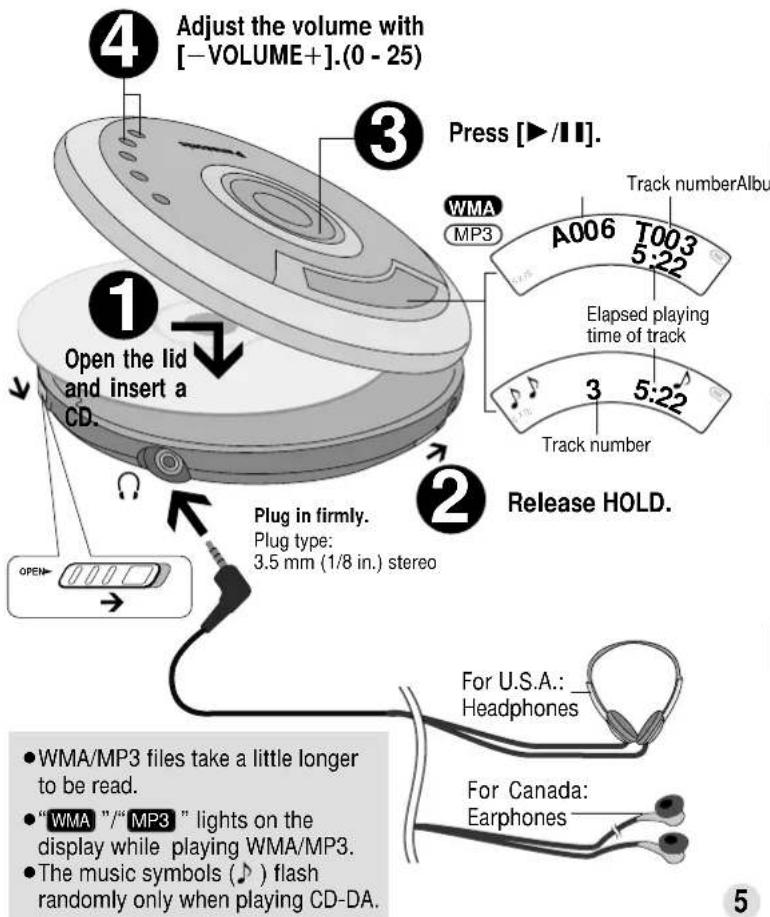
text_image
4 Adjust the volume with [-VOLUME+].(0 - 25) 3 Press [▶/11]. WMA MP3 A006 T003 5:22 Track numberAlbu Open the lid and insert a CD. 1 Plug in firmly. Plug type: 3.5 mm (1/8 in.) stereo 2 Release HOLD. For U.S.A.: _ Headphones For Canada: Earphones 5 ● WMA/MP3 files take a little longer to be read. ● "WMA" /"MP3" lights on the display while playing WMA/MP3. ● The music symbols (♪) flash randomly only when playing CD-DA.Pause
Press.
■Press again to restart play.
Search
Press and hold during play.
■You cannot search while playing WMA/MP3.
■ You can search only within the current track during program, one-track repeat, or random play modes ( page 6).
Skip
Press.
■Press [I◄◄] twice to skip to the previous track during play.
Stop
Press.
■Press again to turn the unit off.
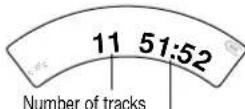
WMA MP3
Number of albums
Total play time
Number of tracks
Program Play Play modes
1 Select the tracks while stopped. When programming WMA/MP3 tracks, you can skip albums before selecting tracks ( below).
2 Press to register.
- MEMO/ - DISP

③ Repeat steps 1 and 2 to register up to 20 tracks.
4 Start play.
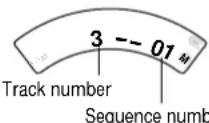
When Playing WMA/MP3
Album number Track number
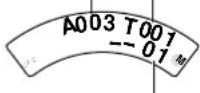
Sequence number
■To confirm the contents of the program
Press [•MEMO/ • DISP] while the disc is playing.
■To delete the entire program Press [■].
Changing the sound quality
Each time you press [EQ]

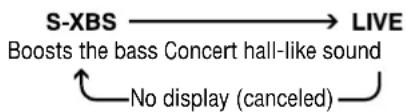
flowchart
graph LR
    A["S-XBS"] --> B["LIVE"]
    B --> C["Boosts the bass Concert hall-like sound"]
    C --> D["No display (canceled)"]
■The effect may differ between different kinds of music.
Playing WMA/ MP3
References to WMA apply only to SL-MP80.
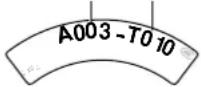
Starting play from an album (Album skip)
Press and hold until the album you want appears.
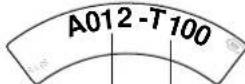
Album number Number of tracks
Playing only the tracks in a selected album (Album mode)
Each time you press and hold [MODE]
MODE


■You cannot turn album mode on during program play.
■You can select another album with album skip.
Changing the display
Each time you press and hold [•MEMO/ • DISP]
- MEMO/— DISP
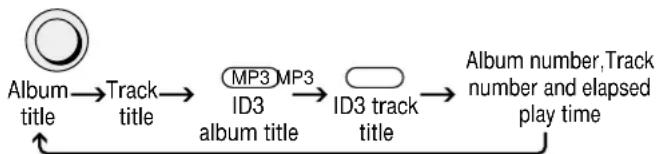
flowchart
graph LR
    A["Album title"] --> B["Track title"]
    B --> C["MP3 ID3 album title"]
    C --> D["ID3 track title"]
    D --> E["Album number, Track number and elapsed play time"]
■The unit displays up to 27 characters for track title and 30 for album title.
■“_” is displayed in place of characters this unit cannot display.
■“Album Title” and “Track Title” appear on the top line when showing album and track titles.
■ MP3 : "TAG" appears when displaying ID3 titles. " -JF-- " appears instead if ID3 titles haven't been entered.
Each time you press [MODE]
MODE

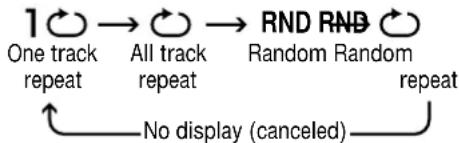
flowchart
graph LR
    A["1"] --> B["One track repeat"]
    B --> C["All track repeat"]
    C --> D["RND"]
    D --> E["Random"]
    E --> F["RNB"]
    F --> G["repeat"]
    G --> H["No display (canceled)"]
■You cannot select "RND" while playing WMA/MP3.
■You cannot skip back to other tracks during random play.
Anti-Skip System
This system reduces the skipping caused by vibration to a minimum. You can change the anti-skip memory time for CD-DA to improve sound quality.
Each time you press and hold [MODE]
MODE

POS 2 ←→ POS 1
Better sound quality, 10-second anti-skip memory
Normal sound quality, 45-second anti-skip memory
■You cannot change the memory time for WMA/MP3. It is a maximum of 130 seconds for WMA recorded at 96 kbps and 100 seconds for MP3 recorded at 128 kbps.
WMA and MP3 are methods of compressing audio without overtly hurting audio data. SL-MP80 can play WMA and MP3. SL-MP73J, SL-MP71C and SL-MP70 can play MP3.
■When creating WMA/MP3 files to play on this unit
- Disc formats: ISO9660 level 1 and level 2 (except for extended formats)
- It is better not to create folders (album) within folders (004album below).
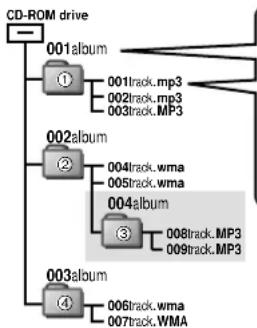
flowchart
graph TD
    A["CD-ROM drive"] --> B["001album"]
    B --> C["①"]
    C --> D["001track.mp3"]
    C --> E["002track.mp3"]
    C --> F["003track.MP3"]
    G["002album"] --> H["②"]
    H --> I["004track.wma"]
    H --> J["005track.wma"]
    G --> K["004album"]
    K --> L["③"]
    L --> M["008track.MP3"]
    L --> N["009track.MP3"]
    O["003album"] --> P["④"]
    P --> Q["006track.wma"]
    P --> R["007track.WMA"]
Naming tracks and albums
Prefix with 3-digit numbers in the order you want to play

001track.mp3 (or.MP3)
Up to 27 characters for tracks and 30 for albums
If you created an album such as 004album at left, the files may not play in name order.
The albums would play in the order ①, ②,
③, ④.
■Limitations on WMA/MP3
- This unit is compatible with multi-session but if there are a lot of sessions it takes more time for play to start. Keep the number of sessions to a minimum to avoid this.
● This unit cannot play files recorded using packet write. - If the disc includes both WMA/MP3 and normal audio data (CD-DA), the unit plays the type recorded in the inner part of the disc. If the disc includes both WMA/MP3 and other types of audio data (e.g. WAV), the unit plays only the WMA/MP3.
- Depending on how you create WMA/MP3 files, they may not play in the order you numbered them or may not play at all.
- MP3 unit can display only version 1.0 and 1.1 ID3 tags.
Windows Media, and the Windows logo are trademarks, or registered trademarks of Microsoft Corporation in the United States and/or other countries. WMA is a compression format developed by Microsoft Corporation. It achieves the same sound quality as MP3 with a file size that is smaller than that of MP3.