
KX-TG8423E - Phone PANASONIC - Free user manual and instructions
Find the device manual for free KX-TG8423E PANASONIC in PDF.


| Product Type | DECT Cordless Phone |
| Model Number | KX-TG8423E |
| Brand | Panasonic |
| Base Unit Dimensions | Approx. 100 mm x 70 mm x 50 mm (without projections) |
| Handset Dimensions | Approx. 170 mm x 50 mm x 30 mm (without projections) |
| Weight (Handset) | Approx. 130 g (with batteries) |
| Power Supply | Base unit: AC adaptor (220-240 V, 50 Hz); Charger: AC adaptor (220-240 V, 50 Hz) |
| Battery Type | Rechargeable Ni-MH AAA (R03) size (supplied) |
| Battery Charge Time | Approx. 7 hours |
| Battery Life (Talk Time) | Up to 15 hours continuous use |
| Battery Life (Standby) | Up to 250 hours (10 days) |
| Display | Backlit LCD with multi-item/single-item mode and screen saver |
| Phonebook Capacity | Up to 100 entries (name: 16 characters, number: 24 digits) |
| Phonebook Categories | Support for categories and custom ringtones per entry |
| Caller ID | Yes (requires subscription) |
| SMS | Short Message Service (requires subscription) |
| Answering System | Built-in digital answering machine (base unit) |
| Redial List | Last 10 dialed numbers |
| Ringer Volume | Adjustable (handset and base unit) |
| Operation | Joystick navigation, soft keys |
| Range | Up to 50 m indoors, up to 300 m outdoors (typical) |
| Registration | Up to 6 handsets per base unit |
| Cleaning and Maintenance | Clean with a soft, dry cloth. Do not use liquid or aerosol cleaners. |
| Security | Base unit PIN (default 0000) for settings protection |
| Spare Parts and Repairability | Contact Panasonic customer care for accessories and service |
Frequently Asked Questions - KX-TG8423E PANASONIC
User questions about KX-TG8423E PANASONIC
0 question about this device. Answer the ones you know or ask your own.
Ask a new question about this device
Download the instructions for your Phone in PDF format for free! Find your manual KX-TG8423E - PANASONIC and take your electronic device back in hand. On this page are published all the documents necessary for the use of your device. KX-TG8423E by PANASONIC.
USER MANUAL KX-TG8423E PANASONIC
Model No. KX-TG8421E/KX-TG8422E
text_image
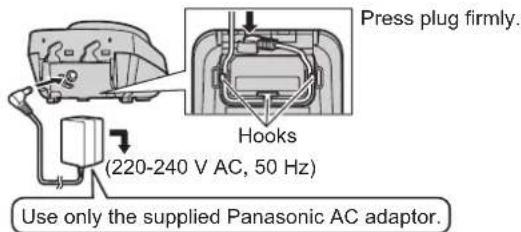
Base unit Correct Base unit Wrong Base unit Press plug firmly. (H220-240 V AC, 50 Hz) Hook Use only the supplied Telephone line cord. Use only the supplied Panasonic AC adaptor. DSL/ADSL filter* (Not supplied) To telephone line*For DSL/ADSL service users
Important:
- If you use a telephone line cord which is not supplied, the unit may not work properly.
Charger
text_image
Press plug firmly. Hooks (220-240 V AC, 50 Hz) Use only the supplied Panasonic AC adaptor.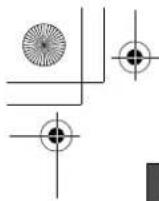
TG8421E(c)_QG.fm Page 2 Wednesday, December 24, 2008 2:14 PM
natural_image
Pure geometric diagram with intersecting lines and circles, no text or symbols presentBattery installation/Battery charge
Charge for about 7 hours.

flowchart
graph LR
    A["Hand holding remote phone"] --> B["Rechargeable Ni-MH ONLY"]
    B --> C["Charger connected to charger"]
    C --> D["Charger connected to charger via charger"]
    D --> E["Charger connected to charger via charger via charger"]
    style A fill:#f9f,stroke:#333
    style B fill:#ccf,stroke:#333
    style C fill:#cfc,stroke:#333
    style D fill:#fcc,stroke:#333
    style E fill:#cff,stroke:#333
Note:
- USE ONLY Ni-MH batteries AAA (R03) size.
- Do NOT use Alkaline/Manganese/Ni-Cd batteries.
- When the language selection is displayed after installing the batteries for the first time, you can select your desired language.
[▼]/[▲]: Select your desired language. → OK → [✗①]

Screen saver mode
The backlight goes dark when on a call or turns off completely after 1 minute of inactivity if the handset is not on the base unit or charger.
Activate the handset display again by: - pushing the joystick left [◀] or right [▶] when on a call. - pressing [✗①] at all other times.

text_image
[◀], [▶] [✗①]
natural_image
Pure geometric lines and crosshair symbols without any text or labels
natural_image
Pure geometric lines and shapes without any text, numbers, or symbolsOperating tips
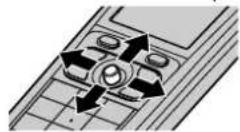
Joystick
By pushing the joystick ([▲], [▼], [◀], or [▶]) repeatedly, you can:
- scroll through (up, down, left, or right) various lists or items
-adjust the receiver or speaker volume (up or down) while talking
Volume up
Volume down
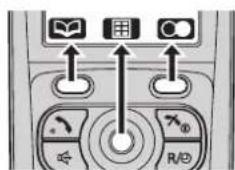
Soft keys
The handset features 2 soft keys and a joystick. By pressing a soft key, or by pressing the centre of the joystick, you can select the feature shown directly above it on the display.
text_image
Control panel interface with icons for battery, grid, and switch symbolsTemporary switching the display mode
You can switch the display mode (single item/multi items) temporarily for the features below by pressing ☐☐.
- menu list, phonebook list, caller list, redial list, and recorded message list
-handset top menu icons shown below
| Icon Feature | |
| Caller List | |
| Answer System | |
| SMS (Short Message Service) | |
| Icon Feature |
| Handset Setup |
| Base Unit Setup |
| Caller Barred |
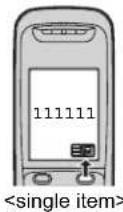
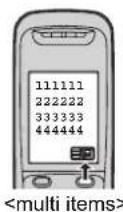
Note:
- To set the display mode to always show either single or multiple items:
E f OK [v] / [A]: "Display Setup" OK [v]/[A]: "Display Mode" OK [v] / [A]: Select "Single Item" or "Multi Items". OK [70]
- When in multiple items display mode, you can switch the screen to confirm the detailed information by pressing ☐☐.
natural_image
Pure geometric diagram with intersecting lines and circles, no text or symbols present
natural_image
Pure electrical circuit lines without any symbolsDate and time (Handset)
| 1 | [■] (centre of joystick) → F → OK |
| 2 | [▼]/[▲]: "Time Settings" → OK |
| 3 | [▼]/[▲]: "Set Date/Time" → OK |
| 4 | Enter the current date, month, and year. → OK |
| 5 | Enter the current hour and minute. → OK |
| 6 | [×○] |
| Basic operations | |
| Making/Answering calls (Handset) | |
| Making calls | Dial the phone number. → [↖]/[◀] |
| Answering calls [↖]/[◀] | |
| To hang up [↖○] | |
| To adjust the receiver/speaker volume | Push the joystick up or down repeatedly while talking. |
| Making a call using the redial list | ○ (right soft key) → [↖]/[▲]: Select the desired phone number. → [↖]/[◀] |
| Handset ringer volume | 1 ∈ (centre of joystick) → ⚫ → OK2 [↖]/[▲]: “Ringer Setup” → OK3 [↖]/[▲]: “Ringer Volume” → OK4 [↖]/[▲]: Select the desired volume. → OK → [↖○] |
| Phonebook (Handset) | |
| Adding entries | 1 ↙ (left soft key) → ∈2 [↖]/[▲]: “New Entry” → OK3 Enter the party’s name (16 characters max.). → OK● You can change the character entry mode by pressing 1/A? .● To enter a name, see the character table in the operating instructions.4 Enter the party’s phone number (24 digits max.). → OK5 [↖]/[▲]: Select the desired category. → OK2 times → [↖○] |

natural_image
Pure geometric diagram with intersecting lines and circles, no text or symbols present
natural_image
Pure geometric diagram with intersecting lines and shapes, no text or symbols present| Basic operations | |
| Phonebook (Handset) | |
| Making calls | 1 [▼] (left soft key)2 [▼]/[▲]: Select the desired entry.●You can scroll through the phonebook entry by pushing and holding the joystick down or up.3 [~] |
| Answering system (Base unit) | |
| Answering on/off | Press [○○] to turn on/off the answering system. |
| Listening to messages [▶] | |
| Frequently asked questions | |
| Question Cause/solution | |
| Why is ¥ flashing? | The handset is too far from the base unit. Move closer.The base unit's AC adaptor is not properly connected. Reconnect AC adaptor to the base unit.You are using the handset or base unit in an area with high electrical interference. Re-position the base unit and use the handset away from sources of interference.The handset is not registered to the base unit. Register it (page 8). |
| Why is the handset display blank or dark? | The handset is in screen saver mode. Activate the handset display again by:– pushing the joystick left [◀] or right [▶] when on a call.– pressing [✗1] at all other times.“LCD in charging” is set to “off” while on charge. Change the setting. |
| What should I do when the handset does not turn on? | Make sure the batteries are installed correctly.Fully charge the batteries.Clean the charge contacts and charge again. |
natural_image
Pure geometric diagram with intersecting lines and circles, no text or symbols present
natural_image
Pure geometric diagram with intersecting lines and shapes, no text or symbols present| Frequently asked questions | |
| Question Cause/solution | |
| How long is the battery operating time? | When you are using fully-charged Ni-MH batteries (supplied batteries);In continuous use: 15 hours max.Not in use (standby): 250 hours (10 days) max.It is normal for batteries not to reach full capacity at the initial charge. Maximum battery performance is reached after a few complete cycles of charge/discharge (use).Actual battery performance depends on a combination of how often the handset is in use and how often it is not in use (standby). |
| Can I keep the handset on the base unit or charger when I am not using it? | Even after the handset is fully charged, the handset can be left on the base unit or charger without any ill effect on the batteries. |
| When should I replace the batteries? | If the batteries are fully charged untilis displayed, butis displayed after a few calls, replace the batteries with new ones. |
| What is a PIN? | The PIN is a 4-digit number that must be entered in order to change certain base unit settings. The default PIN is “0000”. |
| What should I do to display caller information? | You must subscribe to a Caller ID service. Contact your service provider/telephone company for details.The message“You must first subscribe to Caller ID.” will be displayed until you receive caller information after subscribing to a Caller ID service. |
| What should I do when noise is heard, sound cuts in and out? | You are using the handset or base unit in an area with high electrical interference. Re-position the base unit and use the handset away from sources of interference.Move closer to the base unit.If you use a DSL/ADSL service, we recommend connecting a DSL/ADSL filter between the base unit and the telephone line jack. Contact your DSL/ADSL provider for details. |
| What should I do when the operating time seems to be shorter even after I fully charged the batteries? | Clean the battery ends (⊕,⊖) and the charge contacts with a dry cloth and charge again. |


natural_image
Pure geometric diagram with intersecting lines and circles, no text or symbols present
natural_image
Pure geometric diagram with intersecting lines and shapes, no text or symbols present
TG8421E(c)_QG.fm Page 7 Wednesday, December 24, 2008 2:14 PM
natural_image
Pure geometric diagram with intersecting lines and circles, no text or symbols present| Frequently asked questions | |
| Question Cause/solution | |
| What do I need to do to erase ➡ (Missed call) from the display? | ● There are unviewed missed calls remaining. View them and erase ➡ in the following way.1 ➡ (centre of joystick) → ➡ → OK2 Push the joystick down to search from the most recent call, or push the joystick up to search from the oldest call. |


natural_image
Pure geometric diagram with intersecting lines and circles, no text or symbols present
natural_image
Pure geometric diagram with intersecting lines and a central circular pattern (no text or symbols)
TG8421E(c)_QG.fm Page 8 Wednesday, December 24, 2008 2:14 PM
natural_image
Pure geometric diagram with intersecting lines and circles, no text or symbols presentRegistering a handset to a base unit
The supplied handset and base unit are pre-registered. If for some reason the handset is not registered to the base unit, re-register the handset.
Handset
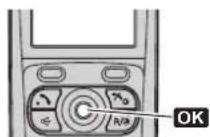
1 (centre of joystick) → OK
2 [▼]/[▲]: "Register" → OK 2 times
3 [▼]/[▲]: Select a base unit number. → OK

Base unit
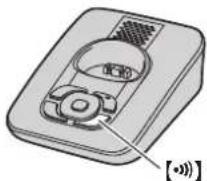
Press and hold [•••] for about 5 seconds, until the registration tone sounds.
- The next step must be completed within 90 seconds.

Handset
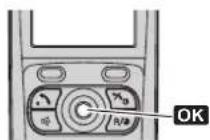
Wait until "Base PIN" is displayed. → Enter the base unit PIN (default: "0000"). → OK
- When the handset has been registered successfully, Y stops flashing.

natural_image
Pure geometric lines and shapes without any text, numbers, or symbols-8-

natural_image
Pure geometric diagram with intersecting lines and circles, no text or symbols present
TG8421E(c)_QG.fm Page 9 Wednesday, December 24, 2008 2:14 PM

natural_image
Pure geometric diagram with intersecting lines and circles, no text or symbols presentOptional services (Caller ID and SMS)
If you subscribe to a Caller ID service,
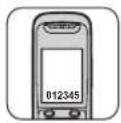
- caller information will be displayed when a call is received, or when viewing missed calls.
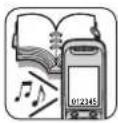
- you can identify who is calling by using different display colours and ringer tones (phonebook category).
To use SMS, you must subscribe to a Caller ID and/or an appropriate service such as SMS.

- SMS (Short Message Service)
Sales and support information
Customer Care Centre
• For customers within the U.K.: 0844 844 3898
- For customers within the Republic of Ireland: 01289 8333
- Visit our website for product information: www.panasonic.co.uk
• E-mail: customer.care@panasonic.co.uk
Direct Sales at Panasonic U.K.
- Order accessory and consumable items for your product with ease and confidence by phoning our Customer Care Centre Monday - Thursday 9:00am - 5:30pm, Friday 9:30am - 5:30pm (Excluding public holidays).
- Or go on line through our Internet Accessory ordering application at www.panasonic.co.uk
- Most major credit and debit cards accepted.
- All enquiries transactions and distribution facilities are provided directly by Panasonic U.K. Ltd.
- It couldn't be simpler!
- Also available through our Internet is direct shopping for a wide range of finished products, take a browse on our website for further details.
Customer Care Helpline Tel. No.: U.K. 0844 844 3898 / R.O.I. 01289 8333
natural_image
Pure geometric diagram with intersecting lines and circles, no text or symbols present
natural_image
Pure geometric diagram with intersecting lines and shapes, no text or symbols presentIMPORTANT
If you have any problems operating this product, please try the following:
① Reconnect AC adaptor.

② Use supplied telephone line cord.

③ Use rechargeable Ni-MH batteries. (Alkaline batteries CANNOT be used.)

Refer to Troubleshooting in Operating Instructions and FAQs in this Quick Guide.

If you still have any problems, please call the Panasonic DECT Helpline
0844 844 3898 (U.K.)
01289 8333 (Rep of Ireland)
Lost Operating Instructions? Download at www.panasonic.co.uk.