
BOOM-100 - Car Mount Steren - Free user manual and instructions
Find the device manual for free BOOM-100 Steren in PDF.


| Product Type | Digital Boom Player / Bluetooth Speaker |
| Brand | Steren |
| Model | BOOM-100 |
| Input Power | 5 V DC, 1 A |
| Power Output | 16 Wrms (8 W x 2) |
| Frequency Response | 90 Hz – 16 kHz |
| Battery Capacity | 1800 mAh |
| Signal-to-Noise Ratio | 80 dB |
| Total Harmonic Distortion | <0.5% |
| Operating Temperature | 0°C – 45°C |
| Relative Humidity | <90% non-condensing |
| Power Consumption | 5 W/h |
| Playback Modes | Bluetooth, FM Radio, USB, Micro SD, AUX, Hands-free calling |
| Functions | Play/Pause, Volume control, Track skip, EQ adjustment, Repeat/Random, Auto scan FM |
| Charging | Micro USB, charge time 4 hours for first use |
| Indicators | Battery level, Bluetooth connection, FM radio, MP3, Call |
| Connectors | DC 5V (Micro USB), TF Card slot, AUX 3.5mm, USB port |
| Controls | MODE, REP/CH, VOL -, VOL +, EQ, FM-, AUTO SCAN, FM+ |
| Safety Warnings | Keep out of reach of children; do not expose to extreme temperatures; do not use solvents |
| Cleaning | Use a dry cloth; do not use solvents or chemicals |
| Warranty | 1 year on parts (conditions apply) |
| Included Accessories | Micro USB cable (assumed) |
| Country of Origin | Mexico |
Frequently Asked Questions - BOOM-100 Steren
User questions about BOOM-100 Steren
0 question about this device. Answer the ones you know or ask your own.
Ask a new question about this device
Download the instructions for your Car Mount in PDF format for free! Find your manual BOOM-100 - Steren and take your electronic device back in hand. On this page are published all the documents necessary for the use of your device. BOOM-100 by Steren.
USER MANUAL BOOM-100 Steren
natural_image
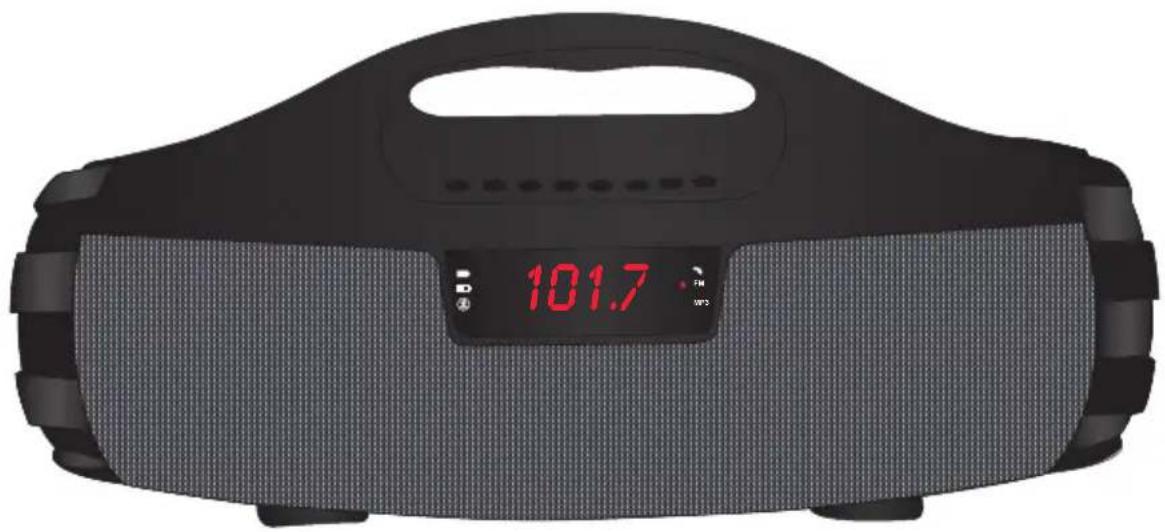
Black and gray digital alarm device with a red LED display showing 101.7, no visible text or symbols on the device itself.V0.0
natural_image
Line drawing of a device with cable and plug, showing a connector inserted into a socket (no text or symbols)natural_image
Top-down schematic of a robotic device with no visible text or symbolsENCENDER / APAGAR
STEREN PRODUCTO EMPACADO S.A. DE C.V.
Autopista México- Qro. Km 26.5 S/N Nave 3-A Col. Lomas de Boulevares, Tlalnepantla de Baz,
Estado de México, México CP. 54020 RFC: SPE941215H4
natural_image
Solid black rectangle with three horizontal color bands: bottom red, middle blue, top dark gray (no text or symbols)

STEREN
BOOM-100
Digital boom player
natural_image
Black and gray digital camera with a digital display showing 101.7 seconds (no text or symbols on the device body)V0.0
Instruction manual
0617A
Before using the product, carefully read this instruction manual to avoid any malfunction.
The information presented serves only as a reference on the product. Due to updates there may be differences. See our website www.steren.com for the latest version of this manual.
- This product is not a toy; Keep out of children reach.
- Do not use or store the product in dripping or splashing places.
- Do not expose the equipment to extreme temperatures.
- Do not use solvents or other chemicals to clean it.
Operation of this equipment is subject to the following two conditions: (1) this device or device may not cause harmful interference, and (2) this device or device must accept any interference, including interference that may cause undesired operation
BATTERY CHARGE
Fully charge the speaker battery for 4 hours before use.
Connect the micro USB cable to DC 5V on the speaker and the other end to a USB adapter to connect it to the electric current as shown in the picture.
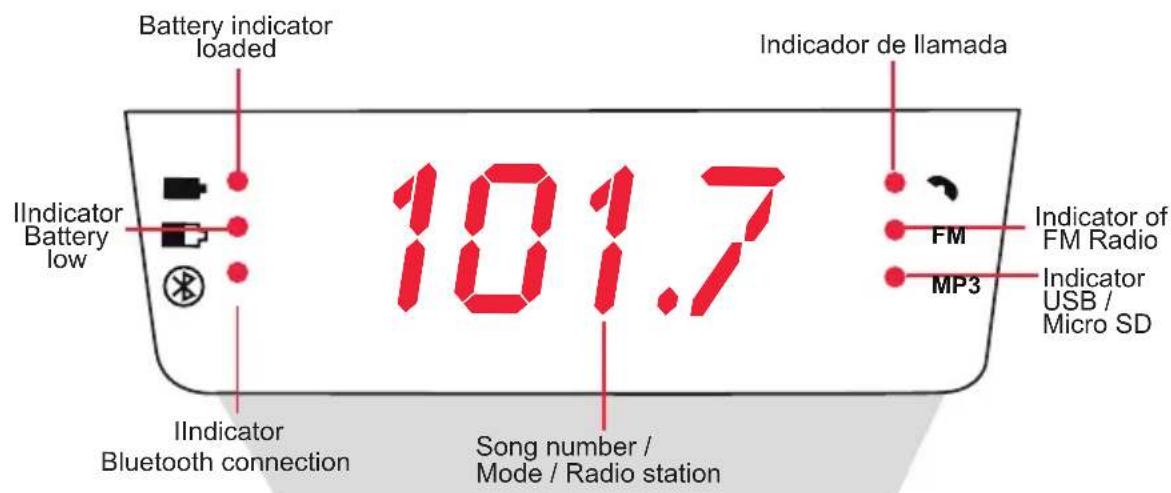
When the symbol 📋 indicator flashes, it means that you must charge the battery.
When the charge is complete the symbol indicator will remain switched on
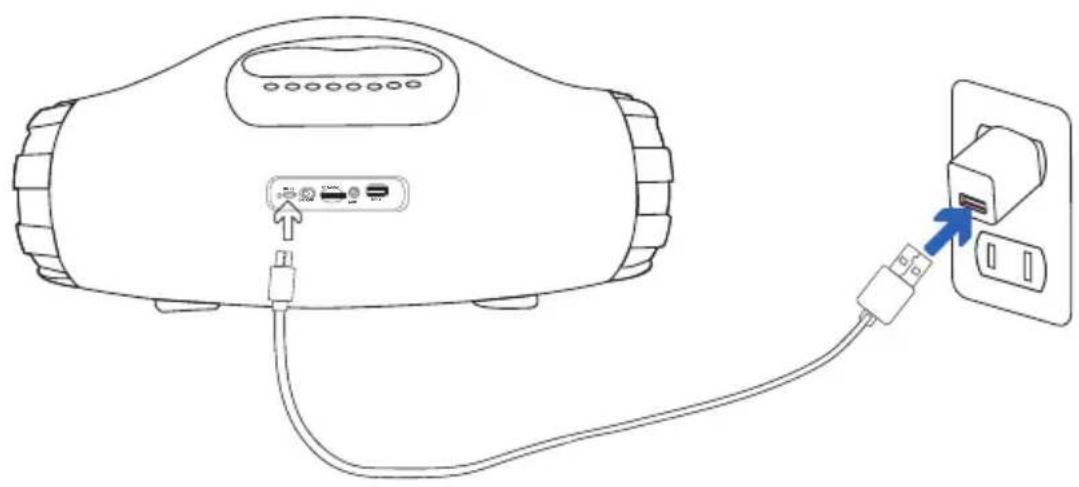
natural_image
Line drawing of a device with cable and plug, showing a connector inserted into a socket (no text or symbols)Do not leave the horn on for more than 4 hours; can affect Negatively the life of the battery
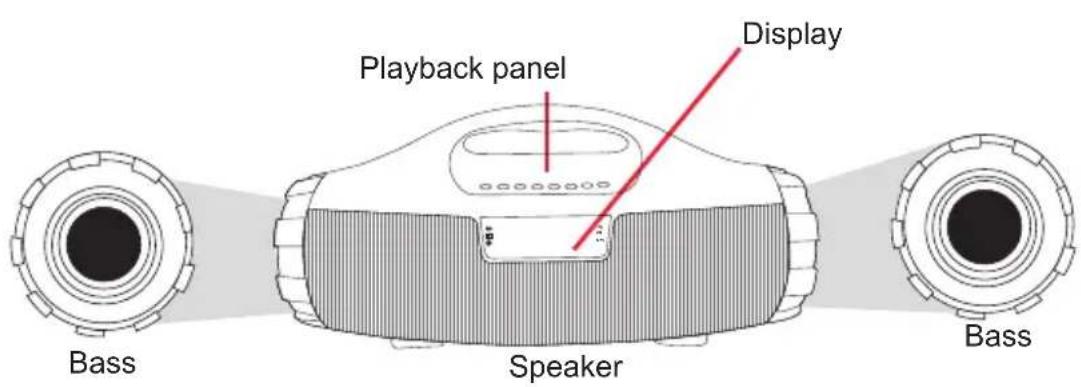
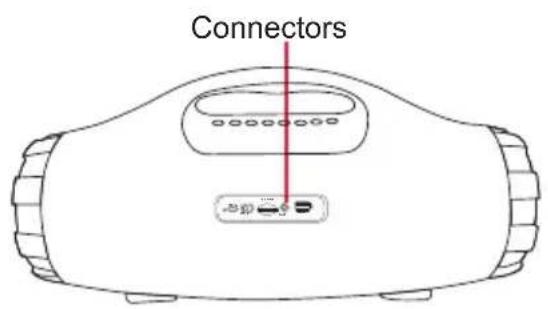
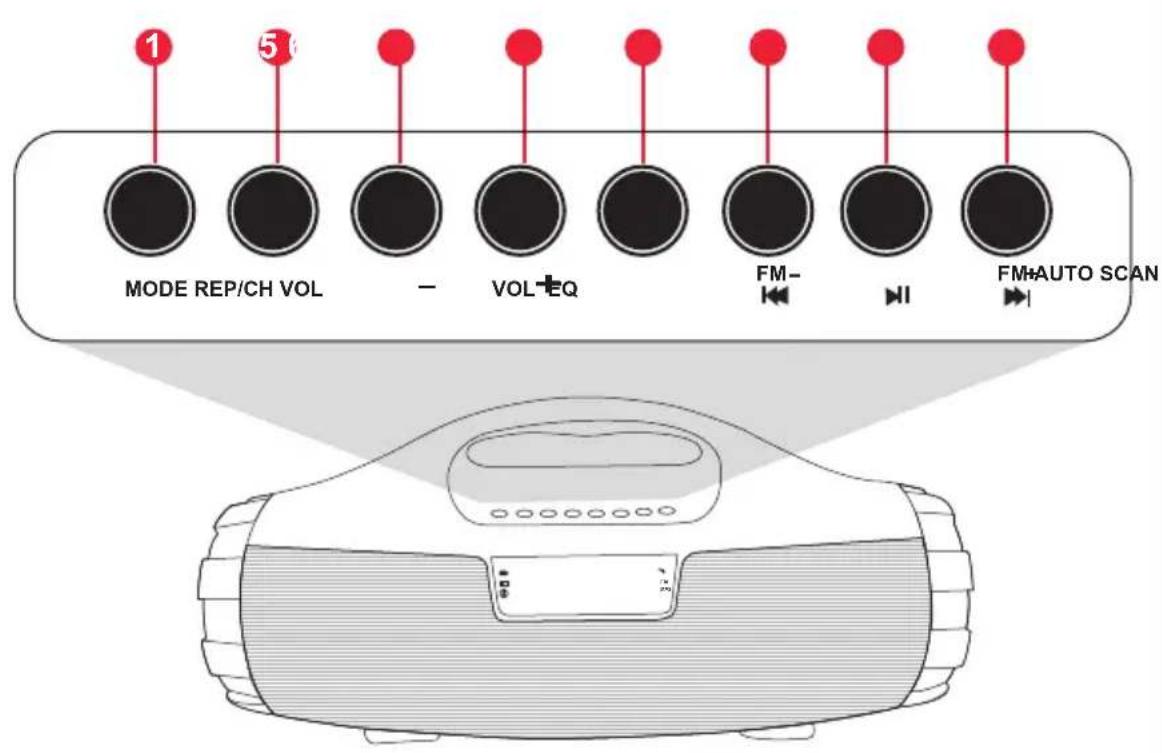
- MODE: Change playback mode (Bluetooth / FM / USB / Micro SD / AUX)
- REP / CH: Repeat (USB and micro SD mode) Disconnect from device (Bluetooth mode) Change channel / frequency (FM mode)
- VOL -: Decrease volume
- VOL +: Increase volume
- EQ: Adjusts bass and treble
- FM-/◀: Previous FM station / Previous song
- AUTO SCAN /▶ Auto scan FM / Pause - resume playback / mute the radio / Answer and hang up calls
- FM+/▶: FM station next / Next song
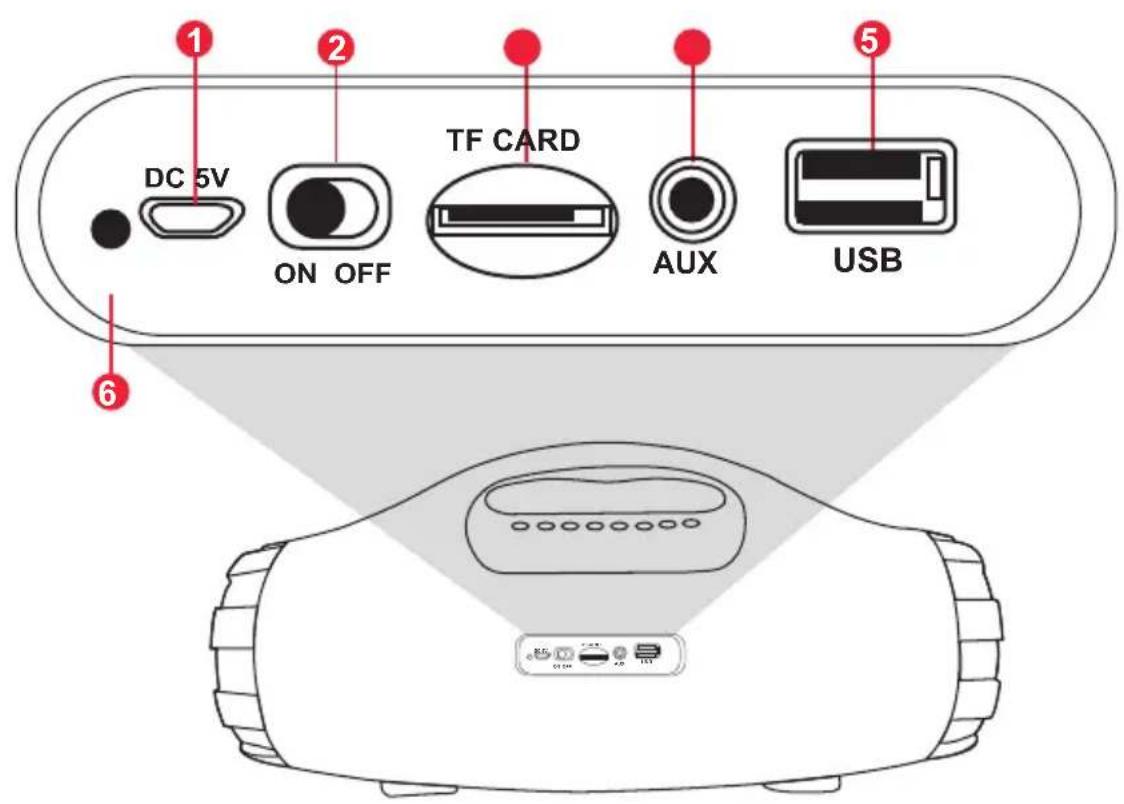
- DC 5V: Micro USB charging port
- ON-OFF: On / Off switch
- TF CARD: Micro SD memory port
- AUX: Auxiliary port 3.5 mm
- USB: USB memory port
- Charge Indicator
natural_image
Line drawing of a robotic device with no visible text or symbolsON / OFF
To turn on the speaker, slide the switch to the ON position.
To turn it off, slide it to the OFF position.

BLUETOOTH MODE
- Turn on the speaker.
- Switch to Bluetooth mode, bt should appear on the display A message will be heard (Bluetooth mode) and the symbol indicator ✝ Will flash quickly.
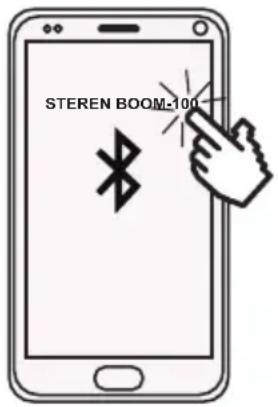
- Activate Bluetooth on your mobile device and select: "STEREN BOOM-100". If the pairing is successful a voice message will be heard and the indicator of the symbol will remain fixed.
- Start playing audio from your mobile device.
MUSIC PLAYBACK
Press ▶ to pause playback
Press ➤ to move to the next song or ➕ to change to the previous song.
To unpair a device, press and hold the REP / CH button for a few seconds. The horn will switch back to search mode and the LED indicator will flash rapidly.
To re-link
A device
Repeat steps 3 and 4.

MP3 MODE (USB / MICRO SD)
u5b
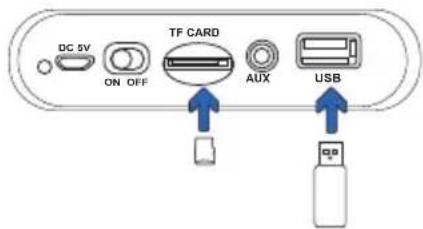
Insert a USB or Micro SD memory card. Playback will start automatically. Press to move to the next song or to move to the previous song.
To pause playback press and to resume playback press ▶I the same button again. When the horn is paused, the display will show the legend PRUS
CHANGE THE PLAY MODE:
Press the REP / CH button to change the playback mode:
ALL : Play all tracks ONE: Repeat Song RAND: Random reproduction

FM RADIO MODE
To set the horn to FM RADIO mode, press MODE until you hear the FM mode message. To perform an automatic search for radio stations, press and hold the AUTO SCAN / ▶I button for 2 seconds. The stations found will be saved automatically (CH01 - CH50) CH01
To change channel or station press ↔ (back) or ▶ (forward).
If you want to change the frequency manually press REP / CH, then press FM- or FM + ▶.
AUX MODE
LINE
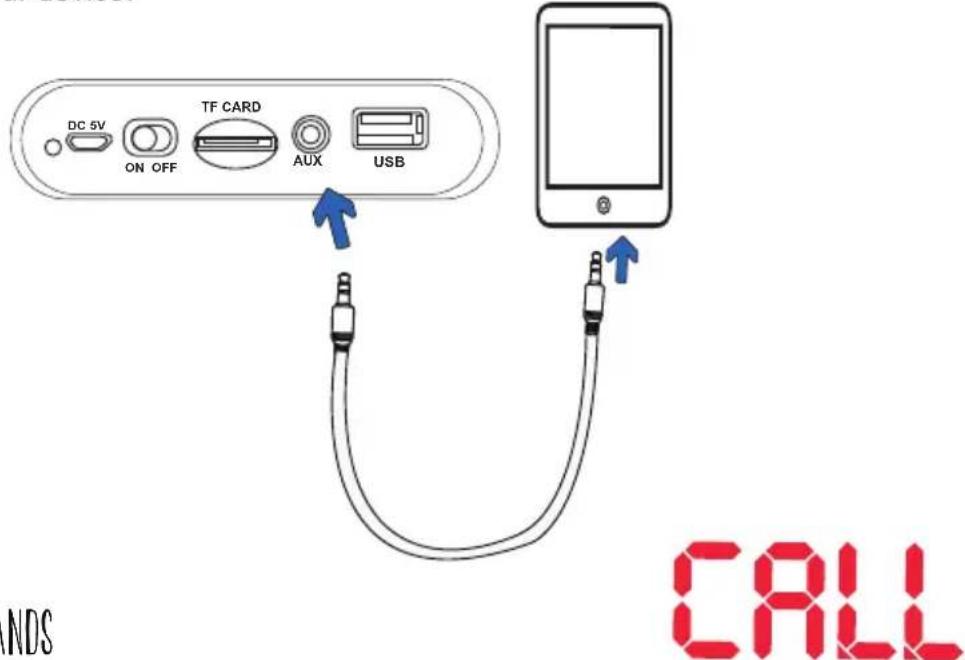
Connect a 3.5 mm AUXILIARY cable to your device and to the speaker, the message LINE will appear on the display. Start playback from your audio device. You can increase or decrease volume with VOL + / VOL-. Change songs directly from your device.
FREE HANDS
To answer a call press the button once ▶I . Press the button ▶I again to hang up
To call the last dialed number press and hold ▶II
These features may vary depending on your phone.
BASS AND TREBLE ADJUSTMENT
Press EQ to adjust bass then press the
Vol - and Vol + to change from -7 to 7, press EQ again to adjust treble and choose from -7 to 7, according to your preference, when you finish adjusting wait 2 seconds and will automatically switch to normal operation mode.

Input: 5 V --- 1 A
Power output: 16 Wrms (8 x 2 Wrms)
Frequency response: 90 Hz - 16 kHz
Battery capacity: 1 800 mAh
SNR: 80 dB
THD: <0,5%
Operating temperature: 0 – 45°C
RH: <90% non condensed
Consumption: 5 W/h
Stand-by power consumption: Not applicable

STEREN®
Product: Digital boom player
Model: BOOM-100
Brand: Steren
WARRANTY
This Steren product is warranted under normal usage against defects in workmanship and materials to the original purchaser for one year on the other parts from the date of purchase.
CONDITIONS
- This warranty card with all the required information, invoice or purchase ticket, product box or package, and product, must be presented when warranty service is required.
- If the product is in the warranty time, the company will repair it free of charge.
- The repairing time will not exceed 30 natural days, from the day the claim was received.
- Steren sell parts, components, consumables and accessories to customer, as well as warranty service, at any of the addresses mentioned later.
THIS WARRANTY IS VOID IN THE NEXT CASES:
If the product has been damaged by an accident, acts of God, mishandling, leaky batteries, failure to follow enclosed instructions, improper repair by unauthorized personnel, improper safe keeping, among others.
a) The consumer can also claim the warranty service in the purchase establishment.
b) If you lose the warranty card, we can reissue it, if you show the invoice or purchase ticket.
RETAILER INFORMATION
Name of the retailer ____
Address Product Brand
Serial number ____ Date of delivery ____
In case your product fails or have questions, please contact your nearest dealer. If you are in Mexico, please call to our Call Center.
01 800 500 9000
Notes

natural_image
Solid black rectangle with three horizontal color bands: bottom red, middle blue, top dark gray (no text or symbols)
Brand : Steren
Model : BOOM-100
Category : Car Mount