StepTrack 7 - Pedometer Barigo - Free user manual and instructions
Find the device manual for free StepTrack 7 Barigo in PDF.


| Product Type | Pedometer |
| Brand | Barigo |
| Model | StepTrack 7 |
| Display | LCD digital |
| Step Count Range | 0 to 99999 steps |
| Distance Range | 0 to 9999.9 miles or km (selectable) |
| Calorie Range | 0 to 9999.9 kcal (0.1 kcal resolution) |
| Time Format | 12/24 hour selectable |
| Alarm | Yes, with ON/OFF setting |
| Stopwatch | 1/100 sec, up to 59 min 59.99 sec |
| Motion Sensitivity | Adjustable slide switch |
| Power Source | 1 x LR1130 (1.5V) battery |
| Dimensions (approx.) | 5 x 3 x 2 cm |
| Weight (approx.) | 30 g |
| Wearing Method | Clip on hip, in line with trouser crease |
| Cleaning | Dry soft cloth; mild detergent if needed |
| Battery Replacement | User-replaceable (LR1130) |
| Package Contents | Pedometer, instruction manual |
| Special Functions | km/mile switch, stride and weight adjustment |
Frequently Asked Questions - StepTrack 7 Barigo
User questions about StepTrack 7 Barigo
0 question about this device. Answer the ones you know or ask your own.
Ask a new question about this device
Download the instructions for your Pedometer in PDF format for free! Find your manual StepTrack 7 - Barigo and take your electronic device back in hand. On this page are published all the documents necessary for the use of your device. StepTrack 7 by Barigo.
USER MANUAL StepTrack 7 Barigo
StepTrack 7
StepTrack 7
Instruction Manual Digital Pedometer Basic

CONTENTS
* Features 5
* Basic Operation of Buttons 6
* Time Mode 7
* Alarm Mode 7
* Step Counting Mode 8
* Distance Mode 8
* Calories Mode 8
* Stopwatch Mode 9
* Motion Sensitivity Slide Switch 9
* How to wear your Pedometer 10
* Battery Replacement 11
* Care of the Pedometer 12
Features
This pedometer is highly accurate and reliable. This is effective for both walking and running. Features include Step Counter, Distance and Calories consumption, Time, and Stopwatch.
Features including:
- Basic features: Time + Step mode, Distance + stopwatch mode, Calories mode, Set Calories
- Step counter can count up to 99999 steps.
- Calorie consumption can display up to 9999.9 kcal with 0.1 kcal resolutions.
- Distance can be displayed up to 9999.9 mile (or km) with 0.001-mile (or km) resolution.
- Distance displayed in mile or km.
- Weight and Stride can be adjusted by user.
- Time mode has 12 / 24 hour display formats selectable by user.
- 1/100 second stop watch with working range to 59 minutes 59 seconds 99 with 1/100 accuracy.
Basic Operation of Buttons

UK-6
Press S1 mode button to change different mode.
TIME > ALARM > STEP COUNT > Distance > Calorie > Stopwatch > TIME
Time Mode
- Press S1 button, and see the "TMR" on display.
- You can simply press S2 to change 12/24H display
- Hold S4 for 2sec. to enter Adjust Mode, you can scroll S1 & S2 to adjust hr. Press S4 to confirm and move to Minute adjust, scroll S1 or S2 to adjust and confirm by press S4
Alarm Mode
- Press S1 button, and see the "ALM" on display.
- Hold S4 for 2sec. to enter Adjust Mode, you can scroll S1 & S2 to adjust hr. Press S4 to confirm and move to Minute adjust., scroll S1 or S2 to adjust and confirm by press S4
- Then you can see both Hr and Min Digit are flashing, you can press S1 to toggle the Alarm ON/OFF, when alarm is ON, the alarm sign is displayed.
- Press S4 to confirm
UK-7
Step Counting Mode
- Press S1 button, and see the "STEP" on display.
- You can see the number of step you are walked on the display
- Press and hold S4 for 2 sec to enter the adjust mode for KM/ Mile. You can press S1 or S2 to switch the KM / MILE icon. Press S4 to confirm.
- Press S3 button to Reset the steps
Distance Mode
- Press S1 button to enter Distance mode, either "KM" or "MILE" icon will show.
- Press S2 to switch Km <-> Mile
Set Stride :
- Press and hold S4 for 2 sec.
To enter the stride adjust mode - You can press S1 or S2 to adjust the stride distance (1cm / 1 inch resolution)
- Press S4 to confirm
Calories Mode
- Press and hold S4 for 2 sec.
To enter the weight adjust mode - You can press S1 or S2 to adjust the weight (1 kg / 1 lb. resolution)
- Press S4 to confirm
Stopwatch Mode
- Press S1 button, and see the "STW" on display.
- Press S2 to "Start" Stopwatch, press S2 again to "Stop" stopwatch.
- Press S4 to "Clear" the data
- Or you can press S4 during the stopwatch is started, for "Split" timing display.
- Press S4 to resume.
Motion Sensitivity Slide Switch
Release the battery compartment by unscrew the secure screw and slide out the battery compartment. Inside you will find the motion sensitivity slide switch.
To fit the unit more or less sensitive to your individual walking pattern, please reposition the motion sensitivity slide switch accordingly.

How to wear your pedometer
Your step counter clips easily and snugly to either side of the hip portion of your trousers or shorts. For best results keep the unit in line with the "Crease line" of your trousers.
Some situations may affect the accuracy of the step counting:
- The step counter isn't direct perpendicular to the ground. The pedometer needed to be at least 60 degree to the ground.
- Dragging feet walking with sandals or sandals likes shoes, or uneven footstep in a crowed area.
- Sport except walking or jogging, walking up / down from stair.
- Inside a vehicle (bicycle, motorcar, train, bus and other vehicle have some vibration generated.
- Motion of stand or sit.
Battery Replacement
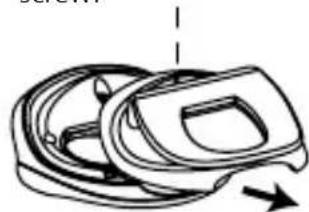
- Release the battery compartment by unscrew the secure screw and slide out the battery compartment.
- Pull out the battery with the help of fingernail.
- Flip out the exhausted battery and replaced with new battery. Make sure the polarity is correct.
- Put the battery compartment back and fasten the screw.
LR1130 (1.5V) × 1

Care of the pedometer
- Avoid exposing the step counter to extreme temperatures.
- To clean the step counter, use a dry soft cloth of a soft cloth moistened in a solution of water and a mild neutral detergent. Never use volatile agents such as benzene, thinner, spray cleaners, etc.
- Store your step counter in a dry place when not in use.
- Keep this manual and any other documentation that comes with the step counter in a safe place for future reference.

DE 484 584 78
Brand : Barigo
Model : StepTrack 7
Category : Pedometer