SFPO72MX - Oven Montpellier - Free user manual and instructions
Find the device manual for free SFPO72MX Montpellier in PDF.


| Product Type | Pyrolytic Built-In Oven |
| Brand | Montpellier |
| Model | SFPO72MX |
| Installation Type | Built-in (hardwired) |
| Overall Dimensions (H x W x D) | 595 x 560 x 575 mm |
| Weight | Approximately 35 kg |
| Power Supply | 220-240 V ~ 50/60 Hz, 3.2 kW |
| Fuse Rating | 30 A |
| Energy Class | A+ (estimated) |
| Oven Functions | Defrost, Bottom Heater, Conventional, Convection with Fan, Radiant Grilling, Double Grilling, Double Grilling with Fan, Convection, Pyrolytic Cleaning, Oven Lamp |
| Temperature Range | 50-250°C (standard), up to 450°C (pyrolytic) |
| Control Type | Rotary knobs + digital timer with touch buttons |
| Display | LED digital display |
| Cleaning Method | Pyrolytic self-cleaning (1.5h or 2h cycles) |
| Safety Features | Child lock, automatic shut-off, cool-down safety, door safety catches |
| Timer Functions | Clock, cooking timer, reminder, reservation (delayed start) |
| Energy Saving | Energy-saving mode (auto-dimming after 10 min idle) |
| Oven Light | Replaceable 25-40 W, 300°C halogen bulb |
| Door Type | Removable glass door with double glazing |
| Accessories Included | Oven shelves, baking tray (not explicitly stated, but standard) |
| Guarantee | 2 years (manufacturer's guarantee) |
Frequently Asked Questions - SFPO72MX Montpellier
User questions about SFPO72MX Montpellier
0 question about this device. Answer the ones you know or ask your own.
Ask a new question about this device
Download the instructions for your Oven in PDF format for free! Find your manual SFPO72MX - Montpellier and take your electronic device back in hand. On this page are published all the documents necessary for the use of your device. SFPO72MX by Montpellier.
USER MANUAL SFPO72MX Montpellier
Installation and Operating Instructions
MODEL: MON-SFPO72MX
Pyrolytic Built-In Oven
natural_image
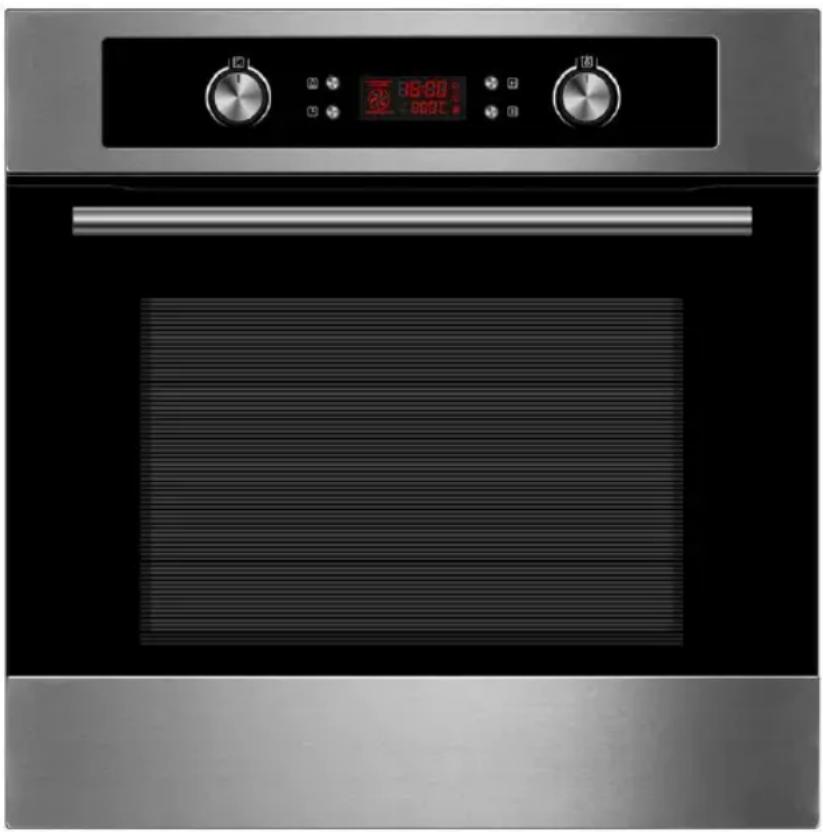
Front view of a stainless steel oven with dual control knobs and a digital temperature display (no text or symbols on the oven itself)(Picture indicative of model supplied)
Please read these instructions carefully before attempting to install or use this appliance. It is advisable to keep these instructions in a safe place for future reference. N.B. Should your appliance require attention, our service agents will not be able to book a service call without your unique serial number which can be found on the last page of this manual.
Introduction
Thank you for choosing this Montpellier branded appliance. It has been designed to give years of trouble-free use provided it is installed and maintained correctly.
Please read these instructions carefully before installing or using your appliance. It is advisable to keep your purchase and installation receipts with these instructions in a safe place for future reference. Included is some important safety information in addition to guidelines and recommendations that will enable you to take full advantage of all the functions available.
This quality appliance has been tested and certified to meet all applicable UK electrical and safety standards.
This appliance must be installed and connected in accordance with current regulations.
After unpacking the appliance ensure that there is no visible damage. If the appliance has been damaged during transit, do not use it, contact your retailer immediately.
Your 2 year Manufacturer's guarantee THIS DOES NOT AFFECT YOUR STATUTORY RIGHTS.
Your new montpellier appliance carries a free guarantee which protects you against the cost of repairs during the first 24 months from date of purchase provided that:
Any claim is accompanied by evidence of the model reference, model serial number and proof of purchase, such as a Sales Receipt, showing that the appliance was purchased within the 24 months prior to the date of claim.
What is not covered under the Guarantee:
- Any appliance not correctly installed and operated in accordance with the manufacturer's instructions.
- Any appliance that is used for anything other than domestic purposes.
- Any defect caused by accident, misuse, unauthorized modification or inexpert repair.
- Cost of Call-out where a fault cannot be found with the appliance.
- Cost of Call-out for work covering routine maintenance, such as, but not exclusively, cleaning of filters or defrosting.
- Cost of Call-out for work required to correct the alignment of doors following door reversal procedures carried out by you.
- Use of the appliance by anyone other than the Householder.
- Use in any commercial environment.
- Consumable items, such as, but not exclusively, fuses in plugs, bulbs and breakable items which require routine replacement.
- Repair costs incurred that have not been authorised by Repairtech and/or carried out by a non-approved Repairtech engineer.
To Register your Appliance simply complete the card in your appliance pack and return it with a stamp affixed or Alternatively you can Register online at www.repairtechuk.com
SERVICE HELP-LINE
Should your appliance develop a fault, please call the Repairtech Service Helpline on:
01527-888133
Please remember to have all your product details available, including the model number, serial number, date of purchase and your retailer's details before registering a fault.
Your service call cannot progress without this information.
Description Of The Appliance
text_image
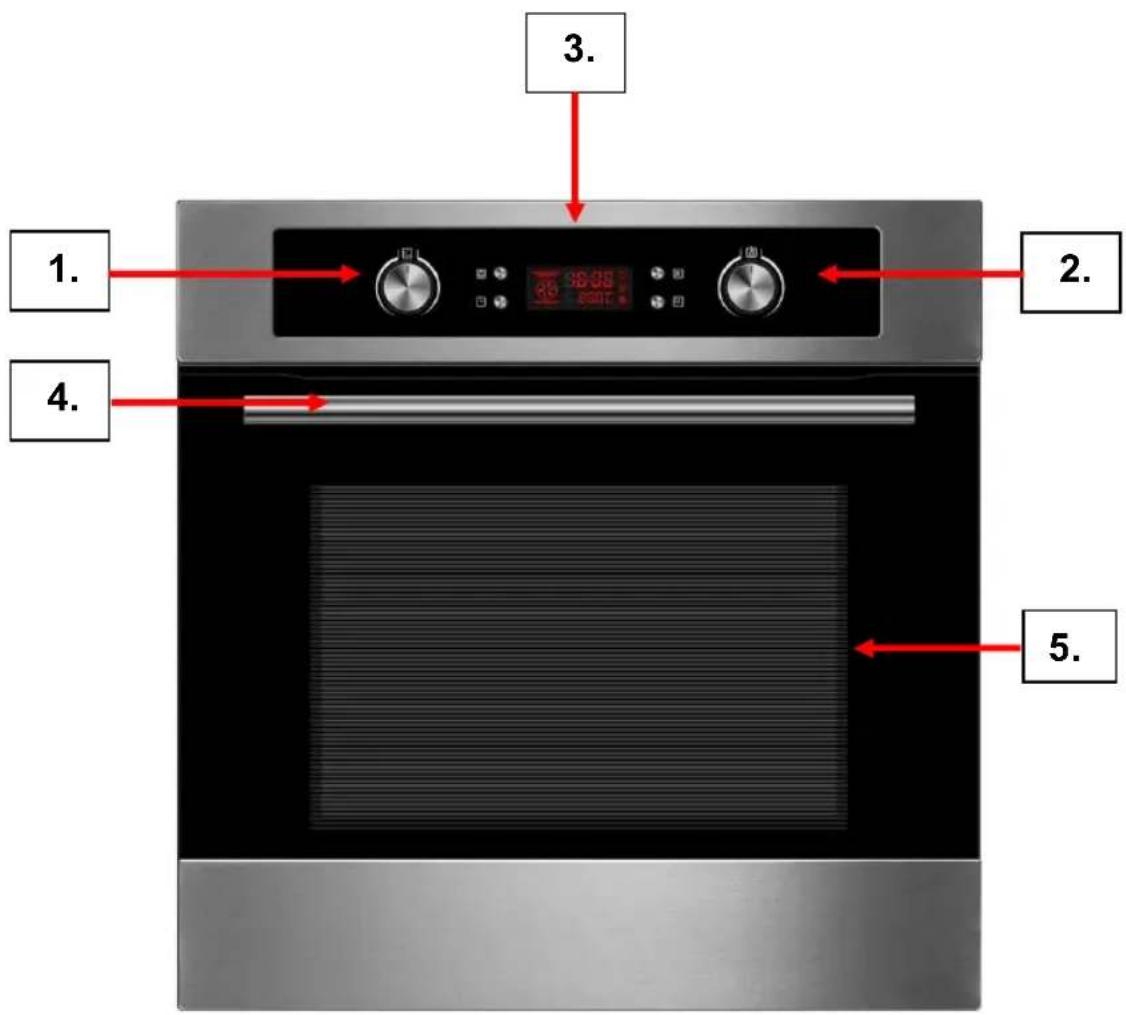
1. 2. 3. 4. 5.- Oven Function Control Knob
- Oven Thermostat Control Knob
- LED Display & Timer
- Door Handle
- Glass Oven Door
(Picture indicative of model supplied)
CONTENTS:
Section 1. Installation
Section 2. Safety Advice
Section 3. Operating the Appliance
Section 4. Maintenance
Section 1. Installation
- Remove all packaging, protective film and securing tape from the appliances
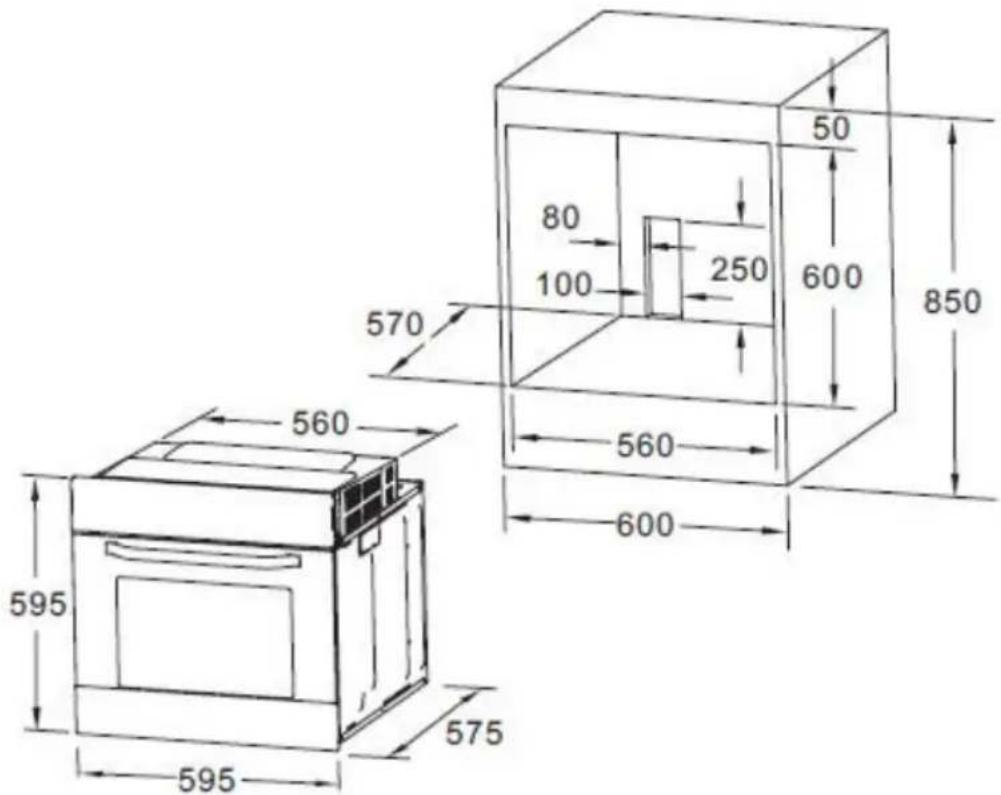
• Position the appliances in a dry atmosphere. - The following dimensions are provided as a guide for installation – your installer will carry out the installation in accordance with the current regulations.
- Your installer will connect the power cables in accordance with the current regulations.
- In order to burn off any oil/grease used during the manufacturing process, we recommend that prior to use you run the oven at 250°C for approximately 90 minutes.
1.1. Kitchen Furniture Cut-Out
text_image
570 80 100 250 600 50 850 560 595 560 600 5751.2. Electrical Connection
N.B. This product must be installed by a Qualified Electrician.
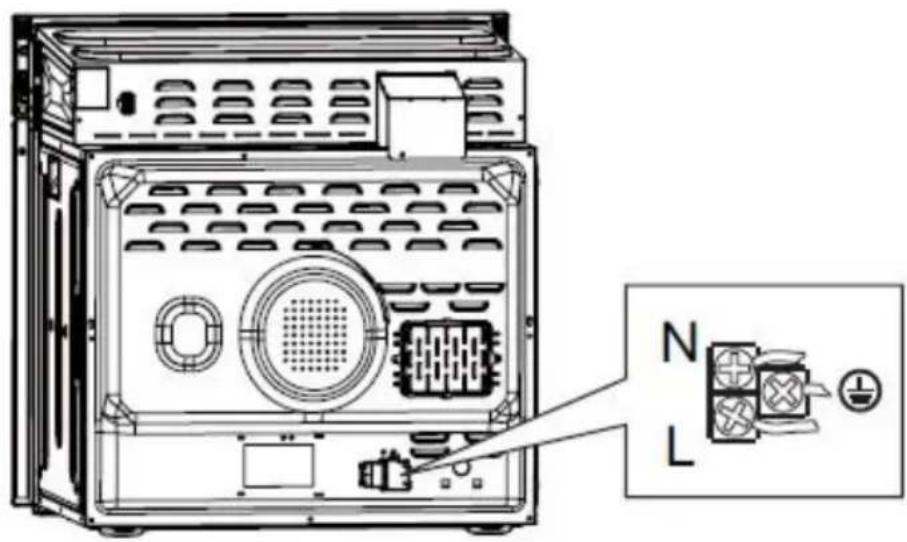
This appliance has a total Power Rating of 3.2kW and must be ‘hard wired’ into a suitable fused spur (see fuse details below) adjacent to the appliance housing.
Please note that a switchable spur should be accessible above the work surface in order that the power can be turned off.
30 AMP
For socket ring mains, some cooker and shower circuits up to 7.2kw (7200 w)
Electrical Connection Diagram:
text_image
Technical diagram of an electronic device with labeled components including N and L connectors1.3. Secure the Oven in Position
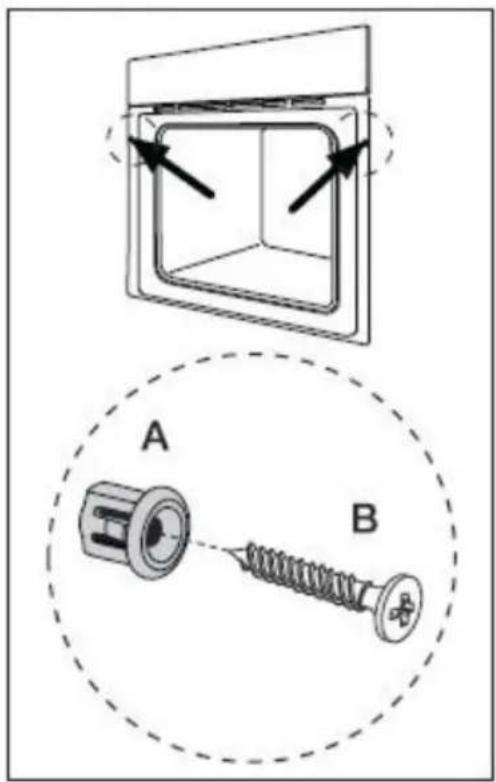
Finally, use the screws to secure the oven to the kitchen cabinetry.
text_image
Technical diagram showing a mechanical assembly with labeled components A and B, including directional arrows and a dashed circular outline.Section 2. Safety Advice
- Please read this booklet thoroughly before installing and switching on the appliance. The manufacturer accepts no responsibility for incorrect installation and usage.
- This appliance is guaranteed for Domestic Use Only.
- This appliance shall not be used by children aged from 8 years and above and persons with reduced physical, sensory or mental capabilities, or lack of experience and knowledge, unless they have been given supervision or instruction on how to use the appliance in a safe way and understand the hazards involved. Children shall not play with the appliance. Cleaning and user maintenance shall not be made by children without supervision.
- This appliance must only be used for cooking/heating food items. Do not use it for any other purpose.
- It is important that you use only ‘oven proof’ pans and dishes when using the appliance for cooking or grilling. Never allow cookware and/or utensils to come into contact with the top heating element/grill.
Do not use melamine or plastic containers when cooking or grilling.
Always take care when removing ovenware from the oven and in particular avoid touching the Grill Element.
- If using an adaptor, this must be used in accordance with the manufacturers instructions and ensure that the electrical circuit is not overloaded as this could cause overheating.
- Do not twist or bend the cables, and keep them away from hot surfaces.
- Following installation make sure that the power cable is not trapped underneath the appliance.
- Keep the appliance surfaces clean. Failure to do this could lead to the appliance malfunctioning.
-
The surface of this appliance will get extremely hot during use. Take care when using the appliance and keep children well away.
-
The interior and surface of this appliance will remain hot after it has been turned off. Do not touch or clean the appliance until it has completely cooled down.
- Never lift this appliance using the door handle or 'open' door.
- If the power supply cord is damaged, it must be replaced by the manufacturer, it's service agent or similarly qualified persons in order to avoid a hazard.
- If the power supply cord(s) is damaged, it must be replaced by the manufacturer, it's service agent or similarly qualified persons in order to avoid a hazard.
Section 3. Operating the Appliance
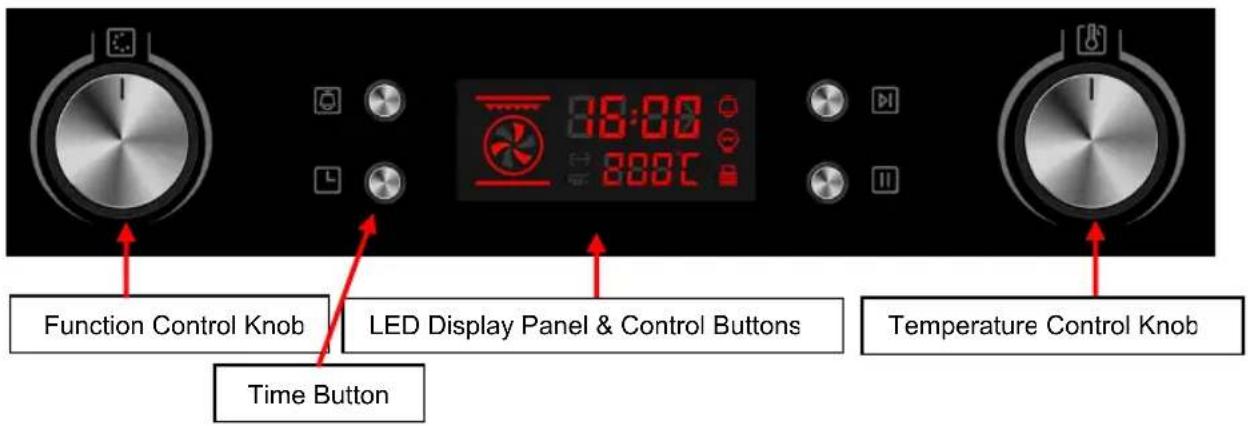
3.1. Oven Control Panel
text_image
Function Control Knob LED Display Panel & Control Buttons Temperature Control Knob Time Button3.2. Cooking & Functions
It is important that you use only ‘oven proof’ pans and dishes when using the appliance for cooking or grilling.
Never allow cookware and/or utensils to come into contact with the top heating element/grill.
Do not use melamine or plastic containers when cooking or grilling.
Always take care when removing ovenware from the oven and in particular avoid touching the Grill Element.
3.2.1. Setting The Clock/Timer
When you first connect power to the oven the display will show "0:00". Proceed as follows to set the time:
- To set the clock, press the 'Time' button and then rotate the Temperature Control Knob to select the correct hour. Press the 'Time' button again and rotate the Temperature Control Knob to set the correct minutes. Now press 'Time' button to confirm the setting.
3.2.2. Cooking Functions
Turn the Oven Function Control Knob clockwise to the required function. Now turn the Oven Thermostat Control Knob to the required oven temperature. Now press to start.
The required temperature setting will be displayed in the LED panel (flashing on/off). When the set temperature has been achieved, the display will stop flashing.
When you have finished using the oven, you must turn the thermostat and oven control knobs back to the off position.
| Symbol | Function description |
| Oven Lamp: Which enables the user to observe the progress of cooking without opening the door. Oven lamp will light for all cooking functions.(except pyrolytic function) | |
| Defrost: The circulation of air at room temperature enables quicker thawing of frozen food, (without the use of any heat). It's a gentle but quick way to speed up the defrosting time and thawing of ready-made dishes and cream filled produce etc. | |
| Bottom heater: A concealed element in the bottom of the oven provides a more concentrative heat to the base of food without browning. This is ideal for slow cooking dishes such as casseroles, stews, pastries and pizzas where a crispy base is desired. The temperature can be set within the range of 60-120°C. The default temperature is 60°C. | |
| Conventional cooking: The top and bottom work together to provide convectional cooking. The temperature can be set within the range of 50-250°C. The default temperature is 220°C. | |
| Convention with fan: Combination of the fan and both heating element provides more even heat penetration,saving up to30-40% of energy. Dishes are lightly browned on the outside and still moist on the inside. Note:This function is suitable for grilling or roasting big pieces of meat at a higher temperature. The temperature can be set within the range of 50-250°C. | |
| The default temperature is 220°C.Radiant grilling: The inner grill element switches on and off to maintain temperature.The temperature can be set within the range of 180-240°C.The default temperature is 210°C. | |
| Double grilling: The inside radiant element and top element are working.The temperature can be set within the range of 180-240°C. The default temperature is 210°C | |
| Double grilling with fan: The inside radiant element and top element are working with fanThe temperature can be set within the range of 180-240°C. The default temperature is 210°C | |
| Convection: An element around the convection fan provides an additional source of heat for convection style cooking. In convection mode the fan automatically comes on to improve air circulation within the oven and creates an even heat for cooking.The temperature can be set within the range of 50-240°C. The default temperature is 180°C. | |
| Pyrolytic mode | Pyrolytic function:When the function set to prolytic mode, LED display "PYA".The default temperature is 450°C. The timer can be set 1:30 or 2:00 hours. |
3.2.3. Full Timer Instructions
1. Clock Setting
After connection the unit to the power, the symbols "0:00" will be visible on the display.
1> Press " ☐", the hour figures will flash.
2> Rotate "K2" to adjust the hour figures, (time should be within 0--23).
3> Press " ☐ ", the minutes will flash.
4> Rotate "K2" to adjust the minutes setting. (time should be within 0--59).
5> Press " ☐ " to finish the clock settings. ":" will flash, and the time will be illuminated.
Note: The clock is 24 hours. After power on, if not set, the clock will show "0:00".
2. Function Setting
1> Rotate "K1" to choose the cooking function you require. The related symbol will illuminated.
2> Rotate "K2" to adjust the temperature.
3> Press " ▶" to confirm the start of cooking.
4> If step 2 is ignored, Press "DL" to confirm the start of cooking and the default time is 9 hours, the default temperature will display on the LED.
NOTE:
1>The step quantities for the adjustment time of the knobs are as follow:
0--0:30min: step 1 minute 0:30--9:00hour :step 5 minutes
2>The step quantities for the adjustment of temperature is 5^ , and the radiant grilling function is 30^ .
3>Rotate "K1" to adjust the cooking time when cooking begins. Then press "☐" to confirm.
If "☐" not pressed within 3 seconds, the oven will revert back to the previous time to continue cooking.
4>Rotate"K2" to adjust the temperature when cooking begins. The related indicator will be illuminated.
Then press" [H]" to start cooking. If " [D]" not pressed in 3 seconds, the oven will revert back to the previous temperatrue to continue cooking.
3.Lamp Setting
1> Rotate"K1" to select the relevant function, then the corresponding icon will be on.
2> Press " button to start, "0:00" and lamp icon " will light up, " : " will flash.
4. Inquiring function
In the following states, you can use inquiring function, after 3 seconds return to the current state.
1> During working state, if the clock was set, press " ☐ " button to see the current time; if the reminder function was set, press " ☐ " button to see the time of reminder.
2> In reminding state, if the clock was set, press " ☐ " button to see the current time.
3> In clock display state, if the reservation function was set, press " ☐ " button to see the time of reservation.
5. Child lock function
To Lock : press " ▶ " and " ■ " simultaneously for 3 seconds, there will be a long "beeping" sound and the " 🔒 " will be illuminated.
Lock quitting : press "☐" and "☐" simultaneously for 3 seconds, there will be a long "beeping" sound indicating the child-lock is released.
Note: During working state, if you want to stop cooking, press stop button quickly. Do not need to long pressing on stop button. It is invalid.
6. Reminder Function:
This function will help to remind you to start cooking in a certain time from 0:01 to 9:59. Only when oven in standby state, the reminder can be set. Follow below to set the reminder:
1> Press reminder setting button "☐";
2> Rotate "K2" to set the hour time of reminder. (Time should be within 0-9).
3> Press reminder setting button " ☐ " again:
4> Rotate "K2" to set minute time of reminder. (Time should be within 0--59).
5> Press "☐" to confirm setting. The time will count down.
Note: The oven buzzer will sound for 10 times after the time back to the zero hour.
You can cancel the reminder during setting by pressing the stop button; After the reminder has been set, you can cancel it by pressing stop button twice.
7. Start/Pause/Cancel Function
1> If the cooking time has been set, press "DI" to start cooking. If the cooking is paused, press "DI" to resume cooking.
2> During cooking process, press " ☐ " once to pause the cooking. Press " ☐ " twice to cancel the cooking.
8. Energy-Saving Function
1> In waiting state and reminding state, press " ▶" for three seconds, the LED display will go off and set to energy-saving mode.
2> If no operation in 10 minutes under waiting state, the LED display will go off and go into energy-saving mode.
3> Under the energy-saving mode, press any key or rotate any knob can quit the energy-saving mode.
9. Pyrolytic Function
This function allows you to clean thoroughly the oven cavity.
1>Rotate "K1" to select the pyrolytic function. LED will display "PYA".
2>Press "☐" to confirm the cooking. And the default time is 2 hours, "PYA" will display on the LED.
3>Rotate "K1" to change the pyrolytic time. There have two levers time can be selected"1:30 or 2:00".
Note:
A) When the oven door was not closed, pressing start button will be invalid. The LED will display "DOOR" and "PYA".
B) When the oven's center temperature is higher than 320^ C, pressing start button will be invalid. The LED will display "COOL" and "PYA". When the oven's center temperature is lower than 200^ C, press cancel button once, it will pause; press again, it will return to waiting state. If higher than 200^ C, press cancel button once, it will return to waiting state directly.
C) Open the door when the oven is working, the LED will display "DOOR" and the buzzer will sound continuously until the door was closed or press cancel button.
D) Before activating the pyrolytic cleaning function, remove any excessive spillage and make sure that oven is empty. Do not leave anything inside it(e.g. pans, baking tray, dripping pan, slider bracket etc.) as this could heavily damage them.
E) When finished pyrolytic cleaning, don't interrupt the power in an hour.
10.Reservation function
1> To use reservation function, clock must be set in advance. Then, in the way of setting the clock, reserved time that oven starts to cook must be set (a> Press reservation setting button";
b> Rotate "K2" to set the hour time of reservation. Time should be within 0--23. c> Press reservation setting button "☐" again; d> Rotate "K2" to set minute time of reservation. Time should be within 0--59.), but don't press clock this time. Next, turn knob "K1" to choose function.
2> Press " [▶] " button to set cooking time and temperature. Then turn knob "K1" to adjust time, and " K2 " to adjust temperature.
3> Press the " [bl] " button to finish cooking setting, and the clock will be on the screen with reservation sign " [×] always lighting. But no other function signals are presented. Reservation time can be checked by pressing " [L] ", 3 seconds later the screen will show clock again.
4> At the time of reservation, cooking will start automatically after a buzzing sound. The reservation symbol "∑" will put out, and other indicating signs will work normally.
Note:
-
Lamp, defrost, probe can't be reserved.
-
During the status of reservation, press cancel button once, time and temperature of reservation menu will be shown with menu icon lighting constantly. Press again, screen returns to clock, or press start button to return to reservation status.
-
Reminder function is invalid during reservation status.
11. Note
1> The oven lamp will be on for all functions.(except pyrolytic function)
2> Once the cooking programme has been set and the" " button is not pressed within 5 minutes, the current time will be displayed or turn back to waiting state. The setting program will be invalid.
3> The buzzer will sound once when effectively pressed, if not effectively pressed there will be no response.
4> The buzzer will sound five times to remind you when cooking has finished.
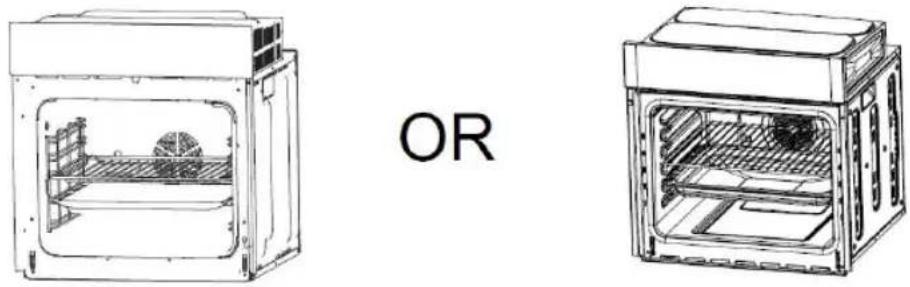
SHELF PLACEMENT WARNING:
To ensure the oven shelves operate safely, correct placement of the shelves between the side rail is imperative. This will ensure that during careful removal of the shelf or tray, hot food items should not slide out.
Section 4. Maintenance
Before any maintenance or cleaning work is carried out, DISCONNECT the appliance from the ELECTRICITY supply and ensure that the appliance is completely cool.
4.1. Cleaning the Oven
In addition to the Pyrolytic function, you are advised to clean spillages from inside the oven as soon as possible after use. Always ensure that the surface has cooled down before cleaning.
Use a cloth with warm soapy water to clean the surface. If the spillage has dried on the surface you may need to use a specialist oven cleaner, available from all good supermarkets.
Clean the glass door with warm soapy water – always ensure the glass is cool before you clean it!
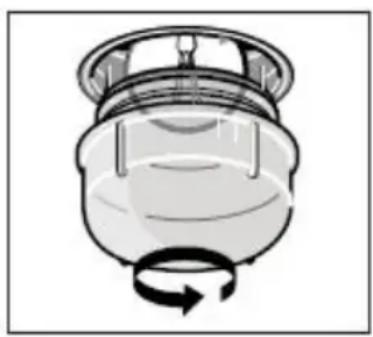
4.2. Changing the Oven Bulb
natural_image
Diagram of a mechanical component with a rotating arrow indicating rotational motion (no text or symbols)Proceed as follows when the glass is cold:
- Unscrew the glass cover
- Remove the bulb
• Fit new like for like bulb (*) - Replace glass cover
(*) Must be a 25 – 40W 300° halogen, like for like replacement oven lamp available from specialist hardware & lighting shops
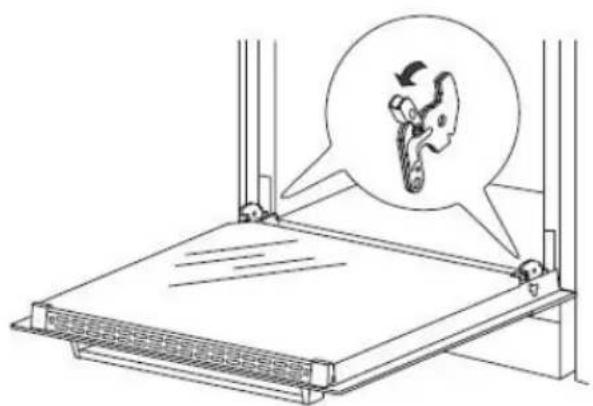
4.3. Removing the Oven Door
If your oven is fitted with a removable door, proceed as follows:
natural_image
Diagram of a mechanical device with a magnified inset showing a hand holding a circular object (no text or symbols present)In order to improve access when cleaning the oven, you can remove the door as follows:
Lift the two safety catches up then close the oven door partially. Now lift the door upwards and away from the oven. To refit the door carry out the above in reverse order, ensuring the safety catches are lowered back into place.
natural_image
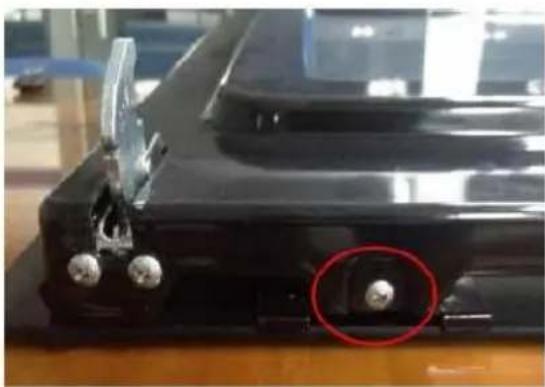
Close-up of a black mechanical component with two metallic pins and a red circle highlighting a small feature (no visible text or symbols)If you need to clean in between the glass door panels, remove the door and remove the 2 screws and the end panel at the bottom of the door (as shown left) and then carefully slide the glass out of the door frame.
Clean the glass panels and carefully slide the glass back into the door frame. Refit the end panel and ensure that the 2 screws are in place.
N.B. Your guarantee does not cover damaged or broken glass on the oven door.
4.4. What to do if something goes wrong
There is no power to the appliance:
- Check there is not a power cut
- Check there is power to the electric socket/appliance
- Check the fuse in the plug
The oven operates but the oven light is not working:
- Replace the oven bulb as described in section 4.2. above. Please note that bulbs are not covered under the guarantee.
To Register your Appliance simply complete the card in your appliance pack and return it with a stamp affixed or Alternatively you can Register online at www.repairtechuk.com
SERVICE HELP-LINE
Should your appliance develop a fault, please call the Repairtech Service Helpline on:
01527-888133
Please remember to have all your product details available, including the model number, serial number, date of purchase and your retailer's details before registering a fault.
Your service call cannot progress without this information.
DOMESTIC APPLIANCE DISTRIBUTORS;
HENRY JOHN HOUSE
NORTHWAY LANE
ASHCHURCH
TEWKESBURY
GLOUCESTERSHIRE
GL20 8JH
Important Note:
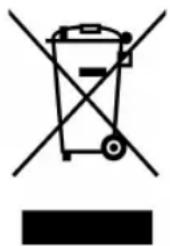
This appliance is marked according to the European directive 2002/96/EC on Waste Electrical and Electronic Equipment (WEEE). By ensuring this product is disposed of correctly, you will help prevent potential negative consequences for the environment and human health, which could otherwise be caused by inappropriate waste handling of this product.
The symbol on the product, or on the documents accompanying the product, the Crossed Out Wheelie Bin, indicates that this appliance may not be treated as household waste. Instead it shall be handed over to the applicable collection point for the recycling of electrical and electronic equipment.
Disposal must be carried out in accordance with local environmental
regulations for waste disposal. For more detailed information about treatment, recovery and recycling of this product, please contact your local authority, your household waste disposal service or the retailer where you purchased the product.
natural_image
Symbol of a trash bin crossed with a diagonal line and a black rectangle below (no text or labels)We continuously try to improve our products for the benefit of our customers. For this reason we reserve the right to make changes to any product at any time, without notice
Issue: 01/03-11-2015