INT451 - Cooker Montpellier - Free user manual and instructions
Find the device manual for free INT451 Montpellier in PDF.


User questions about INT451 Montpellier
0 question about this device. Answer the ones you know or ask your own.
Ask a new question about this device
Download the instructions for your Cooker in PDF format for free! Find your manual INT451 - Montpellier and take your electronic device back in hand. On this page are published all the documents necessary for the use of your device. INT451 by Montpellier.
USER MANUAL INT451 Montpellier
Installation and Operating Instructions
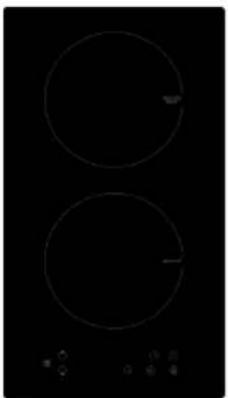
Models: MON-INT251, MON-INT451 & MON-INT461F 30cm & 60cm Induction Hobs
natural_image
Two circular electrical enclosures on a black background with control buttons at the bottom (no text or symbols visible)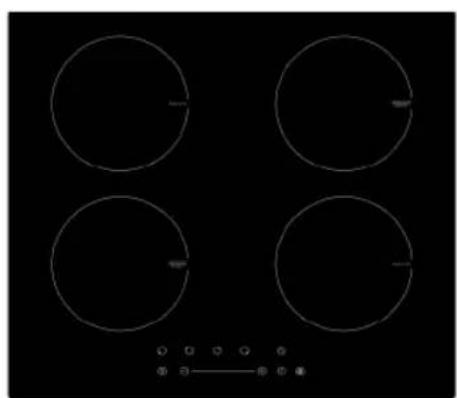
natural_image
Four circular white outlines on a black background, resembling a four-wheeled kitchen or electrical appliance (no text or symbols)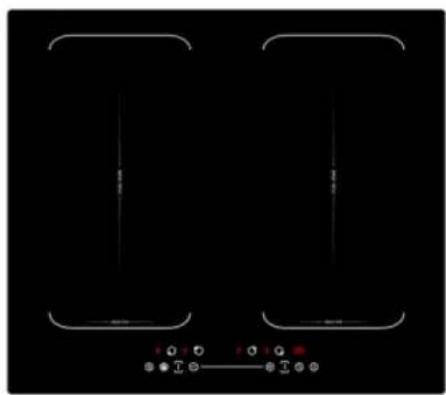
natural_image
Pure electrical circuit lines without any symbols(Pictures indicative of models supplied)
Please read these instructions carefully before attempting to install or use this appliance. It is advisable to keep these instructions in a safe place for future reference.
N.B. Should your appliance require attention, our service agents will not be able to book a service call without your unique serial number which can be found on the last page of this manual.
Introduction
Thank you for choosing this Montpellier branded appliance. It has been designed to give years of trouble-free use provided it is installed and maintained correctly.
Please read these instructions carefully before installing or using your appliance. It is advisable to keep your purchase and installation receipts with these instructions in a safe place for future reference. Included is some important safety information in addition to guidelines and recommendations that will enable you to take full advantage of all the functions available.
This quality appliance has been tested and certified to meet all applicable UK electrical and safety standards.
This appliance must be installed and connected in accordance with current regulations.
After unpacking the appliance ensure that there is no visible damage. If the appliance has been damaged during transit, do not use it, contact your retailer immediately.
Your 2 year Manufacturer's guarantee
THIS DOES NOT AFFECT YOUR STATUTORY RIGHTS.
Your new Montpellier appliance carries a free guarantee which protects you against the cost of repairs during the first 24 months from date of purchase provided that:
Any claim is accompanied by evidence of the model reference, model serial number and proof of purchase, such as a Sales Receipt, showing that the appliance was purchased within the 24 months prior to the date of claim.
What is not covered under the Guarantee:
Any appliance not correctly installed and operated in accordance with the manufacturer's instructions.
Any appliance that is used for anything other than domestic purposes.
Any defect caused by accident, misuse, unauthorized modification or inexpert repair.
Cost of Call-out where a fault cannot be found with the appliance.
Cost of Call-out for work covering routine maintenance, such as, but not exclusively, cleaning of filters or defrosting.
Cost of Call-out for work required to correct the alignment of doors following door reversal procedures carried out by you.
Use of the appliance by anyone other than the Householder.
Use in any commercial environment.
Consumable items, such as, but not exclusively, fuses in plugs, bulbs and breakable items which require routine replacement.
Repair costs incurred that have not been authorised by Repairtech and/or carried out by a non-approved Repairtech engineer.
To Register your Appliance simply complete the card in your appliance pack and return it with a stamp affixed or Alternatively you can Register online at
www.repairtechuk.com
SERVICE HELP-LINE
Should your appliance develop a fault, please call the
Repairtech Service Helpline on:
01527-888133
Description Of The Appliance
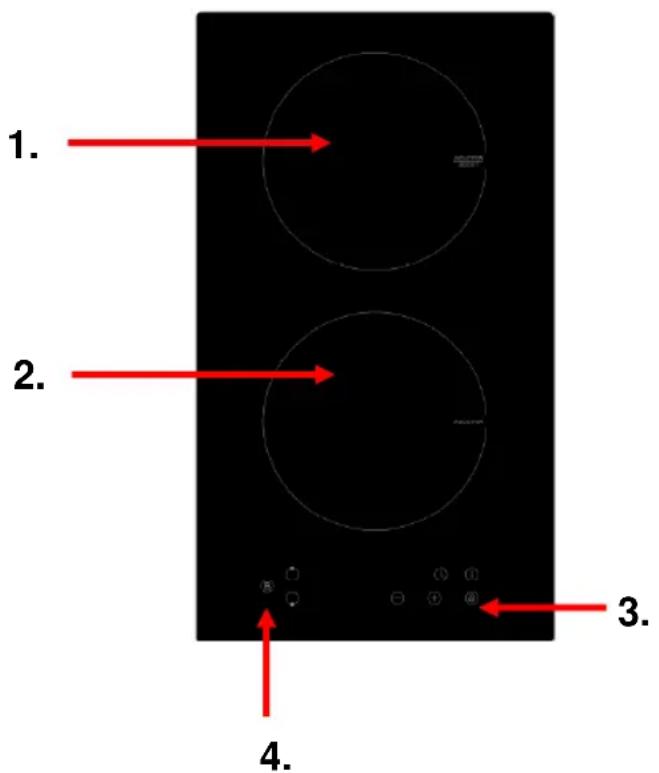
a) MON-INT251
text_image
1. 2. 3. 4.- 2000W (Plus Boost Function) Cook Zone
- 1500W Cook Zone
- Main Function Controls
- Boost Function Control
b) MON-INT451
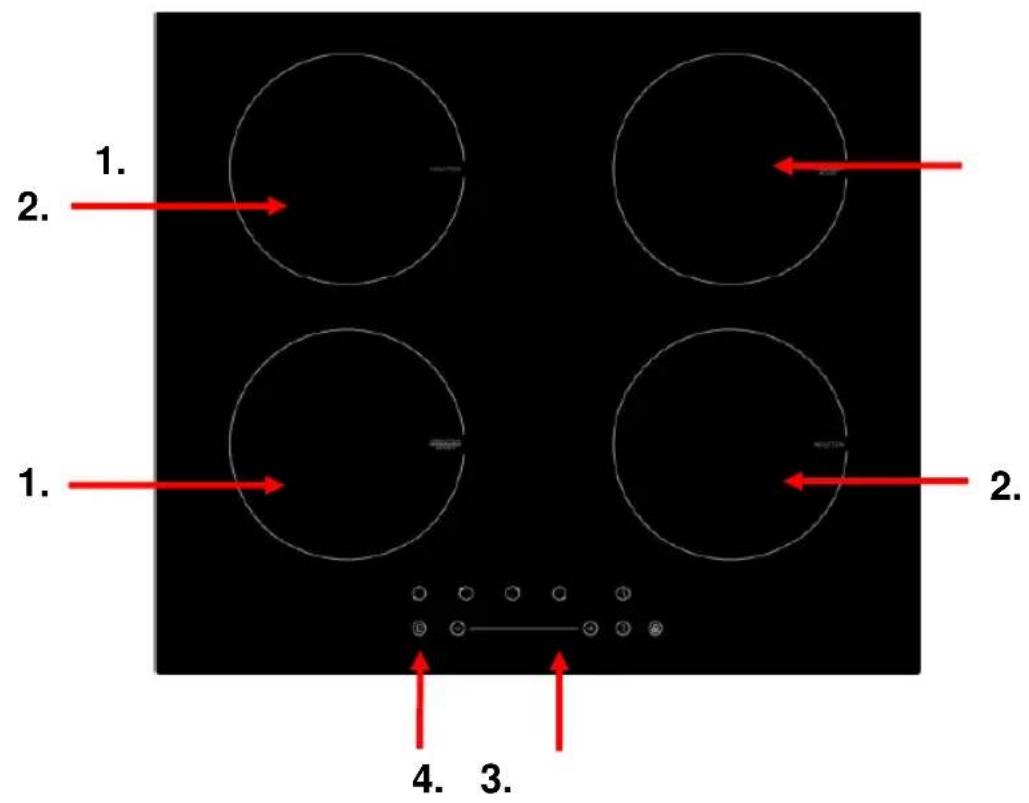
text_image
1. 2. 1. 2. 4. 3.- 2000W (Plus Boost Function) Cook Zone
- 1500W Cook Zone
- Main Function Controls
- Boost Function Control
c) MON-INT461F
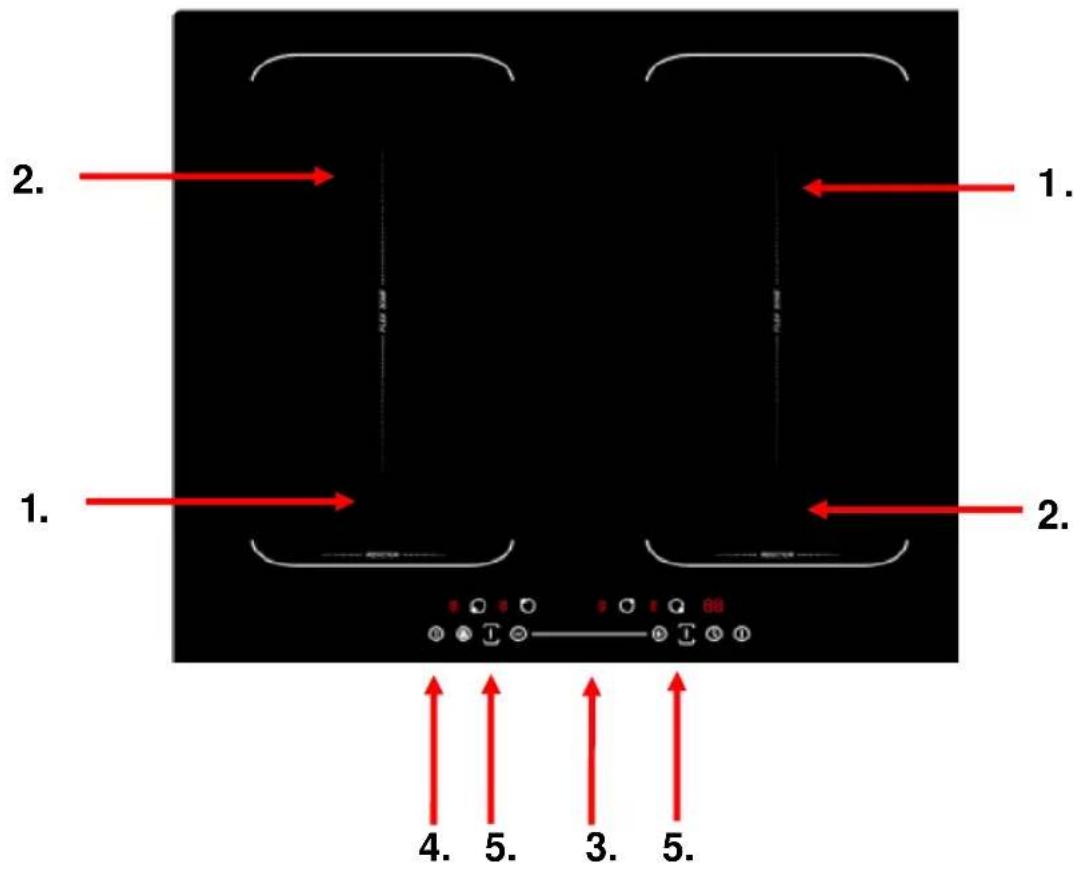
text_image
1. 2. 1. 2. 4. 5. 3. 5.- 2000W (Plus Boost Function) Cook Zone
- 1500W (Plus Boost Function) Cook Zone
- Main Function Controls
- Boost Function Control
- Flex Zone Controls
CONTENTS:
Section 1. Installation
Section 2. Safety Advice
Section 3. Operating the Appliance
Section 4. Maintenance
Section 1. Installation
- Remove all packaging, protective film and securing tape from the appliance.
- Position the appliance in a dry atmosphere.
- The following dimensions are provided as a guide for installation – your installer will carry out the installation in accordance with the current regulations.
- Your installer will connect the power cable in accordance with the current regulations.
To install this appliance, please proceed as follows:
1.1. Work-Surface Cut-Out
- Cut out the work-top as shown in the drawing below, ensuring that the actual sizes used are as per the chart below.
- For installation and use, a minimum of 5cm must be maintained around the cut-out.
- The work surface must have a thickness of at least 30mm.
- The work surface must be heat resistant.
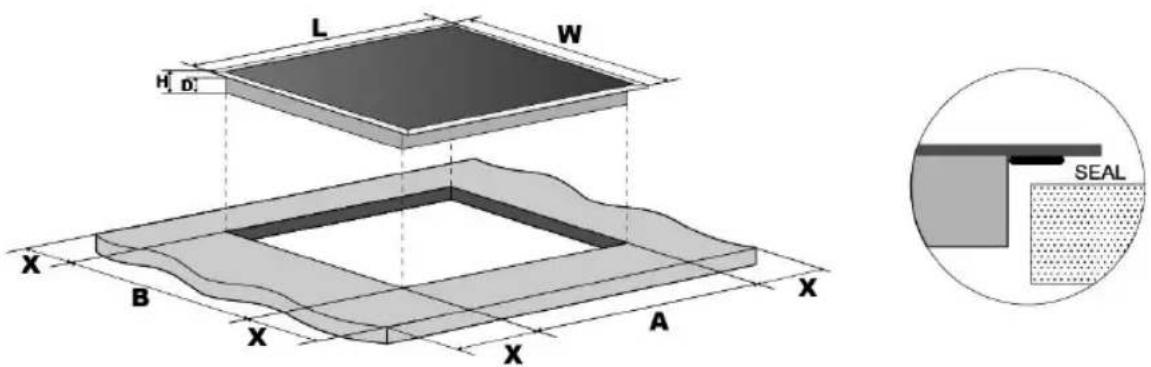
text_image
L W H D X B X A X X X SEAL1.2. Space to Rear or Side Wall
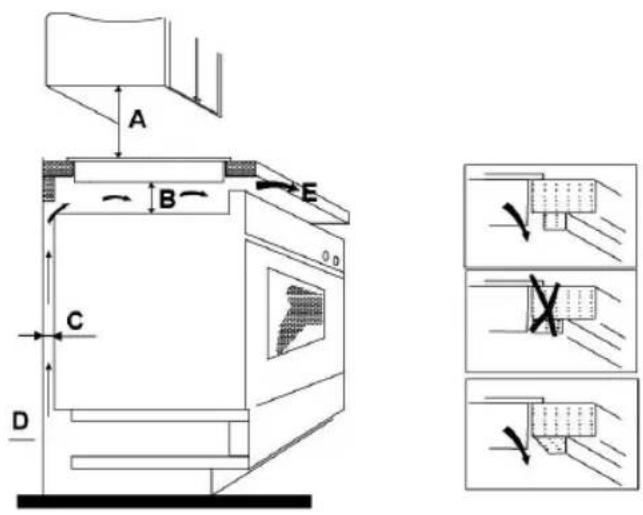
A = 760mm
B = 50mm (min)
C = 20mm (min)
D = Air Gap/Intake
E = Air Exit (5mm)
1.3. Fixing Brackets
- Fix the brackets as shown below:
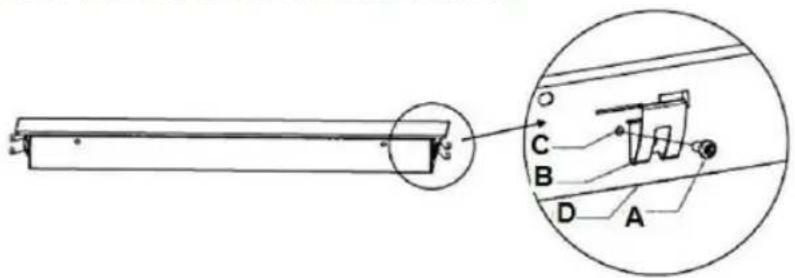
text_image
Technical diagram of a mechanical assembly with labeled components A, B, C, D and an inset view showing a component with a circular detail.a) Screw
b) Bracket
c) Screw Hole
d) Base of hotplate
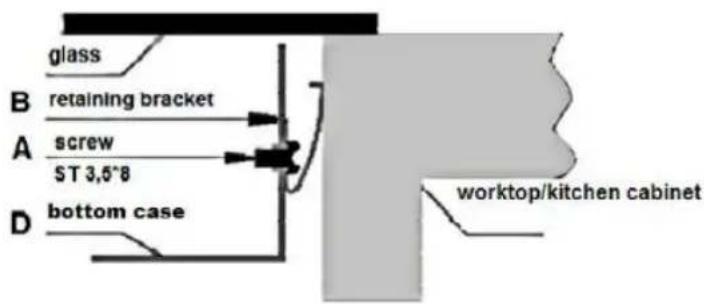
text_image
glass B retaining bracket A screw ST 3,5°8 D bottom case worktop/kitchen cabinet1.4. Electrical Connection
These appliances have a total Power Rating of 3500W (MON-INT251) and 7000W (MON-INT451 & MON-INT461F) and must be ‘hard wired’ into a suitable fused spur adjacent to the appliance housing.
The product must be installed by a Qualified Electrician.
Please note that a switchable spur should be accessible above the work surface in order that the power can be turned off.
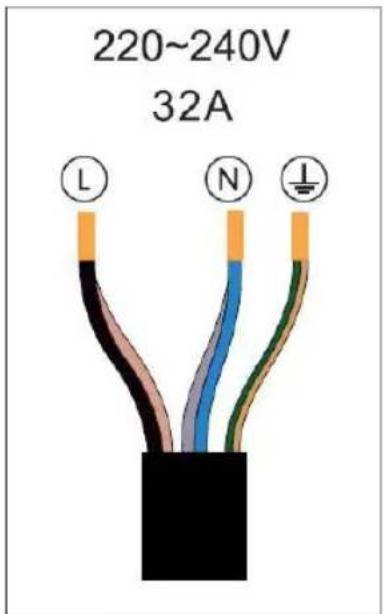
text_image
220~240V 32A L NHob voltage
2 zone 220-240 3.5 KW
4 Zone 220-240 7.0KW
Total power
Section 2. Safety Advice
- Please read this booklet thoroughly before installing and switching on the appliance. The manufacturer accepts no responsibility for incorrect installation and usage.
- This appliance is guaranteed for Domestic Use Only. This appliance shall not be used by children aged from 8 years and above and persons with reduced physical, sensory or mental capabilities, or lack of experience and knowledge, unless they have been given supervision or instruction on how to use the appliance in a safe way and understand the hazards involved. Children shall not play with the appliance. Cleaning and user maintenance shall not be made by children without supervision.
- This appliance must only be used for cooking/heating foods and liquids. Do not use it for any other purpose.
- It is important that you use only metal pans specifically designed and/or approved for use on Induction Hobs. Never allow melamine or plastic containers to come in contact with the heat zones.
- If using an adaptor, this must be used in accordance with the manufacturers instructions and ensure that the electrical circuit is not overloaded as this could cause overheating.
- Do not twist or bend the cables, and keep them away from hot surfaces. Following installation make sure that the power cable is not trapped underneath the appliance.
- Keep the appliance surfaces clean. Failure to do this could lead to the appliance malfunctioning.
- The surface of this appliance will get extremely hot during use. The surface of this appliance will remain hot after it has been turned off. Do not touch or clean the heating zone until it has completely cooled down.
- If the power supply cord is damaged, it must be replaced by the manufacturer, it's service agent or similarly qualified persons in order to avoid a hazard.
Important Message for Cardiac Pacemaker Implant Patients!
THIS INDUCTION HOB GENERATES MAGNETIC FIELDS IN ITS IMMEDIATE SURROUNDINGS. Your pacemaker must be designed in compliance with the corresponding regulations in order for no interference to be caused between it and the hotplate. Consult the pacemaker manufacturer or your doctor to determine whether it complies with the regulations in force or whether any incompatibilities exist.
Section 3. Operating the Appliance
3.1. Cookware Suitable for Induction
Induction hobs are made from smooth, ceramic glass, the heat comes from a magnetic induction coil which heats the cookware but not the cooking surface. The heat from the cookware is transferred to the food.
Pans suitable for induction hob use must be made from magnetisable metal such as cast iron or steel. Pure aluminium, copper or glass pans will not work with this type of hob unless the base is bonded with a magnetic metal.
Check that pans are attracted to a magnet - this ensures that they are suitable for use with an induction hob.
It is important that you use only metal pans specifically designed and/or approved for use on Induction Hobs. Never allow melamine or plastic containers to come in contact with the heat zones.
3.2. Control Panel
3.2.1. MON-INT251
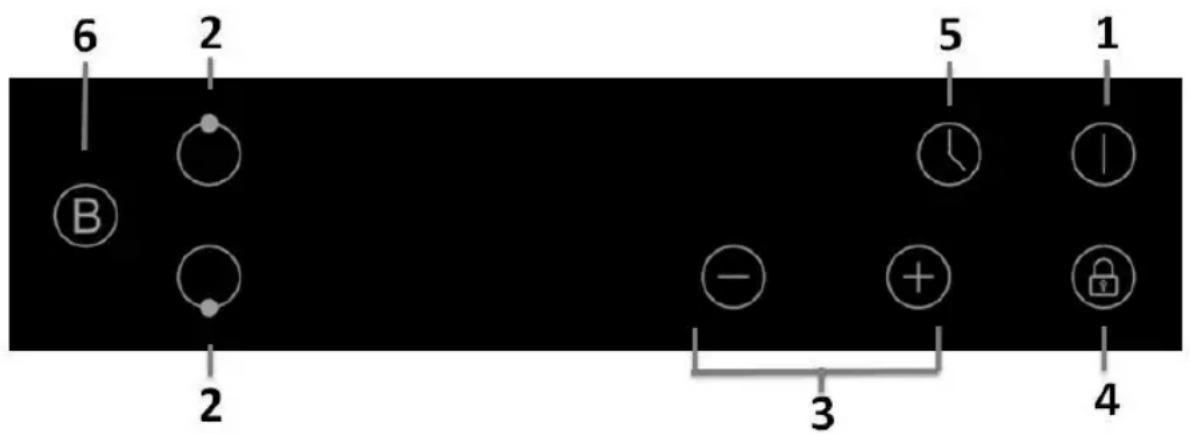
text_image
6 2 5 1 B - + - 4 3 2 1- On/Off Control
- Heat Zone Selection Controls
- Power & Timer Regulation Control
- Child Lock Control
- Timer Control
- Boost Control
3.2.2. MON-INT451
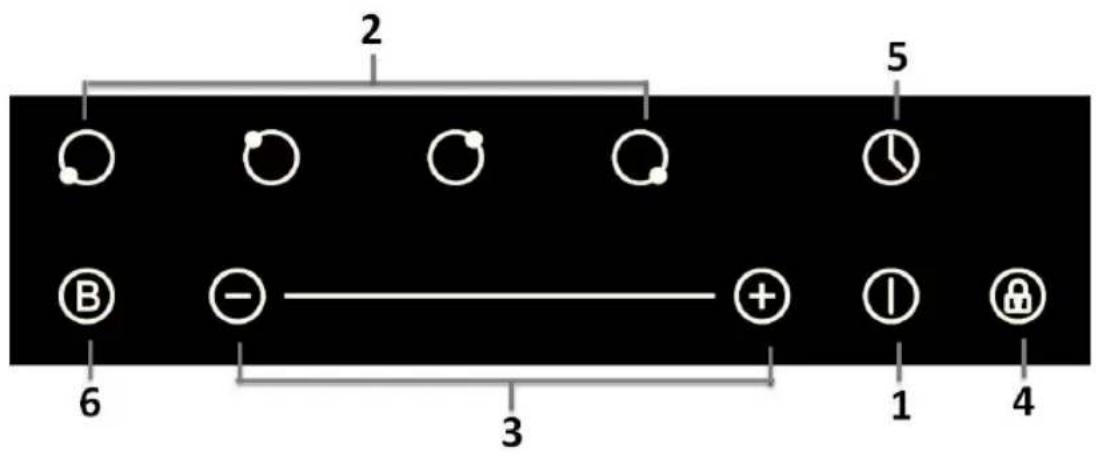
text_image
2 5 6 3 1 4- On/Off Control
- Heat Zone Selection Controls
- Power & Timer Regulation Control
- Child Lock Control
- Timer Control
- Boost Control
3.2.3. MON-INT461F
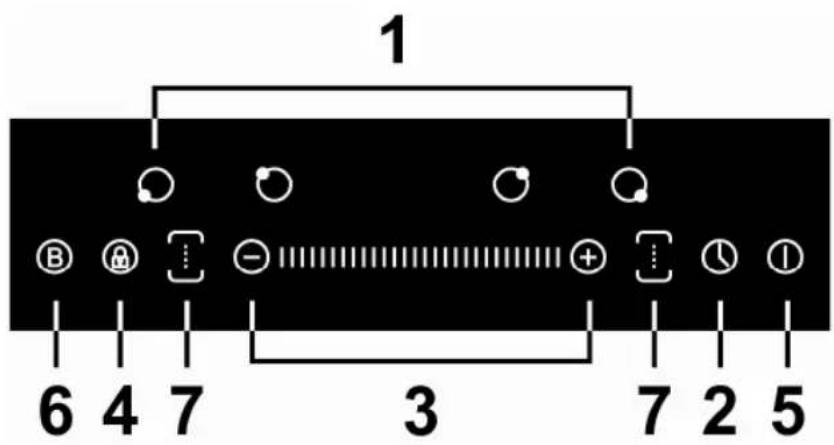
text_image
1 6 4 7 3 7 2 5- Heat Zone Selection Controls
- Timer Control
- Power & Timer Regulation Control
- Child Lock Control
- On/Off Control
- Boost Function Control
- Flex Zone Controls
3.3. Power, Cooking & Functions
3.3.1. On-Off
To turn the appliance on or off, press and hold the Power On/Off control until you hear a ‘beep’. When the appliance powers up, the heat zone indicators will display.
3.3.2. Setting the Zone Temperature
Press the required heat zone and then use the ‘+’ or ‘-’ (3) to increase or decrease the power for the required zone. Power settings range from ‘0’ lowest to ‘9’ highest setting.
Press the heat zone control Off when you have finished and then turn the appliance off by pressing the On/Off Control.
3.3.3. Power Boost
You can use the ‘Boost’ function to boost the power of the relevant heat zone for a maximum of 5 minutes.
- To operate, press the heat zone selection button (boost zone only) and then press the Boost function control (6).
- The heat zone will operate at full power for 5 minutes.
- You can select the Boost function when you are already operating the heat zone at a lower heat setting. The Boost function will then operate at maximum heat for 5 minutes and then return to the pre-set heat setting.
- N.B. For model MON-INT461F, you can only use the Boost function on one heat zone at a time within each Flex Zone area, i.e. Left or Right. It will not operate on both heat zones at the same time.
3.3.4. Timer (1 to 99 Minutes)
You can use the Timer to operate one of the heat zones for a time period of between 1 and 99 minutes:
- Press the heat zone button that you want to operate the timer on and select the heat setting level.
- Press the Timer Control.
- Select the required time between 1 and 99 minutes by using the ‘+’ or ‘-’ controls (3).
- Now the heat zone will operate for the selected time and automatically turn off at the end of the period. An audible signal will also be heard at the end of the time period.
- If you need to cancel prior to the end of the set time, simply press the heat zone control and then the Timer Control.
3.3.5. Flex Zone Operation
Each zone can be used as a standard dual cooking zone area with independent temperature settings as in 3.3.2. above, or as a large ‘flexible’ cooking zone where a pan can be used anywhere within the zone. To operate as a ‘Flex Zone’:
- Press the left or right Flex Zone Control (7)
- Use the Power Control (3) to set the required heat level
- Place your Pan within the zone as shown below:
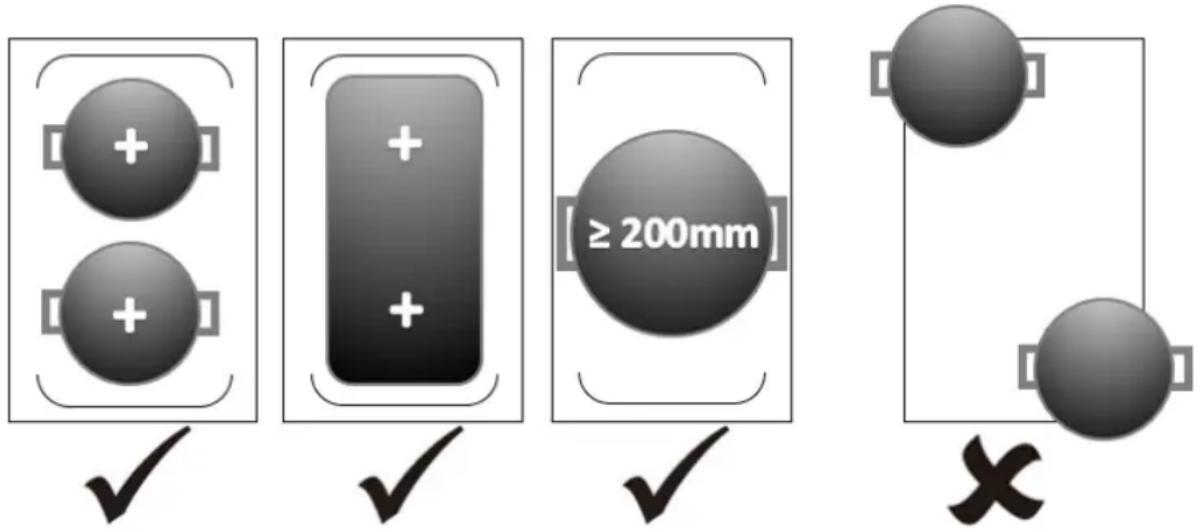
text_image
Diagram illustrating four different physical states: two positive charges, a rectangular block, a circular object with ≥200mm diameter, and a floating sphere with cross symbols.- To finish, press the Flex Zone Control (7) again.
- Finally, press the On/Off Control to switch the hob off.
3.3.6. Child Lock
To activate the Child Lock, press and hold the Child Lock control (4) until ‘Lo’ is displayed. The lock will now be set and the appliance will not operate. To unlock the Child Lock, simply press and hold the Child Lock control again until the display is removed.
3.3.7. Hot Surface Warning Indicator
Please note, a hot surface indicator (H) will show when one or more of the heat zones has been used – it will go out when the zone is completely cool.
Section 4. Maintenance
Before any maintenance or cleaning work is carried out, DISCONNECT the appliance from the ELECTRICITY supply and ensure that the appliance is completely cool.
4.1. Cleaning the Hob Surface
Clean spillages from the hob surface as soon as possible after use. Always ensure that the surface has cooled down before cleaning.
Use a soft cloth or kitchen paper to clean the surface. If the spillage has dried on the surface you may need to use a specialist vitro-ceramic glass cleaner, available from all good supermarkets.
Do not use other abrasive cleaners and/or wire wool etc as this may scratch the surface of the hob.
4.2. What to do if something goes wrong
There is no power to the appliance:
- Check there is not a power cut
- Check there is power to the electric socket/appliance
- Has the auto time elapsed? – see section 3.3.4.
After cooking the letter 'H' is displayed:
- This is the hot surface indicator – it will remain on until the appropriate heat zone has completely cooled down.
After switching off, the appliance sounds like it is still running:
- This is the cooling fan – it will remain on until the appliance has completely cooled down.
The display indicates E5:
- This indicates high temperature. Allow the hob to cool down then start again
The hob makes a ‘clicking’ noise during use:
- This is quite normal – it is the sound of the induction coils during operation.
For all other error codes, switch off and call your service provider.
To Register your Appliance simply complete the card in your appliance pack and return it with a stamp affixed or Alternatively you can Register online at www.repairtechuk.com
SERVICE HELP-LINE
Should your appliance develop a fault, please call the Repairtech Service Helpline on:
01527-888133
DOMESTIC APPLIANCE DISTRIBUTORS;
HENRY JOHN HOUSE
NORTHWAY LANE
ASHCHURCH
TEWKESBURY
GLOUCESTERSHIRE
GL20 8JH
Important Note:
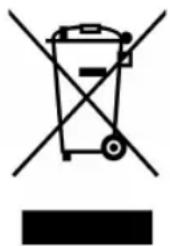
This appliance is marked according to the European directive 2002/96/EC on Waste Electrical and Electronic Equipment (WEEE). By ensuring this product is disposed of correctly, you will help prevent potential negative consequences for the environment and human health, which could otherwise be caused by inappropriate waste handling of this product.
The symbol on the product, or on the documents accompanying the product, the Crossed Out Wheelie Bin, indicates that this appliance may not be treated as household waste. Instead it shall be handed over to the applicable collection point for the recycling of electrical and electronic equipment.
Disposal must be carried out in accordance with local environmental
regulations for waste disposal. For more detailed information about treatment, recovery and recycling of this product, please contact your local authority, your household waste disposal service or the retailer where you purchased the product.
natural_image
Symbol of a trash bin crossed with two crossed lines and a solid black rectangle below (no text or labels)We continuously try to improve our products for the benefit of our customers.
For this reason we reserve the right to make changes to any product at any time, without notice
Issue: 03/29-09-2016