
GKNE 5300 - Refrigerator GRUNDIG - Free user manual and instructions
Find the device manual for free GKNE 5300 GRUNDIG in PDF.


| Product Type | Refrigerator with Freezer |
| Brand | Grundig |
| Model | GKNE 5300 |
| Height (mm) | 1850 |
| Width (mm) | 595 |
| Depth (mm) | 650 |
| Net Weight (kg) | 72 |
| Energy Class | E |
| Annual Energy Consumption (kWh) | 228 |
| No Frost Technology | Yes (Freezer) |
| Total Gross Capacity (L) | 300 |
| Refrigerator Capacity (L) | 210 |
| Freezer Capacity (L) | 90 |
| Freezing Capacity (kg/24h) | 4 |
| Noise Level (dB) | 42 |
| Climate Class | N-ST |
| Power Supply | 220-240 V ~ 50 Hz |
| Adjustable Thermostat | Yes |
| Reversible Door | Yes |
| Interior Light | LED |
| Cleaning | Wipe with damp cloth; defrost freezer annually |
| Spare Parts Availability | Contact Grundig customer service |
Frequently Asked Questions - GKNE 5300 GRUNDIG
User questions about GKNE 5300 GRUNDIG
0 question about this device. Answer the ones you know or ask your own.
Ask a new question about this device
Download the instructions for your Refrigerator in PDF format for free! Find your manual GKNE 5300 - GRUNDIG and take your electronic device back in hand. On this page are published all the documents necessary for the use of your device. GKNE 5300 by GRUNDIG.
USER MANUAL GKNE 5300 GRUNDIG
natural_image
Technical line drawing of a mechanical component with a labeled section (1), no text or symbols present.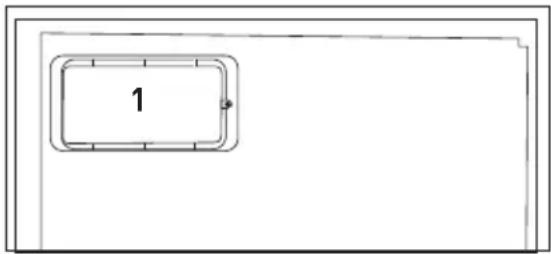
natural_image
Diagram showing a device with a lightning bolt and cable, no text or symbols present1.1.1 HC uyarısı
natural_image
Pure electrical circuit lines without any symbolsnatural_image
Diagram showing directional arrows and curved arrows around a rectangular structure (no text or symbols)natural_image
Line drawing of a hand interacting with a wall-mounted device (no text or symbols)4.2 İlk kullanım
natural_image
Line drawing of a hand holding a circular device with numbered parts (no text or symbols)5.2 Hızlı dondurma
natural_image
Technical line drawing of a mechanical component with concentric rings and mounting holes (no text or symbols)
natural_image
Technical line drawing of a mechanical component with concentric rings and labeled features (no text or symbols)natural_image
Abstract concentric oval shapes with a small 'r' mark in the center (no text or symbols beyond the label)5.4 Gösterge paneli
natural_image
Line drawing of a rectangular room with a central square and side panel (no text or symbols)5.10 Sebzelik
natural_image
Technical line drawing of two identical mechanical or architectural components with hands holding rectangular panels (no text or symbols)natural_image
Diagram of a mechanical or fluidic component with directional arrows indicating flow or movement (no text or symbols present)5.14 Nem kontrollü sebzelik
(FreSHelf)
natural_image
Technical line drawing of a mechanical assembly with two arrows indicating direction (no text or symbols)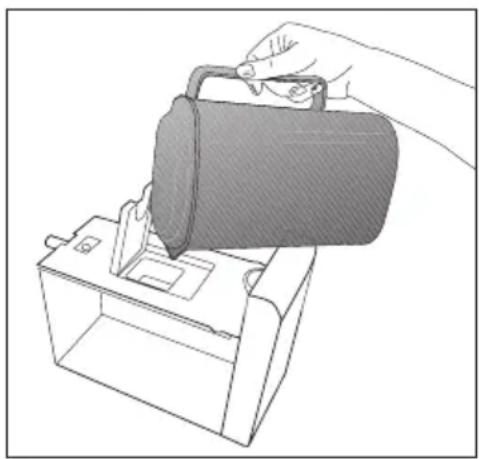
natural_image
Line drawing of a hand pouring liquid into a container using a tool (no text or symbols)5.16 Koku filtresi
1. Important instructions for safety and environment 3
1.1 General safety ....3
1.1.1 HC warning......6
1.1.2 For products with a water dispenser 7
1.2 Intended use....7
1.3 Children's safety .....7
1.4 Compliance with WEEE Directive and Disposing of the Waste Product: 8
1.5 Compliance with RoHS Directive: 8
1.6 Package information......8
2. Your Refrigerator 9
3 Installation 10
3.1 Appropriate installation location ....10
3.2 Installing the plastic wedges 10
3.3 Adjusting the feet .....10
3.4 Electrical connection .....11
3.5 Reversing the doors .....12
3.6 Reversing the doors .....13
4 Preparation 14
4.1 Things to be done for energy saving....14
4.2 Initial use ......15
5 Operating the product 16
5.1 Temperature setting button .16
5.2 Fast freeze 16
5.3 Vacation function .....17
5.4 Indicator panel 21
5.5 Indicator panel 23
5.6 Ice container .....26
5.7 Egg holder....26
5.8 Fan....26
5.9 Crisper 26
5.10 Chiller compartment......26
5.11 Moving door shelf .....27
5.12 Sliding storage container ..27
5.13 Blue light 27
5.14 Humidity controlled crisper 28
5.15 Auto Icematic 28
5.16 Description and cleaning of odor filter....29
5.17 Freezing fresh food ......30
5.18 Recommendations for preserving the frozen food......31
5.19 Deep-freeze information....31
5.20 Placing the food .....31
5.21 Door open warning......32
5.22 Changing the door opening direction....32
5.23 Illumination lamp ......32
6. Maintenance and cleaning 33
6.1 Avoiding bad odours......33
6.2 Protecting the plastic surfaces 34
6.3 Door Glasses 34
7. Troubleshooting 35
Please read this manual first!
Dear Customer,
We hope that your product, which has been produced in modern plants and checked under the most meticulous quality control procedures, will provide you an effective service
For this, we recommend you to carefully read the entire manual of your product before using it and keep it at hand for future references.
The user manual will help you use the product in a fast and safe way.
Will help you use your appliance in a fast and safe way.
Read the manual before installing and operating your product.
Follow the instructions, especially those for safety.
Keep the manual in an easily accessible place as you may need it later.
Besides, read also the other documents provided with your product.
Please note that this manual may be valid for other models as well.
Symbols and their descriptions
This instruction manual contains the following symbols:
 | Important information or useful usage tips. |
 | Warning against dangerous conditions for life and property. |
 | Warning against electric voltage. |
 | Packaging materials of the product are manufactured from recyclable materials in accordance with our National Environment Regulations. |
1. Important instructions for safety and environment
This section contains safety instructions that will help protect from risk of personal injury or property damage. Failure to follow these instructions shall void any warranty.
1.1 General safety
- This product can be used by children at and above 8 years old and by persons whose physical, sensory or mental capabilities were not fully developed or who lack experience and knowledge provided that they are supervised or trained on the safe usage of the product and the risks it brings out. Children must not play with the product. Cleaning and maintenance works should not be performed by children unless they are supervised by someone.
- Unplug the product if a failure occurs while it is in use.
- If the product has a failure, it should not be operated unless it is repaired by the Authorised Service Agent. There is the risk of electric shock!
- Connect the product to a grounded outlet protected by a fuse complying with the values in the rating plate. Have the grounding installation made by a qualified electrician. Our company shall not be liable for any damages that will arise when the product is used without grounding in accordance with the local regulations.
• Unplug the product when not in use. - Never wash the product by spreading or pouring water onto it! There is the risk of electric shock!
- Never touch the plug with wet hands! Never unplug by pulling on the cable, always pull out by grabbing the plug.
- It is recommended to clean the tip of the plug regularly with a dry cloth.
-
Do not plug the refrigerator if the wall outlet is loose.
-
Never connect your refrigerator to electricity-saving systems. Such systems are harmful for the product.
- Unplug the product during installation, maintenance, cleaning and repairing procedures.
- Always have the installation and repairing procedures carried out by the Authorised Service Agent. Manufacturer shall not be held liable for damages that may arise from procedures carried out by unauthorised persons.
- Do not eat cone ice cream and ice cubes immediately after you take them out of the freezer compartment! This may cause frostbite in your mouth!
- Do not touch frozen food by hand! They may stick to your hand!
- Do not put bottled and canned liquid beverages in the freezer compartment. They may burst!
- Never use steam and steam assisted cleaning materials to clean or defrost the refrigerator. Steam will cause short circuit or electric shock since it would get into contact with the electrical parts in the refrigerator!
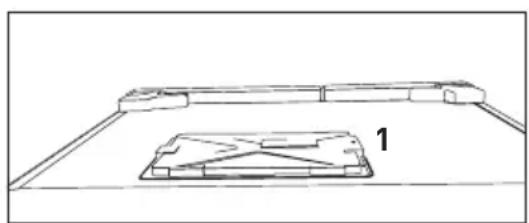
- The product shall never be used while the compartment which is located at the top or back of your product and in which electronic boards are available (electronic board box cover) (1) is open.
natural_image
Technical line drawing of a mechanical component with a labeled part (1), no text or symbols present.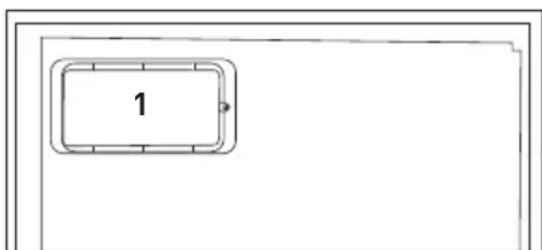
- Do not use mechanical devices or other methods to accelerate the defrosting process, other than those recommended by the manufacturer.
- Never use the parts on your refrigerator such as the door and drawer as a means of support or step. This will cause the product to tip over or parts of it get damaged.
natural_image
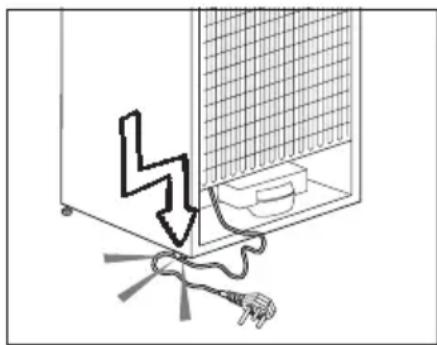
Diagram showing a device with a lightning bolt and cable, no text or symbols present- Do not damage the cooling circuit, where the refrigerant is circulating, with drilling or cutting tools. The refrigerant that might blow out when the gas channels of the evaporator, pipe extensions or surface coatings are punctured may cause skin irritations and eye injuries.
- Do not cover or block the ventilation holes on the refrigerator with any material.
- Place the beverage with higher proofs tightly closed and vertically.
- Do not use gaseous sprays near the product since there is the risk of fire or explosion!
- Flammable items or products that contain flammable gases (e.g. spray) as well as the explosive materials should never be kept in the appliance.
- Do not place containers filled with liquid on top of the product. Spilling water on an electrical component may cause electric shocks or risk of fire.
-
Do not store products (vaccines, heat-sensitive medicines, scientific materials and etc.) that require a precise temperature control in the refrigerator.
-
If you will not operate the product for a long period of time, unplug and unload the food in it.
- If the product is equipped with blue light, do not look at the blue light with optical tools.
- Exposing the product to rain, snow, sun and wind is dangerous with respect to electrical safety.
- In products with mechanical control (thermostat), wait for minimum 5 minutes to plug in the product again after unplugging it.
- Do not overload the product. It may fall when the door is opened, and cause injury or damage. Similar problems may occur in case of putting things on top of the product.
- 8's door is equipped with a handle, do not pull by the handle when changing the place of the product. Handle may get loose.
- Pay attention not to have your hand or any part of your body get caught by the moving parts inside the product.
1.1.1 HC warning
- If the product is equipped with a cooling system containing R600a gas, pay attention not to damage the cooling system and piping during usage and transportation. This gas is flammable. If the cooling system is damaged, keep the product away from potential sources that can cause the system catch a fire and ventilate the room in which the unit is placed immediately.
 | If the product is equipped with a cooling system containing R134a gas, ignore this warning. |
 | You can learn the gas used in production of your product on the rating plate located on the left inner part of it. |
 | WARNING: Never dispose the product in fire. |
1.1.2 For products with a water dispenser
- Pressure for cold water inlet shall be maximum 90 psi (8 bar). If your water pressure exceeds 6.2 psi (5.5 bar), use a pressure limiting valve in your mains system. If you do not know how to check your water pressure, ask for the help of a professional plumber.
- If there is risk of water hammer effect in your installation, always use a water hammer prevention equipment in your installation. Consult Professional plumbers is you are not sure that there is no water hammer effect in your installation.
- Do not install on the hot water inlet. Take precautions against of the risk of freezing of the hoses. Water temperature operating interval shall be 33^ F ( 0.6^ C) minimum and 100^ F ( 38^ C) maximum.
• Use only potable water.
1.2 Intended use
- This product has been designed for domestic use. It is not suitable for commercial use and it must not be used out of its intended use.
• Product must be used only for storing food.
- The manufacturer waives any responsibility arisen from incorrect usage or transportation.
- The service life of your product is 10 years. During this period, original spare parts will be available to operate the appliance properly.
1.3 Children's safety
- Packaging materials are dangerous for the children. Keep packaging materials in a safe place away from reach of the children.
- Electrical products are dangerous for the children. Keep children away from the product when it is in use.
- If the product's door is equipped with a lock, keep the keys away from reach of children.
1.4 Compliance with WEEE Directive and Disposing of the Waste Product:
natural_image
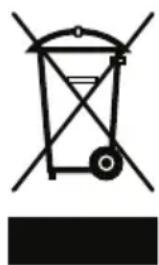
Pure electrical circuit lines without any symbolsThis product complies with EU WEEE Directive (2012/19/EU). This product bears a classification symbol for waste electrical and electronic equipment (WEEE). This product has been manufactured with high quality parts and materials which can be reused and are suitable for recycling. Do not dispose of the waste product with normal domestic and other wastes at the end of its service life. Take it to the collection center for the recycling of electrical and electronic equipment. Please consult your local authorities to learn about these collection centers.
1.5 Compliance with RoHS Directive:
The product you have purchased complies with EU RoHS Directive (2011/65/EU). It does not contain harmful and prohibited materials specified in the Directive.
1.6 Package information
Packaging materials of the product are manufactured from recyclable materials in accordance with our National Environment Regulations. Do not dispose of the packaging materials together with the domestic or other wastes. Take them to the packaging material collection points designated by the local authorities.
2. Your Refrigerator
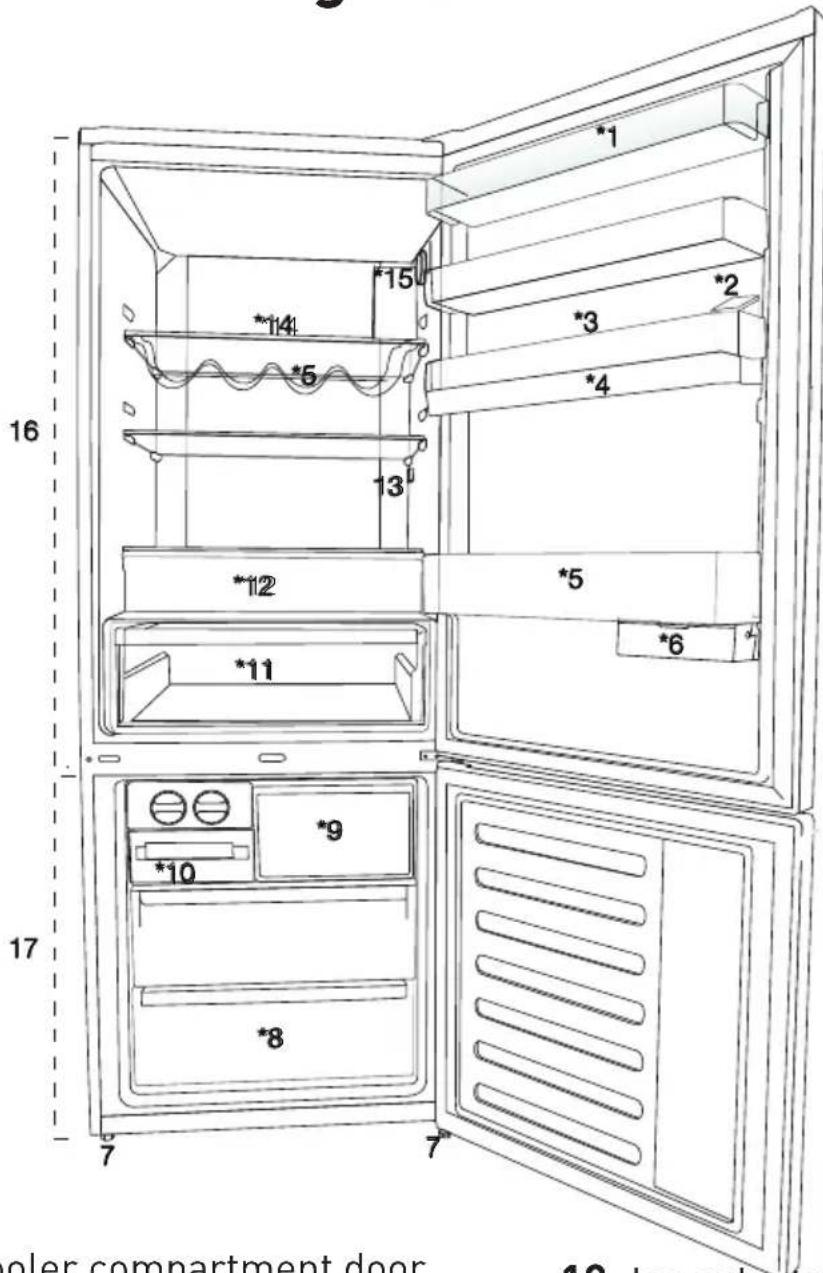
- Cooler compartment door shelf
- Water dispenser filling tank
- Egg section
- Water dispenser reservoir
- Bottle shelf
- Sliding storage containers
- Adjustable legs
- Deep freezer compartment
-
Quick freeze compartment
-
Ice cube tray & Ice bank
- Vegetable bin
- Zero degree compartment
- Interior light
- Cooler compartment glass shelf
- Temperature adjustment button
- Cooler compartment
- Freezer compartment * optional

Figures in this user manual are schematic and may not match the product exactly. If the subject parts are not included in the product you have purchased, then those parts are valid for other models.
3 Installation
3.1 Appropriate installation location
Contact an Authorized Service for the installation of the product. In order to prepare the product for use, refer the information in the user manual and ensure that electrical installation and water installation are appropriate. If not, call a qualified electrician and technician to have any necessary arrangements carried out.
| WARNING:Manufacturer shall not be held liable for damages that may arise from procedures carried out by unauthorized persons. | |
| WARNING: Product must not be plugged in during installation. Otherwise, there is the risk of death or serious injury! | |
| WARNING: If the door clearance of the room where the product shall be place is so tight to prevent passing of the product, remove the door of the room and pass the product through the door by turning it to its side; if this does not work, contact the authorized service. |
- Place the product on an even floor surface to prevent jolts.
• Install the product at least 30 cm away from heat sources such as
hobs, heater cores and stoves and at least 5 cm away from electrical ovens.
- Product must not be subjected to direct sun light and kept in humid places.
- Appropriate air ventilation must be provided around your product in order to achieve an efficient operation. If the product is to be placed in a recess in the wall, pay attention to leave at least 5 cm distance with the ceiling and side walls.
- Do not install the product in places where the temperature falls below -5°C.
3.2 Installing the plastic wedges
Plastic wedges supplied with the product are used to create the distance for the air circulation between the product and the rear wall.
- To install the wedges, remove the screws on the product and use the screws supplied together with the wedges.
- Insert the 2 plastic wedges onto the rear ventilation cover as illustrated in the figure.
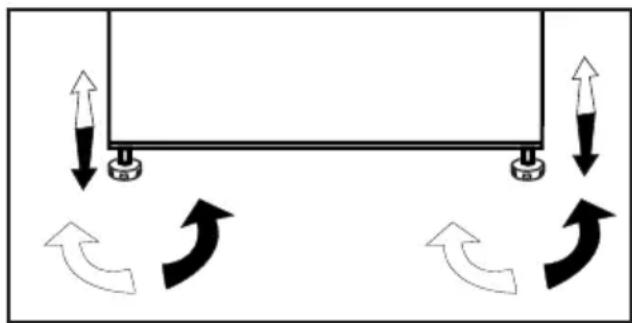
3.3 Adjusting the feet
If the product stands unbalanced after installation, adjust the feet
natural_image
Diagram showing a rectangular structure with upward and downward arrows indicating motion or force directions, no text or symbols present.on the front by rotating them to the right or left.
3.4 Electrical connection
| WARNING:Do not make connections via extension cables or multi-plugs. | |
| WARNING: Damaged power cable must be replaced by the Authorized Service Agent. | |
| If two coolers are to be installed side by side, there should be at least 4 cm distance between them. |
- Our company shall not be liable for any damages that will arise when the product is used without grounding and electrical connection in accordance with the national regulations.
- Power cable plug must be within easy reach after installation.
- Connect your refrigerator to a grounded outlet rated for a voltage value of 220-240V /50 Hz. Outlet shall have 10 to 16A fuse.
- Do not extension cords or cordless multiple outlets between your product and the wall outlet.
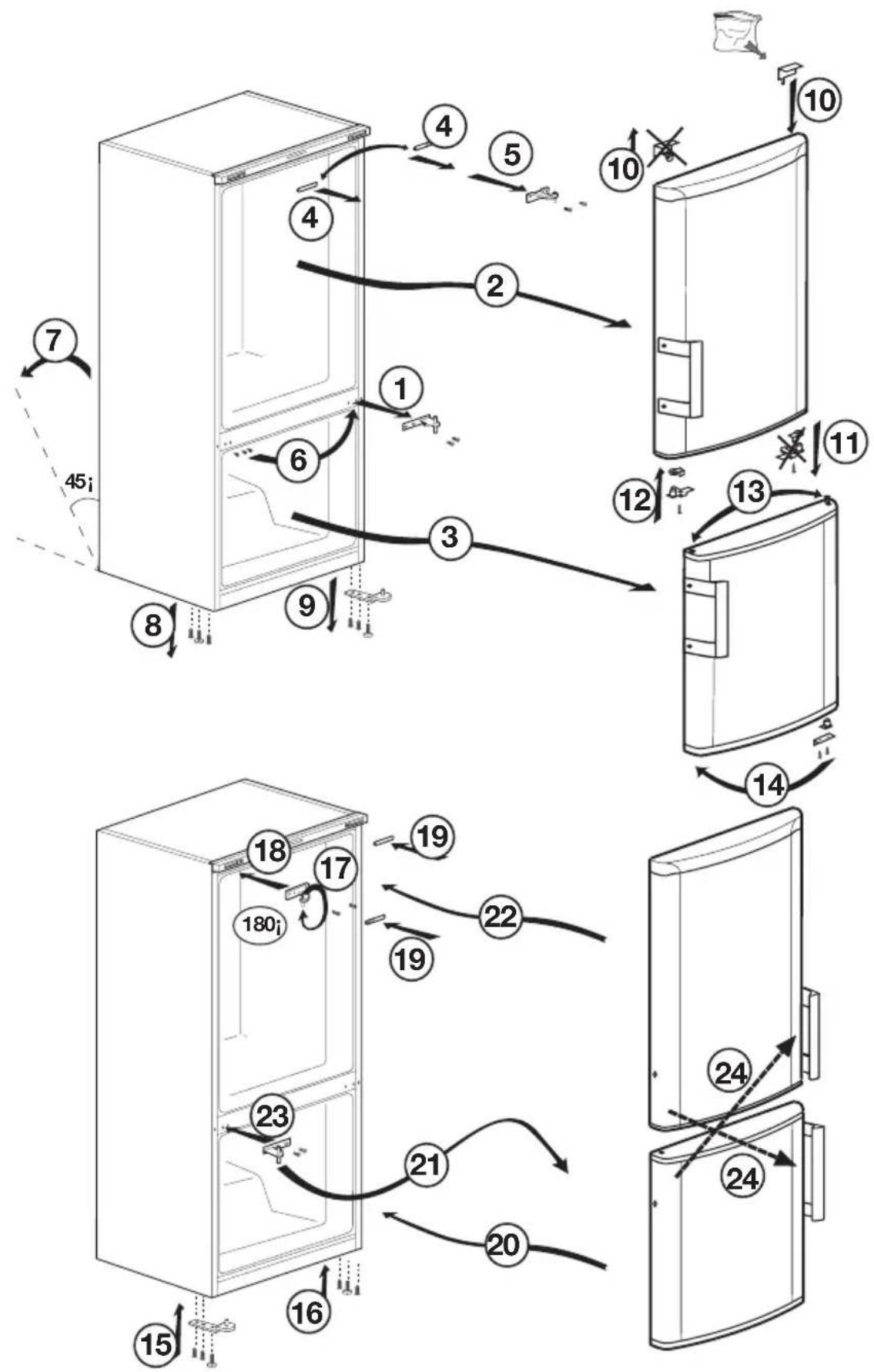
3.5 Reversing the doors
Proceed in numerical order.
flowchart
graph TD
    A["Opening Room 45i"] --> B["Refrigerator 1"]
    B --> C["Refrigerator 2"]
    C --> D["Refrigerator 3"]
    D --> E["Refrigerator 4"]
    E --> F["Refrigerator 5"]
    F --> G["Refrigerator 6"]
    G --> H["Refrigerator 7"]
    H --> I["Refrigerator 8"]
    I --> J["Refrigerator 9"]
    J --> K["Refrigerator 10"]
    K --> L["Refrigerator 11"]
    L --> M["Refrigerator 12"]
    M --> N["Refrigerator 13"]
    N --> O["Refrigerator 14"]
    O --> P["Refrigerator 15"]
    P --> Q["Refrigerator 16"]
    Q --> R["Refrigerator 17"]
    R --> S["Refrigerator 18"]
    S --> T["Refrigerator 19"]
    T --> U["Refrigerator 20"]
    U --> V["Refrigerator 21"]
    V --> W["Refrigerator 22"]
    W --> X["Refrigerator 23"]
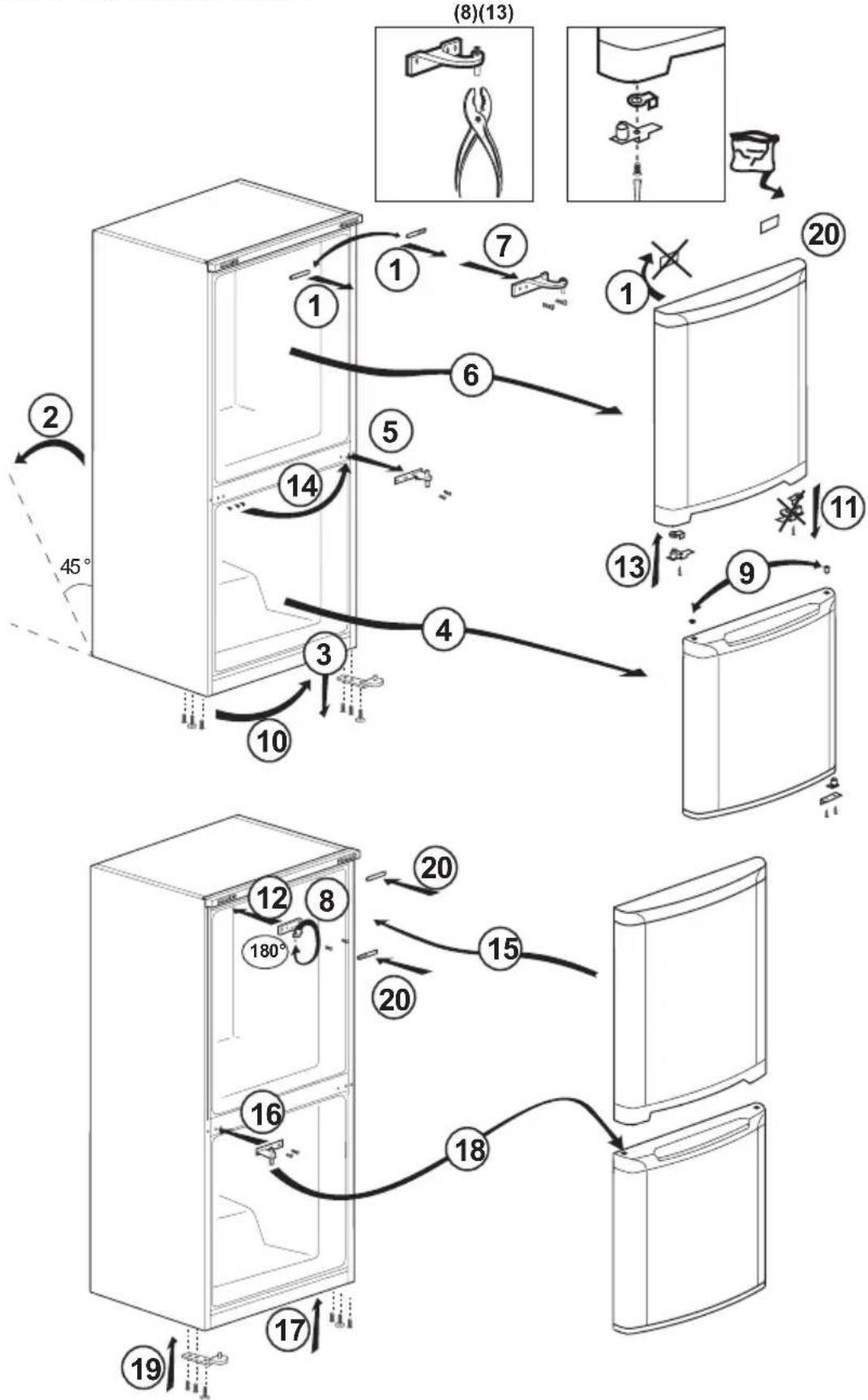
3.6 Reversing the doors
Proceed in numerical order.
flowchart
graph TD
    A["Opening refrigerator"] --> B["1"]
    B --> C["2"]
    C --> D["3"]
    D --> E["4"]
    E --> F["5"]
    F --> G["6"]
    G --> H["7"]
    H --> I["8"]
    I --> J["9"]
    J --> K["10"]
    K --> L["11"]
    L --> M["12"]
    M --> N["13"]
    N --> O["14"]
    O --> P["15"]
    P --> Q["16"]
    Q --> R["17"]
    R --> S["18"]
    S --> T["19"]
    style A fill:#f9f,stroke:#333
    style K fill:#f9f,stroke:#333
    style L fill:#f9f,stroke:#333
    style M fill:#f9f,stroke:#333
    style N fill:#f9f,stroke:#333
    style O fill:#f9f,stroke:#333
    style P fill:#f9f,stroke:#333
    style Q fill:#f9f,stroke:#333
    style R fill:#f9f,stroke:#333
    style S fill:#f9f,stroke:#333
    style T fill:#f9f,stroke:#333
    style U fill:#f9f,stroke:#333
    style V fill:#f9f,stroke:#333
    style W fill:#f9f,stroke:#333
    style X fill:#f9f,stroke:#333
    style Y fill:#f9f,stroke:#333
    style Z fill:#f9f,stroke:#333
    style AA fill:#f9f,stroke:#333
    style AB fill:#f9f,stroke:#333
    style AC fill:#f9f,stroke:#333
    style AD fill:#f9f,stroke:#333
    style AE fill:#f9f,stroke:#333
    style AF fill:#f9f,stroke:#333
    style AG fill:#f9f,stroke:#333
    style AH fill:#f9f,stroke:#333
    style AI fill:#f9f,stroke:#333
    style AJ fill:#f9f,stroke:#333
    style AK fill:#f9f,stroke:#333
    style AL fill:#f9f,stroke:#333
    style AM fill:#f9f,stroke:#333
    style AN fill:#f9f,stroke:#333
    style AO fill:#f9f,stroke:#333
    style AP fill:#f9f,stroke:#333
    style AQ fill:#f9f,stroke:#333
    style AR fill:#f9f,stroke:#333
    style AS fill:#f9f,stroke:#333
    style AT fill:#f9f,stroke:#333
    style AU fill:#f9f,stroke:#333
    style AV fill:#f9f,stroke:#333
4 Preparation
4.1 Things to be done for energy saving
Connecting the product to electric energy saving systems is risky as it may cause damage on the product.
- Do not leave the doors of your refrigerator open for a long time.
- Do not put hot food or drinks in your refrigerator.
- Do not overload the refrigerator, cooling capacity will fall when the air circulation inside is hindered.
- In order to store maximum amount of food in the freezer compartment, the icematic, available in the freezer compartment and easily removable by hand, shall be taken out. Net volume and energy consumption values declared on the power data plate of your refrigerator are measured and tested by removing the icematic. Do not remove the shelves inside the freezer compartment and on the door of freezer compartment shall not be removed and they shall always be used they provide ease of use and efficiency in energy consumption.
- Airflow should not be blocked by placing foods on the sides of the freezer compartment fan.
A minimum distance of 3 cm shall be provided on the sides of protective fan cover.
- The baskets/drawers that are provided with the chill compartment must always be in use for low energy consumption and for better storage conditions.
- Food contact with the temperature sensor in the freezer compartment may increase energy consumption of the appliance. Thus any contact with the sensor(s) must be avoided.
- Depending on the features of your product, thawing frozen food in fridge compartment will both provide energy saving and preserve the food quality.
- Do not allow contact of the food with the fridge compartment temperature sensor shown in the figure below.
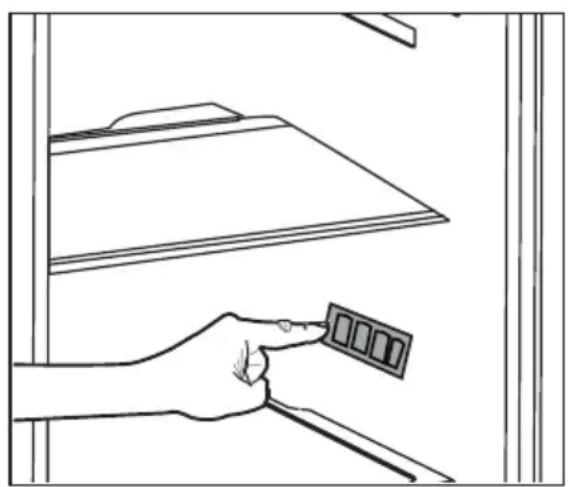
natural_image
Line drawing of a hand inserting a small rectangular component into a cabinet (no text or symbols)4.2 Initial use
Before starting to use your refrigerator, ensure that all preparations are made in accordance with the instructions in sections “Instructions for safety and environment” and “Installation”.
- Run the product without putting any food for 6 hours and do not open its door unless certainly required.

You will hear a noise when the compressor starts up. The liquids and gases sealed within the refrigeration system may also give rise to noise, even if the compressor is not running and this is quite normal.

Front edges of the product may feel warm. This is normal. These areas are designed to be warm to avoid condensation.

In some models, the instrument panel automatically turns off 5 minutes after the door has closed. It will be reactivated when the door has opened or pressed on any key.
5 Operating the product
5.1 Temperature setting button
The interior temperature of your refrigerator changes for the following reasons;
• Seasonal temperatures,
- Frequent opening of the door and leaving the door open for long periods,
- Food put into the refrigerator without cooling down to the room temperature,
- The location of the refrigerator in the room (e.g. exposing to sunlight).
- You may adjust the varying interior temperature due to such reasons by using the setting button.
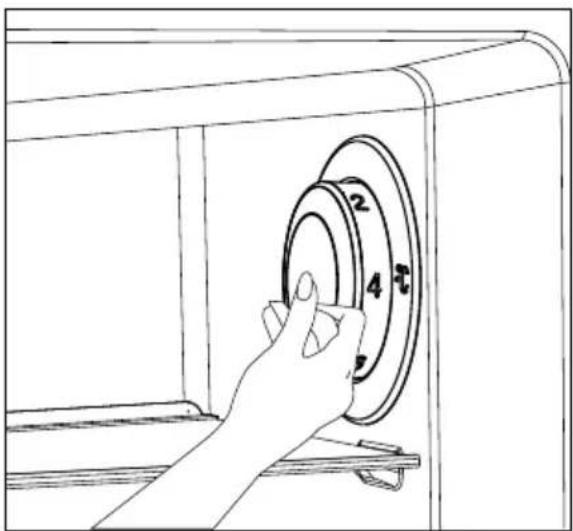
- The numbers around the control knob indicate the temperature values in "°C".
- If the ambient temperature is 25^ C, we recommend you to use the temperature control knob of your refrigerator at 4^ C. This value may be increased or decreased as required in other ambient temperatures.
natural_image
Line drawing of a hand pressing down on a circular device with numbered parts (no text or symbols)5.2 Fast freeze
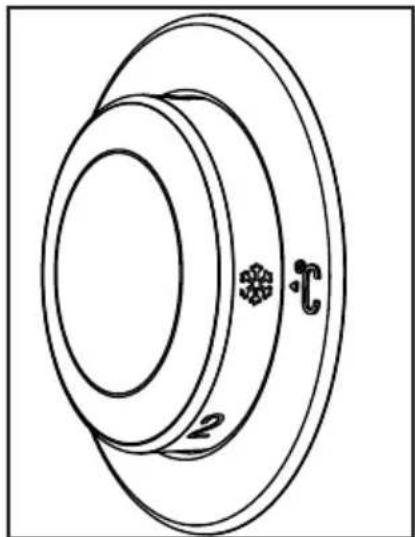
If large amounts of fresh food are going to be frozen, adjust the temperature control knob to
I ^1 max. 24 hours before putting the fresh food in the fast freeze compartment.
It is strongly recommended to keep the knob at this position at least 24 hours to freeze maximum amount of fresh food declared as freezing capacity. Take special care not to mix frozen food and fresh food.
Remember to turn the temperature control knob back to its previous position once food has frozen.
natural_image
Technical line drawing of a mechanical component with concentric rings and mounting holes (no text or symbols)5.3 Vacation function
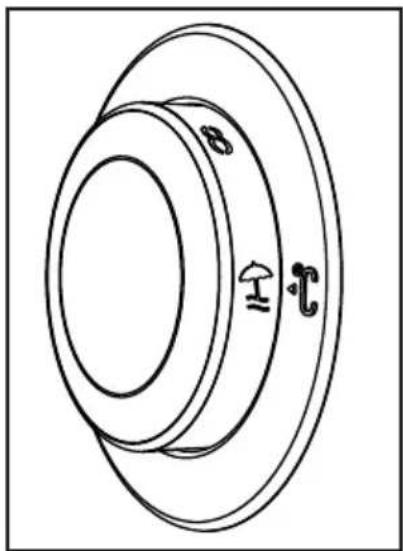
If the doors of the product are not opened for 12 hours after the temperature control knob is switched to the hottest position, then the vacation function will be activated automatically.
natural_image
Technical line drawing of a mechanical component with concentric rings and labeled features (no text or symbols)To cancel the function, change the knob setting.
It is not recommended to store food in cooler compartment when the vacation function is active.
natural_image
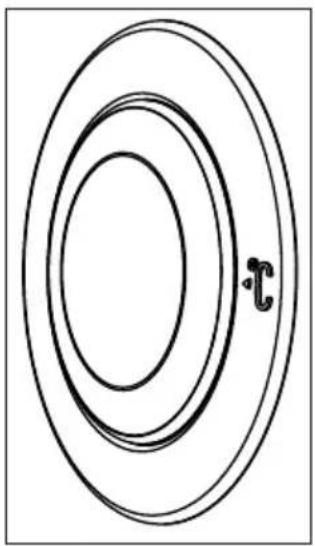
Simple concentric oval diagram with a small 't' mark at the center (no text or symbols beyond the label)- When the setting operation is completed, you may press the temperature control knob and have it hidden.
Indicator panel allows you to set the temperature and control the other functions related to the product without opening the door of the product. Just press the inscriptions on relevant buttons for function settings.
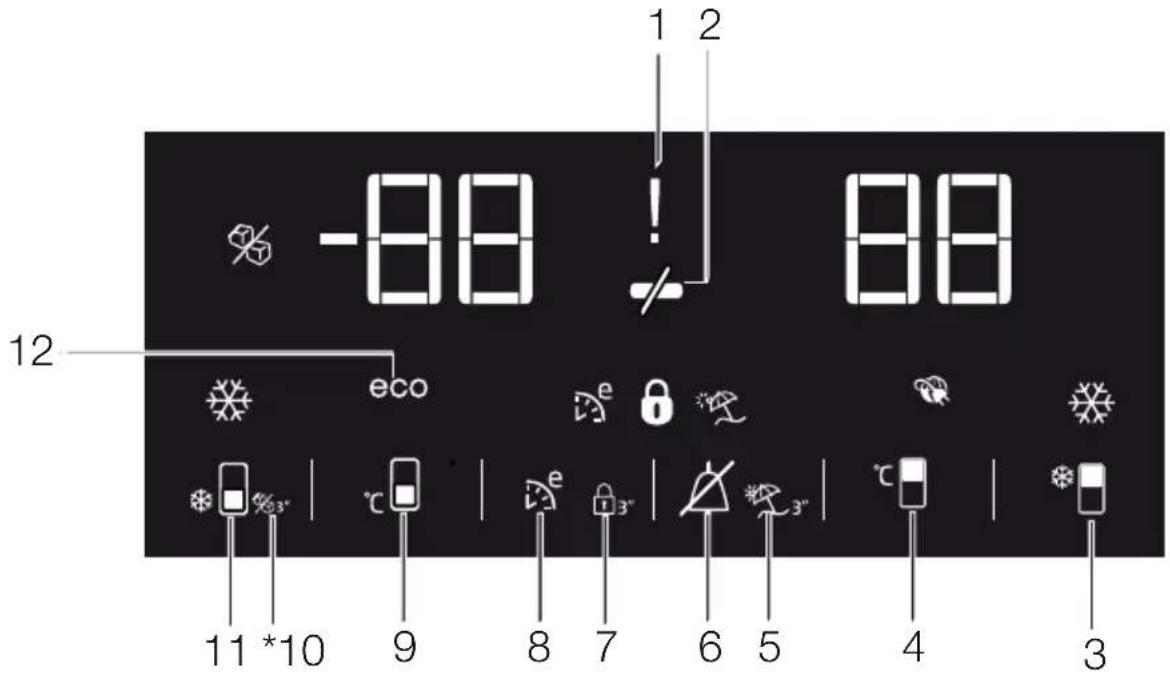
1. Power failure/High temperature / error warning indicator
This indicator (☐) illuminates during power failure, high temperature failures and error warnings. During sustained power failures, the highest temperature that the freezer compartment reaches will flash on the digital display. After checking the food located in the freezer compartment (☐) press the alarm off button to clear the warning.
Please refer to "remedies advised for troubleshooting" section on your manual if you observe that this indicator is illuminated.
2. Energy saving function (display off):
If the product doors are kept closed for a long time energy saving function is automatically activated and energy saving symbol is illuminated. (✗)
When energy saving function is activated, all symbols on the display other than energy saving symbol will turn off. When the Energy Saving function is activated, if any button is pressed or the door is opened, energy saving function will be canceled and the symbols on display will return to normal.
Energy saving function is activated during delivery from factory and cannot be canceled.

Figures in this user manual are schematic and may not match the product exactly. If the subject parts are not included in the product you have purchased, then those parts are valid for other models.
3. Quick fridge function
The button has two functions. To activate or deactivate the quick cool function press it briefly. Quick Cool indicator will turn off and the product will return to its normal settings.

Use quick cooling function when you want to quickly cool the food placed in the fridge compartment. If you want to cool large amounts of fresh food, activate this function before putting the food into the product.

If you do not cancel it, quick cooling will cancel itself automatically after 8 hours or when the fridge compartment reaches to the required temperature.

If you press the quick cooling button repeatedly with short intervals, the electronic circuit protection will be activated and the compressor will not start up immediately.

This function is not recalled when power restores after a power failure.
4. Fridge compartment temperature setting button
Press this button to set the temperature of the fridge compartment to 8, 7,6, 5,4,3, 2, 8... respectively. Press this button to set the fridge compartment temperature to the desired value.
5. Vacation Function
In order to activate vacation function, press the this button (for 3 seconds, and the vacation mode indicator will be activated. When the vacation function is activated, “- -” is displayed on the fridge compartment temperature indicator and no active cooling is performed on the fridge compartment. It is not suitable to keep the food in the fridge compartment when this function is activated. Other compartments shall be continued to be cooled as per their set temperature.
To cancel this function press
Vacation function button again.
6. Alarm off warning:
In case of power failure/high temperature alarm, after checking the food located in the freezer compartment press the alarm off button (A) to clear the warning.
7. Key lock
Press key lock button (3" simultaneously for 3 seconds. Key lock symbol
(Ⓧ will light up and key lock mode will be activated. Buttons will not function if the Key lock mode is active. Press key lock button simultaneously for 3 seconds again. Key lock symbol will turn off and the key lock mode will be exited.
Press the key lock button if you want to prevent changing of the temperature setting of the refrigerator (83"
8. Eco fuzzy
Press and hold eco fuzzy button for 1 seconds to activate eco fuzzy function. Refrigerator will start operating in the most economic
mode at least 6 hours later and the economic usage indicator will turn on when the function is active ( ). Press and hold eco fuzzy function button for 3 seconds to deactivate eco fuzzy function.
This indicator is illuminated after 6 hours when eco fuzzy is activated.
9. Freezer compartment temperature setting button
Press this button to set the temperature of the freezer compartment to -18,-19,-20,-21, -22, -23,-24, -18... respectively. Press this button to set the freezer compartment temperature to the desired value.
- Icematic off indicator
Indicates whether the icematic is on or off. On, then the icematic is not operating. To operate the icematic again press and hold the On-Off button for 3 seconds.

Water flow from water tank will stop when this function is selected. However, ice made previously can be taken from the icematic.
11. Quick freeze function button/icematic on-off button
Press this button to activate or deactivate the quick freezing function. When you activate the function, the freezer compartment will be cooled to a temperature lower than the set value. [☐]
To turn on and off the icematic press and hold it for 3 seconds.

Use the quick freeze function when you want to quickly freeze the food placed in fridge compartment. If you want to freeze large amounts of fresh food, activate this function before putting the food into the product.

If you do not cancel it, Quick Freeze will cancel itself automatically after 4 hours or when the fridge compartment reaches to the required temperature.

This function is not recalled when power restores after a power failure.
12. Economic usage indicator
Indicates that the product is running in energy-efficient mode. (e) This indicator will be active if the Freezer Compartment temperature is set to -18 or the energy efficient cooling is being performed due to Eco-Extra function.

Economic usage indicator is turned off when quick cooling or quick freeze functions are selected.
5.4 Indicator panel
Indicator panels may vary according to the product model.
Audio – visual functions on the indicator panel helps you in using your product.
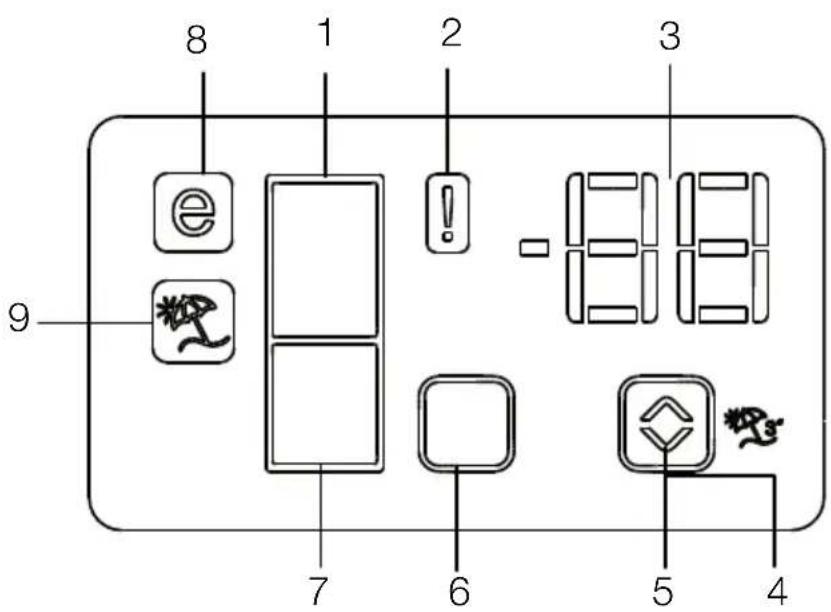
- Fridge Compartment Indicator
- Error status indicator
- Temperature indicator
- Vacation function button
- Temperature setting button
- Compartment selection button
- Freezer compartment indicator
- Economy mode indicator
- Vacation function indicator
*optional

Figures in this user manual are schematic and may not match the product exactly. If the subject parts are not included in the product you have purchased, then those parts are valid for other models.
1. Fridge compartment indicator
Fridge compartment light is illuminated while the fridge compartment temperature is set.
2. Error status indicator
If your refrigerator does not perform enough cooling or in case of a sensor fault, this indicator is activated. When this indicator is activated, "E" is displayed on the freezer compartment temperature indicator, and numbers such as "1,2,3..." are displayed on the fridge compartment temperature indicator. These numbers on the indicator inform service personnel about the error.
3. Temperature indicator
Indicates freezer, fridge compartment temperature.
4. Vacation function button
Press on Vacation Button for 3 seconds to activate this function. When the vacation function is activated, “- -” is displayed on the fridge compartment temperature indicator and no active cooling is performed on the fridge compartment. It is not suitable to keep the food in the fridge compartment when this function is activated. Other compartments shall be continued to be cooled as per their set temperature.
To cancel this function press
Vacation button again.
5. Temperature setting button
Changes the temperature of the relevant compartment between -24^ ... -18^ and 8^ ... 1^ .
6. Compartment selection button
Selection button: Press compartment selection button to switch between fridge and freezer compartments.
7. Freezer compartment indicator
Fridge compartment light is illuminated while the freezer compartment temperature is set.
8. Economy mode indicator
Indicates that the refrigerator operates in energy saving mode. This display shall be activated if the freezer compartment temperature is set to -18^ .
9. Vacation function indicator
Indicates that vacation is activated.
5.5 Indicator panel
Indicator panel allows you to set the temperature and control the other functions related to the product without opening the door of the product. Just press the inscriptions on relevant buttons for function settings.
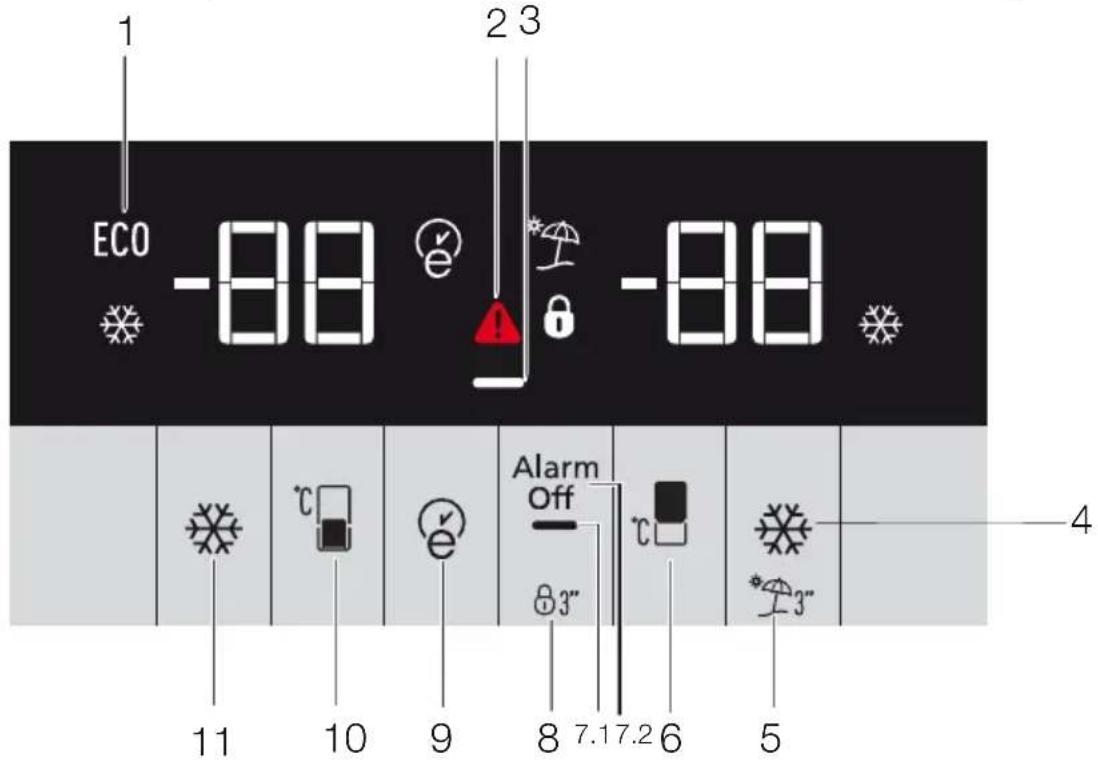
1. Economy
This symbol is illuminated when the freezer compartment is set to -18°C'ye as the most economical setting value (ECD). Economy indicator is turned off when quick cooling or quick freeze functions are selected.
2. Power failure/High temperature / error warning indicator
This indicator (A) illuminates during power failure, high temperature failures and error warnings. During sustained power failures, the highest temperature that the freezer compartment reaches will flash on the digital display. After checking the food located in the freezer compartment (↓) press the alarm off button to clear the warning.
Please refer to "remedies advised for troubleshooting" section on your manual if you observe that this indicator is illuminated.
3. Energy saving function (display off)
If the product doors are kept closed for a long time energy saving function is automatically activated and energy saving symbol is illuminated. When energy saving function is activated, all symbols on

Figures in this user manual are schematic and may not match the product exactly. If the subject parts are not included in the product you have purchased, then those parts are valid for other models.
the display other than energy saving symbol will turn off. When the Energy Saving function is activated, if any button is pressed or the door is opened, energy saving function will be canceled and the symbols on display will return to normal.
4. Quick cool
Quick cooling indicator (✿) is illuminated when quick cooling function is activated and fridge compartment temperature indicator value is displayed as 1. To cancel this function press Quick cooling button again. Quick cooling indicator will turn off and refrigerator will return to its normal settings. Quick cooling function is canceled automatically in 1 hour if you do not cancel it before. If you want to cool large amounts of fresh food, press the Quick cooling button before putting the food into the fridge compartment.
5. Vacation function
In order to activate vacation function, press the button no. (5) for 3 seconds, and the vacation mode indicator activates. When the vacation function is activated, “- -” is displayed on the fridge compartment temperature indicator and no active cooling is performed on the fridge compartment. It is not suitable to keep the food in the fridge compartment when this function is activated. Other compartments shall be continued to be cooled as per their set temperature. To cancel this function press Vacation function button again.
6. Freezer compartment temperature setting
Temperature setting for freezer compartment is performed here. When button no. 6 is pressed, you may set the temperature of the freezer compartment to -18, -19, -20, -21, -22, -23 and -24 respectively.
7.1. Energy saving function (display off):
Energy saving symbol ( ) is illuminated and Energy saving function is activated when you press this button ( ). When energy saving function is activated, all symbols on the display other than energy saving symbol will turn off. When the Energy Saving function is activated, if any button is pressed or the door is opened, energy saving function will be canceled and the symbols on display will return to normal. Energy saving symbol is turned off and energy saving function is deactivated when you press this button ( ) again.
7.2. Alarm off warning:
In case of power failure/high temperature alarm, after checking the food located in the freezer compartment press the alarm off button to clear the warning.
8. Key lock
Press key lock button (8) simultaneously for 3 seconds. Key lock symbol 🔒 will light up and key lock mode will be activated. Buttons will not function if the Key lock mode is active. Press key lock button simultaneously for 3 seconds again. Key lock symbol will turn off and the key lock mode will be exited.
Press the key lock button if you want to prevent changing of the temperature setting of the refrigerator (8)3"
9. Eco fuzzy
Press and hold eco fuzzy button for 1 seconds to activate eco fuzzy function. Refrigerator will start operating in the most economic mode at least 6 hours later and the economic usage indicator will turn on when the function is active (e). Press and hold eco fuzzy function button for 3 seconds to deactivate eco fuzzy function.
This indicator is illuminated after 6 hours when eco fuzzy is activated.
10. Fridge compartment temperature setting
When the button no. (10) is pressed, you may set the temperature of the fridge compartment to 8,7,6,5,4,3,2 and 1 respectively ).
11. Fast freeze
Press button no. (10) for fast freeze operation, quick freeze indicator (✗ shall be activated.
Quick freeze indicator is illuminated when quick freeze function is activated and fridge compartment temperature indicator is displayed as -27. To cancel this function press quick freeze button again.
Quick freeze indicator will turn off and refrigerator will return to its normal settings. Quick freeze function is canceled automatically in 24 hour if you do not cancel it before. If you want to freeze large amounts of fresh food, press the quick freeze button before putting the food into the freezer compartment.
5.6 Ice container
- Remove the ice container from the freezer compartment.
• Fill the ice container with water. - Place the ice container in the freezer compartment. About two hours later, the ice is ready.
- Remove the ice container from the freezer compartment and bend it over the service plate. Ice cubes will easily fall down to the service plate.
5.7 Egg holder
You can install the egg holder to the desired door or body shelf. If it will be placed on body shelves than the lower cooler shelves are recommended.
Never place the egg holder in the freezer compartment
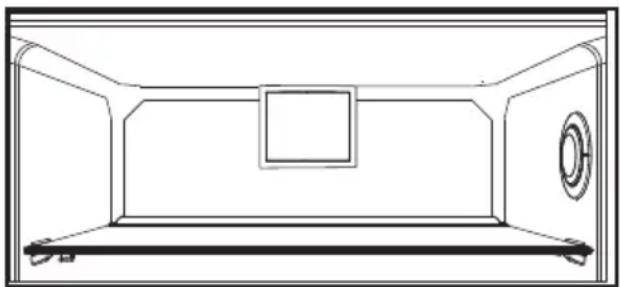
5.8 Fan
Fan is designed to ensure homogeneous distribution and circulation of the cold air inside your refrigerator. Operation time of the fan may vary depending on the properties of your product.
While the fan works only with the compressor in some products, the control system determines its operation time in some products in accordance with the cooling requirement.
natural_image
Line drawing of a rectangular room with a central square and side panel (no text or symbols)5.9 Crisper
Crisper of the product is designed specially to keep the vegetables fresh without loosing their humidity. For this purpose, cool air circulation is intensified around the crisper in general.
5.10 Chiller compartment
(This feature is optional)
Use this compartment to store delicatessen that shall be stored in a lower temperature or meat products that you will consume in a short time.
Chiller compartment is the coolest place in your refrigerator where you can keep dairy products, meat, fish and poultry under ideal storage conditions. Fruits and vegetables should not be stored in this compartment.
(This feature is optional)
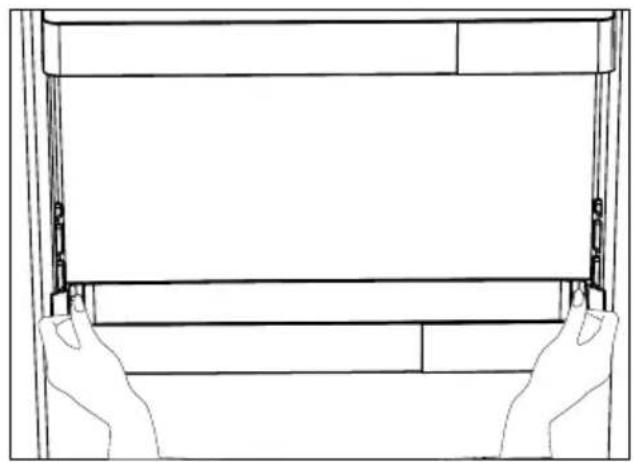
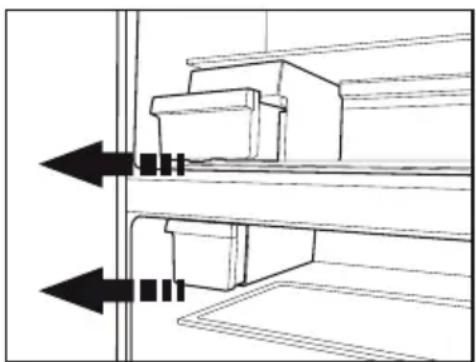
Moving door shelf may be fixed in 3 different positions.
Press the buttons shown in the sides at the same amount in order to move the shelf. Shelf shall be movable.
Move the shelf up or down.
Release the buttons when you have the shelf in the desired position. Shelf shall be fixed on the position where you release the buttons.
natural_image
Line drawing of two hands opening a rectangular frame with a blank sheet (no text or symbols)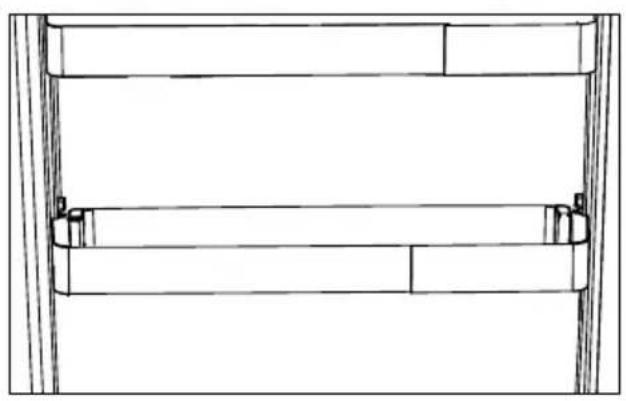
natural_image
Technical line drawing of a mechanical assembly with no visible text or symbols5.12 Sliding storage container
(This feature is optional)
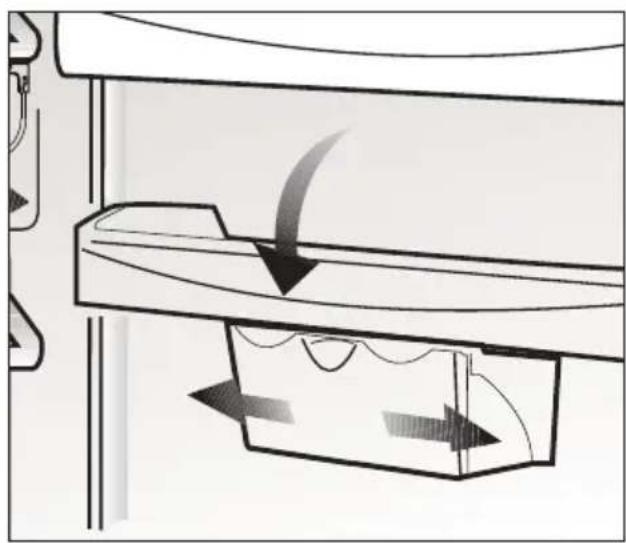
This accessory is designed to increase the usable volume of the door shelves.
It allows you to easily place the tall bottles, jars and tins to the lower bottle shelf thanks to its ability to move right or left.
natural_image
Diagram of a mechanical or fluidic system with directional arrows indicating flow or movement (no text or symbols present)5.13 Blue light
(This feature is optional)
This accessory is designed to increase the usable volume of the door shelves.
It allows you to easily place the tall bottles, jars and tins to the lower bottle shelf thanks to its ability to move right or left.
5.14 Humidity controlled crisper 5.15 Auto Icematic
(FreSHelf)
(This feature is optional)
Humidity rates of the vegetables and fruit are kept under control with the feature of humidity-controlled crisper and the food is ensured to stay fresh for longer.
We recommend you to place the leafy vegetables such as lettuce, spinach and the vegetables which are sensitive to humidity loss, in a horizontal manner as much as possible inside the crisper, not on their roots in a vertical position.
While the vegetables are being placed, specific gravity of the vegetables should be taken into consideration. Heavy and hard vegetables should be put at the bottom of the crisper and the lightweight and soft vegetables should be placed over.
Never leave the vegetables inside the crisper in their bags. If the vegetables are left inside their bags, this will cause them to decompose in a short period of time. In case contacting with other vegetables is not preferred for hygiene concerns, use a perforated paper and other similar packaging materials instead of a bag.
Do not place together the pear, apricot, peach, etc. and apple in particular which have a high level of generation of ethylene gas in the same crisper with the other vegetables and fruit. The ethylene gas which is emitted by these fruit may cause the other fruit to ripen faster and decompose in a shorter time.
(This feature is optional)
The Auto Icematic allows you to make ice in the fridge easily. Remove the water tank in the fridge compartment, fill it wilt water and install it back to obtain ice from the Icematic.
First ice cubes will be ready in approximately 2 hours in the Icematic drawer located in the freezer compartment.
If you fill the water tank completely, you will be able to obtain approximately 60-70 ice cubes.
Change the water in water tank if it has waited around 2-3 weeks.

For the products having automatic Icematic, sound may be heard during ice pouring. This sound is normal and does not signal any error.
natural_image
Technical line drawing of a mechanical assembly with two arrows indicating direction (no text or symbols)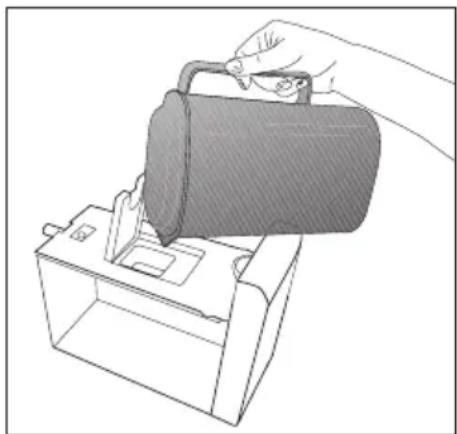
natural_image
Line drawing of a hand pouring liquid into a container (no text or symbols)5.16 Description and cleaning of odor filter
(This feature is optional)
Odor filter prevents unpleasant odor build-up in your product.
- Pull the cover into which the odor filter is installed downwards from the front section and remove as illustrated.
- Leave the filter under sunlight for one day. Filter will be cleaned during this time.
- Install the filter back to its place.

Odor filter must be cleaned once in a year.
5.17 Freezing fresh food
- In order to preserve the quality of the food, it shall be frozen as quickly as possible when it is placed in the freezer compartment, use the fast freezing feature for this purpose.
- You may store the food longer in freezer compartment when you freeze them while they are fresh.
- Pack the food to be frozen and close the packing so that it would not allow entrance of air.
- Ensure that you pack your food before putting them in the freezer. Use freezer containers, foils and moisture-proof papers, plastic bags and other packing materials instead of traditional packing papers.
- Label each pack of food by adding the date before freezing. You may distinguish the freshness of each food pack in this way when you open your freezer each time. Store the food frozen before in the front side of compartment to ensure that they are used first.

The freezer compartment defrosts automatically.
- Frozen food must be used immediately after they are thawed and they should not be re-frozen.
- Do not freeze too large quantities of food at one time.
| Freezer Compartment Setting | Fridge compartment Setting | Remarks |
| -18°C 4°C This is the normal recommended setting. | ||
| -20,-22 or -24°C | 4°C | These settings are recommended when the ambient temperature exceeds 30°C. |
| Quick Freeze 4°C | Use when you wish to freeze your food in a short time. Your product will return to its previous mode when the process is over. | |
| -18°C or colder 2°C | Use these settings if you think that your fridge compartment is not cold enough because of the hot ambient conditions or frequent opening and closing of the door. | |
5.18 Recommendations for preserving the frozen food
Compartment shall be set to -18^ at least.
- Put packages in the freezer as quickly as possible after purchase without allowing the to thaw.
- Check whether the "Use By" and "Best Before" dates on the packaging are expired or not before freezing it.
- Ensure that the package of the food is not damaged.
5.19 Deep-freeze information
According to IEC 62552 standards, the product shall freeze at least 4.5 kg of food at 25^ C ambient temperature to -18^ C or lower within 24 hours for every 100-litres of freezer volume.
It is possible to preserve the food for a long time only at -18^ C or lower temperatures.
You can keep the freshness of food for many months (at -18^ C or lower temperatures in the deep freeze).
Foods to be frozen should not be allowed to come in contact with the previously frozen items to prevent them from getting thawed partially.
Boil the vegetables and drain their water in order to store vegetables for a longer time as frozen. After draining their water, put them in air-proof packages and place them inside the freezer. Food such as bananas, tomatoes, lettuce, celery, boiled eggs, potatoes are not suitable for freezing. When these foods are frozen, only their nutritional value and taste shall be affected negatively. They shall not be spoiled so that they would create a risk for human health.
5.20 Placing the food
| Freezer compartment shelves | Various frozen food such as meat, fish, ice cream, vegetables and etc. |
| Refrigerator compartment shelves | Food in pans, covered plates and closed containers, eggs (in closed container) |
| Door shelves of fridge compartment | Small and packaged food or beverage |
| Crisper | Vegetables and fruits |
| Fresh zone compartment | Delicatessen (breakfast food, meat products that shall be consumed in a short time) |
5.21 Door open warning
(This feature is optional)
Door open warning is given to user both visually and acoustically. If the warning continues for 10 minutes, interior lights will be turned off.
5.22 Changing the door opening direction
Door opening direction of your refrigerator can be changed according to the place you are using it. If this is necessary, please call your nearest Authorized Service.
Above description is a general expression. For information on changing the opening direction of the door, you must refer to the warning label located on the inner side of the door.
5.23 Illumination lamp
LED lamps are used as illumination lamps. Contact authorized service in case of any problem with this type of light. The lamp(s) used in this appliance is not suitable for household room illumination. The intended purpose of this lamp is to assist the user to place foodstuffs in the refrigerator/freezer in a safe and comfortable way.
6. Maintenance and cleaning
Service life of the product extends and frequently faced problems decrease if cleaned at regular intervals.
WARNING: Unplug the product before cleaning it.
- Never use gasoline, benzene or similar substances for cleaning purposes.
- Never use any sharp and abrasive tools, soap, household cleaners, detergent and wax polish for cleaning.
- Dissolve one teaspoon of carbonate in half litre of water. Soak a cloth with the solution and wrung it thoroughly. Wipe the interior of the refrigerator with this cloth and the dry thoroughly.
- Make sure that no water enters the lamp housing and other electrical items.
- If you will not use the refrigerator for a long period of time, unplug it, remove all food inside, clean it and leave the door ajar.
- Check regularly that the door gaskets are clean. If not, clean them.
- To remove door and body shelves, remove all of its contents.
- Remove the door shelves by pulling them up. After cleaning, slide them from top to bottom to install.
- Never use cleaning agents or water that contain chlorine to clean the outer surfaces and chromium coated parts of the product. Chlorine causes corrosion on such metal surfaces
- Do not use sharp, abrasive tools, soap, household cleaning agents, detergents, kerosene, fuel oil, varnish etc. to prevent removal and deformation of the prints on the plastic part. Use lukewarm water and a soft cloth for cleaning and then wipe it dry.
6.1 Avoiding bad odours
Materials that may cause odour are not used in the production of our refrigerators. However, due to inappropriate food preserving conditions and not cleaning the inner surface of the refrigerator as required can bring forth the problem of odour. Pay attention to following to avoid this problem:
- Keeping the refrigerator clean is important. Food residuals, stains, etc. can cause odour. Therefore, clean the refrigerator with carbonate dissolved in water every 15 days. Never use detergents or soap.
- Keep the food in closed containers. Microorganisms spreading out from uncovered containers can cause unpleasant odours.
- Never keep the food that have expired best before dates and spoiled in the refrigerator.
6.2 Protecting the plastic surfaces
Do not put liquid oils or oil-cooked meals in your refrigerator in unsealed containers as they damage the plastic surfaces of the refrigerator. If oil is spilled or smeared onto the plastic surfaces, clean and rinse the relevant part of the surface at once with warm water.
6.3 Door Glasses
Remove the protective foil on the glasses.
There is a coating on the surface of the glasses. This coating minimizes the stain build-up and helps to remove the possible stains and dirt easily. Glasses that are not protected with such a coating may be subject to persistent binding of air or water based organic or inorganic dirt such as limescale, mineral salts, unburned hydrocarbons, metal oxides and silicones that can easily and quickly cause stains or material damage. Keeping the glass clean becomes too difficult despite the regular cleaning. Consequently, the appearance and the transparency of the glass deteriorates. Harsh and corrosive cleaning methods and compounds will intensify these defects and speed up the deterioration process.
Water-based cleaning products that are not alkaline and corrosive must be used for regular cleaning purposes.
Non-alkaline and non-corrosive materials must be used for cleaning so that the service life of this coating lasts for a long time.
These glasses are tempered to increase their durability against impacts and breaking.
A safety film is also applied to their rear surfaces as an extra safety measure in order to prevent them from causing damage to their surrounding in case of a breakage.
*Alkali is a base that forms hydroxide ions (OH ^- ) when it is dissolved in water.
Li (Lithium), Na (Sodium), K (Potassium) Rb (Rubidium), Cs (Cesium) and artificial and radioactive Fr (Fan-sium) metals are called ALKALI METALS.
7. Troubleshooting
Please review this list before calling the service. It will save your time and money. This list includes frequent complaints that are not arising from defective workmanship or material usage. Some of the features described here may not exist in your product.
The refrigerator does not operate.
- The plug is not inserted into the socket correctly. >>> Insert the plug into the socket securely.
- The fuse of the socket which your refrigerator is connected to or the main fuse have blown out. >>> Check the fuse.
Condensation on the side wall of the fridge compartment (MULTIZONE, COOL CONTROL and FLEXI ZONE).
- Door has been opened frequently. >>> Do not open and close the door of refrigerator frequently.
- Ambient is very humid. >>> Do not install your refrigerator into highly humid places.
- Food containing liquid is stored in open containers. >>> Store food with liquid content in closed containers.
- Door of the refrigerator is left ajar. >>> Do not leave the doors of your refrigerator open for a long time.
- Thermostat is set to a very cold level. >>> Set the thermostat to a suitable level.
Compressor is not running
- Protective thermic of the compressor will blow out during sudden power failures or plug-out plug-ins as the refrigerant pressure in the cooling system of the refrigerator has not been balanced yet. The refrigerator will start running approximately after 6 minutes. Please call the Authorised Service Agent if the refrigerator does not start at the end of this period.
- The fridge is in defrost cycle. >>> This is normal for a full-automatically defrosting refrigerator. Defrosting cycle occurs periodically.
- The refrigerator is not plugged into the socket. >>> Make sure that the plug is fit into the socket.
- Temperature settings are not made correctly. >>> Select the suitable temperature value.
- There is a power outage. >>> Refrigerator returns to normal operation when the power restores.
The operation noise increases when the refrigerator is running.
- The operating performance of the refrigerator may change due to the changes in the ambient temperature. It is normal and not a fault.
The refrigerator is running frequently or for a long time.
- New product may be wider than the previous one. Larger refrigerators operate for a longer period of time.
- The room temperature may be high. >>> It is normal that the product operates for longer periods in hot ambient.
- The refrigerator might be plugged in recently or might be loaded with food. >>> When the refrigerator is plugged in or loaded with food recently, it will take longer for it to attain the set temperature. This is normal.
- Large amounts of hot food might be put in the refrigerator recently. >>> Do not put hot food into the refrigerator.
- Doors might be opened frequently or left ajar for a long time. >>> The warm air that has entered into the refrigerator causes the refrigerator to run for longer periods. Do not open the doors frequently.
- Freezer or fridge compartment door might be left ajar. >>> Check if the doors are closed completely.
- The refrigerator is adjusted to a very low temperature. >>> Adjust the refrigerator temperature to a warmer degree and wait until the temperature is achieved.
- Door seal of the fridge or freezer may be soiled, worn out, broken or not properly seated. >>> Clean or replace the seal. Damaged/broken seal causes the refrigerator to run for a longer period of time in order to maintain the current temperature.
Freezer temperature is very low while the fridge temperature is sufficient.
- The freezer temperature is adjusted to a very low value. >>> Adjust the freezer temperature to a warmer degree and check.
Fridge temperature is very low while the freezer temperature is sufficient.
- The fridge temperature is adjusted to a very low value. >>> Adjust the fridge temperature to a warmer degree and check.
Food kept in the fridge compartment drawers is frozen.
- The fridge temperature is adjusted to a very high value. >>> Adjust the fridge temperature to a lower value and check.
Temperature in the fridge or freezer is very high.
- The fridge temperature is adjusted to a very high value. >>> Fridge compartment temperature setting has an effect on the temperature of the freezer. Change the temperatures of the fridge or freezer and wait until the relevant compartments attain a sufficient temperature.
- Doors are opened frequently or left ajar for a long time. >>> Do not open the doors frequently.
• Door is ajar. >>> Close the door completely. - The refrigerator is plugged in or loaded with food recently. >>> This is normal. When the refrigerator is plugged in or loaded with food recently, it will take longer for it to attain the set temperature.
- Large amounts of hot food might be put in the refrigerator recently. >>> Do not put hot food into the refrigerator.
Vibrations or noise.
- The floor is not level or stable. >>> If the refrigerator rocks when moved slowly, balance it by adjusting its feet. Also make sure that the floor is strong enough to carry the refrigerator, and level.
- The items put onto the refrigerator may cause noise. >>> Remove the items on top of the refrigerator.
There are noises coming from the refrigerator like liquid flowing, spraying, etc.
- Liquid and gas flows occur in accordance with the operating principles of your refrigerator. >>>It is normal and not a fault.
Whistle comes from the refrigerator.
- Fans are used in order to cool the refrigerator. It is normal and not a fault.
Condensation on the inner walls of refrigerator.
- Hot and humid weather increases icing and condensation. It is normal and not a fault.
- Doors are opened frequently or left ajar for a long time. >>> Do not open the doors frequently. Close them if they are open.
• Door is ajar. >>> Close the door completely.
Humidity occurs on the outside of the refrigerator or between the doors.
- There might be humidity in the air; this is quite normal in humid weather. >>> When the humidity is less, condensation will disappear.
- If moisture forms in the area between the two refrigerator doors, disable the “Energy Saving” mode.
Bad odour inside the refrigerator.
- No regular cleaning is performed. >>> Clean the inside of the refrigerator regularly with a sponge, lukewarm water or carbonate dissolved in water.
- Some containers or package materials may cause the smell. >>> Use a different container or different brand packaging material.
- Food is put into the refrigerator in uncovered containers. >>> Keep the food in closed containers. Microorganisms spreading out from uncovered containers can cause unpleasant odours.
- Remove the foods that have expired best before dates and spoiled from the refrigerator.
The door is not closing.
- Food packages are preventing the door from closing. >>> Replace the packages that are obstructing the door.
- The refrigerator is not completely even on the floor. >>> Adjust the feet to balance the refrigerator.
- The floor is not level or strong. >>> Also make sure that the floor is level and strong enough to carry the refrigerator.
Crispers are stuck.
- The food is touching the ceiling of the drawer. >>> Rearrange food in the drawer.

WARNING: If you cannot eliminate the problem although you follow the instructions in this section, consult your dealer or the Authorised Service Agent. Never try to repair a non-functional product yourself.
Notes
Notes
- HC uyarısı
- İlk kullanım
- Hızlı dondurma
- Gösterge paneli
- Sebzelik
- Nem kontrollü sebzelik
- (FreSHelf)
- Koku filtresi
- Important instructions for safety and environment 3
- Your Refrigerator 9
- Installation 10
- Preparation 14
- Operating the product 16
- Maintenance and cleaning 33
- Troubleshooting 35
- Please read this manual first!
- The user manual will help you use the product in a fast and safe way.
- Symbols and their descriptions
- Important instructions for safety and environment
- General safety
- HC warning
- For products with a water dispenser
- Intended use
- Children's safety
- Compliance with WEEE Directive and Disposing of the Waste Product:
- Compliance with RoHS Directive:
- Package information
- Your Refrigerator
- Installation
- Appropriate installation location
- Installing the plastic wedges
- Adjusting the feet
- Electrical connection
- Reversing the doors
- Reversing the doors
- Preparation
- Things to be done for energy saving
- Initial use
- Operating the product
- Temperature setting button
- Fast freeze
- Vacation function
- Power failure/High temperature / error warning indicator
- Energy saving function (display off):
- Quick fridge function
- Fridge compartment temperature setting button
- Vacation Function
- Vacation function button again.
- Alarm off warning:
- Key lock
- Eco fuzzy
- Freezer compartment temperature setting button
- Quick freeze function button/icematic on-off button
- Economic usage indicator
- Indicator panel
- Fridge compartment indicator
- Error status indicator
- Temperature indicator
- Vacation function button
- Temperature setting button
- Compartment selection button
- Freezer compartment indicator
- Economy mode indicator
- Vacation function indicator
- Indicator panel
- Economy
- Power failure/High temperature / error warning indicator
- Energy saving function (display off)
- Quick cool
- Freezer compartment temperature setting
- Energy saving function (display off):
- Alarm off warning:
- Key lock
- Eco fuzzy
- Fridge compartment temperature setting
- Fast freeze
- Ice container
- Egg holder
- Fan
- Crisper
- Chiller compartment
- (This feature is optional)
- Sliding storage container
- Blue light
- Humidity controlled crisper 5.15 Auto Icematic
- Description and cleaning of odor filter
- Freezing fresh food
- Recommendations for preserving the frozen food
- Deep-freeze information
- Placing the food
- Door open warning
- Changing the door opening direction
- Illumination lamp
- Maintenance and cleaning
- Avoiding bad odours
- Protecting the plastic surfaces
- Door Glasses
- Troubleshooting
- The refrigerator does not operate.
- Condensation on the side wall of the fridge compartment (MULTIZONE, COOL CONTROL and FLEXI ZONE).
- Compressor is not running
- The operation noise increases when the refrigerator is running.
- The refrigerator is running frequently or for a long time.
- Freezer temperature is very low while the fridge temperature is sufficient.
- Fridge temperature is very low while the freezer temperature is sufficient.
- Food kept in the fridge compartment drawers is frozen.
- Temperature in the fridge or freezer is very high.
- Vibrations or noise.
- There are noises coming from the refrigerator like liquid flowing, spraying, etc.
- Whistle comes from the refrigerator.
- Condensation on the inner walls of refrigerator.
- Humidity occurs on the outside of the refrigerator or between the doors.
- Bad odour inside the refrigerator.
- The door is not closing.
- Crispers are stuck.
- Notes
Brand : GRUNDIG
Model : GKNE 5300
Category : Refrigerator