TVP 5481 - Tumble dryer Cylinda - Free user manual and instructions
Find the device manual for free TVP 5481 Cylinda in PDF.


| Product Type | Tumble dryer |
| Brand | Cylinda |
| Model | TVP 5481 |
| Width | 59.5 cm |
| Depth | 54.5 cm |
| Height | 85 cm |
| Weight | 35 kg |
| Power Supply | 220-240 V, 50 Hz |
| Energy Class | A++ |
| Drying Capacity | 8 kg |
| Drying Technology | Heat pump |
| Programs | Cotton, Synthetics, Delicates, Wool, Mix, Quick 30 min |
| Noise Level | 65 dB(A) |
| Display | LED, remaining time indicator |
| Child Lock | Yes |
| Delay Start | Up to 24 hours |
| Lint Filter | Removable, clean after each cycle |
| Condenser Cleaning | Accessible at bottom, clean monthly |
| Spare Parts Availability | Filters, belts, heating elements available |
| Repair Index | 8.0/10 |
Frequently Asked Questions - TVP 5481 Cylinda
User questions about TVP 5481 Cylinda
0 question about this device. Answer the ones you know or ask your own.
Ask a new question about this device
Download the instructions for your Tumble dryer in PDF format for free! Find your manual TVP 5481 - Cylinda and take your electronic device back in hand. On this page are published all the documents necessary for the use of your device. TVP 5481 by Cylinda.
USER MANUAL TVP 5481 Cylinda
natural_image
Exterior view of a modern kitchen appliance set with washing machines, ovens, and cabinets against a solid pink background (no text or symbols visible)TVP 5481
Cylinda
år efter år
natural_image
Simple line drawing of an open book with no text or symbols visiblenatural_image
Pure electrical circuit lines without any symbolsnatural_image
Line drawing of a hand inserting a bag into a circular device (no text or symbols)
natural_image
Technical line drawing of a mechanical component with no visible text or symbols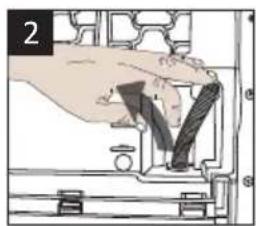
natural_image
Hand operating a mechanical component with a tool, no visible text or symbols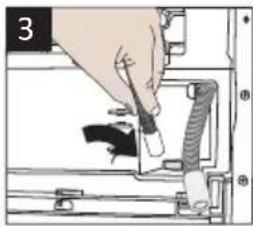
natural_image
Illustration of a hand inserting a cable into a device (no text or symbols visible)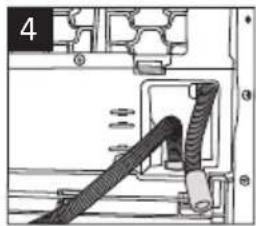
natural_image
Technical diagram of a mechanical assembly with a coiled cable and housing (no text or symbols)
natural_image
Illustration of a hand holding a small mechanical component with rotational arrows indicating motion (no text or symbols)
natural_image
Line drawing of a washing machine with a circular vent and a rectangular base, showing sound waves (no text or symbols)
natural_image
Technical line drawing of a mechanical device with internal components and a magnified inset showing sound waves (no text or symbols)3.8 Byta belysningen
natural_image
Diagram of a washing machine with internal components and lid, showing no text or symbols
natural_image
Simple black-and-white diagram of a triangular shape with a droplet, resembling a stylized pen or marker (no text or symbols)Öppen lucka
natural_image
Technical diagram of a mechanical device with internal components and a red arrow indicating a specific part (no text or symbols present)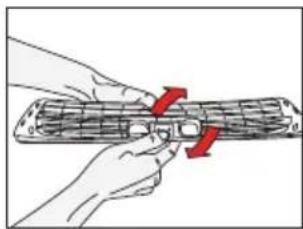
natural_image
Illustration of hands holding a cylindrical object with red arrows indicating direction (no text or symbols)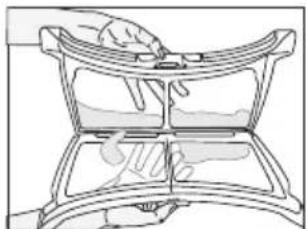
natural_image
Line drawing of a hand pressing down on a curved mechanical component (no text or symbols)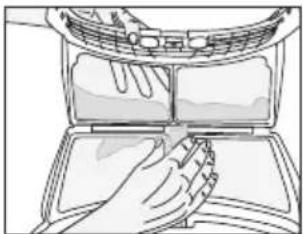
natural_image
Illustration of hands cleaning a car air conditioner cover (no text or symbols)natural_image
Line drawing of a hand using a tool to clean or wash material inside a device (no text or symbols)natural_image
Line drawing of hands cleaning a circular mechanical component (no text or symbols)
natural_image
Line drawing of hands cleaning a washing machine drum (no text or symbols)natural_image
Line drawing of a hand placing a small object into a circular mechanical component (no text or symbols)natural_image
Line drawing of hands installing or adjusting a device panel on a machine (no text or symbols visible)natural_image
Line drawing of a hand holding a mechanical component with a tool, no text or symbols presentnatural_image
Line drawing of a hand cleaning a window with a red-handled tool (no text or symbols)natural_image
Illustration of a hand inserting a device into a computer case (no text or symbols visible)natural_image
Illustration of a hand inserting a component into a device casing (no text or symbols visible)- Open the filter drawer by pressing the red button.
natural_image
Illustration of a hand using a tool to press down a card into a device (no text or symbols visible)natural_image
Diagram of a mechanical device with internal components and directional arrows indicating movement or assembly (no text or symbols)natural_image
Diagram showing a device being processed into a closed notebook or holder (no text or symbols present)
natural_image
Open and closed diagram of a multi-compartment container or storage unit (no text or symbols visible)natural_image
Illustration of a hand holding a device with an arrow indicating rotation (no text or symbols present)natural_image
Hand inserting a component into a device casing (no text or symbols visible)natural_image
Illustration of a hand pressing down on a computer monitor with a red arrow pointing to the screen (no text or symbols)
natural_image
Diagram of a hand holding a device with a black X mark, no text or symbols present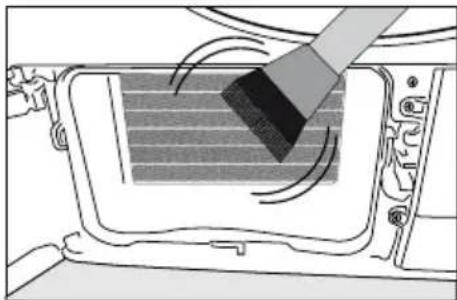
natural_image
Diagram showing a brush applying material to a panel inside a vehicle (no text or symbols visible)
Please read this user manual first!
Dear Customer,
Thank you for preferring a Cylinda product. We hope that your product which has been manufactured with high quality and technology will give you the best results. We advise you to read through this manual and the other accompanying documentation carefully before using your product and keep it for future reference. If you transfer the product to someone else, give its manual as well. Pay attention to all details and warnings specified in the user manual and follow the instructions given therein.
Use this user manual for the model indicated on the cover page.

natural_image
Simple line drawing of an open book with no text or symbols visibleRead the instructions.
Explanation of symbols
Throughout this user manual the following symbols are used:

Important information or useful hints about usage.

Warning for hazardous situations with regard to life and property.
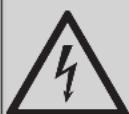
Warning against electric shock.

Warning against hot surfaces.

Warning against fire hazard.

Packaging materials of the product are manufactured from recyclable materials in accordance with our National Environment Regulations.
Do not dispose of the packaging wastes with the domestic waste or other wastes, discard them to the dedicated collection points designated by the local authorities.
1 Important instructions for safety and environment
This section contains safety instructions that will help protect from risk of personal injury or property damage. Failure to follow these instructions shall void any warranty.
1.1 General safety
- The dryer can be used by children at and above 8 years old and by persons whose physical, sensory or mental capabilities were not fully developed or who lack experience and knowledge provided that they are supervised or trained on the safe usage of the product and the risks it brings out. Children should not play with the product. Cleaning and maintenance works should not be performed by children unless they are supervised by someone.
- Children of less than 3 years should be kept away unless continuously supervised.
- Adjustable feet should not be removed. The gap between the dryer and the floor should not be reduced with materials such as carpet, wood and tape. This will cause problems with the dryer.
- Always have the installation and repairing procedures carried out by the Authorized Service. Manufacturer shall not be held liable for damages that may arise from procedures carried out by unauthorized persons.
- Never wash the dryer by spraying or pouring water onto it! There is the risk of electric shock!
Important instructions for safety and environment
1.1.1 Electrical safety

Electrical safety instructions should be followed while electrical connection is made during the installation.

The appliance must not be supplied through an external switching device, such as a timer, or connected to a circuit that is regularly switched on and off by utility.
- Connect the dryer to a grounded outlet protected by a fuse at the value specified on the type label. Have the grounding installation performed by a qualified electrician. Our company shall not be liable for any damages that will arise when the dryer is used without grounding in accordance with the local regulations.
- The voltage and allowed fuse protection is stated on the type label plate.
- The voltage specified on the type label must be equal to your mains voltage.
- Unplug the dryer when it is not in use.
- Unplug the dryer from the mains during installation, maintenance, cleaning and repair works.
- Do not touch the plug with wet hands! Never unplug by pulling on the cable, always pull out by grabbing the plug.
- Do not use extension cords, multi-plugs or adaptors to connect the dryer to power supply in order to decrease the risk of fire and electric shock.
- Power cable plug must be easily accessible after installation.
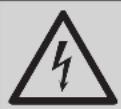
Damaged mains cable should be changed notifying the Authorized Service.
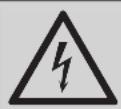
If the dryer is faulty, it must not be operated unless it is repaired by an authorized service agent! There is the risk of electric shock!
Important instructions for safety and environment
1.1.2 Product safety

Superheating of the clothes inside of the dryer can occur if you cancel the programme or in the event of a power failure whilst the dryer is running, this concentration of heat can cause self-combustion and fire so always activate the ventilation programme to cool down or quickly remove all laundry from the dryer in order to hang them up and dissipate the heat.

Points to be taken into consideration for fire hazard:
Below specified laundry or items must not be dried in the dryer considering fire hazard.
- Unwashed laundry items
- Items soiled with oil, acetone, alcohol, fuel oil, kerosene, stain removers, turpentine, paraffin or paraffin removers must be washed in hot water with plenty of detergent before being dried in the dryer.
For this reason especially the items containing the above specified stains must be washed very well, to do this use adequate detergent and choose a high washing temperature.

Below specified laundry or items must not be dried in the dryer due to the fire hazard:
- Garments or pillows bolstered with rubber foam (latex foam), shower bonnets, water resistant textiles, materials with rubber reinforcement and rubber foam pads.
- Clothing cleaned with industrial chemicals.
Items such as lighter, match, coins, metal parts, needle etc. may damage the drum set or may lead to functional problems. Therefore check all the laundry that you will load into your dryer.
Never stop your dryer before the programme completes. If you must do this, remove all laundry quickly and lay them out to dissipate the heat.

Clothes that are washed inadequately may ignite on their own and even may ignite after drying ends.
Important instructions for safety and environment
- You must provide enough ventilation in order to prevent gases exiting from devices operating with other types of fuels including the naked flame from accumulating in the room due to the back fire effect.
 | Underwear that contains metal reinforcements should not be dried in the dryer. Dryer may be damaged if metal reinforcements come loose and break off during drying. |
 | Use softeners and similar products in accordance with the instructions of their manufacturers. |
 | Always clean the lint filter before or after each loading. Never operate the dryer without the lint filter installed. |
- Never attempt to repair the dryer by yourself. Do not perform any repair or replacement procedures on the product even if you know or have the ability to perform the required procedure unless it is clearly suggested in the operating instructions or the published service manual. Otherwise, you will be putting your life and others' lives in danger.
- There must not be a lockable, sliding or hinged door that may block the opening of the loading door in the place where your dryer is to be installed.
- Install your dryer at places suitable for home use. (Bathroom, closed balcony, garage etc.)
- Make sure that pets do not enter the dryer. Check the inside of the dryer before operating it.
- Do not lean on the loading door of your dryer when it is open, otherwise it may fall over.
- The lint must not be allowed to accumulate around the tumble dryer
Important instructions for safety and environment
1.2 Mounting over a washing machine
- A fixing device should be used between the two machines when installing the dryer above a washing machine. The fitting device must be installed by the authorized service agent.
- Total weight of the washing machine and the dryer -with full load- when they are placed on top of each other reaches to approx. 180 kilograms. Place the products on a solid floor that has sufficient load carrying capacity!

Washing machine cannot be placed on the dryer. Pay attention to the above warnings during the installation on your washing machine.
| Installation Table for Washing Machine and Dryer | ||||||||
| Dryer Depth | Washing Machine Depth | |||||||
| 62 cm | 60 cm | 54 cm | 50 cm | 49 cm | 45 cm | 40 cm | ||
| 54 cm | Can be installed | Can be installed | Cannot be installed | |||||
| 60 cm Can be installed | Cannot be installed | |||||||
1.3 Intended use
- Dryer has been designed for domestic use. It is not suitable for commercial use and it must not be used out of its intended use.
- Use the dryer only for drying laundry that are marked accordingly.
- The manufacturer waives any responsibility arisen from incorrect usage or transportation.
- The service life of the dryer that you purchased is 10 years. During this period, original spare parts will be available to operate the dryer properly.
Important instructions for safety and environment
1.4 Child safety
- Packaging materials are dangerous for the children. Keep packaging materials away from children.
- Electrical products are dangerous for the children. Keep children away from the product when it is operating. Do not let them tamper with the dryer. Use the child-proof lock in order to prevent the children to tamper with the dryer.

Child-proof lock is on the control panel.(See Child lock)
- Keep loading door closed even when the dryer is not in use.
1.5 Compliance with the WEEE regulation and disposing of the waste product
natural_image
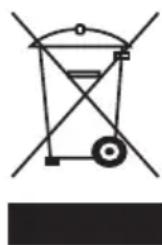
Pure electrical circuit lines without any symbolsThis product complies with EU WEEE Directive (2012/19/EU). This product bears a classification symbol for waste electrical and electronic equipment (WEEE).
This product has been manufactured with high quality parts and materials which can be reused and are suitable for recycling. Do
not dispose of the waste product with normal domestic and other wastes at the end of its service life. Take it to the collection center for the recycling of electrical and electronic equipment. Please consult your local authorities to learn about these collection centers.
1.6 Compliance with RoHS Directive:
The product you have purchased complies with EU RoHS Directive (2011/65/EU). It does not contain harmful and prohibited materials specified in the Directive.
1.7 Package information
Packaging materials of the product are manufactured from recyclable materials in accordance with our National Environment Regulations. Do not dispose of the packaging materials together with the domestic or other wastes. Take them to the packaging material collection points designated by the local authorities.
Important instructions for safety and environment
1.8 Technical Specifications
EN
| Height (Min. / Max.) 84,6 cm / 86,6 cm* | |
| Width 59,7 cm | |
| Depth 58,9 cm | |
| Capacity (max.) 8 kg** | |
| Net weight (± 4 kg) 46 kg | |
| Width | See type label***Voltage |
| Rated power input | |
* Min. height: Height with adjustable feet are closed.
Max. height: Height with adjustable feet are opened maximum.
** Dry laundry weight before washing.
*** Type label is located behind the loading door.
 | Technical specifications of the dryer are subject to specification without notice to improve the quality of the product. |
 | Figures in this manual are schematic and may not match the product exactly. |
 | Values stated on markers on the dryer or in the other published documentation accompanying with the dryer are obtained in laboratory in accordance with the relevant standards. Depending on operational and environmental conditions of the dryer, these values may vary. |
2 Your Dryer
2.1 Package Contents
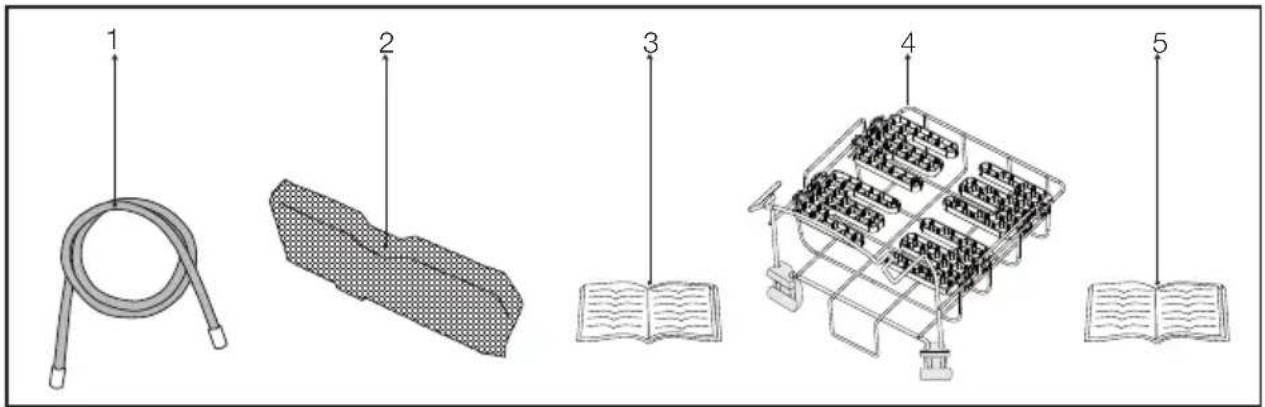
- Water drain hose *
- Filter drawer spare sponge*
- User Manual
- Drying basket*
- Drying basket user manual*
*It can be supplied with your machine depending on its model.
3 Installation
Before the calling the nearest Authorized Service for the installation of the dryer, ensure that electrical installation and water drain is appropriate referring to the user's manual. (See 3.3 Connecting to the drain and 3.5 Electrical connection) If they are not suitable, contact a qualified electrician and technician to make necessary arrangements.

Preparation of the dryer's location as well as the electrical and waste water installations is under customer's responsibility.

Prior to installation, visually check if the dryer has any defects on it. If the drier is damaged, do not have it installed. Damaged products cause risks for your safety.

Let your dryer wait for 12 hours before starting to use it.
3.1 Appropriate installation location
Install the dryer on a stable and level surface.
Dryer is heavy. Do not move it by yourself.
- Operate your dryer in a well ventilated, dust-free environment.
- The gap between the dryer and the surface should not be reduced by the materials such as carpet, wood and tape.
- Do not cover the ventilation grills of the dryer.
- There must not be a lockable, sliding or hinged door that may block the opening of the loading door in the place where your dryer is to be installed.
- Once the dryer is installed, it should stay at the same place where its connections have been made. When installing the dryer, make sure that its rear wall does not touch anywhere (tap, socket, etc.).
- Place the dryer at least 1 cm away from the edges of other furniture.
- Your dryer can be operated at temperatures between +5°C and +35°C. If the operating conditions fall outside of this range, operation of the dryer will be adversely affected and it can get damaged.
- The rear surface of the tumble dryer shall be placed against a wall.
Do not place the dryer on the power cable.
3.2 Removing the transportation safety assembly

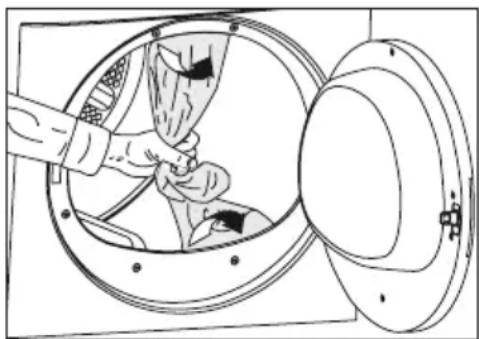
Remove the transportation safety assembly before using the dryer for the first time.
- Open the loading door.
- There is a nylon bag inside the drum that contains a piece of styrofoam. Hold it from its section marked with XX XX.
- Pull the nylon towards yourself and remove the transportation safety assembly.
natural_image
Diagram of a hand inserting a component into a circular device, showing internal components and wiring (no text or symbols)
Check that no part of the transportation safety assembly remains inside the drum.
3.3 Connecting to the drain
In products equipped with condenser unit, water accumulates in the water tank during the drying cycle. You should drain accumulated water after each drying cycle.
You can directly drain accumulated water through the water drain hose supplied with the product instead of periodically draining the water collected in the water tank.
Connecting the water drain hose
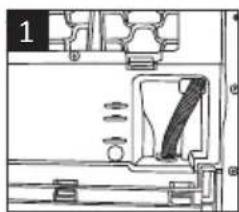
1-2 Pull hose at the behind of the dryer by hand in order to disconnect it from where it is connected. Do not use any tools to remove the hose.
3 Connect one end of the drain hose supplied with the dryer to the connection point from where you removed the hose of the product in previous step.
4 Connect the other end of the drain hose directly to the wastewater drain or to the washbasin.
Installation
natural_image
Technical line drawing of a mechanical component with no visible text or symbols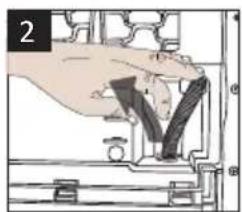
natural_image
Hand holding a mechanical component, no visible text or symbols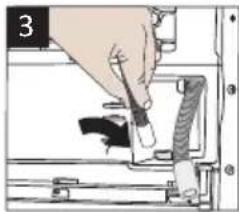
natural_image
Illustration of a hand inserting a plug into a device (no text or symbols visible)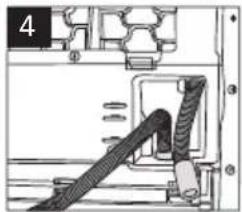
natural_image
Mechanical assembly diagram showing a cable inserted into a housing (no text or symbols visible)
Hose connection should be made in a safe manner. Your drain house will be flooded if the hose comes out of its housing during water discharge.

Water drain hose should be attached to a height of maximum 80 cm.

Make sure that the water drain hose is not stepped on and it is not folded between the drain and the machine.
3.4 Adjusting the feet
- In order to ensure that the dryer operates more silently and vibration-free, it must stand level and balanced on its feet. Balance the machine by adjusting the feet.
- Turn the feet to left or right until the dryer stands level and firmly.

natural_image
Hand holding a mechanical component with a curved arrow indicating rotation (no text or symbols)
Never unscrew the adjustable feet from their housings.
3.5 Electrical connection
For specific instructions for electrical connection required during installation (see 1.1.1 Electrical Safety)
3.6 Transportation of the dryer
Unplug the dryer before transporting it. Drain all water that has remained in the dryer. If direct water drain connection is made, then remove the hose connections.

We recommend carrying the dryer in upright position. If it is not possible to carry the machine in the upright position, we recommend carrying it by tilting towards the right side when looked from the front.
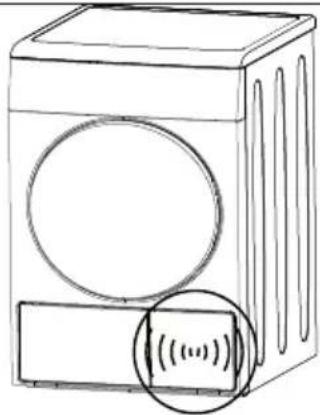
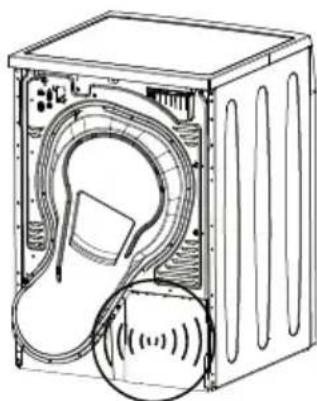
3.7 Warnings about sounds

It is normal to hear a metallic noise from the compressor sometimes during operation.
natural_image
Line drawing of a washing machine with a circular vent and a rectangular base, showing sound waves (no text or symbols)
Water collected during operation is pumped to water tank. It is normal to hear pumping noise during this process.
natural_image
Diagram of a washing machine interior showing internal components and sound waves (no text or symbols)3.8 Changing the illumination lamp
In case an illumination lamp is used in your laundry dryer. To change the Bulb/LED used for illumination of your tumble dryer, call your Authorized Service. The lamp(s) used in this appliance is not suitable for household room illumination. The intended purpose of this lamp is to assist the user to place laundry in the tumble dryer in a comfortable way. The lamps used in this appliance have to withstand extreme physical conditions such as vibrations and temperatures above 50 °C
4 Preparation
4.1 Laundry suitable for drying in the dryer
Always obey the instructions given on the garment tags. Dry only the laundry having a label stating that they are suitable for drying in a dryer and make sure that you select the appropriate programme.
| LAUNDRY DRYING SYMBOLS | ||||||||||||
 | Drying Symbols |  Suitable for dryer Suitable for dryer |  No Iron No Iron |  Sensitive / Delicate dry Sensitive / Delicate dry |  Do not dry with dryer Do not dry with dryer |  Do not dry Do not dry |  Do not dry-clean Do not dry-clean | |||||
| Drying Settings | ○At any temperature | ●At high temperature | ●At medium temperature | ●At low temperature | ●Without heating | ○Hang to dry | —Lay to dry | ■Hang wet to dry | □Lay in shadow to dry | PDry-cleanable | ||
| IRON | Iron - | ●●● | ●●● | ●●● | ××× | ××× | ||||||
| Dry or Steam | Iron at high temperature | Iron at medium temperature | Iron at low temperature | Do not iron | Iron without steam | |||||||
| Maximum temperature | 200 °C 150 | °C 110 | °C | |||||||||
 | Drying Settings |  |  |  |  |  |  |  |  |  |  |
| At any temperature | At high temperature | At medium temperature | At low temperature | Without heating | Hang to dry | Lay to dry | Hang wet to dry | Lay in shadow to dry | Dry-cleanable |
| IRON | Iron - | |||||
| Dry or Steam | Iron at high temperature | Iron at medium temperature | Iron at low temperature | Do not iron | Iron without steam | |
| Maximum temperature | 200 °C 150 | °C 110 | °C |
4.2 Laundry not suitable for drying in the dryer

Delicate embroidered fabrics, woollen, silk garments, delicate and valuable fabrics, airtight items and tulle curtains are not suitable for machine drying.
4.3 Preparing laundry for drying
- Laundry may be tangled with each other after washing. Separate the laundry items before placing them into the dryer.
- Dry garments having metal accessories such as zippers, inside out.
- Fasten the zippers, hooks and buckles and button sheets.
4.4 Things to be done for energy saving
Following information will help you use the dryer in an ecological and energy-efficient manner.
- Spin your laundry at the highest speed possible when washing them. Thus, the drying time is shortened and energy consumption is reduced.
- Sort out the laundry depending on their type and thickness. Dry the same type of laundry together. For example thin kitchen towels and table clothes dries earlier than thick bathroom towels.
- Follow the instructions in the user manual for programme selection.
- Do not open the loading door of the machine during drying unless necessary. If you must certainly open the loading door, do not to keep it open for a long time.
- Do not add wet laundry while the dryer is in operation
- Clean the lint filter before or after each drying cycle. (See 6.1 Cleaning Lint Filter / Loading Door Inner Surface)
Preparation
- Clean the filter periodically when there is visible air collection on it or when the symbol lights up, if there is a filter drawer cleaning warning symbol «
» available. (See 6.4 Cleaning the filter drawer)
- Ventilate the room, where the dryer is located, well during drying.
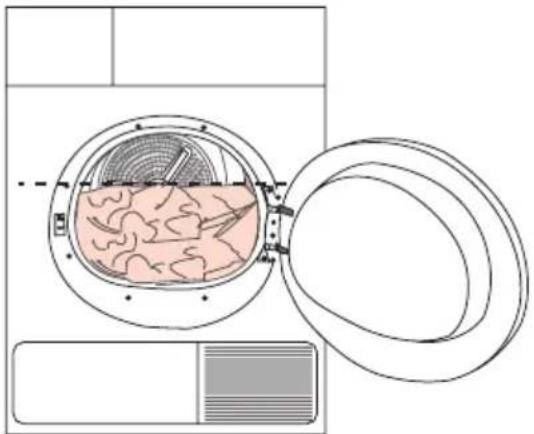
4.5 Correct load capacity
Follow the instructions in the "Programme selection and consumption table". Do not load more than the capacity values stated in the table.
natural_image
Diagram of a washing machine with internal tissue and lid, showing no text or symbols
It is not recommended to load the dryer with laundry exceeding the level indicated in the figure. Drying performance will degrade when the machine is overloaded. Furthermore, dryer and the laundry can get damaged.
Following weights are given as examples.
| Laundry | Approximate weights (g)* |
| Cotton quit covers (double) 1500 | |
| Cotton quit covers (single) 1000 | |
| Bed sheets (double) 500 | |
| Bed sheets (single) 350 | |
| Large tablecloths 700 | |
| Small tablecloths 250 | |
| Tea napkins 100 | |
| Bath towels 700 | |
| Hand towels 350 | |
| Blouses 150 | |
| Cotton shirts 300 | |
| Shirts 250 | |
| Cotton dresses | 500 |
| Dresses | 350 |
| Jeans | 700 |
| Handkerchiefs (10 pieces) | 100 |
| T-Shirts | 125 |
*Dry laundry weight before washing.
5 Operating the product
5.1 Control panel
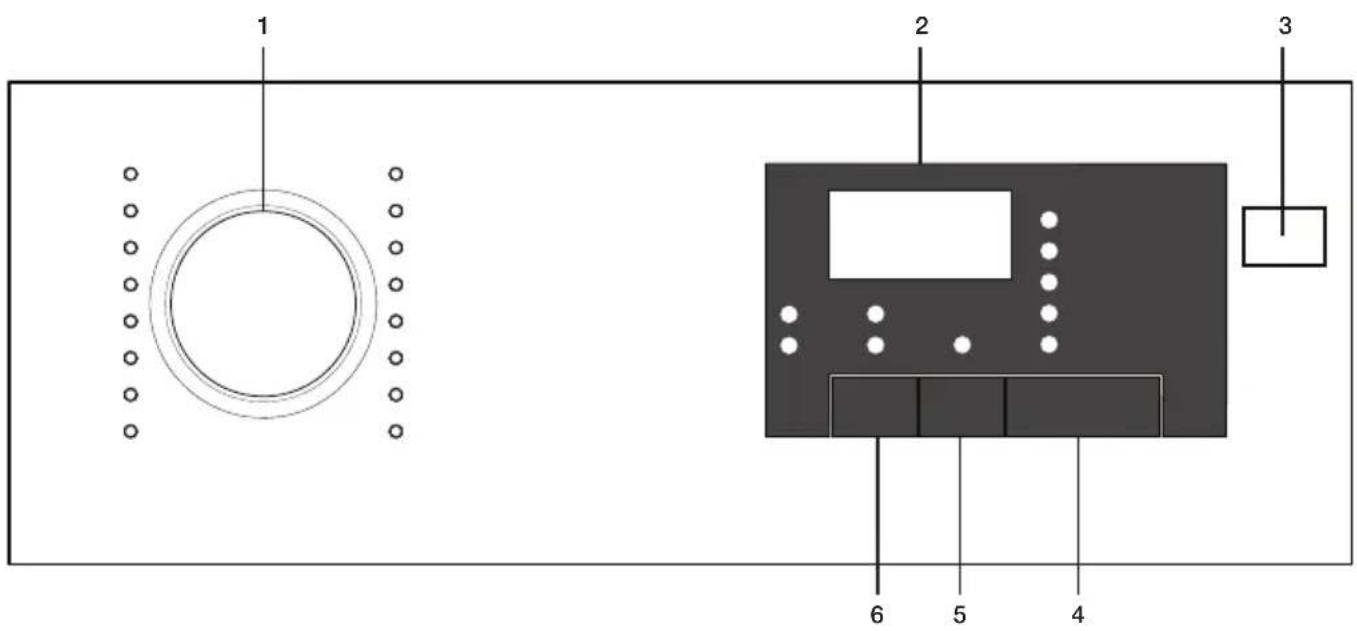
- Program selection knob
- Remaining duration indicator
- On/Off button
- Start/pause button
- End duration button
- Sound warning button
5.2 Screen symbols
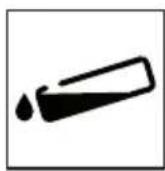
Tank full
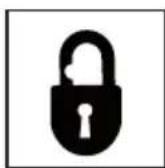
Child-proof lock
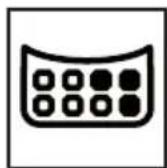
Filter cleaning
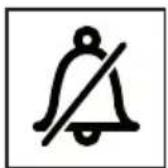
Volume upMute Anti Creasing
Operating the product
5.3 Preparing the machine
- Plug in the machine
- Place laundry inside the machine.
- Press the On/Off button.
- When your machine turns on for the first time, it turns on with the declaration (cotton cabinet dryness) program.

Pressing the On/Off button doesn't mean the program starts.
Press the Start / Pause button to start the program.
5.4 Program selection
- Determine the appropriate program from the chart below containing the drying levels.
- Select the program you desire using the Program Selection knob.
| Extra Dry | Only cotton laundry is dried in normal temperature.Thick and multi-layered laundry (towels, sheets, jeans etc.) are dried so that they can be placed into wardrobe without ironing. |
| Cupboard dry | Normal laundry (tablecloths, underwear etc.) are dried so that they can be placed into wardrobe without ironing. |
| Cupboard dry + | Normal laundry (Ex: tablecloths, underwear) are again dried so that they can be placed into the wardrobe but more so than the wardrobe dryness option. |
| Iron Dry | Normal laundry (shirts, dresses etc) are dried ready for ironing. |

For detailed program information see. „Program selection and consumption table“..
5.5 Main programs
The main programs are given below based on fabric type.
- Cotton
Dry durable laundry with this program. It dries in normal temperature. Recommended for use with your cotton laundry (sheets, bed covers, towels, bathrobes etc.)
- Synthetic
Dry laundry that is not very durable with this program. Recommended for use with your synthetic laundry.
5.6 Extra programs
The following extra programs are available in the machine for special conditions.

Extra programs may vary according to the specifications of your machine.

In order to receive better results from drying machine programs, your laundry should be washed with the appropriate program in your washing machine and wringed with recommended wringing revolution..
- Jeans
Use to dry jeans that are wringed with high rpm in washing machine.
- Sport
Use to dry laundry made from synthetic, cotton or mixed fabrics.
- Express
You can use this program to dry cotton laundry that you had wringed in high rpm in your washing machine. It dries 1 kg of your Cotton laundry (3 shirts / 3 T-shirts) in 55 minutes.
• Daily
Program for daily drying of cotton and synthetic laundry and lasts 125 minutes.
- Shirts
Dries shirts more delicately and thus causes less wrinkles for easy ironing.
- BabyProtect
Program used for baby clothing with can be dried approval on the label.

Very little dampness might remain on the shirts after the program. It is recommended that you do not leave the shirts in the drying machine.
- Delicates
You can dry your delicates suitable for drying or laundry that is recommended to hand wash (silk blouses, thin underwear etc.) in low temperature.
Operating the product

It is recommended to dry your delicates in laundry bag to prevent wrinkles and damage. When the program ends, take your laundry out of the machine immediately and hang them to prevent wrinkles.
- Freshen Up
It only performs ventilation for 10 minutes without blowing hot air. You can ventilate the cotton and linen clothing that has remained closed for a long duration and remove their odor.
- Timed programs
You can select the 30 mins and 45 mins time programs to achieve the desired final drying level with low temperature.

On this program, the machine dries as long as the set duration, regardless of the drying level.
Operating the product
5.7 Program selection and consumption table
EN
| Programs | Capacity (kg) | Spin speed in washing machine (rpm) | Approximate amount of remaining humidity | Drying time (minutes) |
| Cottons / Coloreds | ||||
| Extra dry | 8 1000 % 60 210 | |||
| Cupboard dry | 8 / 4 1000 % 60 197 / 115 | |||
| Iron dry | 8 1000 % 60 145 | |||
| Shirt | 1,5 1200 % 60 60 | |||
| Jeans | 4 1200 %50 150 | |||
| Daily | 4 1200 %50 125 | |||
| Sport | 4 1000 %60 135 | |||
| Express | 1 1200 %50 55 | |||
| Delicates | 2 600 %40 70 | |||
| Babyprotect | 3 1000 % 60 85 | |||
| Synthetics | ||||
| Cupboard dry | 4 800 % 40 70 | |||
| Iron dry | 4 800 % 40 60 | |||
| Energy consumption values | ||||
| Programs | Capacity (kg) | Spin speed in washing machine (rpm) | Approximate amount of remaining humidity | Energy consumption value kWh |
| Cottons linen Ready to wear* | 8 / 4 1000 % 60 2,47 / 1,35 | |||
| Cottons Ready to iron | 8 1000 % 60 2,1 | |||
| Synthetics Ready to wear | 4 800 % 40 0,8 | |||
| Power consumption of the off-mode for the standart cotton programme at full load, PO (W) | 0,5 | |||
| Power consumption of the left-on mode for the standart cotton programme at full load, PL (W) | 1,0 | |||
| Contains fluorinated greenhouse gases covered by the Kyoto Protocol. Hermetically sealed.R134a / 0,225 kg - GWP:1430 - 0,321 tCO2e | ||||
„Cotton cupboard dry programme“ used at full and partial load is the standard drying programme to which the information in the label and the fiche relates, that this programme is suitable for drying normal wet cotton laundry and that it is the most efficient programme in terms of energy consumption for cotton.
* : Energy Label standard program (EN 61121:2012)
All the values in the table are determined according to EN 61121:2012 standard. Consumption values may vary from the values in the table depending on laundry type, wringing revolution, ambient conditions and changes in voltage.
Operating the product
5.8 Auxiliary functions Sound warning cancel
Drying machine makes sound warnings when the program is completed. If you don't want sound notifications, press the "Sound Notification" button. When you press the sound notification button it lights up, and program does not make sound notifications when completed.

You can select this function before or after the program starts.
5.9 Warning symbols

Warning symbols may vary according to the specifications of your machine.
Fiber filter cleaning
When the program is completed, a warning led lights up, which indicates that the filter has to be cleaned.

If the filter cleaning led blinks, see the „Troubleshooting“ chapter.
Water tank
When the program is completed, a warning led lights up, which indicates that the water tank must be emptied.
If the water tank fills up while the program is running, warning led starts blinking and the machine goes into stand-by. In that case empty the water in the water tank and start the program by pressing the Start / Pause button. Warning led turns off and the program resumes.
natural_image
Simple black-and-white geometric shape resembling a stylized arrow or tool (no text or symbols)Loading door open
Start/Pause led blinks when the loading door of the drying machine is open.
5.10 End duration
You can delay the end duration of the program for up to 24 hours with the end duration function.
- Open the loading door and place your laundry.
- Select the drying program.
- Press the end duration selection button and set the delay duration you want.
End duration led lights up. (End duration moves continuously when you keep pressing the button).
- Press the Start / Pause button. End duration countdown begins. The “:” sign in the middle of the displayed delay duration blinks.

You can add or remove laundry for the duration of the end duration. The duration displayed on the screen is the sum of the normal drying duration and the end duration. At the end of the countdown the end duration led turns off, drying beings and drying led lights up.
Changing the end duration
If you want to change the duration during the countdown:
- Cancel the program by pressing the On/Off button. Turn on the drying machine again by pressing the On/Off button. When your drying machine turns on for the first time, it turns on with the declaration (cotton wardrobe dryness) program.
- Select the program you desire using the Program Selection knob.
- Repeat the end duration operation for the duration you want.
- Start the program by pressing the Start / Pause button.
Canceling the end duration function
If you want to cancel the end duration setting countdown and start the program right away:
- Cancel the program by pressing the On/Off button. Turn on the drying machine again by pressing the On/Off button. When your drying machine turns on for the first time, it turns on with the declaration (cotton wardrobe dryness) program.
- Select the program you desire using the Program Selection knob.
- Start the program by pressing the Start / Pause button.
Operating the product
5.11 Starting the program
Start the program by pressing the Start / Pause button. Start/Pause led and the Drying led light up, indicating the program started. The “:” sign in the middle of the remaining duration starts to blink.
5.12 Child Lock
The machine features a child lock which prevents the machine program flow from being affected when buttons are pressed during operation.
When the Child Lock is active, all buttons except for the On/Off button are deactivated.
To activate the child lock, press the Sound Notification button and End Duration button simultaneously for 3 seconds.
Te child lock should be deactivated to be able to start a new program after the current program ends or to be able to interfere with the current program. Keep the same buttons pressed for 3 seconds again to deactivate the child lock.

The lock led on the screen lights up when the Child Lock is activated.

Child Lock deactivates when the machine is turned off and on again using the On/Off button.
A warning sound is heard when any button is pressed (except for On/Off button) or the Program Selection knob is turned while the child lock is active.
5.13 Changing the program after it is started
After the machine starts running, you can change the program you selected to dry your laundry with a different program.
- For example, to select Extra Dry program instead of the Iron Dryness, stop the program by pressing the Start / Pause button.
- Turn the Program Selection knob to select the Extra Dry program.
- Start the program by pressing the Start / Pause button.
Adding and removing laundry in stand-by mode
If you want to add or remove laundry after the drying program starts:
- Press the Start/Pause button to take the machine into Stand-by mode. Drying operation stops.
- Open the loading door, add or remove laundry and close the loading door.
- Start the program by pressing the Start / Pause button.

The laundry adding made after the drying operation started may cause the dried laundry inside the machine to mix with the wet laundry and the laundry to remain damp after the operation ends..

Laundry adding and removing can be repeated as much as desired during drying operation. But this process would continuously interrupt the drying operation, and so would cause the program duration to lengthen and increase energy consumption. Thus, it is recommended to add laundry before the program starts.

If a new program is selected by changing the position of the program selection knob while your machine is in stand-by mode, the running program ends.
Operating the product
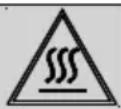
Do not contact the inner surface of the drum when adding or removing laundry during a continuing program. The drum surface is hot.
5.14 Canceling the program
If you want to cancel the program and end the drying operation for any reason after the machine starts running, press the On/Off button.

As it will be extremely hot inside the machine when you cancel the program while the machine is in operation; run the ventilation program to cool it down.
5.15 Program end
When the program ends, the Final/Wrinkle Prevention, Fiber Filter Cleaning and Water Tank Warning leds on the program follow up indicator light up. Loading door can be opened and machine becomes ready for a second run.
Press the On/Off button to turn off the machine.

In case the laundry is not removed after the program is completed, the wrinkle prevention program that lasts 2 hours start in order to prevent wrinkling of the laundry that remains inside the machine.

Clean the fiber filter after each drying. (See. „Fiber filter and loading door inner surface“)

Empty the water tank after each drying. (See. „Emptying the water tank“)
6 Maintenance and cleaning
Service life of product extends and frequently experienced problems will be reduced if it is cleaned at regular intervals.
6.1 Cleaning Lint Filter / Loading Door Inner Surface
Lint and fiber released from the laundry to the air during the drying cycle are collected in the Lint Filter.
 | Such fiber and lint are generally formed during wearing and washing. |
 | Always clean the lint filter and the inner surfaces of the loading door after each drying process. |
 | You can clean the lint filter housing with a vacuum cleaner. |
To clean the lint filter:
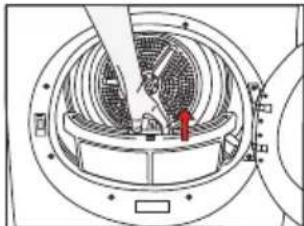
- Open the loading door.
- Remove the lint filter by pulling it up and open the lint filter.
- Clean lint, fiber, and cotton raveling by hand or with a soft piece of cloth.
- Close the lint filter and place it back into its housing.
natural_image
Technical diagram of a mechanical device with internal components and a red arrow indicating a specific part (no text or symbols present)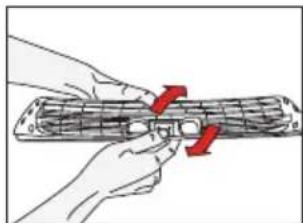
natural_image
Illustration of hands holding a cylindrical object with red arrows indicating rotation or movement (no text or symbols)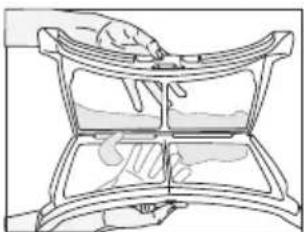
natural_image
Line drawing of a hand pressing down on a curved mechanical component (no text or symbols)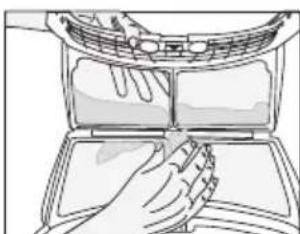
natural_image
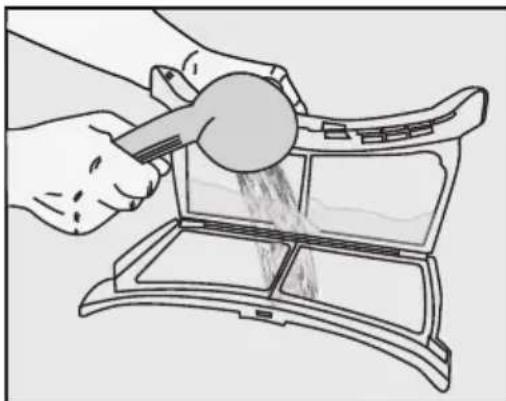
Illustration of hands cleaning a car air conditioner cover (no text or symbols)- A layer can build up on the filter pores that can cause clogging of the filter after using the dryer for a while. Wash the lint filter with warm water to remove the layer that builds up on the lint filter surface. Dry the lint filter completely before reinstalling it.
natural_image
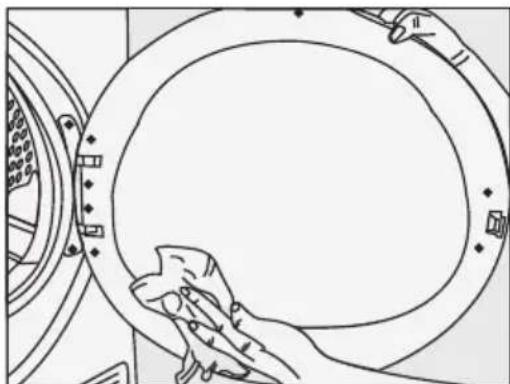
Illustration of hands using a tool to clean or prepare food items in a tray (no text or symbols visible)- Clean the entire inner surface of the loading door and loading door gasket with a soft damp cloth.
natural_image
Line drawing of a hand cleaning a circular mechanical component (no text or symbols)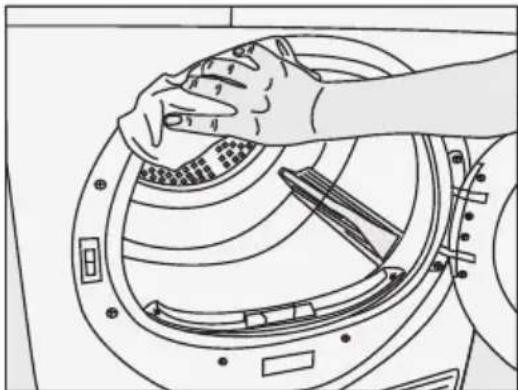
natural_image
Line drawing of hands cleaning a circular mechanical component with internal channels (no text or symbols)Maintenance and cleaning
6.2 Cleaning the sensor
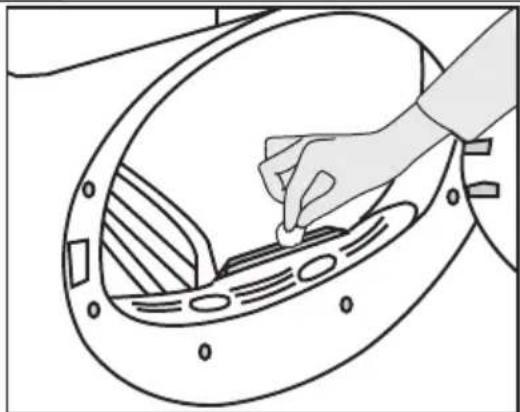
There are dampness sensors in the dryer that detect whether the laundry is dry or not.
To clean the sensors:
- Open the loading door of the dryer.
- Allow the machine to cool down if it is still hot due to the drying process.
- Wipe the metal surfaces of the sensor with a soft cloth, dampened with vinegar and dry them.
 | Clean metal surfaces of the sensors 4 times a year. |
 | Do not use metal tools when cleaning metal surfaces of the sensors. |
 | Never use solvents, cleaning agents or similar substances for cleaning due to the risk of fire and explosion! |
natural_image
Line drawing of a hand inserting a small component into a circular device (no text or symbols)6.3 Draining the water tank
Dampness of the laundry is removed and condensed during drying process and the water that arise accumulates in the water tank. Drain the water tank after each drying cycle.
 | Condensed water is not drinkable! |
 | Never remove the water tank when the program is running! |
If you forget to drain the water tank, the machine will stop during the subsequent drying cycles when the water tank is full and the Water Tank warning symbol will flash. If this is the case, drain the water tank and press Start / Pause button to resume the drying cycle.
To drain the water tank:
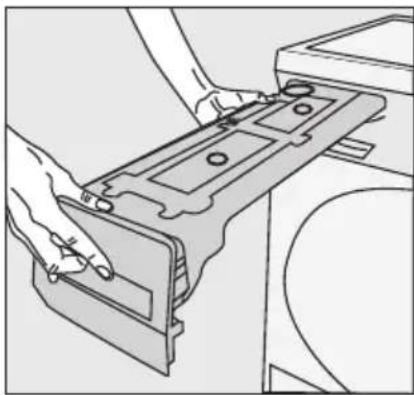
Pull the drawer and remove the water tank carefully.
natural_image
Line drawing of hands installing or adjusting a mechanical component (no text or symbols visible)- Drain the water in the tank.
natural_image
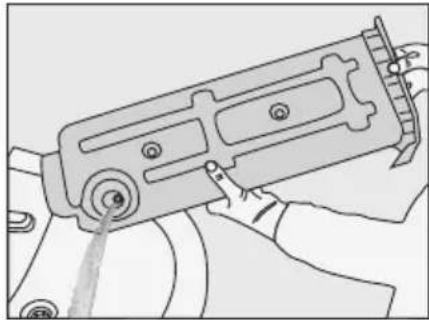
Line drawing of a hand holding a mechanical device with no visible text or symbols- If there is lint accumulation in the funnel of the water tank, clean it under running water.
- Place the water tank into its seat.

If the direct water draining is used as an option, there is no need to empty the water tank.
6.4 Cleaning the filter drawer
Lint and fiber that could not be captured by the lint filter are blocked in the filter drawer behind the kick plate.
Clean the filter periodically when there is visible air collection on it or when the symbol lights up, if there is a filter drawer cleaning warning symbol « available.
There is an one stage filter. This one stage filter is from sponge
To clean the filter drawer:
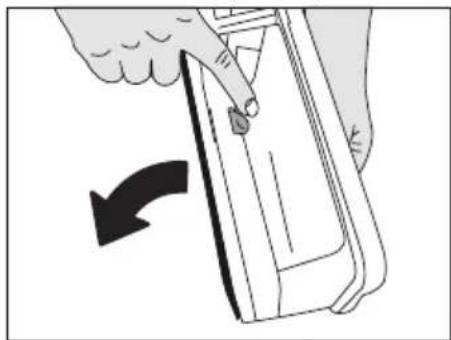
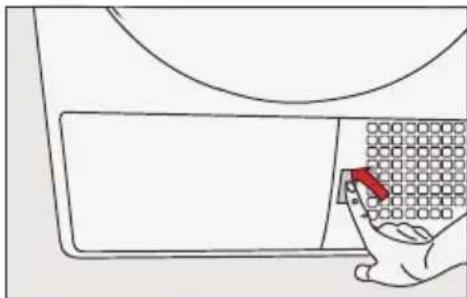
- Press the kick plate button to open the kick plate.
natural_image
Line drawing of a hand holding a grid-patterned object inside a container (no text or symbols)Maintenance and cleaning
- Remove the filter drawer cover by turning it in the direction of arrow.
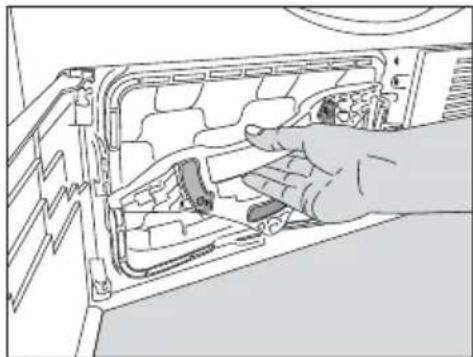
natural_image
Illustration of a hand inserting a component into a device panel (no text or symbols visible)- Pull out the filter drawer.
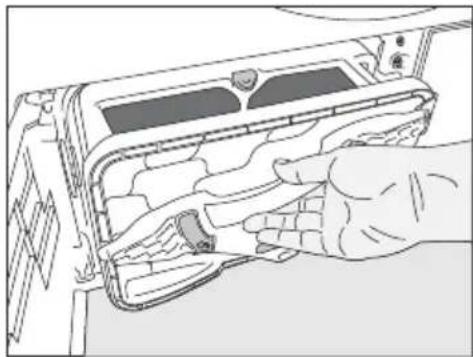
natural_image
Illustration of hands inserting a device into a rack (no text or symbols visible)- Open the filter drawer by pressing the red button.
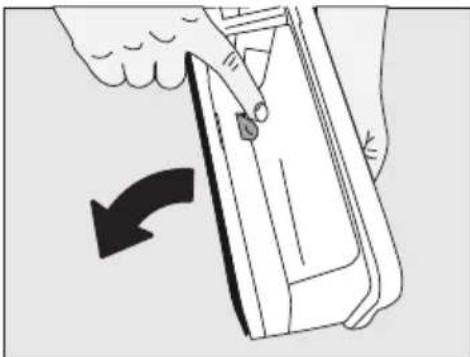
natural_image
Illustration of a hand pressing down on a rectangular object with a curved arrow indicating rotation (no text or symbols)• Take out the filter drawer sponge.
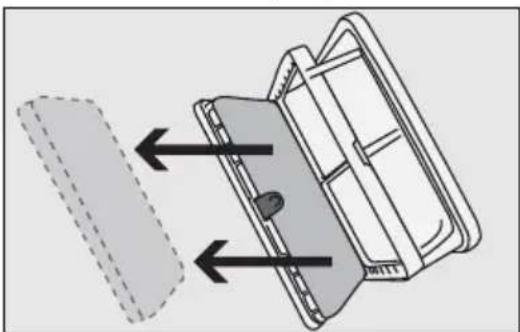
natural_image
Diagram of a mechanical component with arrows indicating direction, no text or symbols present- Wash the filter drawer sponge by hand to remove the fiber and lint on the surface. After washing the sponge, squeeze it by hand and remove the excess water. Well-dry the sponge before storing it.

It is not necessary to clean the sponge if lint and fiber accumulation on it is not significant.
- Place the sponge back into its place.
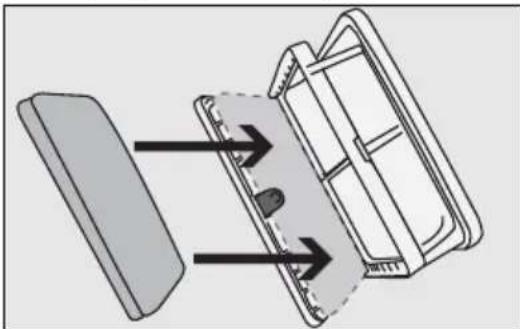
natural_image
Diagram of a mechanical component with arrows indicating direction, no text or symbols present
Please place the sponge carefully inside the frame of the filter cassette shown by arrows in order to avoid squeezing when filter drawer closed".:
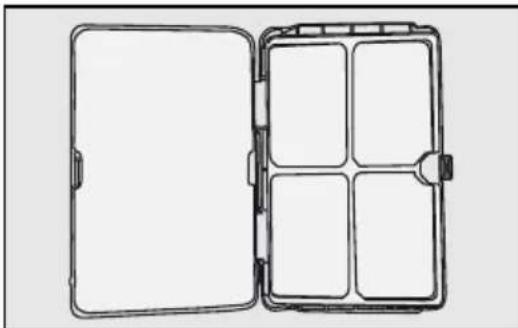
natural_image
Line drawing of an open and closed mechanical device with internal compartments (no text or symbols)- Close the filter drawer as to lock the red button.
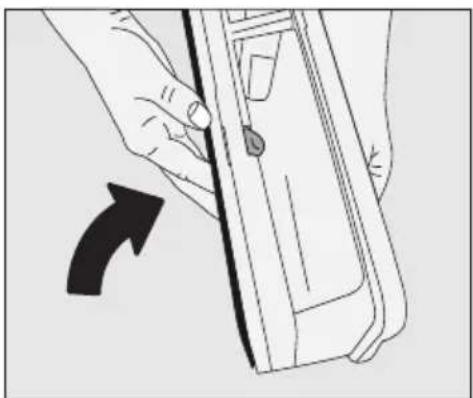
natural_image
Illustration of a hand holding a device with a black arrow indicating rotation (no text or symbols)Maintenance and cleaning
- Place the filter drawer back into its place, turn the filter drawer cover in the arrow direction and close it securely.
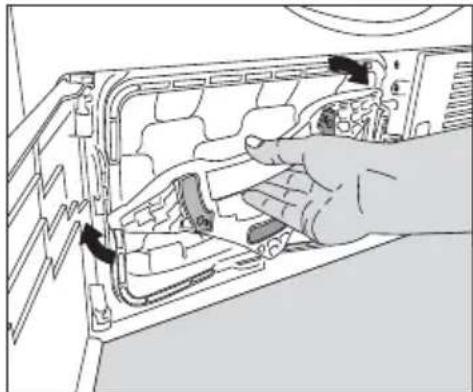
natural_image
Illustration of a hand inserting a component into a device panel (no text or symbols visible)- Close the kick plate cover.
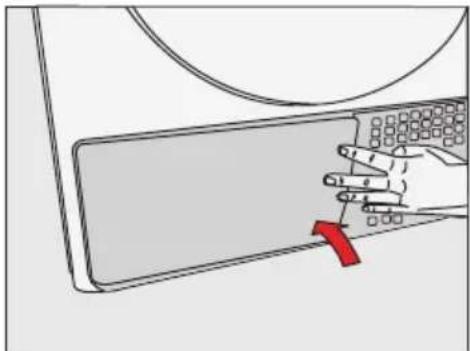
natural_image
Illustration of a hand pressing down on a keyboard on a laptop (no text or symbols)| Drying without the filter drawer sponge in place will damage the machine! | |
| A dirty lint filter and filter drawer will cause longer drying periods and higher energy consumption. |
6.5 Cleaning the evaporator
Clean the lint accumulated on the fins of the evaporator located behind the filter drawer with a vacuum cleaner.
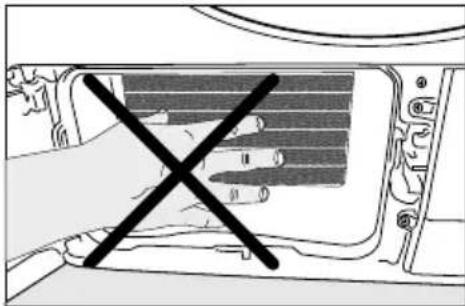
natural_image
Diagram of a hand using a screwdriver to cut the interior of a computer case (no text or symbols present)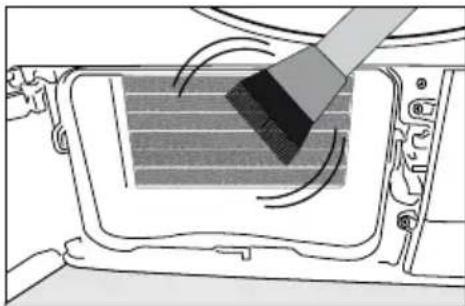
natural_image
Diagram showing a brush applying material to a vehicle's internal panel (no text or symbols)
You can also clean by hand provided that you wear protective gloves. Do not attempt to clean with bare hands. Evaporator fins can harm your hand.
7 Troubleshooting
Drying process takes too much time.
- Pores of the lint filter are clogged. >>> Wash the lint filter with warm water.
- Filter drawer may be blocked>>>clean the foam inside the filter drawer.
- Ventilation grids on the front side of the machine are blocked. >>> Remove the objects (if any) that block ventilation in front of the ventilation grids.
- Ventilation is not sufficient since the room where the machine is installed is very small. Open the door and window of the room to avoid the room temperature increase too much.
- Lime deposit has built up on the dampness sensor. >>> Clean the dampness sensor.
- Excessive laundry is loaded. >>> Do not load the dryer in excess.
- Laundry is not spun sufficiently. >>> Spin your laundry at a higher speed in your washing machine.
Laundry comes out wet at the end of drying.

After drying, the hot clothes feel damper than their actual dampness level.
- It is likely that the selected programme did not suit the laundry type.>>>Checking the care labels on clothes, select appropriate programme for the laundry type or use timer programmes in addition.
- Pores of the lint filter are clogged. >>> Wash the lint filter with warm water.
- Filter drawer may be blocked>>>clean the foam inside the filter drawer.
- Excessive laundry is loaded. >>> Do not load the dryer in excess.
- Laundry is not spun sufficiently. >>> Spin your laundry at a higher speed in your washing machine.
Dryer does not switch on or the programme does not start. Dryer does not start when it is set.
- It is not plugged in. >>> Make sure that the machine is plugged in.
- The loading door is ajar. >>> Make sure that the loading door is closed securely.
- Programme is not selected or the Start / Pause / Cancel button is not pressed. >>> Make sure that the programme is selected and the machine is not in Pause mode.
- Childproof Lock is activated. >>> Deactivate the Childproof Lock.
Programme is interrupted without any cause.
- Loading door is ajar. >>> Make sure that the loading door is closed securely.
- There was a power failure. >>> Press Start / Pause / Cancel button to start the programme.
• Water tank is full. >>> Drain the water tank.
Laundry has shrunk, become felted or deteriorated.
- A programme suitable for the laundry type is not used. >>> Check the garment tag and select a programme suitable for the fabric type.
Drum lighting does not turn on. (On models with lamp)
- Dryer is not switched on with the On / Off button. >>> Make sure that the dryer is switched on.
- Lamp is defective. >>> Call Authorized Service Agent to have the lamp replaced.
End/Anti-creasing symbol is on.
- Anti-breasing programme is activated in order to prevent laundry that has remained in the machine from creasing. >>> Turn off the dryer and take out the laundry.
End symbol is on.
Troubleshooting
| Programme is over. Turn off the dryer and take out the laundry. |
| Lint Filter Cleaning symbol is on. |
| Lint filter is not cleaned. >>> Clean the lint filter. |
| Lint Filter Cleaning symbol is flashing. |
| Filter housing is clogged with lints. >>> Clean the lint filter housing.A deposit has built up on the lint filter pores that may cause clogging. >>> Wash the lint filter with warm water.Filter drawer is clogged. >>> Clean the sponge and the filter cloth in the filter drawer. |
| Water leaks from the loading door |
| Lint has accumulated on the inner surfaces of the loading door and on the surfaces of the loading door gasket. >>> Clean the inner surfaces of the loading door and the surfaces of the loading door gasket. |
| Loading door opens spontaneously. |
| Loading door is ajar. >>> Push the loading door to close until you hear a locking sound. |
| Water Tank warning symbol is on/flashing. |
| Water tank is full. >>> Drain the water tank.Water draining hose is bent. >>> If the product is connected directly to a wastewater drain, check the water drain hose. |
| Filter Drawer Cleaning warning symbol is flashing. |
| Filter drawer is not cleaned. >>> Clean the sponge and the filter cloth in the filter drawer. |
| If you cannot eliminate the problem although you follow the instructions in this section, consult your dealer or the Authorized Service Agent. Never try to repair a nonfunctional product yourself. | |
| In an event that you encounter an issue on any part on your appliance, you can ask for a replacement by contacting the authorized service with the appliance model number. | |
| Operating the appliance with non-authentic parts may lead the appliance to malfunction. | |
| Manufacturer and distributor are not liable for malfunctions resulting from using non-authentic parts. |
| PRODUCT FICHE | ||
| Complying Commission Delegated Regulation (EU) No 392/2012 | ||
| Supplier name or trademark | Cylinda | |
| Model name | TVP 5481 | |
| Rated capacity (kg) | 8 | |
| Type of Tumble Dryer | Air Vented | - |
| Condenser | ● | |
| Energy efficiency class(1) | A+ | |
| Annual Energy Consumption (kWh)(2) | 297 | |
| Type of Control | Automatic | ● |
| Non-automatic | - | |
| Energy consumption of the standard cotton programme at full load (kWh) | 2,47 | |
| Energy consumption of the standard cotton programme at partial load (kWh) | 1,35 | |
| Power consumption of the off-mode for the standart cotton programme at full load, P_0 (W) | 0,5 | |
| Power consumption of the left-on mode for the standart cotton programme at full load, P_L (W) | 1,0 | |
| The duration of the left on mode (min) | 30 | |
| Standard cotton programme(3) | ||
| Programme time of the standard cotton programme at full load, T_dry (min) | 197 | |
| Programme time of the standard cotton programme at partial load, T_dry1/2 (min) | 115 | |
| Weighted programme time of the standard cotton programme at full and partial load ( T_t ) | 150 | |
| Condensation efficiency class(4) | B | |
| Average condensation efficiency of the standard cotton programme at full load, C_dry | 85% | |
| Average condensation efficiency of the standard cotton programme at partial load, C_dry1/2 | 85% | |
| Weighted condensation efficiency of the standard cotton programme at full load and partial load, C_t | 85% | |
| Sound power level for the standard cotton programme at full load(5) | 65 | |
| Built-in | - | |
• : Yes - : No
(1) Scale from A+++ (most efficient) to D (least efficient)
(2) Energy consumption based on 160 drying cycles of the standard cotton programme at full and partial load, and the consumption of the low-power modes. Actual energy consumption per cycle will depend on how the appliance is used.
(3) "Cotton cupboard dry programme" used at full and partial load is the standard drying programme to which the information in the label and the fiche relates, that this programme is suitable for drying normal wet cotton laundry and that it is the most efficient programme in terms of energy consumption for cotton
(4) Scale from G (lest efficient) to A (most efficient)
(5) Weighted average value — LWA expressed in dB(A) re 1 pW
?
service
• Vi har service i hela landet / Nationwide service
- G&in-pil www.cylinda.se / Visit www.cylinda.se
• Ring 0771 2S 2500 (endayt lokalitaxa) / Call 0771 25 25:00
uppge
• Maskintyp / Model code
- Serienummer / Serial number
• Inköpsdatum / Purchase date
- Problembeskrivning / Problem description
- Namnoch adress / Name and address
- Ditt telefornummer / Phone number
- Byta belysningen
- Öppen lucka
- Please read this user manual first!
- Explanation of symbols
- Important instructions for safety and environment
- General safety
- Important instructions for safety and environment
- Electrical safety
- Product safety
- Points to be taken into consideration for fire hazard:
- Below specified laundry or items must not be dried in the dryer due to the fire hazard:
- Mounting over a washing machine
- Intended use
- Child safety
- Compliance with the WEEE regulation and disposing of the waste product
- Compliance with RoHS Directive:
- Package information
- Technical Specifications
- Your Dryer
- Package Contents
- Installation
- Appropriate installation location
- Removing the transportation safety assembly
- Connecting to the drain
- Connecting the water drain hose
- Installation
- Adjusting the feet
- Electrical connection
- Transportation of the dryer
- Warnings about sounds
- Changing the illumination lamp
- Preparation
- Laundry suitable for drying in the dryer
- Laundry not suitable for drying in the dryer
- Preparing laundry for drying
- Things to be done for energy saving
- Preparation
- Correct load capacity
- Operating the product
- Control panel
- Screen symbols
- Operating the product
- Preparing the machine
- Program selection
- Main programs
- - Cotton
- - Synthetic
- Extra programs
- - Jeans
- - Sport
- - Express
- • Daily
- - Shirts
- - BabyProtect
- - Delicates
- - Freshen Up
- - Timed programs
- Program selection and consumption table
- Auxiliary functions Sound warning cancel
- Warning symbols
- Fiber filter cleaning
- Water tank
- Loading door open
- End duration
- Changing the end duration
- Canceling the end duration function
- Starting the program
- Child Lock
- Changing the program after it is started
- Adding and removing laundry in stand-by mode
- Canceling the program
- Program end
- Maintenance and cleaning
- Cleaning Lint Filter / Loading Door Inner Surface
- Maintenance and cleaning
- Cleaning the sensor
- Draining the water tank
- Cleaning the filter drawer
- Cleaning the evaporator
- Troubleshooting
- Drying process takes too much time.
- Programme is interrupted without any cause.
- Troubleshooting
- ?
- service
- uppge
Brand : Cylinda
Model : TVP 5481
Category : Tumble dryer