
I.Gear slider for iPhone - Keyboard TrekStor - Free user manual and instructions
Find the device manual for free I.Gear slider for iPhone TrekStor in PDF.


| Product Type | Bluetooth Keyboard for iPhone 4/4S |
| Brand | TrekStor |
| Model | i.Gear slider |
| Compatibility | Apple iPhone 4 and iPhone 4S |
| Connectivity | Bluetooth 2.1+EDR (estimated) |
| Power Supply | Built-in Lithium-Ion rechargeable battery |
| Charging | Via Mini-USB 2.0 cable (included) |
| Charging Indicator | Red LED lights when charging |
| Status Indicator | Bluetooth signal light (white LED) on top left |
| Operating Temperature | 10°C to 40°C |
| Package Contents | Keyboard, Mini-USB cable, operating instructions |
| Special Keys | Fn key for blue symbols, Shift for white symbols, language switch key combination |
| Language Switching | Press ✗ + └─ (specific keys) to change input language |
| Pairing Procedure | Turn on keyboard, press Bluetooth button, select on iPhone |
| Battery Disposal | Remove battery before disposal; battery must be recycled |
| Safety | Do not expose to moisture, extreme temperatures, or solvents |
| Cleaning | Use soft dry cloth or brush |
| Certifications | CE, RoHS compliant |
| Manufacturer | TrekStor GmbH, Kastanienallee 8-10, D-64653 Lorsch, Germany |
Frequently Asked Questions - I.Gear slider for iPhone TrekStor
User questions about I.Gear slider for iPhone TrekStor
0 question about this device. Answer the ones you know or ask your own.
Ask a new question about this device
Download the instructions for your Keyboard in PDF format for free! Find your manual I.Gear slider for iPhone - TrekStor and take your electronic device back in hand. On this page are published all the documents necessary for the use of your device. I.Gear slider for iPhone by TrekStor.
USER MANUAL I.Gear slider for iPhone TrekStor
i.Gear slider
Bluetooth® Keyboard for iPhone® 4|4S

BEDIENUNGSANLEITUNG
a) b)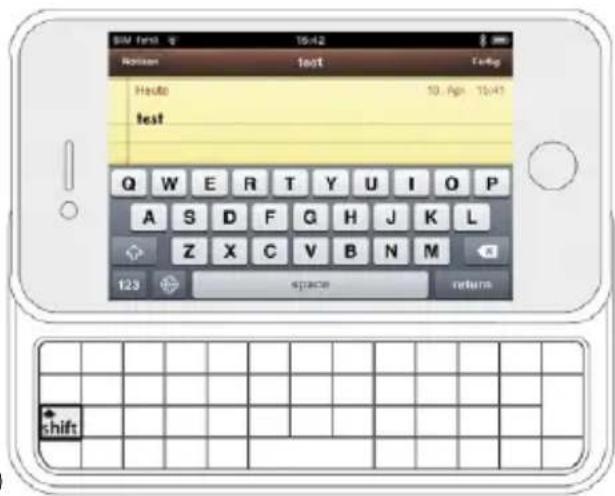
a)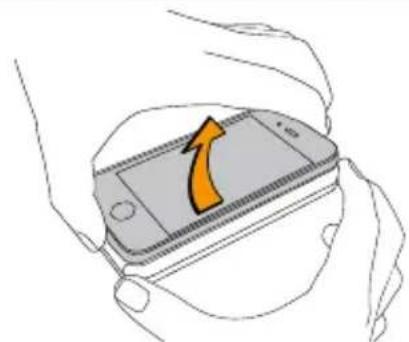
b)
Mac® OS and iPhone® are registered trademarks of Apple Inc. in the United States and/or other countries.
Bluetooth is a registered trademark of Bluetooth® SIG, Inc.

QUICK GUIDE
Thank you for buying the TrekStor i.Gear slider Bluetooth® Keyboard for iPhone® 4/4S. We are confident that this product will be the source of much enjoyment. Please read the following instructions carefully so that you can become acquainted with the functions of this product and its use.
Current product information as well as a detailed user manual can be found at the TrekStor Website www.trekstor.de.
Have you got questions about the operation or the functions of this product? On the TrekStor website you can find answers to the most frequently asked questions under "SERVICE" → "FAQ".
You can also get quick assistance by contacting our support. If you want to contact our support, it is best to visit our website, www.trekstor.de, and fill out the support form that can be found under "SERVICE" → "SUPPORT". You can of course also contact us directly by e-mail or telephone. The more detailed your support request is, the quicker and better we will be able to help you!
1) Package contents
- TrekStor i.Gear slider Bluetooth® Keyboard for iPhone® 4/4S
- Mini-USB 2.0 cable
- Operating instructions
2) Lights
Status light
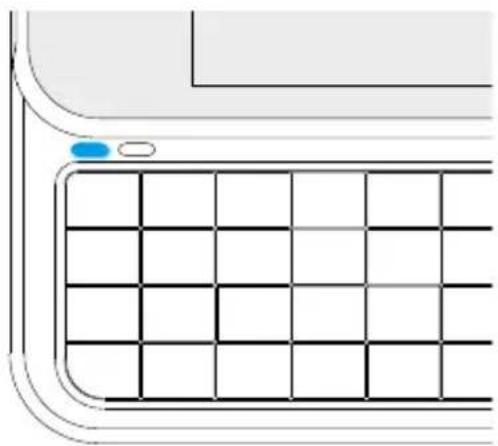
When the Bluetooth® signal light on the left top of the keyboard is on, the i.Gear slider is ready to use.
Charging light
Charging light: turns on red when charging.
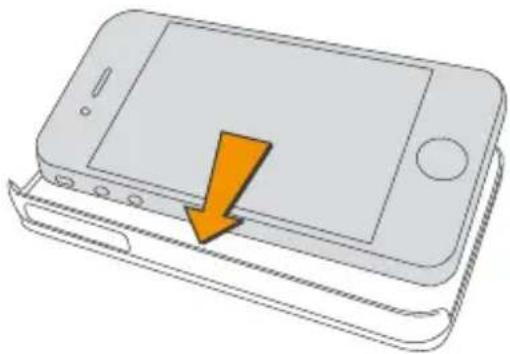
3) Placing the iPhone® 4/4S into your i.Gear slider
1) Place your iPhone® into the case as shown. Begin first with the left side of the iPhone®.
2) Pair your iPhone® with the i.Gear slider:
i Note: This step is only needed when you use the i.Gear slider for the first time.
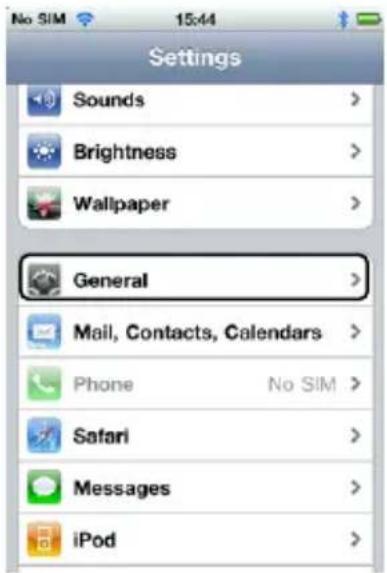
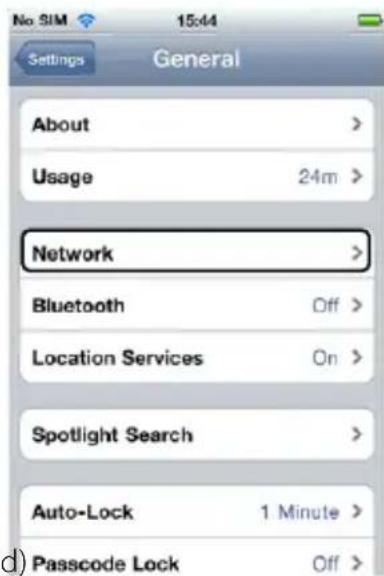
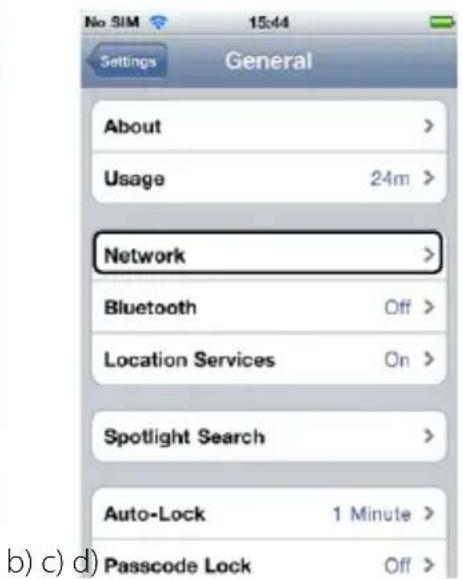
a) Turn on your iPhone® and tap "Settings".
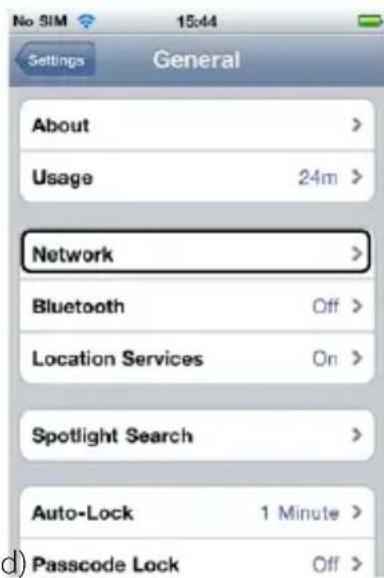
b) Tap "General" in the following submenu.
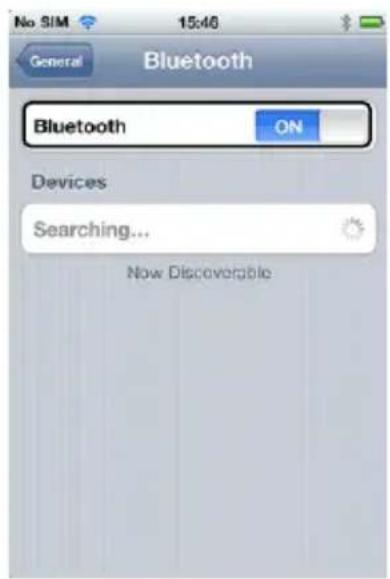
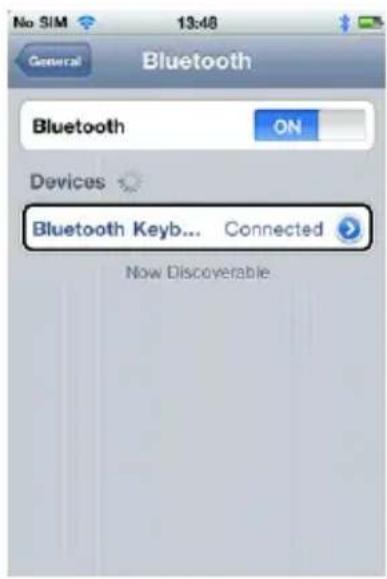
c) Choose there the "Bluetooth" option.
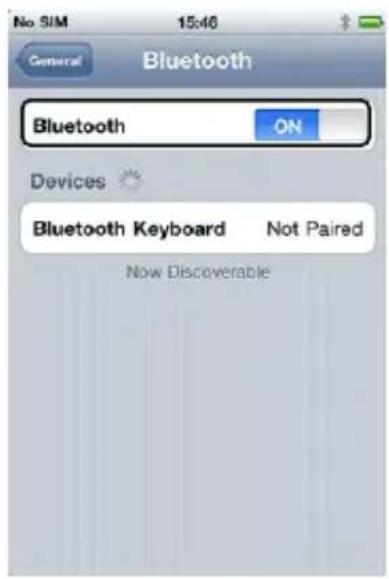
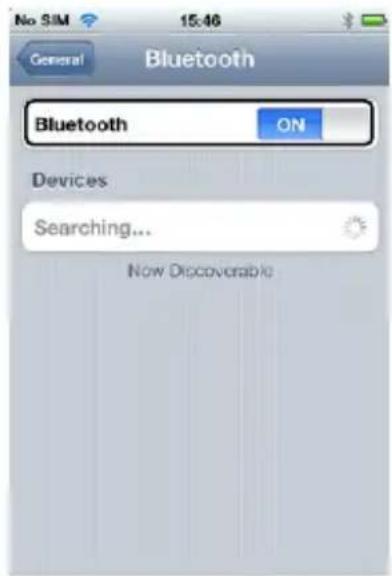
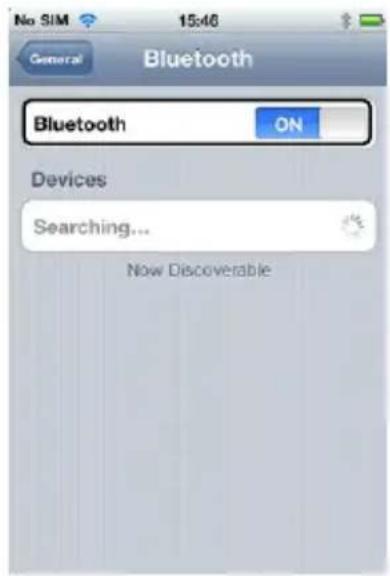
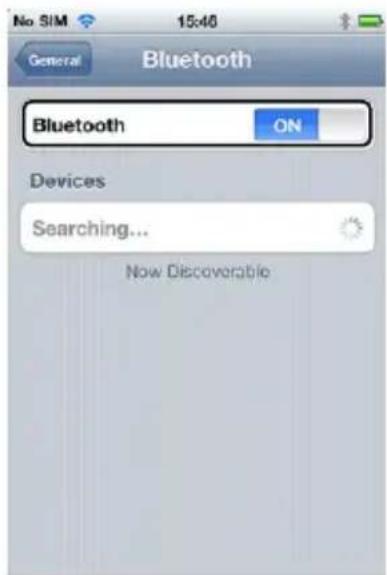
d) Slide the Bluetooth® button to "ON" and your iPhone® will start to search for Bluetooth® devices.
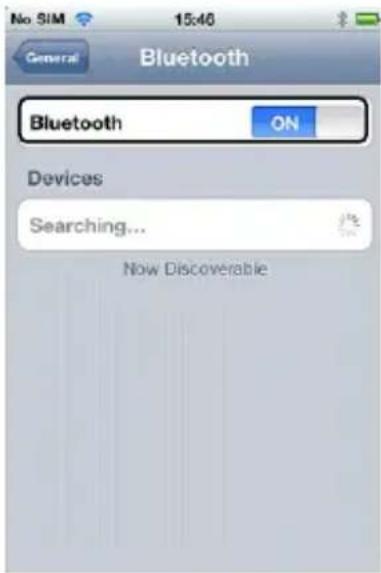
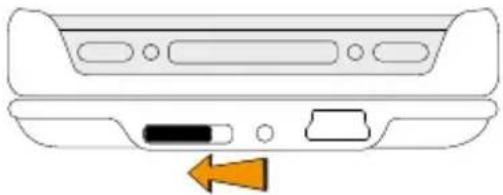
e) Please turn now the switch on the i.Gear slider to the "ON" position.
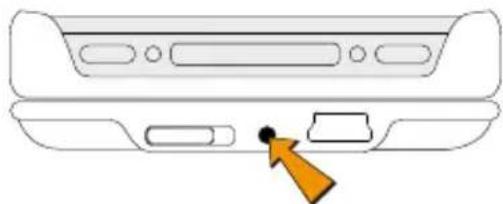
f) Activate the Bluetooth® button next to the switch by pressing it with a little stick.
g) When the Bluetooth® signal light on the left top of the keyboard is on, the i.Gear slider is ready to use.
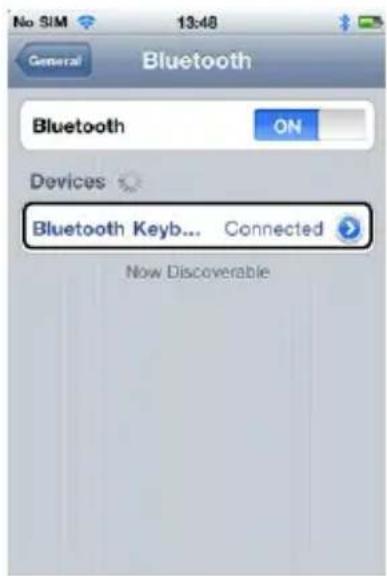
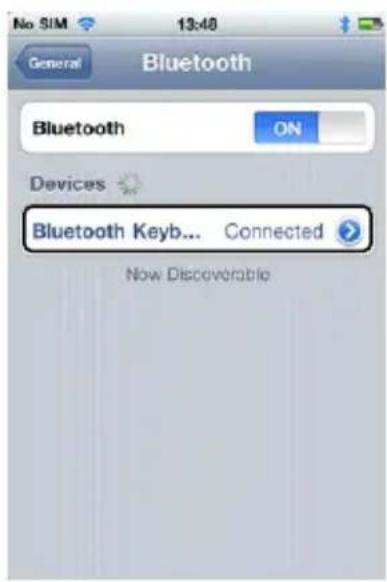
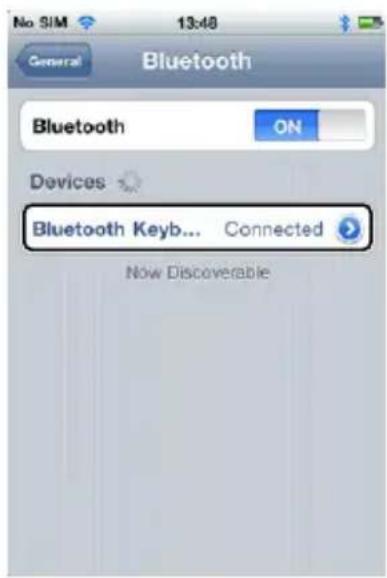
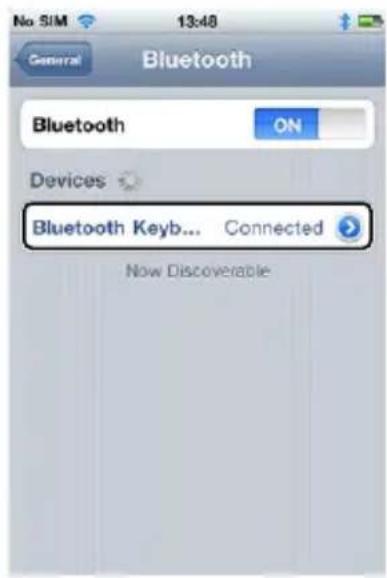
h) Now your iPhone® will find the i.Gear slider as a new device. i) Then you should tap the "Keyboard for iPhone" option in order to pair both devices. A window appears now on the screen including a password, which is needed to connect the i.Gear slider with the iPhone®. j) Enter the password via the i.Gear slider and press the "Enter" key. Now your iPhone® is successfully paired (connected) with the keyboard.
4) Start to use the keyboard
a) You can now write messages, notes and emails with the i.Gear slider instead of using the touch screen keyboard on your iPhone®. b) However, you can press "fn" plus the key with the blue keyboard symbol at the same time, if you wish to go back to the touch screen keyboard ( ).
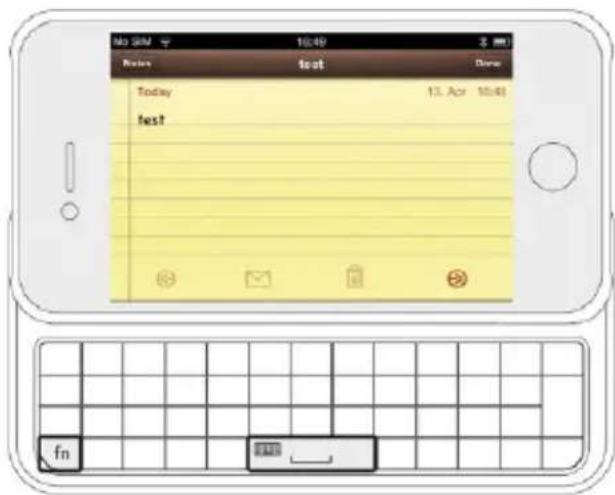
c) In case you would like to use the white symbols on the left top of some keys, press the "Shift" key at the same time as the desired white symbol. d) In case you would like to use the blue symbols on the left top of some keys, press the "fn" key at the same time as the desired blue symbol.
e) ✗ + └─ = Changing the language
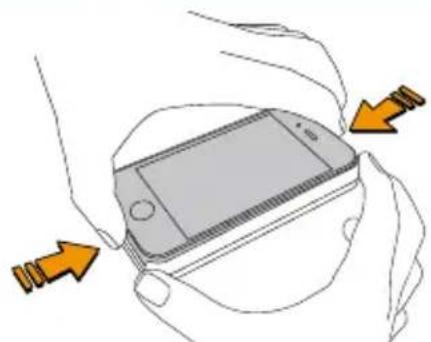
5) Separating
Instructions for safety and use:

Only qualified persons may perform technical work on the product. The product may not be opened or changed. The components cannot be serviced by the user.

Never expose the device to moisture, condensation and liquids.

Protect the device from extremely high and low temperatures and temperature fluctuations. Use the device within an ambient temperature of 10°C to 40°C.

Never place the device close to a source of heat, and protect it from direct sunlight.

Make sure that the surroundings are as dust-free as possible when you use and store the device.

Never clean the surface of the device with solvents, paint thinners, cleansers or other chemical products. Instead, use a soft, dry cloth or soft brush.
Notes:

If this device is exposed to electrostatic discharge, the functionality of it could be affected. Please restart your device.

Please keep in mind, that through a battery detaching your device will eventually get broken. You should remove the battery only, if your device is disused and shall be forwarded to the disposal.
The manufacturer retains the right to continually improve the product. These changes may be made without being directly described in these operating instructions. For this reason, the information provided in these operating instructions may not reflect the current state of the art.
The manufacturer only guarantees suitability for the product's intended purpose. In addition, the manufacturer is not responsible for damages or loss of data and subsequent consequences.
Copyright © 2011 TrekStor GmbH. All rights reserved. Other cited product or company names may be trademarks or brand names of the respective owner.
Mac® OS and iPhone® is a registered trademark of Apple Inc. in the United States and/or other countries.
Bluetooth is a registered trademark of Bluetooth® SIG, Inc.

QUICK GUIDE
b) c)
h) i) j)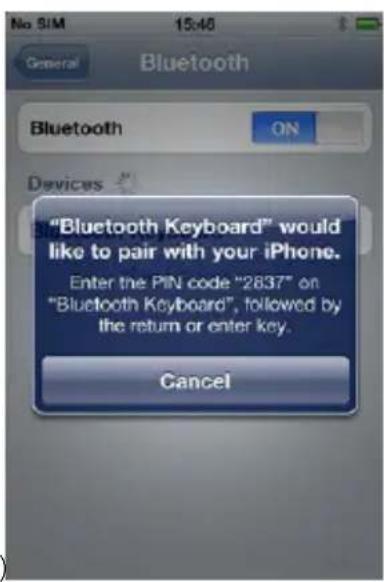
a) b)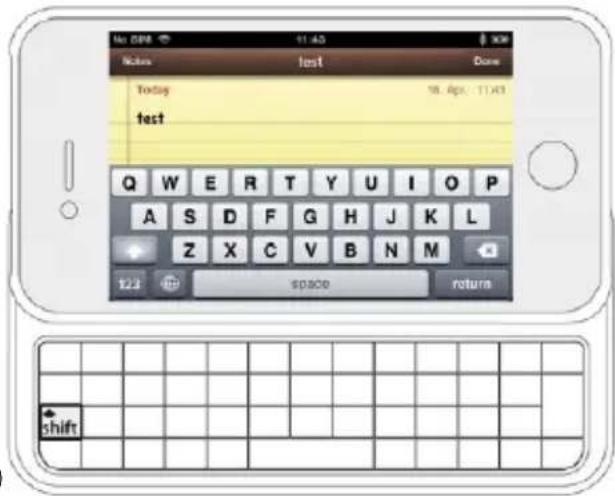
a)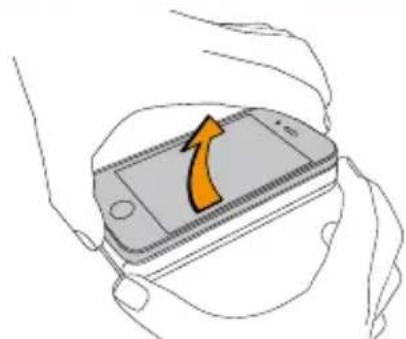
b)
Please keep in mind that detaching the battery will eventually damage your device. You should only remove the battery if your device is no longer in use and is to be disposed of.
Mac® OS and iPhone® are registered trademarks of Apple Inc. in the United States and/or other countries.
Bluetooth is a registered trademark of Bluetooth® SIG, Inc.

QUICK GUIDE
h) i) j)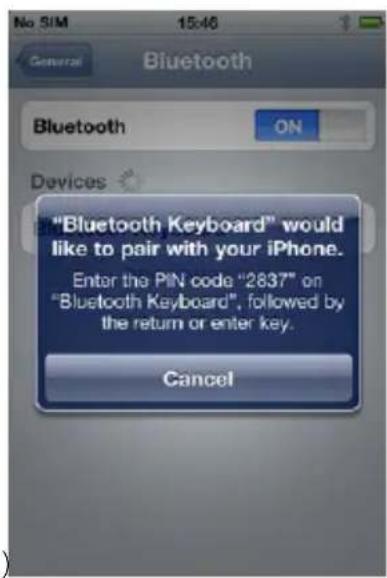
a)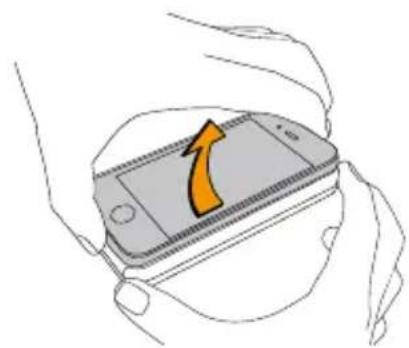
b)
Please keep in mind that detaching the battery will eventually damage your device. You should only remove the battery if your device is no longer in use and is to be disposed of.
Mac® OS and iPhone® are registered trademarks of Apple Inc. in the United States and/or other countries.
Bluetooth is a registered trademark of Bluetooth SIG, Inc.

SHORT INSTRUCTION MANUAL
b) c) d)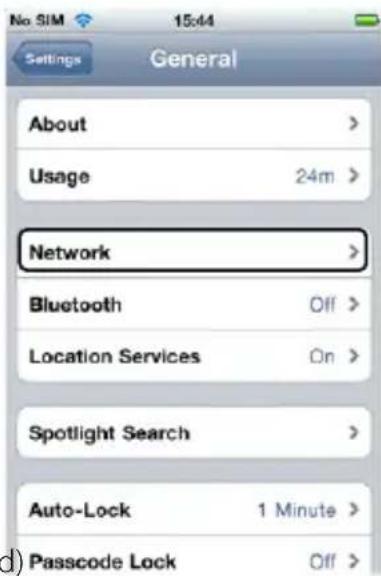
h) i) j)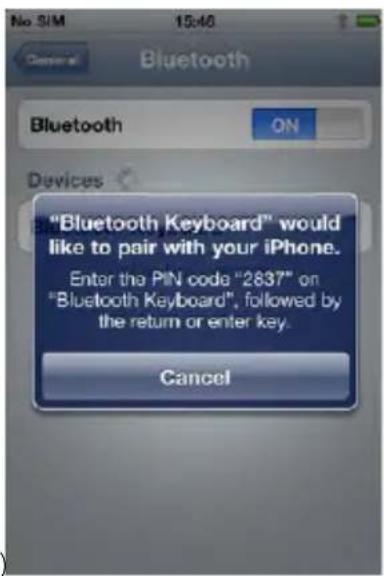
a) b)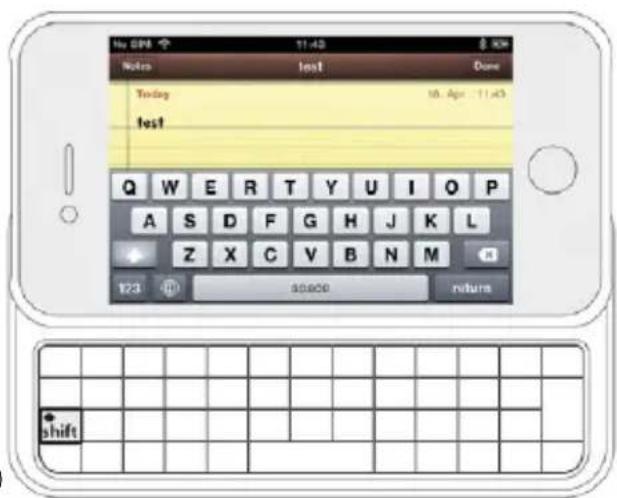
a)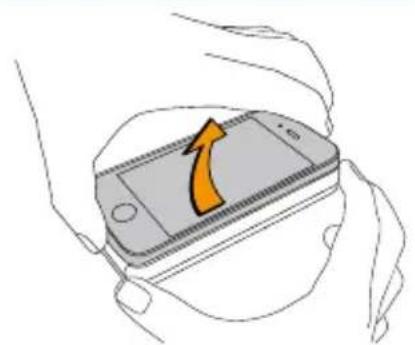
b)
Please keep in mind that detaching the battery will eventually break your device. You should remove the battery only if your device is disused and shall be forwarded for disposal.
Mac® OS and iPhone® are registered trademarks of Apple Inc. in the United States and/or other countries.
Bluetooth is a registered trademark of Bluetooth SIG, Inc.

USER MANUAL
b) c)
h) i) j)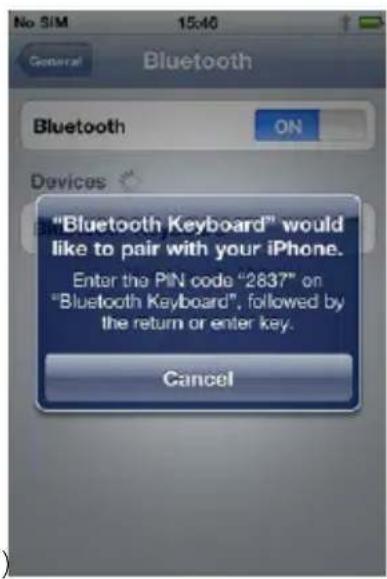
a) b)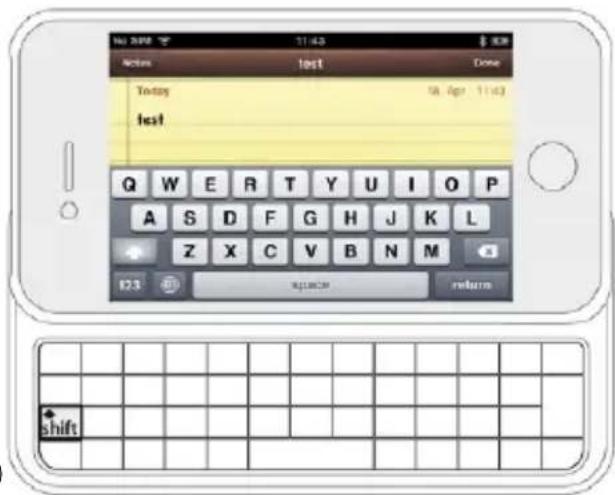
a)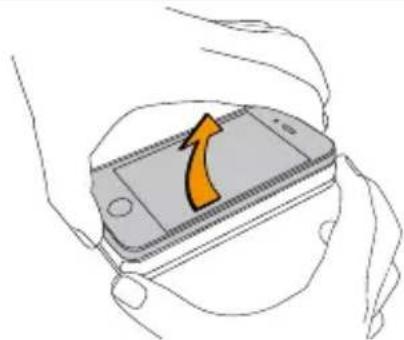
b)
Please keep in mind that through a battery detaching your device will eventually get broken. You should remove the battery only if your device is disused and shall be forwarded to the disposal.
Mac® OS and iPhone® are registered trademarks of Apple Inc. in the United States and/or other countries.
Bluetooth is a registered trademark of Bluetooth SIG, Inc.

TrekStor®
Enjoy now.
EC DECLARATION OF CONFORMITY
As manufacturer and importer respectively:
TrekStor GmbH
Kastanienallee 8 - 10
D-64653 Lorsch, Germany
herewith declares that the products
Product: i.Gear slider
Type:
Bluetooth® Keyboard
comply with the following directive(s):
• 1999/5/EC Radio Equipment and Telecommunications Terminal Equipment
The following norms were consulted to assess conformity:
. EN 300 328 V1.7.1 (2006-10)
Electromagnetic compatibility and Radio spectrum Matters (ERM); Data transmission equipment operating in the 2,4 GHz ISM band and using wide band modulation techniques
. EN 301 489-1 V1.8.1 (2008-04)
EMC and ERM: EMC standard for radio equipment and services; Part 1: Common technical requirements
• EN 301 489-17 V2.1.1 (2009-05)
Electromagnetic compatibility and Radio spectrum Matters (ERM); ElectroMagnetic Compatibility (EMC) standard for radio equipment; Part 17: Specific conditions for 2,4 GHz wideband transmission systems.
• EN 60950-1:2006 + A11:2009 + A1:2010
Information technology equipment – Safety – Part 1: General requirements
The CE symbol confirms that this product conforms with the above mentioned norms and regulations.
The manufacturer also declares the conformity of the product according to the following directives:
.2001/95/EC General Product Safety
• 2002/95/EC RoHS: Hazardous substances in electrical and electronic equipment
Lorsch,
28.03.2011
Aaron Taylor, CTO
Battery disposal
Reporting requirement according to the Battery Directive (BattV)
Batteries are not part of the domestic waste. The consumer is obliged to return no longer used batteries properly. Please dispose of them by a specialized trade or a battery collection point. Hereby you make an important contribution to environmental protection.
Since 1998 the German Battery Directive compels all citizens to dispose of used batteries exclusively through the trader or specially equipped departments (legal return obligation).
Trade and manufacturers are committed to take back batteries for free and to exploit it properly or to remove it as special waste (legal take-back obligation).

The built-in Lithium-Ion battery of this keyboard is marked with the adjoining symbol, consisting of a crossed out bin and the used battery type.
Remove battery

Before you return a disused device for disposal, the battery has to be removed from the device.
Support information
If you have any questions regarding your TrekStor product, please proceed as follows:
- Check the features as well as the functions of your device (apparent on the packaging), in order to use the correct settings. • Read the manual carefully.
- Inform yourself on our website www.trekstor.de/en about the up-to-date information concerning your product (e.g. available most recent firmware releases).
In the case you have further questions regarding your product, please note the following TrekStor support options:
FAQ The FAQ area of our website offers you a wide range of problem solving hints. Here you can obtain answers to the most frequently asked questions concerning our products.
E-Mail Please fill in the support form on our website or send an E-Mail to support.en@trekstor.de. You can find mailing addresses for other countries when you click "SERVICE" at the menu bar on our website.
Phone support Please find the number of the support hotline for your country on our website under "SERVICE" as well.
TrekStor GmbH
Kastanienallee 8-10
D-64653 Lorsch, Germany
www.trekstor.de



BA-IGSLIDER-DE-NL-V2.10-111110



- I.GEAR SLIDER
- BEDIENUNGSANLEITUNG
- QUICK GUIDE
- PACKAGE CONTENTS
- LIGHTS
- STATUS LIGHT
- CHARGING LIGHT
- PLACING THE IPHONE® 4/4S INTO YOUR I.GEAR SLIDER
- START TO USE THE KEYBOARD
- SEPARATING
- SHORT INSTRUCTION MANUAL
- USER MANUAL
- EC DECLARATION OF CONFORMITY
- PRODUCT: I.GEAR SLIDER
- TYPE
- BLUETOOTH® KEYBOARD
- BATTERY DISPOSAL
- REPORTING REQUIREMENT ACCORDING TO THE BATTERY DIRECTIVE (BATTV)
- REMOVE BATTERY
- SUPPORT INFORMATION
- IF YOU HAVE ANY QUESTIONS REGARDING YOUR TREKSTOR PRODUCT, PLEASE PROCEED AS FOLLOWS
- IN THE CASE YOU HAVE FURTHER QUESTIONS REGARDING YOUR PRODUCT, PLEASE NOTE THE FOLLOWING TREKSTOR SUPPORT OPTIONS
- TREKSTOR GMBH
Brand : TrekStor
Model : I.Gear slider for iPhone
Category : Keyboard