
I.Beat run - Mp3 player TrekStor - Free user manual and instructions
Find the device manual for free I.Beat run TrekStor in PDF.


| Product Type | MP3 Player |
| Brand | TrekStor |
| Model | i.Beat run |
| Storage Capacity | Internal flash memory (capacity not specified) |
| Audio Format Support | MP3 (implied) |
| Battery Type | Rechargeable lithium-ion (built-in) |
| Battery Charging Time | 3–4 hours for initial charge |
| Operating Time | Up to several hours (full capacity after ~10 charge cycles) |
| Charging Method | Via USB port (slide switch must be ON) |
| Connectivity | USB 2.0 (Mini-B) |
| Headphone Jack | 3.5 mm |
| Control Buttons | Play/Pause, Volume (+/-), Track Next/Previous, ON/OFF slide switch |
| Playback Modes | REPEAT ALL, SHUFFLE |
| Status LED | Indicates charging and playback mode |
| Firmware Update | Via Windows only (from TrekStor website) |
| Supported Operating Systems | Windows 2000/XP/Vista, Mac OS X 10.3+ |
| File System for Formatting | FAT32 |
| Operating Temperature | 5°C to 40°C |
| Safety Certifications | CE, RoHS |
| Country of Origin (Manufacturer) | Germany (TrekStor GmbH & Co. KG) |
Frequently Asked Questions - I.Beat run TrekStor
User questions about I.Beat run TrekStor
0 question about this device. Answer the ones you know or ask your own.
Ask a new question about this device
Download the instructions for your Mp3 player in PDF format for free! Find your manual I.Beat run - TrekStor and take your electronic device back in hand. On this page are published all the documents necessary for the use of your device. I.Beat run by TrekStor.
USER MANUAL I.Beat run TrekStor
i.Beat run
BEDIENUNGSANLEITUNG
If you have problems with this product, you can quickly get assistance. Only in extremely rare cases will you need to return this product to your dealer. You can find answers to the most frequently asked questions at our website, www.trekstor.de, under "SERVICE" → "SUPPORT". You can of course also contact our award-winning support team by filling out the support form on our website, or by e-mail or telephone (see the back of these instructions). You will be surprised at how quickly we can help you.
i Please charge your MP3 player as described in these operating instructions for at least 3 to 4 hours before initial use.
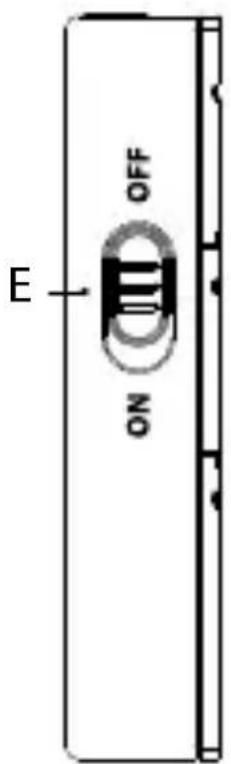
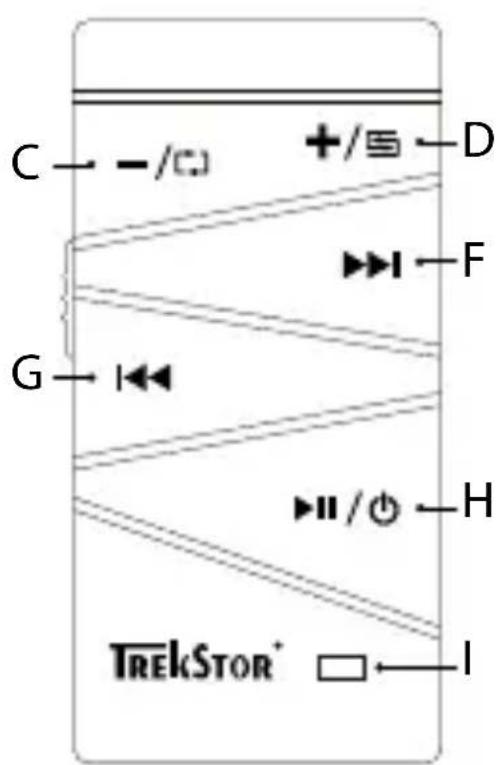
1) Controls and connections of the TrekStor i.Beat run
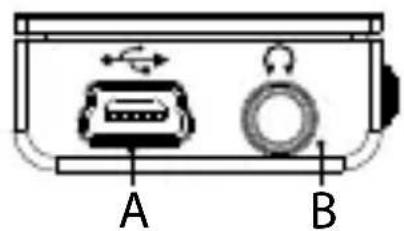
USB port: This port is used for transferring data and A) charging the MP3 player. Headphone jackB)
C) - button: Lowers the volume / [→] button: Activates the playback mode "REPEAT ALL".
D) + button: Raises the volume / ➕ button: Activates the playback mode "SHUFFLE".
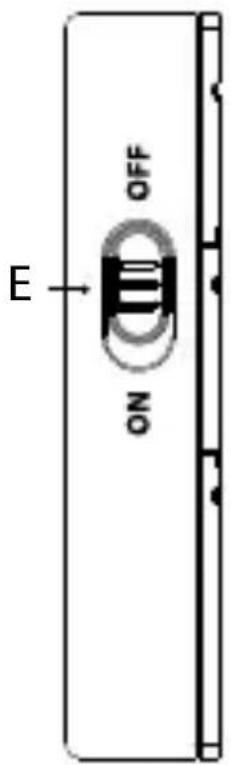
E) ON / OFF slide switch: Turns the device on and off.
F) ▶ button: Changes to the next track or fast forwards within a track.
G) ◀ button: Changes to the previous track or rewinds within a track.
H) ▶ button: Starts and pauses the playback. / ⏻ button: If this button is pressed for a longer time, the MP3 player is switched on or back to the standby mode. Status LEDI)
2) Connecting the TrekStor i.Beat run to a computer
Use the included USB cable to connect your MP3 player to a USB port on your computer.
Windows® 2000/XP/Vista
Your operating system automatically detects the MP3 player and adds a "DEVICE WITH REMOVABLE STORAGE" to "MY COMPUTER"/"COMPUTER".
Mac ® OS X from 10.3
Your operating system automatically detects the MP3 player and adds a "DRIVE" to "DESKTOP".
3) Charging the TrekStor i.Beat run

When charging the TrekStor i.Beat run via the USB port, the slide switch must be in the "ON" position!
The MP3 player starts charging automatically when you connect it to a computer and the ON/OFF slide switch is in the "ON" position. The battery is charged after a maximum of three to four hours; charging stops automatically to prevent overcharging. When the battery is fully charged, the status LED is turned off.

The maximum operating time of the MP3 player can be reached only after approximately 10 battery charging cycles have been completed.
4) Exchanging data with the TrekStor i.Beat run
Windows® 2000/XP/Vista
a) Select the desired files (such as MP3) with the mouse.
Copy these files by clicking them with your right mouse button ("C#").
b) Under "M Y COMPUTER" or "COMPUTER", select the device with removable storage, "I.BEAT RUN".
c) Right-click the device and select "P AS" to start copying.
After copying has completed, the data will be available on your MP3 player.
Mac ® OS X from 10.3
Select the desired files (such as MP3) with the mouse. Drag and drop the files in the "FINDER" to the drive symbol of your MP3 player.
5) Logging off and disconnecting the TrekStor i.Beat run from the computer
i Please follow the recommended logout procedure to prevent damage to the device or data loss!
Windows® 2000/XP/Vista
At the bottom right on the task bar, right-click the "SAFELY REMOVE HARDWARE" icon. In the popup menu that appears, left-click "SAFELY REMOVE MASS STORAGE DEVICE - DRIVE" to select it. You can now disconnect your MP3 player from the computer.
Mac® OS X from 10.3
You must remove the drive from the "DESKTOP" before you disconnect or turn off your MP3 player. Click the relevant drive icon and drag it to the trash icon.
6) Operation of the TrekStor i.Beat run
Your MP3 player can generate high volumes; for this reason, make sure that the volume is not too high while you are listening to it. Further information on this topic can be found at the end of these operating instructions.
Turning the device on and off
To start your MP3 player, move the ON/OFF slide switch to the "ON" position and press the ▶ button for approx 2 seconds until the LED is lit. After the MP3 player has been switched on, it automatically begins playback.
To activate the standby mode of your MP3 player, hold down the ▶ button for approx. 2 seconds. When the standby mode is activated, your MP3 player automatically stores the current playback position. The next time the MP3 player is switched on, playback will resume at this position.
In order to completely switch off your MP3 player, slide the ON/OFF slide switch in the "OFF" position after you have activated the standby mode.
If you want to store the current settings and playback position, you have to put your MP3 player in standby mode before switching it off.
Starting and pausing playback
Briefly press the ▶■ button to start the playback of an audio file. In order to pause the playback, briefly press the ▶■ button. Another press of the ▶■ button resumes the playback.
If the MP3 player is paused, it will automatically enter the standby mode after approx. 3 minutes if no other buttons are pressed.
Changing the track / Fast-forwarding and rewinding within a track
Briefly press the ▶ button to select the next track. If you press the ◀ button within 5 seconds after the playback starts, you switch to the prior track. If you briefly press the ◀ button after a track has been playing for at least 5 seconds, you return to the beginning of the current track.
In order to jump to the first track, keep both the ◀◀ and the ▶▶ button pressed simultaneously for approx. 1 second. Briefly press the ▶▶ button to start the playback of the first audio file.
You can fast-forward or rewind within the track by holding down the ▶▶▶ or ◀◀◀ button.
Adjusting the volume
Briefly press the + or - button to raise or lower the volume.
i If you hold down the + or - button, the volume changes at a constant rate.
Changing the playback mode
Your MP3 player has two playback modes: "SHUFFLE" and "REPEAT ALL".
i In order to change the playback mode, the playback must be paused.
Repeat all: In the playback mode "REPEAT ALL", all of the tracks are played in sequence.
On the MP3 player, the music files and folders are sorted alphanumerically by to the file names and folder names (Numbers are sorted before the alphabetic characters). In order to control the sorting of the music files and folders, you can add numbers before the file names, e.g. "001_Title", "002_Title", etc.
Hold down the ↗ button for approx. 2 seconds when the playback is paused to activate the playback mode "REPEAT ALL". When this playback mode is active, the status LED flashes fast.
Random playback: In the playback mode "SHUFFLE", all tracks are played in a random order. Hold down the ➕ button for approx. 2 seconds when the playback is paused to activate the playback mode "SHUFFLE". When this playback mode is active, the status LED flashes slowly.
7) Firmware update for the TrekStor i.Beat run
The Firmware is the program responsible for the control of your MP3 player. A firmware update serves to transfer firmware upgrades to your MP3 player. If you should encounter any problems with your MP3 player, please make sure that you have the latest firmware version installed on your MP3 player.
A firmware update is possible only under Windows ® and not under Linux ® and Mac ® OS X.
You can update the i.Beat run with the most current firmware from the Internet. This can be found on the TrekStor website www.trekstor.de under "Dow". Please make sure that you follow the instructions supplied with the firmware update exactly.
8) Formatting the TrekStor i.Beat run
Note: ALL the data on the MP3 player will be deleted when you format it.
In this section you can find instructions on how to format your MP3 player using the operating systems Windows® 2000/XP/Vista, Mac® OS X from 10.3.
Windows® 2000/XP/Vista
a) Connect your MP3 player to a USB port on your computer.
b) Back up all the important data on your MP3 player onto your computer.
c) Open "M Y COMPUTER"/"COMPUTER" and click your right mouse button on your MP3 player ("DEVICE WITH REMOVABLE STORAGE").
d) Select "F ⓄA..." from the context menu.
e) Select the "FAT32" option under "F LE SYSTEM" from the dialog window that appears.
f) Click on the "S" button to start formatting.
g) Please wait until formatting has completed.
Mac ® OS X from 10.3
a) Connect your MP3 player to a USB port on your computer.
b) Back up all the important data of your MP3 player on your computer.
c) Open "D ISK UTILITY" via "FINDER" → "PROGRAMS" → "UTILITIES".
d) Click the MP3 player.
e) From the right window, select the "D ELET" option and confirm the following query.
f) Using the drop-down list, select the "MS-DOS F LE SYSTEM" for your MP3 player.
g) Click the "D ELECTE" button to start formatting.
h) Please wait patiently until formatting has completed. This can take some time.
Instructions for safety and use:

Only qualified persons may perform technical work on the product. The product may not be opened or changed. The components cannot be serviced by the user.

Never expose the device to moisture, condensation and liquids.

Protect the device from extremely high and low temperatures and temperature fluctuations. Use the device within an ambient temperature of 5° C to 40° C.

Never place the device close to a source of heat, and protect it from direct sunlight.

Make sure that the surroundings are as dust-free as possible when you use and store the device.

Never clean the surface of the device with solvents, paint thinners, cleansers or other chemical products. Instead, use a soft, dry cloth or soft brush.
Notes:
This MP3/movie player is optimized for the provided • earphones (32 Ohm impedance). Using other earphones/headphones with a lower impedance can damage the MP3/movie player or earphone/headphone, especially MP3/movie players with two earphone jacks.
In certain circumstances, exposing the device to an • electrostatic discharge may interrupt the data transfer between the device and the computer and impair the functions of the device. If this occurs, the device should be unplugged from the USB port and then plugged in again.
Note: This device can produce high sound volumes. In order to avoid hearing loss that can occur immediately, in the future, or gradually, you should not listen at high volumes for extended periods. This applies regardless of whether you listen with speakers, headphones, or earphones. If you notice a ringing noise in your ears, lower the volume immediately or stop using the MP3/movie player. Please keep in mind that permanent hearing loss can first appear at a later point in
time. While you may become accustomed to higher volumes over time so that they may seem normal to you, your sense of hearing may still have been impaired by this. The higher you set the volume, the faster your sense of hearing can be damaged.
Note: Using earphones/headphones while driving a motor • vehicle is not recommended and is prohibited in some countries. Always drive carefully and with full concentration. Stop using your MP3/movie player if you become distracted or interrupted by it when driving a motor vehicle or during other activities that require your full attention.
Do not use USB cables longer than 3 meters.
The manufacturer retains the right to continually improve the product. These changes may be made without being directly described in these operating instructions. For this reason, the information provided in these operating instructions may not reflect the current state of the art.
The manufacturer only guarantees suitability for the product's intended purpose. In addition, the manufacturer is not responsible for damages or loss of data and subsequent consequences.
Copyright © 2009 TrekStor GmbH & Co. KG. All rights reserved. Other cited product or company names may be trademarks or brand names of the respective owner.
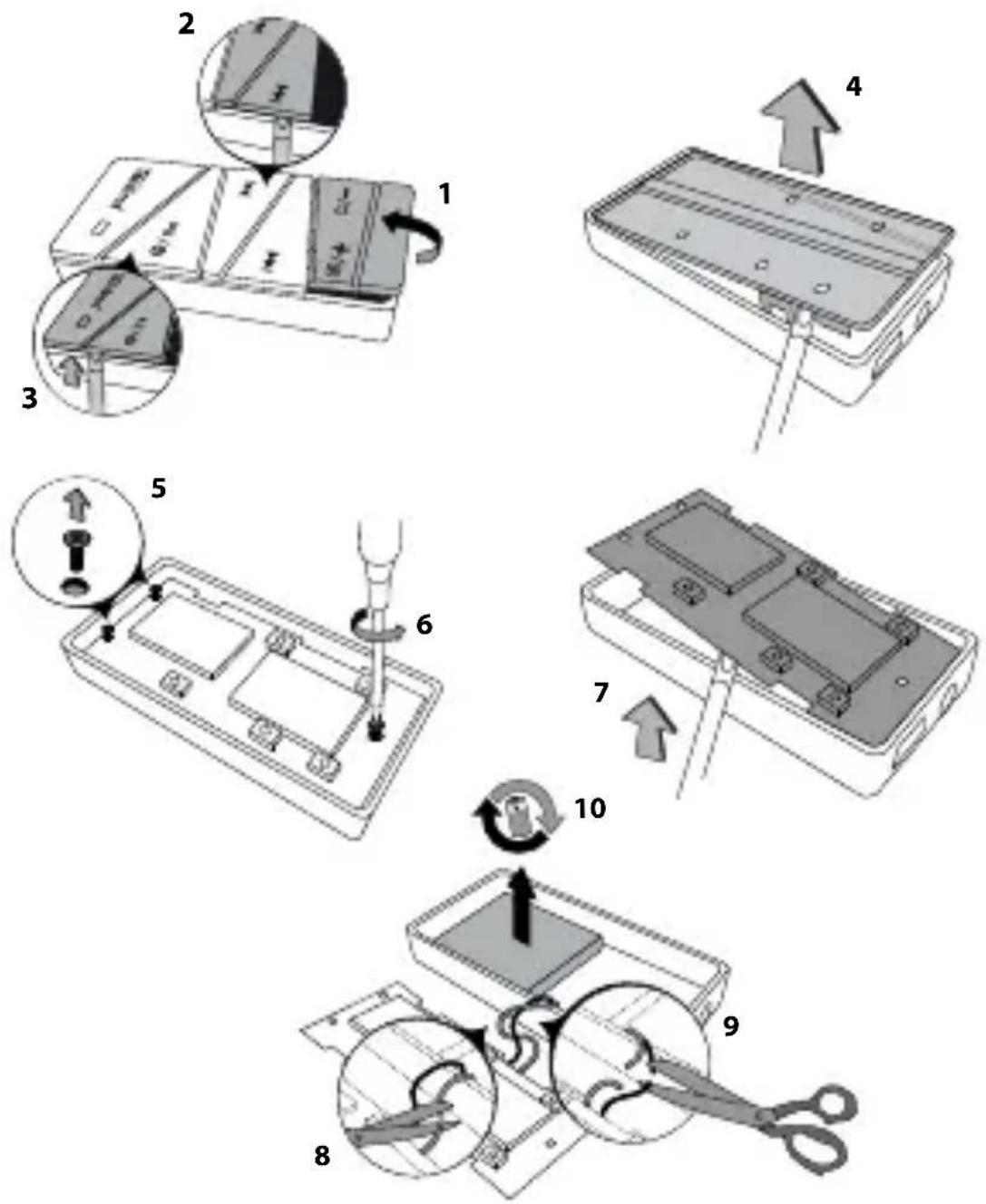
Instructions for removing the built in battery for safe disposal

The device must be turned off before the battery can be removed!
EC DECLARATION OF C
As manufacturer and importer respectively:
D-64653 Lorsch, Germany
herewith declares that the products
Product: i.Beat run
Type: MP3-Player
comply with the following directive(s):
• 2004/108/EC EMC Directive: Electromagnetic Compatibility
• 2006/95/EC Low Voltage Directive
The following norms were consulted to assess conformity:
• EN 55013:2001 + A1:2003
Sound and television broadcast receivers and associated equipment – Radio disturbance characteristics – Limits and methods of measurement
• EN 55020:2002 + Corrigendum 2005-02 + A1:2003 + A2:2005
Sound and television broadcast receivers and associated equipment – Immunity characteristics – Limits and methods of measurement
• EN 55022:2006 + A1:2000 + A2:2003
EMC: Information technology equipment. Radio disturbance characteristics. Limits and methods of measurement
EN 55024:1998 + A1:2001 + A2:2003
EMC: In formation technology equipment – Immunity characteristics – Limits and methods of measurement
• EN 60065:2002 + A1:2006 + Corrigendum:2006
Audio, video and similar electronic apparatus – Safety requirements
- EN 61000-3-2:2006
EMC: Part 3-2: Limits – Limits for harmonic current emissions (equipment input current 16A per phase)
• EN 61000-3-3:1995 + A1:2001 + A2:2005
EMC: Part 3-3: Limits – Limitation of voltage changes, voltage fluctuations and flicker in public low-voltage supply systems, for equipment with rated current 16 A per phase and not subjected to conditional connection
The CE symbol confirms that this product conforms with the above mentioned norms and regulations.
The manufacturer also declares the conformity of the product according to the following directives:
• 2001/95/EC General Product Safety
• 2002/95/EC RoHS: Hazardous substances in electrical and electronic equipment
Lorsch, 09.06.2009
Aaron Taylor, SPM
Support
| Hotline E-Mail Language | ||
| AT | +49 431 - 24 89 45 70** | support.at@trekstor.de German |
| BE | +49 431 - 24 89 45 80** | support.en@trekstor.de English |
| CH | +49 431 - 24 89 45 73** | support.ch@trekstor.de German |
| DE | 01805 - TREKSTOR* | |
| 01805 - 87 35 78 67* | support.de@trekstor.de German | |
| ES | +49 431 - 24 89 45 76** | support.es@trekstor.de Spanish |
| FR | +49 431 - 24 89 45 74** | support.fr@trekstor.de French |
| HU | +49 431 - 24 89 45 79** | support.en@trekstor.de English |
| IT | +49 431 - 24 89 45 75** | support.it@trekstor.de Italian |
| LU | +49 431 - 24 89 45 72** | support.lu@trekstor.de German, French |
| NL | +49 431 - 24 89 45 81** | support.en@trekstor.de English |
| PL | +49 431 - 24 89 45 77** | support.pl@trekstor.de Polish |
| PT | +49 431 - 24 89 45 78** | support.en@trekstor.de English |
| UK | +49 431 - 24 89 45 71** | support.uk@trekstor.de English |
| GR | +49 431 - 24 89 45 82** | support.en@trekstor.de English |
| TR | +49 431 - 24 89 45 83** | support.en@trekstor.de English |
| RU | +49 431 - 24 89 45 84** | support.en@trekstor.de English |
| SE | +49 431 - 24 89 45 92** | support.en@trekstor.de English |
| UA | +49 431 - 24 89 45 93** | support.en@trekstor.de English |
| SI | +49 431 - 24 89 45 94** | support.en@trekstor.de English |
| CA | +49 431 - 24 89 45 95** | support.en@trekstor.de English |
| +49 431 - 24 89 45 96** | support.fr@trekstor.de French | |
| Other Countries | +49 431 - 24 89 45 99** | support.en@trekstor.de English |
** Please check with your local telephone provider for connection costs.

- BEDIENUNGSANLEITUNG
- CONNECTING THE TREKSTOR I.BEAT RUN TO A COMPUTER
- WINDOWS® 2000/XP/VISTA
- MAC ® OS X FROM 10.3
- CHARGING THE TREKSTOR I.BEAT RUN
- EXCHANGING DATA WITH THE TREKSTOR I.BEAT RUN
- LOGGING OFF AND DISCONNECTING THE TREKSTOR I.BEAT RUN FROM THE COMPUTER
- MAC® OS X FROM 10.3
- OPERATION OF THE TREKSTOR I.BEAT RUN
- TURNING THE DEVICE ON AND OFF
- STARTING AND PAUSING PLAYBACK
- CHANGING THE TRACK / FAST-FORWARDING AND REWINDING WITHIN A TRACK
- ADJUSTING THE VOLUME
- CHANGING THE PLAYBACK MODE
- FIRMWARE UPDATE FOR THE TREKSTOR I.BEAT RUN
- FORMATTING THE TREKSTOR I.BEAT RUN
- INSTRUCTIONS FOR REMOVING THE BUILT IN BATTERY FOR SAFE DISPOSAL
- EC DECLARATION OF C
Brand : TrekStor
Model : I.Beat run
Category : Mp3 player