
DA824 - Audio/video converter YAMAHA - Free user manual and instructions
Find the device manual for free DA824 YAMAHA in PDF.


| Product Type | Digital-to-Analog Converter |
| Brand | Yamaha |
| Model | DA824 |
| Channels | 8 |
| Digital Input Interface | Optional mini YGDAI cards (AES/EBU, ADAT, TDIF-1) |
| DA Conversion Resolution | 24-bit linear, 128x oversampling |
| Dynamic Range | 110 dB (typical) |
| Frequency Response | -3, +1 dB, 20 Hz–20 kHz |
| Total Harmonic Distortion | 0.05%, 20 Hz–20 kHz; 0.01% @ 1 kHz full scale |
| Analog Output Connectors | XLR-3-32 (balanced) and TRS phone jack (balanced) per channel |
| Maximum Output Level Settings | +24 dB, +18 dB, +15 dB, +4 dBV (internal switches) |
| Wordclock Input | BNC, 75Ω, TTL level |
| Wordclock Termination | 75Ω ON/OFF switch |
| Power Supply | 120 V AC 60 Hz (US/Canada), 230 V AC 50 Hz (Europe) |
| Power Consumption | 40 W |
| Dimensions (W x H x D) | 480 x 97.5 x 366.8 mm (18.9 x 3.84 x 14.44 inches) |
| Weight | 7.5 kg (16.53 lbs) |
| Rackmountable | Yes, 2U height |
| Operating Temperature | 10°C to 35°C (50°F to 95°F) |
| Storage Temperature | -20°C to 60°C (-4°F to 140°F) |
| Included Accessories | Power cord, Owner’s Manual |
| Cleaning | Use only a soft, dry cloth. No benzene, thinner, or chemical cloths. |
| Safety Certification | FCC Class B, CE (EN55103-1/2), Earthed |
| Firmware Update Port | COM port (RS232C, 9-pin D-sub, not for normal use) |
Frequently Asked Questions - DA824 YAMAHA
User questions about DA824 YAMAHA
0 question about this device. Answer the ones you know or ask your own.
Ask a new question about this device
Download the instructions for your Audio/video converter in PDF format for free! Find your manual DA824 - YAMAHA and take your electronic device back in hand. On this page are published all the documents necessary for the use of your device. DA824 by YAMAHA.
USER MANUAL DA824 YAMAHA
- IMPORTANT NOTICE: DO NOT MODIFY THIS UNIT! This product, when installed as indicated in the instructions contained in this manual, meets FCC requirements. Modifications not expressly approved by Yamaha may void your authority, granted by the FCC, to use the product.
- IMPORTANT: When connecting this product to accessories and/or another product use only high quality shielded cables. Cable/s supplied with this product MUST be used. Follow all installation instructions. Failure to follow instructions could void your FCC authorization to use this product in the USA.
- NOTE: This product has been tested and found to comply with the requirements listed in FCC Regulations, Part 15 for Class "B" digital devices. Compliance with these requirements provides a reasonable level of assurance that your use of this product in a residential environment will not result in harmful interference with other electronic devices. This equipment generates/uses radio frequencies and, if not installed and used according to the instructions found in the users manual, may cause interference harmful to the operation of other electronic devices. Compliance with FCC regulations does not guarantee that interference will not occur in all installations. If this product is found to be the source of interference, which can be determined by turning the unit "OFF" and "ON", please try to eliminate the problem by using one of the following measures: Relocate either this product or the device that is being affected by the interference. Utilize power outlets that are on different branch (circuit breaker or fuse) circuits or install AC line filter/s. In the case of radio or TV interference, relocate/reorient the antenna. If the antenna lead-in is 300 ohm ribbon lead, change the lead-in to coaxial type cable. If these corrective measures do not produce satisfactory results, please contact the local retailer authorized to distribute this type of product. If you can not locate the appropriate retailer, please contact Yamaha Corporation of America, Electronic Service Division, 6600 Orangethorpe Ave, Buena Park, CA 90620
The above statements apply ONLY to those products distributed by Yamaha Corporation of America or its subsidiaries.
WARNING: THIS APPARATUS MUST BE EARTHED
IMPORTANT
THE WIRES IN THIS MAINS LEAD ARE COLOURED IN ACCORDANCE WITH THE FOLLOWING CODE:
As the colours of the wires in the mains lead of this apparatus may not correspond with the coloured markings identifying the terminals in your plug, proceed as follows:
The wire which is coloured GREEN and YELLOW must be connected to the terminal in the plug which is marked by the letter E or by the safety earth symbol 12 or coloured GREEN and YELLOW.
The wire which is coloured BLUE must be connected to the terminal which is marked with the letter N or coloured BLACK.
The wire which is coloured BROWN must be connected to the terminal which is marked with the letter L or coloured RED.
* This applies only to products distributed by YAMAHA KEMBLE MUSIC (U.K.) LTD.
Important Information
Please read before operating the DA824
Warnings
- D o not subject the DA824 to extreme temperatures, humidity, direct sunlight, or dust, which could be a potential fire or electrical shock hazard.
- Do not allow water to enter the DA824 or allow it to become wet. Fire or electrical shock may result.
- Connect the power cord only to an AC outlet of the type stated in the Owner's Manual or as marked on the DA824. Failure to do so is a fire and electrical shock hazard.
- H old the power-cord plug when disconnecting from an AC outlet. Never pull the cord. A power cord damaged through pulling is a potential fire and electrical shock hazard.
- Do not touch the power plug with wet hands. Doing so is a potential electrical shock hazard.
- D o not place heavy objects, including the DA824, on top of the power cord. A damaged power cord is a fire and electrical shock hazard. In particular, be careful not to place heavy objects on a power cord covered by a carpet.
- Do not scratch, bend, twist, pull, or heat the power cord. A damaged power cord is a fire and electrical shock hazard.
- If the power cord is damaged (e.g., cut or a bare wire is exposed), ask your dealer for a replacement. Using the DA824 with a damaged power cord is a fire and electrical shock hazard.
- Do not plug several devices into the same AC outlet. This may overload the AC outlet, and could be a fire or electrical shock hazard. It may also affect the performance of some equipment.
- If you notice any abnormality, such as smoke, odor, or noise, or if a foreign object or liquid gets inside the DA824, turn it off immediately. Remove the power cord from the AC outlet and consult your dealer for repair. Using the DA824 in this condition is a fire and electrical shock hazard.
- Do not place small objects on top of the DA824. Metal objects falling inside the DA824 is a fire and electrical shock hazard.
- If a foreign object or water gets inside the DA824, turn it off immediately. Remove the power cord from the AC outlet and consult your dealer for repair. Using the DA824 in this condition is a potential fire and electrical shock hazard.
- Should the DA824 be dropped or the cabinet be damaged, turn off the power, remove the power plug from the AC outlet, and contact your dealer. If you continue using the unit without heeding this instruction, fire or electrical shock may result.
- D o not remove the DA824's cover. You could receive an electrical shock. If you think internal inspection, maintenance, or repair is necessary, contact your dealer.
• D o not attempt to modify the DA824. This is a potential fire and electrical shock hazard. - Do not block the DA824 ventilation slots. Blocking the ventilation slots is a potential fire hazard.
- D o not place a container with liquid or small metal objects on top of this unit. Liquid or metal objects inside this unit are a fire and electrical shock hazard.
- Be sure to connect to an appropriate outlet with a protective grounding connection. Improper grounding can result in electrical shock.
Cautions
- If this device is to be mounted in an EIA-standard rack, leave the back of the rack open and make sure that it is at least 10 cm away from walls or surfaces. Also, if this device is to be mounted with devices that tend to generate heat, such as power amplifiers, be sure to keep an adequate gap between this device and the heat-generating devices or install ventilation panels to prevent high temperatures from developing inside this device. Under these conditions these devices can be rackmounted. Inadequate ventilation can result in overheating, possibly causing damage to the device(s), or even fire.
- Use the DA824 in an environment where the temperature is between 10^ and 35^ (50°F and 95°F).
- Turn off audio devices when connecting them to the DA824, and use only the cables specified in the relevant owner's manuals.
- If you plan not to use the DA824 for a long period of time, remove the power cord from the AC outlet. Leaving the DA824 connected is a potential fire hazard.
- Do not use benzene, thinner, cleaning detergent, or a chemical cloth to clean the DA824. Use only a soft, dry cloth.
- If the DA824 is stored in a cold place (e.g., overnight in a car), and then moved to a warmer environment, or the temperature rises sharply, condensation may form inside the DA824, which may affect performance. In such cases, the DA824 should be allowed to acclimatize for about one hour before use.
- When the wordclock source is changed, the DA824's analog outputs may produce noise, especially if an MY8-AT I/O card is installed, so turn down your power amps beforehand. Likewise, when changing the wordclock source on the wordclock master device (e.g., AD824 or DME32), turn down your power amps beforehand, or turn off the DA824.
- When setting up the product, make sure that the AC outlet you are using is easily accessible. If some trouble or malfunction occurs, immediately turn off the power switch and disconnect the plug from the outlet. Even when the power switch is turned off, electricity is still flowing to the product at the minimum level. When you are not using the product for a long time, make sure to unplug the power cord from the wall AC outlet.
Interference
The DA824 uses high-frequency digital circuits that may cause interference on radio and television equipment located nearby. If interference is a problem, relocate the affected equipment.
DA824 Exclusion of Certain Responsibility
Manufacturer, importer, or dealer shall not be liable for any incidental damages including personal injury or any other damage caused by improper use or operation of the DA824.
Yamaha cannot be held responsible for any loss of data or data damage due to improper use or operation of the DA824.
Package Contents
The DA824 package should contain the following items. Contact your Yamaha dealer if anything is missing.
• D A824 DA Converter
• Power cord
• T his manual
Trademarks
ADAT MultiChannel Optical Digital Interface is a trademark of Alesis Corporation. Tascam Digital Interface is a trademark and Tascam and Teac are registered trademarks of Teac Corporation. Yamaha is a trademark of Yamaha Corporation. All other trademarks are the property of their respective holders and are hereby acknowledged.
Copyright
No part of the DA824 software or this Owner's Manual may be reproduced or distributed in any form or by any means without the prior written authorization of Yamaha Corporation.
© 2000 Yamaha Corporation. All rights reserved.
Contents
1 Introduction .... 1
Welcome....1
Installation 1
Setting the Maximum Output Level 1
Connecting the Power Cord.... 1
Turning On the Power 1
2 Touring the DA824 2
Front Panel 2
Rear Panel....3
3 Digital I/O Cards 4
About Digital I/O Cards 4
Card Specifications 4
Installing I/O Cards 5
4 Hookup Examples 6
Basic AES/EBU Connection 6
Basic ADAT Connection 6
AES/EBU Connection with Splitter Cable 7
Dual ADAT Connection 7
5 Wordclocks 8
About Wordclocks 8
Wordclock Hookup Examples 8
Wordclock Termination 9
Appendix 10
Specifications 10
Dimensions 12
1 Introduction
Welcome
Thank you for choosing the Yamaha DA824 DA Converter.
The DA824 is a high-performance 8-channel digital-to-analog converter, with 24-bit linear digital-to-analog converters and 128-times oversampling providing a typical dynamic range of 110 dB. Optional mini YGDAI (Yamaha General Digital Audio Interface) cards offer a variety of digital input interfaces, with support for all the popular digital audio interconnect formats, including AES/EBU, ADAT, and Tascam TDIF-1.
Installation
The DA824 can be used freestanding on a stable surface, somewhere that complies with the important information at the beginning of this manual, or mounted in a rack.
When mounting the DA824 in a rack, leave adequate ventilation space around the DA824 (at least 10 cm of free space behind). If the DA824 is mounted in a portable rack case, keep the rear of the case open when using the DA824, so as not to obstruct the flow of air from the air vents. Do not mount the DA824 next to equipment that produces a lot of heat, such as a power amplifier.
Setting the Maximum Output Level
Inside the DA824 are eight output-level switches for presetting the maximum output level of each analog output. Maximum output levels settings are: +24 dB, +18 dB, +15 dB, and +4 dBV. See you Yamaha dealer for more information.
Connecting the Power Cord
Warning: Turn off all equipment before making any connections.
Connect the power-cord plug to a suitable AC wall outlet, one that conforms to the power supply requirements stated on the DA824 rear panel.
Turning On the Power
To prevent audible thumps and clicks, turn on your audio equipment in the following order (reverse this order when turning off your equipment)—sound sources, mixer or recorder (e.g., 02R, DME32, D24, etc.), DA824, power amplifiers.
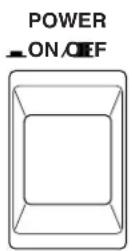
1 Press the [POWER] switch to turn on the DA824.
The DA824 starts up and the POWER indicator lights up.
2 Press the [POWER] switch again to turn off the DA824.
The POWER indicator goes out.
2 Touring the DA824
Front Panel
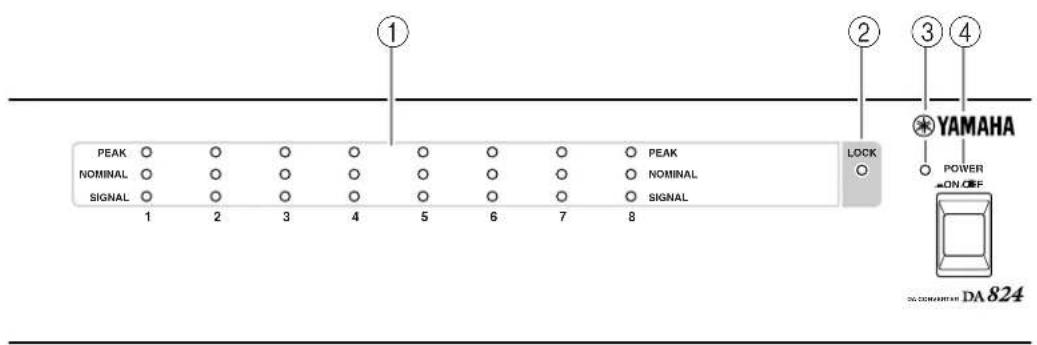
These indicators show the signal level of each channel.
PEAK—This indicator lights up when the signal level is 3 dB below full-scale output.
NOMINAL—This indicator lights up when the signal level is 14 dB below full-scale output.
SIGNAL—This indicator lights up when the signal level is 34 dB below full-scale output.
② LOCK indicator
This indicator shows whether or not the DA824 is locked to the wordclock source. See "Wordclocks" on page 8 for more information.
③ POWER indicator
This indicator lights up when the DA824 is powered up.
④ POWER switch
This switch is used to turn on the power to the DA824. It's recessed to prevent accidental operation. See "Turning On the Power" on page 1 for more information.
Rear Panel
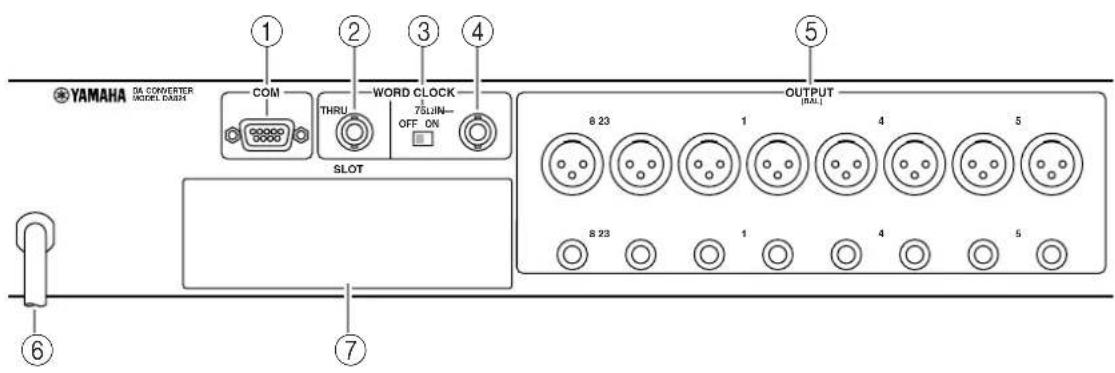
① COM port
This port is for updating the DA824's internal firmware and is not used in normal operation.
② WORD CLOCK THRU connector
This BNC connector transmits the wordclock signal received at the WORD CLOCK IN.
③ WORD CLOCK 75Ω ON/OFF switch
This switch is used to terminate the wordclock signal received at the WORD CLOCK IN. See “Wordclocks” on page 8 for more information.
④ WORD CLOCK IN connector
This BNC connector is used to connect an external wordclock source. Normally, the DA824 locks to a wordclock signal derived from the SLOT digital audio inputs, but when a usable wordclock signal is present at the WORD CLOCK IN connector, this is used instead. See “Wordclocks” on page 8 for more information.
⑤ OUTPUT (BAL) connectors
These male XLR-3-32 type connectors and 1/4" phone jack (TRS) connectors are the analog outputs for each channel. Both types of connector are electronically balanced. XLR connectors are wired as follows: pin-1 ground, pin-2 hot (+), and pin-3 cold (-). When using both the XLR and phone jack output of a channel at the same time, ensure that the total load is greater than 600Ω.
⑥ Power cable
This power cable is used to connect the DA824 to an AC outlet. See “Connecting the Power Cord” on page 1 for more information.
⑦ SLOT
This slot is for use with optional mini YGDAI cards, which offer various digital input options. See “Digital I/O Cards” on page 4 for more information.
3 Digital I/O Cards
About Digital I/O Cards
For digital input, the DA824 uses optional mini YGDAI (Yamaha General Digital Audio Interface) cards, which are available in all the popular digital audio interconnect formats, including AES/EBU, ADAT, and Tascam TDIF-1.
The following digital I/O cards are currently available. See the Yamaha Professional Audio Web site at the following address for up-to-date news on mini YGDAI cards: http://www.yamaha.co.jp/product/proaudio/homeenglish/.
MY8-AT—ADAT
The MY8-AT card provides ADAT format digital I/O via two MultiChannel Optical Digital Interface connectors, and supports 16-, 20-, and 24-bit wordlengths.
MY8-AE—AES/EBU
The MY8-AE card provides AES/EBU format digital I/O via a 25-pin D-sub connector, and supports 16-, 20-, and 24-bit wordlengths.
MY8-TD—Tascam TDIF-1
The MY8-TD card provides Tascam TDIF-1 format digital I/O via a 25-pin D-sub connector, and supports 16-, 20-, and 24-bit wordlengths. A BNC connector is provided for wordclock output.
MY8-TD cards feature a device selector switch (EXT: 88/INT: 38) that should be set to match the device being connected. This should be set to "EXT: 88" when connecting a Tascam DA-88, or "INT: 38" when connecting a Tascam DA-38, DME32, or other device.
Card Specifications
The following table provides specifications for the DA824-compatible I/O cards.
| Card Format In Out Wordlength Connectors | |||||
| MY8-AT ADAT | I/O 8 8 16, 20, 24 | Optical | x2 | ||
| MY8-AE AES/ | EBU I/O 8 8 16, 20, 24 | 25-pin D-sub(cable not included) | |||
| MY8-TD Tascam | TDIF-1 I/O 8 8 16, 20, 24 | 25-pin D-sub,BNC wordclock out | |||
Installing I/O Cards
This section explains how to install mini YGDAI cards in the DA824.
1 Turn off the DA824.
2 Undo the two fixing screws and remove the slot cover, as shown below.
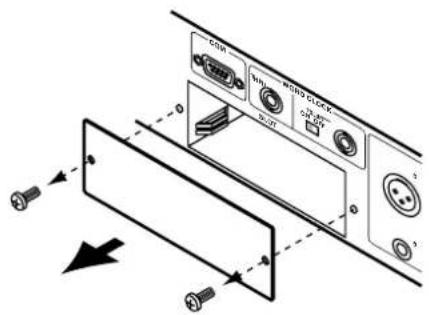
Keep the cover and fixing screws in a safe place for future use.
3 Insert the card between the guide rails and slide it all the way into the slot, as shown below. You may have to push firmly to plug the card into the DA824 connector.
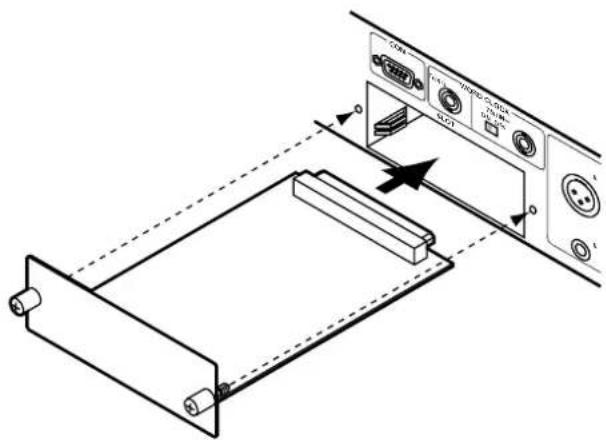
4 Secure the card using the attached thumbscrews. Do not leave the thumbscrews loose, as the card will not be grounded correctly.
4 Hookup Examples
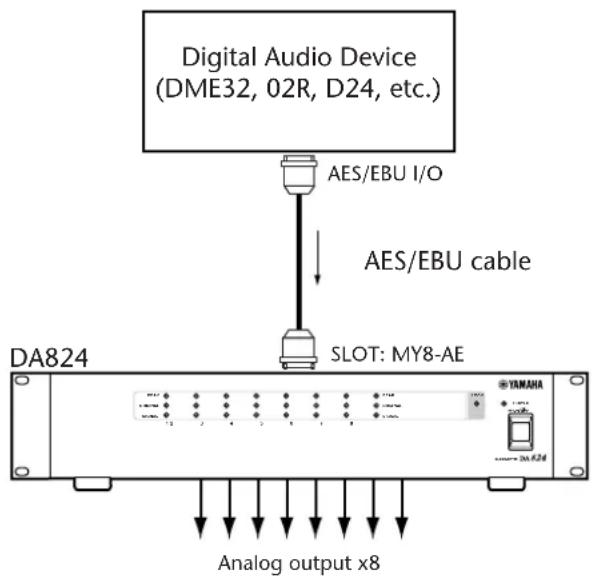
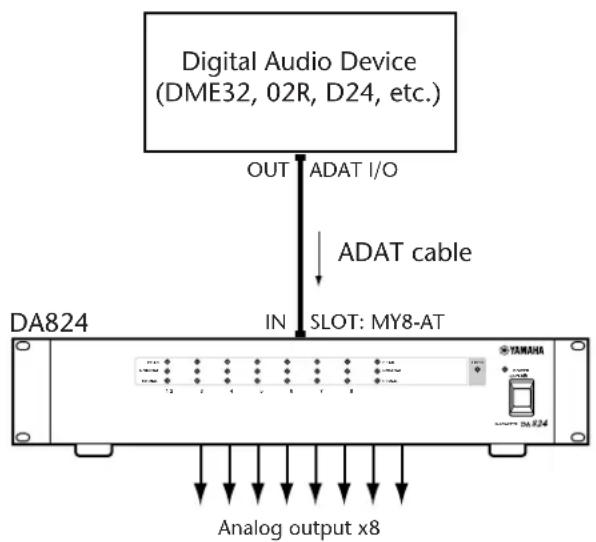
In the following hookup examples, the “Digital Audio Device” could be any device with a compatible AES/EBU or ADAT interface, including the following Yamaha products with the necessary I/O cards installed: DME32 Digital Mixing Engine, 02R Digital Recording Console, 03D Digital Mixing Console, 01V Digital Mixing Console, or D24 Digital Multitrack Recorder.
Basic AES/EBU Connection
This example shows how the DA824 can be connected to a digital audio device with an AES/EBU interface by using an MY8-AE I/O card and a 25-pin D-sub AES/EBU connecting cable.
Basic ADAT Connection
This example shows how the DA824 can be connected to a digital audio device with an ADAT interface by using a MY8-AT I/O card and standard ADAT connecting cable.
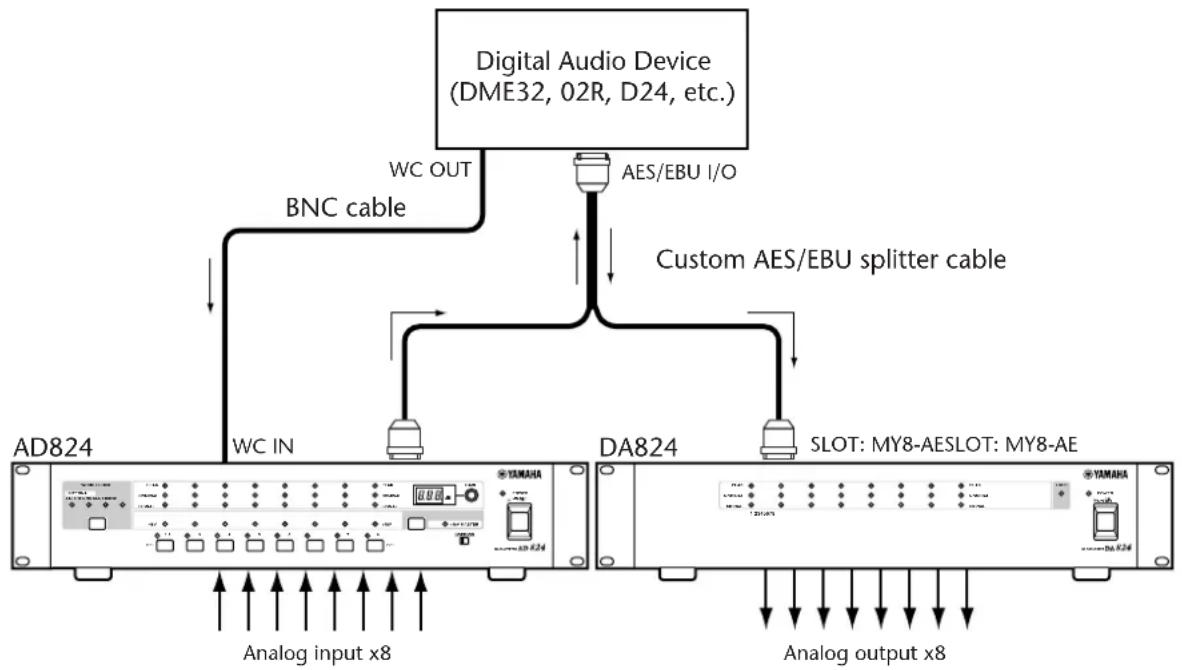
AES/EBU Connection with Splitter Cable
This example shows how both an AD824 and DA824 can be connected to a digital audio device with a single AES/EBU interface by using MY8-AE I/O cards and a custom AES/EBU splitter cable. Pin wiring details for the AES/EBU interface are supplied with each MY8-AE I/O card. The digital audio device is the wordclock master, with the AD824 receiving its wordclock via a BNC connection, the DA824, via its slot input.
flowchart
graph TD
    A["AD824"] -->|WC IN| B["Analog input x8"]
    C["DA824"] -->|SLOT: MY8-AESLOT: MY8-AE| D["Analog output x8"]
    B --> E["BNC cable"]
    D --> F["Custom AES/EBU splitter cable"]
    G["Digital Audio Device (DME32, 02R, D24, etc.)"] --> H["WC OUT"]
    H --> I["AES/EBU I/O"]
Dual ADAT Connection
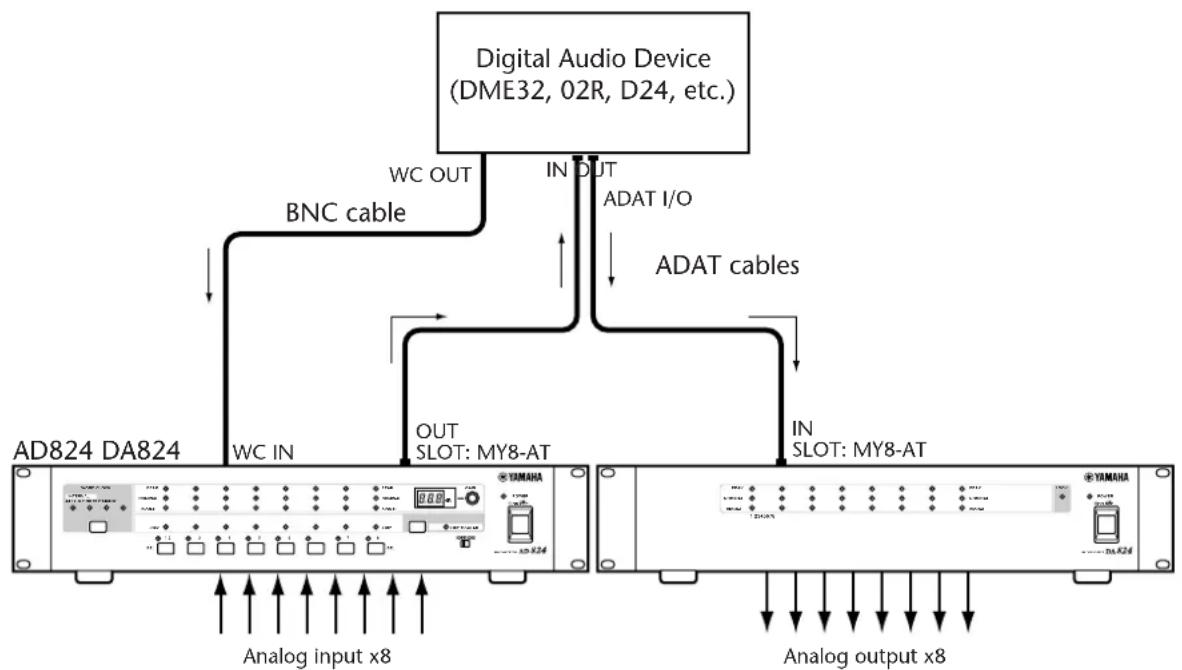
This example shows how both an AD824 and DA824 can be connected to a digital audio device with standard ADAT I/O by using MY8-AT I/O cards and standard ADAT connecting cables. The digital audio device is the wordclock master, with the AD824 receiving its wordclock via a BNC connection, the DA824, via its slot input.
flowchart
graph TD
    A["Digital Audio Device (DME32, 02R, D24, etc.)"] -->|WC OUT| B["BNC cable"]
    A -->|IN DUT| C["ADAT I/O"]
    A -->|ADAT cables| D["ADAT cables"]
    B --> E["AD824 DA824"]
    D --> F["AD824 DA824"]
    E --> G["Analog input x8"]
    F --> H["Analog output x8"]
    G --> I["Out SLOT: MY8-AT"]
    H --> J["Out SLOT: MY8-AT"]
5 Wordclocks
About Wordclocks
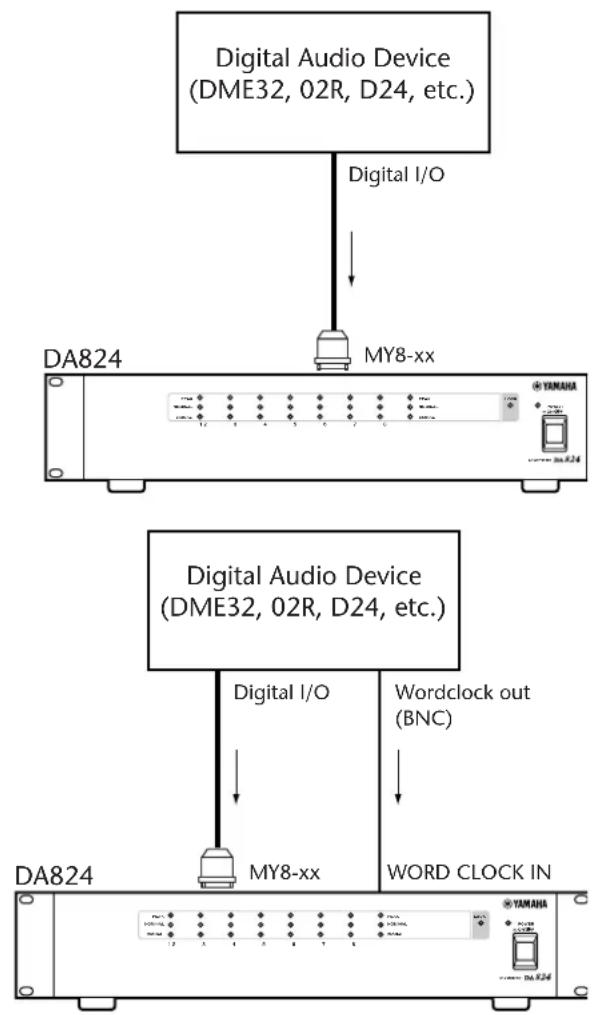
For correct operation and digital-to-analog processing, it is essential that the DA824 is wordclock locked to the digital audio device transmitting the digital audio signals. Normally, the DA824 locks to a wordclock signal derived from the SLOT digital audio inputs, but when a usable wordclock signal is present at the WORD CLOCK IN connector, this is used instead.
The LOCK indicator lights up when the DA824 is locked to the wordclock source and synchronized to the digital audio signal. It flashes if the DA824 is not synchronized to the digital audio signal.
Note: When the wordclock source is changed, the DA824's analog outputs may produce noise, especially if an MY8-ATI/O card is installed, so turn down your power amps beforehand. Likewise, when changing the wordclock source on the wordclock master device (e.g., AD824 or DME32), turn down your power amps beforehand, or turn off the DA824.
Wordclock Hookup Examples
In this example, the DA824 sources the wordclock signal from the SLOT digital audio inputs.
flowchart
graph TD
    A["Digital Audio Device (DME32, 02R, D24, etc.)"] -->|Digital I/O| B["DA824"]
    B --> C["MY8-xx"]
    C --> D["DA824"]
    D --> E["Digital Audio Device (DME32, 02R, D24, etc.)"]
    E --> F["MY8-xx"]
    F --> G["DA824"]
    G --> H["Wordclock out (BNC)"]
    H --> I["WORD CLOCK IN"]
In this example, the DA824 sources the wordclock signal automatically from the WORD CLOCK IN connector.
Wordclock Termination
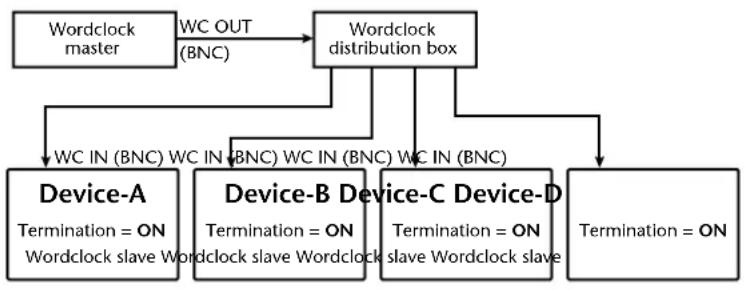
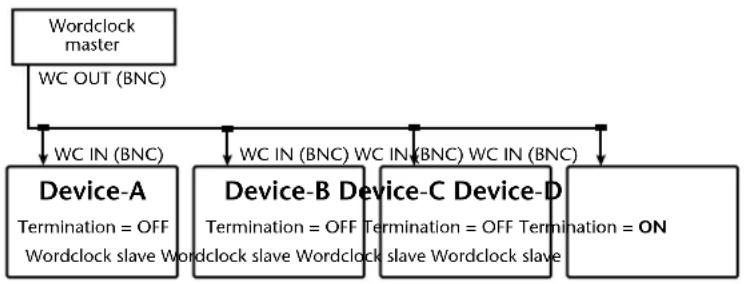
For correct and reliable operation, wordclock signals distributed via BNC cables must be terminated correctly. Termination is typically applied at the last device, although it depends on the distribution method being used. The DA824's WORD CLOCK 75Ω ON/OFF switch allows the DA824 to be connected in a variety of ways. The following examples show three ways in which wordclock signals can be distributed and how termination should be applied in each case.
Wordclock Distribution Box
In this example, a dedicated wordclock distribution box is used to supply a wordclock signal to each device individually. Termination is applied at each device.
flowchart
graph TD
    A["Wordclock master"] -->|WC OUT (BNC)| B["Wordclock distribution box"]
    B --> C["Device-A\nTermination = ON\nWordclock slave Wordclock"]
    B --> D["Device-B\nTermination = ON\nWordclock slave Wordclock"]
    B --> E["Device-C\nTermination = ON\nslave Wordclock slave"]
    B --> F["Device-D\nTermination = ON"]
    C --> G["End"]
    D --> G
    E --> G
    F --> G
Bus Distribution
In this example, the wordclock signal is distributed via a common line. Termination is applied at the last device only.
flowchart
graph TD
    A["Wordclock master"] -->|WC OUT (BNC)| B["Device-A"]
    A -->|WC IN (BNC)| C["Device-B"]
    A -->|WC IN (BNC) WC IN (BNC) WC IN (BNC)| D["Device-C Device-D"]
    B -->|Termination = OFF\nWordclock slave Wordclock slave Wordclock slave Wordclock slave| E["End"]
    C -->|Termination = OFF\nTermination = OFF Termination = ON| F["End"]
Daisy Chain Distribution
In this example, the wordclock signal is distributed in a “daisy-chain” fashion, with each device feeding the wordclock signal on to the next. Termination is applied at the last device only. This method of distribution is not recommended for larger systems.
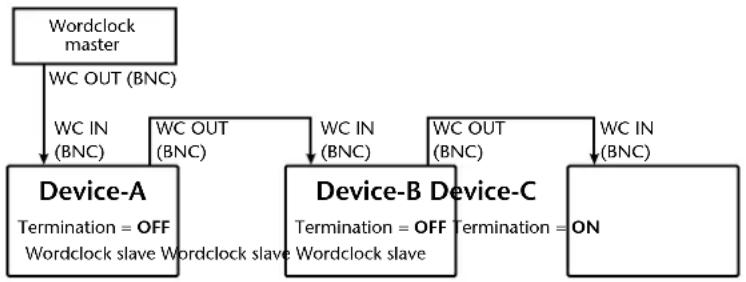
flowchart
graph TD
    A["Wordclock master"] -->|WC OUT (BNC)| B["Device-A"]
    A -->|WC IN (BNC)| B
    B -->|WC OUT (BNC)| C["Device-B Device-C"]
    B -->|WC IN (BNC)| C
    C -->|WC OUT (BNC)| D["Device-B Device-C"]
    C -->|WC IN (BNC)| D
    B -->|Termination = OFF\nWordclock slave Wordclock slave Wordclock slave| E["Wordclock slave"]
    C -->|Termination = OFF\nTermination = ON| F["Wordclock slave"]
Appendix
Specifications
| Sampling rate | MY8-AE, MY8-TD 39 | .69–50.88 kHz |
| MY8-AT 41.013–50.8 | 88 kHz | |
| DA conversion resolution 24-bit linear, 1 | 28-times oversampling | |
| Frequency response -3, +1 dB, 20 Hz–20 kHz | ||
| Dynamic Range ^1 | 110 dB (typical) | |
| Gain Error ±1 dB @ 1 kHz | ||
| THD ^2 | 0.05%, 20 Hz–20 kHz | |
| 0.01% full scale output @ 1 kHz | ||
| Hum & Noise Level ^1 | -92 dBu (typical) | |
| Crosstalk –70 dB between adjacent channels @ 1 kHz | ||
| Signal Delay 0.57 ms (digital input to analog output, fs = 48 kHz) | ||
| Indicators | PEAK 3 dB below full scale | |
| NOMINAL 14 dB below full scale | ||
| SIGNAL 34 dB below full scale | ||
| LOCK Wordclock lock | ||
| POWER Power on/off | ||
| Power requirements | U.S.A. & Canada 120 V AC, 60 HzEurope 230 V AC, 50 Hz | |
| Power consumption | 40 W | |
| Dimensions (W × H × D) | 480 × 97.5 × 366.8 mm (18.9 × 3.84 × 14.44 inches) | |
| Weight | 7.5 kg (16.53 lbs) | |
| Free-air operating temperature | 10°C to 35°C (50°F to 95°F) | |
| Storage temperature | -20°C to 60°C (-4°F to 140°F) | |
| Power cord length | 1.9 m | |
| Supplied Accessories | Owner's Manual | |
- Measured with a 6 dB/octave filter at 12.7 kHz; equivalent to a 20 kHz filter with infinite dB/octave attenuation.
- 6 dB/octave filter @ 80 kHz.
* Where dB represents a specific voltage, 0 dB is referenced to 0.775 V rms, 0 dBV is referenced to 1.00 V rms.
Analog Output
| Connection GAIN SW | Actual Source Impedance | For Use with Nominal | Output Level | Connector | ||
| Nominal | Max. before clip | |||||
| OUTPUT 1-8^1 | +24 dB | 150 Ω lines | 600 Ω lines | +10 dB (2.45 V) | +24 dB (12.28 V) | XLR-3-32 type (balanced) ^2 & TRS phone jack (balanced) ^3 |
| +18 dB | +4 dB (1.23 V) | +18 dB (6.16 V) | ||||
| +15 dB | +1 dB (0.87 V) | +15 dB (4.36 V) | ||||
| +4 dBV | -10 dBV (0.316 V) | +4 dBV (1.58 V) | ||||
-
24-bit 128-times oversampling D/A converters.
-
XLR-type connectors are electronically balanced (pin 1 = ground, pin 2 = hot, pin 3 = cold).
-
TRS phone jacks are electronically balanced (tip = hot, ring = cold, sleeve = ground).
* Where dB represents a specific voltage, 0 dB is referenced to 0.775 V rms, 0 dBV is referenced to 1.00 V rms.
Digital I/O
| Connection Format | Level/Impedance Connector | |
| COM — RS232C 9-pin D-sub (male) | ||
| WORD CLOCK IN — TTL, 75Ω (ON/OFF) BNC | ||
| WORD CLOCK THRU — TTL, 75Ω | BNC | |
| SLOT | mini YGDAI | — |
Dimensions
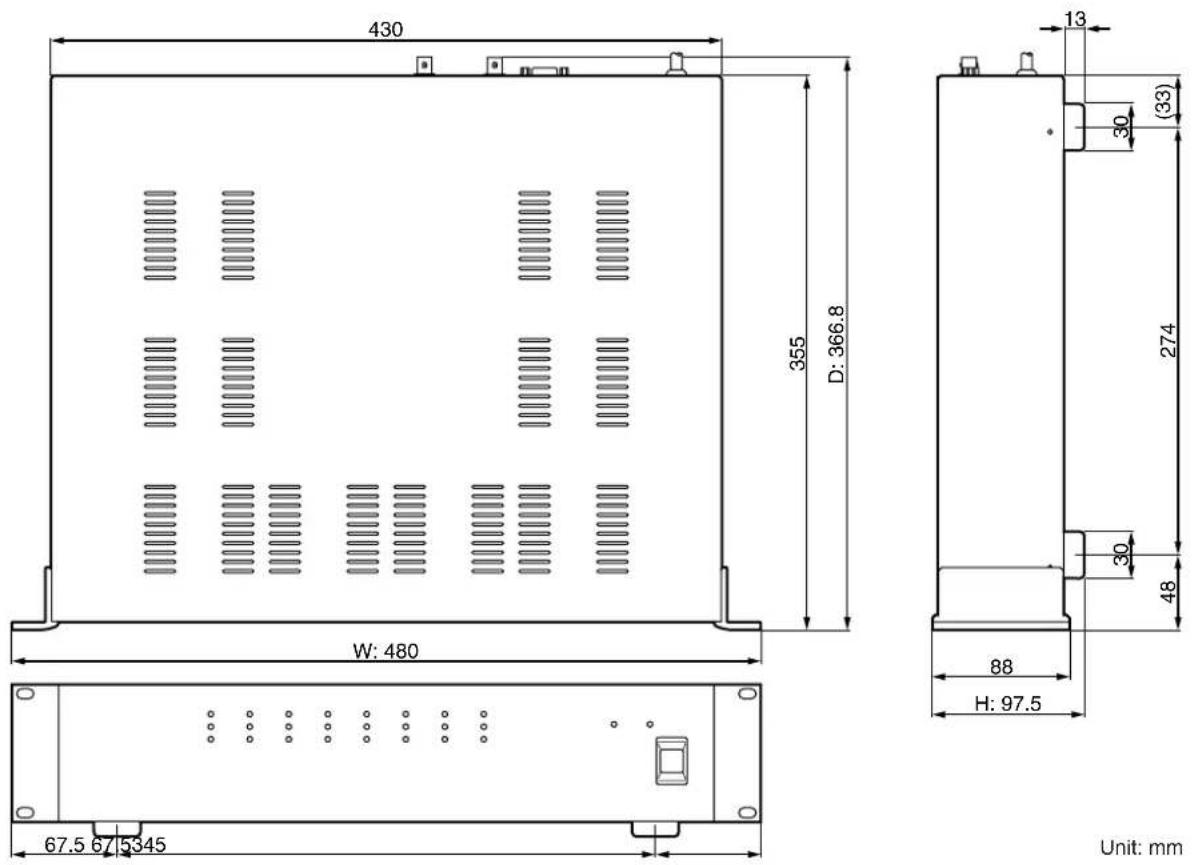
Unit: mm
Specifications and external appearance subject to change without notice.
For European Model
Purchaser/User Information specified in EN55103-1 and EN55103-2.
Inrush Current: 10A
Conformed Environment: E1, E2, E3 and E4

YAMAHA
- IMPORTANT
- Important Information
- Please read before operating the DA824
- Warnings
- Cautions
- Interference
- DA824 Exclusion of Certain Responsibility
- Package Contents
- Trademarks
- Copyright
- Contents
- Introduction .... 1
- Touring the DA824 2
- Digital I/O Cards 4
- Hookup Examples 6
- Wordclocks 8
- Appendix 10
- Introduction
- Welcome
- Installation
- Setting the Maximum Output Level
- Connecting the Power Cord
- Turning On the Power
- Touring the DA824
- Front Panel
- Rear Panel
- Digital I/O Cards
- About Digital I/O Cards
- MY8-AT—ADAT
- MY8-AE—AES/EBU
- MY8-TD—Tascam TDIF-1
- Card Specifications
- Installing I/O Cards
- Hookup Examples
- Basic AES/EBU Connection
- Basic ADAT Connection
- AES/EBU Connection with Splitter Cable
- Dual ADAT Connection
- Wordclocks
- About Wordclocks
- Wordclock Hookup Examples
- Wordclock Termination
- Wordclock Distribution Box
- Bus Distribution
- Daisy Chain Distribution
- Appendix
- YAMAHA
Brand : YAMAHA
Model : DA824
Category : Audio/video converter