
TS-E 135MM F2.8L Macro - Lens CANON - Free user manual and instructions
Find the device manual for free TS-E 135MM F2.8L Macro CANON in PDF.


User questions about TS-E 135MM F2.8L Macro CANON
0 question about this device. Answer the ones you know or ask your own.
Ask a new question about this device
Download the instructions for your Lens in PDF format for free! Find your manual TS-E 135MM F2.8L Macro - CANON and take your electronic device back in hand. On this page are published all the documents necessary for the use of your device. TS-E 135MM F2.8L Macro by CANON.
USER MANUAL TS-E 135MM F2.8L Macro CANON
TS-E50mm f/2.8L MACRO
TS-E90mm f/2.8L MACRO
TS-E135mm f/4L MACRO
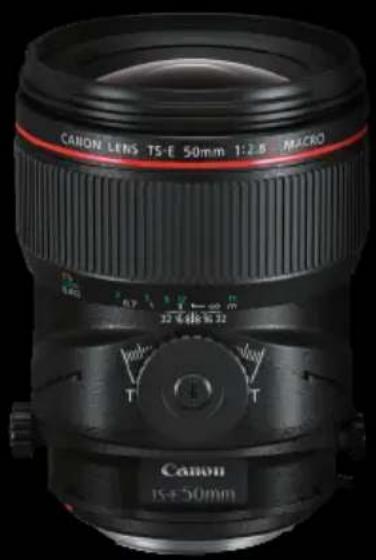
natural_image
Close-up of a Canon EF 50mm camera lens with adjustable settings (no visible text or symbols on the lens body)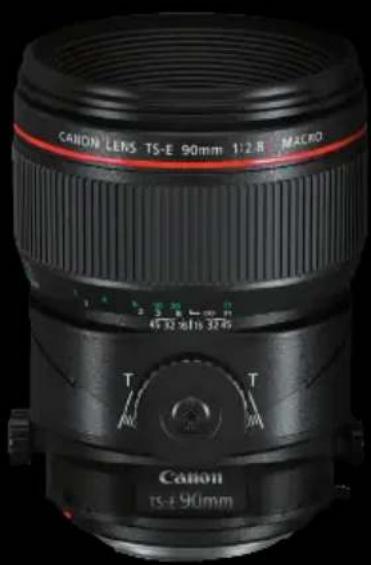
text_image
CANION LERS TS-E 90mm 1:2.8 MAERO 45.32 x 1/16 3750 T T Canon rs+90mm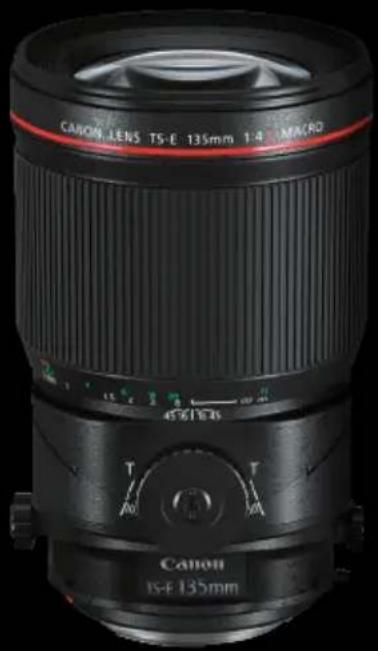
natural_image
Close-up of a Canon EF 135mm camera lens with adjustable focal length and aperture (no text or symbols on the lens itself)ENG
Instructions
Thank you for purchasing a Canon product.
The Canon TS-E50mm f/2.8L MACRO, Canon TS-E90mm f/2.8L MACRO, and Canon TS-E135mm f/4L MACRO are tilt-shift lenses* designed for EOS cameras that allow macro shooting up to 0.5 times magnification.
Camera Firmware
Please use the latest version of firmware with the camera in use. For details on whether the firmware is the latest version or not, and for details on updating the firmware, please check the Canon website.
Conventions used in this instruction

Warning to prevent lens or camera malfunction or damage.

Supplementary notes on using the lens and taking pictures.
* Depending on the camera model, the orientation or movement required for operation differs somewhat. For nomenclature and tilt operation, see the corresponding page for each model.
• TS-E50mm f/2.8L MACRO
Nomenclature: p.5, p.6
Using tilt: p.15, p.16
- TS-E90mm f/2.8L MACRO, TS-E135mm f/4L MACRO
Precautions to ensure that the camera is used safely. Read these precautions thoroughly. Make sure all details are observed in order to prevent risks and injury to the user and other people.

Warning
Details pertaining to risks that may result in death or serious injury.
- Do not look at the sun or a bright light source through the lens or single-lens reflex camera. Doing so could result in loss of vision. Looking at the sun directly through the lens is especially hazardous.
- Whether it is attached to the camera or not, do not leave the lens under the sun without the lens cap attached. This is to prevent the lens from concentrating the sun's rays, which could cause a fire.

Caution
Details pertaining to risks that may result in injury.
- Do not leave the camera in locations subject to high or low temperatures. This may result in the camera becoming excessively hot or cold, which may cause burns or other injuries when touched.
- Do not insert your fingers inside the camera. Failure to observe this may result in injury.
Before mounting or detaching the lens, or turning the lens for rotation or TS rotation, always lock the lens in a non-tilted and non-shifted position. Not doing so may cause injury. - When tilting or shifting the lens, avoid touching protrusions on the tilt mechanism and shift mechanism. Not doing so may cause injury.
Caution
Details pertaining to risks that may result in damage to property.
- Do not leave the lens in excessive heat such as in a car in direct sunlight. High temperatures can cause the lens to malfunction.
- Do not turn knobs forcefully. This may cause malfunction.
- When mounting or detaching the lens or turning the lens for rotation, always lock the lens in a non-tilted and non-shifted position. Not doing so may cause malfunction.
ENG-2
This device complies with Part 15 of the FCC Rules.
Operation is subject to the following two conditions: (1) This device may not cause harmful interference, and (2) this device must accept any interference received, including interference that may cause undesired operation.
Do not make any changes or modifications to the equipment unless otherwise specified in the instructions. If such changes or modifications should be made, you could be required to stop operation of the equipment.
This equipment has been tested and found to comply with the limits for a class B digital device, pursuant to part 15 of the FCC Rules. These limits are designed to provide reasonable protection against harmful interference in a residential installation. This equipment generates, uses and can radiate radio frequency energy and, if not installed and used in accordance with the instructions, may cause harmful interference to radio communications.
However, there is no guarantee that interference will not occur in a particular installation. If this equipment does cause harmful interference to radio or television reception, which can be determined by turning the equipment off and on, the user is encouraged to try to correct the interference by one or more of the following measures:
- Reorient or relocate the receiving antenna.
- Increase the separation between the equipment and receiver.
- Connect the equipment into an outlet on a circuit different from that to which the receiver is connected.
- Consult the dealer or an experienced radio/TV technician for help.
CAN ICES-3(B)/NMB-3(B)
ENG-3
General Precautions
Handling Precautions
- If the lens is taken from a cold environment into a warm one, condensation may develop on the lens surface and internal parts. To prevent condensation in this case, first put the lens into an airtight plastic bag before taking it from a cold to warm environment. Then take out the lens after it has warmed gradually. Do the same when taking the lens from a warm environment into a cold one.
- Please also read any lens related handling precautions listed in your camera's instruction manual.
Shooting Precautions
- To ensure that you use the lens' functions effectively, it is recommended that you shoot in the following conditions.
- Use an EOS camera with about 100% viewfinder visibility
- Use Live View (with onscreen grid)
- Use an external monitor
- Use a tripod
- Use a matte with grid focusing screen
-
Use a stand-alone exposure meter
-
Since only a hood is not very effective in cutting off the harmful rays entering the lens, also using a piece of cardboard is recommended.
- If using Digital Photo Professional to perform lens correction (lens aberration correction, Digital Lens Optimizer, etc.)*, shooting with rotation or TS rotation locked or at a click position is recommended.
* Supported cameras: EOS 6D Mark II (As of August 2017)
Nomenclature (TS-E50mm f/2.8L MACRO)
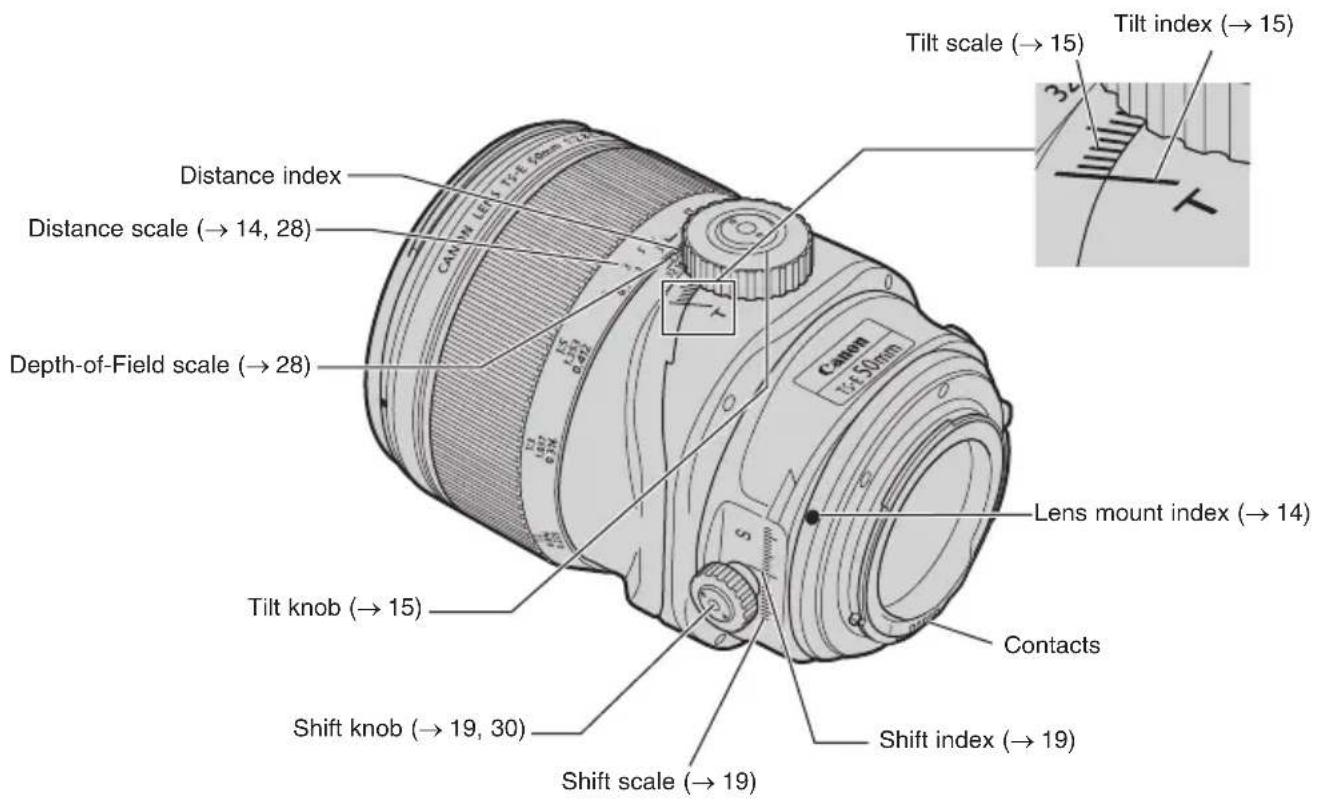
text_image
Tilt scale (→ 15) Tilt index (→ 15) Distance index Distance scale (→ 14, 28) Depth-of-Field scale (→ 28) Lens mount index (→ 14) Tilt knob (→ 15) Contacts Shift knob (→ 19, 30) Shift scale (→ 19) Shift index (→ 19)For detailed information, reference page numbers are provided in parentheses ^* .
ENG-5
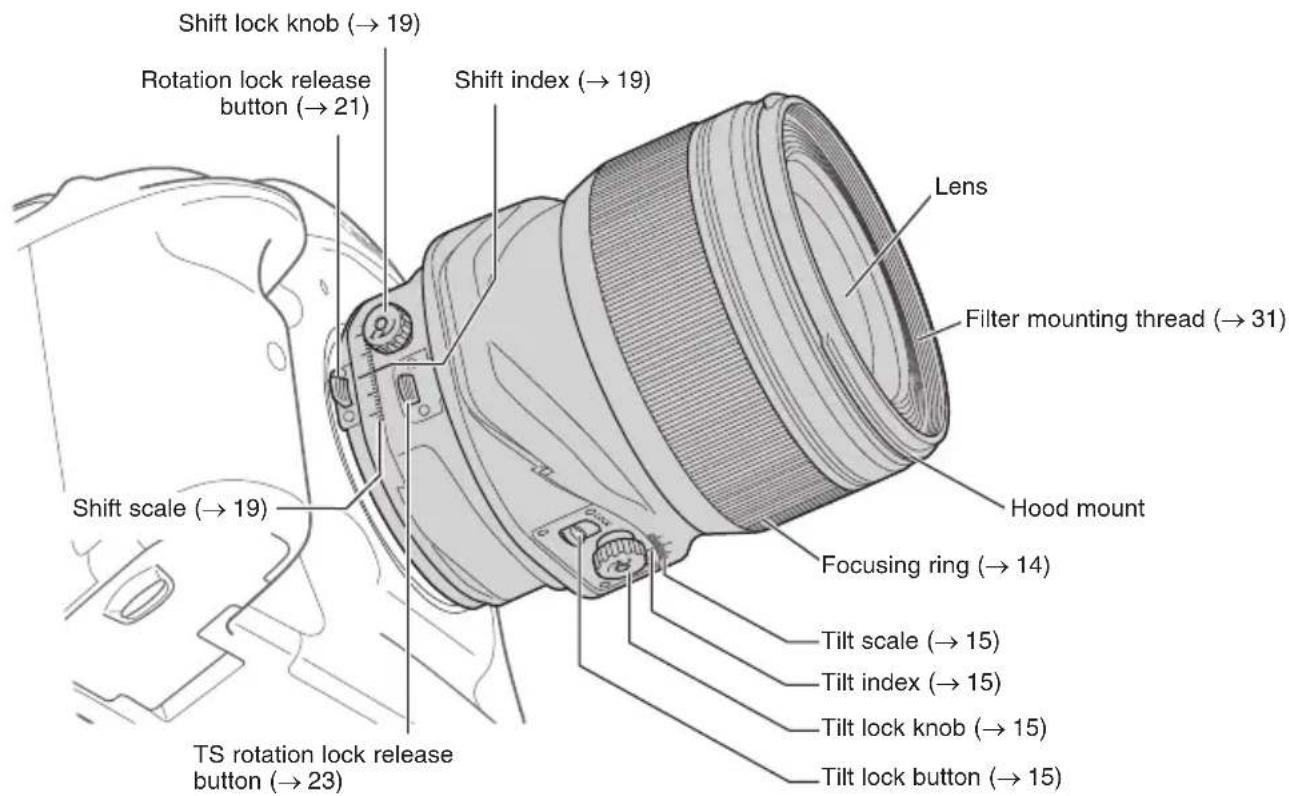
Nomenclature (TS-E50mm f/2.8L MACRO)
text_image
Shift lock knob (→ 19) Rotation lock release button (→ 21) Shift index (→ 19) Lens Filter mounting thread (→ 31) Shift scale (→ 19) Hood mount Focusing ring (→ 14) TS rotation lock release button (→ 23) Tilt scale (→ 15) Tilt index (→ 15) Tilt lock knob (→ 15) Tilt lock button (→ 15)Illustration shows lens viewed from below.
For detailed information, reference page numbers are provided in parentheses ^* .
ENG-6
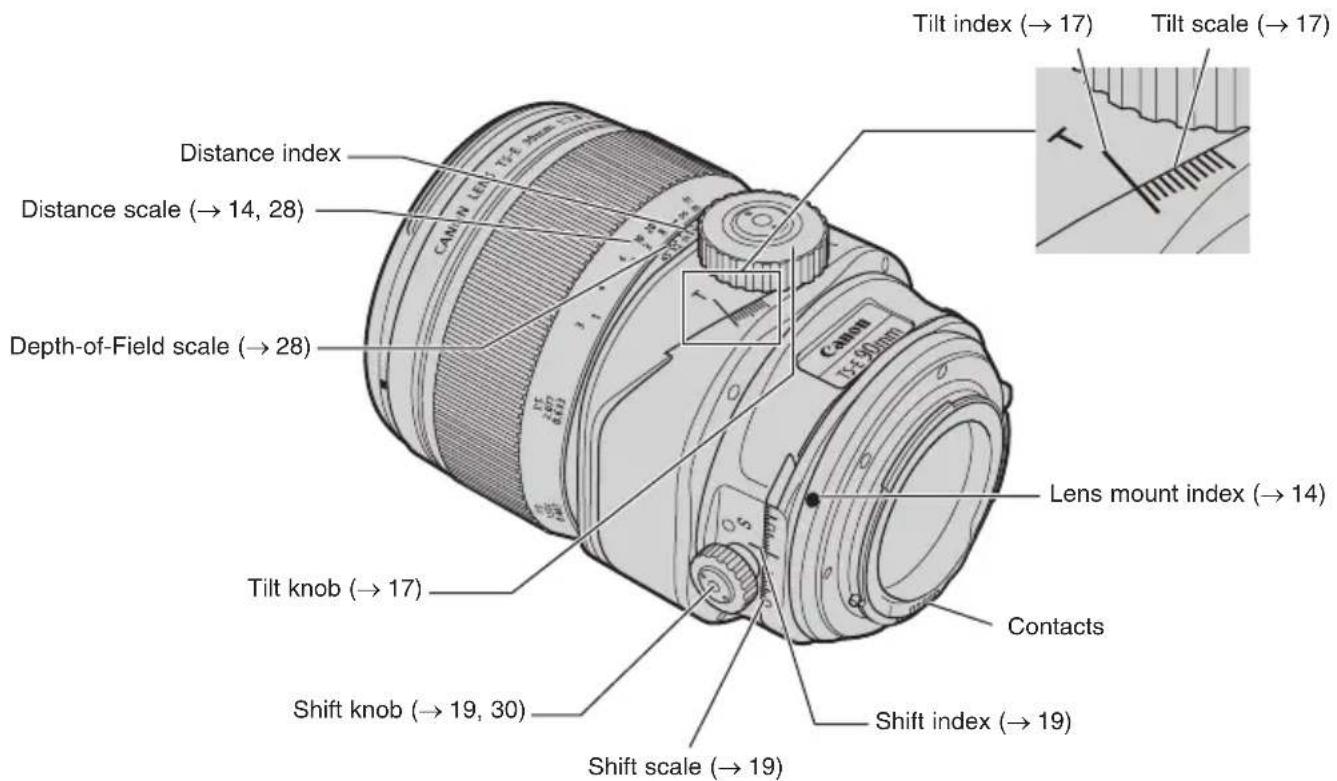
Nomenclature (TS-E90mm f/2.8L MACRO, TS-E135mm f/4L MACRO)
text_image
Tilt index (→ 17) Tilt scale (→ 17) Distance index Distance scale (→ 14, 28) Depth-of-Field scale (→ 28) Lens mount index (→ 14) Tilt knob (→ 17) Contacts Shift knob (→ 19, 30) Shift scale (→ 19) Shift index (→ 19)The illustration shows TS-E90mm f/2.8L MACRO, with nomenclature being the same for TS-E135mm f/4L MACRO.
For detailed information, reference page numbers are provided in parentheses ^* .
ENG-7
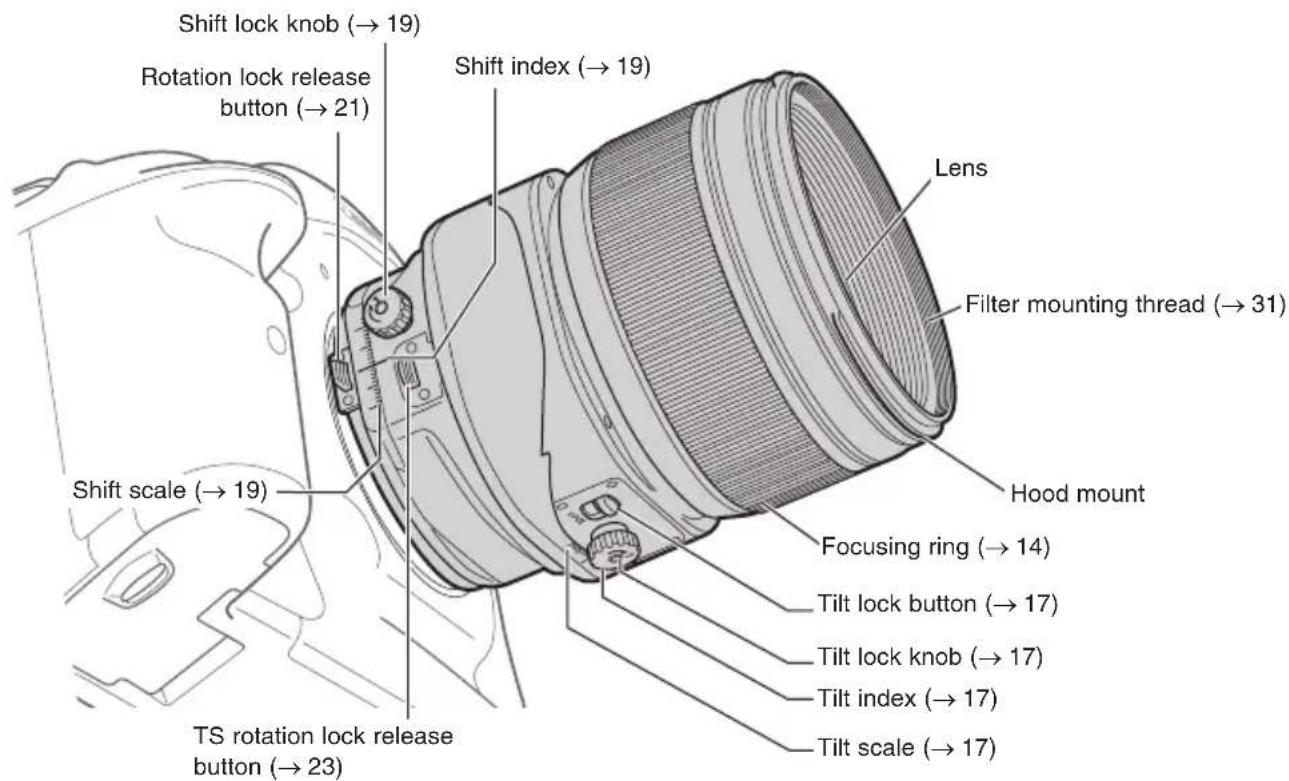
Nomenclature (TS-E90mm f/2.8L MACRO, TS-E135mm f/4L MACRO)
text_image
Shift lock knob (→ 19) Rotation lock release button (→ 21) Shift index (→ 19) Lens Filter mounting thread (→ 31) Shift scale (→ 19) Hood mount Focusing ring (→ 14) Tilt lock button (→ 17) Tilt lock knob (→ 17) Tilt index (→ 17) TS rotation lock release button (→ 23) Tilt scale (→ 17)Illustration shows lens viewed from below.
The illustration shows TS-E90mm f/2.8L MACRO, with nomenclature being the same for TS-E135mm f/4L MACRO.
For detailed information, reference page numbers are provided in parentheses ^* .
ENG-8
TS-E MACRO Lens Features
Canon TS-E50mm f/2.8L MACRO, Canon TS-E90mm f/2.8L MACRO, and Canon TS-E135mm f/4L MACRO have the following features.
- Range of tilt is ±8.5° for TS-E50mm f/2.8L MACRO, and ±10° for TS-E90mm f/2.8L MACRO and TS-E135mm f/4L MACRO.
• Range of shift is ±12 mm. - Macro shooting at up to 0.5 times magnification when tilted or shifted is possible.
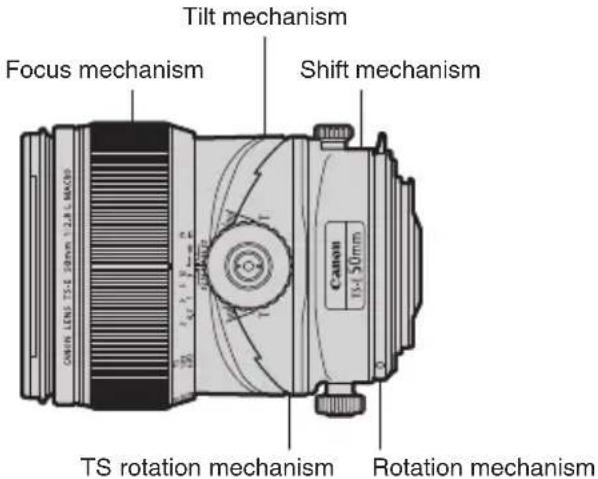
- Rotation allows the direction of the entire lens to be changed.
- TS rotation allows the tilt operation angle to be changed in regard to shift.
These features can be combined to allow a diverse range of expressive possibilities.
text_image
Tilt mechanism Focus mechanism Shift mechanism Canon TS 50mm TS rotation mechanism Rotation mechanismIllustration shows TS-E50mm f/2.8L MACRO.
ENG-9
TS-E MACRO Lens Features

- Before mounting or detaching the lens, or turning the lens for rotation or TS rotation, always lock the lens in a non-tilted and non-shifted position.
For how to lock the lens in a non-tilted and non-shifted position, see p.16, p.18, and p.20. - If using Digital Photo Professional to perform lens correction (lens aberration correction, Digital Lens Optimizer, etc.)*, correction may not be performed adequately depending on the amount of tilt or shift, and on the rotation or TS rotation setting.
*Supported cameras: EOS 6D Mark II (As of August 2017)
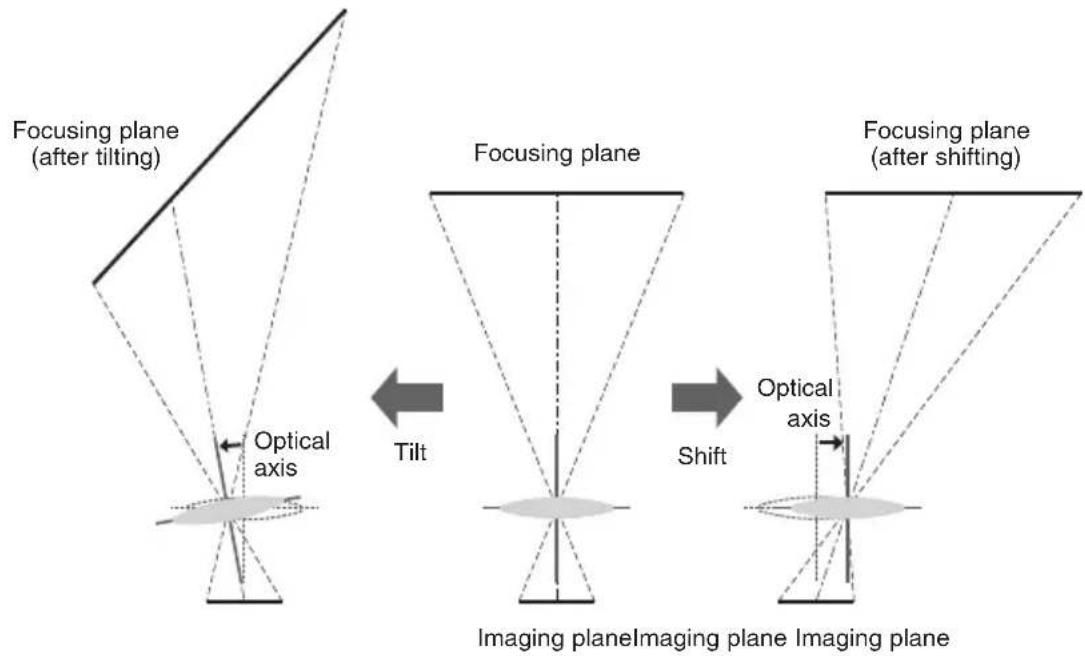
The Principle of Tilt and Shift
flowchart
graph LR
    A["Focusing plane (after tilting)"] --> B["Focusing plane"]
    B --> C["Imaging plane"]

    subgraph Before_Tilt
        D["Optical axis"] --> E["Tilt"]
        E --> F["Imaging plane"]
        F --> G["Optical axis"]
        G --> H["Imaging plane"]
    end

    subgraph After_Tilt
        I["Optical axis"] --> J["Imaging plane"]
        J --> K["Optical axis"]
        K --> L["Imaging plane"]
        L --> M["Optical axis"]
        M --> N["Imaging plane"]
    end

    style Before_Tilt fill:#f9f,stroke:#333
    style After_Tilt fill:#bbf,stroke:#333
- By tilting the lens, the lens' optical axis is tilted with regard to the imaging plane, allowing the focusing plane to be tilted.
- By shifting the lens, the lens' optical axis is moved in parallel with regard to the image plane, allowing the focusing plane to be moved in parallel.
ENG-11
Tilt Effect
■Shooting a field of flowers
Example 1 Example 2

natural_image
Black-and-white close-up of a dense field of white tulips with no visible text or symbols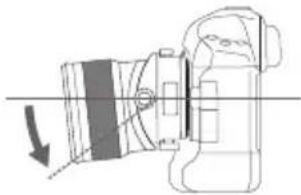
natural_image
Technical line drawing of a camera with an arrow indicating motion (no text or symbols)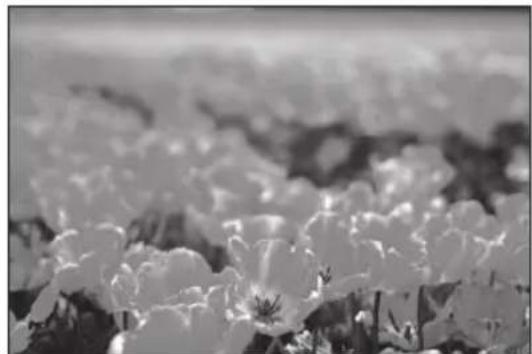
natural_image
Black-and-white close-up of a field of white flowers with soft focus background (no text or symbols)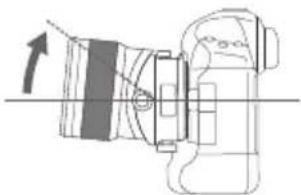
natural_image
Technical line drawing of a mechanical assembly with an arrow indicating direction (no text or symbols)- Tilting as shown has the effect of broadening the depth of field. This allows the entire field, from immediately in front to far in the background, to be in focus.
- Tilting as shown has the effect of narrowing the depth of field. Only flowers immediately in front are in focus, with the rest of the subject being blurred.
ENG-12
Shift Effect
■Shooting architecture ■Shooting a mirror
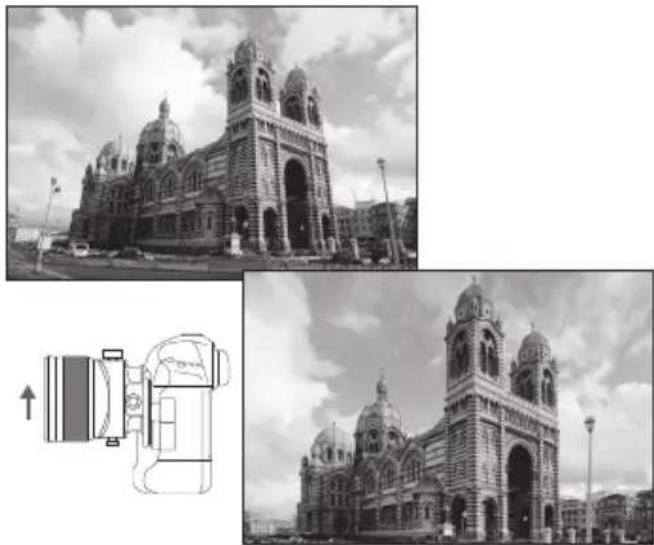
- If you photograph a subject such as a building with a normal lens, the top of the building tapers away. But by placing the camera parallel to the building and shifting the lens, you can correct this tapering effect.
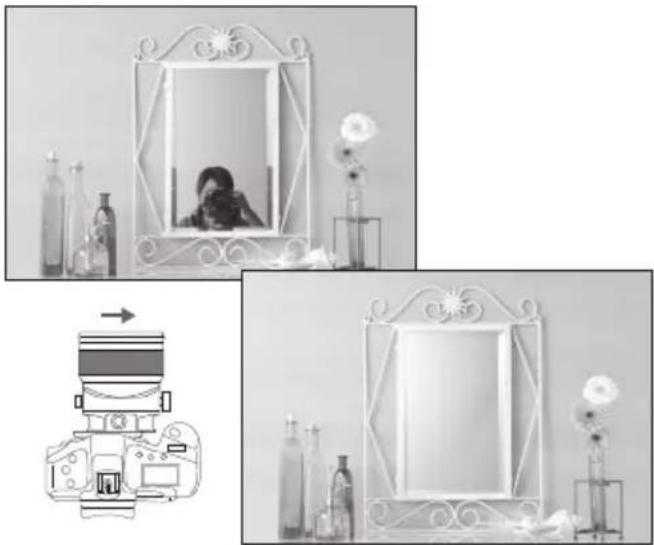
- When you are shooting a reflective subject, you can move the camera to a position where the camera does not appear in the shot and then use shift to take the picture. This lets you keep the camera out of the shot without having to change the shot composition.
ENG-13
1. Mounting and Detaching the Lens
See your camera's instructions for details on mounting and detaching the lens.

natural_image
Technical line drawing of a mechanical device with concentric rings and mounting brackets (no text or symbols)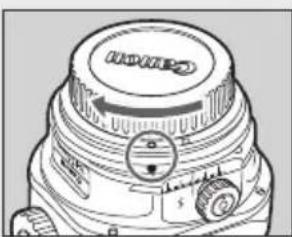
natural_image
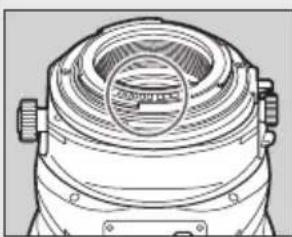
Technical line drawing of a camera lens with no visible text or symbolsBefore mounting or detaching the lens, always lock the lens in a non-tilted and non-shifted position.
● After detaching the lens, place the lens with the rear end up to prevent the lens surface and contacts from getting scratched.
- Contacts that are scratched, soiled, or have fingerprints on them may result in faulty connections or corrosion, which may lead to malfunctions. If the contacts get soiled, clean them with a soft cloth.
- Attach the lens cap and dust cap when disconnecting the lens. When attaching the dust cap, align the lens mount index with the O index of the dust cap and turn in a clockwise direction as shown in the illustration. Follow the reverse procedure to detach it.
2. Focusing
natural_image
Technical line drawing of a camera lens with directional arrows indicating motion (no text or symbols)Illustration shows TS-E50mm f/2.8L MACRO.
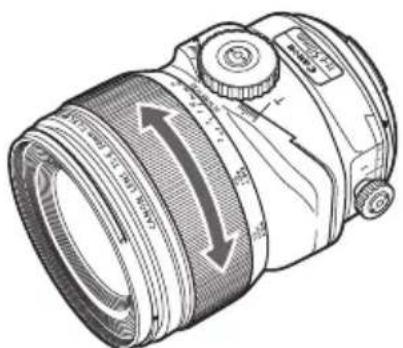
Focus the lens by manually turning the focusing ring. (Shots cannot be taken using autofocus.)

● After tilting or shifting the lens, or turning the lens for rotation or TS rotation, readjust the focus.
- The distance scale is only valid when the lens is not tilted or shifted.

For cameras which allow Live View shooting, focusing using the LCD monitor's magnified image is recommended.
3. Using Tilt (TS-E50mm f/2.8L MACRO)
text_image
Tilt lock knob Tilt scale 1 LOCK L Loosen LockTilt lock button Tilt index
text_image
Tilt scaleTilt knob 2 3 5 Ω ft 0.7 1 3 1 ∞ m 2.16 U - 3.32 T T Tilt index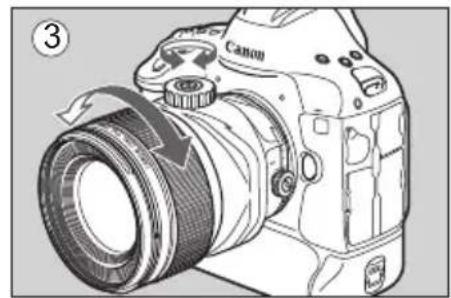
natural_image
Line drawing of a Canon DSLR camera with lens and scroll (no text or symbols)Illustration shows TS-E50mm f/2.8L MACRO.
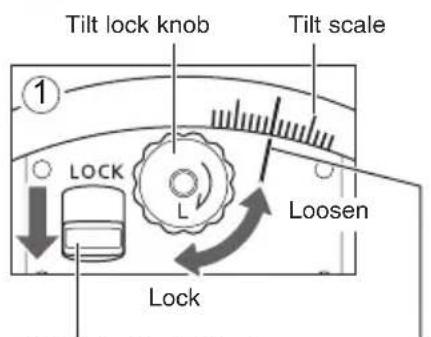
To tilt the lens, slide the tilt lock button away from LOCK, and then turn the tilt lock knob counterclockwise to loosen. (Fig. 1)
Tilting the lens for shooting
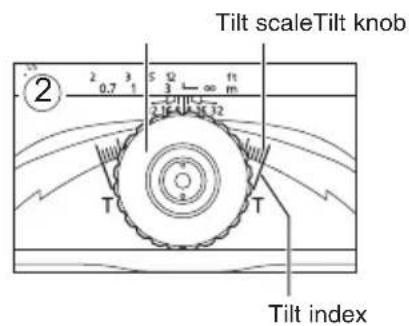
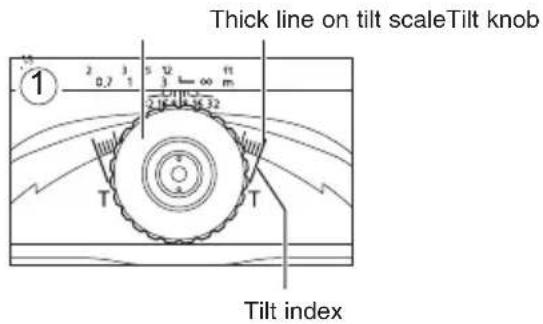
1 Turn the tilt knob to adjust the amount of tilt. The amount of tilt can be adjusted in a range of ± 8.5^ with the thick line on the tilt scale as a reference. (Fig. 2) (A tilt scale is also located near the tilt lock knob.)
2 Focus the shot by turning the focusing ring. (Fig. 3)
3 Turn the tilt lock knob clockwise and lock it before taking the shot. (Fig. 1)
Do not turn the tilt knob forcefully. This may cause malfunction.
ENG-15
Using Tilt (TS-E50mm f/2.8L MACRO)
text_image
Thick line on tilt scaleTilt knob 1 2 3 4 5 6 7 8 9 0,7 1 2 3 4 5 6 7 8 9 T Tilt index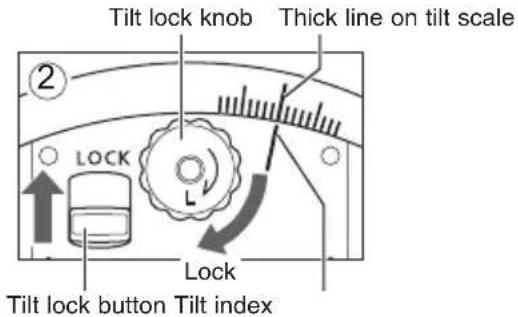
text_image
Tilt lock knob Thick line on tilt scale ② LOCK L Lock Tilt lock button Tilt indexIllustration shows TS-E50mm f/2.8L MACRO.
Locking the Lens in a Non-Tilted Position
1 Turn the tilt knob so that the thick line on the tilt scale is aligned with the tilt index (at a click position). (Fig. 1)
2 Turn the tilt lock knob clockwise to lock. Slide the tilt lock button toward LOCK to lock tilt. (Fig. 2)

- When tilt is locked with the tilt lock button, do not turn the tilt knob. This may cause malfunction.
Using Tilt (TS-E90mm f/2.8L MACRO, TS-E135mm f/4L MACRO)
text_image
Tilt lock knob Loosen Tilt index 1 LOCK Lock Tilt lock button Tilt scale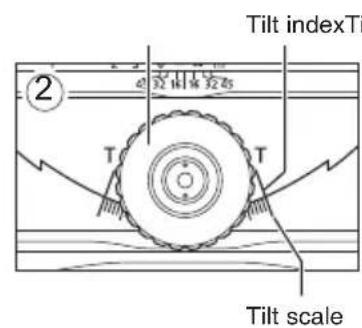
text_image
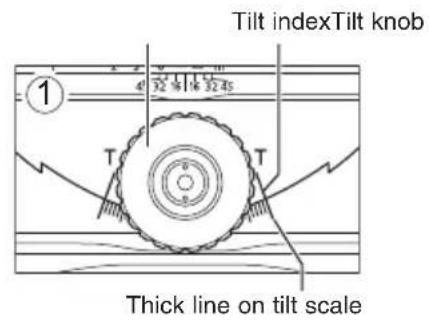
Tilt indexTi 2 32 10 15 32 45 T T Tilt scale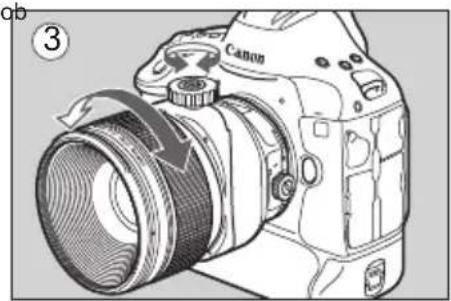
natural_image
Line drawing of a Canon DSLR camera with lens and scroll (no text or symbols)Illustration shows TS-E90mm f/2.8L MACRO.
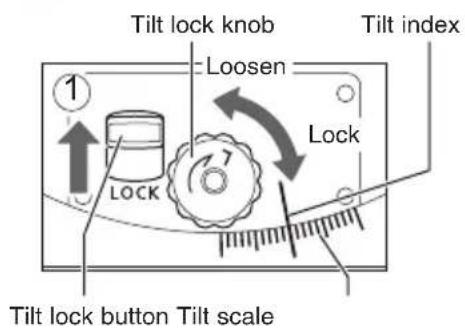
Location of features on TS-E90mm f/2.8L MACRO and TS-E135mm f/4L MACRO differ somewhat from TS-E50mm f/2.8L MACRO, but their function and operation is the same.
To tilt the lens, slide the tilt lock button away from LOCK, and then turn the tilt lock knob counterclockwise to loosen. (Fig. 1)
Tilting the lens for shooting
1 Turn the tilt knob to adjust the amount of tilt. The amount of tilt can be adjusted in a range of ±10^ with the thick line on the tilt scale as a reference. (Fig. 2) (A tilt scale is also located near the tilt lock knob.)
2 Focus the shot by turning the focusing ring. (Fig. 3)
3 Turn the tilt lock knob clockwise and lock it before taking the shot. (Fig. 1)
Do not turn the tilt knob forcefully. This may cause malfunction.
ENG-17
Using Tilt (TS-E90mm f/2.8L MACRO, TS-E135mm f/4L MACRO)
text_image
Tilt indexTilt knob 1 4° 宽45 T T Thick line on tilt scale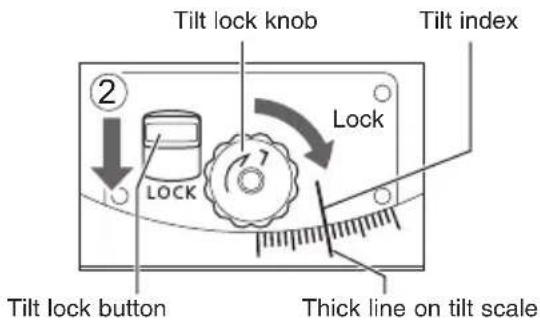
text_image
Tilt lock knob Tilt index ② LOCK Lock Tilt lock button Thick line on tilt scaleIllustration shows TS-E90mm f/2.8L MACRO.
Locking the Lens in a Non-Tilted Position
1 Turn the tilt knob so that the thick line on the tilt scale is aligned with the tilt index (at a click position). (Fig. 1)
2 Turn the tilt lock knob clockwise to lock. Slide the tilt lock button toward LOCK to lock tilt. (Fig. 2)
- When tilt is locked with the tilt lock button, do not turn the tilt knob. This may cause malfunction.
ENG-18
4. Using Shift
Shift scale Shift index
text_image
① Loosen LockShift lock knobShift index
text_image
Shift knob ②Shift scale
natural_image
Diagram of a Canon DSLR camera with lens and scroll arrows indicating rotation (no text or symbols)Illustration shows TS-E50mm f/2.8L MACRO.
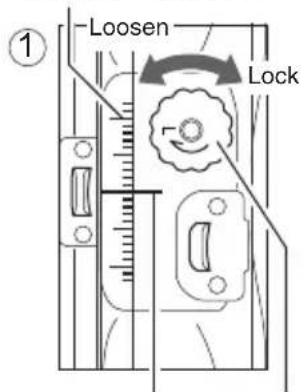
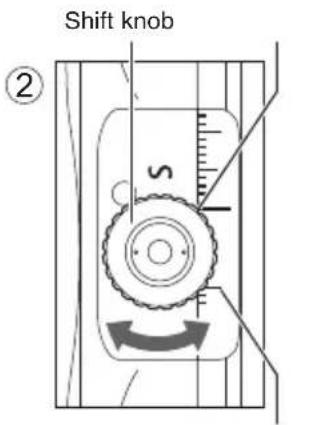
To shift the lens, turn the shift lock knob counterclockwise to loosen. (Fig. 1)
Shifting the lens for shooting
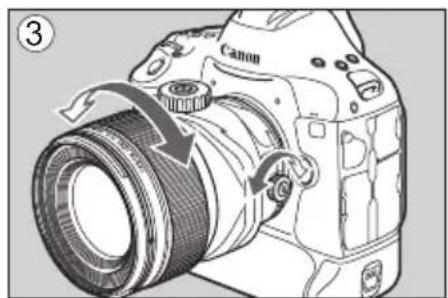
1 Turn the shift knob to adjust the amount of shift. The amount of shift can be adjusted in a range of ±12 mm with the thick line on the shift scale as a reference. (Fig. 2) (A shift scale is also located near the shift lock knob.)
2 Focus the shot by turning the focusing ring. (Fig. 3)
3 Turn the shift lock knob clockwise and lock it before taking the shot. (Fig. 1)
Do not turn the shift knob forcefully. This may cause malfunction.
ENG-19
Using Shift
text_image
Shift knob ① s Thick line on shift scale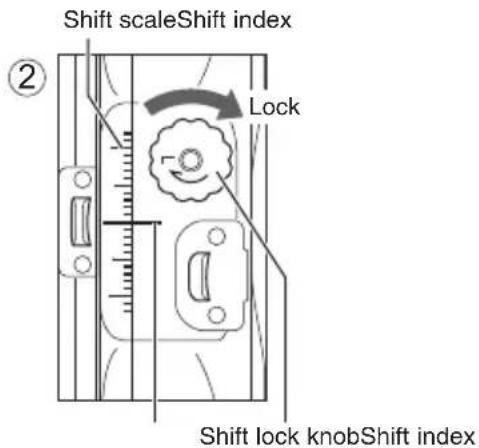
text_image
Shift scaleShift index ② Lock Shift lock knobShift indexLocking the Lens in a Non-Shifted Position
Illustration shows TS-E50mm f/2.8L MACRO.
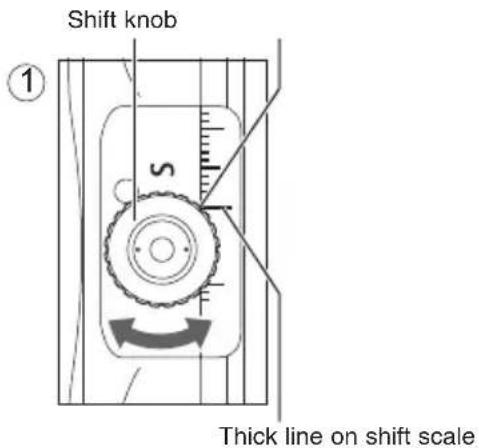
1 Turn the shift knob so that the thick line on the shift scale is aligned with the shift index (at a click position). (Fig. 1)
2 Turn the shift lock knob clockwise to lock. (Fig. 2)
For EOS cameras with built-in flash, the lens may contact the camera while you operate the shift function.

With large amounts of shift, the amounts of peripheral light at the top and bottom or left and right sides of the screen may differ, so shooting with a small aperture is recommended.
The shift operation will be easier if the supplied cap is mounted on the shift knob (p.30)
ENG-20
5. Using Rotation
natural_image
Mechanical assembly diagram showing a component with mounting holes and directional arrows indicating motion (no text or symbols)Rotation lock release button
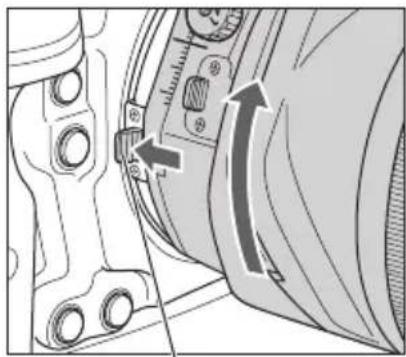
By using rotation, the direction of the entire lens can be switched. With the lens mounted on the camera, turn the entire lens while pushing the rotation lock release button toward the mount.
natural_image
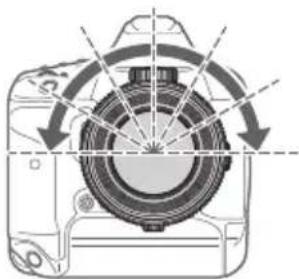
Diagram of a camera with visible lens and directional arrows indicating rotation (no text or symbols)The rotation mechanism can be turned through ±90^ . The lens clicks every 30^ , and locks in place in the 0^ and ±90^ positions.
natural_image
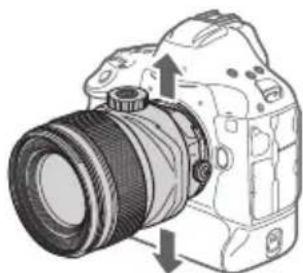
Diagram of a DSLR camera with lens and adjustment arrows indicating rotation (no text or symbols)Shift directions when rotation is at 0^ .
natural_image
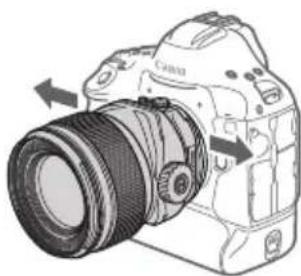
Line drawing of a DSLR camera with lens and scroll arrows indicating assembly (no text or symbols)Shift directions when rotation is at 90^ .
Illustration shows TS-E50mm f/2.8L MACRO.
ENG-21
Using Rotation

Before turning the lens for rotation, always lock the lens in a non-tilted and non-shifted position.
Note that your fingers may contact the shift lock knob when turning the lens for rotation.
- For EOS cameras with built-in flash, the lens may contact the camera while you operate the rotation function.

- In order to prevent shifts in position while shooting, shooting with rotation locked or at a click position is recommended.
- If using Digital Photo Professional to perform lens correction (lens aberration correction, Digital Lens Optimizer, etc.)*, shooting with rotation locked or at a click position is recommended so as to reduce the amount of correction error.
*Supported cameras: EOS 6D Mark II (As of August 2017)
6. Using TS Rotation
natural_image
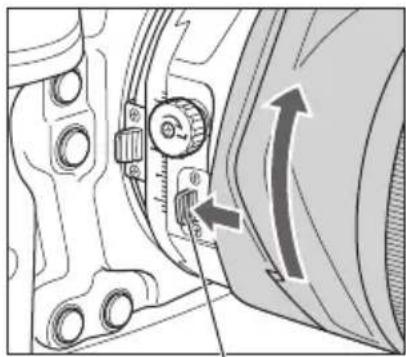
Mechanical component diagram showing a dial indicator and directional arrow (no text or symbols)TS rotation lock release button
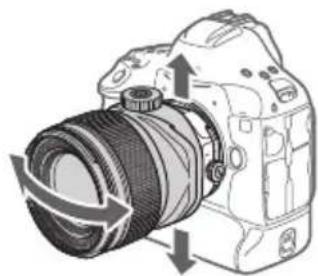
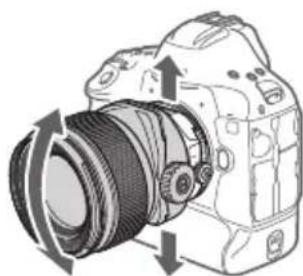
By using TS rotation, the relationship of the tilt and shift operation directions can be switched from right angle to parallel.
With the lens mounted on the camera, turn the tilt mechanism while pressing the TS rotation lock release button toward the mount.

natural_image
Diagram of a DSLR camera with a circular lens and directional arrows indicating rotation (no text or symbols)The lens clicks at the 45^ position, and locks in place in either the right angle or parallel position.
natural_image
Diagram of a DSLR camera with directional arrows indicating motion (no text or symbols)Tilt and shift directions in right angle TS rotation
natural_image
Diagram of a DSLR camera showing lens and frame structure with directional arrows (no text or labels)Tilt and shift directions in parallel TS rotation
Illustration shows TS-E50mm f/2.8L MACRO.
ENG-23
Using TS Rotation

Before turning the lens for TS rotation, always lock the lens in a non-tilted and non-shifted position.
- When tilt and shift are used together in right-angled operation directions, or only either of tilt or shift is used, vignetting by this lens will not occur.
- When tilt and shift are used together in any operation directions other than right-angled, vignetting may occur in the range indicated in gray as shown in the figure below. For example, when the tilt and shift operation directions are parallel, and tilt and shift are each at their maximum setting. When using TS rotation in conditions where vignetting may occur, it is recommended to shoot while checking results after shooting an image.
TS-E50mm f/2.8L MACRO

heatmap
Amount of tilt (degrees) | Amount of shift (mm) | 1 | 23456789101112 | |---|---|---| | 8.5 | | | | 8 | | | | 7 | | | | 6 | | | | 5 | | | | 4 | | | | 3 | | | | 2 | | | | 1 | | |TS-E90mm f/2.8L MACRO
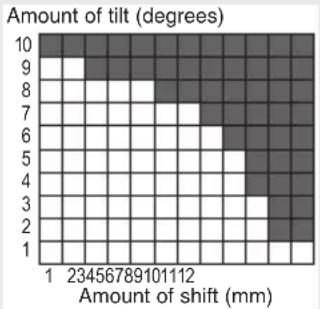
heatmap
| Amount of shift (mm) | 1 | 23456789101112 | |---|---|---| | 1 | 0 | 0 | | 2 | 0 | 0 | | 3 | 0 | 0 | | 4 | 0 | 0 | | 5 | 0 | 0 | | 6 | 0 | 0 | | 7 | 0 | 0 | | 8 | 0 | 0 | | 9 | 0 | 0 | | 10 | 0 | 0 |TS-E135mm f/4L MACRO
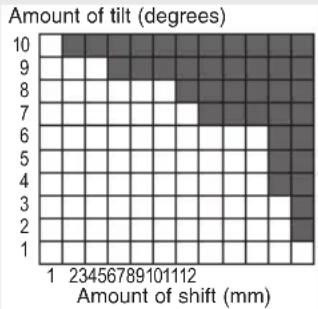
heatmap
| Amount of shift (mm) | 1 | 23456789101112 | 23456789101112 | 23456789101112 | 23456789101112 | 23456789101112 | 23456789101112 | 23456789101112 | 20 | |---|---|---|---|---|---|---|---|---|---| | 10 | 0 | 0 | 0 | 0 | 0 | 0 | 0 | 0 | 0 | | 9 | 0 | 0 | 0 | 0 | 0 | 0 | 0 | 0 | 0 | | 8 | 0 | 0 | 0 | 0 | 0 | 0 | 0 | 0 | 0 | | 7 | 0 | 0 | 0 | 0 | 0 | 0 | 0 | 0 | 0 | | 6 | 0 | 0 | 0 | 0 | 0 | 0 | 0 | 0 | 0 | | 5 | 0 | 0 | 0 | 0 | 0 | 0 | 0 | 0 | 0 | | 4 | 0 | 0 | 0 | 0 | 0 | 0 | 0 | 0 | 0 | | 3 | 0 | 0 | 0 | 0 | 0 | 0 | 0 | 0 | 0 | | 2 | 0 | 0 | 0 | 0 | 0 | 0 | 0 | 0 | 0 | | 1 | 0 | 0 | 0 | 0 | 0 | 0 | 0 | 0 | 0 |
- In order to prevent shifts in position while shooting, shooting with TS rotation locked or at a click position is recommended.
- If using Digital Photo Professional to perform lens correction (lens aberration correction, Digital Lens Optimizer, etc.)*, shooting with TS rotation locked or at a click position is recommended so as to reduce the amount of correction error.
*Supported cameras: EOS 6D Mark II (As of August 2017)
ENG-24
7. TS-E MACRO Lens Exposure Setting
Since the optical axis shifts when the lens is tilted or shifted, the exposure value may deviate largely with automatic exposure during viewfinder shooting. Either of the following methods is recommended for obtaining an appropriate exposure setting.
■Exposure setting by Live View shooting
Shoot using a Live View shooting exposure value.
Regardless of tilt or shift, you can shoot with automatic exposure, including for macro shots.
■Exposure setting by stand-alone exposure meter
Shoot using manual exposure using the exposure value obtained from a stand-alone exposure meter as a guide.
Macro shooting requires an exposure compensation that is according to the magnification. Shoot using the exposure value obtained from the stand-alone exposure meter with an exposure factor in the table on the next page added.

- With either exposure setting method, you may not be able to obtain an appropriate exposure depending on shooting conditions. It is recommended that you try shooting after changing the exposure as much as possible, or while checking results after shooting an image.
TS-E MACRO Lens Exposure Setting
TS-E50mm f/2.8L MACRO
| Magnification 1:5 1:3 1:2 | ||
| Effective f/No. 3.3 3.4 3.8 | ||
| Exposure Factor (stops) | 1/3 2/3 2/3 | |
| 1/2 1/2 1 |
Upper values: 1/3 stops.
Lower values: 1/2 stops.
TS-E90mm f/2.8L MACRO
| Magnification 1:5 1:3 1:2 | ||
| Effective f/No. 3.4 3.8 4.3 | ||
| Exposure Factor (stops) | 1/3 2/3 1 | |
| 1/2 1 1 |
Upper values: 1/3 stops.
Lower values: 1/2 stops.
TS-E135mm f/4L MACRO
| Magnification 1:5 1 | :3 1:2 | ||
| Effective f/No. 4.8 | 5.2 5.8 | ||
| Exposure Factor (stops) | 1/3 2/3 1 | ||
| 1/2 1/2 1 |
Upper values: 1/3 stops.
Lower values: 1/2 stops.
TS-E MACRO Lens Exposure Setting

- Depending on the camera model* and settings, you may not obtain standard exposure or you may obtain uneven exposure.
This phenomenon may improve by decreasing the shutter speed.
It is recommended that you try shooting while checking results after shooting an image.
* • The firmware in the below cameras already corrects this phenomenon.
EOS 6D Mark II
- Upgrading the firmware in the below cameras will correct this phenomenon.
EOS 5D Mark IV, EOS 5D Mark III, EOS 5DS, EOS 5DS R, EOS-1D X Mark II, EOS-1D X, EOS 6D
For details on firmware, see the Canon website.
8. Depth-of-Field Scale
text_image
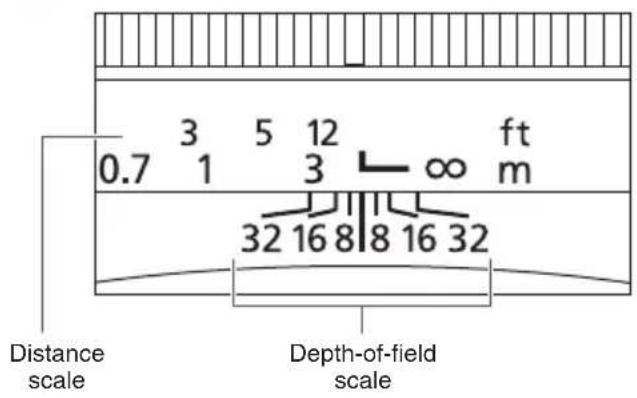
0.7 3 5 12 ft 1 3 ∞ m 32 16 8 8 16 32 Distance scale Depth-of-field scaleThe depth of field is the distance in front of and behind the plane of focus on the subject that appears sharp. The depth of field is indicated by the area between the depth-of-field scale lines below the distance scale.
The numbers on the scale are aperture settings.

The depth-of-field scale is only valid when the lens is not tilted or shifted.
- The depth-of-field scale is an approximate indicator.
9. Infinity Compensation Mark

text_image
0.7 3 5 12 ft 1 3 m 32 16 8 8 16 32 Distance scale Distance index Infinity compensation markIllustration shows TS-E50mm f/2.8L MACRO.
To compensate for shifting of the infinity focus point that results from changes in temperature, there is a margin at the infinity ( ) position. The infinity position at normal temperature is the point at which the vertical line of the distance scale L mark is aligned with the distance index.

For accurate manual focusing of subjects at infinity, look through the viewfinder or look at the magnified image on the LCD screen while turning the focusing ring.
10. Hood
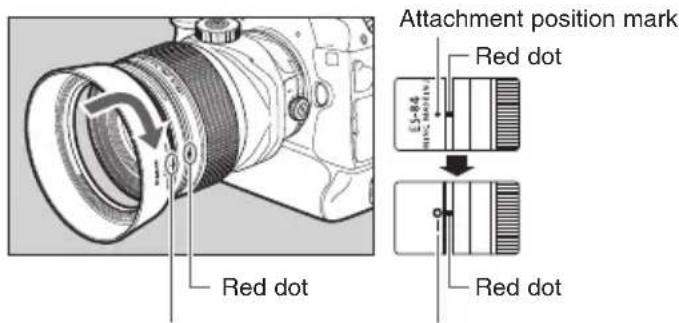
The ES-84 or ET-88 hood cuts out unwanted light and protects the front of the lens from rain, snow, and dust.
text_image
Red dot Attachment position mark Red dot L=84 Red dot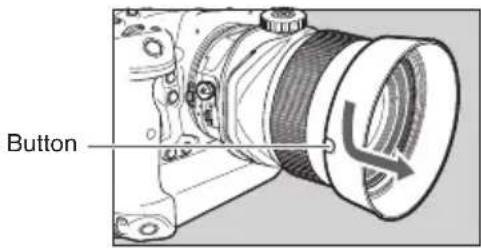
text_image
ButtonIllustration shows TS-E50mm f/2.8L MACRO.
Stop position markAttachmentpositionRemoving
- Attaching To attach the hood, align the hood's red attachment position mark with the red dot on the front of the lens, then turn the hood as shown by the arrow until it clicks.
Keep your finger pressed down on the button located on the side of the hood, and then turn the hood in the direction of the arrow until the attachment position mark on the hood is aligned with the red dot on the front of the lens to detach it. The hood can be reverse-mounted on the lens for storage.

- If the hood is not attached properly, vignetting (darkening of the perimeter of the picture) may occur.
- Grasp and turn the base of the hood when attaching and detaching it. There are cases in which it may become deformed if the hood is turned with it grasped near to the rim.

- Since only a hood is not very effective in cutting off the harmful rays entering the lens, also using a piece of cardboard is recommended.
ENG-29
11. Shift Knob Cap
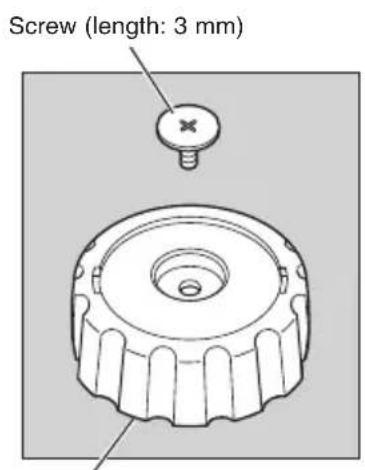
Shifting will be easier if the supplied shift knob cap is mounted (p.19).
However, note that for EOS cameras with a built-in flash, the cap may come in contact with the camera when mounting/detaching the lens, shifting the lens, or turning the lens for rotation.
text_image
Screw (length: 3 mm)Shift knob cap
natural_image
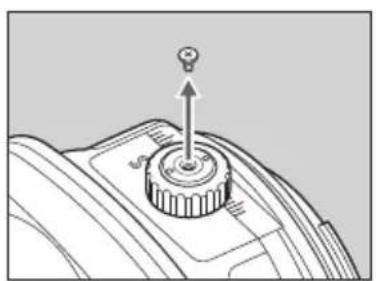
Mechanical component diagram showing a rotating knob with an upward arrow (no text or symbols)1 Remove the shift knob screw.
natural_image
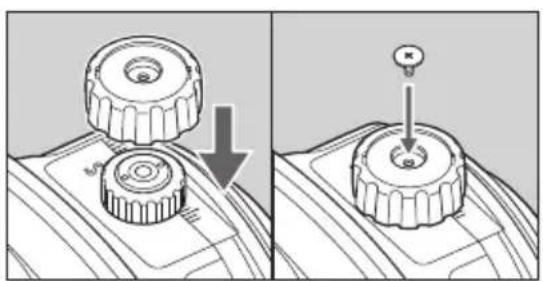
Mechanical assembly diagram showing two stages of a gear shift with a downward arrow indicating motion (no text or symbols)2 Mount the cap by squeezing it onto the shift knob, and then fix it in place using the supplied screw.

- Be sure to fix the cap in place using the supplied screw (length: 3 mm).
- The removed screw (length: 2.2 mm) cannot be used to fix the cap in place. Store the removed screw, as it will be required when not using the cap.
Use a precision screwdriver (Phillips). - Do not turn the shift knob forcefully. This may cause malfunction.
ENG-30
12. Filters (sold separately)
You can attach filters to the filter mounting thread on the front of the lens.

- Only one filter may be attached.
Use a Canon circular polarizing filter PL-C B. TS-E50mm f/2.8L MACRO and TS-E90mm f/2.8L MACRO: 77mm TS-E135mm f/4L MACRO: 82mm - Detach the hood when adjusting the polarizing filter.
13. Close-up Lens (sold separately)
TS-E50mm f/2.8L MACRO
Attaching a 500D (77 mm) Close-up Lens enables close-up photography.
It provides a magnification of 0.10x to 0.58x.
Close-Up Lens 250D does not have a compatible size.
TS-E90mm f/2.8L MACRO
Attaching a 500D (77 mm) Close-up Lens enables close-up photography.
It provides a magnification of 0.18x to 0.69x.
Close-Up Lens 250D does not have a compatible size.
TS-E135mm f/4L MACRO
Close-Up Lenses 250D and 500D do not have compatible sizes.
14. Extension Tubes (sold separately)
You can attach extension tube EF12 II or EF25 II for magnified shots. The focusing distance and magnification are shown below.
TS-E50mm f/2.8L MACRO
| Focusing distance (mm)(working distance) | Magnification (×) | |||
| Near Far Near Far | ||||
| EF12 II | 242(57) | 371(216) | 0.74 0.23 | |
| EF25 II | 224(44) | 256(101) | 1.00 0.48 | |
TS-E90mm f/2.8L MACRO
| Focusing distance (mm)(working distance) | Magnification (×) | |||
| Near Far | Near Far | |||
| EF12 II | 365(162) | 821(648) | 0.64 0.15 | |
| EF25 II | 352(134) | 493(305) | 0.82 0.32 | |
ENG-32
Extension Tubes (sold separately)
TS-E135mm f/4L MACRO
| Focusing distance (mm)(working distance) | Magnification (×) | |||
| Near Far | Near Far | |||
| EF12 II | 459(263) | 1716(1521) | 0.62 0.09 | |
| EF25 II | 443(232) | 943(733) | 0.77 0.20 | |
ENG-33
15. TS-E Tripod Adapter (sold separately)
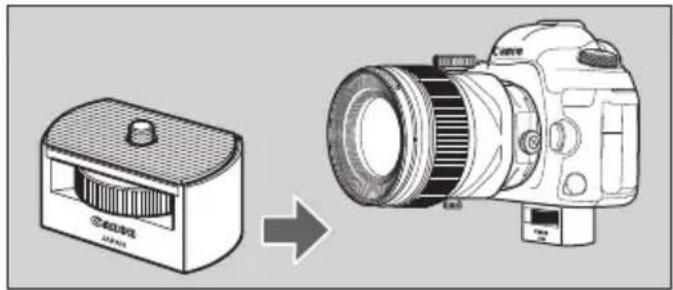
With some camera models, the tilt, shift and rotation functions cannot be used when the camera is mounted directly on a tripod. When this happens, fit the optional TS-E tripod adapter into the tripod mount socket on the camera before mounting the camera on the tripod.
natural_image
Diagram showing a camera module being processed by a DSLR camera (no text or symbols present)Illustration shows TS-E50mm f/2.8L MACRO.
ENG-34
Specifications
| TS-E50mm f/2.8L MACRO | TS-E90mm f/2.8L MACRO T | TS-E135mm f/4L MACRO | ||
| Focal Length/Aperture 50mm f/2.8 90mm f/2.8 135mm f/4 | ||||
| Lens Construction 12 elements in 9 groups 11 elements in 9 groups 11 elements in 7 groups | ||||
| Minimum Aperture f/32 f/45 f/45 | ||||
| Angle of View (Normal) | Horizontal 40° 22°40' 15° | |||
| Vertical 27° 15°10' 10° | ||||
| Diagonal 46° 27° 18° | ||||
| Min. Focusing Distance (working distance) | 0.273 m/0.896 ft(89 mm/3.50 in) | 0.390 m/1.281 ft(200 mm/7.87 in) | 0.486 m/1.595 ft(303 mm/11.93 in) | |
| Max. Magnification | 0.5 times | |||
| Field of View | Approx. 72 × 48 mm/2.83 × 1.89 in | |||
| Tilt amount | ±8.5° | ±10° | ||
| Shift amount | ±12 mm | |||
| Tilt scale display | 1° increments | |||
| Shift scale display | 1-mm increments | |||
| Rotation mechanism | Locks at -90°, 0°, and +90° positionsClicks each 30° | |||
| TS Rotation mechanism | Locks at right angle and parallel positionsClicks at 45° | |||
| Filter Diameter | 77mm | 82mm | ||
| Max. Diameter × Length | 86.9 × 114.9 mm/3.42 × 4.52 in | 86.9 × 116.5 mm/3.42 × 4.59 in | 88.5 × 139.1 mm/3.48 × 5.48 in | |
| Weight | Approx. 945 g/33.3 oz | Approx. 915 g/32.3 oz | Approx. 1110 g/39.2 oz | |
| Hood | ES-84 | ET-88 | ||
| Lens Cap | E-77II | E-82II | ||
| Case | LP1219 | LP1424 | ||
ENG-35
Specifications
- The lens length is measured from the mount surface to the front end of the lens. Add 24.2 mm when including the lens cap and dust cap.
● The size and weight listed are for the lens only, except as indicated.
- Extenders cannot be used with this lens.
- Macro Ring Lite MR-14EX II and Macro Twin Lite MT-24EX cannot be used with this lens.
- Aperture settings are specified on the camera.
● All data listed is measured according to Canon standards.
● Product specifications and appearance are subject to change without notice.
ENG-36
Canon
CT1-D009-A 1707SZ © CANON INC. 2017