
EF 400MM F/5.6L USM - Lens CANON - Free user manual and instructions
Find the device manual for free EF 400MM F/5.6L USM CANON in PDF.


| Product Type | Telephoto Lens |
| Model | Canon EF 400mm f/5.6L USM |
| Focal Length | 400 mm |
| Maximum Aperture | f/5.6 |
| Lens Construction | 6 groups, 7 elements (including UD and Super UD elements) |
| Minimum Aperture | f/32 |
| Angle of View | Diagonal: 6°10', Vertical: 3°30', Horizontal: 5°10' |
| Minimum Focusing Distance | 3.5 m / 11.5 ft |
| Maximum Magnification | 0.12x |
| Filter Diameter | 77 mm |
| Maximum Diameter x Length | 90 x 256.5 mm (3.5 x 10.1 in) |
| Weight | 1250 g (44.1 oz) |
| Power Source | Powered by camera body via electrical contacts |
| Autofocus Motor | Ultrasonic Motor (USM) for quick and quiet AF |
| Focus Mode | AF/MF switch; Full-time manual focus in ONE SHOT AF |
| Focusing Distance Range Switch | Selectable range: 3.5 m to infinity |
| Image Stabilization | None |
| Hood | Built-in (pull-out and twist) |
| Lens Cap | E-77U / E-77 II |
| Case | LZ1132 |
| Tripod Mount | Ring-type tripod mounting socket A II (W) |
| Extender Compatibility | EF1.4X II and EF2X II (AF limited with extenders) |
| Infrared Index | Yes, for infrared film (wavelength 800 nm) |
| Depth-of-Field Scale | Yes, approximate indicator |
| Cleaning | Clean electrical contacts with soft cloth; avoid condensation |
| Safety Precautions | Do not look at sun; avoid leaving lens in direct sunlight or extreme heat |
| Spare Parts / Repairability | Accessories: filters, close-up lenses, extension tubes, extenders; professional service recommended |
Frequently Asked Questions - EF 400MM F/5.6L USM CANON
User questions about EF 400MM F/5.6L USM CANON
0 question about this device. Answer the ones you know or ask your own.
Ask a new question about this device
Download the instructions for your Lens in PDF format for free! Find your manual EF 400MM F/5.6L USM - CANON and take your electronic device back in hand. On this page are published all the documents necessary for the use of your device. EF 400MM F/5.6L USM by CANON.
USER MANUAL EF 400MM F/5.6L USM CANON
EF200mm f/2.8L II USM
EF300mm f/4L USM
EF400mm f/5.6L USM

ULTRASONIC
ENG
Instructions
Thank you for purchasing a Canon product.
The Canon EF135mm f/2L USM, the EF200mm f/2.8L II USM, the EF300mm f/4L USM, and the EF400mm f/5.6L USM are high-performance telephoto lenses designed for EOS cameras.
- "USM" stands for Ultrasonic Motor.
Features
- UD lens elements (in the EF135mm f/2L USM, the EF200mm f/2.8L II USM, the EF300mm f/4L USM, and the EF400mm f/5.6L USM) and super UD lens elements (in the EF400mm f/5.6L USM) for excellent imaging performance.
- Ultrasonic motor (USM) for quick and quiet autofocusing.
- Manual focusing is available after the subject comes into focus in autofocus mode (ONE SHOT AF).
- The lens is compatible with Extender EF1.4X II and EF2X II.
Conventions used in this instruction

Warning to prevent lens or camera malfunction or damage.

Supplementary notes on using the lens and taking pictures.
ENG-1

Safety Precautions

Safety Precautions
- Do not look at the sun or a bright light source through the lens or camera. Doing so could result in loss of vision. Looking at the sun directly through the lens is especially hazardous.
- Whether it is attached to the camera or not, do not leave the lens under the sun without the lens cap attached. This is to prevent the lens from concentrating the sun's rays, which could cause a fire.
Handling Cautions
- If the lens is taken from a cold environment into a warm one, condensation may develop on the lens surface and internal parts. To prevent condensation in this case, first put the lens into an airtight plastic bag before taking it from a cold to warm environment. Then take out the lens after it has warmed gradually. Do the same when taking the lens from a warm environment into a cold one.
- Do not leave the lens in excessive heat such as in a car in direct sunlight. High temperatures can cause the lens to malfunction.
This device complies with Part 15 of the FCC Rules. Operation is subject to the following two conditions: (1) This device may not cause harmful interference, and (2) this device must accept any interference received, including interference that may cause undesired operation.
Do not make any changes or modifications to the equipment unless otherwise specified in the instructions. If such changes or modifications should be made, you could be required to stop operation of the equipment.
This equipment has been tested and found to comply with the limits for a class B digital device, pursuant to part 15 of the FCC Rules. These limits are designed to provide reasonable protection against harmful interference in a residential installation. This equipment generates, uses and can radiate radio frequency energy and, if not installed and used in accordance with the instructions, may cause harmful interference to radio communications.
However, there is no guarantee that interference will not occur in a particular installation. If this equipment does cause harmful interference to radio or television reception, which can be determined by turning the equipment off and on, the user is encouraged to try to correct the interference by one or more of the following measures:
- Reorient or relocate the receiving antenna.
- Increase the separation between the equipment and receiver.
- Consult the dealer or an experienced radio/TV technician for help.
This Class B digital apparatus complies with Canadian ICES-003.
Nomenclature
text_image
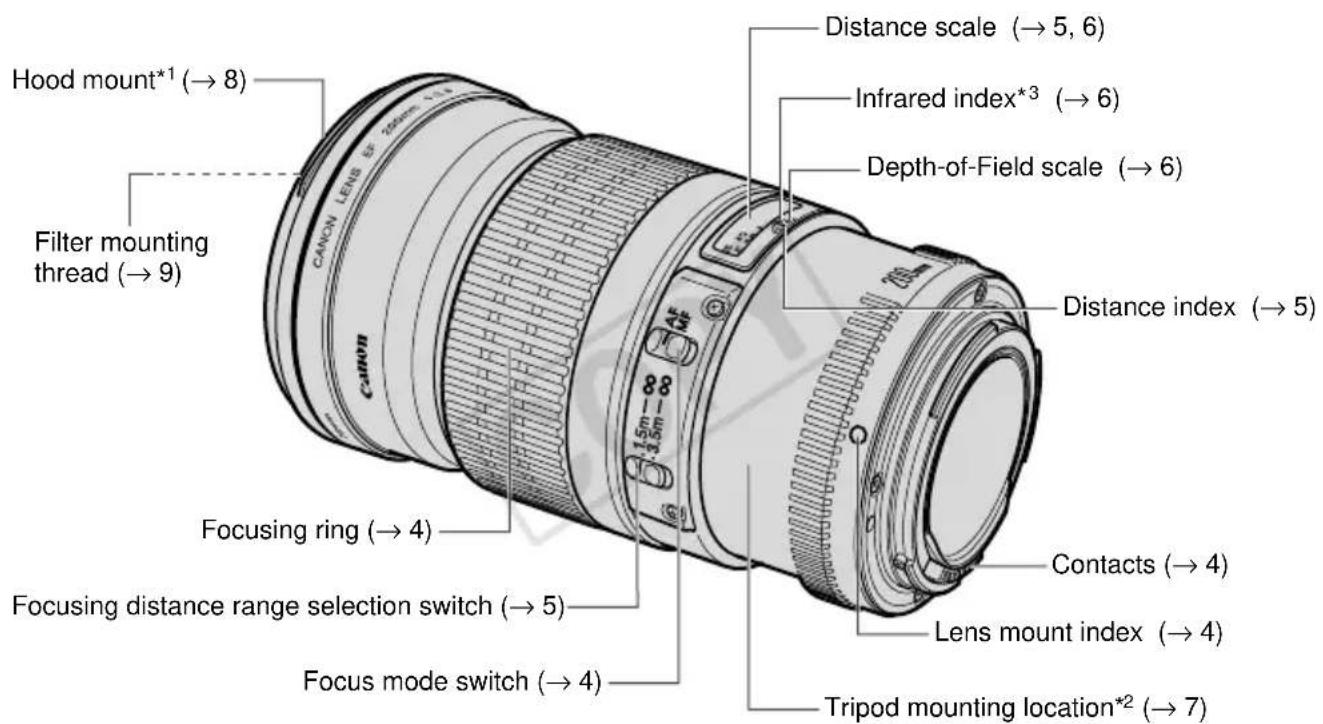
Hood mount*1 (→ 8) Filter mounting thread (→ 9) Focusing ring (→ 4) Focusing distance range selection switch (→ 5) Focus mode switch (→ 4) Distance scale (→ 5, 6) Infrared index*3 (→ 6) Depth-of-Field scale (→ 6) Distance index (→ 5) Contacts (→ 4) Lens mount index (→ 4) Tripod mounting location*2 (→ 7)*1) EF135mm f/2L USM • EF200mm f/2.8L II USM
*2,3) EF200mm f/2.8L II USM • EF300mm f/4L USM • EF400mm f/5.6L USM
For detailed information, reference page numbers are provided in parentheses ( **).
ENG-3
1. Mounting and Detaching the Lens
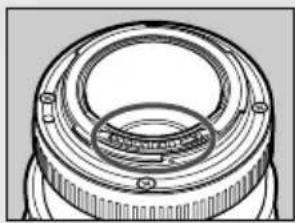
See your camera's instructions for details on mounting and detaching the lens.

natural_image
Technical line drawing of a mechanical component with concentric rings and mounting holes (no text or symbols)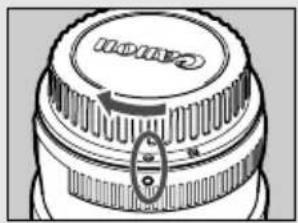
natural_image
Close-up of a camera lens component with no visible text or symbols- After detaching the lens, place the lens with the rear end up to prevent the lens surface and electrical contacts from getting scratched.
- If the contacts get soiled, scratched, or have fingerprints on them, corrosion or faulty connections can result. The camera and lens may not operate properly.
- If the contacts get soiled or have fingerprints on them, clean them with a soft cloth.
- If you remove the lens, cover it with the dust cap. To attach it properly, align the lens mount index and the ○ index of the dust cap as shown in the diagram, and turn clockwise. To remove it, reverse the order.
2. Setting the Focus Mode
natural_image
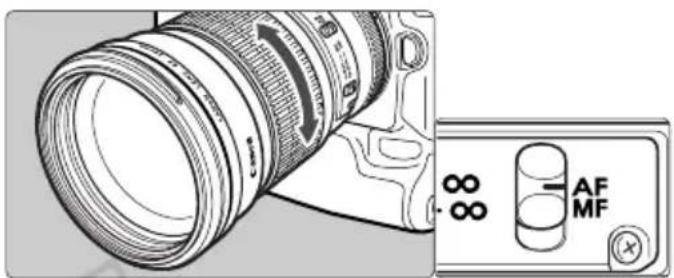
Diagram of a DSLR camera lens and its control panel showing AF MF (no text or symbols on the main components)Toshoot in autofocus (AF) mode, set the focus mode switch to AF.
Touse only manual focusing (MF), set the focus mode switch to MF, and focus by turning the focusing ring. The focusing ring always works, regardless of the focus mode.

After autofocusing in ONE SHOT AF mode, focus manually by pressing the shutter button halfway and turning the focusing ring. (Full-time manual focus)
3. Switching the Focusing Distance Range
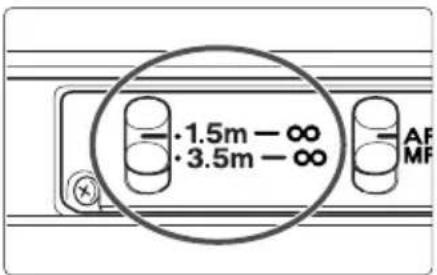
You can choose the focusing distance range with a switch. By setting a suitable focusing distance range, actual autofocusing time can be shorter.
• EF135mm f/2L USM :
① 0.9 m / 3.0 ft. - ∞ ② 1.6 m / 5.2 ft. - ∞
- EF200mm f/2.8L II USM :
① 1.5 m / 4.9 ft. - ∞ ② 3.5 m / 11.5 ft. - ∞
- EF300mm f/4L USM :
If you autofocus outside the set focusing distance range, the lens may stop focusing at the start of the focusing range; however, this is not a malfunction. Press the shutter release button halfway again.
4. Infinity Compensation Mark
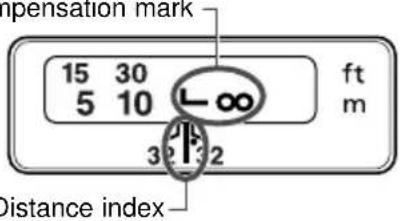
Infinity compensation mark
text_image
mpensation mark 15 30 5 10 L-∞ ft m 3 2 3 2 Distance indexTo compensate for shifting of the infinity focus point that results from changes in temperature. The infinity position at normal temperature is the point at which the vertical line of the L mark is aligned with the distance indicator on the distance scale.

For accurate manual focusing on subjects at infinity distance, look through the viewfinder while rotating the focusing ring.
5. Infrared Index
(EF200mm f/2.8L II USM · EF300mm f/4L
USM · EF400mm f/5.6L USM)
text_image
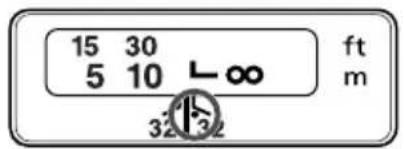
15 30 5 10 L∞ ft m 32 32The infrared index corrects the focus setting when using monochrome infrared film. Focus on the subject manually, then adjust the distance setting by moving the focusing ring to the corresponding infrared index mark.

Some EOS cameras cannot use infrared film. See the instructions for your EOS camera.

- The infrared index position is based on a wavelength of 800 nm.
- Be sure to observe the manufacturer's instructions when using infrared film.
- Use a red filter also when you take the picture.
6. Depth-of-Field Scale
text_image
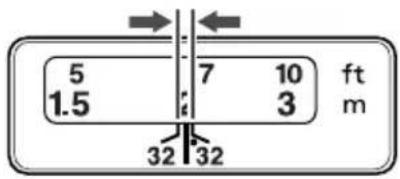
5 1.5 7 10 3 ft m 32 32The depth of field is the distance in front of and behind the plane of focus on the subject that appears sharp. The depth of field is indicated by the area between the depth-of-field scale lines below the distance scale.
The number on the scale is the F value.

The depth-of-field scale is an approximate indicator.
7. Using the Tripod Mount (EF200mm f/2.8L II USM · EF300mm f/4L USM · EF400mm f/5.6L USM)
Adjusting the Revolving Mount
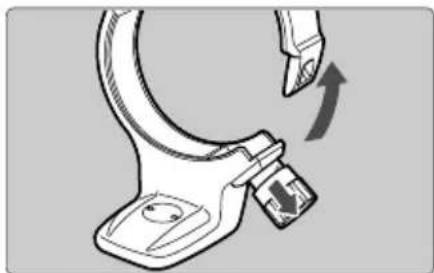
You can loosen the orientation lock-knob on the tripod mount to allow it to rotate as needed to fit a particular camera model for switching between vertical and horizontal positions.
The EF200mm f/2.8L II USM lens can be used with the A II (B) tripod mount ring, sold separately.
Detaching
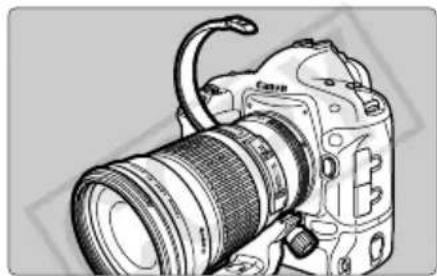
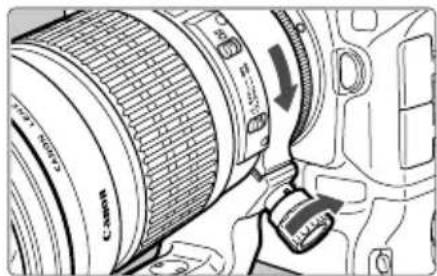
Use the following procedures to remove and attach the tripod mount.
natural_image
Technical line drawing of a mechanical clamp or bracket with an arrow indicating rotation (no text or symbols)1 Turn the locking knob counterclockwise until it becomes loose (about 3 turns), and pull the knob in the direction of the arrow to release the collar.
natural_image
Line drawing of a DSLR camera with lens and external frame (no text or symbols)2 With the collar open, remove the tripod mount.
natural_image
Technical illustration of a Canon EF-198 camera with adjustment knob (no text or symbols)3 To install, while pulling the locking knob, bring the collar to the original position, and tighten the locking knob securely.
If the foot of the tripod mount overlaps the switch, loosen the orientation locking knob on the tripod mount to move the foot.
The tripod mount can be attached to or detached from the lens while the lens is attached to the camera.
ENG-7
8. Hood
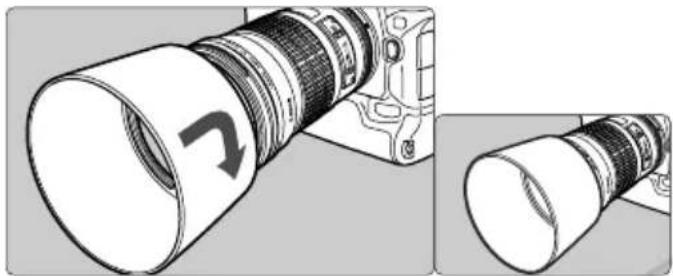
The lens hood can reduce unwanted reflections and also protects the front of the lens from rain, snow, dust, and other substances.
natural_image
Diagram showing a camera lens assembly with a curved arrow indicating direction, alongside a close-up of its cylindrical component (no text or symbols present)EF135mm f/2L USM · EF200mm f/2.8L II USM
Attach and align the hood to the hood mount on the front of the lens, and turn the hood as shown by the arrow to secure it.
The hood can be reverse-mounted on the lens for storage.
natural_image
Technical illustration of a DSLR camera with two views showing lens assembly (no text or symbols)EF300mm f/4L USM
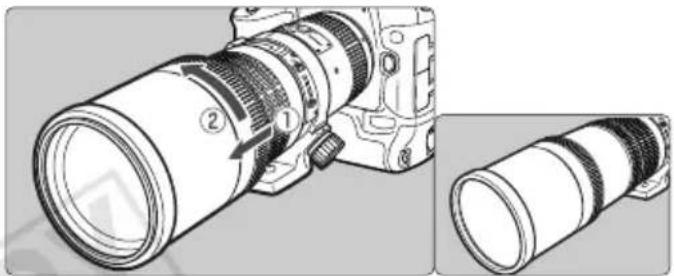
Bring the hood out from the end of the lens until it stops. For storage, reverse the procedure.
EF400mm f/5.6L USM
Bring the hood out from the end of the lens until it stops and turn in the direction of the arrow. For storage, reverse the procedure.

EF135mm f/2L USM · EF200mm f/2.8L II USM
- Part of the picture may be blocked if the hood is not attached properly.
- When attaching or detaching the hood, grasp the base of the hood to turn it. To prevent deformation, do not grasp the rim of the hood to turn it.
9. Filters (Sold separately)
You can attach filters to the filter mounting thread on the front of the lens.

- If you need a polarizing filter, use the Canon Circular Polarizing Filter.
- To adjust the polarizing filter, first remove or store the lens hood.
10. Close-up Lenses (Sold separately)
Attaching a 500D Close-up Lens enables close-up photography.
The magnification will be as follows:
- EF135mm f/2L USM (72mm) 0.48× - 0.27×
- EF200mm f/2.8L II USM (72mm) 0.57× - 0.39×
- EF300mm f/4L USM (77mm) 0.82× - 0.59×
- EF400mm f/5.6L USM (77mm) 0.91× - 0.78×

- Close-up Lens 250D cannot be attached because there is no size that fits the lens.
- Manual focusing is recommended for accurate focusing.
11. Extension Tubes (Sold separately)
You can attach Extension Tube EF12 II or EF25 II for magnified shots. The shooting distance and magnification are shown below.
EF135mm f/2L USM
| Camera-to-Subject Distance (mm) | Magnification | |||
| Near Far | Near Far | |||
| EF12 II 691 | 1661 | 0.29×0.09× | ||
| EF25 II 579 | 883 | 0.41×0.20× | ||
EF200mm f/2.8L II USM
| Camera-to-Subject Distance (mm) | Magnification | |||
| Near Far | Near Far | |||
| EF12 II 1 | 169 | 3284 0 | 23 × 0.06 × | |
| EF25 II 9 | 77 | 1801 0.3 | 2 × 0.14 × | |
EF300mm f/4L USM
| Camera-to-Subject Distance (mm) | Magnification | |||
| Near Far | Near Far | |||
| EF12 II 1986 7786 0 | 18 × 0.04 × | |||
| EF25 II 1661 3925 0 | 24 × 0.09 × | |||
EF400mm f/5.6L USM
| Camera-to-Subject Distance (mm) | Magnification | |||
| Near Far | Near Far | |||
| EF12 II 2893 13449 | 0.16 × 0.03 × | |||
| EF25 II 2460 6610 0 | 21 × 0.07 × | |||

Manual focusing is recommended for accurate focusing.
12. Extenders (Sold separately)
With Extender EF1.4X II or EF2X II attached, the lens specifications will change as follows:
EF135mm f/2L USM
| Focal length (mm) | Aperture | Angle of view | Maximum magnification (×) | |||
| Diagonal Vertical Horizontal | ||||||
| EF1.4X II | 189 | f/2.8-45 | 13° 35' | 7° 25' | 11° 5' | 0.27 |
| EF2X II | 270 | f/4-64 | 9° 15' | 5° 10' | 7° 40' | 0.38 |
EF200mm f/2.8L II USM
| Focal length (mm) | Aperture | Angle of view | Maximum magnification (×) | |||
| Diagonal Vertical Horizontal | ||||||
| EF1.4X II | 280 f/4-45 9° | 20' 5° 10' 7° | 40' 0.22 | |||
| EF2X II | 400 | f/5.6-64 | 8° 50' | 4° 55' | 7° 20' | 0.32 |
EF300mm f/4L USM
| Focal length (mm) | Aperture | Angle of view | Maximum magnification (×) | |||
| Diagonal Vertical Horizontal | ||||||
| EF1.4X II | 420 | f/5.6-45 | 6° 10' | 3° 20' | 5° | 0.18 |
| EF2X II 60 | 0 f/8-64 4° 1 | 0' 2° 20' 3° | 30' 0.26 | |||
EF400mm f/5.6L USM
| Focal length (mm) | Aperture | Angle of view | Maximum magnification (×) | |||
| Diagonal Vertical Horizontal | ||||||
| EF1.4X II | 560 f/8-45 4° | 25' 2° 25' 3° | 40' 0.18 | |||
| EF2X II | 800 | f/11-64 | 3° 5' | 1° 40' | 2° 35' | 0.25 |
ENG-11
Extenders (Sold separately)

EF300mm f/4L USM
- With Extender EF2X II attached to the lens, only manual focus is possible. However, with the EOS-1Ds Mark III, EOS-1Ds Mark II, EOS-1Ds, EOS-1D Mark III, EOS-1D Mark II N, EOS-1D Mark II, EOS-1D, EOS-1V/HS, EOS-3 camera, autofocusing with the center focusing point is possible.
EF400mm f/5.6L USM
- With Extender EF1.4X II attached to the lens, only manual focus is possible. However, with the EOS-1Ds Mark III, EOS-1Ds Mark II, EOS-1Ds, EOS-1D Mark III, EOS-1D Mark II N, EOS-1D Mark II, EOS-1D, EOS-1V/HS, EOS-3 camera, autofocusing with the center focusing point is possible.
- With Extender EF2X II attached to the lens, only manual focus is possible.
For all lenses
- First attach the Extender to the lens, then attach the lens to the camera. Detach it from the camera in the reverse order. If you attach the lens to the camera first, misoperation may occur.
- Only one Extender can be attached to the lens and camera.
- If you use an Extender on the lens mounted on a EOS A2/A2E/5, set the exposure compensation to -1/2 stop for the EF1.4X II or -1 stop for the EF2X II.

When an Extender is attached, the AF speed will become slower by design to retain proper AF control.
Specifications
| EF135mm f/2L USM | EF200mm f/2.8L II USM | EF300mm f/4L USM | EF400mm f/5.6L USM | |
| Focal Length/Aperture | 135 mm f/2 | 200 mm f/2.8 | 300 mm f/4 | 400 mm f/5.6 |
| Lens Construction | 8 groups, 10 elements | 7 groups, 9 elements | 7 groups, 8 elements | 6 groups, 7 elements |
| Minimum Aperture | f/32 | f/32 | f/32 | f/32 |
| Angle of View | Diagonal: 18°Vertical: 10°Horizontal: 15° | Diagonal: 12°Vertical: 7°Horizontal: 10° | Diagonal: 8° 15'Vertical: 4° 35'Horizontal: 6° 50' | Diagonal: 6° 10'Vertical: 3° 30'Horizontal: 5° 10' |
| Min. Focusing Distance | 0.9 m / 3.0 ft. | 1.5 m / 4.9 ft. | 2.5 m / 8.2 ft. | 3.5 m / 11.5 ft. |
| Max. Magnification | 0.19 × | 0.16 × | 0.13 × | 0.12 × |
| Field of View | 124 × 185 mm /4.9 × 7.3 inch (at 0.9 m) | 152 × 226 mm /6.0 × 8.9 inch (at 1.5 m) | 185 × 275 mm /7.3 × 10.8 inch (at 2.5 m) | 194 × 291 mm /7.6 × 11.5 inch (at 3.5 m) |
| Filter Diameter | 72 mm / 2.8 inch | 72 mm / 2.8 inch | 77 mm / 3.0 inch | 77 mm / 3.0 inch |
| Max. Diameter and Length | 82.5 × 112 mm / 3.2 × 4.4 inch | 83.2 × 136.2 mm / 3.3 × 5.4 inch | 90 × 213.5 mm / 3.5 × 8.4 inch | 90 × 256.5 mm / 3.5 × 10.1 inch |
| Weight | 750 g / 26.5 oz | 765 g / 27.0 oz | 1165 g / 41.1 oz | 1250 g / 44.1 oz |
| Hood | ET-78 II | ET-83B II | Built-in | Built-in |
| Lens Cap | E-72U/E-72 II | E-72U/E-72 II | E-77U/E-77 II | E-77U/E-77 II |
| Case | LP1219 | LP1222 | LZ1128 | LZ1132 |
| Tripod Collar | - | Ring-type tripod mountingsocket A II (B) (Sold separately) | Ring-type tripodmounting socket A II (W) | Ring-type tripodmounting socket A II (W) |
- The lens length is measured from the mount surface to the front end of the lens. Add 21.5 mm to include the E-72U/E-77U lens cap and dust cap, and 24.2 mm for the E-72 II/E-77 II.
- The size and weight listed are for the lens only, except as indicated.
- Aperture settings are specified on the camera.
- All data listed is measured according to Canon standards.
● Product specifications and appearance are subject to change without notice.
ENG-13
Canon
© CANON INC. 2002CT1-8504-004 0812Ni