
AQ07XLN - Air-conditioner SAMSUNG - Free user manual and instructions
Find the device manual for free AQ07XLN SAMSUNG in PDF.


User questions about AQ07XLN SAMSUNG
0 question about this device. Answer the ones you know or ask your own.
Ask a new question about this device
Download the instructions for your Air-conditioner in PDF format for free! Find your manual AQ07XLN - SAMSUNG and take your electronic device back in hand. On this page are published all the documents necessary for the use of your device. AQ07XLN by SAMSUNG.
USER MANUAL AQ07XLN SAMSUNG
(Cooling and Heating)
natural_image
Pure technical line drawing of a mechanical component or bracket (no text or symbols)Safety Precautions
The following safety precautions must be taken when using your air conditioner.

WARNING
Risk of electric shock. • Can cause injury or death. • Disconnect all remote electric power supplies before servicing, installing or cleaning. • This must be done by the manufacturer or its service agent or a similar qualified person in order to avoid a hazard.
DURING OPERATION
◆ Users of this product are cautioned not to attempt repair of this product at their own discretion. Instead, they are requested to directly contact a designated service center or the outlet at which the product was purchased.
◆ Never spill any kind of liquid into the unit. Should this happen, unplug or main switch off the unit and contact an authorized service center.
Do not insert anything between the air outlet blades because the inner fan may be damaged and could cause injury. Keep children away from the unit.
Do not place any obstacles in front of the unit.
Do not spray liquid of any kind into the indoor unit. Should this happen, switch off the breaker used for your air conditioner and contact your installation specialist.
◆ Make sure that the unit is correctly ventilated at all times: Do not place clothing or other materials over it.
If the wireless remote control will not be used for a long time, remove the batteries. (If applicable)
When using a wireless remote control, the distance should not be more than 7 meters from the air conditioner. (If applicable)
Before throwing out the device, it is necessary to pull back the battery cells and get rid of them safely for recycling reasons.
When you need to dispose of the unit, consult your dealer. If pipes are removed incorrectly, refrigerant may blow out and come into contact with your skin, causing injury. Releasing refrigerant into the atmosphere also damages the environments.
◆ Please recycle or dispose of the packaging material for this product in an environmentally responsible manner.
◆ Never store or ship the air conditioner upside down or sideways to avoid damage to the compressor.
The appliance is not intended for use by young children or infirm persons without supervision: Young children should be supervised to ensure that they do not play with the appliance.
Max current is measured according to IEC standard for safety and current is measured according to ISO standard for energy efficiency.
DISPOSING OF THE UNIT
OTHERS
Contents
◆ PREPARING YOUR AIR CONDITIONER
■ Safety Precautions....2
■ View of the Unit 4
■ Remote Control - Buttons and Display....6
■ Inserting the Remote Control Batteries .... 7
■ Getting Started 8
◆ OPERATING YOUR AIR CONDITIONER
■ Selecting the Automatic Operating Mode....9
■ Cooling Your Room .... 10
■ Heating Your Room 11
■ Removing Excess Humidity....12
■ Airing Your Room....13
■ Changing the Room Temperature Quickly.... 14
■ Adjusting the Air Flow Direction Vertically.... 15
■ Adjusting the Air Flow Direction Horizontally....15
◆ PROGRAMMING YOUR AIR CONDITIONER
■ Setting the On Timer 16
■ Setting the Off Timer 17
■ Selecting good'sleep mode....18
◆ RECOMMENDATIONS FOR USE
■ Operating Recommendations.... 20
■ Temperature and Humidity Ranges.... 21
■ Operating Your Air Conditioner Without the Remote Control ..... 21
■ Solving Common Problems 22
■ Cleaning Your Air Conditioner.... 23
■ Installation and maintenance....24
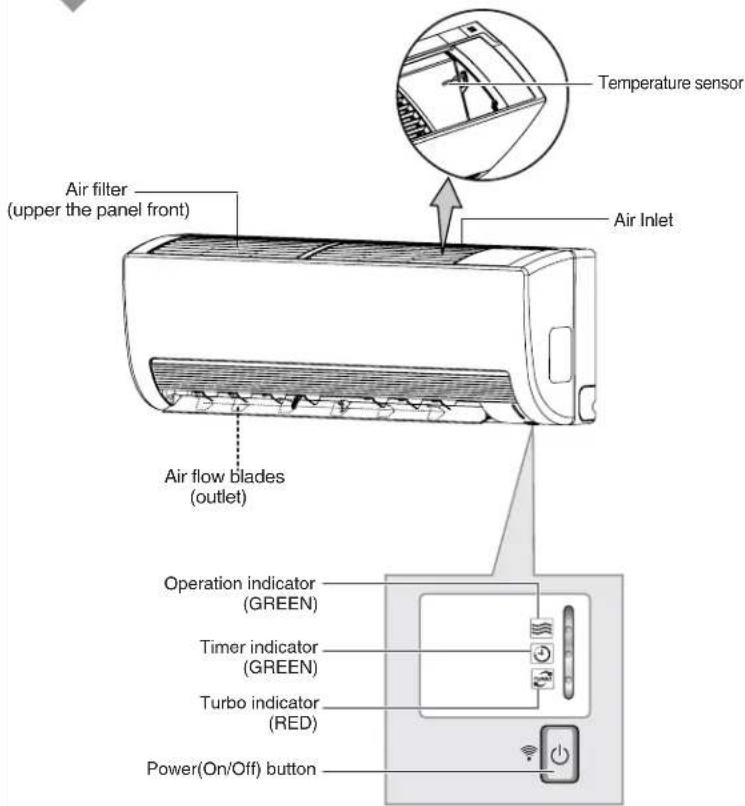
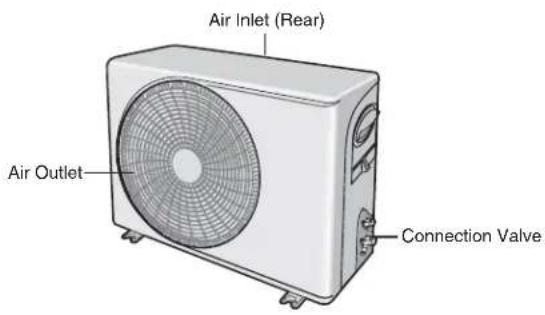
View of the Unit
The design and shape are subject to change according to the model.
Indoor Unit
text_image
Temperature sensor Air filter (upper the panel front) Air Inlet Air flow blades (outlet) Operation indicator (GREEN) Timer indicator (GREEN) Turbo indicator (RED) Power(On/Off) buttonOutdoor Unit
text_image
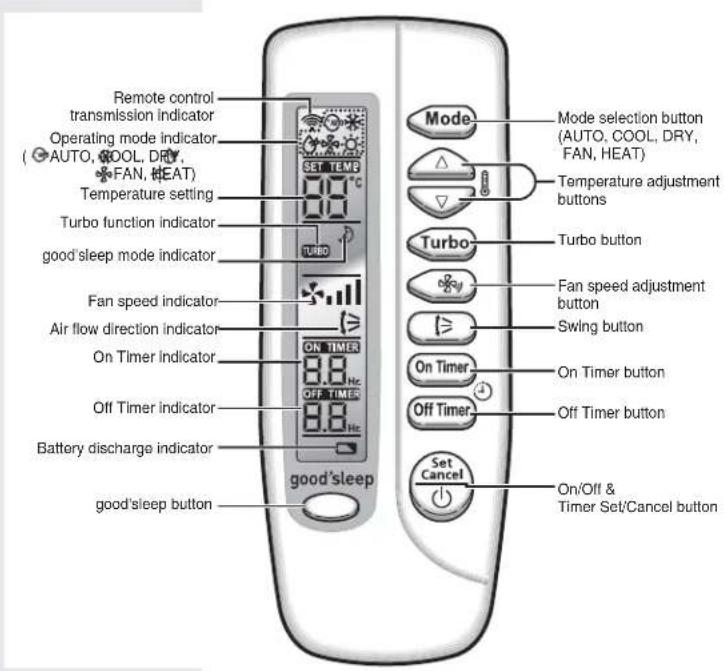
Air Inlet (Rear) Air Outlet Connection ValveRemote Control - Buttons and Display
text_image
Remote control transmission indicator Operating mode indicator (AUTO, COOL, DRY, FAN, HEAT) Temperature setting Turbo function indicator good'sleep mode indicator Fan speed indicator Air flow direction indicator On Timer indicator Off Timer indicator Battery discharge indicator good'sleep button SET TEMP TURBO ON TIMER OFF TIMER 8.8 Hz 9.8 Hz good'sleep Mode selection button (AUTO, COOL, DRY, FAN, HEAT) Temperature adjustment buttons Turbo button Fan speed adjustment button Swing button On Timer button Off Timer button Set Cancel On/Off & Timer Set/Cancel buttonInserting the Remote Control Batteries
You must insert or replace the remote control batteries when :
◆ You purchase the air conditioner
◆ The remote control does not work correctly
Note
◆ Use two AAA, LR03 1.5V batteries.
◆ Do not use old batteries or different kinds of batteries together.
◆ Batteries may be completely discharged after 12 months, even if they have not actually been used.
1 Push the battery cover on the rear of the remote control with your thumb in the direction of the arrow and remove it.
2 Insert the two batteries, taking care to respect the polarities:
◆ + on the battery with + on the remote control.
◆ - on the battery with - on the remote control.
3 Close the cover by sliding it back until it clicks into place.

natural_image
Illustration of a handheld device with a black arrow pointing to its side panel (no text or symbols visible)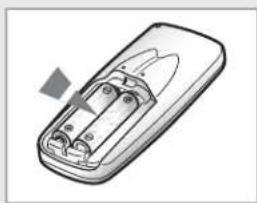
natural_image
Illustration of a remote control device with battery pack and indicator lights (no text or symbols)Getting Started
You have just purchased a split type air conditioner and it has been installed by your installation specialist.
Your Owner's Instructions contains valuable information on using your air conditioner. Please take the time to read it as it will help you take full advantage of the unit's features.
The booklet is organized as follows.
◆ The following figures are shown on pages from 4 to 6 :
- Indoor and outdoor units
- Remote control(buttons and display)
They will help you find the buttons and understand the symbols displayed.
◆ In the manual, you will find a series of step-by-step procedures for each function available.
The Illustrations in the step-by-step procedures use three different symbols:

PRESS PUSH

HOLD DOWN

Selecting the Automatic Operating Mode
You can start the air conditioner in Auto mode from your remote control. In the Auto mode, the cooling operation is selected automatically. You can also raise or lower the temperature but not the fanspeed.
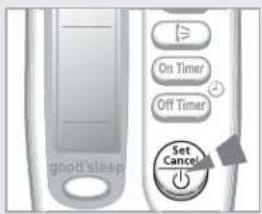
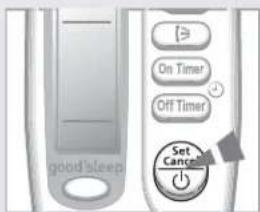
1 If necessary, press the ⏚ button.
Result:
◆ The operation indicator on the indoor unit lights up.
◆ The air conditioner starts up in the mode selected when the unit was last used.
◆ The Indoor unit beeps
IMPORTANT
The air conditioner is fitted with protection mechanism to prevent the unit from being damaged when it is started immediately after being:
◆ Plugged in
◆ Stopped
It will start up normally after three minutes.
2 If the 📄 is not displayed at the top of the remote control, press the 📄 button on the remote control one or more times until it appears.
Result:
◆ The indoor unit beeps each time you press the 📂 Mode button.
◆ The air conditioner runs in the Auto mode.
Note
You can change modes at any time.
3 To adjust the temperature, press the ⏻ button one or more times until the required temperature is displayed.
Possible temperatures are between 16°C and 30°C inclusive.
Result:
◆ Each time you press the 🔊 button:
- The temperature is adjusted by 1°C
- The indoor unit beeps
text_image
On Timer Off Timer Set Cancel good sleep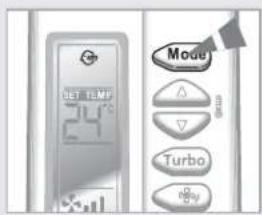
text_image
Mode Δ ▽ Turbo Play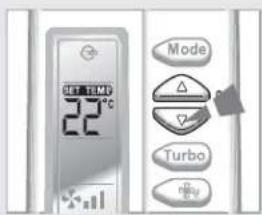
text_image
SET TEM 22°C Mode TurboCooling Your Room
text_image
good sleep On Timer Off Timer Set Cancel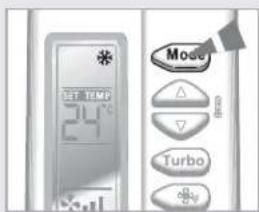
text_image
Mode 24°C Turbo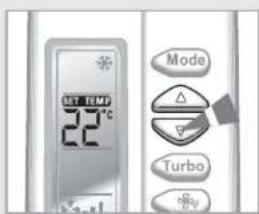
text_image
UST TEM 22°C Mode Turbo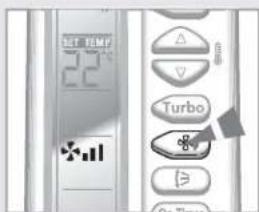
text_image
22℃ TurbosYou must select the Cool mode if you wish to adjust the:
◆ Cooling temperature
◆ Fan speed when cooling
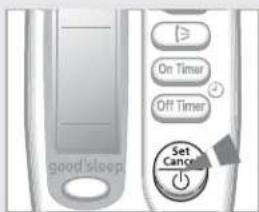
1 If necessary, press the 📄 button.
Result:
◆ The operation indicator on the indoor unit lights up.
◆ The air conditioner starts up in the mode selected when the unit was last used.
◆ The indoor unit beeps.

The air conditioner is fitted with protection mechanism to prevent the unit from being damaged when it is started immediately after being:
◆ Plugged In
♦ Stopped
It will start up normally after three minutes.
2 If the e is not displayed at the top of the remote control.
press the Mode button on the remote control one or more times until it appears.
Result:
◆ The indoor unit beeps each time you press the Mode button.
◆ The air conditioner runs in the Cool mode.
Note
You can change modes at any time.
3 To adjust the temperature, press the ⏻ button one or more times until the required temperature is displayed.
Possible temperatures are between 16°C and 30°C inclusive.
Result:
◆ Each time you press the 🔊 button:
- The temperature is adjusted by 1°C - The indoor unit beeps
◆ The air conditioner starts cooling, provided that the room temperature is higher than the selected temperature.
◆ If the room temperature reaches the set temperature, the air conditioner stops cooling, but the fan is still operating.
4 Select the fan speed by pressing the button one or more times until the required setting is displayed:
*11
Automatic (rotated: ✦₁→ ✦₂↓ ✦₃↓)
*
Low
*11
Medium
*11
High
Result:
Each time you press the 📊 button, the indoor unit beeps.
5 To control the direction of the air flow, refer to page 15.
Heating Your Room
You must select the Heat mode if you wish to adjust the:
◆ Heating temperature
◆ Fan speed when Heating
1 If necessary, press the ⏚ button.
Result:
◆ The operation indicator on the indoor unit lights up.
◆ The air conditioner starts up in the mode selected
when the unit was last used.
◆ The indoor unit beeps.
IMPORTANT The air conditioner is fitted with a protection mechanism to prevent the unit from being damaged when it is started immediately after being:
◆ Plugged in
◆ Stopped
It will start up normally after three minutes.
2 If the ⚙ is not displayed at the top of the remote control, press the ⚙ button on the remote control one or more times until it appears.
Result:
◆ The indoor unit beeps each time you press the button.
◆ The air conditioner runs in the Heat mode.
Note
You can change modes at any time.
3 To adjust the temperature, press the button one or more times until the required temperature is displayed. Possible temperatures are between 16°C and 30°C inclusive.
Result:
◆ Each time you press the 🔊 button:
- The temperature is adjusted by 1°C
The temperature is up
- The indoor unit beeps
If the room temperature reaches the set temperature (selected temperature+5°C), the air conditioner stops heating, but the fan is still operating.
◆ The air conditioner starts heating, provided that the room
temperature is lower than the desired temperature (selected temperature+3°C).
4 Select the fan speed by pressing the + button one or more times until the required setting is displayed:
Automatic (rotated: * - * - * )
Low
Medium
High
Result:
◆ Each time you press the + button, the indoor unit beeps.
For the first three to five minutes, the fan operates very slowly until the air has been sufficiently warmed. Once the correct temperature has been reached, the fan is automatically set to the required speed.
5 To control the direction of the air flow, refer to pages 1 5.
text_image
Good sleep On Timer Off Timer Set Cancel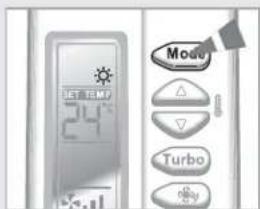
text_image
MODE 24°C Turbo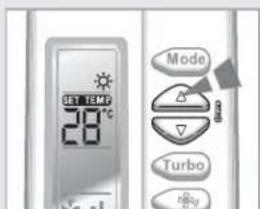
text_image
SET TEM 28°C Mode Turbo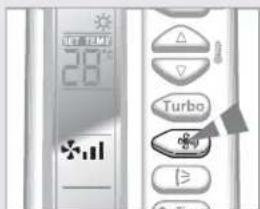
text_image
20°C On-Term
Removing Excess Humidity
text_image
On Timer Off Timer Set Caps good'sleep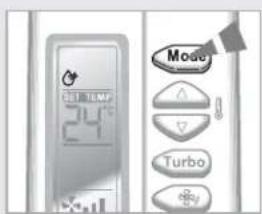
text_image
Mode Turbo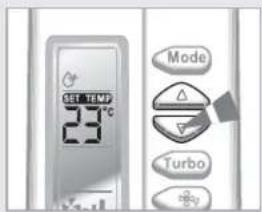
text_image
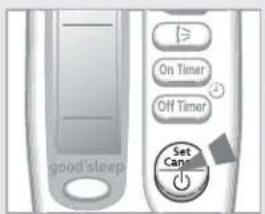
SET TEM 23°C Mode TurboIf the atmosphere in your room is very humid or damp, you can remove excess humidity without lowering the room temperature too much.
1 If necessary, press the ⏚ button.
Result: ◆ The operation indicator on the indoor unit lights up.
◆ The air conditioner starts up in the mode selected when the unit was last used.
◆ The indoor unit beeps.
IMPORTANT
The air conditioner is fitted with a protection mechanism to prevent the unit from being damaged when it is started immediately after being:
◆ Plugged in
◆ Stopped
It will start up normally after three minutes.
2 If the 📋 is not displayed at the top of the remote control press the Mode button on the remote control one or more times until it appears.
Result: ◆ The indoor unit beeps each time you press the None button.
◆ The air conditioner runs in the Dry mode.
Note You can change modes at any time.
3 To adjust the temperature, press the button one or more times until the required temperature is displayed. Possible temperatures are between 16°C and 30°C inclusive.
Result: ◆ Each time you press the button: - The temperature is adjusted by 1°C - The indoor unit beeps
◆ The air conditioner starts removing the excess humidity; the quantity of air is adjusted automatically.
◆ The fan is running in auto mode.
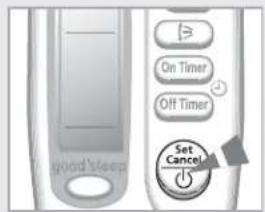
4 To control the direction of the air flow, refer to pages 15.
Airing Your Room
If the atmosphere in your room is stale, you can air the room using the Fan feature.
1 If necessary, press the 📄 button.
Result:
◆ The operation indicator on the indoor unit lights up.
◆ The air conditioner starts up in the mode selected when the unit was last used.
◆ The indoor unit beeps.
2 If the ✿ is not displayed at the top of the remote control, press the Mode button on the remote control one or more times until it appears.
Result:
◆ The indoor unit beeps each time you press the Mode button.
◆ The air conditioner runs in the Fan mode.
◆ The temperature is set automatically.
Note
You can change modes at any time.
3 Select the fan speed by pressing the ⏻ button one or more times until the required setting is displayed:

Low

Medium

High
Result:
Each time you press the + button, the indoor unit beeps.
4 To control the direction of the air flow, refer to pages 15.
text_image
On Timer Off Timer Set Cancel good sleep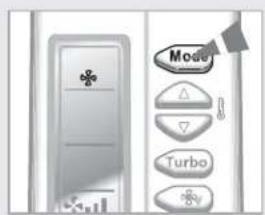
text_image
Mode △ ▽ Turbo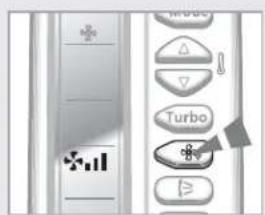
text_image
Screenshot of a software toolbar with icons for menu, keyboard, and Turbo functionsChanging the Room Temperature Quickly
The Turbo cooling/heating function is used to cool or heat your room as quickly as possible.
Example : You have just come home and find that the room is very hot. You wish to cool it down as quickly as possible. The Turbo function operates for 30 minutes with the maximum settings before returning automatically to the mode and temperature previously selected.
1 If necessary, press the ⏚ button.
Result:
◆ The operation indicator on the indoor unit lights up.
◆ The air conditioner starts up in the mode selected
when the unit was last used.
◆ The indoor unit beeps.
IMPORTANT
The air conditioner is fitted with protection mechanism to prevent the unit from being damaged when it is started immediately after being:
◆ Plugged in
◆ Stopped
It will start up normally after three minutes.
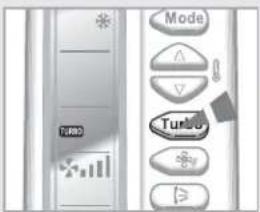
2 Press the Turbo button.
Result:
◆ The temperature and fan settings are adjusted automatically.
The air conditioner cools or heats the room as quickly as possible. After 30 minutes, the air conditioner is reset automatically to the previous mode, temperature and fan settings.
◆ You can select the Turbo function in the Auto, Cool and Heat mode.
If you select this function in the Dry or Fan mode, it will return to the Auto mode.
3 If you wish to stop the Turbo function before the end of the 30-minute period, press the Turbo button one or more times until Turbo disappears.
Result:
The air conditioner is reset automatically to the previous mode, temperature and fan settings.
4 To control the direction of the air flow, refer to pages 15.
text_image
Mode Turb0Adjusting the Air Flow Direction Vertically
Depending on the position of the indoor unit on the wall of your room, you can adjust the position of the outer air flow blade on the bottom of the unit, thus increasing the efficiency of the air conditioner.
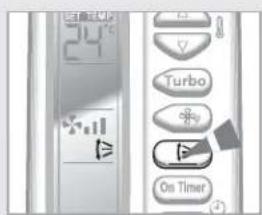
1 Press the button one or more times as required.
Result: The outer blade is adjusted vertically.
| RECOMMENDATION | When... | Adjust the blade to face... |
| Cooling Upwards | ||
| Heating | Downwards. | |
2 If you want the blade to move up and down automatically when the air conditioner is operating, press the Ⓗ button.
Result: The blade move up and down, around the base position set.
3 To stop the blade moving up and down, press the 📄 button again.
| Note | If you switch the air conditioner... | Then the blade is... |
| Off Closed completely. | ||
| On again | Set to the initial position powered. |
text_image
24°C Turbo On TimerAdjusting the Air Flow Direction Horizontally
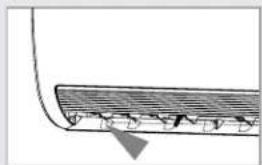
There are two sets of inner air flow blades. Just as the outer air flow blade can be adjusted vertically, the inner blades can be adjusted horizontally.
1 Adjust each set of inner blades to the required position, by pushing or pulling them sideways.
natural_image
Diagram of a roof drainage system with labeled components (no text or symbols)Setting the On Timer
text_image
ON TIME 3.0 Hz Turbo On Timer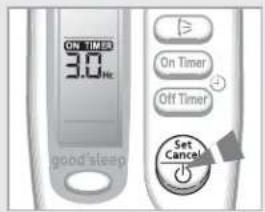
text_image
ON TIMER 3.0 Hz On Timer Off Timer Set Cancel good'sleep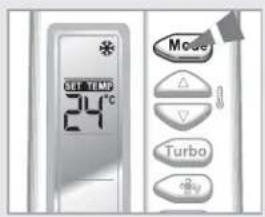
text_image
SET TURBO 24°C Move Turbo Fire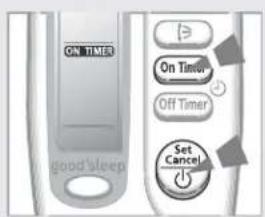
text_image
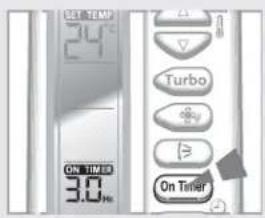
ON TIMER On Timer Off Timer Set Cancel good/sleepThe On Timer enables you to switch on the air conditioner automatically after a given period of time. You can set the period of time from 0.5 hour to 24 hours.
1 To set the operating time, press the OrTime button one or more times until the required time is displayed. Possible time is between 0.5 hour and 24 hour inclusive.
2 Press the button to complete the setting.
Result: ◆ The remaining time is displayed.
◆ Blinking of the timer indicator on the remocon stops.
◆ The selected mode and the temperature on the remocon display disappear after 10 seconds.
The air conditioner will switch on automatically when the counter displayed on the remote control reaches the set time and disappears the On Timer setting.
3 To select an operating mode in advance, press the Mode button until the desired mode is displayed at the top of the remote control.
Result: The air conditioner will run in the selected mode when it is turned on.
To Cancel the On Timer
If you no longer wish to use the On Timer that you have set, you can cancel it at any time.
1 To cancel the On Timer, press the On Timer button one or more times until the timer setting disappears.
2 Press the button.
If you want to turn on the air conditioner before the timer reaches the setting time, press the button.
Setting the off Timer
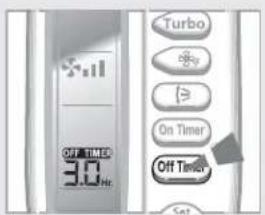
The Off Timer enables you to switch off the air conditioner automatically after a given period of time. You can set the period of time from 0.5 hour to 24 hours.
1 To set the operating time, press the ⏻ button one or more times until the required time is displayed. Possible time is between 0.5 hour and 24 hour inclusive.
2 Press the 📄 button to complete the setting.
Result:
◆ The remaining time is displayed.
◆ Blinking of the timer indicator on the remocon stops.
The air conditioner will switch off automatically when the counter displayed on the remote control reaches the set time and disappears the Off Timer setting.
Example
If you would like to turn the air conditioner on after 2 hours and to operate it for 2 hours:
- Press the button until '2 Hr' is displayed.
- Press the button.
- Press the button until '4 Hr' is displayed.
- Press the button.
Hee
You can see or change the setting mode and/or the temperature
by pressing the Mode button or the Button after setting the
Off Timer.
To Cancel the Off Timer
If you no longer wish to use the Off Timer that you have set, you can cancel it at any time.
1 To cancel the Off Timer, press the 📣 button one or more times until the timer setting disappears.
2 Press the button.
Note
If you want to turn off the air conditioner before the timer reaches
the setting time, press the ⏻ button.
text_image
OFF TINER 3.0 Hz Turbo On Timer Off Timer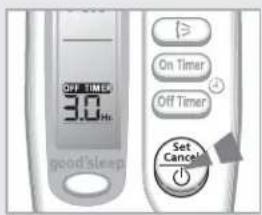
text_image
OFF TIMER 3.0 Hz good'sleep On Timer Off Timer Set Cancel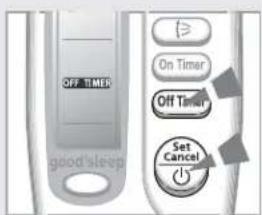
text_image
OFF TIMER On Timer Off Timer Set Cancel good sleepSelecting good'sleep mode
text_image
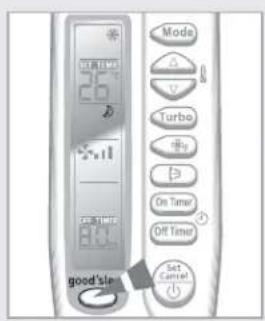
MODE Turbo On Timer Off Timer Set Cancel good'slaggood'sleep mode helps users to fall asleep well after going to bed whether being too hot to sleep or being awakened by coldness. The good'sleep mode can be selected only when the air conditioner is "switched on" in cool mode.
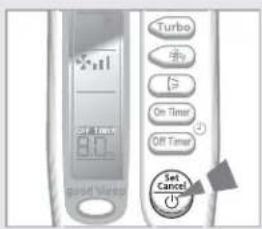
Selecting good'sleep mode, as a result, the Off Timer will switch off the air conditioner after 8 hours automatically, or you can press the 📄 button to set Off Timer in the range from 0.5 hour to 12 hours then press the 📄 button to confirm this selection, during the period of good'sleep mode, the possible temperatures are between 16°C and 30°C inclusive, but the fan speed and the direction of the air flow is nonadjustable.
1 Press the 📋 button one or more times until 🔒 is displayed on your remote control.
Result: ◆ The indoor unit beeps.
If good'sleep is selected after switching on the unit, the air conditioner will run in Cool mode. During this period, the temperature displayed is one you set for the Cool mode. If good'sleep is selected before switch on the unit, the air conditioner starts running in Cool mode and the temperature is set to 26°C.
◆ The fan is running in auto mode.
To Cancel the good'sleep
If you no longer wish to use good'sleep that you have set, you can cancel it at any time.
1 press the button to switch off the air conditioner.
2 To cancel a selected good'sleep mode you can also press the button, the Off-Back, the On-Back button, or Mode button, the air conditioner will run in cool mode.
text_image
Turbo On Timer Off Timer Set CancelSelecting good'sleep mode
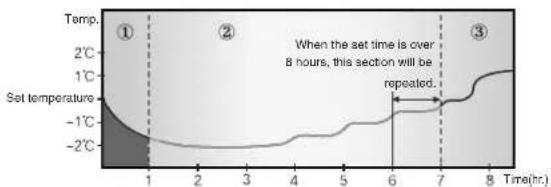
To prevent excessive cooling/heating during sleep, the good'sleep mode automatically modifies the temperature setting in according with the time setting. Temperature and air current change according to the 3 stages; Falling Asleep, Sound Sleep, Wake Up from good'sleep mode, and then the air conditioner will automatically turn off when the set time has elapsed.
Falling Asleep Stage :
This stage supports environment to quickly cool down. Together with comfortable intermittent air, you will be able to fall asleep quickly.
Sound Sleep Stage :
This stage helps users to take deep sleep and keep the healthy skin by controlling wavy temperature control and insensible air stream.
Wake Up Stage :
This stage supports comfortable intermittent air to the room to raise human body temperature for refreshing wake up.
Cool mode

line
| Time(hr.) | Temperature (°C) | | --------- | ---------------- | | 0 | -2 | | 1 | -1 | | 2 | 0 | | 3 | 1 | | 4 | 2 | | 5 | 1 | | 6 | 0 | | 7 | -1 | | 8 | 0 |Heat mode
line
| Time(hr.) | Temperature | | --------- | ----------- | | 1 | -2°C | | 2 | -1°C | | 3 | -1°C | | 4 | -1°C | | 5 | -1°C | | 6 | -1°C | | 7 | -1°C | | 8 | -1°C |The recommended temperature is set between 25^ C – 27^ C, and 26^ C is the most ideal temperature for comfortable sleep for cooling and 21^ C – 23^ C for heating.
▶ Airflow blades and fan speed are controlled automatically as the above 3 stages in good'sleep mode.
▶ Set Off timer in good'sleep mode over 5 hours. You feel disturbed sleep if the good'sleep mode is set too short or long because the basic off timer is set for 8 hours. If the good'sleep mode is set less than 4 hours, the operation will be stopped.
▶ After setting time, If the good'sleep mode is set over 5 hours, it will run as Wake Up stage for the last one hours before stop.
Operating Recommendations
When you use your air conditioner, it is recommended that you read the following:
Topic Recommendation
| Common Air conditioner should be used only in the single closed room.Effective air conditioner operation can be guarantee if all windows and doors in the room are closed. | |
| Heating capacity | The heat pump inside the air conditioner absorbs heat from outside air and brings it indoors. If the temperature of the outside air drops, the air conditioner heats less. If the room is not warm enough, use an additional heating appliance. |
| Warm air circulation | The air conditioner circulates warm air to heat your room. It will take some to warm the air in your room entirely after the air conditioner turns on.Therefore, turn the air conditioner on in advance. |
| Frost | When you select the Heat mode, frost may from in the outdoor unit due to low temperature and high humidity.If this happens:► The heating operation is stopped.► The air conditioner defrost automatically for about 7 minutes.After about 7 minutes, the air conditioner starts operating again normally. |
| High indoor and outdoor temperatures | If the both the indoor and outdoor temperatures are high when you select the Heat mode, the fan and the compressor of the outdoor unit may stop periodically. This is normal; wait until the air conditioner turns on again. |
| Powerfailure | If a power failure occurs when the air conditioner is operating, the air conditioner will turn off. When the power returns, the air conditioner will start up again automatically. |
| Protection mechanism | When the air conditioner is started immediately after being plugged in or stopped, the normal operation starts up after 3 minutes for reason of protection. |
Temperature and Humidity Ranges
The following table indicates the temperature and humidity ranges within which the air conditioner can be used.
If the air conditioner is used at... Then...
| High temperatures | The automatic protection feature may be triggered and the air conditioner stopped. |
| Low temperatures | A water leak or some other malfunction may occur if the heat exchanger freezes. |
| High humidity levels | Water may condense on and drip from the surface of the indoor unit if it is used for long periods. |
| Mode | Outdoor Temperature | Indoor Temperature | Indoor Humidity |
| Heating | 0°C to 24°C approx. | 27°C or less | - |
| Cooling | 19°C to 43°C approx. | 16°C to 32°C approx. | 80% or less |
| Drying 19°C to 43°C approx. | 16°C to 32°C approx. - | ||
If the outdoor temperature is as low as 0^ C, the heating capacity drops up to 70\~80% depending on the operating condition.
If the cooling operation is used at over 32°C(indoor temperature), it does not cool at its full capacity.
Operating Your Air Conditioner Without the Remote Control
Your air conditioner can be operated directly from the indoor unit if the remote control is lost or broken.
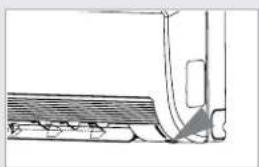
1 To switch the air conditioner on, press the ON/OFF switch on the right side of the indoor unit.
Result:
◆ The OPERATION indicator on the indoor unit comes on.
◆ The indoor unit beeps.
The air conditioner starts up in the most suitable mode for the room temperature. The mode may change from cooling into heating, from heating into cooling depending on the current temperature during operation:
Room Temperature Operating Mode
Less than 24°C
Heat
24°C or above
Cool
2 To switch the air conditioner off, press the ON/OFF switch again.
Note
Even if the air conditioner has been switched on via the ON/OFF switch, operations can still be controlled using the remote control as usual.
natural_image
Line drawing of a vehicle's side profile showing front wheel, rear wheel, and side panel (no text or symbols)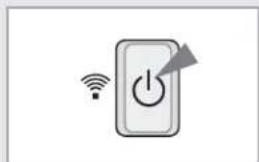
natural_image
Simple icon of a power button with wireless signal and directional arrows, no text or symbols present.Solving Common Problems
Before contacting the after-sales service, perform the following simple checks.
They may save you the time and expense of an unnecessary call.
| Problem Explanation/Solution | |
| The air conditioner does not operate at all | ◆ Check that the breaker used for the air conditioner is switched on.◆ Check that the operation indicator on the indoor unit is on; if necessary press the button on the remote control.◆ Check whether the Timer indicator on the indoor unit is switched on. If so:- Wait until the switch-on time is reached and the air conditioner starts up automatically- Cancel the timer (see pages 16 and 17 for further details) |
| The air conditioner does not operate with the remote control | ◆ Check that there are no obstacles between you and the indoor unit.◆ Check the remote control batteries.◆ Check that you are close enough to the Indoor unit (seven meters/yards or less). |
| No beep is heard when you press the 📋 on the remote control | ◆ Check that you are pointing the remote control at the remote control sensor in the right of the indoor unit.◆ Replace the remote control batteries if necessary. |
| The air conditioner does not cool | ◆ Check that the correct operating mode has been selected (Auto, Cool).◆ The room temperature may be too low.◆ Dust may be blocking the air filter guard; refer to pages 23 for cleaning instructions.◆ Check that there is no obstacle in front of the outdoor unit. |
| The fan speed does not change when you press the 📋 button | ◆ Check that the operating mode is set to the Auto, Cool or Fan mode ; in the Dry mode, the fan speed changes automatically. |
| The air cow direction does not change when you press the 📋 button | ◆ Check that the air conditioner has been switched on; if necessary, press the 📋 button on the remote control. |
| The timer is not correctly triggered | ◆ Check that the timer has been programmed correctly; see pages 16 and 17. |
| Odour is permeated in the room during air conditioning | ◆ Air the room. |
Cleaning Your Air Conditioner
To get the best possible use out of your air conditioner, you must clean it regularly to remove the dust that accumulates on the air filter.
IMPORTANT Before cleaning your air conditioner, ensure that you have switched off the breaker used for the unit.
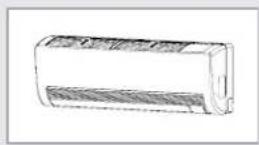
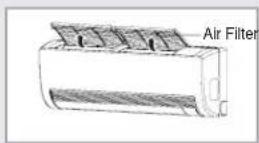
1 Open the guard air filters by pushing backward.
2 Pull guard air filters out of the panel front.
3 Remove all dust on the guard air filters with a vacuum cleaner or brush.
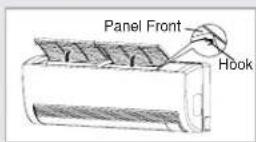
4 When you finished, insert guard air filters into the aperture in the panel front.
5 To close the guard air filters, fix it to hooks and push down to the panel front.
6 Clean the front grille with a damp cloth and mild detergent (do NOT use benzene, solvents or other chemicals).
1800
If you have not used the air conditioner for a long period of time, set the fan going for three to four hours to dry the inside of the air conditioner thoroughly.
Installation and maintenance
Air conditioners are technically complex products that require regular maintenance. Failure to heed to these requirements and Operation Recommendations could result in reduction of product life span as well as breakdowns of expensive parts.
Installation\*
It is recommended to perform installation works by organizations with certified statelicenses and Samsung certificate. Contacts for certified organizations you can receive in "Samsung Contact Center" by phones mentioned in Warranty card 8-800-200-0-400. There should be a stamp of Installation Company in warranty card after installation.
when choosing installation site, please remember that unit should be easy accessible for service. Service will not be available for the outdoor unit where our servicemen cannot access and the cost of moving the outdoor unit to the service area will be borne by the customer.
Maintenance\*
Service works means elimination of defects, caused by Manufacturer. Service works are performed by authorized Samsung service centers; you can find contacts at "Customer Contact Center" by phones, mentioned in warranty card 8-800-200-0-400.
Preventive maintenance means periodically carried out cleaning, testing, tuning of Aircon, that necessary for its normal work. It is recommended to execute Preventive maintenance by organization with certified state licenses and Samsung certificate. You can find contacts at "Customer Contact Center" by phones, mentioned in warranty card 8-800-200-0-400.
Recommendations for Preventive maintenance:
▶ At least once a year engage a certified specialist to carry out maintenance works, preferably during dry and warm periods.
Maintenance worksshallinclude:
- Cleaning heat exchanger of indoor and outdoor unit
- Cleaning drainage system
- Checking the pressure level (refrigerant quantity)
- Checking the operation modes of the system
- Top-up of refrigerant, if necessary (usually once per 2 years)
▶ Also, pleaserefer to page "Cleaning your Air conditioner".
* Manufacturer provides warranty and free of charge service during 12 months, if Installation or service works was performed by organization, not being certified Samsung Installer or Service Center.
Every installation and preventive maintenance works shall be paid for by the air conditioner owner, since the product warranty does not cover any of these works.
Aforementioned expenses on proper installation and maintenance works will be compensated by the long and reliable air conditioner operations.
Memo
E-25
[NO TEXT]
Memo
Memo

ELECTRONICS
Contact SAMSUNG WORLD WIDE
If you have any comments or questions regarding a Samsung products, contact the SAMSUNG customer care center.
| Country Customer CareCenter | Web Site | |
| RUSSIA 8-800-555-55-55 www.samsung.ru | ||
| KAZAHSTAN 8-10-800-500-55-500 www.samsung.kz | ||
| UZBEKISTAN 8-800-120-0-400 www.samsung.uz | ||
| UKRAINE | 8-800-502-0000 | www.samsung.com/ua |
| LITHUANIA | 8-800-77777 | www.samsung.lt |
| LATVIA | 800-7267 | www.samsung.com/lv |
| ESTONIA | 800-7267 | www.samsung..ee |
© Samsung Electronics Co., Ltd. All Rights Reserved.

natural_image
Pure technical line drawing of a mechanical component or panel (no text or symbols)natural_image
Illustration of a flip phone with a visible logo (no text or symbols on the device body)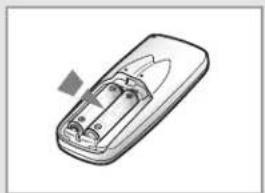
natural_image
Illustration of a rectangular electronic device with internal components and a small triangular component inserted (no text or symbols)text_image
good sheep On Timer Off Timer Set Cancel[Unreadable due to severe distortion and noise]
text_image
Fuel Pump Mode Turbotext_image
Control panel interface with labeled buttons including 'MOSU', 'Turbo', and 'B'natural_image
Diagram of a curved pipe or channel with internal layered structure and a triangular load arrow (no text or symbols)text_image
ON TIM On Tim Off Timer Set Cancel good/sleepR-16
If you have any comments or questions regarding a Samsung product, contact the SAMSUNG customer care center.
| Country | Customer Care Center Web Site | |
| RUSSIA | 8-800-555-55-55 | www.samsung.ru |
| KAZAHSTAN | 8-10-800-500-55-500 | www.samsung.kz |
| UZBEKISTAN | 8-800-120-0-400 | www.samsung.uz |
| UKRAINE | 8-800-502-0000 | www.samsung.com/ua |
| LITHUANIA | 8-800-77777 | www.samsung.lt |
| LATVIA | 800-7267 | www.samsung.com/lv |
| ESTONIA | 800-7267 | www.samsung.ee |
© Samsung Electronics Co., Ltd. All Rights Reserved.