
RS20VRPS - Fridge SAMSUNG - Free user manual and instructions
Find the device manual for free RS20VRPS SAMSUNG in PDF.


User questions about RS20VRPS SAMSUNG
0 question about this device. Answer the ones you know or ask your own.
Ask a new question about this device
Download the instructions for your Fridge in PDF format for free! Find your manual RS20VRPS - SAMSUNG and take your electronic device back in hand. On this page are published all the documents necessary for the use of your device. RS20VRPS by SAMSUNG.
USER MANUAL RS20VRPS SAMSUNG
Correct Disposal of This Product (Waste Electrical & Electronic Equipment)
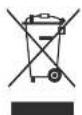
(Applicable in the European Union and other European countries with separate collection systems)
This marking on the product, accessories or literature indicates that the product and its electronic accessories (e.g. charger, headset, USB cable) should not be disposed of with other household waste at the end of their working life. To prevent possible harm to the environment or human health from uncontrolled waste disposal, please separate these items from other types of waste and recycle them responsibly to promote the sustainable route of material resources.
Household users are around contact either the retailer where they purchased this product, other local government office, for details of where and how they can take these items for environmentally safe recycling.
Business users should contact their supplier and check the terms and conditions of the purchase contract. This product and its electronic accessories should not be mixed with other commercial wastes for disposal.
Contact SAMSUNG WORLD WIDE
If you have any questions or comments relating to Samsung products, please contact the SAMSUNG customer care centre.
| Country | Customer Care Centre | Web Site |
| Switzerland | 0848 - SAMSUNG(7267864, CHF 0.08/min) | www.samsung.com/ch |
DA68-01903S(2)
natural_image
Exterior view of a modern white refrigerator with black control panel (no visible text or symbols)SAMSUNG
Before operating the appliance, please read this manual carefully and keep for further reference in a handy and safe place.
Please follow the operation instructions and the related safety precautions in this manual before your proper operation.
- Our products are improved constantly and it will not be otherwise informed if there is any change.
Free Standing Appliance
Contents
SAFETY PRECAUTIONS 1
OPERATING INSTRUCTIONS 3
PREPARING THE APPLICANCE FOR USE 3
FEATURES 3
CONTROL PANEL 4
TEMPERATURE CONTROL 5
OVERVIEW OF YOUR REFRIGERATOR 6
MAKING ICE....7
FOOD STORAGE GUIDE 8
REMOVING ACCESSORIES FROM THE FREEZER 10
REMOVING ACCESSORIES FROM THE FRIDGE 10
CLEANING THE ACCESSORIES 11
INSTALLATION INSTRUCTIONS 12
INSTALLING REFRIGERATOR 12
ADJUSTING DOOR CLEARANCE 14
TROUBLESHOOTING 15
The contents in this manual include three models:
RS20B*/RS20C*/RS20N*/RS20V*/RS20S*
The construction of these three models are similar,
therefore RS20B* is the main object described in this manual.

CAUTION
- This appliance is not intended for use by persons (including children) with reduced physical, sensory or mental capabilities, or lack of experience and knowledge, unless they have been given supervision or instruction concerning use of the appliance by a person responsible for their safety.
• Children should be supervised to ensure that they do not play with the appliance.
CE Notice
This product has been determined to be in compliance with the Low Voltage Directive (2006/95/EC), the Electromagnetic Compatibility Directive (2004/108/EC) and the Eco-Design Directive(2009/125/EC) implemented by Regulation (EC) No 643/2009 of the European Union.
AMBIENT ROOM TEMPERATURE LIMITS
This appliance is designed to operate at the ambient temperatures specified by its temperature class marked on the rating plate.
| Temperature Class | Symbol | Ambient Temperature | |
| Maximum | Minimum | ||
| Subtemperate | SN | 32°C (90°F) | 10°C (50°F) |
| Temperate | N | 32°C (90°F) | 18°C (61°F) |
| Subtropical | ST | 38°C (100°F) | 18°C (64°F) |
| Tropical | T | 43°C (109°F) | 18°C (64°F) |
NOTES: the internal temperature may be affected by such factors as appliance location, ambient temperature, and the frequency of your opening the doors. Please adjust the temperature as required to compensate for these factors.
aDDitionaL tiPs for ProPER usagE

- Allow the appliance to stand for 2 hours after installation.
• To get best performance of product.
- Do not place foods too closely in front of the vents at the rear of the appliance as it can obstruct free air circulation in the freezer compartment.
- Wrap the food up property or place it in a tight containers before put it into the fridge freezer
- Do not put any newly introduced food for freezing near to already frozen food.
- Do not place carbonated or fizzy drinks in the freezer compartment
- Please observe maximum storage times and expiry dates of frozen goods.
- There is no need to disconnect the refrigerator from the power supply if you will be away for less than three weeks. But, remove all the food if you are going away for the three weeks or more. Unplug the refrigerator and clean it, rinse and dry.
- Most power failures that are corrected in an hour or two will not affect your refrigerator temperatures. However, you should minimize the number of door openings while the power is off. But should the power failure last more than 24 hours, remove all frozen food.
- If the key is provided with refrigerator, the keys should be kept out of the reach of children and not in the vicinity of the appliance.
- The appliance might not operate consistently (possibility of defrosting of contents or temperature becoming too warm in the frozen food compartment) when sited for an extended period of time below the cold end of the range of temperatures for which the refrigerating appliance is designed.
- Do not store food which goes bad easily at low temperature, such as bananas, melons.
- Place the ice tray at the originally provided position by manufacturer in order to achieve optimal ice-freezing.
- Your appliance is frost free, which means there is no need to manually defrost your appliance, as this will be carried out automatically.
- Temperature rising during the defrost can comply with ISO requirement. But if you want to prevent an undue rise in the temperature of the frozen food while defrosting the appliance, please wrap the frozen food in several layers of paper such as newspaper.
- Any increase in temperature of frozen food during defrostling can shorten its storage life.
SAFETY PRECAUTIONS

- Before using your refrigerator, please read this manual thoroughly and keep it in a safe place for further reference.
- The features of the refrigerator you purchased may vary little bit from the descriptions in this manual as the below instructions are involved in various models.
• Children or weak person should not use this refrigerator without supervision.
• Take care of children and prevent them from playing this regurgals - R800a or R134a is refrigerant. Check the compressor power and temperature level sign on the back side of the refrigerator to obtain the information of refrigerant used in refrigerants
Caution / Warning Sign
| WARNING | Can cause injury or death |
| CAUTION | Can cause person injury o material damage |
Other Signs
| Never Do | |
| Never Remove | |
| NO Touch | |
| Must Follow | |
| Must pull out power plug from sock | |
| Must connect the earth to avoid electric shock | |
| Friendly Reminding |

WARNING

Never plug several electrical appliances into one multifunctional socket
- Otherwise it can become potential fire hazard
Avoid keeping the power socket very close teeth back side of refrigerator to ensure no crush or damage to power socket.
- The damaged socket may be over hal to cause fire.
No water spills or flows to refrigerator
• There is a risk of electric shock order
Do not use spray around the refrigerator
• There is a risk of explosion or _r
Do not put heavy object on power abr
• There is a risk of short circuit order
Do not pull out plug with well habit
• There is a risk of electric shock
Do not put any container full filled with water on top of the unit
- If water spills, it can cause fire or electric shock. Refrigerator must not be installed where it is dep
or easily be spilled by walls
*There is a risk of electric shock or fire if electrical parts have insulation failure.
The materials that can be easily volatilized or b flammable shall not be stored in the unit.
- It can cause explosion if benzene, frinner, ethanal aether, LP gas or the other similar materials are stored.

Do not dismente or repair the refrigerator by yourself • There is a risk of fire, malfunction and person injury

Do not replace LED lamp privately and please contact the specialized repair staff if necessary. And make it sure that the new LED lamp is the same as the old one. Do not break the lamp cover.

The door and rubber seal of refrigerator should be dismantled in before disposing and throwing away the unit. - It can avoid locking children in the uni

Refrigerator must be earth • Refrigerator must be earthed to prevent energy consumption of electric shock caused by refrigerator power leakage.

Gasoped, phone lined or the other potential lighting rod shall not be used as earth point. - It can cause electric shock if earth plug is not used proper

WARNING
- Keep air vent and channel inside the refrigerator clean to prevent blocking.
- Remove frost according to the recommendations byth manufacturer. No mechanical equipment or the other methods shall be used.
- Refrigerant system and electrical circuit shall not be damaged
- Do not use the other electronic products inside the refrigerator except those recommended by the manufacturer.
• No tread on leg cover at the bolt
SAFETY PRECAUTIONS

CAUTION
②
Do not overfill the refrigerator with food.
- If food falls out when you open the doors, there is a risk of personal injury or material damage.
Do not store bottles or glass containers in the freezer. When the contents freeze, the glass may break and cause personal injury.
If power socket is loose, do not insert plug
• There is a risk of electric shock or fire.
Do not disconnect the power cord by pulling on its head.
- Damage to the cord may cause a short circuit, fire or electric shock.
- If power cord is damaged, it must be replaced by the manufacturer, a certified service agent or qualified service person.
Do not store articles on top of the unit.
- When you open or close the doors, the articles may fall and cause personal injury or material damage.
Do not store medicine, scientific materials and the other temperature-sensitive products in the freezer.
- Check product label to make sure the refrigeration is not prohibited.
- Do not let children hang on the counter and doors.
• Do not let children hang on the shelf in the unit.

- Do not let children hang on the food guard on the doors.


CAUTION
Refrigerant decides the refrigeration of refrigerator and it is filled into the refrigerator with special process. Ensure the piping behind refrigerator is undamaged.

Small amount of high-temperature, environmental protected Isobutane refrigerant and gas is included in the refrigerator, but they are also very
Flammable. Handle the refrigerator carefully to ensure the refrigerant system is not damaged during transportation and installation of this unit.
The refrigerant leaked from the piping may be ignited or cause injury to the eyes. If refrigerant leakage is found, fire or potential fire source shall be avoided and ventilate the room where the refrigerator is for several minutes.
- The room size for refrigerator shall be determined according to the quantity of refrigerant in the appliance to avoid that the refrigerator leaked from piping circuit is mixed with the air to generate flammable mixture.
The room size for the appliance shall be calculated according to 8g of refrigerant type R600a per cubic meter. Refer to the instruction in the refrigerator for the details of refrigerant quantity in the unit.
- Do not start up refrigerator if there is any damage in the unit. Please contact dealer or service center for any query.


Do not touch the inside wall of the freezer or products or food stored in the freezer with wet hands. It may cause frostbite
Do not use a wet or damp cloth to remove any foreign materials from the power plug pins when cleaning the plug.
• There is a risk of burning and fire.
If you wish to move the refrigerator, hold it by handle on its back and bottom sides.
- If the appliance power is disconnected, you have to wait for at least five minutes before plugging it back.

If you will not use the refrigerator for a long period of time, please pull out of power plug.
• Any deterioration in the insulation may cause fire.
TROUBLESHOOTING
The refrigerator does not work at all or can not chill sufficiently The front corners and sides are equipped with heat radiator. It is normal to be hot.
- Check that the power plug is properly connected
- Check that the power plug fuse has not blown.
- Is the temperature control set to the proper temperature?
- Is the refrigerator in direct sunlight or located near a heat source?
- Is the back of the refrigerator too close to the wall?
The food in fridge is frozen
• Is the temperature control set to the proper temperature?
- Is the temperature in the room too low?
• Did you put food with a high water content near the coldest part of the fridge.
You can hear abnormal noise or sound
- Check that the floor is level and stable.
- Is the back of the appliance too near to the wall?
- Has anything dropped behind or under the appliance?
• Is the noise from the compressor in the appliance? - A "icking" sound may be heard from inside the
appliance, but this is normal, it is caused when the various accessories contract or expand.
The front corners and sides are equipped with heat
radiator. It is normal to be hot.
- The front corner of refrigerator is equipped with frost device to prevent condensation.
- Both sides of the refrigerator are equipped heat pipes and it is normal to be hot.
There is some condensate water inside the refrigerator, which is normal.
- Condensation can result of leaving the door open too long or storing unwrapped food with a high water contact when outside temperature and humidity are high.
There is odor inside the refrigerator
- You did not wrap food with a strong smell properly or you have left something in the refrigerator too long.
• Always wrap food with a strong smell so that it is a light.
• Always throw always the food that has gone off
Frost forms on the wall of the freezer
• Is air inlet/outlet blocked?
• Always allow sufficient space between the food items for
efficient air circulation
• Is the door closed properly?
GENERAL KNOWLEDGE OF REFRIGERATOR SILENCE
The refrigerator runs through compressor and lowers the temperature inside by the procedures such as refrigerant circulation to ensure the freshness and nutrition of the food inside the refrigerator. When the refrigerator is running, you may hear some slight sounds. Please take it easy because it is normal and will not have any influence on the refrigerator application.

Slight "humming" sound
When the compressor is running, the startup sound is slight high. High-efficient refrigerator has higher sound due the strong working capacity of the compressor.

Air or Water flow Sound
The temperature inside the refrigerator can be lowered quickly when refrigerant is flowing in the pipes. There are two kinds of refrigerants, gas and liquid. Slight sound may be heard during its flowing.

"Clattering" Sound
When starting and stopping the refrigerator, the electrical components such as main control panel, startup breaker and heat protector give off "Clattering" sounds because of being constantly on or off.

Slight "Whishing" Sound
A fan is installed inside the refrigerator to improve air circulation. When the fan is running, it will give off the sounds of air flow and motor running. In the other hand, the fan running can ensure that the temperature inside can be decreased rapidly and evenly, which have great impact on keeping food fresh and nutritional, on the other hand, the fan running can increase the cooling effects of the refrigerator.

Frost Crack Sound and "Pooping" Sound
When the refrigerator is running, due to the variation of temperature differences, the food is frost cracked or evaporator and pipe line gives off "pooping" sound due to heat expansion and cold contraction.
ADJUSTING DOOR CLEARANCE

Adjusting the slight differences between the doors.
If the door of freezer is lower than that of fridge.
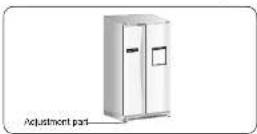
If the door of freezer is higher than that of fridge.
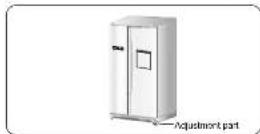
Please open the doors and adjust the doors as follows:
1) Release the nut (1) on the lower hinge until the upper end the upper end of the bolt (2).

When you release the nut(1), use hexagonal wrench (3) to turn the bolt (2) a little counterclockwise to make the nut (1) loose with your fingers.

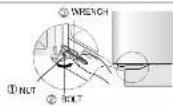
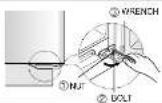
2) Please adjust height difference between the doors by turning the 601 plockwise( ) or counterclockwise

When you turn clockwise( ) , the door goes up.

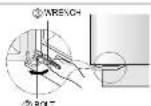
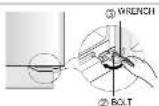
3) After adjusting the doors, turn the nill clockwise ( ) until the lower end of the bolt, and then tighten the bolt again with the wrench (2) to fix the nut (1).
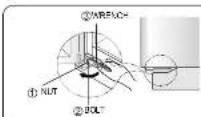
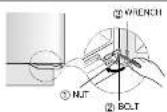

- If you do not fix the nut(1) firmly, the bolt (2) may be released.

- Do not press power cord.
- If throwing away the refrigerator, please remove the rubber door seal first.
PREPARING THE APPLICANCE FOR USE
Once you have performed the following steps, your refrigerator should be fully operational. If not, please check the power supply and electricity source. If you have any doubts or problems, please contract your nearest SAMSUNG service center.

Place the shelves and containers which were removed for transportation in their appropriate positions (refer to pages 8 to 9).

Set the temperature control to the lowest temperature and wait for one hour. The refrigerator should not be slightly cooled and the compressor should run smoothly producing soft humming noises.

Clean the freezer/refrigerator and accessories to remove any dust accumulated during packaging and shipping (refer to page 9).

Once the refrigerator temperature is sufficiently low, you can begin storing food inside. Please be advised that it takes a few hours to reach the appropriate temperature after the refrigerator is running.

When the refrigerator is plugged in, the interior bulb should light every time the refrigerator interior door is opened.

verify voltage range, electrical wire and socket ca stand the electrical circuit above 10A before power is connected.
FEATURES
Multi-flow System
• Cooling air circulates through each vent
This provides even distribution of cooling strength inside the refrigerator and keeps food fresh for a long period of time.
High Humidity for Fresher Food
- You can keep food, fruits and vegetables fresh for a long period of time because your refrigerator supplies very humid cooling air.
Door Alarm
- If the refrigerator door is kept open for more than two minutes, the musical alarm is automatically triggered. This feature helps you save energy and preserve stored food.
Bar Counter Feature
- It is convenient to store frequent-used drinks and food and reduce the cold air loss in the unit.
CONTROL PANEL(RS20B*/RS20C*/RS20V*/RS20S*)
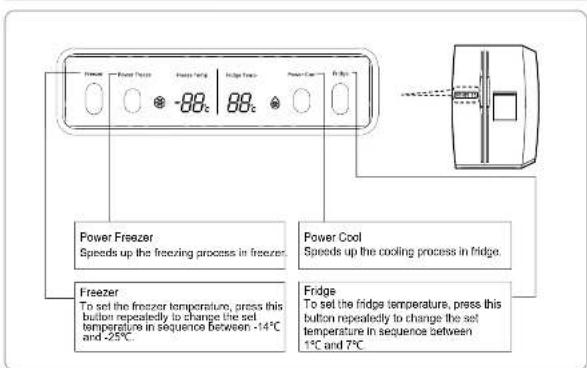
text_image
Power Freezer Speeds up the freezing process in freezer. Power Cool Speeds up the cooling process in fridge. Freezer To set the freezer temperature, press this button repeatedly to change the set temperature in sequence between -14°C and -25°C. Fridge To set the fridge temperature, press this button repeatedly to change the set temperature in sequence between 1°C and 7°C.DIGITAL PANEL
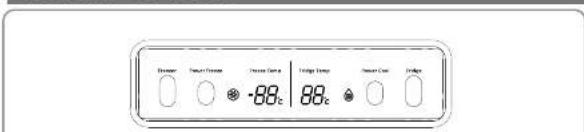
text_image
Dinner Smart Therms House Tube Tledge Temp Smart Coat Indice -88℃ 88℃Freeze Temp: indicate the current freeze temperature. Bridge Temp: indicates the current fridge temperature.
Power Freeze*
This light is on when you pressure the Power Freeze button.
- Press this button to make the freezer reach the set temperature quickly. - Press this button again to cancel the Power Freeze mode.

• This light is on when you press the Power Cool button.
Pressure this button to make the fridge reach the set temperature quickly. • Pressure this button again to cancel the Power Cool Mode.

The inside temperature of the appliance will increase if a large amount of hot articles are stored at the same time, or the doors are opened frequently or for a long time.
If you need to freeze large amount of food stuff, set the temperature of freezer compartment as the coldest temperature before you turn on the Power Freeze Button.
INSTALLING REFRIGERATOR

LEVELLING
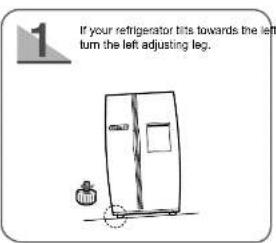
When you adjust the refrigerator level, set the front legs slightly higher than the rear legs so that you can open and close the doors more easily.
First disassemble the leg cover and then adjust the refrigerator level.
text_image
1 If your refrigerator tits towards the left turn the left adjusting leg.
text_image
2 if your refrigerator tills towards the right, turn the right adjusting leg.
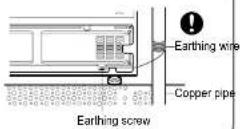
The appliance must be eartned before use.
You must earth the refrigerator to prevent any power leakage or electric shock caused by current leakage from the appliance.
- Never use gas pipes, phone lines or other potential lightning rods as earthing.
Never use unearthed power plug.
- Connect the earthing wire (yellow/green or green).
INSTALLING REFRIGERATOR

Check the dimensions of your entrance door.
Check the dimensions of your entrance door to determine whether the refrigerator can pass through it.
* Dimension of the Appliance
| Dimension (mm) | Remarks | |
| Width | 855 | |
| Depth | 756 | With door |
| Height | 1728 | With hinge |
Remove all packing materials:
Remove the foam pad for the appliance before using it.
Allow a clearance of 10cm to the right, left and rear side when installing the appliance; as this will
help to reduce power consumption

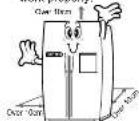
Allow sufficient space to install the appliance on a flat surface.
- If your appliance is not level, the internal cooling system may not work properly.

Clean your refrigerator.
- Wipe the inside and outside of your refrigerator with a dry cloth.

Store food in the refrigerator.
- Wait for at least two or three hours after plugging your appliance in and before storing food and other articles inside.
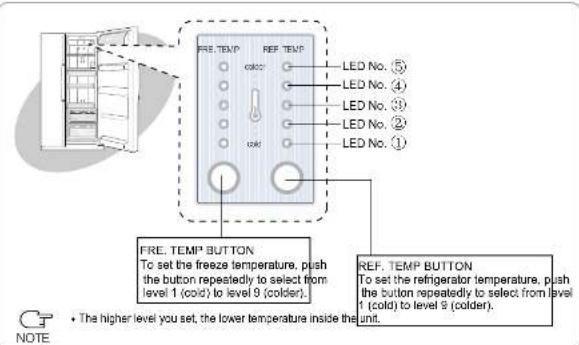
TEMPERATURE CONTROL(RS20N\*)
text_image
FRE. TEMP REF. TEMP LED No. ⑤ LED No. ④ LED No. ③ LED No. ② LED No. ① FRE. TEMP BUTTON To set the freeze temperature, push the button repeatedly to select from level 1 (cold) to level 9 (colder). REF. TEMP BUTTON To set the refrigerator temperature, push the button repeatedly to select from level 1 (cold) to level 9 (colder). • The higher level you set, the lower temperature inside the unit. NOTETEMPERATURE CONTROL
FREEZE
- The freeze temperature can be set to any level from level 1 (cold) to level 9 (colder).
- Press FRE. TEMP button repeatedly until the desired level is reached.
- At each level, the LED indicators turn on or off as shown on the table.
Refrigerator
- The refrigerator temperature can be set to any level from level 1 (cold) to level 9 (colder).
- Press REF. TEMP button repeatedly until the desired level is reached.
- At each level, the LED indicators turn on or off as shown on the table.
Control Level Table
| Reference | Cold-Norms-Colder | ||||||||
| LED CONDITION | 5 | 5 | 5 | 5 | 5 | 5 | 5 | 5 | 5 |
| 3 | 4 | 3 | 4 | 2 | 3 | 1 | 1 | 1 | |
| ●(On) | 3 | 3 | 3 | 3 | 7 | 1 | 0 | 0 | 0 |
| ○(Off) | 2 | 2 | ● | 1 | ● | ● | ● | ● | ● |
| ○(Blink) | ● | ● | ● | ● | ● | ● | ● | ● | ● |
| Level | 1 | 2 | 3 | 4 | 5 | 6 | 7 | 8 | 9 |
※ At level 2.4,6 and 8, LED marked with ( ) will fully light up after blinking for 5 secor(●)

NOTE
- For your convenience, your refrigerator temperature control has been preset in the factory.
- Refrigerator temperature controller shall be set as "NORMAL" (level 5: -20°C for Freeze and 3°C for Fridge if your refrigerator is installed first time or has been switched off for a long time.
- When accidental power off happens and the power is reconnected, please check the status of temperature controller. User is suggested to set according to your actual application conditions and normal recommended setting is NORMAL.
OVERVIEW OF YOUR REFRIGERATOR
FREEZER / REFRIGERATOR (RS20B*/RS20V*)
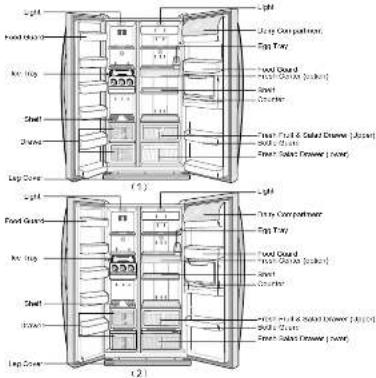
text_image
Light Food Guard Roof Leg Shell Shawn Leg Cover Light Food Guard Roof Leg Shell Shawn Leg Cover Light Food Guard Roof Leg Shell Shawn Leg Cover Light Food Guard Roof Leg Shell Shawn Leg Cover Light Food Guard Roof Leg Shell Shawn Leg Cover Light Food Guard Roof Leg Shell Shawn Leg CoverFREEZER / REFRIGERATOR (RS20C*/RS20S*)
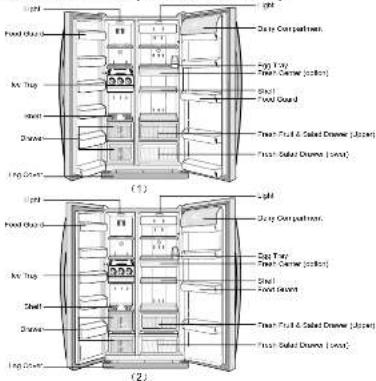
text_image
Light Food Guard Air Tray Shell Diameter Long Diameter (1) Light Food Guard Air Tray Shell Diameter Long Diameter (2) Light Food Guard Air Tray Shell Diameter Long Diameter (1) Light Food Guard Air Tray Shell Diameter Long Diameter (2)CLEANNING THE ACCESSORIES
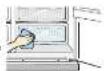
Inside
- Clean the accessories with a mild
detergent. Then wipe with a dry cloth.
• After washing the accessories, make sure that they are dry before using them again.
Rear
- Use a vacuum cleaner to remove dust once or twice a year.

Rubber Door Seals
Exterior
- The doors and door handles should be cleaned with a mild detergent and cloth. Dry them with a clean cloth.
• The exterior should be cleaned once or twice a year.

- If the rubber door seals are dirty, the door will not be closed properly and the refrigerator will be unable to run efficiently. Clean them with a mild date. Then wipe them with a dry

Clean them with a mild detergent and damp cloth. Then wipe them with a dry cloth,

- When cleaning the appliance or if the appliance will not be used for a long time, always turn the power off, leave the doors open and keep the appliance dry.
- Do not clean it by removing it directly with water.
- Do not clean it by spraying it directly with water.
- Do not clean it with benzene, thinner or car detergent.
Energy Saving Tips
Install the appliance in a cool, dry room with adequate ventilation.
Ensure that it is not exposed to direct sunlight and never put it
near a direct source of heat [radiator, for example]
Never block any vents or grilles on the appliance. Allow warm food to cool down before placing it in the appliance.
Put frozen food in the refrigerator to thaw.
You can then use the low temperatures of the frozen products to
cool food in the refrigerator.
Do not keep the door of the appliance open for too long when putting feed in or taking feed out.
putting food in or taking food out.
The shorter lime for which the door is open, the less ice will form
in the freezer.
Allow clearance to the right, left, back and top when installing. This will
help reduce power consumption and keep your energy bills lower.
REMOVING ACCESSORIES FROM THE FREEZE

Tempered Glass Shelf
Pull the shelf cut as far a it goes. Then lift it up and remove it.


Ice Tray and Cube


Food Guard
- Hold the guard with both hands and then lift it up.


Leg Cover
Only remove the leg cover wh

Drawers - Remove the drawings by pulling it out and lifting it up slightly.

- Open the freezer and
refrigerator doors, remove the three screws and detach the leg cover
• To reassemble the leg cover, replace it in this original position and tighten the three screws.

Drawers
- Remove the drawings by pulling it out and lifting it up slightly.
• Do not use excessive force when removing the accessories, otherwise, it may cause personal injury.
- Do not place top side shelf of freezer in any other location. It may get dropping, damaged and cause personal injury.
- Before removing accessories from the freezer and refrigerator, always remove stored food to the other space first.
- Do not put food on ice tray and take out it separately when not in use.
REMOVING ACCESSORIES FROM THE FRIDGE

Tempered Glass Shelf
- Pull the shelf out as far as it goes. Then lift it up and remove it.


Fresh Fruit & Salad
Drawer and Lower Shelf

- Remover the drawer by holding the handle, pulling the drawer outwards and lifting it up slightly.

Bottle Guard and Food Guard
- Hold the guards with both hands and then remove it by lifting it up.

- Remove the lower shelf by pulling it outwards. - Follow the sequences (first, remove fresh fruit & salad drawer before removing the lower she
- Lower shelf can be damaged if you do not follow the sequences.

Counter
- Hold the food guard with both hands and remove it by lifting it up.
- Hold the counter compartment with both hands and remove it by lifting it up.
- Follow the sequences (first, remove food guard, and then remove counter compartment.
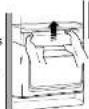
Step 1
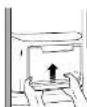
(Step 2)

(Step 3)
text_image
Light Food Guard Ice Tray Shelf Drawer Leg Cover Light Dairy Compartment Egg Tray Fresh Center (option) Shelf Food Guard Fresh Fruit & Salad Drawer (Upper) Fresh Salad Drawer (lower)MAKING ICE

Pull out the ice tray.


Place it inside ice tray.
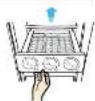

Pour cool water into the tray until it reaches the water level indicator on the tray.


Turn ice tray button and the ice automatically full into the below ice compartment after release. Pull out ice storage compartment for ice.

COUNTER USAGE

Open counter door.


Take away the food or drink after use.


Put food or drink on the counter.


Close counter door.

FOOD STORAGE GUIDE
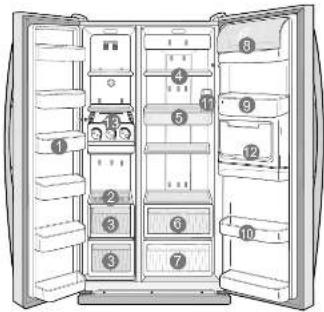
text_image
Diagram of an open refrigerator with numbered compartments for identificationTo get the best energy efficiency of this product, please leave all selves, drawers and baskets on their original position like as above illustration.

FOOD STORAGE GUIDE

Food Guard
For storing small packages of frozen food.


Tempered Glass Shelf
For storing all types of frozen food.


Meat and Dry Goods Storage Compartment
For storing meat and dry goods. Stored food should be wrapped securely using foil or other suitable wrapping materials.


Tempered Glass Shelf
• Can be used safely.


Fresh Center (option)
- Preserve the taste of food and prolongs its freshness. Use the fresh center to store cheese, meat, snacks, fish or any food to be used quickly.

FOOD STORAGE GUIDE

Fresh Fruit & Salad Drawer(upper)
• Store vegetables and fruits.


Fresh Fruit & Salad Drawer (lower)
• Store vegetables and fruits.

- This drawer is comparatively air tight and the food installed in this drawer and other food in the freezer will not affect with each other, therefore it can receive its taste inside freezer.

Dairy Compartment
• Stores fatty food, like butter and cheese


Food Guard
• Stores small packages of milk and yoghurt etc.


Bottle Guard
• Stores various types of bottles and cans.


Egg Tray
- Stores eggs in egg tray and then place the tray on the tempered glass shelf.


Counter
• Can take drink and food conveniently.


Ice Tray
- For ice making. It can be put outside when not making ice.

- Food stored under ambient temperature of 5 lower can be frozen.

• The temperature inside the refrigerator can be increased if a large amount of hot articles are put in at the same time. The temperature returns to normal usually after twenty-four hours.
- There should be several others when the refrigerator reaches the proper temperature after it starts up. Please put in food after the temperature is sufficiently low.
- For liquid or very humid food (such as fruits and vegetables), they should be stored in sealed condition or after they are cleaned dry.
• Do not open the doors frequently or keep it open for a long period time so that the refrigerator efficiency will not be affected and running loads will not be increased.
- There may be fog on the surfaces of inside accessories when freezer door is opened, which is normal.
- There is small amount of condensate water partially in the refrigerator when the surrounding temperature is very high, which is normal.
- During making ice, do not use hot water and it is recommended not to change the location of ice tray set in the factory.