DTVCT2 - Uncategorized Anttron - Free user manual and instructions
Find the device manual for free DTVCT2 Anttron in PDF.


User questions about DTVCT2 Anttron
0 question about this device. Answer the ones you know or ask your own.
Ask a new question about this device
Download the instructions for your Uncategorized in PDF format for free! Find your manual DTVCT2 - Anttron and take your electronic device back in hand. On this page are published all the documents necessary for the use of your device. DTVCT2 by Anttron.
USER MANUAL DTVCT2 Anttron
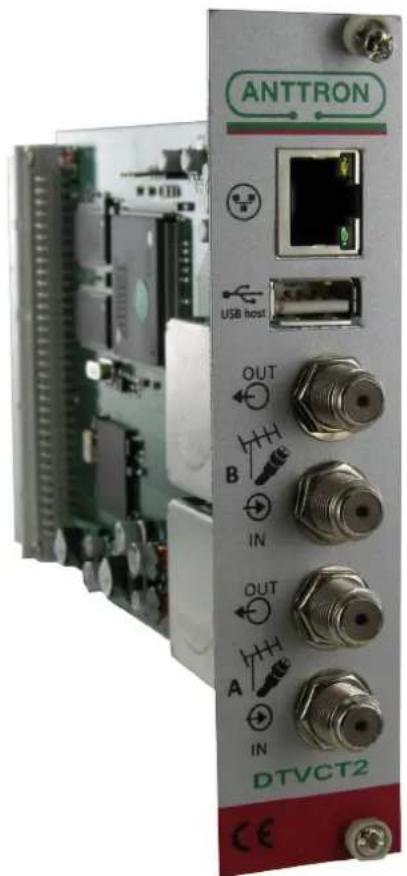
Twin terrestrial/cable receiver module for DTV Rack
text_image
ANTTRON USB Host OUT B IN OUT A IN DTVCT2 CE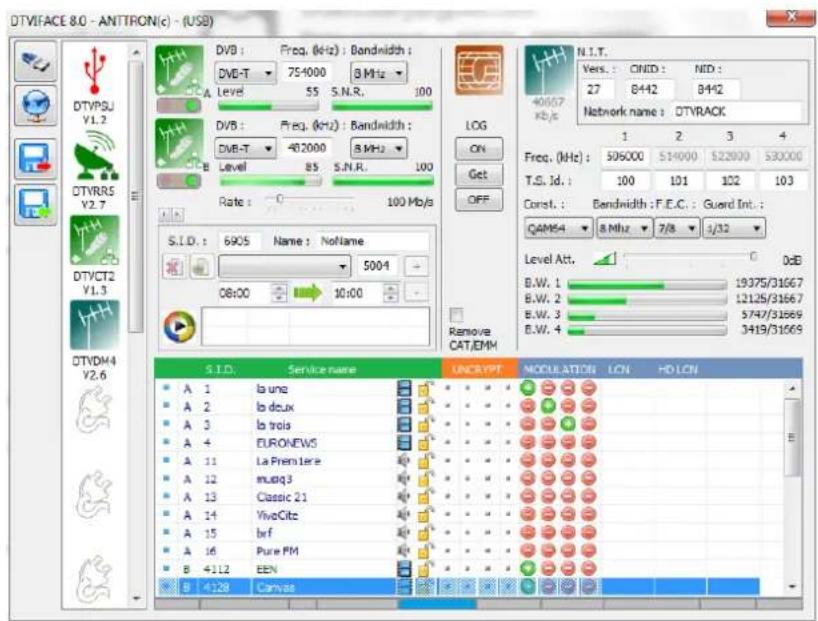
text_image
DTVIFACE 8.0 - ANITRON(c) - (USB) DVB : Freq. (kHz) : Bandwidth : DVB-T 754000 8 MHz Level 55 S.N.R. 100 DVB : Freq. (kHz) : Bandwidth : DVB-T 482000 8 MHz Level 85 S.N.R. 100 Rate : 0 100 Mb/s S.I.D. : 6905 Name : NoName 5004 08:00 10:00 S.I.D. Service name UNCRYPPT MODULATION LCN HD LCN A 1 la uno A 2 lo doux A 3 lo trois A 4 EURONEWS A 11 La Premier A 12 music3 A 13 Classic 21 A 14 VivoCitz A 15 Inf A 16 Pure FM B 4112 EEN B 4128 Canvas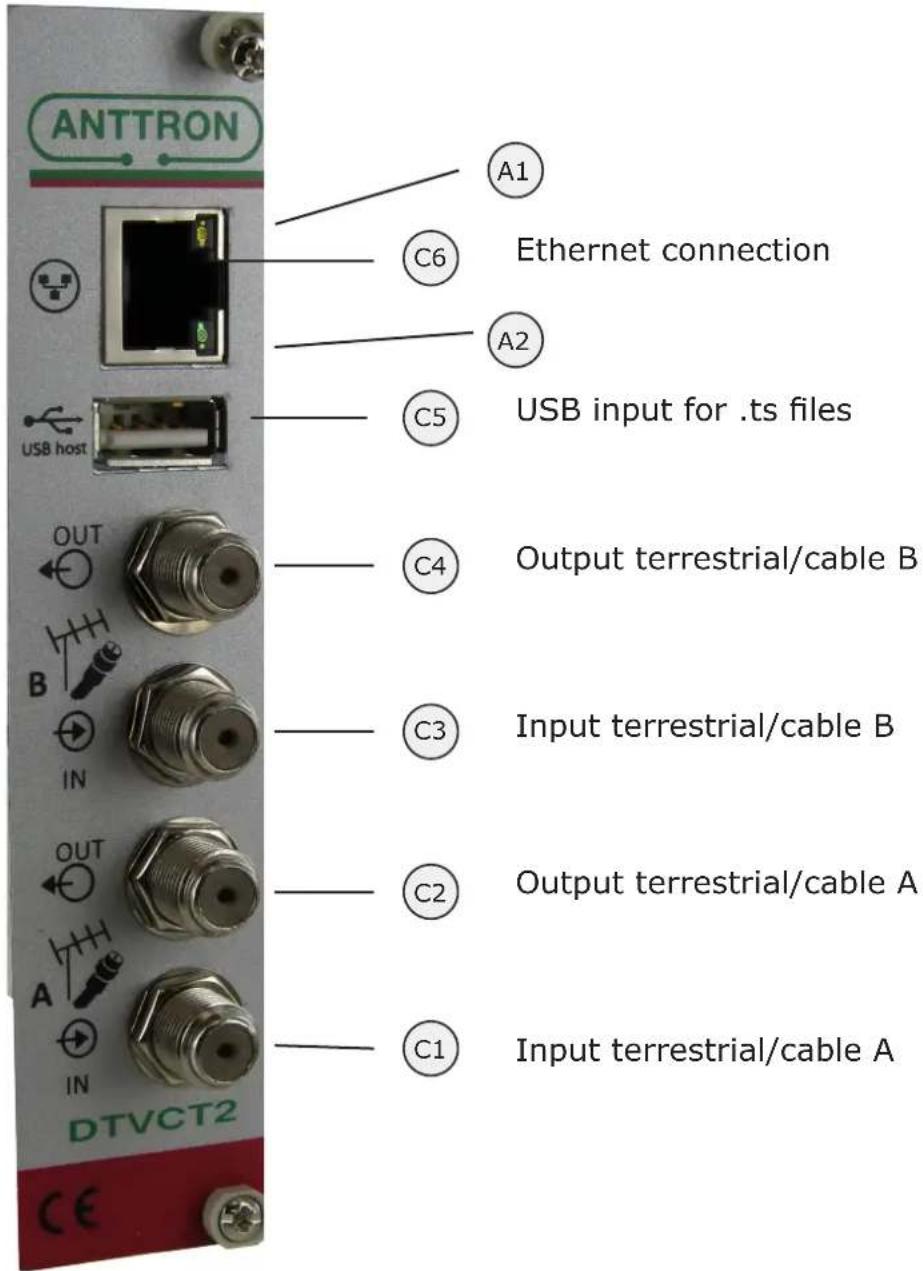
text_image
ANTTRON C6 Ethernet connection A1 A2 USB host C5 USB input for .ts files C4 Output terrestrial/cable B C3 Input terrestrial/cable B C2 Output terrestrial/cable A C1 Input terrestrial/cable A OUT IN DTVCT2 CEA1 and A2 are status indicator LEDs. The LEDs blink in a sequence of seven. In each sequence a condition is tested. If the test is positive then LED A2 (GREEN) blinks, if the test is negative then the LED A1 (ORANGE) blinks.
The 7 tests are as follows :
1) Ethernet connected (YES/NO)
2) USB stick connected (YES/NO)
3) Time/date received from terrestrial/cable (YES/NO)
4) Tuner A locked (YES/NO)
5) Analysis on tables from input A OK (YES/NO)
6) Tuner B locked (YES/NO)
7) Analysis on tables from input B OK (YES/NO)
DTVCT2 : this module performs the following function in the DTVRack
a) It receives the terrestrial/cable programs from two terr./cable frequencies.
b) The programs of the two inputs are remultiplex together eventually with programs coming from a DTVCT2, DTVRR5 (or DTVAV2) module preceding this DTVCT2.
c) An extra USB input, allows connection of an USB stick containing .ts files. These .ts files can be used for broadcast purposes, by creating its own program or replacing an existing program based on a time schedule.
d) An ethernet connection allows connection to the web. By connecting one DTVCT2 module to the web, remote control of the complete DTVRack over the web is possible
- Accessing the parameters of a DTVCT2 module.
When in DTVIface, click on a DTVCT2 symbol to get access to the parameters of the DTVCT2 module.
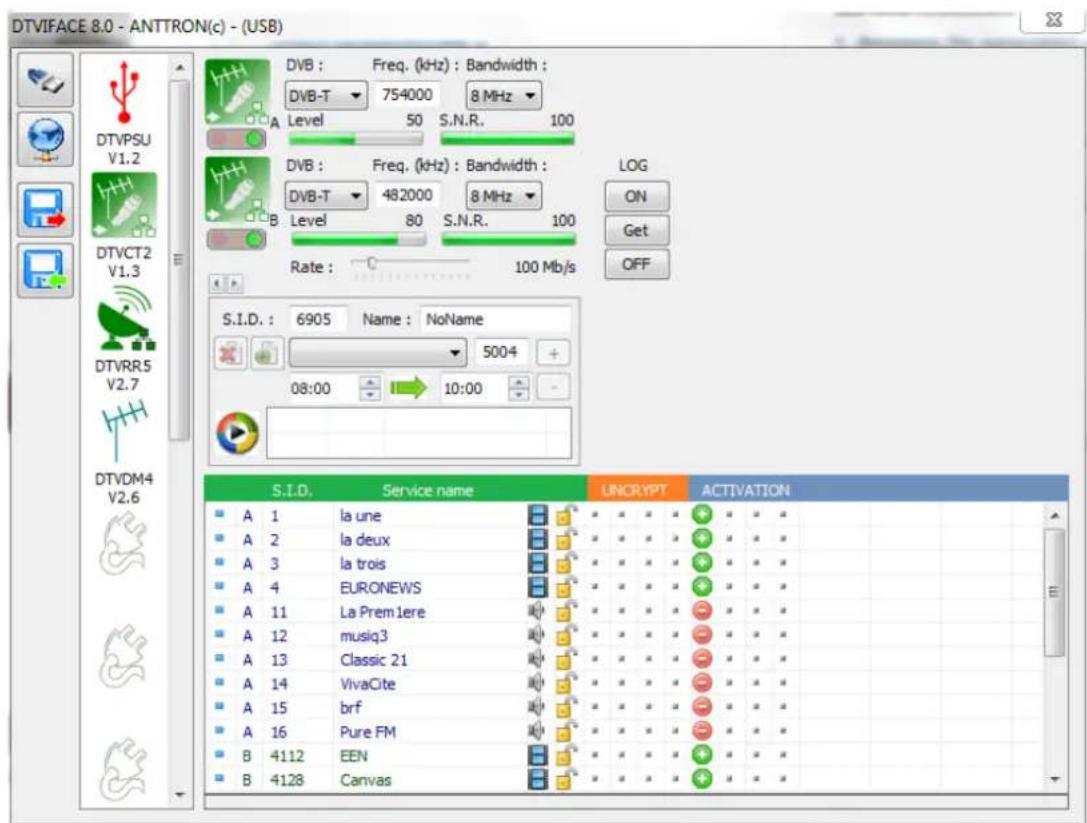
Depending of where the DTVCT2 module is located in the rack, following windows may appear :
a) the DTVCT2 module is followed by another module DTVCT2 or DTVRR5
text_image
DTVIFACE 8.0 - ANTTRON(c) - (USB) DTVPSU V1.2 DTVCT2 V1.3 DTVRR5 V2.7 DTVDM4 V2.6 DVB : Freq. (kHz) : Bandwidth : DVB-T 754000 8 MHz Level 50 S.N.R. 100 DVB : Freq. (kHz) : Bandwidth : DVB-T 482000 8 MHz Level 80 S.N.R. 100 Rate : 100 Mb/s S.I.D. : 6905 Name : NoName 5004 + 08:00 10:00 - S.I.D. Service name LINCRYPT ACTIVATION A 1 la une A 2 la deux A 3 la trois A 4 EURONEWS A 11 La Prem 1ere A 12 musiq3 A 13 Classic 21 A 14 VivaCite A 15 brf A 16 Pure FM B 4112 EEN B 4128 Canvasb) the DTVCT2 module is followed by a modulator DTVDMx or DTVCMx
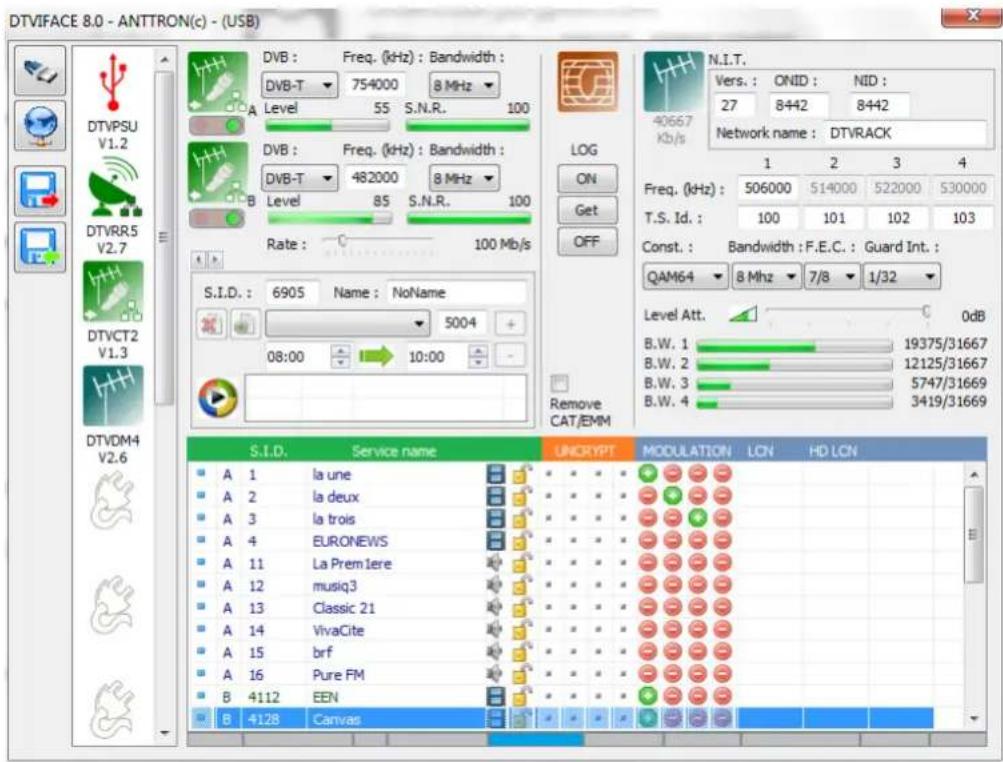
text_image
DTVIFACE 8.0 - ANTTRON(c) - (USB) DTVIFACE 8.0 - ANTTRON(c) - (USB) DTVIFACE 8.0 - ANTTRON(c) - (USB) DTVIFACE 8.0 - ANTTRON(c) - (USB) DTVIFACE 8.0 - ANTTRON(c) - (USB) DTVIFACE 8.0 - ANTTRON(c) - (USB) DTVIFACE 8.0 - ANTTRON(c) - ( DVB : Freq. (kHz) : Bandwidth : DVB-T 754000 8 MHz Level 55 S.N.R. 100 DVB : Freq. (kHz) : Bandwidth : DVB-T 482000 8 MHz Level 85 S.N.R. 100 Rate : 100 Mb/s S.I.D. : 6905 Name : NoName 5004 08:00 10:00 S.I.D. Service name UNCRYPT MODULATION LCN HD LCN A 1 la une A 2 la deux A 3 la trois A 4 EURONEWS A 11 La Prem Iere A 12 musiq3 A 13 Classic 21 A 14 VivaCite A 15 brf A 16 Pure FM B 4112 EEN B 4128 Canvas N.I.T. Vers. : ONID : NID : 27 8442 8442 Network name : DTVRACK Freq. (kHz) : 506000 514000 522000 530000 T.S. Id. : 100 101 102 103 Const. : Bandwidth : F.E.C. : Guard Int. : QAM64 8 Mhz 7/8 1/32 Level Att. 0dB B.W. 1 19375/31667 B.W. 2 12125/31667 B.W. 3 5747/31669 B.W. 4 3419/31669 Remove CAT/EMM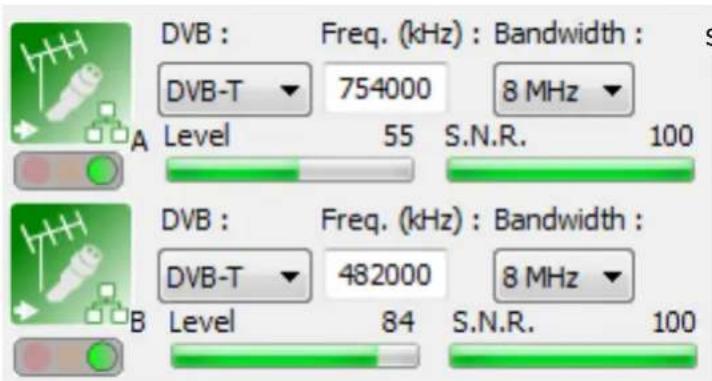
text_image
DVB : Freq. (kHz) : Bandwidth : DVB-T 754000 8 MHz Level 55 S.N.R. 100 DVB : Freq. (kHz) : Bandwidth : DVB-T 482000 8 MHz Level 84 S.N.R. 100For both inputs A and B, following parame-strial/cable tuners
DVB : select DVB-C, DVB-T or DVB-T2
Frequency : set the frequency in kHz
Bandwidth : select bandwidth(6,7 or 8
MHz) (for DVB-T/DVB-T2 only).
When the settings are valid and a signal is received, a green dot appears under the antenna/cable symbol. Also bargraphs allow you to evaluate the level and the quality of the received signal.
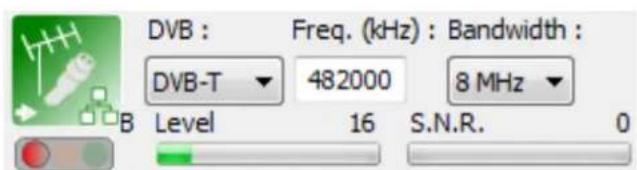
When no signal is present, or the settings are incorrect, a RED dot appears under the antenna/cable symbol.
When the tuner is locked (signal found), but the module is identifying the programs received, an OR-ANGE dot appears under the antenna/cable symbol, indicating that the module is analysing the information.
text_image
DVB : Freq. (kHz) : Bandwidth : DVB-T 482000 8 MHz B Level 16 S.N.R. 0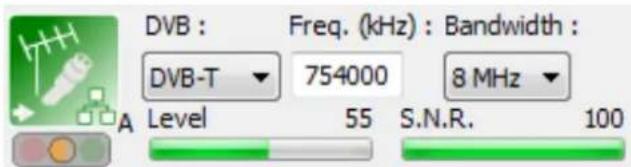
text_image
DVB : Freq. (kHz) : Bandwidth : DVB-T 754000 8 MHz Level 55 S.N.R. 100If the status for an input is GREEN, then the list of programs received will be shown.
In the list you will find following information :
Input : A or B (or C if another DTVCT2, DTVRR5 or an DTVAV2 is preceding this module.)
Service ID of the received program
Service name of the received program.
Symbol indicating if it concerns a television or radio program.
Symbol indicating if the service is encrypted or clear.

| S.I.D. | Service name | UNCRYPT | ACTIVATION | ||||||||
| A | 12060 | VOX | * | * | * | * | + | * | * | * | |
| A | 12061 | RTLINITRO | * | * | * | * | - | * | * | * | |
| A | 12080 | Channel 21 | * | * | * | * | - | * | * | * | |
| A | 12090 | n-tv | * | * | * | * | + | * | * | * | |
| A | 12095 | Channel 21 ALT | * | * | * | * | - | * | * | * | |
| B | 17500 | SAT.1 | * | * | * | * | + | * | * | * | |
| B | 17501 | ProSieben | * | * | * | * | + | * | * | * | |
| B | 17502 | kabel eins | * | * | * | * | + | * | * | * | |
| B | 17503 | N24 | * | * | * | * | + | * | * | * | |
| B | 17504 | SIXX | * | * | * | * | + | * | * | * | |
| B | 17505 | SAT.1 emotions | * | * | * | * | - | * | * | * | |
| B | 17506 | label-sine classification | * | * | * | * | - | * | * | * | |
If the next module in the DTVRack line up is a DTVCT2 pr DTVRR5, you can now select the programs to be transferred to the next module DTVCT2, DTVRR5. You do this by double clicking the activation symbol besides the requested program.

the program is activated and will be sent to the next DTVCT2, DTVRR5.

the program is not activated will NOT be sent to the next DTVCT2, DTVRR5.
If the next module in the DTVRack line up is a modulator DTVDMx or DTVCMx we refer to the manual about the modulators how to add and distribute programs over the available output channels on the modulator.
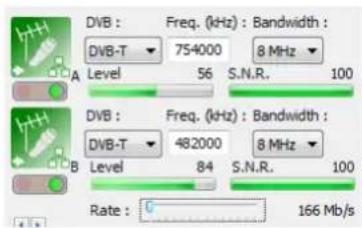
Rate settings in DTVCT2 module :
In the menu of DTVCT2 module, and under the input parameters there is the rate setting for the module.
The rate defines the output speed of the transport stream of the DTVCT2 module to the backplane. This rate can be set between 166 Mb/s and 31 Mb/s.
text_image
DVB : DVB-T 754000 8 MHz Level 56 S.N.R. 100 A DVB : DVB-T 482000 8 MHz Level 84 S.N.R. 100 Rate : 0 166 Mb/sHow to set the rate ? Some rules to set the rate :
a) If this DTVCT2 is followed by another DTVCT2 or DTVRR5 set to maximum 166 Mb/s
b) If this DTVCT2 is followed by a module DTVCI1 then the rate should not exceed the maximum permissible rate specified by the CAM placed in the DTVCI1 module. Please check the specifications of the CAM used.
c) If the DTVCT2 module is followed by a modulator DTVCMx, DTVDMx set rate to maximum 166 Mb/s
3 - Programming a video file (\*.ts)
text_image
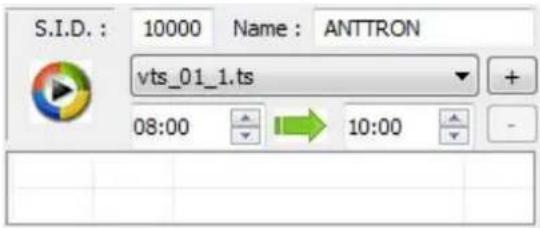
S.I.D.: 10000 Name: ANTTRON vts_01_1.ts 08:00 10:00This transmodulator will also allow to program a video file on a certain received program or allows you to create your own channel, which you can give a specific name. The time window for the video can also be programmed.
The video file is fed to the transmodulator using the USB input in the front of the module.
To allow the module to detect this file, the file has to be converted in .ts with some particular parameters. Use a conversion program to edit your video file. (for instance "Ojosoft Total Video convertor" to convert a 'video' file to .ts or Moyea PPT to Video Converter. to convert a Powerpoint presentation to a .ts file)
Once your USB device is connected, select your file using the software. Chose the start and stop time for the video to be displayed.
Now you have to indicate if you want to create your own program, or if you want the video file to replace a certain program from the program list.
A) Creating your own program: in the field SID, put a number DIFFERENT from the S.I.D. of the programs listed in the window of the received programs. When a different number is entered the field NAME becomes editable and you can fill in your own program name.(for instance ANTTRON). Now you can program the start and stop time for your video. Then click the + bouton and the video will be added in the list. You can add as much .ts files in the list as you want, as far as time windows do not overlap.

text_image
S.I.D.: 10000 Name: ANTTRON vts_01_1.ts 08:00 10:00 8:00 10:00 vts_01_1.ts Remove CAT/EMM B.W. 1 B.W. 2 S.I.D. Service name UNCRYPT MODULATION LCN D 10000 ANTTRON A 12003 RTL TelevisionThe result is displayed in the above figure. A program named ANTTRON is added in the program list. This program, you can now add this program to the output.
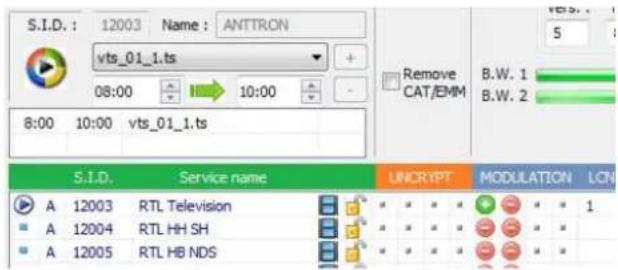
B) Replacing a service with your video: in the field SID, please insert a S.I.D. which corresponds to the SID of the program you want to replace with the video file. For instance, if I want to replace the program RTL Television, I fill in as SID 12003. After setting up the time window please click the button +.
text_image
S.I.D.: 12003 Name: ANTTRON vts_01_1.ts 08:00 10:00 8:00 10:00 vts_01_1.ts Remove CAT/EMM B.W. 1 B.W. 2 S.I.D. Service name UNCRYPT MODULATION LCN A 12003 RTL Television A 12004 RTL HH SH A 12005 RTL HB NDSThe symbol 📋 placed next to the program RTL Television, indicating that this program will be replaced with the .ts file that you have selected during the time window you have indicated.
4 - Connecting your DTVCT2 to internet
The DTVCT2 can be connected to the internet. This allows you to remotely control not only your module, but the whole DTVRack where is placed in the DTVCT2.
In order to arrange this, please make a connection between the DTVRR5 with an appropriate ethernet cable from the DTVCT2 to a router which has access to internet.
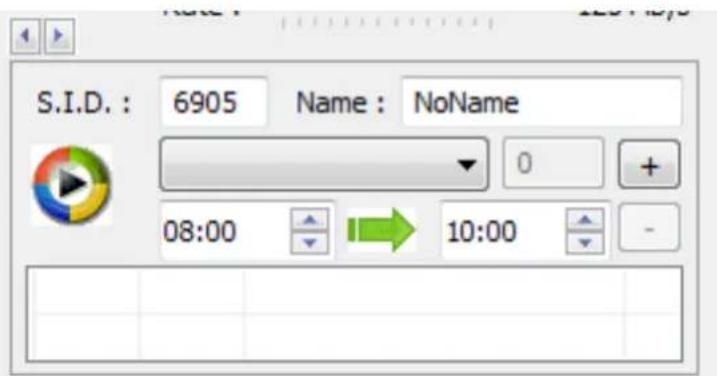
In the DTVIface and in the menu of the DTVCT2 module, please click on the arrows above the .ts file menu.

text_image
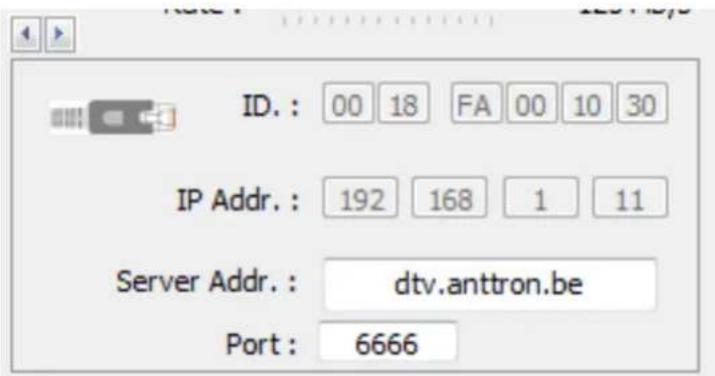
S.I.D.: 6905 Name: NoName 08:00 10:00A new window appears and the ethernet data of the DTVCT2 module appear.
text_image
ID.: 00 18 FA 00 10 30 IP Addr.: 192 168 1 11 Server Addr.: dtv.anttron.be Port: 6666In this window, you can find back the following parameters :
a) ID : MAC address of the module
b) IP Addr.: IP address assigned to the module by your router
c) Server Addr.: in this field, the IP address, or name should be filled in where the server is located which handles all communications of DTVRR5 modules. A server called 'dtv.anttron.be' is put in service for this task. So fill in this address here.
d) Port : fill in port '6666' in this field.
In order for your DTVCT2 module to connect to the server, make sure that your router is not 'blocking' the port '6666'.
5 - Adding/removing .ts files from the USB stick
If the DTVCT2 module is accessible over the web and an USB stick is connected to the DTVCT2 module then, it is also possible to change the contents on the USB stick over the web.
Once, you have made connection to the rack containing the DTVCT2 module, (to know how to do this please read the manual on DTVIface first), just click on the following symbol :

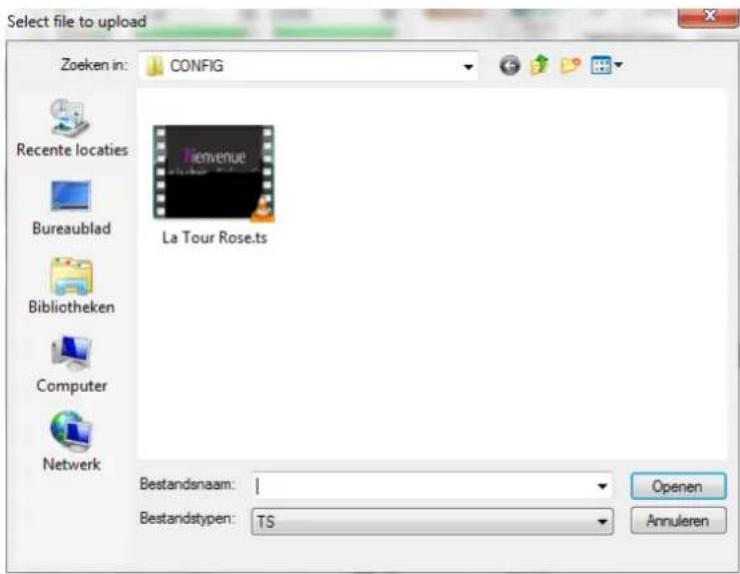
DTVIface asks you to select a file (TS format) from your computer to upload to your USB stick :
text_image
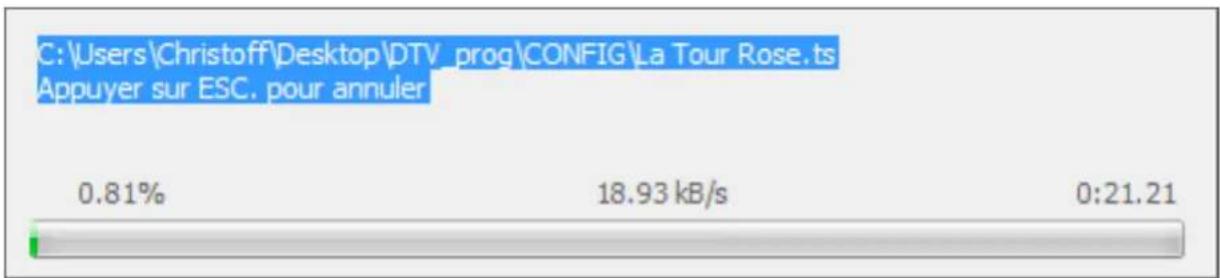
Select file to upload Zoeken in: CONFIG Recente locaties Bureaublad Bibliotheken Computer Netwerk La Tour Rose.ts Bestandsnaam: 1 Bestandstypen: TS Openen AnnulerenAfter the TS file selected, another window opens :
bar
| Metric | Value (%) | | :--- | :--- | | 0.81% | 0.81 | | 18.93 kB/s | 18.93 | | 0:21.21 | 0:21.21 |The TS file is now uploaded to the USB stick on your DTVCT2 module, indicating the speed, expected duration and % transferred.
After this procedure, the uploaded TS files will be available on the USB stick and can then be used to create your own content.
6 - Technical specifications
| Terrestrial/cable (x2) Freq | uency 110-862 MHz | |
| Input level -75 dBm to -20 dBm DVBT/T2 - -62 dBm to -20 dBm DVBC | ||
| Insertion loss < 1 dB | ||
| DVB-T2 : EN 302 755 | Modulation - FFT mode | QPSK, 16QAM, 64 QAM, 256 QAM - 1K,2K,4K,8K,16K,32K |
| Channel bandwidth 6,7,8 MHz | ||
| Code rate 1/2, 3/8, 2/3, 3/4, 4/5, 5/6 | ||
| Guard Interval 1/4, 5/32, 1/8, 5/64, 1/16, 1/32,1/64,1/128 | ||
| DVB-T : EN 300 744 Modulation - FFT mode QPSK, 16QAM, 64 QAM - 2K,8K | ||
| Channel bandwidth 6,7,8 MHz | ||
| Code rate 1/2, 2/3, 3/4, 5/6, 7/8 | ||
| Guard Interval 1/4, 1/8, 1/16, 1/32 | ||
| DVB-C : EN 300 429 Modulation 16, 32, 64, 128, 256 QAM | ||
| Channel bandwidth 6,7,8 MHz | ||
| Symbol Rate 0.2 - 7.2 Msps | ||
| EAN code | DTVCT2 | 5420037699421 |