Moniron Dec Euro - Detector PRO Intellect Technology - Free user manual and instructions
Find the device manual for free Moniron Dec Euro PRO Intellect Technology in PDF.


User questions about Moniron Dec Euro PRO Intellect Technology
0 question about this device. Answer the ones you know or ask your own.
Ask a new question about this device
Download the instructions for your Detector in PDF format for free! Find your manual Moniron Dec Euro - PRO Intellect Technology and take your electronic device back in hand. On this page are published all the documents necessary for the use of your device. Moniron Dec Euro by PRO Intellect Technology.
USER MANUAL Moniron Dec Euro PRO Intellect Technology
Corporation PRO INTELLECT TECHNOLOGY represents the automatic detector MONIRON DEC. The present detector automatically carries out a complex analysis for authentication and gives a well-defined result, what enables operator to test banknotes quickly, without any special knowledge about false banknote protection types. By means of the newest spectral analysis technologie "Redtooth", less than for 1 second it is possible to check the banknote and to see the total sum and quantity of verified banknotes. The detector is designed for use in: cash desks, banks, currency exchange offices and other specialized organizations making high demands to banknote authentication verification. By means of PC- connection it is possible to save and print the detailed results of test and counting. The detector is compact and doesn't take a lot of place on a desktop, and use simplicity of device allows to use it in supermarkets, accounts departments, offices.
Distinctive features
- Currencies in standart kit: EUR, USD, LOCAL CURRENCY**
- Quantity of currencies: 4**
- Any orientation of notes in receiving tray*
- High verification speed, up to 100 banknotes/1 min*.
- Spectral analysis "Redtooth"
- Infra-red detection. Location Control of the of strong / weak IR tags
- Magnetic detection. Checks magnetic marks presence.
- Ultraviolet detection**.
- Optical density detection.
- Banknote size detection.
- Nominal value detection.
- Summing up by nominal values.
- Sound and code indication of false banknotes
- Automatically switches to the correct currency
- Direct and reversal banknote supply mode
- Compact dimensions
- Displaying of counting results on the PC
1 Specification
- Verification speed, banknote/min (max) ....60**/100*
- Supply voltage, V 12
- Consumption current, mA 800
- Power supply 100-240V, 50/60Hz (AC adapter)
- Operating temperature, degrees ^ C .....+10..+40 ^ C
- Overall dimensions (l/w/h), mm 158x136x83 (6.2"x5.4"x3.3")
- Weight, kg 0,5 (1.1lbs)
* Only for MONIRON DEC EUR
** Only for MONIRON DEC MULTI
2 Appearance
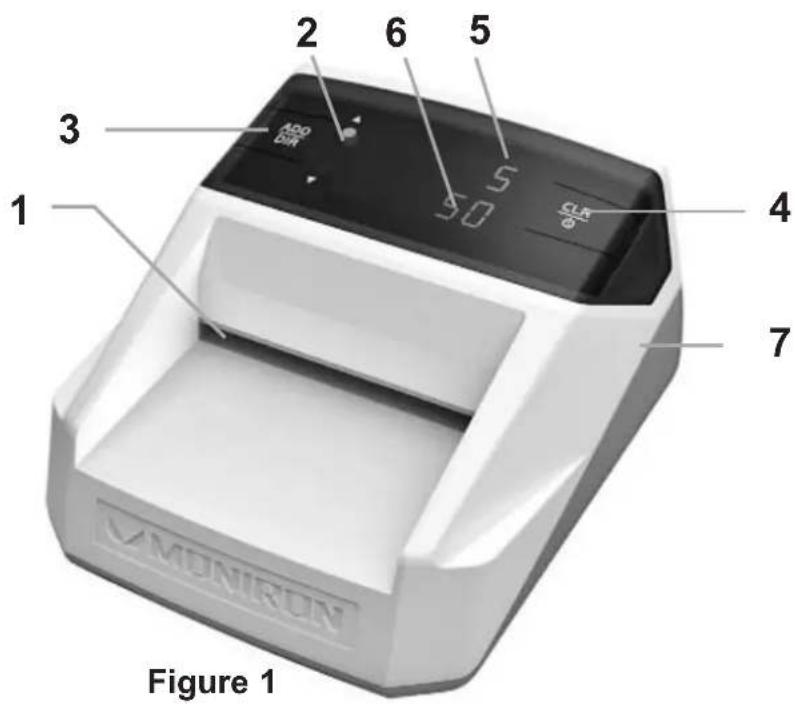
text_image
MONIFRON Figure 1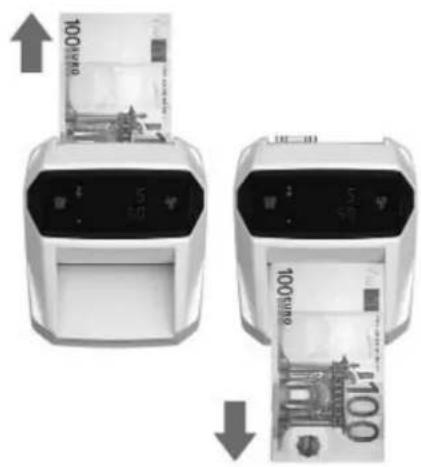
text_image
100 Euro 5 Euro 100 Euro 5 Euro 100 EuroFigure 2
- Receiving tray.
- Banknote supply mode indicators. The upper indicator corresponds with forward supply mode, the lower one-backward supply.
- 'ADD/DIR' button switches on 'Add'/ off 'onE' mode of summing up nominal values. If hold 'ADD/DIR' button for 3 seconds, banknote supply mode switches (forward/backward).
- 'CLR' button. Clears display values. Holding the button down within 3 seconds allows to switch on/off the detector.
- 3-digit LED display showing the quantity of counted banknotes.
- 6-digit LED display showing the nominal of counted banknotes.
- RS-232 COM-port for PC - connection. The program and the instruction of installation is available on the web-site www.pro-intell.com
3 Operation
- By means of the supplied ac adapter connect the detector to the mains of 100-240V 50/60Hz. At the same time on the detector panel the green indicator should blink.
- To switch on the detector hold the button 'CLR' down within 3 seconds. After self-test the detector is ready for operation.
- If needed select banknote supply mode.
In case of forward supply mode, after a banknote is tested it will be placed from the left side (as shown on Fig.2) and a banknote, which has not passed the test, will be placed from the right side (as shown on Fig.2). To set forward and backward supply mode hold
'ADD/DIR' button for 3 seconds. The upper green indicator corresponds to forward mode and the lower indicator – backward mode.
- The detector has 2 operation modes: 'onE' one banknote verification mode and 'Add' nominal valued summing up mode.
The upper display shows the quantity of counted banknotes in 'Add' mode, while in 'onE' mode the display value is equal to 1.
The lower display shows the sum of banknotes by their nominal values in 'Add' mode, while in 'onE' one banknote verification mode the valued is equal to the nominal value of the banknote. Set 'onE' one banknote verification mode or 'Add' summing up mode. To do this press 'ADD/DIR'.
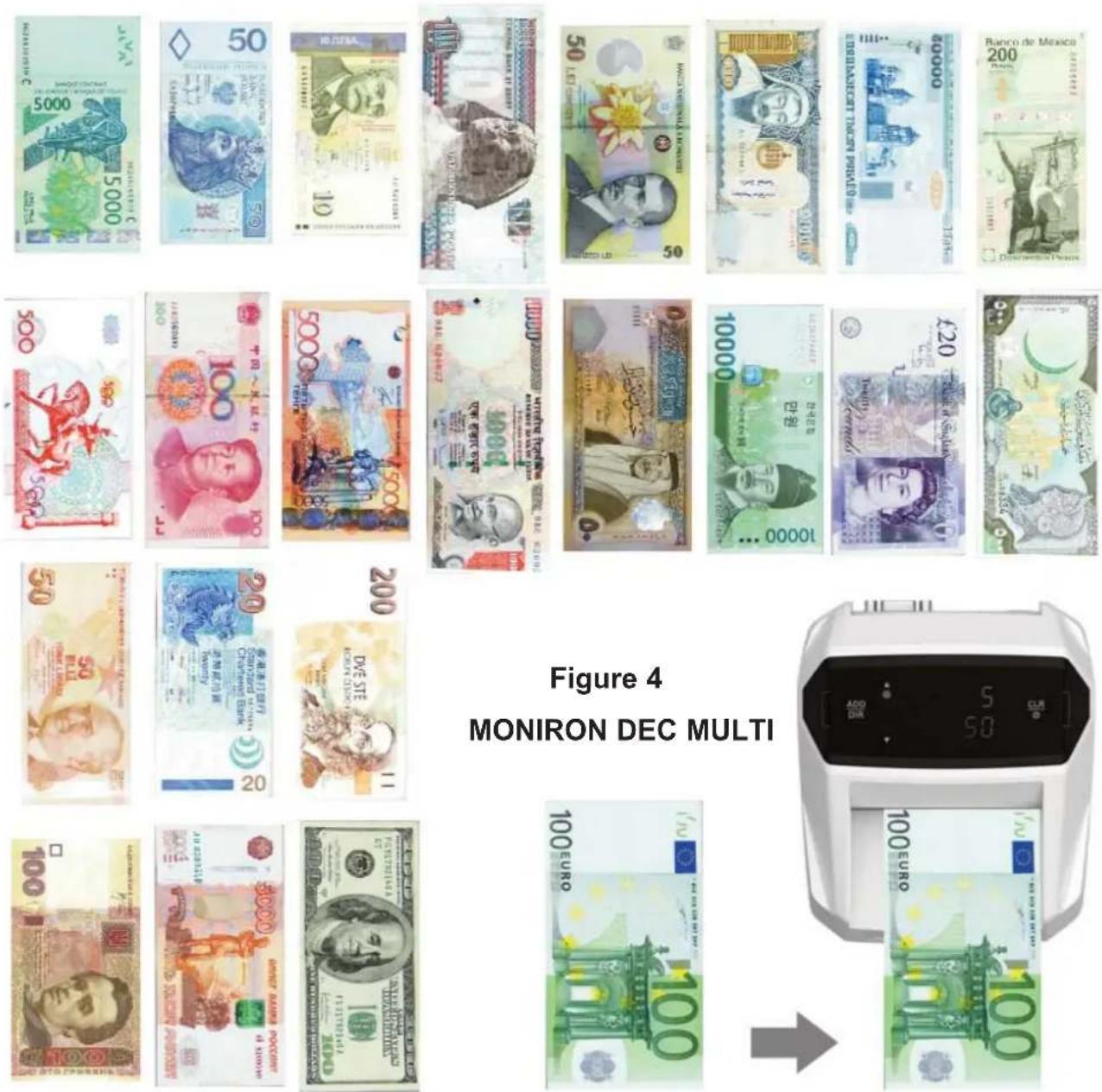
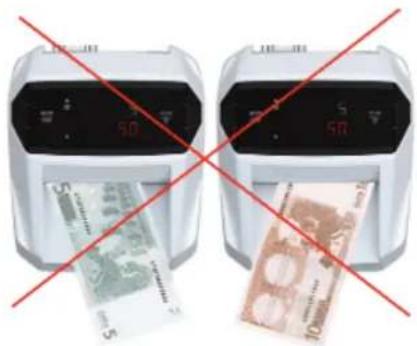
- Place a banknote into receiving tray as shown on Fig.4, tightly pressing an edge of banknote to the right side of receiving tray.
MONIRON DEC EUR
Orientation to:
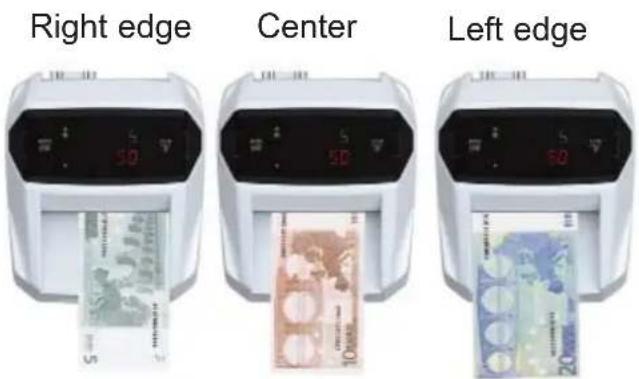
Figure 5
Correct orientation of notes
text_image
Two digital billboards showing Chinese 50-yuan banknotes, one with red prohibition crossed over the other.Figure 6
Incorrect orientation of notes
The detector will determine the nominal of authentic banknote (in 'Add' mode it will add its nominal to the total sum).
Attention! If a banknote is placed in receiving tray incorrectly, the banknote is not detected as an authentic one and any error code is displayed.
In case of error check banknote orientation (Fig.4) and try to place the banknote into receiving tray once again.
At the end of the counting reset the display by pressing the button 'CLR'.
At the end of operation switch off the detector, holding button 'CLR' within 3 seconds down.
4 Mounting and maintenance rules
- When choosing a mounting place for detector, avoid uneven and water-close surfaces and dangerous objects.
- Do not mount and so not use the detector in places where it can be affected by direct sunlight, strong vibration and dust.
- Use the adapter supplied with the device.
- If the device was kept in cold for a long time, keep it for at least 6 hours without packing at a room temperature before switching on.
- Switch off detector when it is not used for a long time during a day.
- Error codes and messages.
Attention! Errors may occur when verifying authentic crumpled, dilapidated, dirty, laundered, torn, taped, decoloured banknotes or if a banknote was exposed to hostile environment or has foreign inscriptions.
Attention! New pattern banknotes may be issued. If there are errors in operation of detector during banknote verification, install a new firmware in service centre. During the warranty period new firmware is installed for free.
| Error Code Reason Solution | ||
| En | Magnetic marks location error | 1. Check the correctness placement banknote into detector (see Fig.4)2. Count the banknote again. If an error occurs again, the banknote can not be detected as authentic |
| EI/Ei | An error of strong / weak infra-red tags location | |
| EF | Banknote image detection error | |
| Ed | Paper quality error | |
| dd | Banknote size is incorrect | |
| EP | Colour printing quality error | |
| EU | Ultraviolet marks location error | |
| EE | A combination of above mentioned errors | |
| EC | The detector speed is low Cont | Contact your service center |
| Ec | Wrong capture of banknote or banknote wreck | 1. Place the banknote one more time. |
| E0 / ES | The banknote stuck at the direct / riversal banknote supply mode | Verify the banknote one more time |
| EUL | No software Contact your service center | |
Warranty
Manufacturer guarantees proper functioning of the device during warranty period since the date of sale under condition of compliance with maintenance and storage procedures described in this manual. After unpacking the device please keep the package and technical description. Warranties are canceled in case the device was not transported in the original package or maintenance procedures were violated. Manufacturer is not responsible for device disfunction as a result of improper maintenance, storage and transportation including mechanical failures.
In case of device failure during the warranty period, customer has the right to repair it in Service centre for free. The equipment is accepted for warranty repair clean from dust and mud.
Cleaning equipment from dust and mud is not included in the warranty and is charged separately.
Warranty service does not include training of equipment maintenance, as well other service for providing functioning of device (connection, testing, customizing, preventive works etc.), which customer can commit on his own according to the attached manual.
Producer is entitled to introduce constructive and software changes, not described in the current manual.
Warranty service is not available in the following cases:
- Absence of warranty coupon, incorrectly filled warranty coupon, or corrected coupon
- If operation rules mentioned in the manual were violated.
- If there are mechanic damages of equipment.
- If there are foreign objects or liquid inside device.
The present warranty is not applied to lamps, batteries, belts, network adaptors, power unit, safety fuse, brushes, parts of the body of the product and any other parts which have naturally limited period of service including failures caused by instability or power supply failures. Replaced defective parts are to be considered property of our company.
The owner delivers faulty equipment to the service centre at his own expense.