ADAM-4562 - Network card / adapter B&B Electronics - Free user manual and instructions
Find the device manual for free ADAM-4562 B&B Electronics in PDF.


| Product Type | 1-Port Isolated USB to RS-232 Converter |
| Interface | USB v1.1 (Type A) and RS-232 (DB-9 DTE) |
| Transmission Speed | 75 bps to 115.2 Kbps |
| Isolation Protection | 2,500 Vdc |
| Power Supply | Derived from USB port; no external adapter needed |
| Power Consumption | 155 mA @ 5V typical, 220 mA max |
| Operating Systems Supported | Windows 98, 2000, XP |
| Installation | Plug-and-play, hot-swap supported |
| Modem Control Signals | Full Modem: RTS, CTS, DTR, DSR, DCD, RI |
| Data Bits | 5, 6, 7, 8 |
| Stop Bits | 1, 1.5, 2 |
| Parity | Odd, Even, Mark, Space, None |
| Error Detection | Parity error, frame error, serial break |
| Connectors | USB Type A (Type A to B cable included) and DB-9 male |
| Case Material | ABS with captive mounting hardware |
| Mounting | DIN-rail or panel mount (adapter and bracket included) |
| Operating Temperature | 0 to 70 °C |
| Storage Temperature | -25 to 80 °C |
| Operating Humidity | 20% to 95% (non-condensing) |
| Storage Humidity | 0% to 95% (non-condensing) |
| Ground Options | Jumper selectable: ground to shell or floating |
| Package Contents | ADAM-4562 unit, USB cable (Type A to Type B), DIN-rail adapter, panel mounting bracket, driver CD |
Frequently Asked Questions - ADAM-4562 B&B Electronics
User questions about ADAM-4562 B&B Electronics
0 question about this device. Answer the ones you know or ask your own.
Ask a new question about this device
Download the instructions for your Network card / adapter in PDF format for free! Find your manual ADAM-4562 - B&B Electronics and take your electronic device back in hand. On this page are published all the documents necessary for the use of your device. ADAM-4562 by B&B Electronics.
USER MANUAL ADAM-4562 B&B Electronics
1 port Isolated USB to RS-232 Converter
User's Manual
1.1 Introduction
Advantech's ADAM-4562 allows PC users to connect their serial devices to systems that use USB interface. By attaching the ADAM-4562 to a PC, it will no longer be necessary to open the chassis or turn off the PC to install the hub. With the ADAM-4562, the user instantly gets one extra high-speed RS-232 ports which is the Full Modem control signals. In addition, since the power is derived from the USB port, there are not any cumbersome power adapters. This makes the ADAM-4562 especially suitable for printers, POS system and industrial control devices.
Compliant with USB v1.1, the ADAM-4562 features a lot of powerful functions such as high-speed 115.2 Kbps, support for various operating systems and Full Modem control signal. By simply plugging in a USB hub, the ADAM-4562 eliminates configuration issues associated with expensive, antiquated card solutions. This eliminates the need to remove the PC cover and or to reboot the operating system during installation. The user only installs the driver, and follows the on-screen instructions. This reduces a lot of programming time.
The USB interface, now standard on virtually all new PCs, offers significant advantages over earlier bus types. A signal USB interface can connect up to 127 devices at data rates up to 12 Mbps. This kind of easy and convenient connectivity means that your network can grow with your needs.
1.2 Features
- Output type: Full compliance with USB v1.1 specifications
● Transmission speed up to 115.2Kbps
● Full-duplex transmitter (TX) and receiver (RX); Six Modem control pins RTS, CTS, DTR, DSR, DCD, and RI)
● Isolation protection 2,500 Vdc provided - No external power supply necessary; the ADAM-4562 derives its power from the USB port
- Plug-and play installation
● Hot swap function supported - Drivers for Windows 98/2000/XP
1.3 Specification
- Compatibility: USB v1.1 standard
- Interface: Network: USB Serial: RS232
- Connector: Network: USB-type A connector (type A to type B cable provided)
Serial: DB-9 serial connectors
● Transmission speed: 75bps to 115.2Kbps
● Power Consumption : 155mA@5V(typical) 220mA@5V(Max.)
● Parity bit: Odd, Even, Mark, Space, None
● Data bit: 5, 6, 7, 8 - Stop bit : 1, 1.5, 2
- Error detection: Parity error, frame error, serial break
● Isolation protection: 2,500 Vdc
● Case: ABS with captive mounting hardware - Operating temperature: 0^ to 70^ C
● Storage Temperature: -25^ to 80^ C
● Operating Humidity: 20% to 95% (non-condensing)
● Storage Humidity: 0% to 95% (non-condensing)
- ADAM-4562
- ADAM series CD
● One Type A to Type B USB cable
● NYLON DIN-rail Mounting Adapter - SECC Panel Mounting Bracket
If you have any questions about USB standard, please refer to the web
Site: www.usb.org
2 Hardware Installation
2.1 Network Architecture
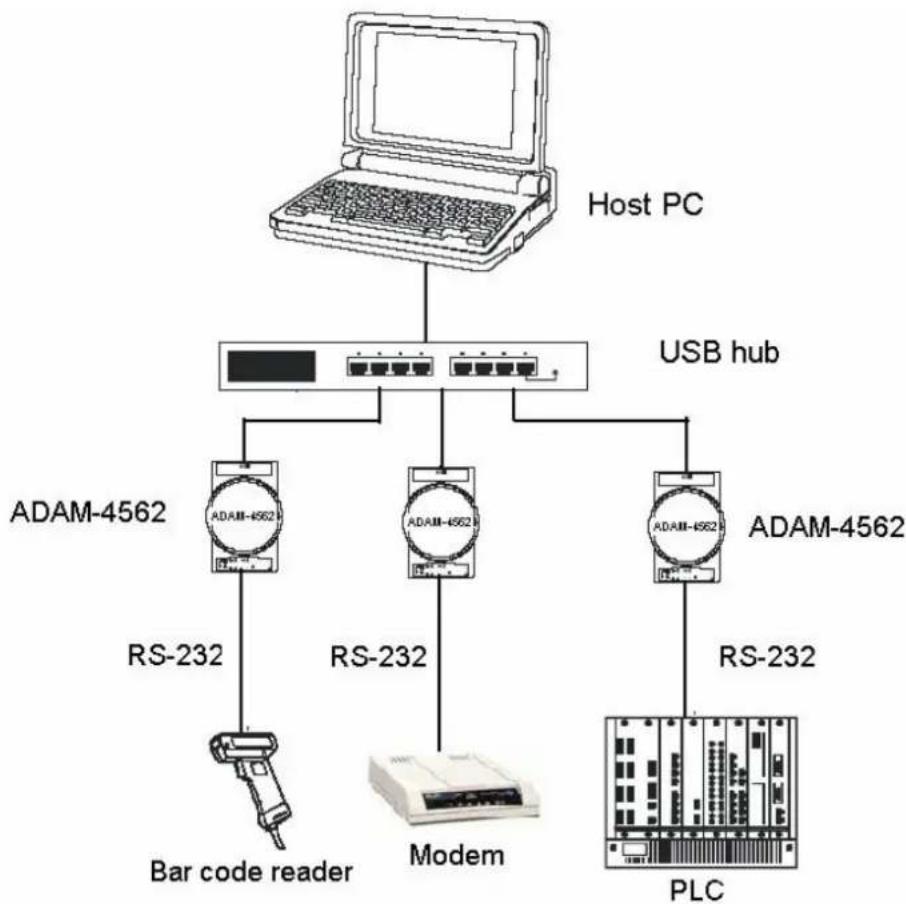
Traditional serial port communication uses a COM port board that slides into one of the slots at the back of your PC. With the ADAM-4562, you can access the COM port from USB ports. The ADAM-4562 can be integrated into the network architecture of any protocol.
Note: all the operating systems on your host must support USB v1.1 or above standard, such as Windows 98/2000/XP. USB devices are used in “Master-Slave” architecture. Before you use ADAM-4562, you must determine the master PC. The following illustration shows the network architecture:
flowchart
graph TD
    A["Host PC"] --> B["USB hub"]
    B --> C["ADAM-4562"]
    B --> D["ADAM-4562"]
    B --> E["ADAM-4562"]
    C --> F["RS-232"]
    D --> G["RS-232"]
    E --> H["Modem"]
    E --> I["PLC"]
    F --> J["Bar code reader"]
Figure 2-1: Network Architecture
2.2 Network Connection
When using the ADAM-4562, you will simply plug one end of USB cable (included in package) into ADAM-4562, and the other end into the USB hub or your host PC.
2.3 Serial Connection
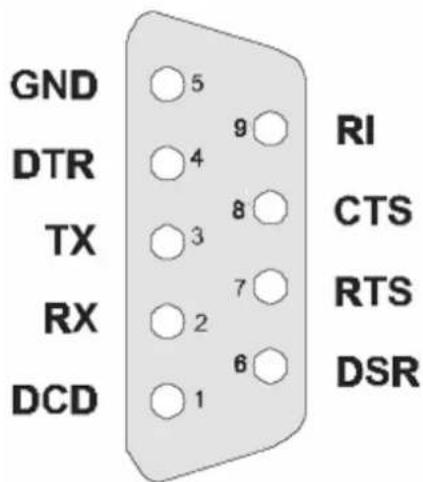
The model of the ADAM-4562 has one RS-232 DTE connector for connecting serial ports on the bottom of module.
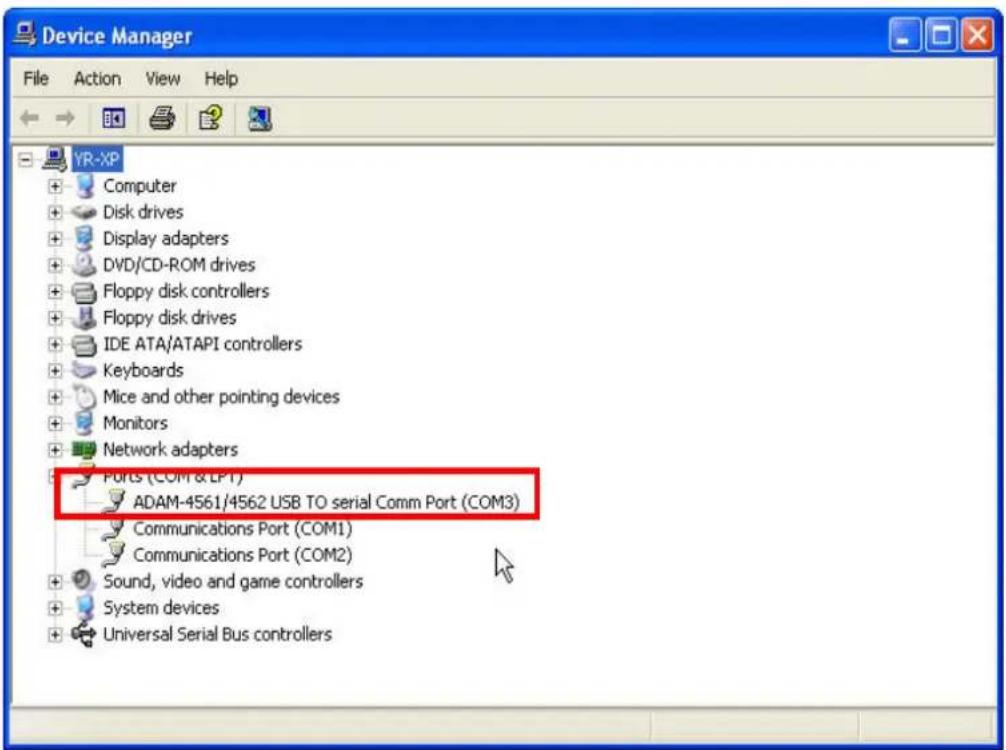
Note: In USB v1.1 standard, if you have used the COM3, COM4.....COMn of host PC. When you plug ADAM-4562 in the host PC, theCOM port will be COMn+1.
text_image
GND DTR TX RX DCD 5 4 3 2 1 9 8 7 6 RI CTS RTS DSRFigure 2-1 RS-232 Terminal (DTE) connections
2.4 Jumper Settings
Grounding is one of the most important issues for our system. Just like Frame Ground of the computer, this signal offers a reference point of the electronic circuit inside the computer. If we want to communicate with this computer, both Signal Ground and Frame Ground should be connected to make a reference point of each other's electronic circuit. Generally speaking, it is necessary to install an individual grounding bar for each system, such as computer networks, power systems, telecommunication networks, etc. Those individual grounding bars not only provide the individual reference point, but also make the earth a our ground!
Jumper JP1 allows choosing the ground setting. If jumpers JP1 is set as following, the pins 1 & 2 are closed and it means the ground is connected to the shell of DB9 connector. On the other words, the pins 2 & 3 are closed and it means the ground is floating
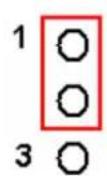
ground is connected to the shell of DB9 connector (default setting)
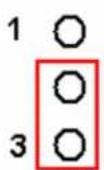
ground is floating
3. Driver and Utility Installation
In order to use a PC to control serial devices connected to the ADAM-4562, you must first have a host running Windows 98/2000/XP.
Following are the installation instructions to set up the ADAM-4562.
-
Insert the ADAM-4562 Driver utility diskette into the CD drive (e.g. E:) on the host PC.
-
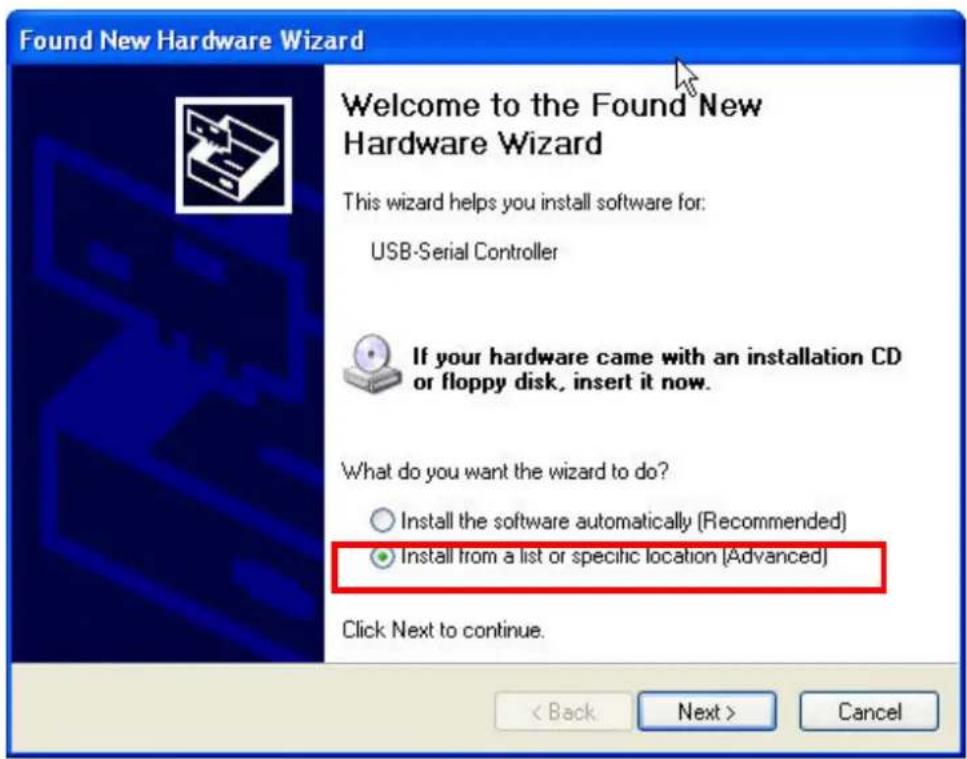
Plug in the USB connector of ADAM-4562 then system will detect the new device automatically and show the hardware wizard. Please choose the item Install from a list or specific location if it is the first use on this PC.
text_image
Found New Hardware Wizard Welcome to the Found New Hardware Wizard This wizard helps you install software for: USB-Serial Controller If your hardware came with an installation CD or floppy disk, insert it now. What do you want the wizard to do? ○ Install the software automatically (Recommended) ● Install from a list or specific location (Advanced) Click Next to continue. < Back Next > Cancel- Indicate the location to specify the installation path like as
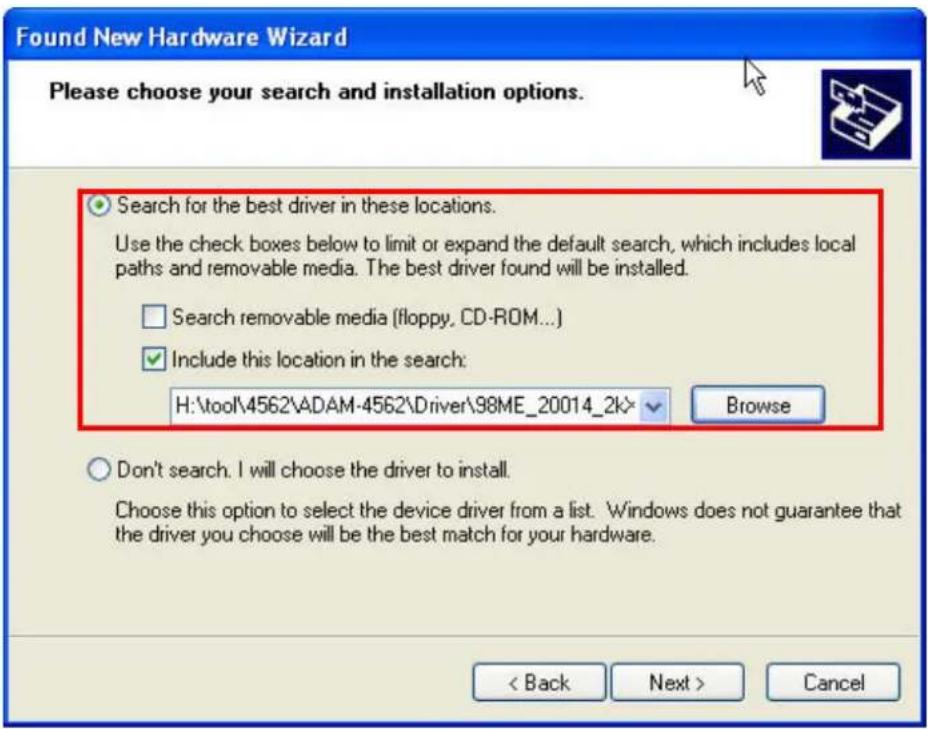
E:\ADAM-4562/driver/98_2k_XP/ then it will auto-select the suitable driver to install for your system. After you have specified the installation path, click the Next button.
text_image
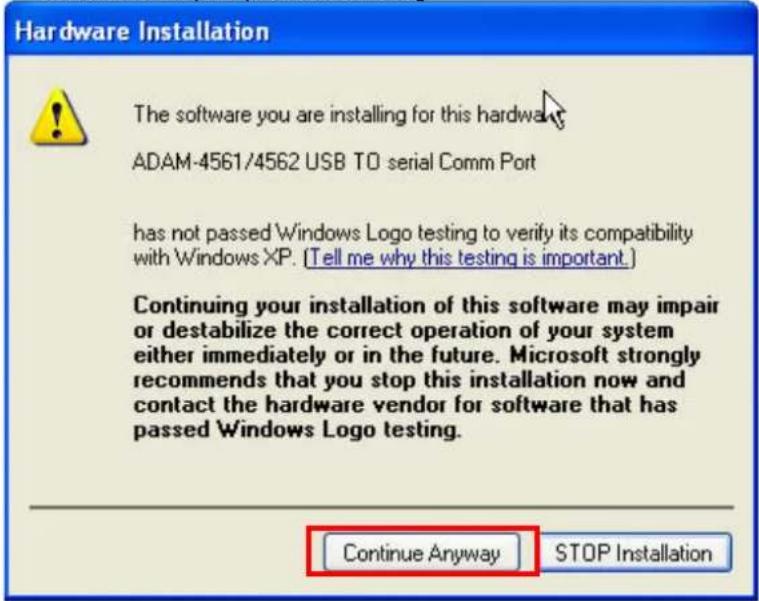
Found New Hardware Wizard Please choose your search and installation options. Search for the best driver in these locations. Use the check boxes below to limit or expand the default search, which includes local paths and removable media. The best driver found will be installed. Search removable media (floppy, CD-ROM...) Include this location in the search: H:\tool\4562\ADAM-4562\Driver\98ME_20014_2k> Browse Don't search. I will choose the driver to install. Choose this option to select the device driver from a list. Windows does not guarantee that the driver you choose will be the best match for your hardware. < Back Next > Cancel- It will have the dialog window for this installation, please click the button of Continue Anyway to start set up
text_image
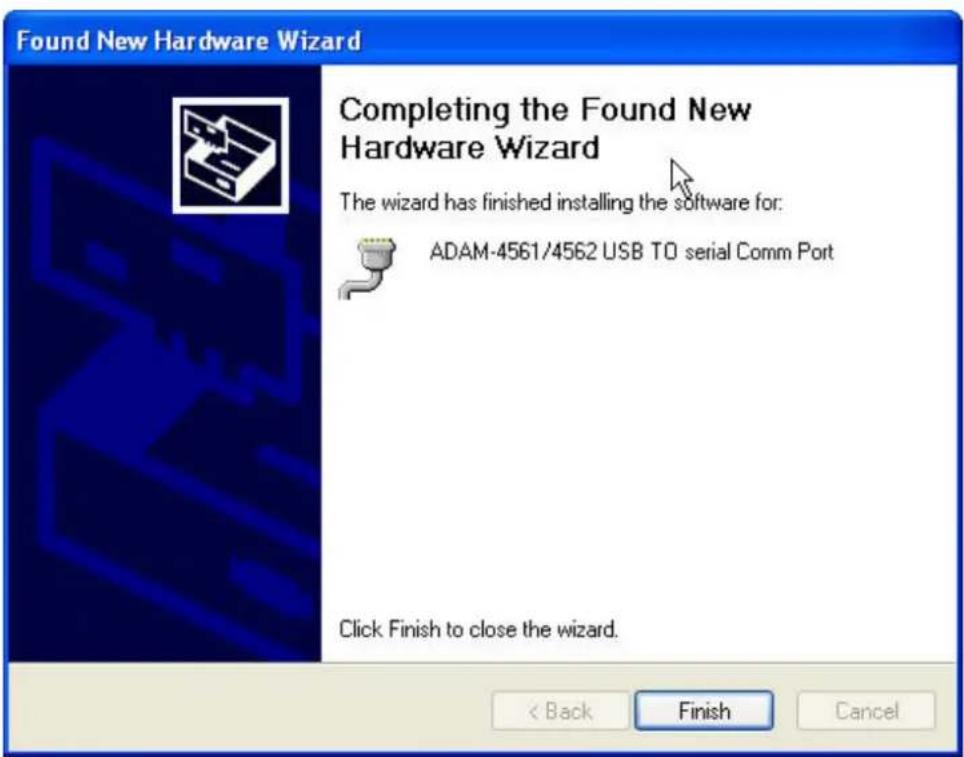
Hardware Installation The software you are installing for this hardwa ADAM-4561/4562 USB TO serial Comm Port has not passed Windows Logo testing to verify its compatibility with Windows XP. (Tell me why this testing is important.) Continuing your installation of this software may impair or destabilize the correct operation of your system either immediately or in the future. Microsoft strongly recommends that you stop this installation now and contact the hardware vendor for software that has passed Windows Logo testing. Continue Anyway STOP Installation- It shows the following window when the installation is completed and use also can find the com port of ADAM-4561/4562 on Device manager
text_image
Found New Hardware Wizard Completing the Found New Hardware Wizard The wizard has finished installing the software for: ADAM-4561/4562 USB TO serial Comm Port Click Finish to close the wizard. < Back Finish Cancel