WP1001 - Wireless pointer Inateck - Free user manual and instructions
Find the device manual for free WP1001 Inateck in PDF.


| Product Type | Wireless Presenter |
| Brand | Inateck |
| Model | WP1001 |
| Connectivity | 2.4 GHz RF |
| Wireless Range | 65 ft (20 m) |
| Laser Type | Class II, Red Laser (650 nm) |
| Laser Power Output | < 1 mW |
| Battery Type | 2 x AAA (not included) |
| Battery Life | Approximately 20 hours of typical use |
| Indicator | LED and LCD display |
| Timer | Countdown timer with vibration alerts at 5 min, 1 min, and end |
| Controls | Page Up, Page Down, Full Screen, Stop Slides, Volume +/-, Laser, Power On/Off |
| Operating Systems | Windows XP/Vista/7/8/8.1 |
| Dimensions (approx.) | 4.5 x 1.2 x 0.8 inches (114 x 30 x 20 mm) |
| Weight (with batteries) | Approximately 50 g |
| Care & Maintenance | Keep dry, store at room temperature, clean with damp cloth |
| Safety | Class II laser product; avoid eye exposure |
| Package Contents | Presenter, USB Receiver, Carrying Case, User Manual |
| Low Battery Indicator | Flashing laser and low battery icon |
Frequently Asked Questions - WP1001 Inateck
User questions about WP1001 Inateck
0 question about this device. Answer the ones you know or ask your own.
Ask a new question about this device
Download the instructions for your Wireless pointer in PDF format for free! Find your manual WP1001 - Inateck and take your electronic device back in hand. On this page are published all the documents necessary for the use of your device. WP1001 by Inateck.
USER MANUAL WP1001 Inateck
WP1001 Wireless Presenter Instruction Manual (EN)
I. Packing list
- WP1001*1
- USB Receiver*1
- Carrying Case*1
- Users manual*1
II. WP1001 Diagram
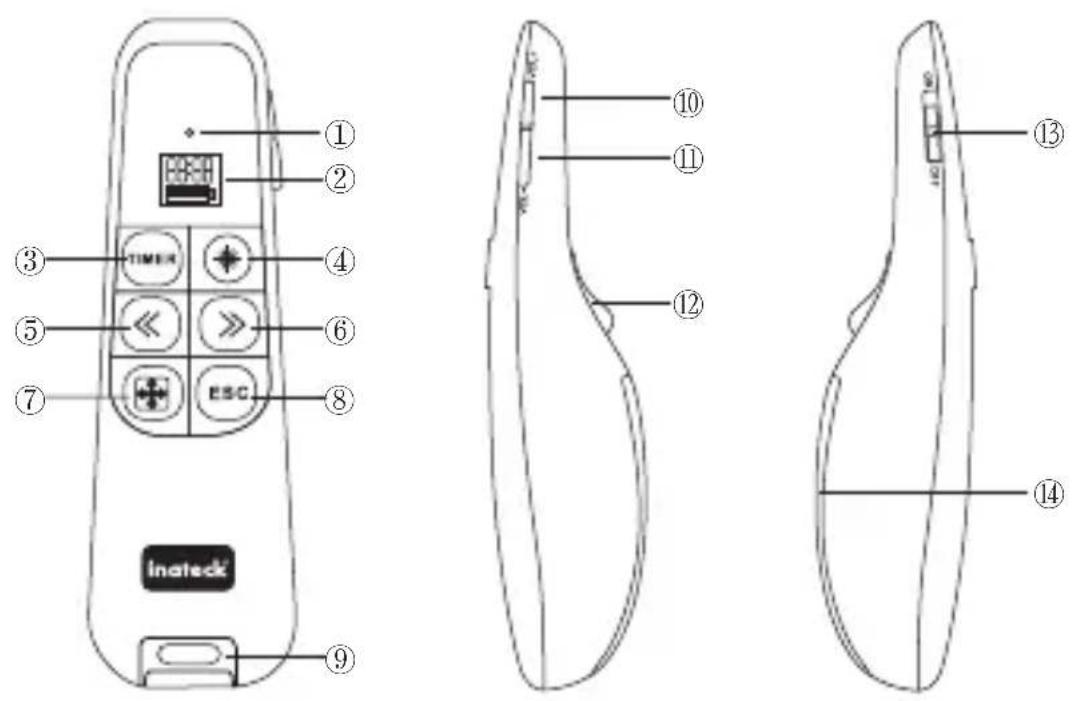
① LED indicator
② LCD
③ Timer Set
④ Laser
⑤ Page Up
⑥ Page Down
⑦ Full Screen
⑧ Stop playing slides
⑨ USB Receiver
⑩ Volume + / Time +
⑪ Volume - / Time -
⑫ Laser
⑬ Power On / Off
⑭ Battery Cover
III. Specs
| Product Name | Wireless Presenter |
| Product Model | Inateck WP1001 |
| RF Frequency | 2.4GHz |
| RF Distance | 65 ft. (20m) |
| Wavelength | 650nm ± 5nm (Class II Laser Product) |
| Power Output | < 1mW |
| System Compatibility | Windows XP/Vista/7/8/8.1 |
IV. Features
- 2.4GHz wireless connection allows you to move freely while presenting
- Red laser pointer works up to 65 feet (20m) away
- The multifunction feature and low-battery indicator
V. Install Batteries
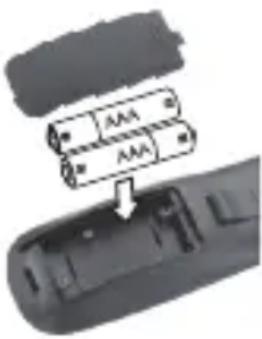
Slide to open the battery cover, and insert two AAA batteries (not included) in the battery compartment symbols (+ and -) marked inside.
natural_image
Close-up of a remote control panel with two battery modules and an arrow indicating a component (no text or symbols visible)Battery Notes:
- Make sure the ON/OFF switch is at the OFF position before installing or replacing batteries.
- If the battery indicator is not full and laser indicator flashes under normal operation, replace the batteries.
- Dispose of batteries promptly and properly. Do not burn or bury them.
- Use only fresh batteries of the required size and type.
- Do not mix old and new batteries, different types of batteries (alkaline or rechargeable), or rechargeable batteries of different capacities.
- If you do not plan to use the presenter for a long time, remove the batteries. Batteries can leak chemicals that can damage electronic parts.
VI. Plug in the Receiver
- Turn on your computer
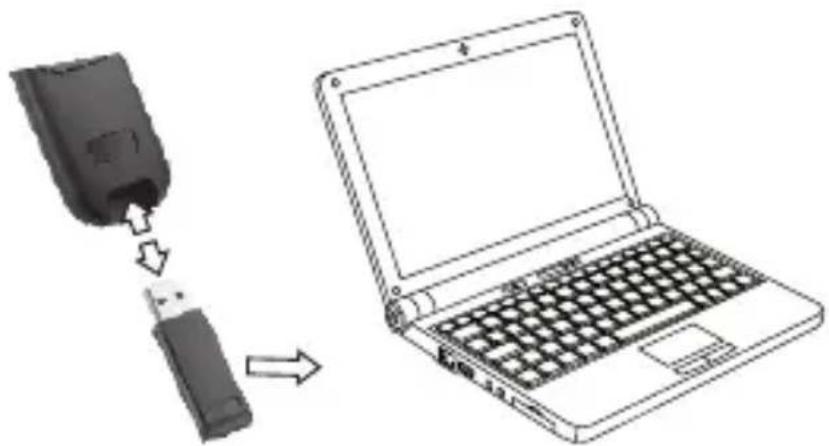
- Take out the USB Receiver, and plug the receiver into your computer's USB port.
- Slide the ON/OFF switch to ON. Your presenter and receiver automatically pair.
natural_image
Diagram showing a device being inserted into a laptop keyboard, with arrows indicating the process (no text or symbols present)Note:
- Insert the receiver back into the presenter's receiver slot when not in use.
- If you do not plan to use your presenter for several minutes, slide ON/OFF to OFF to save battery power.
VII. Set the Timer
- Press and hold TIMER for 3 seconds until the LCD screen lights blue. The minute digit flashes.
- Press VOL+ or VOL- to set the minute.
- Press << or >> to move between the hour or minute digit. Press VOL+ or VOL- to set the hour.
- Press TIMER to confirm and exit the timer setting.
Note:
- The presenter vibrates to let you know when you have 5 minutes, 1 minute, and no time remaining. The LCD screen turns off when you have no time remaining.
- Press and hold TIMER for 3 seconds to enter the timer setting again to reset the timer.
VIII. Troubleshooting
If you have difficulty pairing your presenter with your computer:
- Make sure you have properly installed fresh batteries.
-
Pair the presenter and receiver again:
-
Place the presenter within 12 inches (30.5cm) of the receiver.
-
Slide the ON/OFF switch to ON.
IV. Care and Maintenance
- Use and store the presenter only in room temperature environments.
- Keep the presenter dry; if it gets wet, wipe it dry immediately.
- Keep the presenter away from dust and dirt, and wipe it with a damp cloth occasionally to keep it looking new.
- Handle the presenter carefully; do not disassemble or drop it.
ínateck®
Tel: 0341-5199 8407
(Service time: Mon - Fri 9:00AM - 5:00PM CET)
Email: support@inateck.com
Website: Http://www.inateck.com
Brand : Inateck
Model : WP1001
Category : Wireless pointer