
Wi Series CIC - Hi-Fi System Starkey - Free user manual and instructions
Find the device manual for free Wi Series CIC Starkey in PDF.


| Product Type | Hearing Aid (Completely-in-Canal) |
| Brand | Starkey |
| Model | Wi Series CIC |
| Dimensions | Approx. 10 x 5 x 5 mm |
| Weight | Approx. 1.5 g |
| Power Source | Zinc-air battery size 10 |
| Battery Life | 5–7 days (typical usage) |
| Wireless Connectivity | 2.4 GHz (compatible with Starkey devices) |
| Noise Reduction | Advanced digital noise reduction |
| Feedback Cancellation | Adaptive feedback cancellation |
| Program Options | Multiple listening programs (quiet, noise, music) |
| Volume Control | Automatic or via smartphone app |
| Telecoil | Yes |
| Water Resistance | IP68 (dust and water resistant) |
| Warranty | 1–3 years (subject to registration) |
| Repair | Available through authorized audiologists |
| Cleaning | Use soft dry cloth; avoid moisture |
| Safety | Keep away from strong magnets and extreme temperatures |
Frequently Asked Questions - Wi Series CIC Starkey
User questions about Wi Series CIC Starkey
0 question about this device. Answer the ones you know or ask your own.
Ask a new question about this device
Download the instructions for your Hi-Fi System in PDF format for free! Find your manual Wi Series CIC - Starkey and take your electronic device back in hand. On this page are published all the documents necessary for the use of your device. Wi Series CIC by Starkey.
USER MANUAL Wi Series CIC Starkey
natural_image
Three pink earbuds with white outlines, displayed against a plain background (no text or symbols visible)Custom Product Family
ITE (In-The-Ear),
ITC (In-The-Canal),
CIC (Completely-In-Canal)
Table of Contents
Overview
ITE Overview 4
ITC Overview.... 5
CIC Overview....6
Preparation
Batteries....7
Battery Indicators....9
Insertion and Removal.... 10
Operation
On & Off 12
Volume Control 13
Multimemory 15
Directional Settings 16
Telephone Use....16
Accessories
Wireless Accessories 19
Hearing System Care
Instrument Care 20
Service and Repair.... 21
Troubleshooting Guide 21
Tips for Better Communication
For You....22
For Your Family and Friends 23
Safety Information 24
FDA Information 26
FCC Information 28
Limited Warranty.... 29
My hearing instrument is a/an:
☐ ITE (In-The-Ear) see page 4.
☐ ITC (In-The-Canal) see page 5.
☐ CIC (Completely-In-Canal) see page 6.
Features, Controls and Identification
Your hearing system controls include:
- Microphone opening(s)
- Battery compartment (on/off control)
- Vent (optional)
- Sound outlet (receiver) and wax protection system
Your hearing system can be identified by:
- Location of serial number:
RED Right
BLUE Left
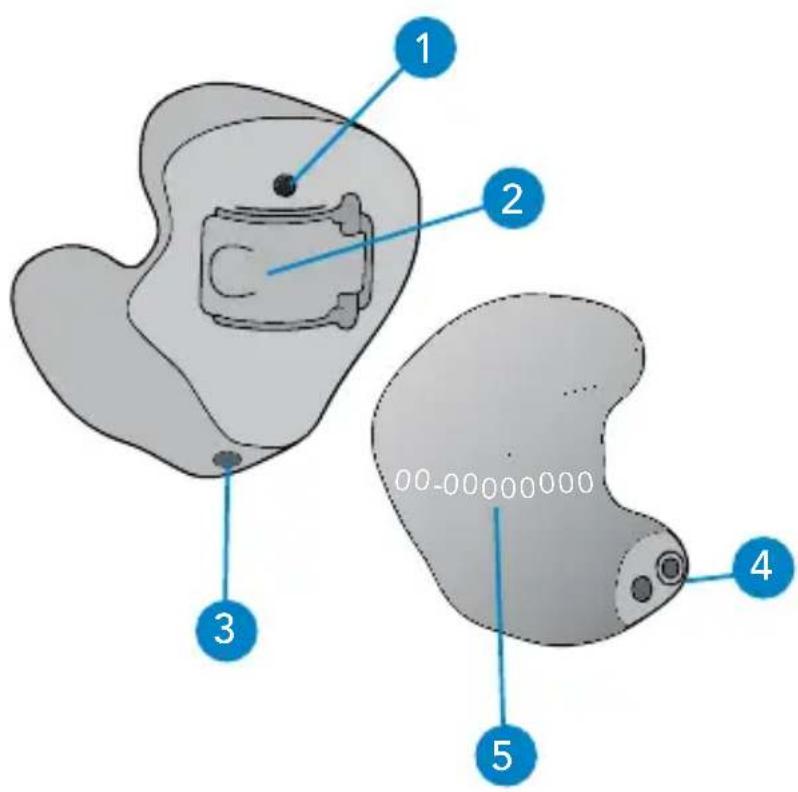
text_image
1 2 3 4 5 00-00000000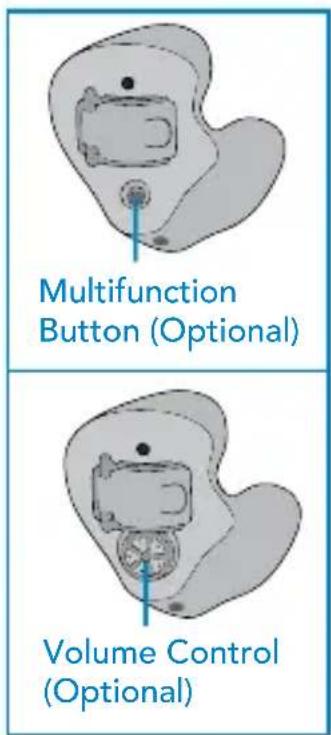
text_image
Multifunction Button (Optional) Volume Control (Optional)ITE Battery Size: 13
Features, Controls and Identification
Your hearing system controls include:
- Microphone opening(s)
- Battery compartment (on/off control)
- Vent (optional)
- Sound outlet (receiver) and wax protection system Your hearing system can be identified by:
- Location of serial number:
RED Right
BLUE Left
text_image
1 2 3 4 5 00-00000000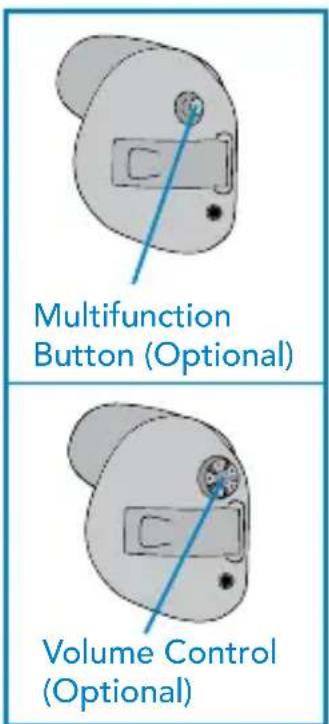
text_image
Multifunction Button (Optional) Volume Control (Optional)ITC Battery Size: 312
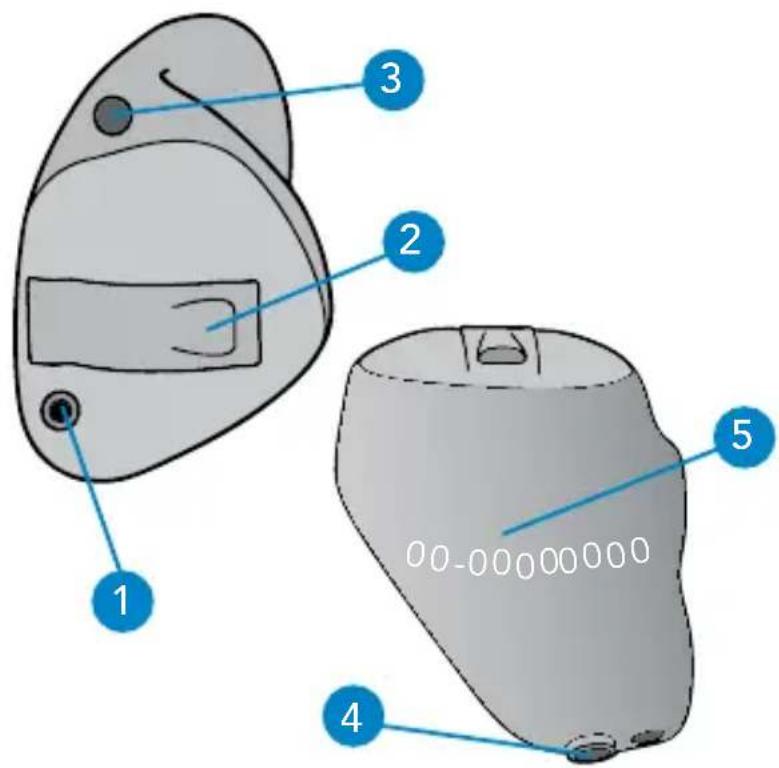
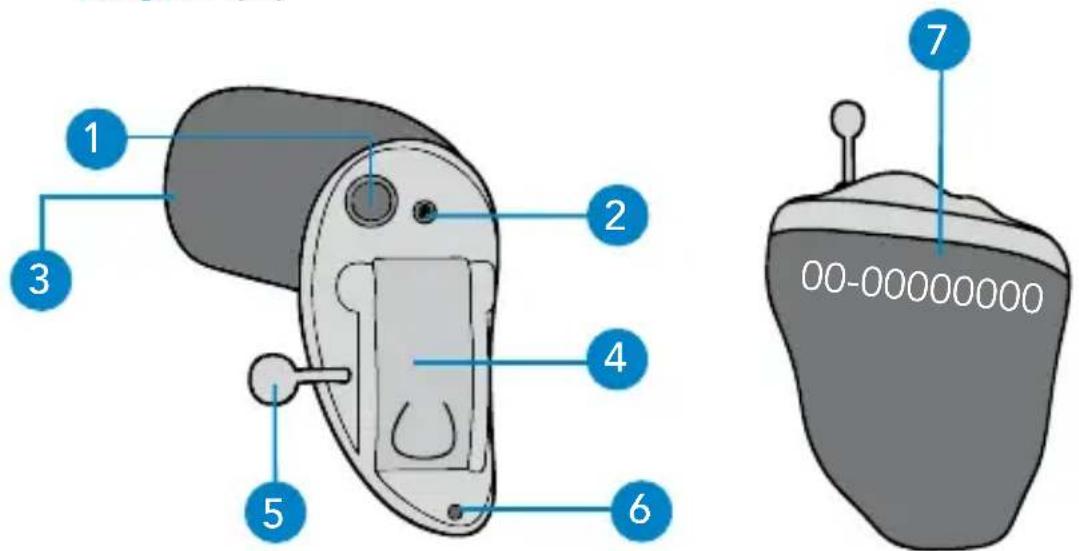
Features, Controls and Identification
Your hearing system controls include:
- Multifunction button (optional)
- Microphone opening
- Sound outlet (receiver) and wax protection system
- Battery compartment (on/off control)
- Removal handle
- Vent (optional)
Your hearing system can be identified by:
- Location of serial number:
RED Right
BLUE Left
text_image
1 2 3 4 5 6 7 00-00000000CIC Battery Size: 10
Batteries
Your hearing system uses a battery as its power source. This battery size can be identified by the orange (13), brown (312), or yellow (10) color code on the packaging.
My hearing instrument uses a:
☐ 13 battery (ITE) – Orange
☐ 312 battery (ITC) – Brown
☐ 10 battery (CIC) – Yellow
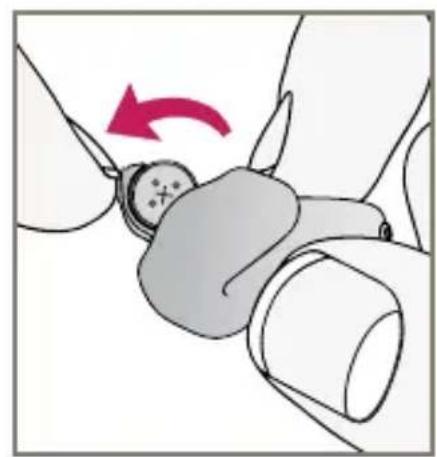
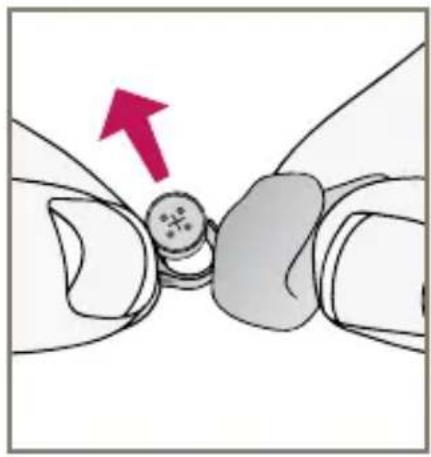
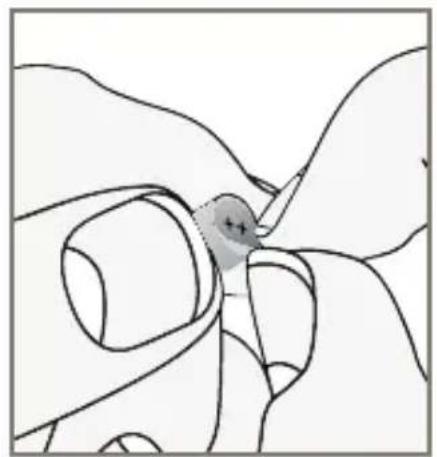
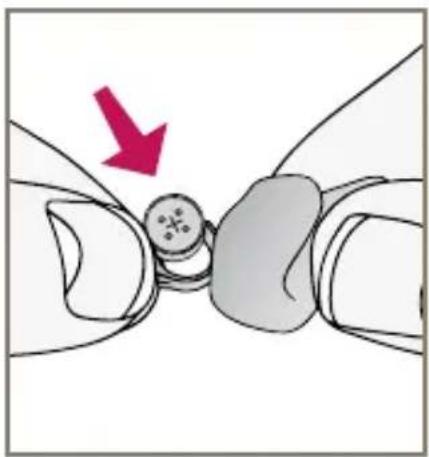
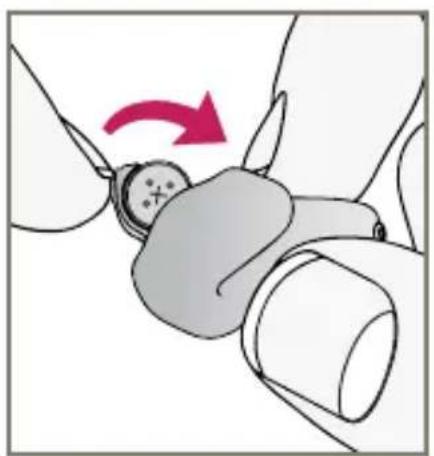
To insert or replace the battery:
- Use the nail grip on the battery door.
- Open the battery door gently and remove the old battery.
- Remove the tab from the new battery.
- Line up the battery's "+" sign (flat side of the battery) with the "+" on the battery door.
- Close the battery door.
natural_image
Illustration of a hand holding a small object with a red arrow indicating rotation (no text or symbols)1
natural_image
Diagram showing a mechanical joint with a red arrow indicating direction (no text or symbols present)2
natural_image
Illustration of a hand holding a small object with a circular mark, no text or symbols present3
natural_image
Illustration of a medical procedure showing a finger pressing a button with a red arrow indicating direction (no text or symbols present)4
natural_image
Illustration of a hand adjusting a small object with a red arrow indicating rotation (no text or symbols)5
Battery Indicators
An indicator will sound when the battery voltage is low. You have approximately 5 minutes* to replace the battery. An indicator will sound just before the battery stops working.
* Actual time between low battery indicator and shut down will vary depending on environmental noise levels and brand of battery used.
Helpful Hints
- NEVER FORCE THE BATTERY DOOR SHUT; this could result in serious damage; if the door will not close securely, check that the battery is inserted correctly.
- Do not open the battery door too far or damage is likely to occur.
- Because of their size, it's a good idea to change and replace batteries above a table or desk to reduce the risk of dropping the instrument or battery.
- Dispose of used batteries immediately in the proper waste or recycling container.
- Because batteries can vary in size and performance, your hearing care professional is your best source for lifespan estimates and verification that you are using the proper size and type.
Warnings
Batteries are dangerous if swallowed. To help prevent the accidental ingestion of batteries:
⚠️ Keep out of reach of children and pets
Check your medications before taking them – batteries have been mistaken for pills
Never put batteries in your mouth, as they can easily be swallowed
National Button Battery Ingestion Hotline: 202-625-3333
Insertion and Removal
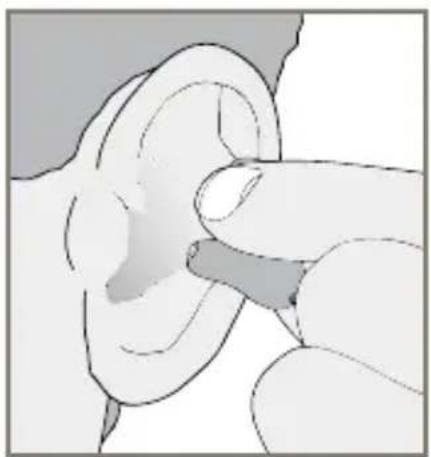
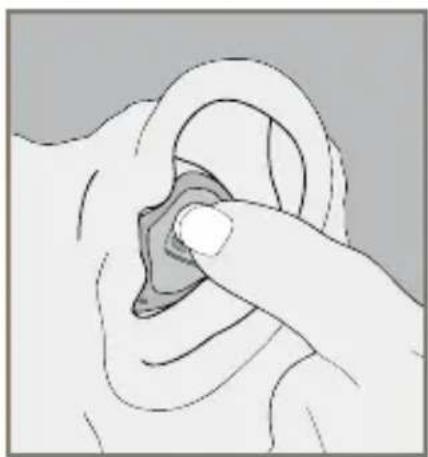
To insert the hearing instrument:
- Hold the instrument with your thumb and forefinger on the outer edges of the case.
- Tilt your hand slightly forward and gently insert the canal tip of the instrument into your ear canal and rotate the instrument backward. Softly press the instrument into place with your fingertip.
natural_image
Illustration of a hand pointing to the ear area (no text or symbols)1
natural_image
Illustration of a finger pressing a circular object on an ear (no text or symbols)2
To remove the hearing instrument:
Grasp the instrument with your thumb and forefinger; gently rotate it as you pull outward.
Devices with removal handle: grasp removal handle and gently remove from ear.
Helpful Hints
- Minor irritation and inflammation may occur as your ear becomes accustomed to having an object in it; if so, please contact your hearing care professional
- If an actual allergic reaction occurs, alternative materials are available; contact your hearing care professional
- Severe swelling, discharge from the ear, excessive wax, or other unusual conditions warrant immediate consultation with a physician
On & Off
To turn ON:
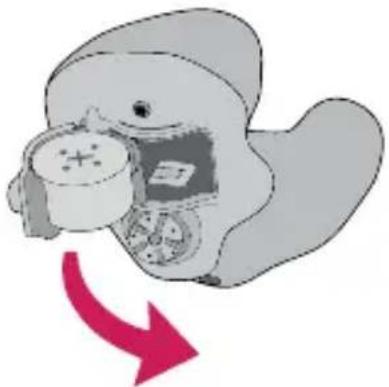
Insert a battery and completely close the battery door.
natural_image
Illustration of a cartoon duck holding a clock, with a red arrow indicating rotation (no text or symbols)To turn OFF:
Open the battery door until the battery is no longer touching the battery contacts.
Your instrument has a Power-On delay and may require a few seconds to power on. You may hear a tone series indicating that your device is fully powered on.
Volume Control
☐ My hearing instrument volume is set automatically. See below.
☐ My hearing instrument uses the multifunction button for volume control. See below.
☐ My hearing instrument has a rotary volume control. See page 14.
Automatic Volume Control
Your hearing system has been set to a specific volume level by your hearing care professional. If sounds are generally too loud or too soft, please contact your hearing care professional for advice and adjustment.
Multifunction Button-Volume Control
Your hearing system uses the button to control volume. Press then release the button until the desired volume level is reached. Each press/release changes the volume one increment.
Volume Settings
| Volume Level Tone | |
| Level 5 (More volume) Five beeps plus tone | |
| Level 4 Four beeps | |
| Level 3 (Power on volume level) Three beeps | |
| Level 2 Two beeps | |
| Level 1 (Less volume) One beep plus tone | |
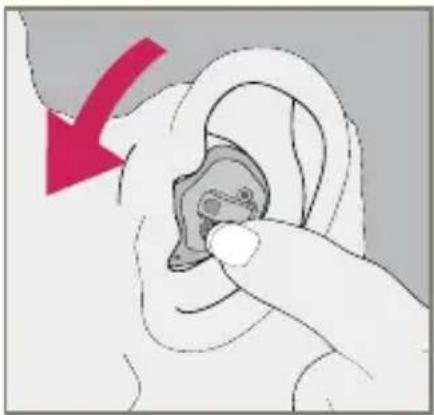
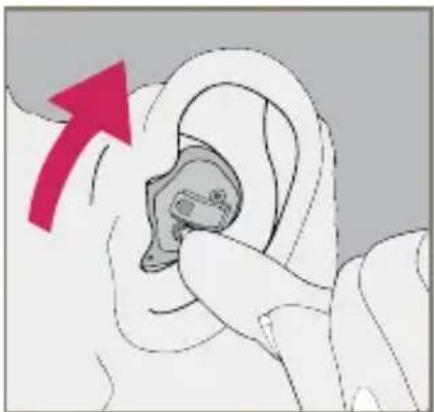
Rotary Volume Control
Use your fingertip to rotate the volume control.
- To make sounds louder, continue to rotate the control forward, toward your face.
- To make sounds softer, use your fingertip to rotate the control toward the back of your head.
natural_image
Illustration of a hand inserting a small object into an ear, with a red arrow indicating direction (no text or symbols)INCREASE VOLUME
natural_image
Illustration of a hand holding an ear with a magnifying glass, showing a red arrow pointing upward (no text or symbols present)DECREASE VOLUME
| Volume Level Tone | |
| (Maximum) Five beeps plus tone | |
 | |
| Level 3 (Power on volume level) Three beeps | |
 | |
| (Minimum) One beep plus tone | |
Multimemory
☐ My multifunction button is set for multimemory. Please read the section below.
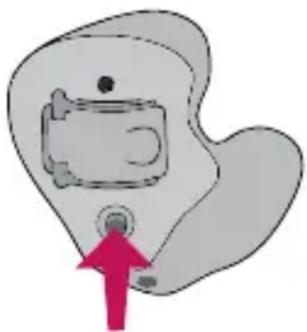
Your hearing care professional can set up to four hearing programs for you. These additional programs are accessed by pressing the multifunction button inward.
natural_image
Simple line drawing of a person pointing at a device inside a rounded shape (no text or symbols)When you press the multifunction button, you may hear an indicator or a tone series indicating the device has changed to the next program.
Ask your hearing care professional about your specific hearing programs.
Directional Settings
Your hearing system may have a directional microphone to help improve speech understanding in noisy situations. Ask your hearing care professional about your particular directional settings.
Telephone Use
Your hearing instruments are equipped with tools to help you effectively communicate on the telephone. Ask your hearing professional about your telephone solution.
My hearing instruments have the following telephone setting(s):
☐ Automatic Telephone. See below.
☐ Automatic Telecoil. See below.
□ Telecoil. See page 18.
(Program # ____.
Automatic Telephone and Automatic Telecoil
These options activate the telephone response automatically when used with a hearing aid compatible telephone. To use, place the telephone receiver on your ear as you normally would and the hearing instrument will select the telephone setting. It might be necessary to move the telephone receiver slightly to find the best reception. Once the telephone is removed from the ear, the hearing instrument will switch back to the normal listening mode.
Note: Consult with your hearing professional if your device does not seem to switch to the telephone setting automatically.
Telecoil and Manual Switching
Hearing instruments with a manual telecoil allow you to switch the devices to telephone mode when needed.
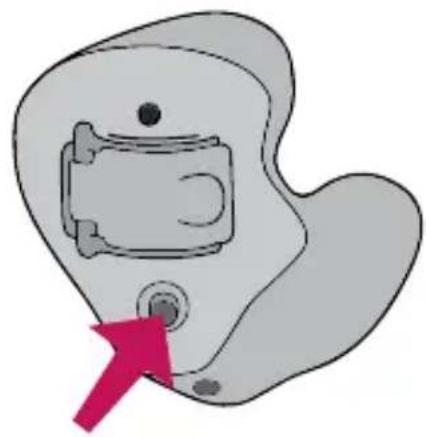
Manually switched telecoils are activated by choosing the telecoil setting using the Multifunction button.
General Telephone Use
Some hearing instruments work best by holding the phone close to, but not fully covering your ear. In some instances, if you encounter whistling (feedback), tilt the receiver at an angle until the whistling stops. Additionally, the hearing instrument in the non-phone ear (ear opposite the phone) may switch to a telephone setting to reduce background sounds. Your hearing professional can provide instructions and techniques for your specific needs.
natural_image
Simple line drawing of a device with a pink arrow pointing to a button (no text or symbols)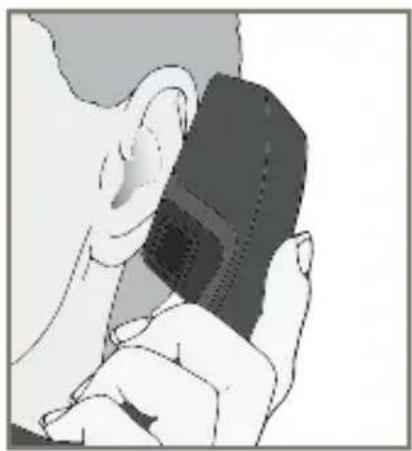
natural_image
Illustration of a person holding a small object, possibly a device or tool, with no visible text or symbols.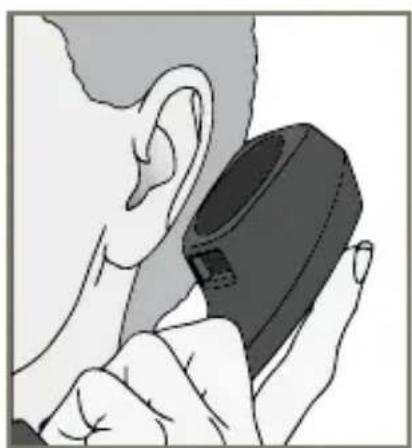
natural_image
Illustration of a person holding a small electronic device, no text or symbols visibleDISCLAIMER – Some hearing aid users have reported a buzzing sound in their hearing aids when they are using cell phones, indicating that the cell phone and hearing aid may not be compatible. According to the ANSI C63.19 standard (ANSI C63.19-2006 American National Standard Methods of Measurement of Compatibility Between Wireless Communications Devices and Hearing Aids), the compatibility of a particular hearing aid and cell phone can be predicted by adding the rating for the hearing aid immunity to the rating for the cell phone emissions. For example, the sum of a hearing aid rating of 2 (M2/T2) and a telephone rating of 3 (M3/T3) would result in a combined rating of 5. Any combined rating that equals at least 5 would provide “normal use”; a combined rating of 6 or greater would indicate “excellent performance.”
The immunity of this hearing aid is at least M2/T2. The equipment performance measurements, categories and system classifications are based upon the best information available but cannot guarantee that all users will be satisfied.
NOTE: The performance of individual hearing aids may vary with individual cell phones. Therefore, please try this hearing aid with your cell phone or, if you are purchasing a new phone, be sure to try it with your hearing aid prior to purchase. For additional guidance, please ask your cell phone provider for the booklet entitled “Hearing Aid Compatibility with Digital Wireless Cell Phones.”
Wireless Accessories
There are several wireless accessories that allow you to control and maximize the full potential of your hearing system. These include a remote control as well as wireless connection to your entertainment system. Consult with your hearing professional to determine which accessories may be best for you.
Instrument Care
Do your best to keep your hearing instrument clean at all times. Heat, moisture and foreign substances can result in poor performance.
- Clean daily over a soft cloth to prevent damage from a fall to a hard surface
- Use a cleaning brush to clean debris from around the microphone, receiver and battery compartment
- Never use water, solvents, cleaning fluids or oil to clean your instrument
Your hearing care professional can provide further information on additional maintenance procedures for your hearing system if needed.
Helpful Hints
- When not wearing your hearing instruments, open the battery door to allow any moisture to evaporate
- When not in use, remove the batteries completely; place your hearing system in the storage container and store:
- In a dry, safe place
- Away from direct sunlight or heat to avoid extreme temperatures
– Where you can easily find them
– Safely out of reach of pets and children - Do not take apart your hearing instruments or insert the cleaning tools inside them
Service and Repair
If, for any reason, your hearing system does not operate properly, do NOT attempt to fix it yourself. Not only are you likely to violate any applicable warranties or insurance, you could easily cause further damage.
Should your hearing system fail or perform poorly, check the guide below for possible solutions. If problems continue, contact your hearing care professional for advice and assistance.
Troubleshooting Guide
| SYMPTOM POSSIBLE CAUSES SOLUTIONS | ||
| Not Loud Enough | Low battery Replace battery | |
| Wax or debris in the microphone or receiver | Clean both microphone and receiver with brush | |
| Change wax prevention system | ||
| Hearing change Contact your hearing care professional | ||
| Inconsistent Performance | Low battery Replace battery | |
| Unclear, Distorted Performance | Low battery Replace battery | |
| Defective hearing instrument | Contact your hearing care professional | |
| Dead | Low battery Replace battery | |
| Wax or debris in the microphone or receiver | Clean both microphone and receiver with brush. Change wax prevention system. | |
Your hearing care professional will recommend an appropriate schedule to help you adapt to your new hearing system. It will take practice, time and patience for your brain to adapt to the new sounds that your hearing system provides. Hearing is only part of how we share thoughts, ideas and feelings. Reading lips, facial expressions and gestures can help the learning process and add to what amplification alone may miss.
Please review the following simple communication tips:
For You
- Move closer to and look at the speaker
- Sit face-to-face in a quiet room
- Try different locations to find the best place to listen
- Minimize distractions
-
Background noises may be frustrating at first; remember, you have not heard them for a while
-
Let others know what you need; keep in mind that people cannot "see" your hearing loss
• Develop realistic expectations of what your hearing instruments can and cannot do - Better hearing with hearing instruments is a learned skill combining desire, practice and patience
For Your Family and Friends
Your family and friends are also affected by your hearing loss. Request that they:
- Get your full attention before beginning to speak
- Look at you or sit face-to-face in a quiet room
- Speak clearly and at a normal rate and level; shouting can actually make understanding more difficult
- Rephrase rather than repeat the same words; different words may be easier to understand
- Minimize distractions while speaking
Safety Information
Your hearing instruments are designed to comply with the most stringent Standards of International Electromagnetic Compatibility. However, it is still possible that you may experience interference caused by power line disturbances, airport metal detectors, electromagnetic fields from other medical devices, radio signals and electrostatic discharges.
If you use other medical devices or wear implantable medical devices such as defibrillators or pacemakers and are concerned that your hearing instruments might cause interference with your medical device, please contact your physician or the manufacturer of your medical device for information about the risk of disturbance.
Your hearing instruments should not be worn during an MRI procedure.
Your hearing instruments are classified as a Type B applied part under the IEC 60601-1 medical device standard.
Your hearing instruments should be stored within the temperature and humidity ranges of -40^ ( -40^ ) to +60^ ( 140^ ) and 10%-95% rH.
Your hearing instruments are designed to operate beyond the range of temperatures comfortable to you, from very cold up to 50^ C ( 122^ F).
Use on Aircrafts
The wireless capabilities featured in your hearing instruments should not be used on an aircraft unless specifically permitted by the flight personnel. Your hearing care professional can enable a special program that allows your hearing aids to work without wireless functionality.
International Use
Your hearing instruments are approved to operate at a radio frequency that is specific to your country or region and might not be approved for use outside your country or region. Be aware that operation during international travel may cause interference to other electronic devices, or other electronic devices may cause interference to your hearing instruments.
Required Information
The following additional information is provided in compliance with U.S. Food and Drug Administration (FDA) regulations:
WARNING TO HEARING AID DISPENSERS. A hearing aid dispenser should advise a prospective hearing aid user to consult promptly with a licensed physician (preferably an ear specialist) before dispensing a hearing aid if the hearing aid dispenser determines through inquiry, actual observation, or review of any other available information concerning the prospective user, that the prospective user has any of the following conditions:
i. Visible congenital or traumatic deformity of the ear.
ii. History of active drainage from the ear within the previous 90 days.
iii. History of sudden or rapidly progressive hearing loss within the previous 90 days.
iv. Acute or chronic dizziness.
v. Unilateral hearing loss of sudden or recent onset within the previous 90 days.
vi. Audiometric air-bone gap equal to or greater than 15 decibels at 500 Hertz (Hz), 1,000 Hz and 2,000 Hz.
vii. Visible evidence of significant cerumen accumulation or a foreign body in the ear canal.
viii. Pain or discomfort in the ear.
IMPORTANT NOTICE FOR PROSPECTIVE HEARING AID USERS.
Good health practice requires that a person with a hearing loss have a medical evaluation by a licensed physician (preferably a physician who specializes in diseases of the ear) before purchasing a hearing aid. Licensed physicians who specialize in diseases of the ear are often referred to as otolaryngologists, otologists, or otorhynolaryngologists. The purpose of the medical evaluation is to assure that all medically treatable conditions that may affect hearing are identified and treated before the hearing aid is purchased.
Following the medical evaluation, the physician will give you a written statement that states that your hearing loss has been medically evaluated and that you may be considered a candidate for a hearing aid. The physician will refer you to an audiologist or hearing aid dispenser, as appropriate, for a hearing aid evaluation.
The audiologist or hearing aid dispenser will conduct a hearing aid evaluation to assess your ability to hear with and without a hearing aid. The hearing aid evaluation will enable the audiologist or dispenser to select and fit a hearing aid to your individual needs.
If you have reservations about your ability to adapt to amplification, you should inquire about the availability of a trial-rental or purchase-option program. Many hearing aid dispensers now offer programs that permit you to wear a hearing aid for a period of time for a nominal fee after which you may decide if you want to purchase the hearing aid.
Federal law restricts the sale of hearing aids to those individuals who have obtained a medical evaluation from a licensed physician. Federal law permits a fully informed adult to sign a waiver statement declining the medical evaluation for religious or personal beliefs that preclude consultation with a physician. The exercise of such a waiver is not in your best health interest and its use is strongly discouraged.
A hearing aid will not restore normal hearing and will not prevent or improve a hearing impairment resulting from organic conditions. Use of a hearing aid is only part of hearing habilitation and may need to be supplemented by auditory training and instruction in lip reading. In most cases infrequent use of a hearing aid does not permit a user to attain full benefit from it.
CHILDREN WITH HEARING LOSS. In addition to seeing a physician for a medical evaluation, a child with a hearing loss should be directed to an audiologist for evaluation and rehabilitation since hearing loss may cause problems in language development and the educational and social growth of a child. An audiologist is qualified by training and experience to assist in the evaluation and rehabilitation of a child with a hearing loss.
REGULATORY NOTICES
FCC ID: EOA-IRIS-HA
IC: 6903A-IRISHA
FCC NOTICE
This device complies with part 15 of the FCC rules and with RSS-210. Operation is subject to the following two conditions: (1) This device may not cause harmful interference, and (2) this device must accept any interference received, including interference that may cause undesired operation of the device.
Note: The manufacturer is not responsible for any radio or TV interference caused by unauthorized modifications to this equipment. Such modifications could void the user's authority to operate the equipment.
Hereby, Starkey declares that the Wi Series custom product family is in compliance with the essential requirements and other relevant provisions of Directive 1999/5/EC. A copy of the Declaration of Conformity can be obtained from the below addresses.
Starkey Laboratories, Inc.
6600 Washington Ave. South
Eden Prairie, MN USA
EC REP
Starkey European Headquarters
Wm. F. Austin House, Bramhall Technology Park
Pepper Road, Hazel Grove, Stockport SK7 5BX
United Kingdom

Waste from electronic equipment must be handled according to local regulations
LIMITED WARRANTY:
This Limited Warranty provided by Starkey Laboratories, Inc. ("Starkey"), to you, the original purchaser of a Starkey hearing instrument, covers your new hearing instrument when sold by a hearing professional authorized by Starkey. The duration of this Limited Warranty begins when you first take delivery of your hearing instrument from an authorized hearing professional and ends either twenty-four (24) months or thirty-six (36) months later ("warranty period") depending on the product purchased:
24 months: Wi Series i90, Wi Series i70
36 months: Wi Series i110
LIMITATION ON DURATION OF IMPLIED WARRANTIES:
IMPLIED WARRANTIES, IF ANY, ARISING BY WAY OF STATE LAW, INCLUDING ANY IMPLIED WARRANTY OF MERCHANTABILITY AND/OR ANY IMPLIED WARRANTY OF FITNESS FOR A PARTICULAR PURPOSE, ARE LIMITED IN DURATION TO THE WARRANTY PERIOD. There is no warranty of any nature made by Starkey beyond this Limited Warranty. No person has authority to enlarge, amend, or Limited Warranty. Starkey is not responsible for any undertaking, representation, or warranty (written, express, or implied) made by any hearing professional or other person beyond those expressly set forth in this Limited Warranty.
Some states do not allow limitations on how long an implied warranty lasts, so the above limitation may not apply to you.
WHAT THIS LIMITED WARRANTY COVERS:
This Limited Warranty covers only a “defect” in the workmanship performed and/or materials used to manufacture your hearing instrument. “Defect” means the failure of the workmanship performed and/or materials used to conform the hearing instrument to Starkey’s design and manufacturing specifications and tolerances.
Your hearing professional may have issued a warranty or service plan that goes beyond the provisions of this Limited Warranty. Please contact him or her for further information.
Starkey will either replace the hearing instrument or repair any covered defect in your hearing instrument, provided that you deliver your hearing instrument to one of Starkey's authorized hearing professionals and notify the hearing professional of the defect during the warranty period and within thirty (30) days of discovering the defect. There will be no cost to you for Starkey's repair or replacement of the instrument itself, but the hearing professional may charge a fee for services he or she provides. Performance of warranty repairs on your hearing instrument shall not extend the duration of the warranty period. Any repairs performed on your hearing instrument after the warranty period has expired shall be considered "good will" repairs, which shall not alter the terms of this Limited Warranty.
HOW TO OBTAIN WARRANTY SERVICE:
Deliver your hearing instrument (at your expense) to the Starkey authorized hearing professional from whom you purchased it. If that professional is unavailable, visit www.starkey.com or call the toll-free telephone number on the back of the Operations Manual to locate another authorized Starkey hearing professional.
WHAT THIS LIMITED WARRANTY DOES NOT COVER:
Batteries, earmolds, accessories, or damage to your hearing instrument caused by misuse or neglect, accident, unauthorized alteration, or failure to provide reasonable and necessary maintenance and cleaning.
DISCLAIMER OF CONSEQUENTIAL AND INCIDENTAL DAMAGES:
THE PURCHASER SHALL NOT BE ENTITLED TO RECOVER FROM STARKEY ANY CONSEQUENTIAL OR INCIDENTAL DAMAGES RESULTING FROM ANY DEFECT IN THE HEARING INSTRUMENT, INCLUDING BY WAY OF EXAMPLE ON EXPENSES TO DELIVER THE HEARING INSTRUMENT TO AN AUTHORIZED HEARING PROFESSIONAL, HOTEL ROOMS, OR LOST WAGES. THIS EXCLUSION AND DISCLAIMER OF CONSEQUENTIAL AND INCIDENTAL DAMAGES SHALL BE DEEMED INDEPENDENT OF, AND SHALL SURVIVE, ANY FAILURE OF T ESSENTIAL PURPOSE OF ANY REMEDY OF THIS LIMITED WARRANTY.
Some states do not allow the exclusion or limitation of consequential or incidental damages, so the above exclusions may not apply to you.
Some states do not allow the exclusion or limitation period, so the above reduction in the limitation period may not apply to you.
This warranty gives you specific legal rights. You may also have other rights which vary from state to state.
This warranty is valid only in the United States.
Notes

text_image
Starkey®A global hearing technology company headquartered in Eden Prairie, Minnesota, U.S.A.
Starkey Laboratories, Inc. 6700 Washington Avenue South Eden Prairie, MN 55344-3476 800.328.8602
www.starkey.com
CE 0086