
The Legend of Zelda - Twilight Princess My Ninteno Picross (3DS) - Video game NINTENDO - Free user manual and instructions
Find the device manual for free The Legend of Zelda - Twilight Princess My Ninteno Picross (3DS) NINTENDO in PDF.


| Product Type | Video Game |
| Platform | Nintendo 3DS Family |
| Genre | Picross Puzzle |
| Publisher | Nintendo |
| Developer | Jupiter |
| Release Year | 2016 |
| Game Modes | Picross, Mega Picross, Micross, Miiverse |
| Controls | Stylus (Touch) and Button Controls |
| Save System | Quick Save, Suspend; Clear Save Data Option |
| Time Limit | 60 minutes per puzzle; color display after completion only if under 60 min |
| Answer Autocheck | Optional; corrects mistakes with time penalty |
| Hint Roulette | Optional; provides hint words |
| Navigation Feature | Highlights rows/columns with possible moves |
| Parental Controls | Yes (via system settings, restricts Miiverse and game access) |
| User Manual Pages | 22 pages (PDF) |
| Language | English |
Frequently Asked Questions - The Legend of Zelda - Twilight Princess My Ninteno Picross (3DS) NINTENDO
User questions about The Legend of Zelda - Twilight Princess My Ninteno Picross (3DS) NINTENDO
0 question about this device. Answer the ones you know or ask your own.
Ask a new question about this device
Download the instructions for your Video game in PDF format for free! Find your manual The Legend of Zelda - Twilight Princess My Ninteno Picross (3DS) - NINTENDO and take your electronic device back in hand. On this page are published all the documents necessary for the use of your device. The Legend of Zelda - Twilight Princess My Ninteno Picross (3DS) by NINTENDO.
USER MANUAL The Legend of Zelda - Twilight Princess My Ninteno Picross (3DS) NINTENDO
My Nintendo™ Picross The Legend of Zelda™ Twilight Princess
1 Important Information
Getting Started
2 Information-Sharing Precautions
3 Internet Enhancements
4 Parental Controls
Basics
5 What is Picross?
6 Control Methods
7 Saving / Erasing Data
How to Play
8 Title Screen
9 Puzzle Selection
10 Puzzle Screen
Troubleshooting
11 Support Information
1 Important Information
Please read this manual carefully before using the software. If the software will be used by children, the manual should be read and explained to them by an adult.
Also, before using this software, please select ⚠️ in the HOME Menu and carefully review content in "Health and Safety Information." It contains important information that will help you enjoy this software.
You should also thoroughly read your Operations Manual, including the "Health and Safety Information" section, before using this software.
Please note that except where otherwise stated, "Nintendo 3DS™" refers to all devices in the Nintendo 3DS family, including the New Nintendo 3DS, New Nintendo 3DS XL, Nintendo 3DS, Nintendo 3DS XL, and Nintendo 2DS™.
CAUTION - STYLUS USE
To avoid fatigue and discomfort when using the stylus, do not grip it tightly or press it hard against the screen. Keep your fingers, hand, wrist, and arm relaxed. Long, steady, gentle strokes work just as well as many short, hard strokes.
noitamn
Nintendo 3DS system and this are not designed for use with unauthorized device or unshedssory. Such use may be illegal, any warranty, and is a breach of our obligations under the Userement. Further, such use may to injury to yourself or others and my cause perform issues and/or go to your Nintendo 3DS system related services. Nintendo (as well as any Nido licensee or distributor) is responsible for any damage or caused by the use of such device licensed accessory. Except as orized, copying of any Nintendo software is illegal and is strictly inhibited by domestic and national intellectual property laws. "ck-up" or "archival" copies are not authorized.
ndo respects the intellectual erty of others, and we ask ntendo 3DS software Content viders to do the same. In rdance with the Digital Millennium pyright Act in the UShe Electronic merce Directive in the EU, and applicable law, we have adopted policy of reving, in appropriate instances and at our sole etion, any Nintendo 3DS software at appearsinfringe anyone else's lectual property. If you believe intellectual property rights are gbimifringed, please visit nintendo.com/ippolicy to view the policy and understand your rights.
© 2016 Nintendo
© 2016 Jupiter
Trademarks are property of their respective owners. Nintendo 3DS is a trademark of Nintendo.
CTR-N-JHXA-00
2 Information-Sharing Precautions
User-generated content, or UGC, is content created by users, such as messages, Mii™ characters, images, photos, video, audio, etc.
Information-Sharing Precautions
The extent of UGC exchange depends on the software.
- Nintendo bears no responsibility whatsoever for any problems that result from the use of the Internet (for example, the sending of content over the Internet, or the sending or receiving of content with others).
3
Internet Enhancements
This software allows you to connect to the Internet to post messages or screenshots to Miiverse.
◆ Refer to your Operations Manual for information about connecting your system to the Internet.
You must go through the initial setup for Miiverse on your system before you can use Miiverse with this game.
This software supports Nintendo .krowNe

Nintendo Network is the name of Nintendo's network service that enables users to enjoy games and other content via the neetnl
Protecting Your Privacy
● To protect your privacy, do not give out personal information, such as last name, phone number, birth date, age, school, e-mail, or home address when communicating with others.
● Friend codes are a part of a system that allows you to play with people you know. If you exchange friend codes with strangers, there is a risk you
could share information with people you do not know or exchange messages that contain offensive language. We therefore recommend that you do not give your friend codes to people you don't know.
4 Parental Controls
You can restrict use of the following features by adjusting the options in Parental Controls.
◆ Access to this game (as well as other games) can also be restricted through the Software Rating item in Parental Controls.
◆ Refer to your Operations Manual for information on how to set up Parental Controls.
Miiverse
Restricts users from viewing or posting content on Miiverse. When set to Restrict Posting, text and handwritten messages cannot be posted. When set to Restrict Viewing and Posting, text and handwritten messages cannot be posted or viewed.
5
What is Picross?
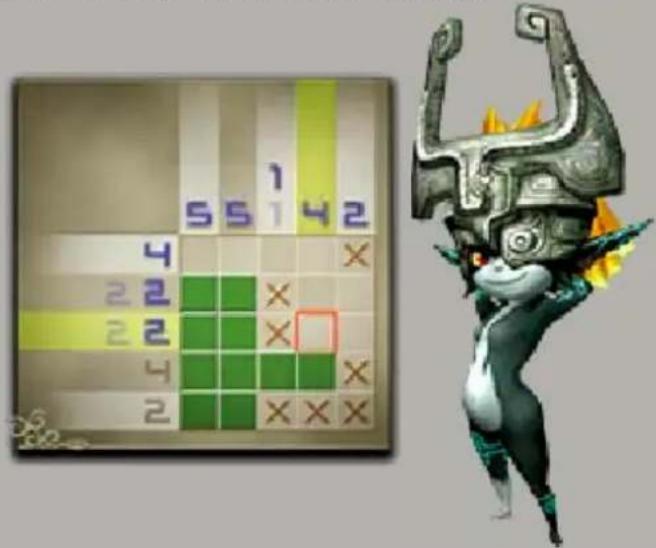
Picross is a "picture crossword" puzzle game in which you complete a picture by filling in only certain squares. You puzzle out which squares to fill in by looking at hint numbers shown on the puzzle's top and left sides.
serutaeF dna se
mtiL eiTn
You'll get a time-over notice if you take longer than 60 minutes to complete a puzzle. You can continue playing after 60 minutes have passed, but the final picture will not be shown in color.
Answer Autocheck
When turned on, this feature will correct any sq you will fill in incorrectly. You will receive a time penalty for each mistake, however.
● Hint Number Autocheck erutæ
When turned on, this feature will gray out an nih y numbers that have been
● Hint Roulette
You will be asked whether you want to use this feature before starting a puzzle. The roulette will start if you select "Yes." Tap the lower screen or press Ⓐ to stop the roulette, which will display words for that row and obn
You can turn these functions on and off in the game settings, which are accessible from the title screen (page 8).
6
Control Methods
You can change your control method for solving puzzles in the settings.
Stylus Controls
You can use your stylus to select options, icons, squares, and more.
Right-handed players can press up or down on +/◎ to switch between filling in squares or marking them with an "x." Left-handed players can use Ⓧ and Ⓑ to do the same.
Button Controls
You can use buttons to select options, icons, squares, and more.
| Select option / move cursor | +/○ |
| Confirm / fill in a square | Ⓐ |
| Cancel / mark with "x" | Ⓑ |
| Switch pages / enable or disable navigation feature | L/R |
Saving Data
Picross and Mega Picross
Pressa then select Suspend to save your current progress and return to the title screen. You can create one set of quick-save data, which you can select later from the title menu.
Micross
Press then select Suspend to save your progress and return to the Micross puzzle-selection screen. Progress for each puzzle within the Micross puzzle will be saved.
Erasing Data
Select Clear Save Data on the settings screen to erase all save data and reset the game.
◆ Please be careful when erasing data. Erased data cannot be restored.
Data can be lost due to user action, such as repeatedly powering off and on the sera or removing a Game Card or SD Card while saving. Data loss may also be caused by poor connectivity tsud in the system's ports. Please be atad .derotser eb tonn
8
Title Screen
Choose the mode you'd like to play.
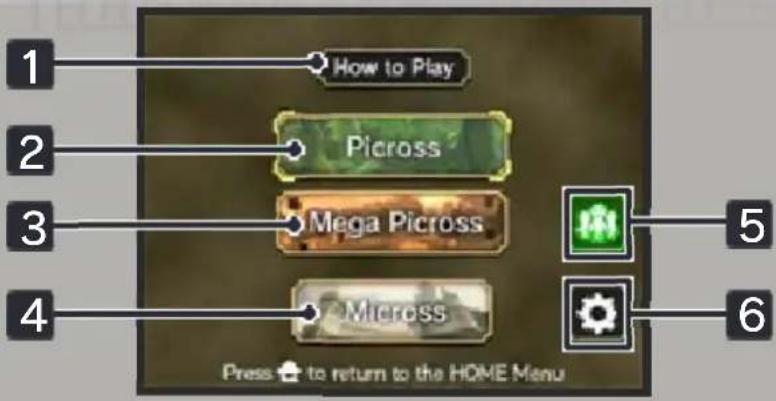
yalP db1w
Learn how to solve Picross, Mega Picross, or Micross puzzles.
oB
There are a myriad of puzzles for everyone from beginners to experienced players to enjoy.
3 Mega Picross
These puzzles have rules for more experienced players involving Mega Numbers, which are numbers that cross over rows or columns.
4 Micross
Complete an elaborate picture by solving puzzles within squares you've filled in.
◆ For this mode, Answer Autocheck is turned off.
esreviiM 5
Connect to Miiverse and post messages or pictures using stamps.
6 Settings
From this menu, you can change your control method, turn some features on and off, and adjust sound options. You can also erase your save data.
9
Puzzle Selection
From the title screen, choose Picross, Mega Picross, or Micross to proceed to the puzzle-selection menu for that mode.
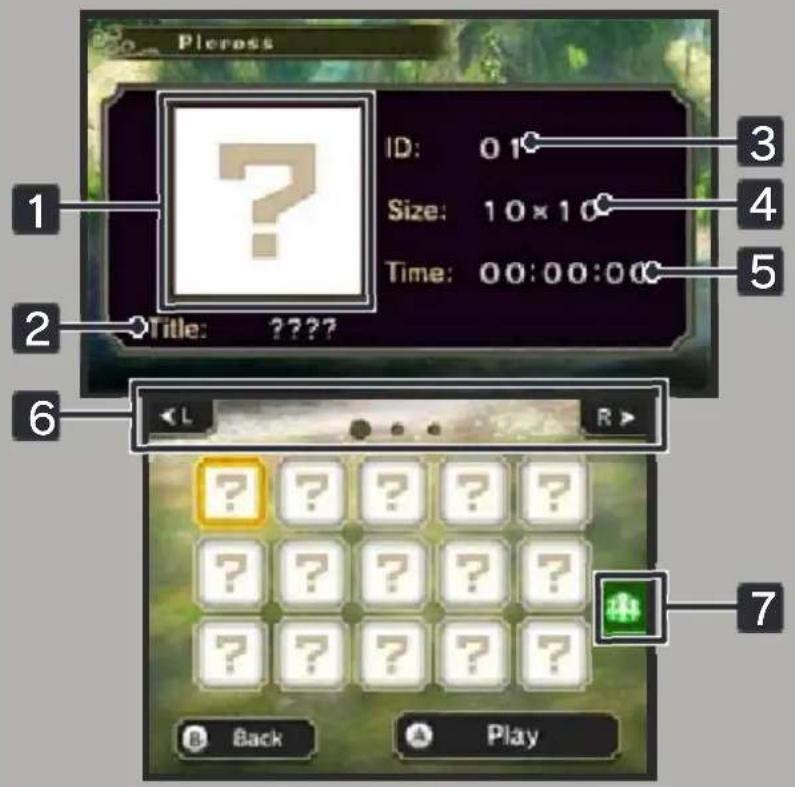
erutciP 1
The final picture is displayed.
e£i
The title for the puzzle.
ID8
The number of the puzzle.
i8e4
The size of the puzzle.
emiT 5acl
Displays how long it took to solve the puzzle.
6 Page Navigation Buttons
Each page displays 15 puzzles. Tap the buttons or press L/R to change pages.
7 Miiverse
You can post a screenshot of the upper screen to Miiverse.
Micross Puzzle Selection
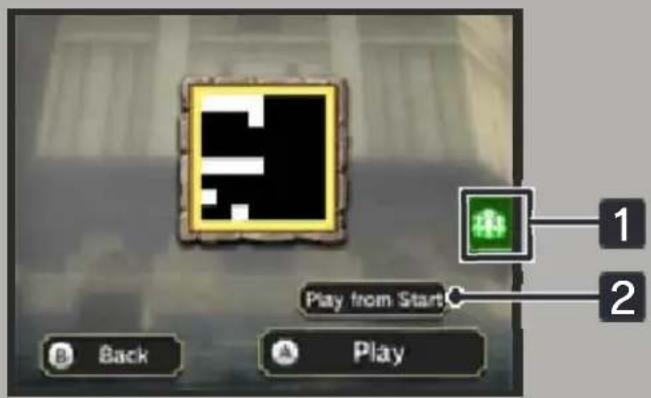
When solving a Micross puzzle, you'll start by playing on the Overall Puzzle. Once you have completed the Overall Puzzle, the filled-in squares will turn into 🙏, which you can select to play a Micro Puzzle.
1 Miiverse
You can post a screenshot of the upper screen to Miiverse.
tratS morf yalP 2
Use this to reset a Micross puzzle and start over.
The puzzle screen shown in the example is for Stylus Controls.
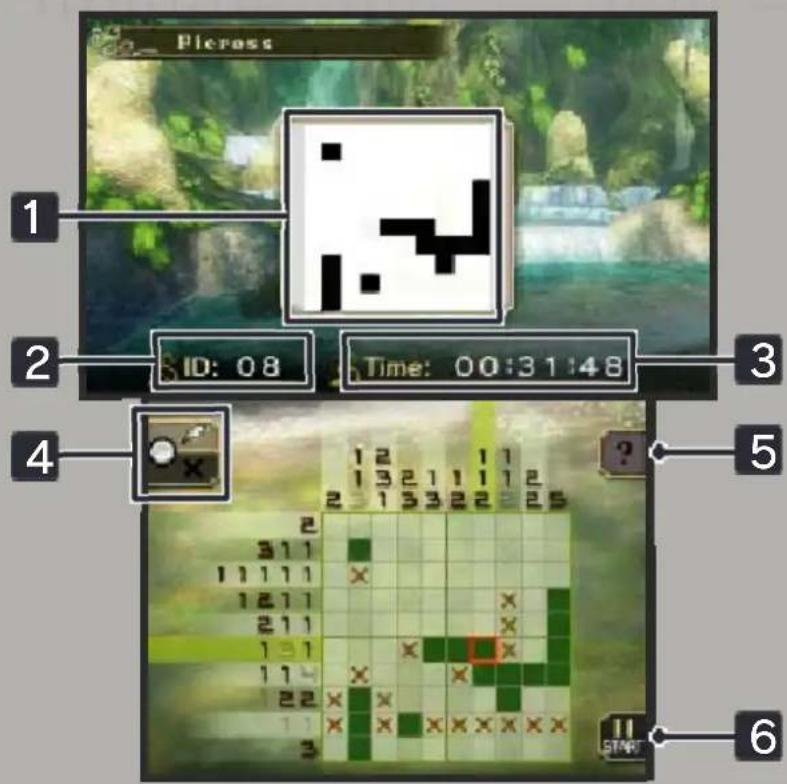
erutciP 1
Displays current state of the picture.
2 ID
The number of the current puzzle.
3 Elapsed Time
If the elapsed time exceeds 60 minutes, you'll get a time-over notice.
edoM Id6t4
This will function only when using stylus controls. You can switch between filling in squares and marking them with an "x."
5 ? Navigation
This is a useful feature that points out rows or columns where it's possible to fill in or mark a square based on your current progress. The numbers in these rows or columns will turn blue. Tap 📄 or press 📁/® to enable or disable this feature.
6 Pause Menu
You can stop working on a puzzle or change your control method a t any time. Tap 📁 or press START to access the pause menu.
11 Support Information
dGimer Service SUPPORT.NINTENDO.COM
:adA0073-552-
Latin America/Caribbean: 8707-85
- My Nintendo™ Picross The Legend of Zelda™ Twilight Princess
- Getting Started
- Basics
- How to Play
- Troubleshooting
- Support Information
- Important Information
- CAUTION - STYLUS USE
- noitamn
- Information-Sharing Precautions
- Information-Sharing Precautions
- 3
- Internet Enhancements
- Protecting Your Privacy
- Parental Controls
- 5
- What is Picross?
- mtiL eiTn
- 6
- Control Methods
- Stylus Controls
- Button Controls
- Saving Data
- Picross and Mega Picross
- Micross
- Erasing Data
- 8
- Title Screen
- yalP db1w
- oB
- Mega Picross
- Micross
- esreviiM 5
- Settings
- 9
- Puzzle Selection
- erutciP 1
- e£i
- ID8
- i8e4
- emiT 5acl
- Page Navigation Buttons
- Miiverse
- Miiverse
- tratS morf yalP 2
- ID
- Elapsed Time
- edoM Id6t4
- ? Navigation
- Pause Menu
Brand : NINTENDO
Model : The Legend of Zelda - Twilight Princess My Ninteno Picross (3DS)
Category : Video game