
RocketRAID 640 - RAID Controller Highpoint - Free user manual and instructions
Find the device manual for free RocketRAID 640 Highpoint in PDF.


| Product Type | RAID Controller (Host Adapter) |
| Model | RocketRAID 640 (RR640) |
| Interface | PCI Express 2.0 x4/x8/x16 |
| Supported Devices | Up to 4 SATA III (6 Gb/s) hard drives or SSDs |
| RAID Levels | 0, 1, 5, 10, JBOD |
| Chipset | Marvell 9128 |
| Features | Native Command Queuing (NCQ), Web GUI management, Event notification, Rebuild priority, Storage Health Inspector (SHI), Email alerts |
| Dimensions (approx.) | 167 mm x 69 mm (low profile) |
| Weight (approx.) | 150 g |
| Power Consumption | 15 W (from PCIe slot) |
| Operating Temperature | 0°C to 55°C (32°F to 131°F) |
| Storage Temperature | -20°C to 80°C (-4°F to 176°F) |
| Regulatory Compliance | FCC Part 15 Class B, EN55022 Class B, EN55024 |
| OS Support | Windows 7, Vista, 2008, Linux, FreeBSD |
| Package Contents | RR640 card, 4 SATA cables, low-profile bracket, software CD, quick installation guide |
| Management Interface | Web-based GUI (default port 7402) |
| Default Login | Username: RAID, Password: hpt |
| Warranty | 1 year (typical) |
Frequently Asked Questions - RocketRAID 640 Highpoint
User questions about RocketRAID 640 Highpoint
0 question about this device. Answer the ones you know or ask your own.
Ask a new question about this device
Download the instructions for your RAID Controller in PDF format for free! Find your manual RocketRAID 640 - Highpoint and take your electronic device back in hand. On this page are published all the documents necessary for the use of your device. RocketRAID 640 by Highpoint.
USER MANUAL RocketRAID 640 Highpoint
RocketRAID 64x Series 6Gb/s SATA Controllers
(RR640, RR644)
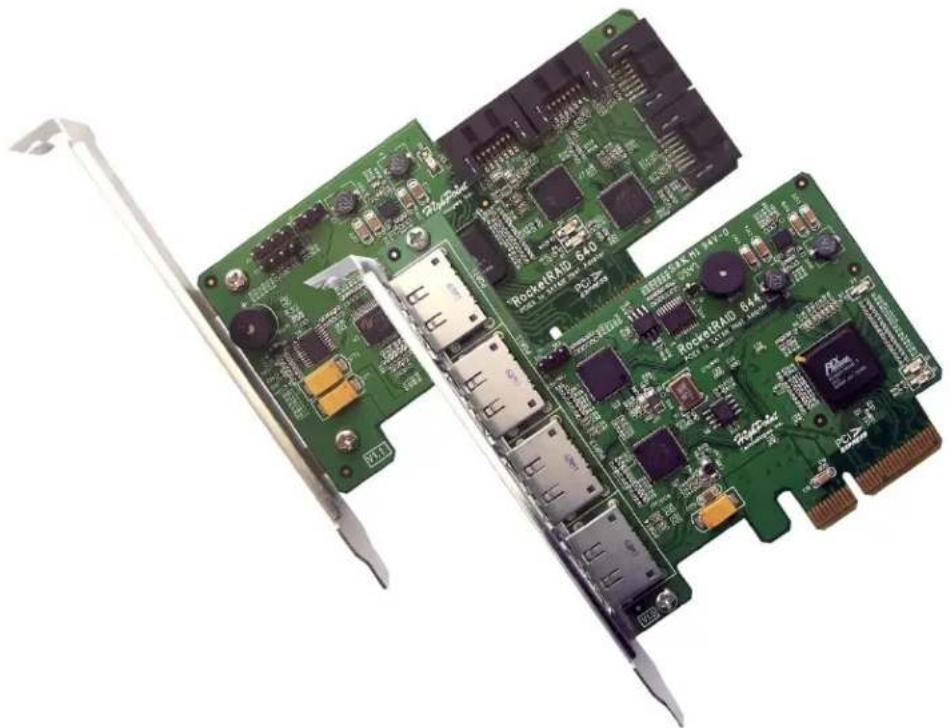
natural_image
Close-up of a green PCI-LED circuit board with multiple electronic components and connectors (no readable text or symbols)Quick Installaon Guide
Contents
HighPoint RocketRAID 64x Series – PCI-Express 2.0 ....3
Hardware Installation....4
Kit Contents .... 4
Installing the RR64x Host Adapter 4
Driver Installation (Windows 7, Vista, 2008)....4
Installing the Web GUI (Windows operating systems)....5
Starting the Web GUI....5
RocketRAID Web GUI – Advanced Features....6
Customer Support....6
FCC Part 15 Class B Radio Frequency Interference statement ....7
HighPoint RocketRAID 64x Series – PCI-Express 2.0
The RocketRAID 640/644 Host Adapter
The HighPoint RocketRAID 640/644 is the world's fastest SATA RAID controller utilizing the Marvell9128 IC. The RocketRAID 640/644 is the latest in storage technology, leveraging the performance of SATA III; providing the fastest available throughput while supporting enterprise level features such as Nave Command Queuing (NCQ)
HighPoint RAID Management
HighPoint's Web-based RAID Management utility provides a user friendly interface to create, manage and maintain your storage solutions. Email nocaon and remote maintenance are some of the advanced features this Management soware has to oer.
Comprehensive OS Support
HighPoint oers the broadest range of support for all major operang systems to ensure OS and hardware server compatibility. Drivers are available for all major operang systems, including Windows, Linux, and FreeBSD.
Hardware Installation
Kit Contents
- RocketRAID 64x controller
• 4 SATA cables (RR640)
• HighPoint Soware CD - Low-prole bracket
- Quick Installaon Guide
Installing the RR64x Host Adapter
Note: Make sure the system is powered-o before installing the RocketRAID 64x host adapter.
1) Open the system chassis and locate an unused PCI-E (2.0 or 1.0) x4, x8 or x16 slot.
2) Remove the PCI slot cover.
3) Gently insert the RocketRAID 64x into the PCI-E slot, and secure the bracket to the system chassis.
4) Aer installing the adapter, each the hard disks or disk enclosure to the RocketRAID card using the SATA or eSATA cables.
5) Close and secure the system chassis.
Driver Installaon (Windows 7, Vista, 2008)
1) Aer installing the RR64x host adapter, boot to the Windows operang system.
2) Windows should automatically detect the card, and displays the "Found New Hardware Wizard". Select "Locate and install driver soware". When Windows asks: "Windows needs your permission to continue", select
3) "Connue".
4) When asked to search online select "Don't Search Online".
5) Select "I don't have disc, show me other options".
6) and then select "Browse my computer for driver soware".
7) Browse to the locaon of the driver and click "Next".
8) When asked: "Would you like to install this driver soware?" select "Install".
9) Reboot the system when prompted. The RocketRAID host adapter will be ready for use aer Windows reboots.
Note: Consult the soware copy of the RocketRAID 64x User's Guide for in-depth installaon procedures.
Installing the Web GUI (Windows operang systems)
The Web GUI is located on the HighPoint Soware CD: \HighPoint RAID Management Soware\WebGUI\RR2xxx_3xxx_None-OBM\Windows\
1) Double-click "Setup.exe" to start installaon. If you are running a 64-bit version of Windows 7, 2008 or Vista, you may need to right-click the icon, and select "Run as Administrator."
2) Click "Run" to connue. The HighPoint Web RAID Management Service install screen will display. Click "Next" to connue.
3) Click "Yes" to install the Management utility.
4) Specify the Desnaon folder and click "Next". Conrm the install locaon, and click "Next".
5) Select the SAF-TE conguraon le for the system's chassis. If the system does not support SAF-TE, select the default opon "Skip and Congure Later".
6) Specify the listening port. 7402 is the default setng, and recommended for most systems.
7) Choose to enable or disable Remote Access. Remote access allows the card to be managed via a Web browser from a separate system.
8) Click OK to complete the installaon procedure.
Starng the Web GUI
1) Open a Web browser and type in the following address: hps://localhost:7402 Press Enter to access the host adapter.
2) Type in the default username and password to start the Web GUI:
Username: RAID Password: hpt
3) Click Login. The Manage – Array screen will be displayed.
Note: Please consult the RocketRAID 64x User's Guide for more informaon about the Web GUI.
RocketRAID Web GUI – Advanced Features
The Web GUI is a full-featured RAID Management interface, and is used to conjure, monitor and maintain the RocketRAID host adapter and its storage devices. Please consult the RocketRAID 64x User's Guide for the complete Web GUI instrucon guide.
Several advanced RAID features are described below:
Event Nocaon - The RocketRAID 64x host adapters will record Administrator acvity or RAID related errors to the Web GUI's Event Log. This feature allows the administrator to track and diagnose storage related problems. The Web GUI can also be congured to send event log data via e-Mail.
Maintenance Tasks – The Web GUI allows the administrator to schedule regular maintenance sessions. Routine RAID Maintenance is essenal to data security.
Rebuild Priority – This feature allows the administrator to control and streamline system resources during a RAID recovery procedure.
Storage Health Inspector (SHI) - The Storage Health Inspector secon provides real-me device related informaon including temperature readings, bad sector counts, and access to SMART data.
Customer Support
If you encounter any problems while utilizing the RocketRAID host adapter, or have any quesons about about this or any other HighPoint Technologies, Inc. product, feel free to contact our Customer Support Department.
Contact Informaon
HighPoint USA
E-mail address: support@highpoint-tech.com
Phone: 1-408-942-5800
9:00AM-5:00PM, Pacic Standard Time
Web Support: hp://www.highpoint-tech.com/websupport/
HighPoint Technologies, Inc. websites:
hp://www.highpoint-tech.com
hp://www.hptmac.com
hp://www.hptesata.com
FCC Part 15 Class B Radio Frequency Interference statement
This equipment has been tested and found to comply with the limits for a Class B digital device, pursuant to part 15 of the FCC Rules. These limits are designed to provide reasonable protecon against harmful interference in a residential installaon. This equipment generates, uses and can radiate radio frequency energy and, if not installed and used in accordance with the instrucons, may cause harmful interference to radio communicaons. However, there is no guarantee that interference will not occur in a parcular installaon. If this equipment does cause harmful interference to radio or television recepon, which can be determined by turning the equipment o and on, the user is encouraged to try to correct the interference by one or more of the following measures:
● Reorient or relocate the receiving antenna.
- Increase the separaon between the equipment and receiver.
- Connect the equipment into an outlet on a circuit different from that to which the receiver is connected.
- Consult the dealer or an experienced radio/TV technician for help.
Modicaons not expressly approved by the manufacturer could void the user's authority to operate the equipment under FCC rules.
This device complies with part 15 of the FCC Rules. Operaon is subject to the following two conditions: (1) this device may not cause harmful interference, and (2) this device must accept any interference received, including interference that may cause undesired operaon.
European Union Compliance Statement
This Informaon Technologies Equipment has been tested and found to comply with the following European direcves:
● European Standard EN55022 (1998) Class B
● European Standard EN55024 (1998)
- RocketRAID 64x Series 6Gb/s SATA Controllers
- Contents
- HighPoint RocketRAID 64x Series – PCI-Express 2.0
- The RocketRAID 640/644 Host Adapter
- HighPoint RAID Management
- Comprehensive OS Support
- Hardware Installation
- Kit Contents
- Installing the RR64x Host Adapter
- Driver Installaon (Windows 7, Vista, 2008)
- Installing the Web GUI (Windows operang systems)
- Starng the Web GUI
- RocketRAID Web GUI – Advanced Features
- Customer Support
- Contact Informaon
- HighPoint USA
- FCC Part 15 Class B Radio Frequency Interference statement
- European Union Compliance Statement
Brand : Highpoint
Model : RocketRAID 640
Category : RAID Controller