Elementi 16169 - Toaster Lakeland - Free user manual and instructions
Find the device manual for free Elementi 16169 Lakeland in PDF.


| Product Type | 2-Slice Toaster |
| Brand | Lakeland |
| Model | Elementi 16169 |
| Dimensions (approx) | 28 x 18 x 20 cm |
| Weight (approx) | 1.5 kg |
| Power Rating | 900 W |
| Voltage | 230 V |
| Frequency | 50 Hz |
| Cord Length | 1 m |
| Number of Slices | 2 |
| Slot Width | Wide (approx 3 cm) |
| Browning Levels | 6 settings plus Reheat (R) |
| Special Programs | Bagel, Defrost, Reheat |
| Cancel Button | Yes |
| Cool Touch Casing | Yes |
| Crumb Tray | Removable, slide-out |
| Cable Storage | Built-in cable tidy on base |
| Material | Stainless steel / heat-resistant plastic |
| Safety Features | Auto shut-off, non-slip feet, overheat protection |
| Cleaning | Wipe exterior with damp cloth; empty crumb tray |
| Spare Parts | Crumb tray (model-specific) |
Frequently Asked Questions - Elementi 16169 Lakeland
User questions about Elementi 16169 Lakeland
0 question about this device. Answer the ones you know or ask your own.
Ask a new question about this device
Download the instructions for your Toaster in PDF format for free! Find your manual Elementi 16169 - Lakeland and take your electronic device back in hand. On this page are published all the documents necessary for the use of your device. Elementi 16169 by Lakeland.
USER MANUAL Elementi 16169 Lakeland
natural_image
Exterior view of a modern stainless steel toaster with black handle and control buttons (no text or symbols visible)LAKELAND 2-SLICE TOASTER
Thank you for choosing this Lakeland 2-Slice Toaster. We are sure you will be delighted with the performance and will enjoy many years of use for toasting a wide variety of breads of varying thicknesses, bagels and crumpets.
An award winning family-owned business we have the same strong values of excellent quality, value for money and exceptional customer care as we did when we first set up the Lakeland company in the 1960's.
Our products are carefully selected by our highly experienced team of experts and are thoroughly and rigorously tested to meet our consistently high standards so you can be assured that any product you purchase will be functional, durable and easy to use. It is this level of commitment to our customers that sets us apart.
Please take a little time to read this booklet before you use your toaster, and then keep it in a safe place for future reference.
This toaster allows you to toast 2 items at a time. Three separate programmes allow you to get perfect results whatever you choose to toast. The levers lift up to allow you to check toast during toasting and the browning control allows you to get exactly your preferred toast.
CONTENTS
Product Features...4
Safety Cautions 4
The Control Panel and Programmes...6.
Using for the very first time 6.
Instructions for use 6
Hints and tips...7...
Troubleshooting 7
Care and cleaning 8.
Recycling your electricals.8
Electrical connections 9
PRODUCT FEATURES
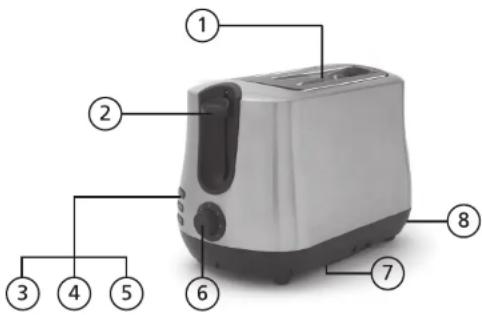
- Wide slots
- Soft touch lever
- Bagel button (top)
- Defrost button (middle)
- Cancel button (bottom)
- Browning control with R and 1-6 settings
- Cable tidy
- Crumb tray
SAFETY CAUTIONS
Carefully read all the instructions before using the appliance and keep in a safe place for future reference. Always follow these safety cautions when using the appliance to avoid personal injury or damage to the appliance. This appliance should be used only as described in this instruction book.
• Always switch off and remove the plug from the socket when not in use or being cleaned.
• Make sure your electricity supply matches the voltage shown on the appliance.
- Ensure all packaging materials and any promotional labels or stickers are removed from the appliance before the first use.
• Always inspect the appliance before use for noticeable signs of damage. Do not use if damaged or has been dropped. In the event of damage, or if the appliance develops a fault contact the Lakeland customer care team on 015394 88100
- Do not use this appliance if the cable is damaged. Do not attempt to repair the damaged cable yourself. Contact Lakeland customer care team on 015394 88100
• Always use the appliance on a dry, level, heat resistant surface. Keep away from source.
- Unplug from the mains when not in use and before cleaning. Allow to cool before cleaning the appliance. To disconnect, turn the socket to "off" and remove the plug from the mains socket. Never leave the toaster unsupervised, very dry bread may catch fire when toasted.
- This appliance is not intended for use by persons (including children) with reduced physical, sensory or mental capabilities, or lack of experience and knowledge, unless they have been given supervision or instruction concerning the use of the appliance by a person responsible for their safety.
- Children should always be supervised to ensure they do not play with this product. Er the product is kept out of reach of children. Do not leave the lead hanging over the edge of a kitchen table or worktop.
- Do not use any accessories or attachments with this appliance other than those recommended by Lakeland.
• To protect against fire, electric shock or personal injury, do not immerse cord, plug or unit in water or other liquids. Do not use the toaster with wet hands.
• For indoor use only in a domestic environment.
- This appliance should be used for preparation of food as described within the instructions for use that accompany it.
- Be careful when using the toaster, metal parts may heat up and could burn if touched.
- Do not insert forks, knives or anything metal into the toasting slot.
- Always ensure that your hands are dry before removing the plug from the mains socket. Never pull the plug out of the mains socket by its lead.
• To avoid injury or possible fire, do not cover the appliance when in use or use it near or below flammable items such as curtains.
- Do not connect this appliance to an external timer or remote control system.
- An extension cable may be used with care. The electrical rating of the cable should be at least as great as the appliance. Do not use an external timer or remote control to operate this.
- This appliance complies with the basic requirements of Directives 04/108/EC (Electromagnetic Compatibility) and 06/95/EC (Safety of Domestic Electrical Appliances)
- WARNING: A cut off plug inserted into a 13amp socket is a serious safety (sh) Ensure the cut off plug is disposed of safely.
- CAUTION: The plastic bags used to wrap this appliance or the packaging may be dangerous. To avoid risk of suffocation, keep these bags out of reach of babies and children. These bags are not toys.
- Do not operate empty.
• Do not lift or move the toaster whilst in use.
• Do not cover the toaster or block the air vents in the lid or sides whilst in use.
• Make sure there is plenty of air circulation around the toaster when in use.
THE CONTROL PANEL AND PROGRAMMES
The function buttons illuminate when selected. When the lever is pressed down to begin toasting, the cancel button will illuminate unless another programme has been selected.
The browning control allows you to select how light or dark your product will be. If you are unsure, select a lower setting. A groove on the control shows you what you have selected.
The R on the browning control means Reheat and should be used to warm bread which you have already toasted.
During toasting, you can stop toasting at any time by pressing Cancel button. The button is illuminated whenever the lever is pressed down to toast.
If you are toasting something straight from frozen, press down the lever to begin toasting, then press the Defrost button to give best results. The button illuminates when this programme is selected. If you would like to toast a frozen bagel, follow bagel instructions described below and also press the Defrost button.
The Bagel button is designed for bagels and any other products where you would only want to toast the inner surfaces eg muffins. Place the cut surfaces of the bagel into the toaster facing the central element. The button illuminates when this programme is selected.
If you inadvertently select the wrong button, press cancel and start again.
On the underside of the toaster there are cable guides for storing any additional cable, we would recommend you store any excess cable so it does not overhang any counters or get in your way.
The crumb tray slides out for ease of cleaning.
USING FOR THE VERY FIRST TIME
This product comes fully assembled. Unwind the cable, remove any packaging materials, cable ties, plug shields and stickers before use.
There may be a slight burning smell the first time this product is used, this is normal and need not cause concern.
INSTRUCTIONS FOR USE
The appliance has heat-insulated "cool touch" casing. However, as metal parts still heat up during operation, please be careful when using it and allow cooling down before you put it away.
- Plug in the appliance and switch on the power.
-
Turn the selector switch clockwise to set the toasting level from the lightest stage 1 to the darkest stage 6. If in any doubt, start with the lower setting (the black groove on the selector switch shows you the setting).
-
Insert chosen product to toast into the toasting slot and push down the lever until it locks.
- The appliance starts toasting. The Cancel button illuminates. The appliance switches off immediately once the set degree of toasting has been reached. The product then pops up automatically.
-
If you wish to use the special functions, press the button you wish to select once you have pushed down the lever. See the Control Panel & Programmes notes for more detail on each of the special functions. The corresponding control lamp displays the function.
-
After use, switch off and unplug the toaster.
HINTS AND TIPS
The wide slots on this toaster allow a variety of breads, fruit breads, rolls, muffins, bagels, crumpets and croissants to be toasted.
If cutting a bagel, muffin or roll always cut into two even sized pieces.
When toasting a product for the first time always choose a lower number on the browning control.
TROUBLESHOOTING
Following are some common problems that can occur when using the toaster. Please review the problems, their possible cause and any corrective action that should be taken to ensure successful operation of this appliance.
| Problem Possible cause Solution | ||
| Toaster lever will not engage | Toaster may not be switched on at mains | Check the plug is in properly and the switch is on |
| The toast is very dark | Too high a setting on the browning control | Breads brown differently according to the ingredients, if not sure then use a low setting. |
| There is a burning smell | Crumbs are lodged inside toaster near elements | Allow to cool, then tap sides of toaster lightly with hand so crumbs dislodge, then empty crumb tray |
| Toast is still frozen in centre Used | frozen bread | Always press the defrost button if using frozen bread |
CARE AND CLEANING
• Unplug the toaster and allow to cool completely before cleaning.
• Never immerse the unit in water or any other liquid.
• To clean the unit and control panel, allow to cool completely and wipe with a clean, damp cloth and dry before storing.
• Do not use abrasive cleaners, steel wool or other coarse materials.
- When completely cool tap the sides of the toaster gently to dislodge any crumbs, slide out crumb tray, empty, wipe with a dry cloth and reassemble.
- Store the toaster with the power cable in the cable tidy in base. Never wrap it tightly around the toaster.
• Do not insert any metallic products into the toaster at any time.
RECYCLING YOUR ELECTRICALS
Along with many other high street retailers, Lakeland has joined a scheme whereby customers can take their unwanted electricals to recycling points set up around the country. Visit www.recycle-more.co.uk to find your nearest recycling point.

ELECTRICAL CONNECTIONS
THIS APPLIANCE MUST BE EARTHED
This appliance is fitted with a fused three-pin plug to BS1363 which is suitable for use in all homes fitted with sockets to current specifications. If the fitted plug is not suitable for your socket outlets, it should be cut off and carefully disposed of. To avoid an electric shock, do not insert the discarded plug into a socket.
FITTING A NEW PLUG
If for any reason you need to fit a new plug, the flexible mains lead must be connected as shown here. The wires in the mains lead fitted to this appliance are coloured in accordance with the following code:
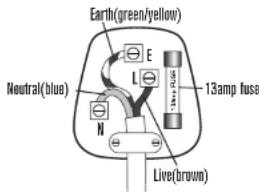
Connect BLUE to Neutral (N)
Connect GREEN & YELLOW to Earth (E)
Connect BROWN to Live (L)
13 amp fuse to be used
If the colours of the wires in the mains lead of this appliance do not correspond with the coloured markings identifying the terminals in your plug, proceed as follows. The wire which is coloured green and yellow MUST be connected to the terminal which is marked with the letter E (Earth) or coloured green. The wire which is coloured blue MUST be connected to the terminal which is marked with the letter N (Neutral) or coloured black. The wire which is coloured brown MUST be connected to the terminal which is marked with the letter L (Live) or coloured red.
Before refitting the plug cover, check that there are no cut or stray strands of wire inside the plug. Use a 13 amp BS1362 fuse. Only BSI or ASTA approved fuses should be used. If you are at all unsure which plug or fuse to use, always refer to a qualified electrician.
Note: after replacing or changing a fuse on a moulded plug which has a fuse cover, the cover must be refitted to the plug; the appliance must not be used without a fuse cover. If lost, replacement fuse covers can be obtained from an electrical shop. This appliance complies with the following EC Directives: 2006/95/EC (Low Voltage Directive) and 2004/108/EC (EMC Directive)

GEBRAUCHS-
ANWEISUNG
Elementi 2-Scheiben-Toaster
MODELLE: 16164/17839/16165/17840
16166/16167/17841/16169/16170
natural_image
Exterior view of a modern stainless steel toaster with black buttons and front panel (no text or symbols visible)2-SCHEIBEN-TOASTER VON LAKELAND
Web: www.lakeland.co.uk
www.lakeland.de
- LAKELAND 2-SLICE TOASTER
- CONTENTS
- PRODUCT FEATURES
- SAFETY CAUTIONS
- THE CONTROL PANEL AND PROGRAMMES
- USING FOR THE VERY FIRST TIME
- INSTRUCTIONS FOR USE
- HINTS AND TIPS
- TROUBLESHOOTING
- CARE AND CLEANING
- RECYCLING YOUR ELECTRICALS
- ELECTRICAL CONNECTIONS
- THIS APPLIANCE MUST BE EARTHED
- FITTING A NEW PLUG
- 2-SCHEIBEN-TOASTER VON LAKELAND
Brand : Lakeland
Model : Elementi 16169
Category : Toaster