
MCD550 - CD Player MCINTOSH - Free user manual and instructions
Find the device manual for free MCD550 MCINTOSH in PDF.


| Product Type | CD Player |
| Brand | McIntosh |
| Model | MCD550 |
| Power Supply | AC 120V/240V, 50/60Hz |
| Power Consumption | Approximately 30 watts |
| Dimensions (W x H x D) | 17.5 inches (44.5 cm) x 6 inches (15.2 cm) x 16 inches (40.6 cm) |
| Weight | Approximately 30 lbs (13.6 kg) |
| Disc Compatibility | CD, CD-R, CD-RW, HDCD |
| Digital Audio Outputs | Coaxial (RCA), Optical (Toslink) |
| Analog Audio Outputs | Balanced (XLR) and Unbalanced (RCA) stereo |
| Remote Control | Infrared remote included |
| Lithium Battery (Backup) | CR2032 (for remote control) |
| Country of Manufacture | USA |
| Safety Certifications | FCC Class B, Industry Canada, CE |
| Cleaning Instructions | Clean with a dry cloth only; do not use liquids |
| Service | Refer all servicing to qualified personnel |
| Warranty | Typically 3 years (check with dealer) |
Frequently Asked Questions - MCD550 MCINTOSH
User questions about MCD550 MCINTOSH
0 question about this device. Answer the ones you know or ask your own.
Ask a new question about this device
Download the instructions for your CD Player in PDF format for free! Find your manual MCD550 - MCINTOSH and take your electronic device back in hand. On this page are published all the documents necessary for the use of your device. MCD550 by MCINTOSH.
USER MANUAL MCD550 MCINTOSH
Important Additional Operation Information Guide

McIntosh Laboratory, Inc.
2 Chambers Street
Binghamton, NY 13903
www.mcintoshlabs.com
Safety
Instructions

ATTENTION:
RISQUE DE CHOC ELECTRIQUE - NE PAS OUVRIR
Lithium
Batteries

Disposal
Instructions
The lightning flash with arrowhead, within an equilateral triangle, is intended to alert the user to the presence of uninsulated "dangerous voltage" within the product's enclosure that may be of sufficient magnitude to constitute a risk of electric shock to persons.
WARNING: TO REDUCE RISK OF FIRE OR ELECTRICAL SHOCK, DO NOT EXPOSE THIS EQUIPMENT TO RAIN OR MOISTURE.
Additional Safety Information specific to this product may be contained in the Owner's Manual supplied with this product
IMPORTANT SAFETY INSTRUCTIONS! PLEASE READ THEM BEFORE OPERATING THIS EQUIPMENT.
- Read these instructions.
- Keep these instructions.
- Heed all warnings.
- Follow all instructions.
- Do not use this apparatus near water.
- Clean only with a dry cloth.
- Do not block any ventilation openings. Install in accordance with the manufacturer's instructions.
- Do not install near any heat sources such as radiators, heat registers, stoves, or other apparatus (including amplifiers) that produce heat.
- Do not defeat the safety purpose of the polarized or grounding-type plug. A polarized plug has two blades with one wider than the other. A grounding type plug has two blades and a third grounding prong. The wide blade or the third prong are provided for your safety. If the provided plug does not fit into your outlet, consult an electrician for replacement of the obsolete outlet.
- Protect the power cord from being walked on or pinched particularly at plugs, convenience receptacles, and the point where they exit from the apparatus.
- Only use attachments/accessories specified by the manufacturer.
- Use only with the cart, stand, tripod, bracket, or table specified by the manufacturer, or sold with the apparatus. When a cart is used, use caution when moving the cart/apparatus combination to avoid injury from tip-over.
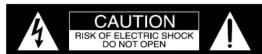
ATTENTION: RISQUE DE CHOC ELECTRIQUE - NE PAS OUVRIR
NO USER-SERVICEABLE PARTS INSIDE. RE-FER SERVICING TO QUALIFIED PERSONNEL.
The exclamation point within an equilateral triangle is intended to alert the user to the presence of important operating and maintenance (servicing) instructions in the literature accompanying the appliance.
TO PREVENT THE RISK OF ELECTRIC SHOCK, DO NOT REMOVE COVER OR BACK. NO USER-SERVICEABLE PARTS INSIDE.
- Unplug this apparatus during lightning storms or when unused for long periods of time.
- Refer all servicing to qualified service personnel. Servicing is required when the apparatus has been damaged in any way, such as power-supply cord or plug is damaged, liquid has been spilled or objects have fallen into the apparatus, the apparatus has been exposed to rain or moisture, does not operate normally, o has been dropped.
- Do not expose this apparatus to dripping or splashing and that no objects filled with liquids, such as vases, should not be placed on the equipment.
Ne pas exposer cet appareil à des éclaboussures ou gouttelettes d'un liquide. Aucun objet remplie de liquide comme par exemple un vase ne doit être placé sur l'appareil. - If this equipment is supplied with a power supply cord only, the mains plug of the power supply cord shall remain readily operable. To completely disconnect this apparatus from the a.c. mains disconnect the plug from the a.c. receptacle.
Si l'équipement est uniquement alimenté par un cordon d'alimentation, la fiche du cordon d'alimentation doit demeurer aisément accessible. Pour déconnecter complètement l'équipement du réseau d'alimentation, déconnecter la fiche du cordon d'alimentation de la prise murale.
If this equipment is supplied with AC /DC Adapter with separate power supply cord or the AC/DC Adapter plugging directly into an a.c. receptacle, they shall remain readily operable. To completely disconnect this equipment from
FCC INFORMATION (For US and Canada Customers
a) User Information acc. to FCC15.21 as following: Changes or modifications not expressly approved by the party responsible for compliance could void the user's authority to operate the equipment.
b) Statement for Class B digital device acc. to FCC 15.105 as following:
NOTE: This equipment has been tested and found to comply with the limits for a Class A/B digital device, pursuant to part 15 of the FCC Rules. These limits are designed to provide reasonable protection against harmful interference in a residential installation. This equipment generates, uses and can radiate radio frequency energy and, if not installed and used in accordance with the instructions, may cause harmful interference to radio communications. However, there is no guarantee that interference will not occur in a particular installation. If this equipment does cause harmful interference to radio or television reception, which can be determined by turning the equipment off and on, the user is encouraged to try to correct the interference by one or more of the following measures:
—Reorient or relocate the receiving antenna. —Increase the separation between the equipment and receiver. —Connect the equipment into an outlet on a circuit different from that to which the receiver is connected. —Consult the dealer or an experienced radio/ TV technician for help. —This device complies with Industry Canada licence-exempt RSS standard(s). Operation is subject to the following two conditions: (1) this device may not cause interference, and (2) this device must accept any interference, including interference that may cause undesired operation of the device. Le présent appareil est conforme aux CNR d'Industrie Canada applicables aux appareils radio exempts de licence. L'exploitation est autorisée aux deux conditions suivantes : (1) l'appareil ne doit pas produire de brouillage, et (2) l'utilisateur de l'appareil doit accepter tout brouillage radioélectrique subi, même si le brouillage est susceptible d'en compromettre le fonctionnement.
c) The device must be kept more than 20 cm from all persons.
Outdoor Antenna Grounding
If an outside antenna or cable system is connected to the product, be sure the antenna or cable system is grounded so as to provide some protection against voltage surges and built-up static charge. Article 810 of the National Electrical Code, ANSI/NFPA 70, provides information with regards to proper grounding of the mast and supporting structure, grounding of the lead-in wire to an antenna discharge unit, and size of ground conductors, location of antenna-discharge unit, connection to ground electrodes and requirements for the grounding electrode.
Example of antenna grounding as per National Electrical Code, ANSI/NFPA 70


persons.
Lithium Battery

WARNING:
DO NOT INGEST BATTERY, CHEMICAL BURN HAZARD
This product and/or the remote control supplied with this product may contain a coin/button cell battery. If the coin/button cell battery is swallowed, it can cause severe internal burns in just 2 hours and can lead to death. Keep new and used batteries away from children. If the battery compartment does not close securely, stop using the product and/or remote control and keep it away from children. If you think batteries might have been swallowed or placed inside of the body, seek immediate medical attention.

AVERTISSEMENT:
NE PAS INGÉRER L'ACCUMULATEUR, RISQUE DE PRÈLURE QUIMIQUE
Danger of explosion if the battery is incorrectly installed. Only install one of the approved Lithium Batteries listed below.
ATTENTION:
Lithium Battery Type
Long Life Lithium Coin Cell type battery is used in this product and/or supplied remote control. This product and/or supplied remote control may be supplied with a battery depending on the country where this product is purchased. When purchasing a battery for use in this product and/or remote control, refer to the following list:
| Approved Lithium Batteries | ||
| Brand IEC No | ANSI/NEDA No. | |
| Energizer CR2032 5004LC | 1 | |
| Panasonic CR2032(PA/1B) | 1 | 5004LC1 |
^1 CR Lithium Coin Cells contain Perchlorate - special handling may apply. For additional information go to https://www.dtsc.ca.gov/hazardouswaste/perchlorate/
Battery Removal or Installation
It is advisable to remove the Lithium Battery from this product and/or remote control when it is not used for an extended period of time. This will help to extend battery life and avoid possible damage to the product and/or remote control.
BATTERY REMOVAL:
Perform the following steps to remove the battery from the product and/or remote control:
- Before removing the Lithium Battery, first disconnect the AC Power Cord and/or AC/DC Adapter from this product.
Note: Step 1 is not required when removing the Lithium Battery from a remote control.
-
Press the tab and lift up on the Backup Battery Cover and temporarily place it aside. Refer to figures 1 and 2.
-
When removing the battery from a remote control proceed to step 4. To remove the battery from a product proceed to step 5.
-
Referring to figure 3, press on the bottom edge of the battery to release the battery from the molded battery socket. Then remove the battery from inside of the Remote Control. Proceed to step 6.
-
Referring to figure 4, use a small pocket size screw driver (or other suitable tool) and carefully insert the tip of the tool between the metal tab of the battery socket and the left side of the battery. Then rotate the tool to release the battery from the socket. Remove the battery from inside of the product.
-
Reinstall the Battery Cover.
-
Store the battery in a cool dry place for future use or dispose of the battery in accordance with the local regulations for lithium battery disposal. Batteries should never be thrown away or incinerated.
BATTERY INSTALLATION:
Perform the following steps to install the battery into the product and/or remote control:
- Before installing the Lithium Battery, first disconnect the AC Power Cord and/or AC/DC Adapter from this product.
Note: Step 8 is not required when installing the Lithium Battery into a remote control.
-
Press the tab and lift up on the Backup Battery Cover and temporarily place it aside. Refer to figures 1 and 2.
-
When installing the battery into the remote control proceed to step 11. To install the battery into a product proceed to step 12.
-
Orient the battery so the + symbol (engraved into one side of the battery) is facing up. Refer to figure 7. Then insert the battery into the socket. Make sure the battery is touching both contact points and is seated in the socket. Refer to figure 8.
-
Orient the battery so the + symbol (engraved into one side of the battery) is facing up. Refer to figures 5 and 6. Then insert the battery into the socket. Make sure the battery is touching both contact points and is seated in the socket.
-
Reinstall the Battery Cover.

Figure 1

Figure 2

Figure 3

[Non-Text]

Figure 5

Figure 6

Figure 7
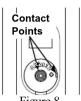
Figure 6
Disposal Instructions
North American Waste of Electrical and Electronic Equipment Directive
When discarding the unit, comply with local rules or regulations. Batteries should never be thrown away or incinerated but disposed of in accordance with the local regulations concerning battery disposal.

European Union (EU) Waste of Electrical and Electronic Sent (WEEE) directive
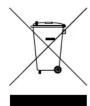
The European Union's WEEE directive requires that products sold into EU countries must have the crossed out trashbin label on the product (or the package in some cases). As defined by the WEEE directive, this cross-out trashbin label means that customers and end-users in EU countries should not dispose of electronic and electrical equipment or accessories in household waste. Customers or end-users in EU countries should contact their local equipment supplier representative or service centre for information about the waste collection system in their country.

Disposal Instructions, con't


- WARNING: TO REDUCE RISK OF FIRE OR ELECTRICAL SHOCK, DO NOT EXPOSE THIS EQUIPMENT TO RAIN OR MOISTURE.
- IMPORTANT SAFETY INSTRUCTIONS! PLEASE READ THEM BEFORE OPERATING THIS EQUIPMENT.
- Outdoor Antenna Grounding
- Lithium Battery
- WARNING:
- AVERTISSEMENT:
- ATTENTION:
- Lithium Battery Type
- Battery Removal or Installation
- BATTERY REMOVAL:
- BATTERY INSTALLATION:
- Disposal Instructions
- European Union (EU) Waste of Electrical and Electronic Sent (WEEE) directive
Brand : MCINTOSH
Model : MCD550
Category : CD Player