S603 - Pregnant ConXeasy - Free user manual and instructions
Find the device manual for free S603 ConXeasy in PDF.


User questions about S603 ConXeasy
0 question about this device. Answer the ones you know or ask your own.
Ask a new question about this device
Download the instructions for your Pregnant in PDF format for free! Find your manual S603 - ConXeasy and take your electronic device back in hand. On this page are published all the documents necessary for the use of your device. S603 by ConXeasy.
USER MANUAL S603 ConXeasy
natural_image
Close-up of a black audio speaker with two concentric sound waves and a central hub (no text or symbols visible)S603
Wall Mount
Powered Loudspeakers
S603
Wall Mount Powered Loudspeakers
CONTENTS
Important Safety Instructions 3
Control Panel 4
Rear Panel 5
Remote Control 6
Connecting Your Speakers 7
Bluetooth Function 8
Use with iPod/MP3 Player 9
Use With Docking Station 11
Remote Learning Function 12-13
Instructions of Mounting Bracket 14
Limited Warranty 15
Specifications 16
natural_image
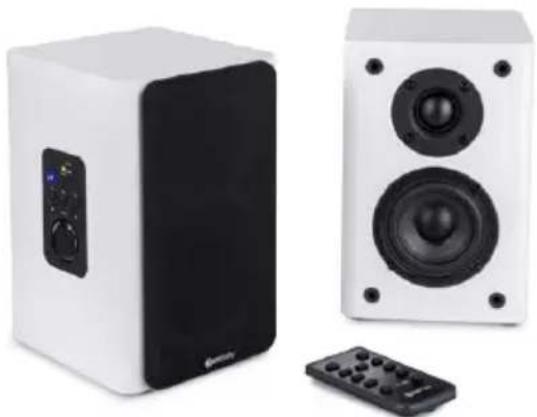
Two white audio speakers with black speakers and a remote control unit, no visible text or symbols.SAFETY INSTRUCTIONS
READ BEFORE OPERATING EQUIPMENT
Read all the instructions carefully before using the unit and keep them for future reference. Check that the voltage selector is switched to the correct position for your country.

text_image
CAUTION RISK OF ELECTRIC SHOCK DO NOT OPEN!SAFETY INSTRUCTIONS
- Do not use this product near water or moisture
- Do not place the unit on sloped or unstable surfaces as the unit may fall off or tip over.
- Clean only with a dry cloth. Unplug this product from the wall outlet
- Do not attempt to service this product yourself.
- Opening or removing covers may expose you to dangerous voltages or other hazards.
- Please contact the manufacturer to be referred to an authorized service center near you.
- Place the unit on a solid surface.
• Do not block any ventilation openings.
• To prevent risk of fire or electric shock, avoid over loading wall outlets,
- Do not put it in a closed bookcase or cabinet that may keep air from flowing through its ventilation openings.
- Do not let objects or liquids enter the product.
- Protect the power cord from being walked on or pinched, particularly at plugs and the point where they exit from the product.
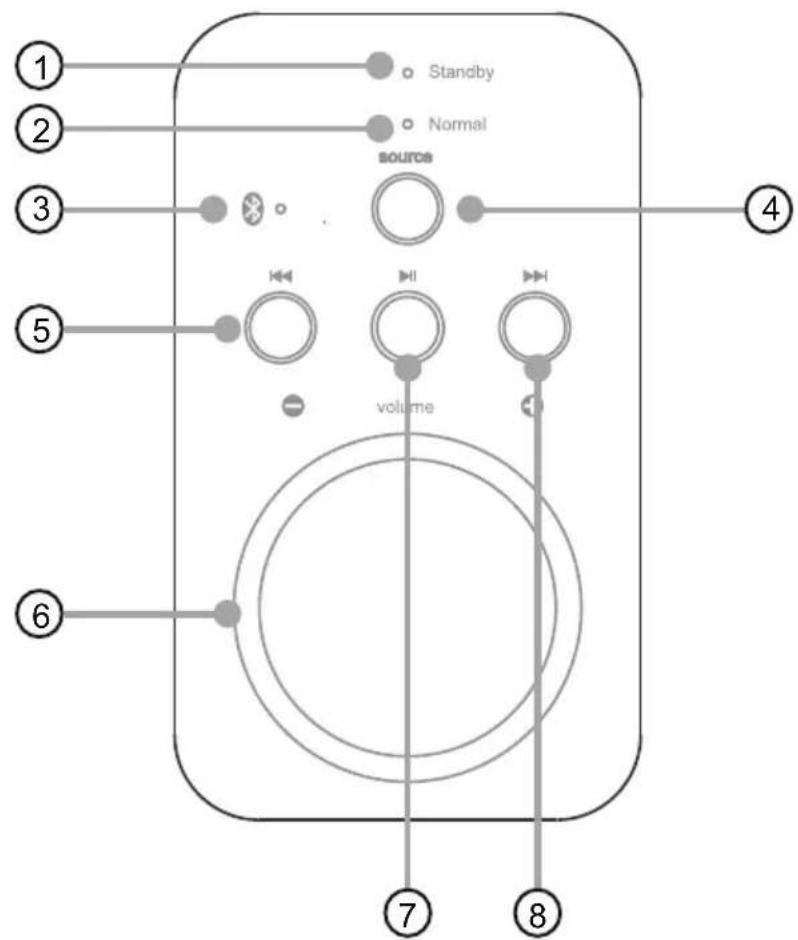
CONTROL PANEL
text_image
Standby Normal source volume ① ② ③ ④ ⑤ ⑥ ⑦ ⑧- Red LED indicator light (Standby)
- Green LED indicator light (Normal)
- Blue LED indicator light (Bluetooth mode)
-
Input source selector
-
PREV
- Volume adjust
- Play/pause
- NEXT
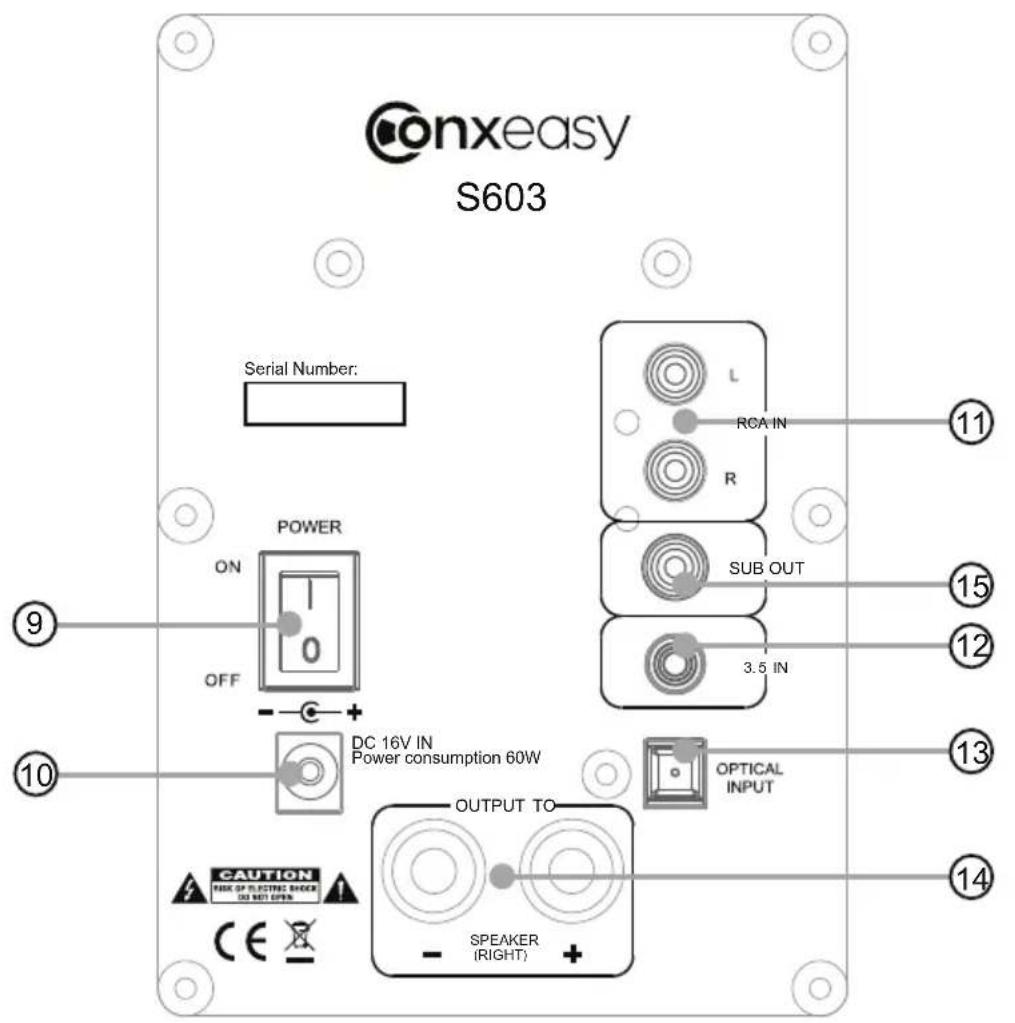
REAR PANEL
text_image
onxeasy S603 Serial Number: POWER ON OFF DC 16V IN Power consumption 60W OUTPUT TO SPEAKER (RIGHT) OPTICAL INPUT 3.5 IN SUB OUT RCA IN L R ⑪ ⑫ ⑫ ⑬ ⑭ ⑭ ⑭ ⑭ ⑭ ⑭ ⑭- Power ON/OFF
- Power supply input
-
Aux in (For right/left RCA stereo plugs, from CD/DVD player, TV etc.)
-
3.5 mm audio in
- Optical audio in
- Speaker output
- Sub out
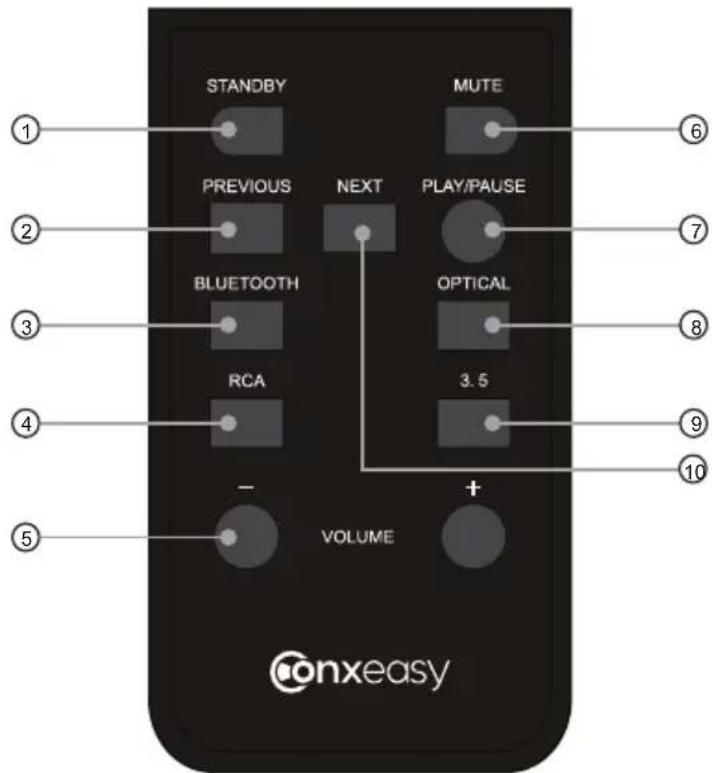
REMOTE CONTROL
text_image
STANDBY PREVIOUS NEXT MUTE PLAY/PAUSE BLUETOOTH OPTICAL RCA 3.5 VOLUME + ① ② ③ ④ ⑤ ⑥ ⑦ ⑧ ⑨ ⑩ Conxeasy- Standby ON/OFF mode
- Previous
- Bluetooth input mode
- RCA input mode
- Volume
Volume decrease (-)
Volume increase (+)
- Mute ON/OFF mode
- Play/pause
- Optical input mode
- 3.5mm input node
- Next
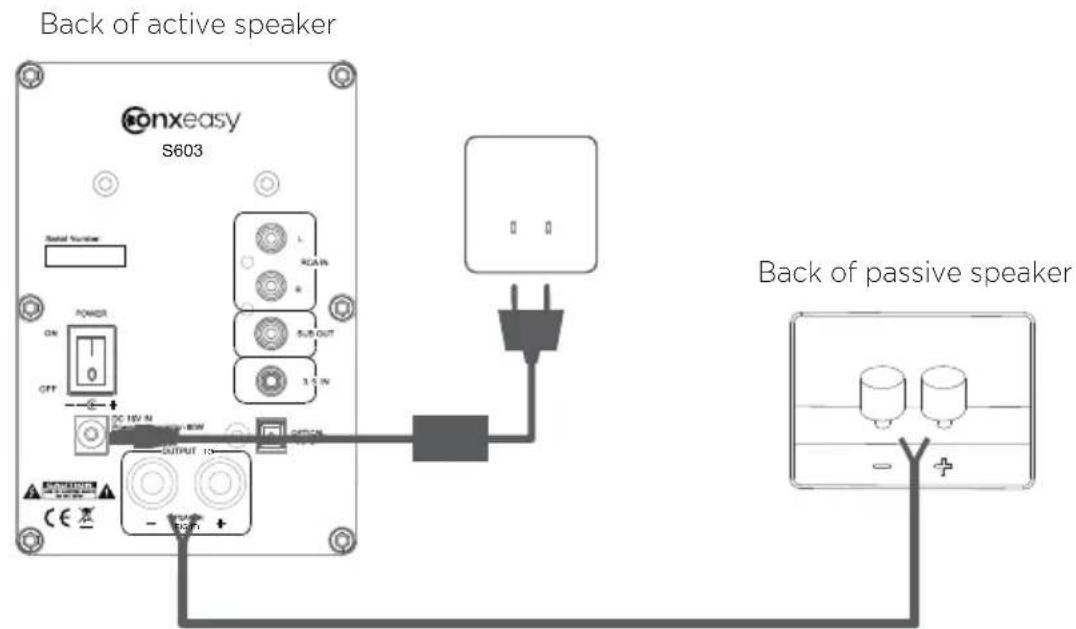
CONNECTING YOUR SPEAKERS
text_image
Back of active speaker Conxeasy S603 Solid Number ON OFF DC 16V N DC 15V 10W OUTPUT 10W - 75 V + Back of passive speaker Back of passive speakerSTEP 1
Connect the RED(+) and BLACK(-) terminals from the left speaker to the corresponding terminals on the right speaker using the included speaker cable. Insulation on cable must be stripped on all ends.
Note: Because this system is self-powered, do not connect the speaker terminals to the speaker outputs of a stereo receiver.
STEP 2
Connect the power cord into the left speaker and the other end into the wall outlet.
BLUETOOTH FUNCTION
Paring bluetooth devices with ConXeasy S603 Active speakers.
If you have a Bluetooth audio device and wish to connect it with ConXeasy S603 Active speakers, you should follow the procedure below:
- Power on ConXeasy S603 Active speakers and select Bluetooth settings/function on the audio device, Wait a few seconds, to let devices go into Bluetooth mode.
- Select Bluetooth input ⚠️ option by remote control, indicator light will turn blue and flash. If there is any problem, please turn off other Bluetooth devices.
- Please use your Bluetooth device to search the Bluetooth device named "ConXeasy S603", If a pairing code is needed, enter "0000" or "1234".
- If pairing is successful, indicator will turn blue, pairing is now finished.
- Once paired, the same Bluetooth device will work again with no need to pair again.
- Connect your Bluetooth device as above.
- Select Bluetooth input mode by remote control, or select Bluetooth input mode using "Source" on control panel. When in Bluetooth input mode, blue light will be on.
- If your bluetooth device supports the AVRCP agreement, you can use your remote control to select "PLAY/PAUSE ▶ / PREV 🎯 / NEXT 🎯"
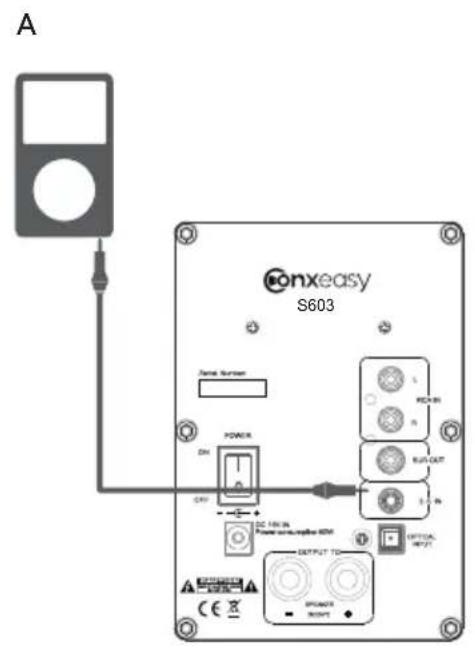
USE WITH IPOD / MP3 PLAYER
text_image
A S603 onxeasy S603 Name Number POWER ON CPU DC 150 IN Power supply/supply I/O OUTPUT TO OUTPUT RIGHT OFFICE INPUT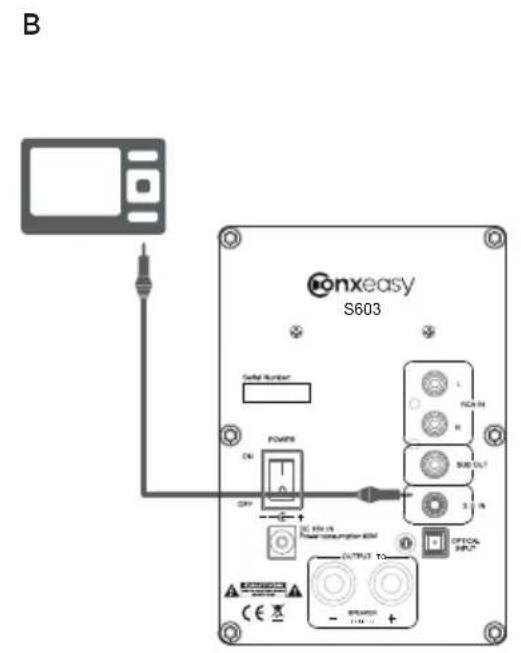
text_image
B Konexasy S603 Signal Number POWER ON OFF OUTPUT TO OUTPUT TO ENGLISH ENGLISH ENGLISH ENGLISH ENGLISH ENGLISH ENGLISH ENGLISH ENGLISH ENGLISH ENGLISH ENGLISH ENGLISH ENGLISH ENGLISH ENGLISH ENGLISH ENGLISH ENGLISH ENGLISH ENGLISH ENGLISH ENGLISH ENGLISH ENGLISH ENGLISH ENGLISH ENGLISH ENGLISH ENGLISH ENGLISH ENGLISH ENGLISH ENGLISHCONFIGURATION A (for use with iPod):
Connect the 3.5mm mini jack audio cable from iPod headphone jack to the AUDIO IN jack on the rear panel of ConXeasy S603.
CONFIGURATION B (all products with 3.5mm mini jack outputs):
Connect the STEREO INPUT L/R from any audio source with RCA L/R audio outputs.
Connect the 3.5mm mini jack audio cable from 3.5mini jack output to the AUDIO IN jack on the rear panel.
ATTENTION: When connecting audio cables the power switch be turned OFF.
After connecting all cables the power can be turned ON and the system is now ready to use.
text_image
B PC AUDIO OUT IN S603 ONXEASY S603 DC POWER OUT DC 4V to Power consumption 4V OUTPUT TO - POWER - OUTPUTCONFIGURATION A (TV,DVD,CD-RCA stereo plugs):
Connect the RCA L/R to your TV,DVD etc. and the RCA L/R to the Stereo Input on rear panel of the ConXeasy S603.
Note that most newer TV remotes can control the ConXeasy S603 active speaker volume if connected to variable TV audio out.
CONFIGURATION B (PC):
Connect the mini jack to your PC and the RCA L/R to the Stereo Input on rear panel of the ConXeasy S603.
REMOTE LEARNING FUNCTION
Introduction: Use a remote control, which is compliant with RC5,NEC and coded format, to learn from the speaker. It can learn on the 3 functions: Vol+, Vol-, Source input select.
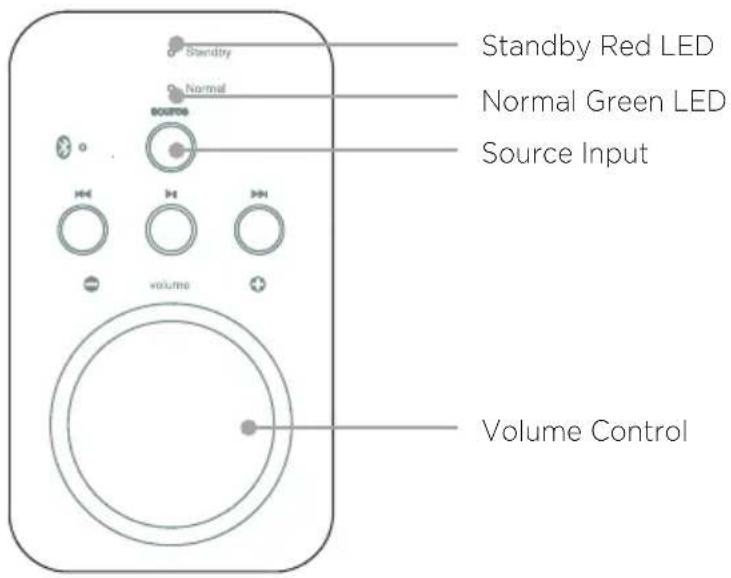
Note: Use the buttons on the control panel and not on the remote control, when setting up the learning functions.
SETUP LEARNING FUNCTION
- Choose a secondary remote control you want to control the ConXeasy S603 active speaker.
- Turn on the S603 active speaker.(Green LED turns ON after flashing)
- Learn Source input:
a) Press Source input, until Standby LED turn on.(ConXeasy S603 active speaker is now in learning mode)
b) Press Source input, Standby red LED turns off
c) On the secondary remote control, press any button you want to control Source input. Normal green LED flashes twice and turns on.
d) Learning function for Source input completed.
- Learn Volume up:
a) Press Source input, until Standby red LED turn on.( ConXeasy S603 active speaker is now in learning mode)
b) Turn on volume knob clockwise, Standby red LED turns off.
c) On the secondary remote control, press any button you want to control Volume up. Normal green LED flashes twice and turns on.
d) Learning function for Volume up completed.
continued...
REMOTE LEARNING FUNCTION
5. Learn Volume down:
a) Press Source input, until Standby red LED turn on.( ConXeasy S603 active speaker is now in learning mode)
b) Turn on volume knob counter-clockwise, Standby red LED turns off.
c) On the secondary remote control, press any button you want to control Volume down. Normal green LED flashes twice and turns on.
d) Learning function for Volume down completed.
Note: When the product is in standby mode, simply press the Vol +/- or the Source buttons and the unit will switch on.
- The secondary remote control can now be used to control the ConXeasy S603 active speaker.
text_image
Standby Red LED Normal Green LED Source Input Volume ControlINSTRUCTIONS FOR MOUNTING BRACKET
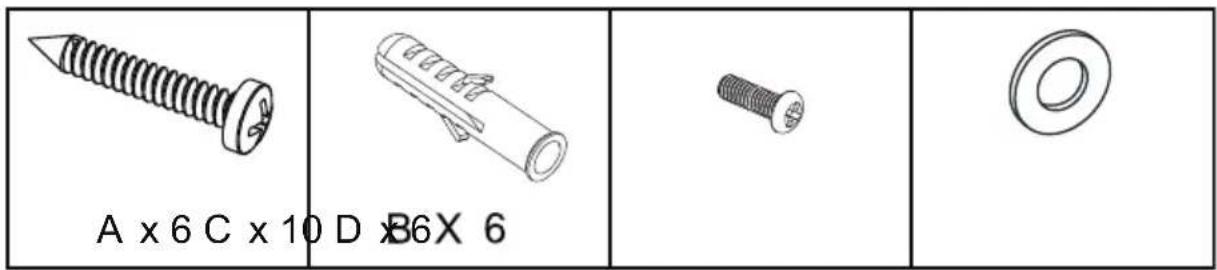
text_image
A x 6 C x 10 D x B6X 6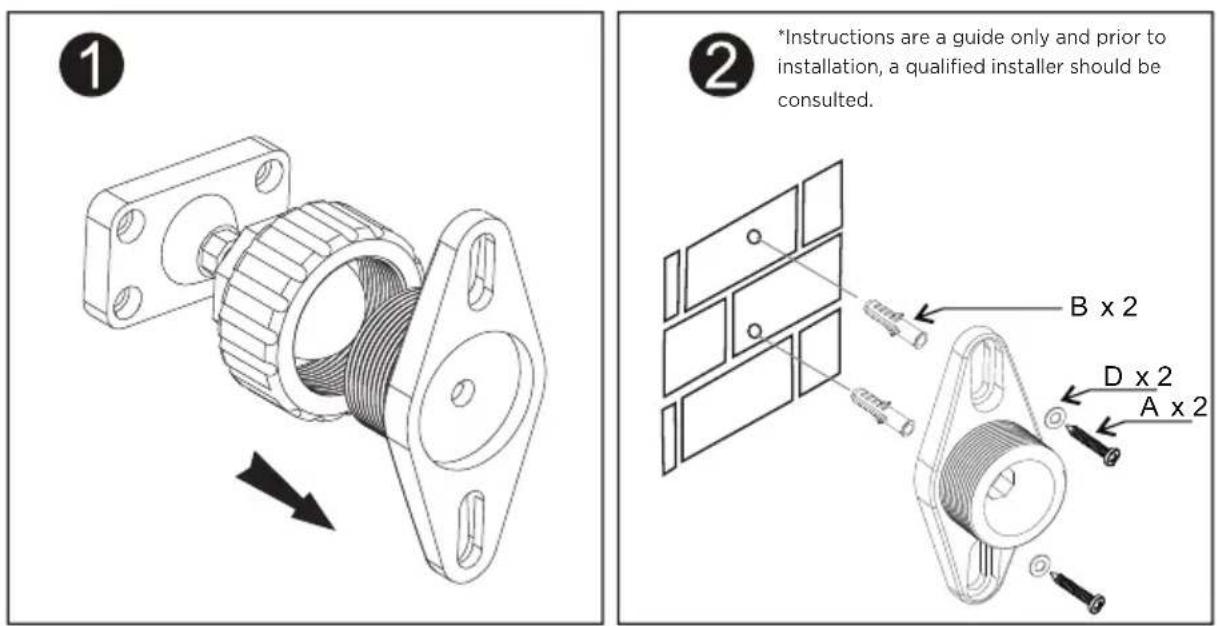
text_image
① ② *Instructions are a guide only and prior to installation, a qualified installer should be consulted. B x 2 D x 2 A x 2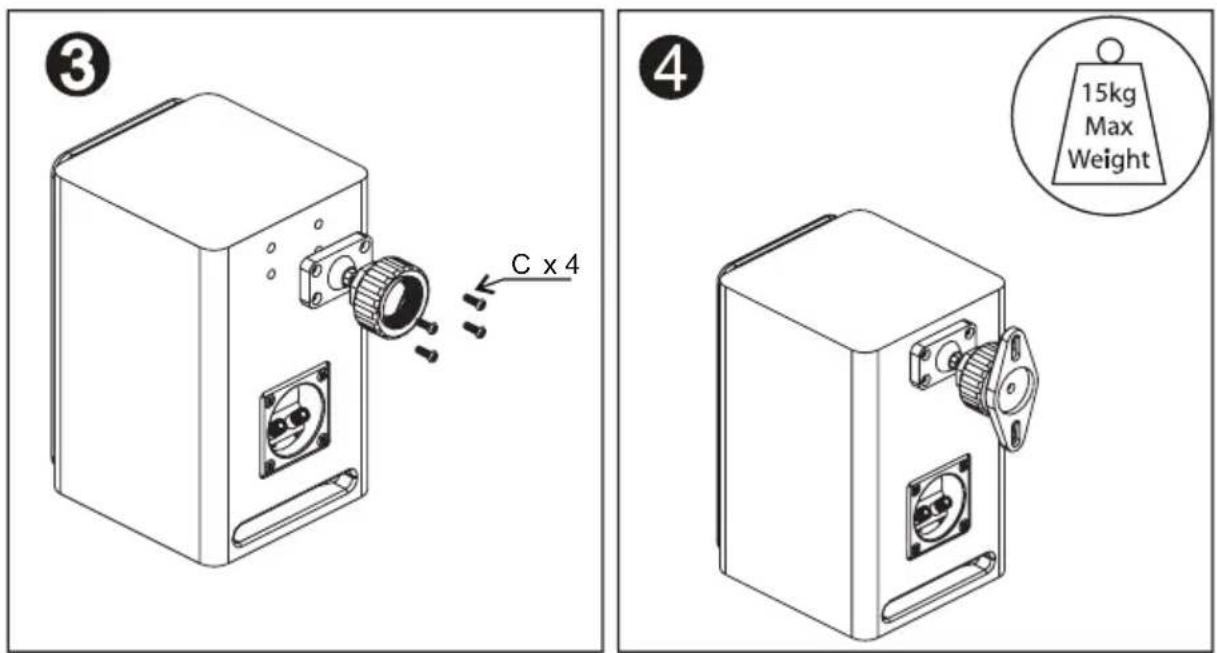
text_image
③ C x 4 ④ 15kg Max WeightLIMITED WARRANTY
LIMITED WARRANTY
This product had been designed and manufactured to the highest quality standards; however, should you encounter any problems with this product please contact your local dealer or your country distributor.
This limited warranty is valid for the original owner for a period of one year from the date of purchase, it is not transferable.
What is covered by the limited warranty:
The limited warranty covers all production and material defects of the product, except for the specifics stated below.
What is not covered by the limited warranty:
Damage caused by packing and transport.
Defects caused by accidents, misuse, normal wear and tear, mis-maintenance, voltage variation and overloading.
Damage caused by incorrect installation or operation. Damage caused by modification or repair by a non-authorized service centre and use of non-original spare parts.
Other damage due to conditions beyond the supplier's control such as fire, rain, war and other force majeure events.
How to claim parts or repair under warranty:
To have your product serviced under warranty, you must contact the dealer from whom the product was purchased.
You will need to produce this warranty booklet completed and stamped by your dealer on the date of purchase.
Alternatively, you will need the original sales invoice or other proof of ownership and date of purchase.
The supplier is liable only to repair or replace defective parts of products and the supplier is not responsible for indirect losses or damage arising from the use of the product.
Transportation costs for servicing are not covered by the warranty.
A service repair or replacement cannot exceed the value of the product under warranty; in no event shall the supplier be responsible or liable for special, incidental, consequential or indirect damage.
NOTES
S603 SPECIFICATIONS
INPUTS
Bluetooth : A2DP audio
3.5mm stereo mini-jack : 500 mV RMS full scale input
Aux : RCA input : 500 mV or 2V RMS full scale input TBD
Optical : SPDIF format, Toslink compatible, Stereo only,
Up to 96 KHz sample rate at up to 24 bit PCM data
SPEAKERS
1 x 1-inch Tweeter
1 x 3-inch Woofer
AMPLIFIERS
Class-D power-stages
60W capability@<10% THD+N
Nominal Imp / Sensitivity: 4ohm / 83±2dB
Nominal /Max Power: 2x30W / 2x 50W
Frequency Response: 70-20KHz
SIGNAL PROCESSING
NCPA 110P AE Engine DSP
AC POWER
External 16V 3.7A (60W) 220/11/ AC input
KEYS
Power
Source
Volume Dial
Play/Pause, Skip back, Skip forward
INDICATORS
Red/Green/Blue LED for channel indicator
GENERAL
Operating Temperature: 5 ^ C - 40 ^ C (32 ^ F - 104 ^ F)
Power Requirements: AC 230 - 240V - 50Hz

Exclusive provider of
ConXeasy™ Audio Products