
Sonicare AirFloss Pro HX8471 - Oral irrigator PHILIPS - Free user manual and instructions
Find the device manual for free Sonicare AirFloss Pro HX8471 PHILIPS in PDF.


| Product Type | Oral Irrigator |
| Brand | Philips |
| Model | Sonicare AirFloss Pro HX8471 |
| Burst Modes | Single, Double, Triple (default) |
| Auto-Fill Time | 10 seconds |
| Charger Type | HX6100 (travel charger included) |
| First Charge Duration | 24 hours |
| Station Reservoir Capacity | Approximately 23 handle fillings |
| Handle Reservoir | Refillable (no specific capacity stated) |
| Nozzle Replacement | Replaceable AirFloss Pro nozzle |
| Cleaning Frequency (with mouthwash) | Every 4 weeks |
| Cleaning Frequency (with water) | Every week |
| Power Source | Mains via charger HX6100 |
| Safety Features | Keep charger away from water; do not immerse; do not use damaged appliance; consult dentist if needed |
| EMF Compliance | Complies with applicable EMF standards |
| Guarantee Restrictions | Nozzle, damage from misuse, unauthorized parts, wear and tear not covered |
| Automatic Shut-Off | After 1 minute of inactivity |
| Auto-Burst Function | Continuous bursts when holding activation button (approx. 1 second between bursts) |
| Compatible Devices | Philips Sonicare 3-Series, Flexcare, Flexcare+, HealthyWhite, HealthyWhite+, EasyClean |
| Recommended Mouthrinse | Antimicrobial (e.g., Philips Sonicare BreathRx); avoid isopropyl myristate, high essential oils, hydrogen peroxide |
| Color | White (as per user manual image) |
Frequently Asked Questions - Sonicare AirFloss Pro HX8471 PHILIPS
User questions about Sonicare AirFloss Pro HX8471 PHILIPS
0 question about this device. Answer the ones you know or ask your own.
Ask a new question about this device
Download the instructions for your Oral irrigator in PDF format for free! Find your manual Sonicare AirFloss Pro HX8471 - PHILIPS and take your electronic device back in hand. On this page are published all the documents necessary for the use of your device. Sonicare AirFloss Pro HX8471 by PHILIPS.
USER MANUAL Sonicare AirFloss Pro HX8471 PHILIPS
PHILIPS Sonicare
English 6
Introduction
Congratulations on your purchase and welcome to Philips! To fully benefit from the support that Philips offers, register your product at
www.philips.com/welcome.
Use AirFloss with your favorite mouthwash as part of your oral care routine. In addition to brushing, AirFloss helps reduce the plaque in between teeth in order to improve your gum health.
Important
Read this user manual carefully before you use the appliance and save it for future reference.
Danger
- Keep the charger away from water. Do not place or store it over or near water contained in a bathtub, washbasin, sink etc. Do not immerse the charger in water or any other liquid. After cleaning, make sure the charger is completely dry before you connect it to the mains.
Warning
- The mains cord cannot be replaced. If the mains cord is damaged, discard the charger.
- Always have the charger replaced with one of the original type in order to avoid a hazard.
- Use only charger type HX6100 provided with the AirFloss Pro to recharge the battery.
- If the appliance is damaged in any way (AirFloss Pro nozzle, handle and/or charger), stop using it. This appliance contains no serviceable parts. If the appliance is damaged, contact the Consumer Care Centre in your country (see chapter ‘Guarantee and support’).
- Do not use the charger outdoors or near heated surfaces.
- This appliance can be used by children aged from 8 years and above and persons with reduced physical, sensory or mental capabilities or lack of experience and knowledge if they have been given supervision or instruction concerning use of the appliance in a safe way and understand the hazards involved. Children shall not play with the appliance. Cleaning and user maintenance shall not be made by children unless they are older than 8 and supervised.
Caution
- Consult your dentist before you use this appliance if you have had recent oral or gum surgery, suffer from an ongoing dental condition, had extensive dental work in the previous 2 months, or have suspected issues with your dental work (fillings, crowns, etc.).
- Consult your dentist if excessive bleeding occurs after using this appliance or if bleeding continues to occur after 4 weeks of use.
- If you have medical concerns, consult your doctor before you use this appliance.
- This Philips appliance complies with the safety standards for electromagnetic devices. If you have a pacemaker or other implanted device, contact your physician or the appliance manufacturer of the implanted appliance prior to use.
- Do not use attachments other than the ones recommended by the manufacturer.
- Do not exert excessive pressure on the nozzle tip of the nozzle.
- To avoid physical injury, do not fill the reservoir with hot water. Do not put foreign objects in the reservoir.
- Only use the AirFloss Pro for its intended purpose as described in this user manual.
- To avoid physical injury, do not direct the spray under the tongue or into the ear, nose, eye or other sensitive area.
- The AirFloss Pro and Fill & Charge station needs to be cleaned on a regular basis to assure proper function and to minimize build up of unwanted biofilm. (see 'Cleaning')
- Do not clean the AirFloss Pro nozzle, the handle, the charger, the water reservoir and its cover in the dishwasher or a microwave.
- To avoid an ingestion hazard, do not put isopropyl alcohol or other cleaning fluids in the reservoir.
- The AirFloss Pro is a personal care appliance and is not intended for use on multiple patients in a dental practice or institution.
Electromagnetic fields (EMF)
This Philips appliance complies with all applicable standards and regulations regarding exposure to electromagnetic fields.
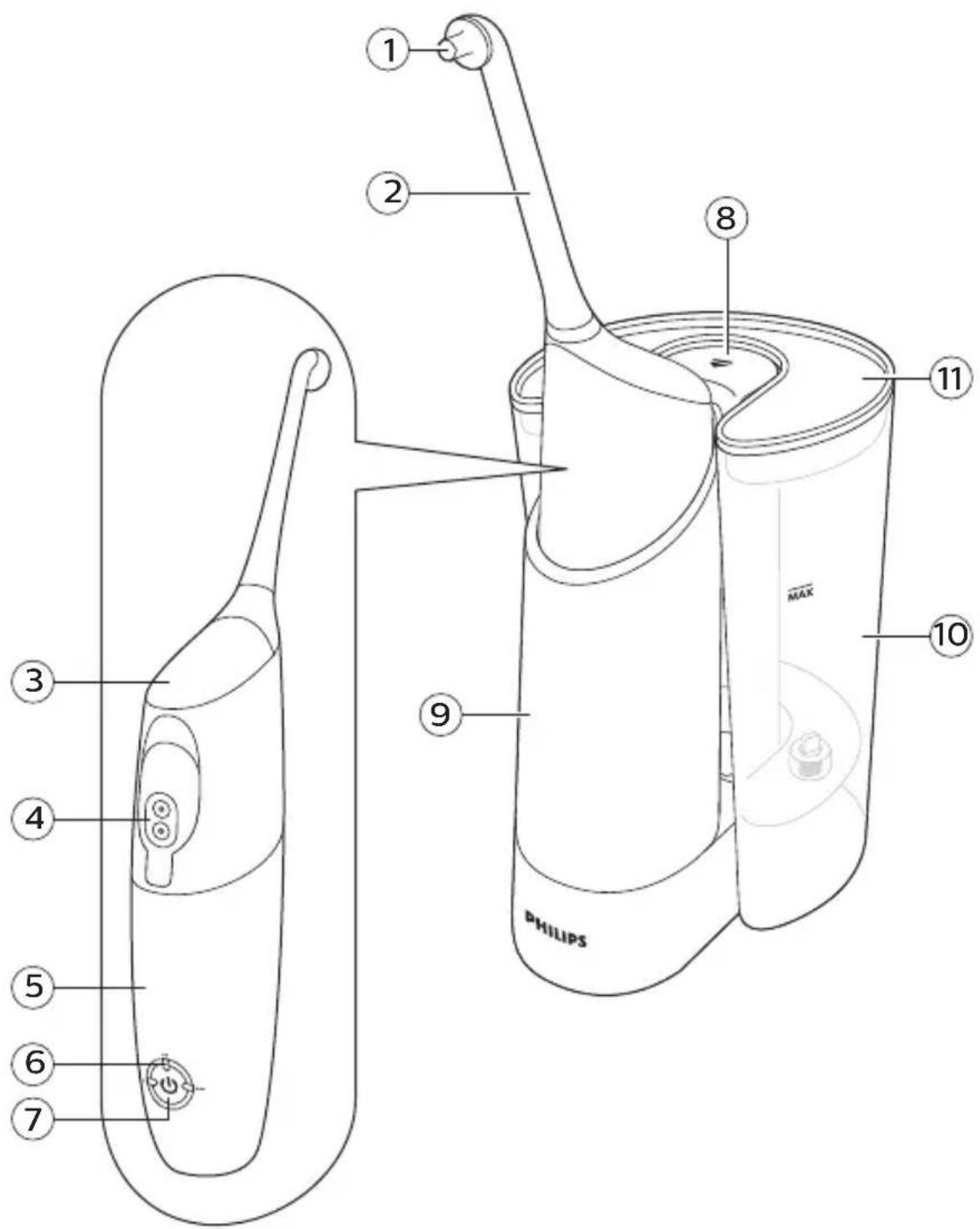
Your Philips AirFloss Pro and Fill & Charge station (Fig. 1)
1 Nozzle tip 2 AirFloss Pro nozzle 3 Activation button 4 Reservoir and reservoir door 5 Handle 6 Charge & burst mode indicators - Single burst: 1 LED - Double burst: 2 LEDs - Triple burst: 3 LEDs 7 Power/mode button 8 Eject button 9 Removable handle cup 10 Removable reservoir 11 Reservoir lid
Note: The content of the box may vary based on the model purchased.
Charging
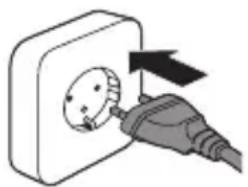
1 Plug the charger into an electrical outlet.
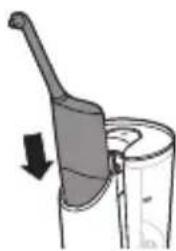
2 Place the AirFloss handle into the Fill & Charge station cup, with the AirFloss reservoir door facing toward the Fill & Charge station. Make sure the handle is fully inserted into the handle cup such that the holes in the handle reservoir door align with ports in the Fill & Charge station post.
Note 1: The AirFloss will only charge if placed in the direction indicated above.
Note 2: The Fill & Charge station can charge other Philips Sonicare devices, including the following Philips Sonicare Rechargeable Power Toothbrushes: 3-Series, Flexcare, Flexcare+, HealthyWhite, HealthyWhite+ and EasyClean.
Getting started
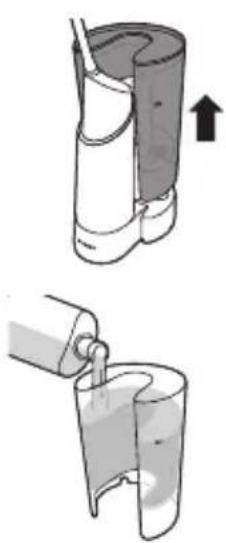
Before first use, plug in Fill & Charge station and place handle in handle cup to charge for 24 hours.
1 Remove the reservoir from the Fill & Charge station base.
2 Remove the reservoir lid and fill the reservoir. For optimal results with your AirFloss, we recommend you use an antimicrobial mouth rinse (such as Philips Sonicare BreathRx).
Note: Recommended to not use with water.
Note: Fill the reservoir only up to the MAX indication.
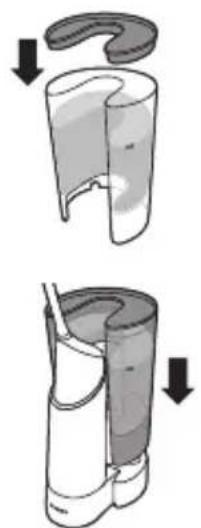
3 Place the reservoir lid on the reservoir.
4 Place the reservoir on the base.
Note: The Fill & Charge station reservoir holds enough liquid for approximately 23 fillings of your AirFloss Pro or 40 fillings of your original AirFloss.
Note: Do not use with mouthwash containing isopropyl myristate (e.g. Dental Active) or high concentrations of essential oils, as it may damage the product. This includes all mouthwash sold in glass or ceramic packaging. Also, do not use with mouthwashes containing hydrogen peroxide, or rinses sold with opaque packaging.
Using your Fill & Charge station
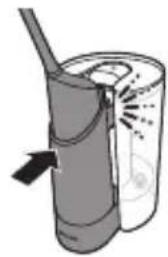
1 Lock the AirFloss handle and handle cup into the Fill & Charge station (click). When you hear a click, the AirFloss is fully engaged and will start to fill automatically (you may be able to hear the pump fill and/or see bubbles indicating filling).
Note: The Fill & Charge station fills your AirFloss handle in 10 seconds.
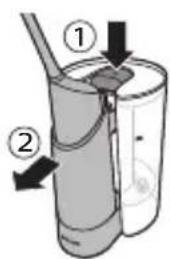
2 Once filled, press the eject button to release the AirFloss handle and the handle cup (if the eject button is pressed before the pump stops, the pump shuts off automatically but your AirFloss handle reservoir may not be full).
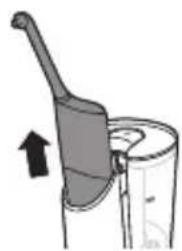
3 Remove the AirFloss handle and begin using your AirFloss.
4 In order to minimize time for your daily oral care routine, we suggest you refill your AirFloss handle immediately after use so that it is ready immediately for the following day's routine.
Using your AirFloss Pro
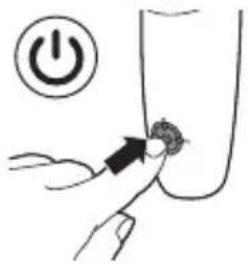
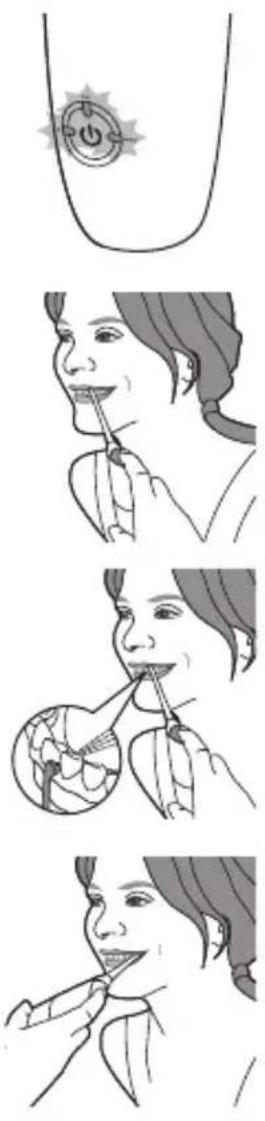
1 Make sure the AirFloss is turned on. If it is off, press and release the power/mode button to turn on the product.
- You can change the modes to have the desired number of bursts each time you press the activation button. For optimal results, use the triple burst mode (the default setting) from both the outside and inside of your teeth.
- To change modes, press the power/mode button to cycle through the modes until you reach your desired mode. The LEDs show the selected mode:
Single burst: 1 LED
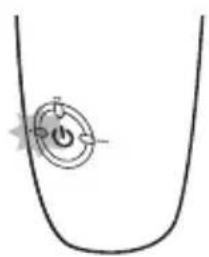
Double burst: 2 LEDs
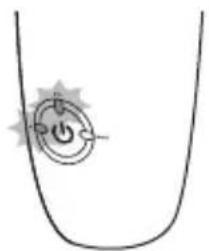
Triple burst: 3 LEDs
Note: The AirFloss remembers what mode was selected last and it is ready for the next use. If your AirFloss becomes fully drained of power, it will go back to the triple burst default mode once it has been recharged.
1 Place the nozzle tip between two teeth at your gum line. Slightly close your lips over the nozzle when it is in place, to avoid splashing. 2 Press the activation button to deliver 1-3 bursts (depending on the selected mode) of air and micro-droplets of mouthwash between the teeth. 3 Slide the nozzle tip along the gum line until you feel it settle between the next two teeth. 4 Continue until you have sprayed from in front of and behind all spaces of the teeth, including behind your back teeth. 5 To turn off AirFloss, press and hold the power/mode button for one second.
Note: Refill the handle reservoir as needed.
Auto-burst function
Hold the activation button to deliver bursts continuously, approximately one second between set of bursts.
Automatic shut-off function
The AirFloss automatically turns off if it has not been used for one minute.
Charger insertion and removal instructions
Your Fill & Charge station charger can be removed and used separately as a standalone charger for your AirFloss and many other Philips Sonicare toothbrush handles.
To remove the charger
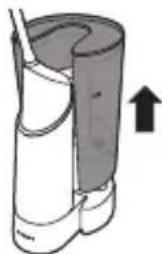
1 Remove the reservoir from the Fill & Charge station base.
2 Place the Fill & Charge station base upside down or on its side.
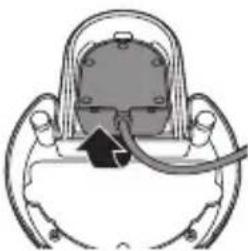
3 Pull the charger cord from the bottom of the base and pull the charger out.
To insert the charger
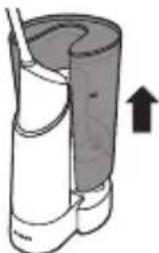
1 Remove the reservoir from the Fill & Charge station base.
2 Place the Fill & Charge station base upside down or on its side.
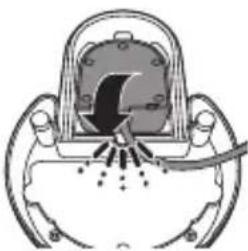
3 Insert the charger base from the bottom of the Fill & Charge station, with the charger peg sticking up. You will hear a click sound once it is fully engaged.
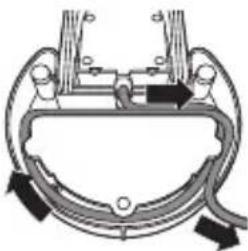
4 Use the cord wrap around the Fill & Charge station to your desired length.
Fill & Charge station features
1 Auto-fill that begins immediately upon handle engagement 2 Quick-fill that fills your AirFloss handle reservoir completely in just 10 seconds 3 Removable reservoir for easy filling and cleaning 4 Reservoir lid to ensure no contamination of reservoir fluid 5 Removable handle cup for easy cleaning 6 Removable travel charger (pre-installed) to allow for on-the-go use of your AirFloss while away from home longer than 2 weeks 7 Cord wrap for customization to your bathroom storage needs
Cleaning
Fill & Charge station and handle
The product needs to be cleaned regularly as follows:
- When using mouthwash in the device, clean it every 4 weeks.
- When using water in the device, clean it every week.
Clean the device as follows:
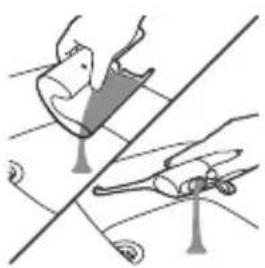
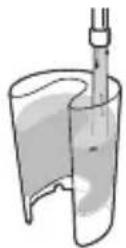
1. Empty mouthwash from the Fill & Charge station reservoir and the handle reservoir.
2. Fill the station reservoir with warm water.
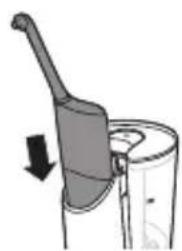
3. Place the handle in the handle cup and engage with the Fill & Charge station; let the station fill the handle until the motor stops (10 seconds).
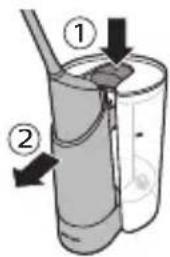
4. Eject the AirFloss handle and handle cup from the Fill & Charge station, but do not remove the AirFloss handle from the handle cup. Re-engage the AirFloss handle and handle cup to run the Fill & Charge station a second time.
5. Repeat this once more for a total of three fill cycles.
6. Eject the handle cup and remove the AirFloss handle from the handle cup. Press and hold the activation button to flush the handle until the handle reservoir is empty.
7. Empty water from the Fill & Charge station reservoir.
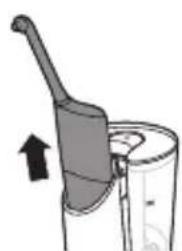
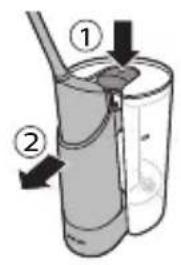
8. Place the AirFloss handle in the handle cup and engage the handle cup to the Fill & Charge station, running one more cycle and purging any remaining fluid between the reservoir and the handle in the Fill & Charge station.
9. Eject the AirFloss handle and the handle cup, remove the AirFloss handle from the handle cup, open the door of the AirFloss handle to dump out remaining water, or press the activation button on the handle to spray any residual water from the AirFloss nozzle until the handle reservoir is empty.
10. The handle cup of the Fill & Charge station can be easily removed in order to clean your Fill & Charge station:
a. Remove the reservoir from the Fill & Charge station base.
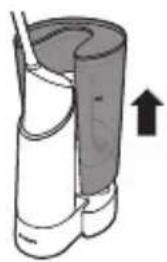
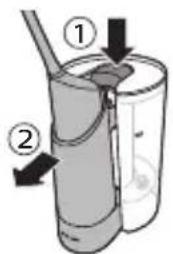
b. Eject the AirFloss handle and handle cup and remove the AirFloss handle from the handle cup.
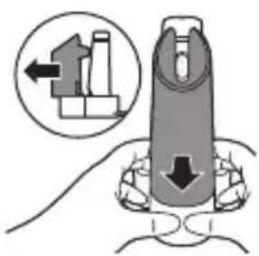
c. To remove the handle cup: pinch the bottom of the handle cup (using both hands) from its base from the front and back. Clean the handle cup with warm water.
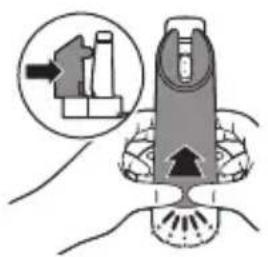
d. To insert the handle cup: slide the handle cup into the base. You will hear a click once it is engaged.
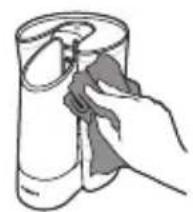
11 Empty and dry the Fill & Charge station reservoir.
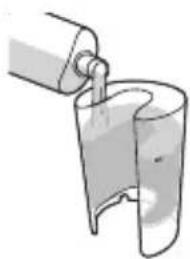
12 Fill the Fill & Charge station reservoir with new mouthrinse, place the handle in the handle cup, and engage with the Fill & Charge station to fill the handle reservoir.
13 Your AirFloss is now ready to use.
Handle and nozzle
If you want to clean your AirFloss handle between Fill & Charge station cleanings, for example, if your AirFloss becomes clogged, fill the handle reservoir with warm water and press the activation button until the reservoir is empty.
Note: Do not clean the nozzle, handle, the Fill & Charge station, handle cup, removable reservoir, reservoir lid, or charger in the dishwasher.
Note: Do not use cleaning agents to clean the product. The formulation or strength of some cleaning agents may damage the AirFloss.
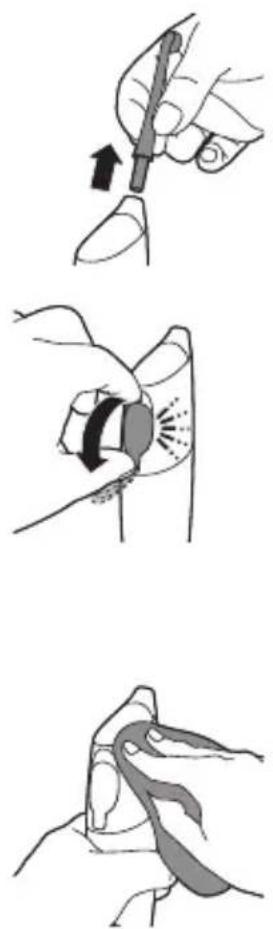
1 Remove the nozzle from the handle. Rinse the nozzle after each use.
2 Open the reservoir and rinse it under a faucet to eliminate residue.
Tip: You can also use a cotton swab to wipe the reservoir and remove the remaining residue.
Note: Do not immerse the handle in water.
Note: Failure to remove residue from the nozzle or reservoir may result in an unhygienic condition.
3 Wipe the entire surface of the handle with a damp cloth.
Storage
If you are not going to use the Fill & Charge station for an extended period of time, unplug it from the electrical outlet, clean it and store it in a cool and dry place away from direct sunlight. You can use the cord wrap to store the power cord in an organized manner.
The charger can be removed from the Fill & Charge station and can be used separately to charge your AirFloss or other compatible Philips Sonicare devices.
Recycling
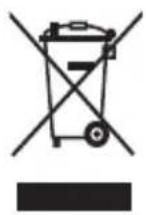
- This symbol means that this product shall not be disposed of with normal household waste (2012/19/EU).
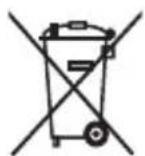
- This symbol means that this product contains a built-in rechargeable battery which shall not be disposed of with normal household waste (2006/66/EC). We strongly advise you to take your product to an official collection point or a Philips service centre to have a professional remove the rechargeable battery.
- Follow your country's rules for the separate collection of electrical and electronic products and rechargeable batteries. Correct disposal helps prevent negative consequences for the environment and human health.
Removing the rechargeable battery
Fill & Charge station
Please note that this process is not reversible.
To remove the battery, you need a Phillips-head screwdriver and scissors. Observe basic safety precautions when you follow the procedure outlined below. Be sure to protect your eyes, hands, fingers, and the surface on which you work.
1 Unplug the device. 2 Remove the AirFloss handle, reservoir, and charger from the Fill & Charge station.
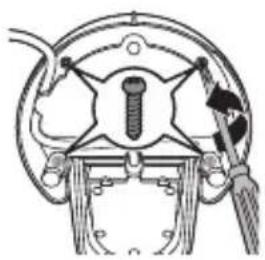
3 Using a Phillips-head screwdriver, remove the 2 screws shown in the image. Also remove the 2 screws beneath the rubber feet.
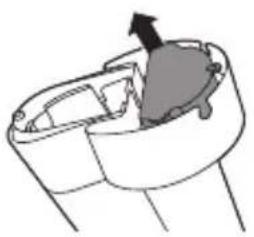
4 Remove the screws and plastic bottom of the Fill & Charge station.
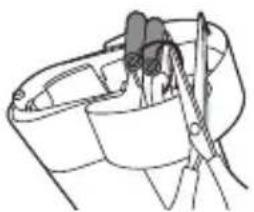
5 Cut the wires to separate the rechargeable batteries from the appliance.
6 Dispose of the batteries properly.
AirFloss handle
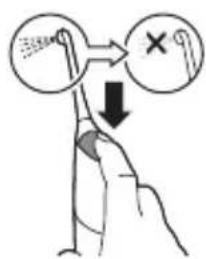
Please note that this process is not reversible.
1 To deplete the battery, repeatedly press the activation button until the AirFloss no longer produces any bursts of air.
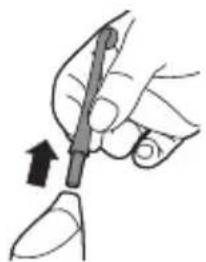
2 Remove the AirFloss nozzle from the handle.
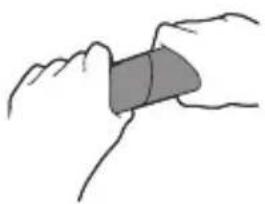
3 Firmly grab the handle with one hand at the top and one hand on the bottom.
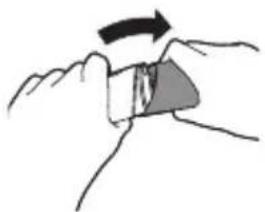
4 Snap the handle into two parts.
Note: This step requires a good amount of physical force. The top and bottom half of the handle should be separated once you snap the handle.
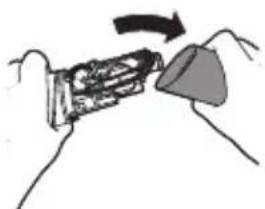
5 Remove the bottom half of the handle.
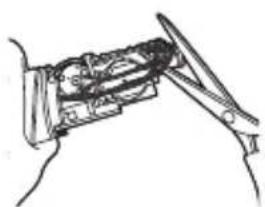
6 Cut all 6 wires on the internal component with scissors.
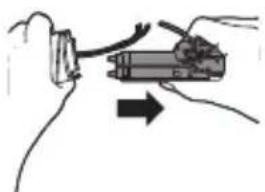
7 Completely pull apart the internal component from the top part of the handle.
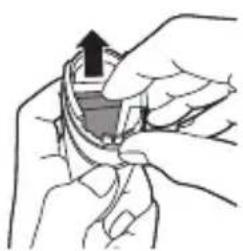
8 The battery is located inside the top half of the handle. Remove the battery and dispose of it properly (not in household waste).
Guarantee and support
If you need information or support, please visit www.philips.com/support or read the separate worldwide guarantee leaflet.
Guarantee restrictions
The terms of the international guarantee do not cover the following:
- AirFloss Pro nozzle
- Damage caused by use of unauthorized replacement parts.
- Damage caused by misuse, abuse, neglect, alterations or unauthorized repair.
- Normal wear and tear, including chips, scratches, abrasions, discoloration or fading.

www.philips.com/Sonicare
©2016 Koninklijke Philips N.V. (KPNV). All rights reserved. Philips and the Philips shield are trademarks of KPNV. Sonicare and the Sonicare logo are trademarks of Philips Oral Healthcare, LLC and/or KPNV.
4235.021.1634.2 (20/1/2017)

75% recycled paper


- PHILIPS SONICARE
- INTRODUCTION
- WWW.PHILIPS.COM/WELCOME
- IMPORTANT
- DANGER
- WARNING
- CAUTION
- ELECTROMAGNETIC FIELDS (EMF)
- YOUR PHILIPS AIRFLOSS PRO AND FILL & CHARGE STATION (FIG. 1)
- CHARGING
- GETTING STARTED
- USING YOUR FILL & CHARGE STATION
- USING YOUR AIRFLOSS PRO
- TRIPLE BURST: 3 LEDS
- AUTO-BURST FUNCTION
- AUTOMATIC SHUT-OFF FUNCTION
- CHARGER INSERTION AND REMOVAL INSTRUCTIONS
- TO REMOVE THE CHARGER
- TO INSERT THE CHARGER
- FILL & CHARGE STATION FEATURES
- CLEANING
- FILL & CHARGE STATION AND HANDLE
- HANDLE AND NOZZLE
- STORAGE
- RECYCLING
- REMOVING THE RECHARGEABLE BATTERY
- PLEASE NOTE THAT THIS PROCESS IS NOT REVERSIBLE
- AIRFLOSS HANDLE
- GUARANTEE AND SUPPORT
- GUARANTEE RESTRICTIONS
Brand : PHILIPS
Model : Sonicare AirFloss Pro HX8471
Category : Oral irrigator